
You want clean backend development without the chaos of scattered explanations—this guide keeps it simple and practical. Many developers struggle when moving from frontend to backend, especially when dealing with data flow, CRUD operations, and HTTP methods like GET, POST, PUT, and DELETE.
Managing project setup, dependencies through Node Package Manager, and styling tools like Bootstrap can also feel overwhelming at first.
Node.js with Express simplifies this process by making it easy to build fast and scalable REST ful APIs. This guide walks through the essentials of Build a REST API with Node.js and Express, starting from initializing a project with package.json, setting up tools like Nodemon and Dotenv, and connecting MongoDB using Mongoose for efficient database management.
It also covers structuring routes, handling JSON data, and implementing authentication using JSON Web Tokens. By the end, you can create fully functional API endpoints and manage backend logic with confidence.
Why Use Node. js and Express for Building REST APIs?
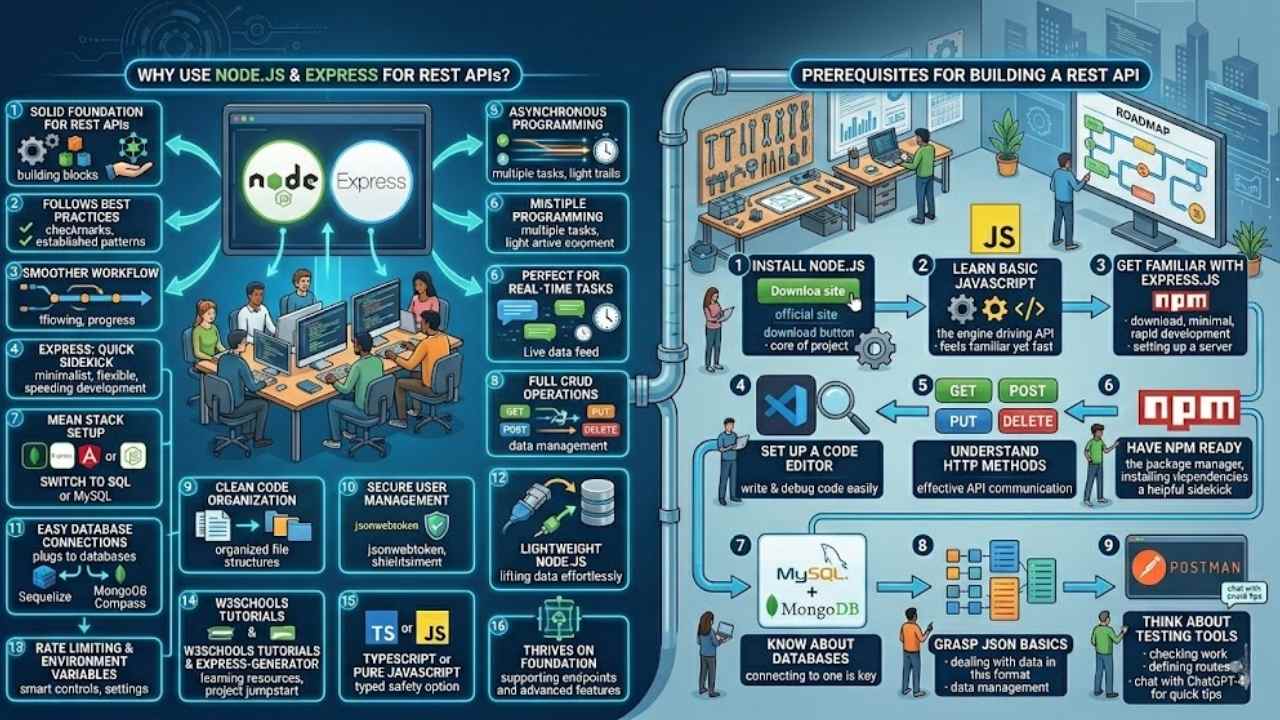
Node.js and Express team up to give you a solid base for crafting REST APIs in web development. They follow best practices and proven patterns that make your work smoother. Think of Express as your quick sidekick, minimal yet flexible, speeding up development like a well-oiled machine.
Developers love this combo for handling asynchronous programming with ease, perfect for real-time tasks. Pair it with MongoDB for a MEAN stack setup, or switch to MySQL for structured data.
You get full support for CRUD operations, like GET requests to fetch info, POST requests to add new data, and PUT requests to update entries. Code organization stays clean, and tools like jsonwebtoken handle user management securely.
Express makes building APIs feel like a breeze, turning complex ideas into simple code. – A seasoned Node.js developer.
This setup connects to databases without fuss, using Sequelize for SQL or MongoDB Compass for NoSQL vibes. Imagine juggling database connections while keeping things lightweight; Node.js excels here.
Rate limiting and environment variables add that extra layer of smarts. Tutorials on sites like W3Schools show how Express-generator jumpstarts projects, saving you time. Stick with TypeScript for typed safety, or keep it pure JavaScript.
REST APIs thrive on this foundation, supporting everything from basic endpoints to advanced features.
Prerequisites for Building a REST API
You need some basics before jumping into building a REST API with Node.js and Express. These steps make sure you’re set up for success, like having the right tools in your toolbox.
- Install Node.js first, since it forms the core of your project; Node.js with Express.js provides an excellent foundation for building REST ful APIs with best practices and established patterns, and you can grab the latest version from the official site to handle things like error handling smoothly.
- Learn basic JavaScript, as it’s the language that powers everything here; think of it as the engine driving your API, and if you’re coming from Python or PHP, you’ll find Node.js feels familiar yet fast for tasks like data analytics or even integrating with tools like Google Sheets.
- Get familiar with Express.js, the framework that enables rapid development of REST APIs due to its minimal and flexible nature; download it via npm, and note that setting up a server is a fundamental first step in creating a REST API with Node.js and Express.
- Set up a code editor, such as VS Code, to write and debug your code easily; this tool helps with api documentation and spotting issues early, plus it’s great for other fields like machine learning or cyber security if you branch out.
- Understand HTTP methods, because handling requests and responses properly is essential for effective API communication; for example, REST API endpoints should support CRUD operations including creating, reading, updating, and deleting data, which ties into clear API design.
- Have npm ready, Node’s package manager, to install dependencies like Express; it’s like a helpful sidekick that pulls in libraries, and you might even use it for packages related to certificates or board infinity courses if you’re expanding your skills.
- Know about databases, since connecting to one is key; options include MySQL, which can be used as a database backend for building complete REST APIs with Node.js and Express, or MongoDB as another database option for building RESTful APIs using Node, Express, and other supporting technologies, or even sqlite3 for simpler setups.
- Grasp JSON basics, as APIs deal with data in this format; static files and data management are important considerations when initializing a new Node.js and Express application, and tools like ajv can help with validation later on.
- Think about testing tools early, like Postman, to check your work; defining routes is a critical component of building a functional REST API, and you can test them right away, maybe even chat with ChatGPT-4 for quick tips on common setups.
Setting Up the Project
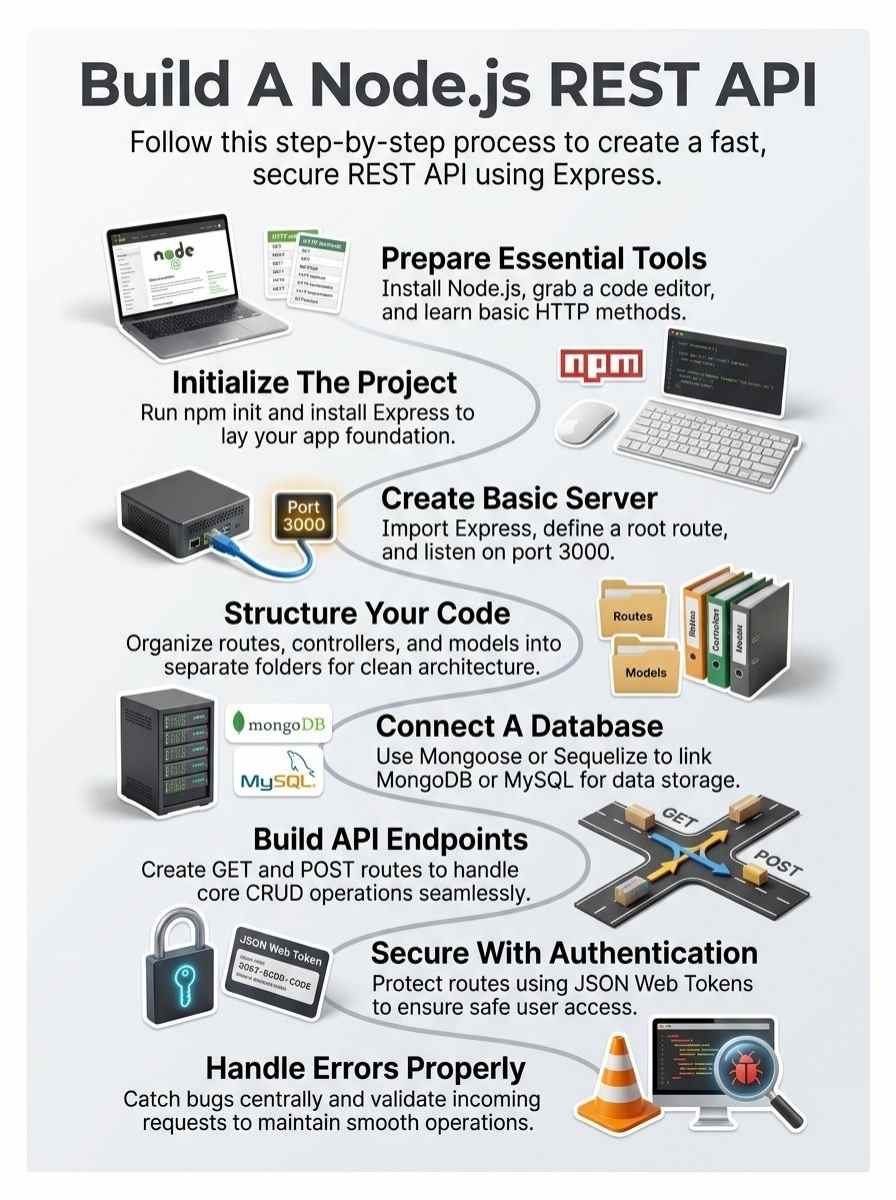
Kick things off by opening your terminal and running npm init to create that fresh package.json file, like laying the foundation for your dream house. Next, grab Express with npm install express, and don’t forget to snag nodemon for smooth development reloads—it’s like having a trusty sidekick that watches your back.
Imagine you’re the captain of this ship, steering through code waves with ease. Keep going to see how this setup powers your API adventure.
Initialize the project
Start by opening your terminal. Create a new folder for your project, say “my-rest-api”. Move into that folder with the cd command. Run npm init-y to set up your package.json file quickly.
This file tracks your project’s details and dependencies. Node.js powers this setup, making it smooth for building APIs.
Think of this step as laying the foundation for a house. You need static files and data management in mind right from the start. Node.js with Express.js gives you that solid base, full of best practices.
Express lets you develop fast, thanks to its simple, flexible style. Keep static files organized early to handle them well later.
Install necessary dependencies
You need to install key packages to kick off your REST API project with Node.js and Express. These steps make setup smooth, like laying bricks for a sturdy house, and they tie into best practices for rapid development.
- Open your terminal in the project folder after you initialize it with npm init, which creates a package.json file for managing dependencies; this file acts as the blueprint for your app, handling static files and data management as key considerations in a new Node.js and Express application.
- Run npm install express to add the Express framework, which enables rapid development of REST APIs due to its minimal and flexible nature, providing an excellent foundation alongside Node.js for building RESTful APIs with best practices and established patterns.
- Install nodemon with npm install –save-dev nodemon if you want automatic server restarts during development; picture it as a watchful friend who reloads your code on the fly, saving you time while you focus on defining routes, a critical component for a functional REST API.
- Add body-parser via npm install body-parser to handle JSON data in requests; this step is vital for proper request and response management, essential for effective API communication, especially when you’ll later implement endpoints that support CRUD operations like creating, reading, updating, and deleting data.
- Include a database connector, such as npm install mysql if you choose MySQL as your backend, or npm install mongoose for MongoDB as an alternative option; Node.js with Express.js pairs well with these for complete REST APIs, and clear API design, including data models, should guide your choice before coding.
- Verify all installations by checking your package.json file, where dependencies list out like ingredients in a recipe; this confirms everything is set for setting up the server, a fundamental first step in creating a REST API with Node.js and Express.
Creating a Basic Express Server
Jump right in, folks, and let’s fire up that Node.js engine by requiring Express in your main file, spinning up an app instance that listens on port 3000, and tossing in a quick GET route to say “Hello, World!” when you hit the root path—it’s like flipping on the lights in your new digital workshop.
Keep going to see how this foundation powers your full API build.
Setting up the server
You kick off your Node.js project by setting up the server, and it’s the bedrock of any REST API. Grab Express, that lightweight framework, and it lets you build fast because of its simple, bendy style.
Import it into your main file, like app.js, then create an app instance. Listen on a port, say 3000, and bam, your server runs. Node.js with Express gives you this solid base, packed with best practices and patterns that make sense right away.
Test it out by firing up the command line, run node app.js, and hit localhost in your browser. See that “Hello World” message? You’ve got a live server now. Express handles requests and responses like a pro, keeping communication smooth.
Think of it as the engine under the hood, revving up your API without the hassle.
Testing the server with a simple route
Fire up your code editor, folks, and let’s test that fresh Express server you just built with Node.js. Start by adding a basic GET route right in your main app file. Type in something like app.get(‘/’, (req, res) => { res.send(‘Hello from your Node.js API!’); });.
This little snippet defines a route that listens for requests at the root URL and shoots back a friendly message. Hit save, then run your server with the node command in your terminal.
Head to your browser, punch in localhost:3000, and boom, you should see that greeting pop up. If it works, pat yourself on the back; you’ve nailed a core step in handling requests and responses like a pro.
Express makes this rapid and fun, almost like flipping on a light switch to check if the power’s flowing. Now, tweak that route a bit, maybe add a parameter or two, to practice those CRUD basics.
Send a test request, watch the response, and fix any hiccups on the spot. Routes form the backbone of your API, so getting them right early keeps everything smooth sailing ahead.
Structuring the REST API
Hey, imagine your API as a busy city where traffic flows smooth—organize it by splitting routes to guide the paths users take, handlers to run the core actions, and data structures to manage info from databases, keeping everything neat and ready to grow, like a puzzle that snaps together perfectly, so if that sparks your interest, hang tight for more tips ahead.
Organizing routes, controllers, and models
You know, structuring your Node.js app with Express feels like organizing a busy kitchen, where everything has its place to keep things running smooth. Start by creating separate folders for routes, controllers, and models.
This setup follows best practices and established patterns that Node.js with Express.js offers for building RESTful APIs. Defining routes becomes critical here; they act as the pathways for your API’s CRUD operations, like creating, reading, updating, and deleting data.
Controllers handle the logic, you see, processing requests and sending responses, while models manage your data structures.
Express’s minimal and flexible nature lets you develop these parts quickly, almost like snapping puzzle pieces together. Think about clear API design first, folks, including endpoint definitions, data models, and those request-response flows, before you start coding.
Static files and data management play a big role too, especially in a fresh Node.js and Express application. Imagine chatting with a friend about your project: “This organization makes troubleshooting a breeze, right?” It keeps your code clean, scalable, and easy to maintain for any REST API project.
Connecting to a Database
Okay, you’ve got your Express server humming, so let’s link it to MongoDB for storing real data. Grab Mongoose to shape your schemas, connect with ease, and watch your API come alive—stick around for the full steps.
Define the data model
You start by shaping your data model, the blueprint for how information flows in your nodejs app. Think of it like sketching a map before a road trip; it keeps everything on track.
Node.js with Express.js gives you that solid base for RESTful APIs, packed with best practices. Establish clear API design up front, covering data models alongside endpoints and request-response flows.
This step avoids headaches later, like mismatched data.
Pick a database that fits, say MySQL for structured setups in your complete REST APIs with Node.js and Express. Or go with MongoDB as another choice for building those APIs using Node, Express, and supporting tools.
Your model should back CRUD operations, letting users create, read, update, and delete data smoothly. Get this right, and your API hums like a well-oiled machine.
Configure and connect to a database
Pick a database that fits your needs, like MySQL for structured data or MongoDB as an alternative for flexible setups. Node.js with Express.js gives you a solid base to connect them, making your REST API more powerful.
Install the right package, say mysql2 for MySQL, and set up a connection file in your project. Write code to link to the database, using your host, user, password, and database name.
Test the connection right away; if it works, you’ll see a success message in your console.
Imagine your API as a busy kitchen, and the database as the fridge full of ingredients. You open that fridge door with a simple function call in Express. For MongoDB, grab Mongoose to handle models and schemas smoothly.
This setup lets you define data models easily, supporting CRUD operations down the line. Keep things minimal and flexible, just like Express promises, so your app runs without a hitch.
Implementing Basic API Endpoints
You know that thrill when your code finally fetches data without a hitch? Start by crafting a GET route in Express to pull items from your database, like grabbing a list of users with app.get(‘/users’, (req, res) => { res.json(users); }).
Then, whip up a POST route to add new data, sending back a success message after saving it, which keeps things flowing smooth as butter.
Create a GET endpoint
Start defining your GET endpoint in Express. Grab that app object, and call the get method on it. Pass in the path, like ‘/users’, and a callback function. This function takes request and response objects.
Inside, fetch data from your database, say MongoDB, and send it back with res.json(). Defining routes like this forms the backbone of your REST API. It supports reading data as part of CRUD operations.
Node.js with Express makes this step quick and flexible.
Handle requests and responses with care to keep communication smooth. For example, query parameters let users filter results. Check for errors in the callback, then respond with status codes.
A 200 means success, while 404 signals not found. Express’s minimal nature speeds up this process. You can test it right away, seeing data flow like a well-oiled machine. REST API endpoints need this for reading, updating, and deleting too, but focus on get for now.
Create a POST endpoint
You build a POST endpoint in Express to let users add new data, like creating a fresh record in your app. Grab your router and define the route with app.post(‘/items’, (req, res) => { // code here }).
This setup taps into CRUD operations, where POST handles the “create” part for reading, updating, or deleting later. Express makes this quick and flexible, thanks to its minimal nature that speeds up REST API development.
Pull the data from req.body, then save it to your database, say MongoDB or MySQL, for solid storage.
Node.js and Express give you best practices for this, so handle requests and responses with care to keep communication smooth. Check the incoming data, process it, and send back a success message like res.status(201).json({ message: ‘Item created!’ }).
Picture it as tossing a new ball into the game; your API catches it and stores it away. Test it out, and watch your app grow with each post.
Adding Authentication and Authorization
You know, adding security to your API feels like locking the front door after a wild party, and it’s key for keeping things safe. Get started on creating signup and login endpoints with JWT for tokens, plus middleware to guard your routes, and you’ll see how easy it locks out the bad guys.
Create a signup endpoint
Start building your signup endpoint with Express to let users create accounts. You code a POST route that takes user details like email and password. Hash that password for safety, then store the info in your database.
Express makes this quick, thanks to its flexible setup. Picture it like opening a new door for folks to join your app’s party.
Grab libraries such as bcrypt to secure passwords and save new users in MongoDB or MySQL. Your endpoint handles the request, checks for duplicates, and sends back a success message.
This fits right into CRUD operations, where creating data keeps things running smooth. Test it out, and watch your API grow more secure.
Implement login functionality
You build login functionality to let users access protected parts of your REST API. Node.js with Express.js makes this straightforward, thanks to its minimal and flexible nature. Start by setting up a POST endpoint at /login.
Users send their email and password in the request body. Your code checks these against stored data in a database like MySQL or MongoDB. Use bcrypt to hash and compare passwords safely.
If credentials match, generate a JSON Web Token (JWT) for the user. Send this token back in the response. Now, the user can include it in headers for future requests.
Picture a bouncer at a club door, that’s your login check. It ensures only invited guests get in. Express enables rapid development here, so you handle requests and responses with ease.
For example, query the database to find the user. Match the password hash. If wrong, return a 401 error. Success means issuing the token. This fits into clear API design, supporting operations like reading user data post-login.
Keep routes organized in a separate file for clean code. Test it out, and watch your API come alive with secure access.
Add middleware for protecting routes
Protect your routes with middleware, folks, it’s like putting a lock on your front door to keep out unwanted guests. In Node.js and Express, you add this layer right in your app to check user credentials before they access sensitive spots.
Say you built CRUD operations for creating, reading, updating, and deleting data, now wrap them in safety. Grab a tool like JWT for tokens, it fits the bill for quick checks. Express makes this fast and flexible, thanks to its minimal style that speeds up development.
Imagine a bouncer at a club, that’s your middleware scanning for valid invites. You code it to run before routes fire off, blocking fakes with a swift error toss. Node.js with Express lays a solid base here, following best patterns for RESTful APIs.
Tie it to your signup and login endpoints, so only logged-in users hit those protected paths. This keeps API communication tight and secure, no funny business slipping through.
Handling Errors and Validation
Think your API as a busy kitchen where mistakes can burn the whole meal, so let’s fix that by adding smart checks with libraries like Joi to spot bad data right away, and set up a central spot to catch and log errors before they wreck the party—keep reading to turn your code into a smooth operator!
Validate incoming requests
You know that feeling when bad data sneaks into your API, like a fox in the henhouse, causing chaos? Node.js and Express make it easy to stop that nonsense. Grab a tool like express-validator to check incoming requests.
This library scans data for issues, such as wrong formats or missing fields. Think of it as a bouncer at the door, keeping your REST API safe. Handling requests and responses properly keeps communication smooth, especially for CRUD operations like creating or reading data.
Think you’re building endpoints for updating records, and junk input could crash everything. Set up middleware to validate before processing. For example, require an email field to be valid in a POST request.
Express framework’s flexibility shines here, letting you add checks quickly. REST API endpoints support those key actions, including deleting data, so proper validation protects it all.
MySQL or MongoDB backends benefit too, as clean data flows right in.
Centralized error handling
Centralized error handling keeps your REST API clean and reliable. Imagine your app throws an error during a request, and without a solid plan, chaos ensues, like a spilled coffee on your keyboard.
In Node.js and Express, you set up a special middleware function to catch these issues. This function takes four arguments: error, request, response, and next. Place it at the end of your middleware stack.
Express routes errors straight there, so you handle them in one spot. Log the problem, send a clear message back to the user, and keep things running smooth. Handling requests and responses properly boosts effective API communication, just as Node.js with Express provides that strong foundation.
You craft this middleware to suit different error types, oh, and it feels empowering, doesn’t it? For instance, check if the error comes from validation, then respond with a 400 status code and a helpful note.
Use try-catch blocks in your routes to pass errors along. Express’s minimal nature makes this flexible, enabling rapid development of your REST APIs. Tie in databases like MySQL or MongoDB; if a query fails, your central handler grabs it, prevents crashes.
CRUD operations stay safe this way, supporting create, read, update, and delete actions without hiccups. Readers, imagine debugging without the headache, that’s the magic here.
Testing and Debugging the API
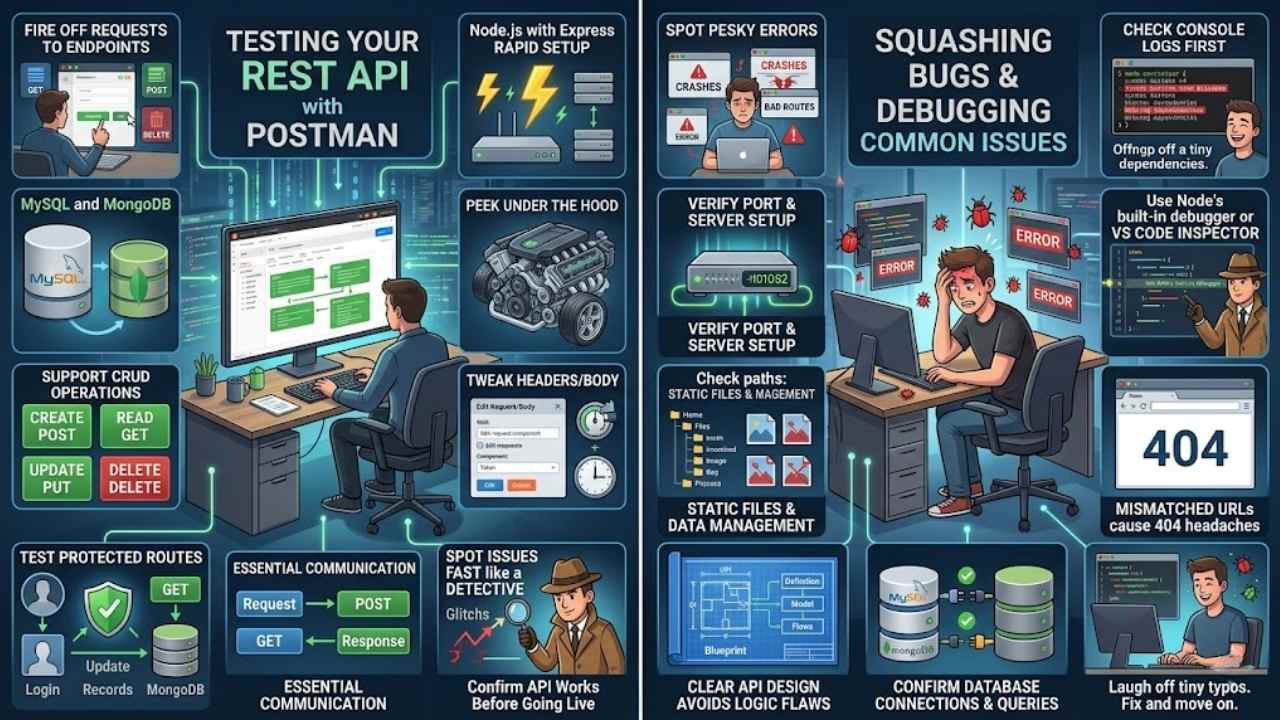
Grab Postman to fire off requests at your endpoints, spot errors fast like a detective on a case, and squash those bugs with console logs before they bite, so stick around for tips on dodging the usual headaches.
Use Postman for testing
You grab Postman, that handy tool for testing APIs, and fire it up to check your Node.js and Express setup. Send a GET request to your endpoint, like one that reads data from your MySQL database.
Watch the response come back with the info you expect. It feels like peeking under the hood of a car engine, smooth and revealing. Now, try a POST request to create new data, supporting those CRUD operations you built in.
Node.js with Express makes this rapid, thanks to its minimal nature. If something glitches, tweak the headers or body right there in Postman.
Switch to testing your protected routes, the ones with authentication middleware. Input a token from your login endpoint and hit that GET for updating records in MongoDB, an alternative database option.
See the server handle requests and responses just right, essential for effective API communication. Postman spots issues fast, like a friend pointing out a typo in your note. Keep sending requests for delete operations too.
This way, you confirm your REST API endpoints work as planned, all before going live.
Debugging common issues
Debugging common issues in your Node.js and Express REST API starts with spotting those pesky errors that pop up, like server crashes or bad routes. Node.js with Express.js provides an excellent foundation for building RESTful APIs with best practices and established patterns, but things go wrong sometimes.
Think you’re testing a GET endpoint, and nothing loads, right? Check your console logs first, they often reveal syntax mistakes or missing dependencies. Setting up a server is a fundamental first step in creating a REST API with Node.js and Express, so verify that port with a quick nod to your code.
Express framework enables rapid development of REST APIs due to its minimal and flexible nature, yet handling requests and responses properly is essential for effective API communication.
Grab Node’s built-in debugger, or use tools like VS Code’s inspector, to step through lines and catch bugs in action.
Static files and data management are important considerations when initializing a new Node.js and Express application, so double-check paths if images or styles fail to serve. Defining routes is a critical component of building a functional REST API, and mismatched URLs cause 404 headaches, I feel your pain there.
Clear API design should be established before coding, including endpoint definitions, data models, and request-response flows, which helps avoid logic flaws. For database woes, like with MySQL or MongoDB, confirm connections and queries; MongoDB is another database option for building RESTful APIs using Node, Express, and other supporting technologies.
REST API endpoints should support CRUD operations including creating, reading, updating, and deleting data, so test each with Postman to pinpoint failures. Hey, laugh it off when a tiny typo derails everything, we’ve all been there, just fix and move on.
Final Thoughts
You’ve walked through building a REST API from scratch with Node.js and Express, covering setup, routes, database links like MongoDB or MySQL, CRUD endpoints, and security steps. These methods keep things simple and quick, so you can code without hassle and get results fast.
Mastering this boosts your apps, solves real-world data issues, and opens doors to scalable projects that impress. Check out docs on Express or tools like Postman for more detailed explorations and community tips.
Go ahead, fire up that server, and watch your ideas turn into working code, just like I did on my first big project.
Frequently Asked Questions (FAQs) about Building a REST API with Node.js and Express
1. What’s the first step to build a REST API with Node.js and Express?
Start by installing Node.js on your machine, it’s like laying the foundation for your digital house. Then, grab Express through npm, that nifty package manager, and you’re off to the races setting up your server.
2. How do I create routes in Express for my REST API?
Think routes as the roads in your API town; you define them with app.get or app.post for HTTP methods. Link them to functions that handle requests, keeping things smooth and responsive.
3. Why use middleware in a Node.js and Express setup?
Middleware acts like a helpful bouncer at the door, checking requests before they hit your endpoints. It can log data, handle errors, or even authenticate users, making your API more secure and efficient. Plus, it’s easy to add, so you avoid common pitfalls right from the start.
4. Can I test my REST API endpoints easily?
Absolutely, tools like Postman let you send requests and see responses in a snap.