


Money often seems to disappear faster than expected, leaving many struggling to manage bills, track expenses, and stay on top of financial goals. Without the right tools, keeping finances organized can quickly become overwhelming.
By the end of the month, it’s common to feel unsure where the money went. This is where Mobile Apps For Personal Finance Management make a real difference—offering features like expense tracking, smart budgeting, and net worth monitoring.
Most of these apps cost under $20 per month, with many providing free versions or trial periods. Popular options like Mint, YNAB (You Need A Budget), and Monarch Money help simplify money management and are easily accessible on Google Play and the Apple App Store.
Take control of finances with the right app and build smarter money habits starting today.
Why Use Personal Finance Apps?
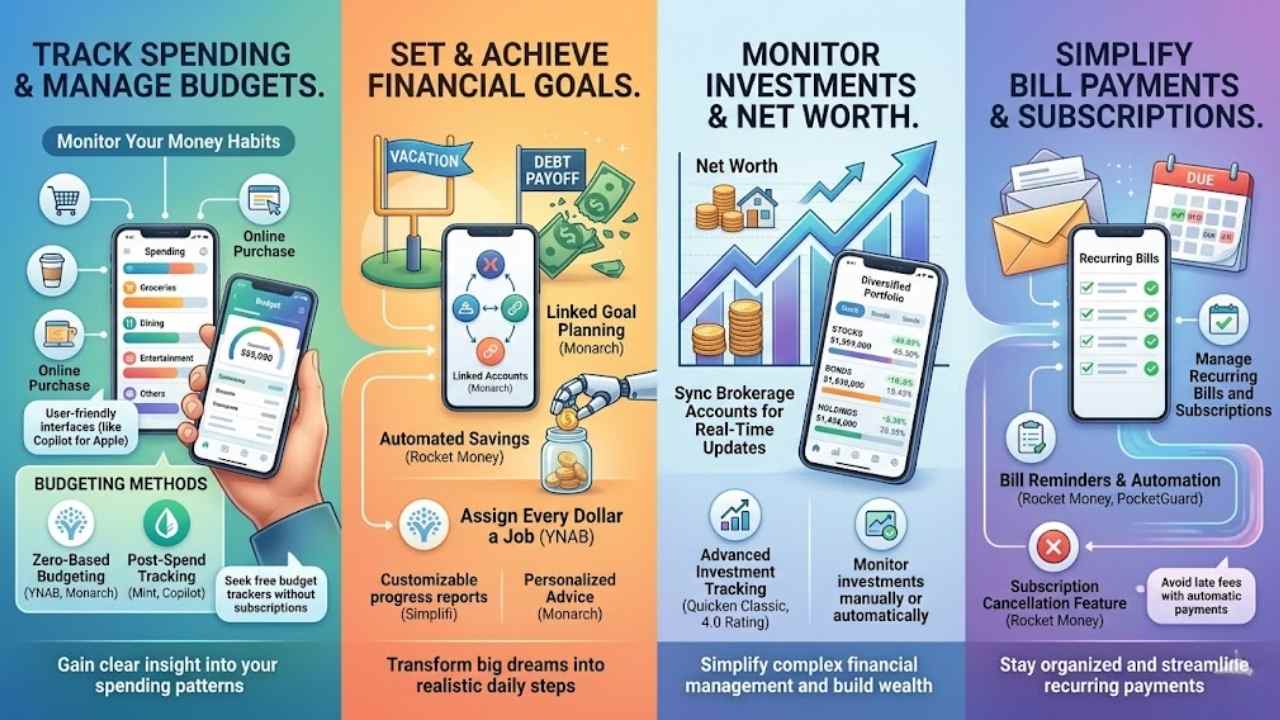
Imagine your cash vanishing like smoke, leaving you puzzled at month’s end. Budgeting apps, such as YNAB or Mint, step in as your trusty sidekick, spotting those sneaky leaks in your spending habits before they drain your wallet dry.
Track spending and manage budgets
You track spending with personal finance apps to stay on top of your money habits. These budgeting apps act like a watchful friend, logging every coffee or online splurge. Many, like Mint and Copilot, focus on post-spend tracking, so you see patterns after the fact.
They let you assign budget amounts, but often skip enforcing realistic financial limits. Copilot Money shines with its user-friendly, stylish interface, yet sticks to Apple platforms only.
Users on Reddit rave about free options in posts with 8 upvotes and 36 comments over 6 months, seeking budget trackers without subscriptions.
Quicken Simplifi earns a 4.5 out of 5 for its exceptional user experience and detail-rich transaction management, notes a review.
Monarch Money and YNAB stand out for flexible, detailed transaction management, pushing proactive budgeting. Unlike most apps, they ditch post-spend vibes for zero-based budgeting or envelope methods.
Google Sheets offers a simple, customizable do-it-yourself fix for budget software needs. Rocket Money helps with debt payoff, while Honeydue suits couples sharing savings goals. PocketGuard and Simplifi connect to financial institutions, making online banking a breeze for monitoring credit scores and investments.
Set and achieve financial goals
Personal finance apps help you set clear goals, like saving for a vacation or paying off debt. They link your plans to real accounts for easy tracking. Monarch Money stands out with its linked goal planning, letting you create savings goals and debt strategies tied to specific spots.
YNAB pushes you to assign every dollar a job, so you think hard before you spend. Rocket Money adds automated deposits on your schedule, plus feedback to curb spending and hit targets fast.
Imagine your money as a team player, working toward retirement or that dream house without the guesswork.
These tools make financial planning feel like a chat with a smart friend. Simplifi gives customizable mini-reports on your savings progress, while Rocket Money’s automated savings act like a quiet helper stashing cash away.
YNAB aligns goals with your spending patterns, turning big dreams into daily steps. Monarch offers personalized advice to track debt payoff, much like a coach cheering you on. Apps like these simplify the envelope budgeting method, keeping your productivity high in managing taxes or investments.
Fidelity Investments might handle your portfolio, but these apps tie it all together for real wins.
Monitor investments and net worth
You see your money grow, or sometimes shrink, with personal finance apps that track investments and net worth. These tools pull in data from brokerage accounts, update in real time, and show your full financial picture.
Take Monarch Money, it handles various investment types with real-time market updates, syncing details from online billers, including investment accounts. Users love this feature, as it highlights the value of monitoring net worth and investments in apps like these.
Quicken Classic earns a 4.0 rating for its advanced investment tracking and flexible transaction management, making it easy to stay on top.
Apps simplify watching stocks, bonds, or other holdings without the hassle of spreadsheets like Microsoft Excel. Rocket Money connects basic brokerage accounts to import balances, though its investment tracking feels weak.
Quicken Simplifi lets you import or add holdings and transactions manually for clear oversight. Mint, when it was around, offered basic investment tracking and net worth monitoring, much like what NerdWallet or PCMag reviews praise in tools from Empower or Acorns.
This setup turns complex financial management into a straightforward task, helping you build wealth step by step.
Simplify bill payments and subscriptions
Personal finance apps make handling bills and subscriptions a breeze. They track due dates, send reminders, and even automate payments to dodge late fees. Take Rocket Money, for instance, it includes bill negotiation and subscription cancellation features that automate savings for users.
Monarch Money syncs automatically with online billers, giving real-time updates on accounts and bills. This setup helps you stay on top of recurring payments and subscriptions without the hassle.
Managing bills shouldn’t feel like herding cats, says Kathy Yakal from Kiplinger.
Rocket Money tracks and automates bill payments, keeping you clear of those pesky late fees. Before it shut down, Mint offered bill tracking and reminders that folks loved for staying organized.
Even Quicken Classic Deluxe, at $8.49 a month, packs in bill payment features for smooth sailing. Simplifi separates recurring and one-time bills, making management simple as pie. Tools like Intuit QuickBooks Online tie in accounting perks, while apps such as PocketGuard or Qapital add spending plan smarts to your routine.
Best Overall: Monarch Money
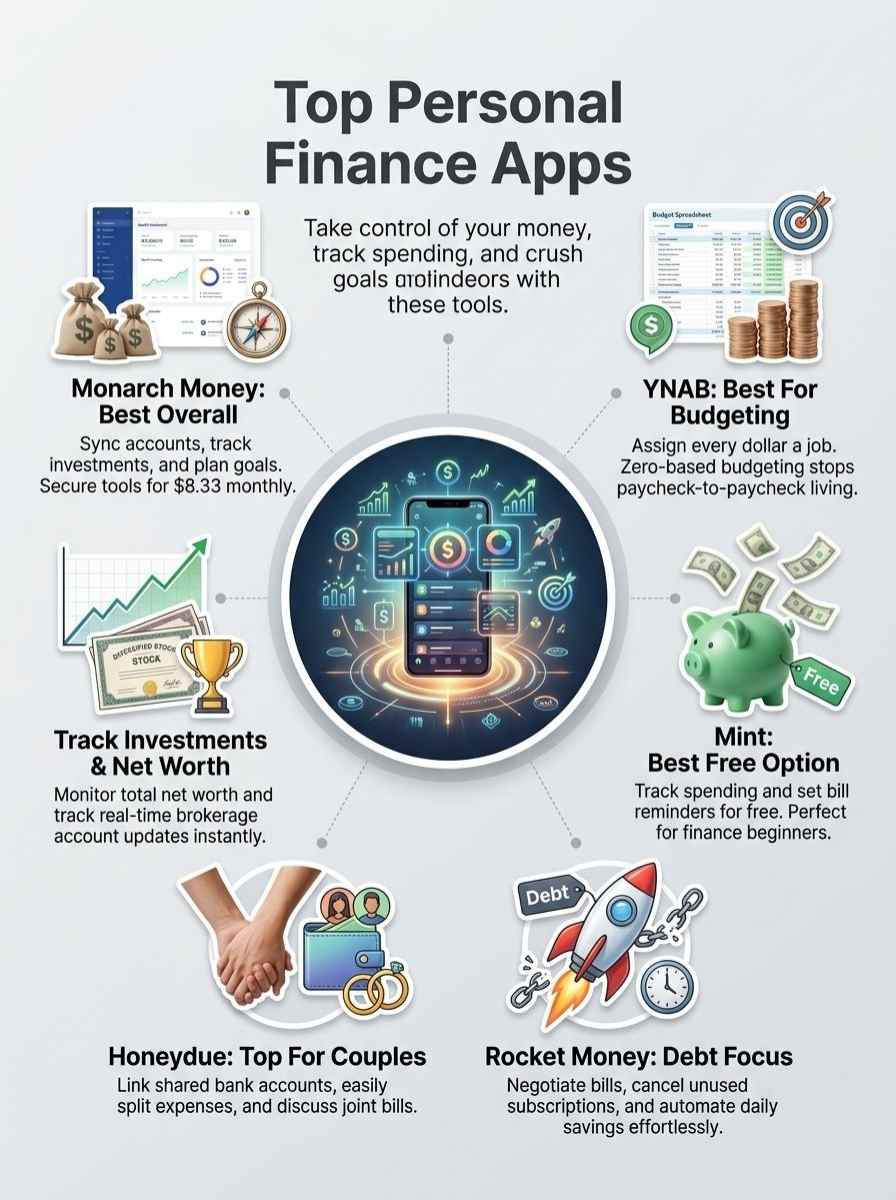
Monarch Money tops the list as the prime choice for handling your money matters, packing in tools to watch expenses, build budgets, chase goals, check stocks and bonds like Morgan Stanley pros do, and handle bills with ease, similar to how WalletHub tracks credit but on a bigger scale—so hang tight to explore its standout features, plus the upsides and downsides.
Features & Description (Monarch Money)
Folks, imagine your finances as a busy beehive, buzzing with activity. This app syncs automatically with online financial institutions and billers. You get up-to-date account details in a snap.
Picture assigning transactions to different users, like passing notes in a team huddle. Collaborative features make that easy. Users import Amazon transactions without hassle. They enjoy AI-driven personal finance reporting, too.
The budgeting tool got a fresh redesign. Now, it helps with easier and more realistic financial planning. Think of it as your trusty sidekick, keeping things simple.
Investments feel like a wild ride sometimes, right? The app handles portfolio management for various asset types. It pulls in real-time market data to keep you informed. Goal planning tools let you create savings strategies.
Tie them to specific accounts for debt repayment. Track progress like checking off a to-do list. Security stands out with industry-leading measures, including multi-factor authentication.
Newbies and pros both love the user-friendly interface. Apps like PocketGuard or Tiller offer similar vibes, but this one fits novices perfectly. It works across operating systems, even linking with tools from Morgan Stanley for broader insights.
Pros & Cons (Monarch Money)
Monarch Money packs a punch for folks juggling finances, so here’s a quick rundown of its ups and downs in a simple table.
| Pros | Cons |
|---|---|
|
|
Best for Dedicated Subscription Tracking: Subpilot
Rocket Money finds your subscriptions as a side feature. Subpilot makes it the entire mission. If forgotten recurring charges are your biggest financial blind spot, Subpilot is the most focused tool on this list for solving that specific problem.
It syncs with your accounts, automatically detects every active subscription — streaming services, SaaS tools, fitness apps, annual renewals — and brings them all into one clean dashboard. No manual entry, no hunting through bank statements. From there, cancelling anything you no longer use takes a few clicks. Most users find at least one or two forgotten charges the first time they connect.
| Feature | Spec / Rating |
|---|---|
| Sync Reliability | High (Automatic detection across accounts) |
| Pricing | Free |
| Best For | Subscription Cleanup & Recurring Charge Audits |
| Review Signal Focus: Most Dedicated Subscription Tracker. |
Best for Budgeting: You Need A Budget (YNAB)
Imagine your money as a team of workers, each with a specific job to do, no slacking off. That’s the magic of You Need A Budget, or YNAB, an app that flips traditional budgeting on its head.
It pushes you to assign every dollar from your income to expenses, savings, or goals before the month starts. This zero-based approach means you live on last month’s earnings, breaking the paycheck-to-paycheck cycle.
YNAB syncs with your bank accounts, tracks transactions in real time, and offers detailed reports to spot spending patterns. Think of it like a financial coach in your pocket, complete with tutorials and workshops to build better habits.
For couples, it even supports shared budgets, much like Honeydue but with a stronger focus on rules. Features include goal tracking, debt payoff tools, and net worth calculators that rival those in apps like PocketSmith.
You can import data from tools such as Credit Karma for a full picture of your credit score alongside spending. Pros shine bright: YNAB transforms your mindset about money, often leading to big savings, and its community support feels like chatting with old friends over coffee.
On the flip side, the $14.99 monthly fee might sting at first, and the learning curve can feel steep, like climbing a hill on a bike with no gears. Some users miss advanced investment tracking, pushing them toward options like Monarch Money instead.
If you’re into tax prep, YNAB pairs well with TurboTax for seamless expense categorization during filing season. A friend once told me, “YNAB saved my bacon when unexpected bills hit, because every penny had a plan.” It beats simple trackers like PocketGuard for depth, yet stays user-friendly.
Cons include no free version, unlike Mint, and it demands commitment, which isn’t for everyone who prefers quick glances at apps from Dayspring Technologies.
Want to explore a solid free alternative? Keep scrolling to the next pick.
Features & Description (YNAB)
YNAB stands out with its zero-based budgeting system. This method makes you assign every dollar from your paycheck to a clear job, like bills or savings. Users love how it lines up daily spending with big financial goals and real cash on hand.
Picture your money as a team, each dollar pulling its weight to avoid waste. The app shares accounts with up to six people, perfect for families or couples who budget together. You import transactions from banks, and add any missed ones by hand.
It works on iOS, Android, and even a web version for easy access anywhere. Security stays tight with multi-factor authentication and bank-grade data encryption, keeping your info safe.
Folks turn to YNAB for strong learning tools, like free workshops and a lively YouTube channel full of tips. These resources guide you through budgeting basics, making tough money talks feel like a chat with a friend.
The app skips investment tracking and bill payments to focus purely on smart budgeting. Pair it with tools like TurboTax for tax software needs, or FreshBooks if you handle payroll for a small gig.
Users often compare it to PocketSmith for detailed tracking, but YNAB keeps things simple and goal-driven. Think of it as your financial coach, cheering you on without the extras. Many say it changes how they see money, turning chaos into control.
Pros & Cons (YNAB)
Readers, explore the pros and cons of You Need A Budget to see if this app matches your money management style.
| Pros | Cons |
|---|---|
|
|
Best Free Option: Mint
Imagine, you’re juggling bills and expenses like a circus performer, and Mint swoops in as your free safety net, linking accounts from places like Honor Bank to track every penny.
Features & Description (Mint)
Mint connects to your bank and credit cards. It pulls in transactions fast. You get charts that show where money goes, say on coffee or gas. Set budgets for categories, and get alerts if you overspend.
The app watches bills, so you never miss a due date. It even checks your credit score for free. Plus, it spots subscriptions you forgot, like that old gym membership. Folks use it to see net worth grow over time.
Think of it as a money diary on your phone, simple and smart.
Pros & Cons (Mint)
Pros: No cost to start, which saves you cash right away. Works with tons of banks and apps, even Pocket Guard alternatives. Ben Moore from finance reviews calls it user-friendly for beginners.
Gives tips to cut spending, like spotting trends in your habits.
Cons: Ads show up often, which can annoy you. Some worry about sharing data with big companies like Dayspring Technologies, Inc. SPC. It lacks features for shared accounts, unlike EEBA for families.
Sync issues happen sometimes with certain banks.
Curious about apps for couples? Check out the next section on Rocket Money.
| Pros | Cons |
|---|---|
|
|
Best for Debt Management: Rocket Money
Rocket Money tackles debt like a smart sidekick, spotting high-interest credit card balances, negotiating cuts on utility bills and cable fees, and slashing forgotten gym memberships or streaming services with its easy dashboard and credit report tools, boasting pros like real cash savings and simple setup but cons like fees for advanced alerts—curious how it can lighten your load? Keep reading for the full scoop.
Features & Description (Rocket Money)
Users love how Rocket Money packs tools for bill negotiation and subscription cancellation. These features cut down on recurring expenses and help tackle debts with ease. The app creates budgets automatically from your transaction categories, and that gives clear insights into your spending habits.
You can monitor your net worth and credit score right inside the app, like having a financial dashboard in your pocket.
This tool automates savings by moving leftover funds to savings accounts based on rules you set. Set up savings goals and track them with flexible deposit schedules, making it feel like a helpful buddy nudging you forward.
It works on iOS and Android devices, plus a web interface for easy access anywhere. Security stays top-notch with bank-level protection, including 256-bit encryption and multi-factor authentication, so you feel safe sharing your data.
Pros & Cons (Rocket Money)
Rocket Money shines for folks tackling debt, offering tools that negotiate bills and cancel subscriptions with ease. Imagine you spot a pesky cable bill, and the app steps in like a savvy negotiator to slash it down. It automates savings too, pulling money aside without you lifting a finger, which feels like having a financial sidekick. Users love its intuitive interface and top-notch mobile design, plus the feedback it gives keeps you on track. A free tier exists, and shared premium options suit couples well, making joint money talks smoother.
On the flip side, that premium subscription might hit your wallet hard, based on what price you pick. Bill negotiation covers only so much, leaving some services out in the cold. Investment tracking falls short against rivals, and you won’t find much online help or learning resources beyond the app itself. Still, for debt management, it packs a punch with those core features.
Best for Couples: Honeydue
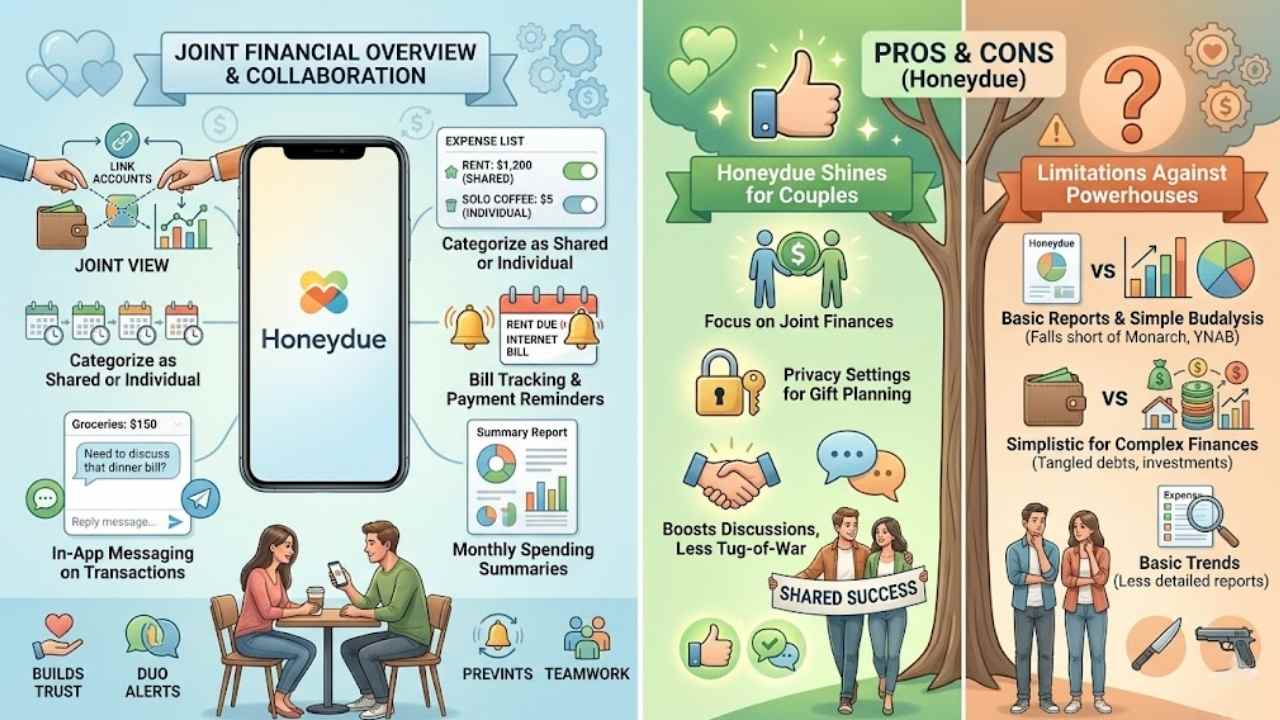
Imagine juggling bills with your partner, like tossing a hot potato back and forth, but what if an app made it smooth as silk? Honeydue steps in as the perfect sidekick for couples, letting you link bank accounts, split expenses on the fly, and chat right in the app about that surprise dinner bill.
It tracks joint spending, sends alerts for due dates, and even hides certain transactions if you want to keep a gift under wraps. Couples love how it builds trust, turning money talks from arguments into easy chats over coffee.
Features & Description (Honeydue)
Honeydue helps couples tackle money matters together. You and your partner connect multiple financial accounts, then see a combined financial overview right away. The app lets you categorize expenses as shared or individual, making splits easy.
Plus, it supports custom spending categories to match your household needs. Think of it like a team huddle for your wallet, where you both get notifications for upcoming bills or budget limits.
Honeydue provides bill tracking and payment reminders just for couples, so no surprises pop up. And those messaging features within transactions? They let partners chat about spending on the spot, like passing notes in class but for cash flow.
Privacy stays in your control with Honeydue. Users decide which account details show to their partner, keeping things comfortable. The app delivers monthly spending summaries to guide joint finances, almost like a monthly report card for your shared budget.
Couples find this setup handy for staying on the same page. You receive alerts together, fostering that sense of teamwork. With these tools, managing money as a duo feels less like a chore and more like a joint adventure.
Pros & Cons (Honeydue)
Honeydue shines for couples, with its design focused on joint money matters. It supports tracking shared costs and personal spends, like splitting rent or logging solo coffee runs. Built-in chats and alerts for bills boost talks between you and your partner, making finances feel like teamwork instead of a tug-of-war. Privacy settings guard touchy details, so no worries about prying eyes on that surprise gift fund.
On the flip side, features fall short against powerhouses like Monarch or YNAB, especially for detailed analysis of budgets. Some folks crave stronger reports to spot trends, but Honeydue keeps things basic. Couples with tangled finances, say from investments or debts, might find it too simple, like bringing a knife to a gunfight.
Final Words
You’ve seen how apps like Monarch Money, YNAB, Mint, Rocket Money, and Honeydue tackle everything from budgeting to debt payoff. These tools keep things simple, letting you track cash flow without the headache.
Ever wonder which one fits your wallet best? Smart money moves with these apps can slash stress and boost savings fast. Try their free trials or check app reviews for more tips. Grab control of your finances today, and watch your future brighten up like a well-planned payday.
FAQs
1. What are some top mobile apps for personal finance management?
Hey, if you’re feeling overwhelmed by bills, apps like Mint and YNAB can be your financial sidekicks, tracking expenses and setting budgets with ease. They turn chaos into clarity, like a trusty map in a foggy forest. Just download one and watch your money worries shrink.
2. How do these apps help with budgeting?
These apps crunch numbers fast, showing where your cash flows, so you avoid living paycheck to paycheck. Picture them as a wise old friend whispering, “Hey, skip that extra coffee.”
3. Can mobile apps track investments for me?
Yes, apps such as Acorns and Robinhood monitor stocks and savings goals in real time. They alert you to smart moves, keeping your portfolio healthy without the headache. It’s like having a personal coach in your pocket, cheering you on to financial wins.
4. Are there free options among the top finance apps?
Plenty of free versions exist, like PocketGuard, which scans accounts and spots savings opportunities. No cost means no excuses for not starting today.





















