In QuickBooks, all financial data is stored in a Company (QBW) file. This file is important to perform any accounting operations. However, you sometimes encounter errors and issues that prevent you from accessing the company file.
When you are unable to access the company file, it can delay accounting tasks and directly disrupt your organization’s workflow. To minimize such delays, it is quite important to identify and troubleshoot these errors quickly. In this article, we have listed the top 10 QuickBooks errors, their reasons, and the solutions to fix them.
Top 10 QuickBooks Company File Errors
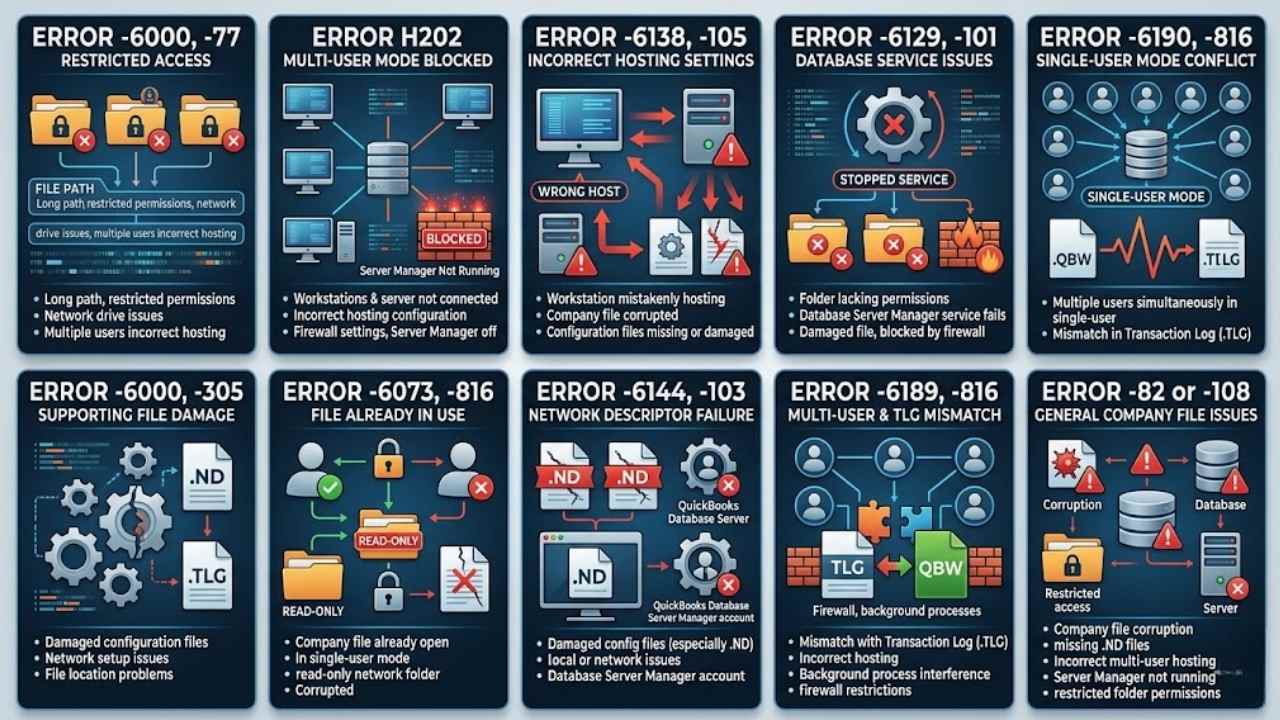
You may fail to open or access the QBW file due to various errors and issues. Top ones are listed below:
Error -6000, -77
It usually happens when the company file path is too long or when folder permissions are restricted. It can also occur if the file is stored on a network drive or if multiple users attempt to access it in an incorrect hosting setup.
Error H202
You may encounter this error in QuickBooks while trying to open a company file in multi-user mode. It happens when the workstations and the server system are not connected due to incorrect hosting configuration, firewall settings, etc. Sometimes, it also occurs when the QuickBooks Server Manager is not running on the server system. In some cases, corruption in the company file can also block access to the file.
Error -6138, -105
This error occurs when the company file is hosted by a workstation. The server system should host the company file. If you have mistakenly set the workstation to host the file, it can cause this error. It also occurs due to various other reasons, like the company file is corrupted or damaged, configuration files are missing or corrupted, etc.
Error -6129, -101
If you’re trying to open the company file from a folder that does not have all permissions, then you can face this error. However, it also occurs when the QuickBooks database server manager service fails to work, the file is damaged, or the file is blocked by firewall settings.
Error -6190, -816
This company file error usually occurs when multiple users try to open the file simultaneously, and the hosting settings are set to single-user mode. It also occurs when there is a mismatch between the transaction log file (.TLG) and the company file.
Error -6000, -305
The QuickBooks error -6000, -305 occurs when you try to open a company file and the supporting configuration files (.ND or .TLG) are damaged, or when there are issues with the network setup or file location. This prevents QuickBooks from accessing the company file properly in both local and multi-user environments.
Error -6073, -816
The QuickBooks error -6073, -816 occurs when the company file you’re trying to open is incorrect, corrupted, or is already in use. It often occurs if the hosting setting of the file is in single-user mode or it is stored in a read-only network folder.
Error -6144, -103
The QuickBooks error -6144, -103 occurs when you try to open a company file locally or over a network and the supporting configuration files are damaged. It is often linked to issues with the Network Descriptor (.ND) file or the QuickBooks Database Server Manager account.
Error -6189, -816
The QuickBooks error -6189, -816 occurs when you try to open the company file, which does not match the transaction log (.TLG). It can also appear if multiple users are accessing the file with an incorrect hosting configuration or due to background process interference, firewall restrictions, etc.
Error -82 or -108
This error occurs when there are issues with the company file or its supporting configuration files. It often arises due to corruption in the company file, damaged or missing network descriptor (.ND) files, or incorrect hosting setup in multi-user mode. It also appears due to reasons such as QuickBooks Database Server Manager is not running correctly or folder permissions are restricted.
Common Causes for QuickBooks Company File Errors
Here are the main reasons for such errors:
- Corruption in QBW file
- Network issue
- Incorrect folder permission
- Incorrect network settings, firewall settings, and hosting settings
- Outdated QuickBooks application
- Corrupted configuration files
Best Solutions to Fix QuickBooks Company File Errors
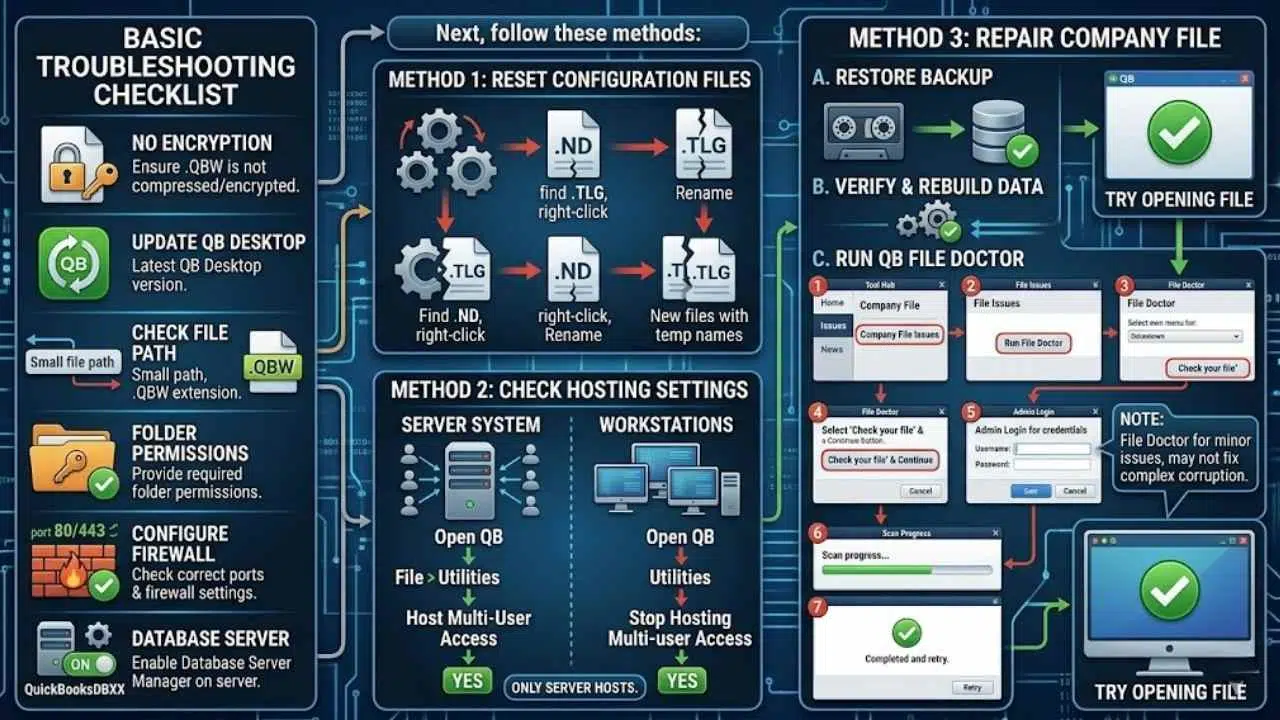
If you see any of the above errors that prevent you from opening the company file, first follow these basic troubleshooting steps:
- Check and make sure your company file is not encrypted or compressed.
- Make sure your QuickBooks desktop version is updated.
- Check the company file path. It should be small and the file extension should be .QBW.
- Check the folder permissions and provide the required permissions.
- Make sure your system’s firewall settings are configured correctly with correct ports.
- Make sure that the Database Server Manager is enabled. You can check your server system’s Server Manager Settings (QuickBooksDBXX).
Next, follow these methods.
1. Reset Configuration Files
You may fail to open the company file if the configuration files, such as the Transaction Log (.TLG) and Network Data (.ND) files, are missing or corrupted. You can recreate these files to resolve the issue. For this, go to the Company file folder, find and right-click on the .TLG file, and click the Rename option.
Similarly, to rename .ND files, search for the .ND file in the company file folder, right-click on it, and then click Rename.
2. Check Hosting Settings
Incorrect Hosting settings is one of the major reasons behind the QuickBooks company file errors. Make sure your server system and workstations have correct hosting settings. Here are the steps to check and change the Hosting settings on the server system:
- Open the QuickBooks application on the server system.
- Click File and then click Utilities.
- Click Host Multi-User Access and then click Yes.
To check and change Hosting settings on workstation, follow these steps:
- Open your QuickBooks application.
- Click File and then choose the Utilities option.
- Click on the option named “Stop Hosting Multi-user Access.”
- Click Yes.
3. Repair Company File
You can even face the company file errors in QuickBooks due to corruption or damage in the file. If the company file is damaged, then you can restore the backup file if it is available. If the backup file is not updated, then you can rebuild the QuickBooks file. If it fails to repair the file and resolve the problem, then you can use the QuickBooks File Doctor in the Tool Hub to repair the company file. Here are the steps:
- In the QuickBooks Tool hub, click Home.
- Click Company File Issues.
-
- Click Run QuickBooks File Doctor.
- Click the dropdown menu to choose the company file.
- Select Check your file and then click Continue.
- A dialog box will ask you to enter the QuickBooks admin credentials. Enter the password and then click Next.
- It will take a few minutes to scan, depending on the size of the QBW file.
- Once the scan is complete, try opening the company file to check if the error is fixed.
Note: QuickBooks File Doctor tool can fix minor company file issues. It may not provide effective results for resolving complex company file errors.
Use a Professional QuickBooks Repair Tool to Resolve Company File Errors
If the above tool fails to repair the corrupted company file, you can use a professional QuickBooks repair tool, such as Stellar Repair for QuickBooks. It can easily repair QBW file even if it is severely corrupted. It can recover all the data from the corrupt file without the need of a backup file. Also, you don’t require QuickBooks admins credentials to operate this tool. You can download this tool on any Windows system. The tool is compatible with all QuickBooks editions – QuickBooks Pro, Premier, and Enterprise solutions.
Final Words
Above, we have listed the top 10 company file errors that QuickBooks users face. Resolving such errors is crucial to work smoothly with QuickBooks application. If the QBW file is not opening due to corruption, you can use a professional QuickBooks repair tool, such as Stellar Repair for QuickBooks to repair it. It can help you to quickly recover all data from corrupt company file without any data loss. Also, the tool is recommended by pro-advisors to repair QBW file, irrespective of the QuickBooks version.