Choosing the right digital tools to help children master the alphabet can be a daunting task for parents and educators. With thousands of options in the App Store, identifying which games truly provide educational value while maintaining child safety is essential. This guide looks at the top options to help you make an informed decision for your early learner.
How We Selected Our 15 Best Alphabet Learning Games for Kids for This Guide
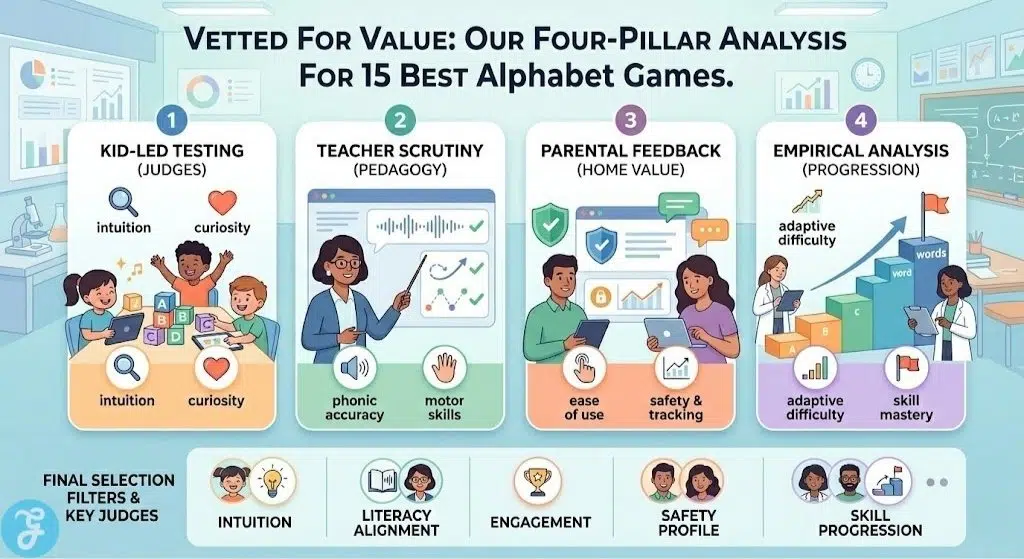
Our selection process followed a rigorous four-pillar research methodology to ensure that every recommendation provides genuine educational value while remaining engaging for young learners. We moved beyond basic digital metrics to conduct a deep analysis of how these tools perform in real world settings.
-
Hands-on Kid-Led Testing: We organized supervised play sessions where children within the target age groups served as our primary judges. By observing their natural interactions, we were able to identify which games sparked genuine curiosity and which ones led to frustration or disinterest.
-
Educational Scrutiny by Teachers: We consulted with early childhood educators to evaluate the pedagogical soundness of each app. This included verifying the accuracy of phonics sounds and ensuring that tracing mechanics align with the physical motor skills taught in modern classrooms.
-
Qualitative Parent Feedback: We interviewed a diverse group of caregivers to understand the long-term impact of these games. We focused on ease of use, the quality of progress tracking features, and the overall peace of mind regarding child safety and data privacy.
-
Empirical Effectiveness Tracking: Our team analyzed the learning curve of each application. We specifically looked for games that successfully moved children from basic letter recognition to advanced phonics and word formation through adaptive difficulty.
The following data reflects the key evaluation filters used by our research team to finalize the rankings for this guide.
| Selection Filter | Evaluation Focus | Stakeholder Judge |
| Intuition Score | Ease of navigation without adult help | Child Focus Groups |
| Literacy Alignment | Accuracy of phonics and tracing paths | Licensed Teachers |
| Engagement Value | Repeated playability and reward systems | Child Focus Groups |
| Safety Profile | Absence of ads and secure environments | Parents and Editors |
| Skill Progression | Speed of letter mastery and retention | Research Team |
This multi-layered approach ensures that the applications listed below are not just popular but are also effective tools that have been vetted by the very people who use them every day.
The Top 15 Alphabet Learning Games For Kids for Early Development
This collection represents the most effective tools currently available on iOS for teaching children how to recognize, trace, and sound out letters.
1. Khan Academy Kids
The Khan Academy Kids application is widely considered the gold standard for free early childhood education. It features an expansive library of activities that cover reading, writing, and language development through a personalized learning path. The experience is guided by a cast of friendly animal characters that help keep children motivated as they progress.
Best Feature/For:
-
Comprehensive and completely free educational curriculum for all early learners
Why We Chose It:
-
It offers a massive variety of content without any subscription fees
-
The adaptive learning technology adjusts to the specific needs of each child
-
The design is entirely free of advertisements and external distractions
Things to consider:
-
The sheer amount of content may require initial parent guidance
To ensure a smooth transition into formal schooling, the next application focuses on foundational classroom skills.
2. Preschool and Kindergarten Games
What’s great about the Preschool and Kindergarten Games app provides a robust set of thirty different games that are designed to teach common core skills to young children. It covers everything from letter recognition to basic math and memory challenges within a single platform. The colorful graphics and simple controls make it easy for toddlers to play independently while they learn.
Best Feature/For:
-
Preparing toddlers for the transition into a traditional school environment
Why We Chose It:
-
It includes a high volume of activities in a single download
-
The games align with established educational standards for preschool
-
The reward system uses stickers to keep children engaged with the tasks
Things to consider:
-
Access to the full library requires a purchase after the initial trial
For those looking for a modern and immersive tracing experience, our third pick offers a highly polished interface.
3. Alphabet Magic: Trace & Phonics
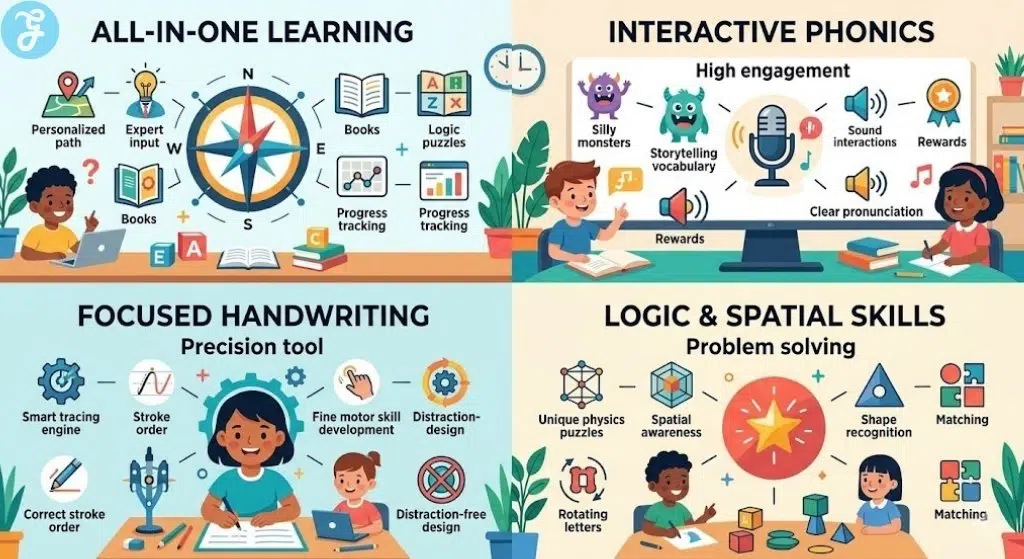
Despite being so new, we couldn’t make our top 15 list without adding Alphabet Magic: Trace and Phonics by Edutorial. This newer entry into the educational space focuses on a multisensory approach to learning the alphabet. It combines fluid tracing mechanics with high quality phonic sounds to help children make strong associations between the visual shape and the auditory sound of each letter. The app uses vibrant colors and magical animations to reward children for every successful stroke.
Best Feature/For:
-
Modern multisensory tracing and immersive phonics associations
Why We Chose It:
-
The tracing engine is highly responsive and designed for small fingers
-
It features a very clean and modern aesthetic that is easy to navigate
-
The phonics sounds are recorded with professional clarity to help with pronunciation
Things to consider:
-
As a newer application, it receives frequent updates that may change features
If your primary goal is teaching the physical act of writing, the following option is highly specialized for that task.
4. ABC Kids – Tracing and Phonics
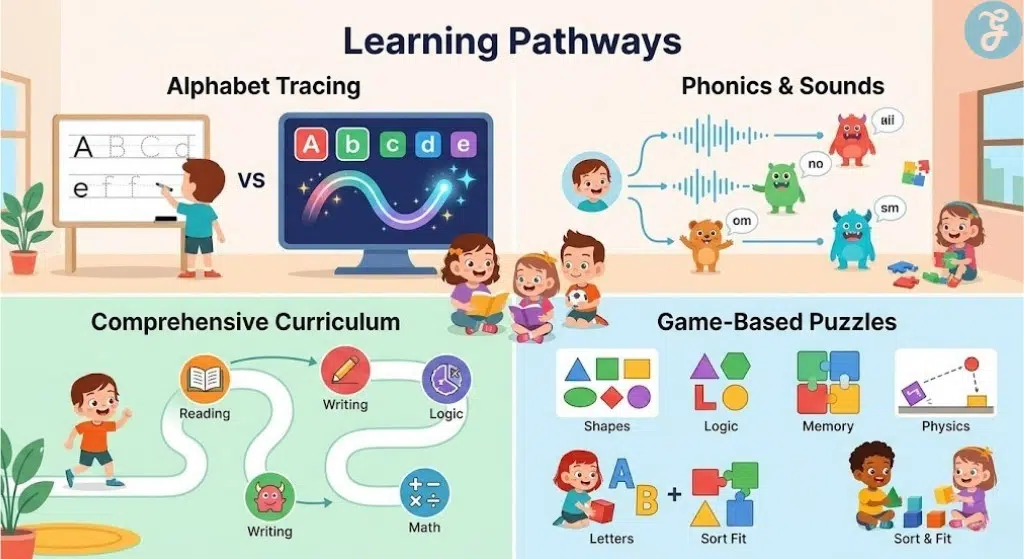
This application is a focused tool designed specifically to help children master the shapes of letters and their associated sounds. It uses a clean interface that eliminates unnecessary menus so kids can stay concentrated on their tracing exercises. The smart tracing feature ensures that children follow the correct stroke order for every letter in the alphabet.
Best Feature/For:
-
Focused handwriting practice and letter sound recognition
Why We Chose It:
-
The interface is incredibly simple and optimized for small fingers
-
It provides a distraction-free environment without any hidden advertisements
-
The phonics sounds are clear and easy for children to replicate
Things to consider:
-
It does not include broader subjects like math or science
Animal lovers will find our next recommendation particularly engaging as it combines biology with literacy.
5. ABC Animal Games for Toddlers
This application allows children to interact with a wide variety of animals while they learn their letters. Each animal is associated with a specific letter of the alphabet, and kids can engage in tasks like grooming or feeding to learn more. It is an excellent way to keep children interested by tapping into their natural curiosity about the animal kingdom.
Best Feature/For:
-
Integrating animal care themes with basic alphabet recognition
Why We Chose It:
-
The interactive elements make the learning feel like a fun game
-
It teaches children about different species while they practice spelling
-
The visual style is warm and inviting for younger children
Things to consider:
-
Some interactive elements can be sensitive for very young users
For those who enjoy physics and creative puzzles, this next choice offers a different take on alphabet learning.
6. Type Spin
Type Spin is a unique puzzle game where players manipulate the shapes of letters to navigate through various obstacle courses. This approach helps children develop a deep understanding of the structural geometry of each character in the alphabet. It is a great choice for older toddlers who may have already mastered basic recognition and want a new challenge.
Best Feature/For:
-
Developing spatial awareness and letter shape recognition through physics
Why We Chose It:
-
The gameplay is highly original and stands out from traditional educational apps
-
It challenges the brain in ways that simple tracing apps do not
-
The minimalistic design is visually pleasing and modern
Things to consider:
-
It lacks traditional phonics sounds and spoken instructions
The next entry uses a unique storytelling approach to help children understand how letters combine to form words.
7. Wonster Words Learning Games
Wonster Words uses funny animations and silly monsters to turn vocabulary building into an entertaining experience. Children help the characters complete puzzles that teach them about phonics, word families, and complex spelling patterns. The storytelling aspect helps children retain the meaning of new words more effectively than simple flashcards.
Best Feature/For:
-
Building vocabulary and understanding phonics through humorous storytelling
Why We Chose It:
-
The use of humor makes repetitive learning much more enjoyable
-
It covers complex topics like diphthongs and silent letters easily
-
The animations are high quality and keep children laughing while they learn
Things to consider:
-
A subscription is needed to unlock the most advanced word lists
Friendly characters can make a big difference in how a child perceives learning, as demonstrated by the following choice.
8. ABC Games for Kids-EduKittyABC
EduKittyABC is a versatile learning tool that supports twelve different languages, making it a great choice for international families. It features a cute 3D cat that leads children through various alphabet games and vocabulary exercises. The app is designed to be highly interactive, with plenty of opportunities for kids to hear and repeat the names of letters.
Best Feature/For:
-
Learning the alphabet in multiple languages with a cute animated guide
Why We Chose It:
-
The multilingual support is a rare and valuable feature for many families
-
The interactive cat character is very appealing to younger children
-
It includes a wide variety of flashcards and handwriting practice tools
Things to consider:
-
The visual design is more traditional than some newer apps
The next selection prioritizes logic and creativity alongside traditional alphabet lessons.
9. Learning Games for Kid&Toddler
This application uses a variety of puzzles to teach children about shapes, colors, and the alphabet. It is designed to foster a sense of curiosity and improve problem-solving skills through interactive play. The game features a friendly dinosaur character that rewards children for their progress throughout the lessons.
Best Feature/For:
-
Developing early logic and spatial reasoning skills through play
Why We Chose It:
-
The games are varied enough to keep a child’s attention for longer periods
-
It focuses on developing cognitive skills as well as basic literacy
-
The interface is bright and engaging for preschool-aged children
Things to consider:
-
The free trial version contains a limited number of accessible games
Music can be a powerful mnemonic device, and the next app uses it to full effect.
10. KidloLand Kids Toddler Games
This massive platform is filled with over 3,000 nursery rhymes, songs, and interactive activities. It uses music as the primary vehicle for teaching the alphabet, numbers, and basic life skills to children. Every scene is interactive, allowing kids to tap objects to hear sounds and see animations that reinforce the lesson.
Best Feature/For:
-
Learning through song and interactive musical play
Why We Chose It:
-
The sheer volume of content ensures that children never get bored
-
The songs are catchy and help with memorization of the alphabet
-
It offers a safe and colorful environment for very young toddlers
Things to consider:
-
Most of the content is locked behind a recurring subscription
The following application is highly regarded by teachers for its effectiveness in teaching fine motor skills.
11. LetterSchool – Learn to Write
LetterSchool is an award-winning application that uses engaging animations to guide children through the writing process. It breaks down each letter into three easy steps to ensure children learn the correct strokes every time. The app covers uppercase letters, lowercase letters, and numbers using a variety of fun visual effects like sparks and train tracks.
Best Feature/For:
-
Precision handwriting practice for both print and cursive styles
Why We Chose It:
-
The three-step learning process is based on proven educational methods
-
The animations are high-quality and visually stimulating
-
It offers specific settings for left-handed children to learn comfortably
Things to consider:
-
The strict tracing requirements can be challenging for beginners
Adaptability is a key feature of the next app, which adjusts to the skill level of the user.
12. Keiki Learning Games for Kids
Keiki offers a curated learning path that is designed by early childhood educators to meet developmental milestones. The app features a wide range of puzzles and tracing games that become more challenging as the child improves. It provides a balanced approach to education that covers both literacy and logic in a playful way.
Best Feature/For:
-
Providing a personalized and adaptive learning curriculum for toddlers
Why We Chose It:
-
The content is developed with the help of professional child psychologists
-
The adaptive difficulty helps prevent children from becoming frustrated
-
The visuals are modern and designed to be easy on the eyes
Things to consider:
-
Frequent upgrade notifications can sometimes disrupt the flow of play
If you are looking for a simple introduction to both letters and numbers, the following choice is a great start.
13. 123 Learning Games for Kids 3+
This application focuses on the basics of counting and letter recognition for children aged three and older. It uses a collection of simple mini games like balloon popping and matching to help kids recognize visual symbols. The gameplay is straightforward and does not require complex instructions for a child to enjoy.
Best Feature/For:
-
Introducing the basic shapes of letters and numbers to young toddlers
Why We Chose It:
-
The interface is clean and prevents children from clicking the wrong buttons
-
It provides a good foundation for both math and literacy in one place
-
The immediate audio feedback helps reinforce the names of the numbers
Things to consider:
-
The content library is smaller than some more expensive alternatives
Simplicity is often the key to a successful toddler app, as shown by the following entry.
14. Learning Games for Toddlers
This app offers a straightforward collection of logic and alphabet games that are easy for any toddler to pick up. It focuses on drag and drop mechanics that help improve fine motor skills while reinforcing letter shapes. The minimalist approach ensures that the learning objective is always front and center.
Best Feature/For:
-
Simple and intuitive play for children just starting with digital devices
Why We Chose It:
-
The games require no reading skills to navigate or understand
-
It provides a safe space for toddlers to practice basic coordination
-
The audio instructions are clear and helpful for independent play
Things to consider:
-
Older children may find the activities a bit too basic
The final app on our list is a great tool for focused and repetitive practice.
15. ABC Kids Fun Learning Games
This application uses high contrast colors and large buttons to make it accessible for even the youngest learners. It features a series of interactive puzzles that help children associate letters with common objects and animals. The focus on visual recognition makes it a strong tool for building early literacy foundations.
This application provides a no-frills approach to learning the alphabet through matching and tracing. It is designed to be a supplemental tool that parents can use to reinforce what children are learning in school or other apps. The clean interface and simple goals make it a reliable choice for daily practice sessions.
Best Feature/For:
-
Reinforcing basic alphabet knowledge through repetitive matching games
Why We Chose It:
-
The simplicity of the app makes it very easy for children to use
-
It offers a reliable and consistent experience for young learners
-
The matching games are very effective for memorizing letter names
Things to consider:
-
It lacks the advanced features found in the top-tier educational apps
An Overview of 15 Alphabet Learning Games for Kids for The Parents
Choosing between these seventeen options depends largely on your specific goals for your child. Some parents may prefer a broad curriculum, while others want a focused tool for writing or phonics.
Overview Comparison Table
The following information summarizes the core strengths of the top recommended applications to assist in your selection.
| App Name | Key Strength | Ideal User |
| Khan Academy Kids | High Volume Content | Budget-conscious families |
| Alphabet Magic | Immersive Tracing | Early learners need high engagement |
| LetterSchool | Writing Accuracy | Preschoolers learning to write |
| Wonster Words | Vocabulary Building | Kids who enjoy storytelling |
Our Top 3 Picks and Why?
Our first pick is Khan Academy Kids because it offers an incredible amount of professional educational content for free. It is a rare example of a high-quality app that is accessible to everyone without any hidden costs. Our second pick is Alphabet Magic: Trace & Phonics for its exceptional visual quality and responsive tracing mechanics that appeal to modern learners. Finally, we recommend Preschool and Kindergarten Games because it offers the most comprehensive bridge between home play and classroom expectations.
How to Choose the Right Alphabet Learning Games for Kids by Yourself?
When you are looking for new educational apps, it is important to have a framework for evaluation. Not all apps that claim to be educational actually provide value, so looking for specific markers can save you time and money.
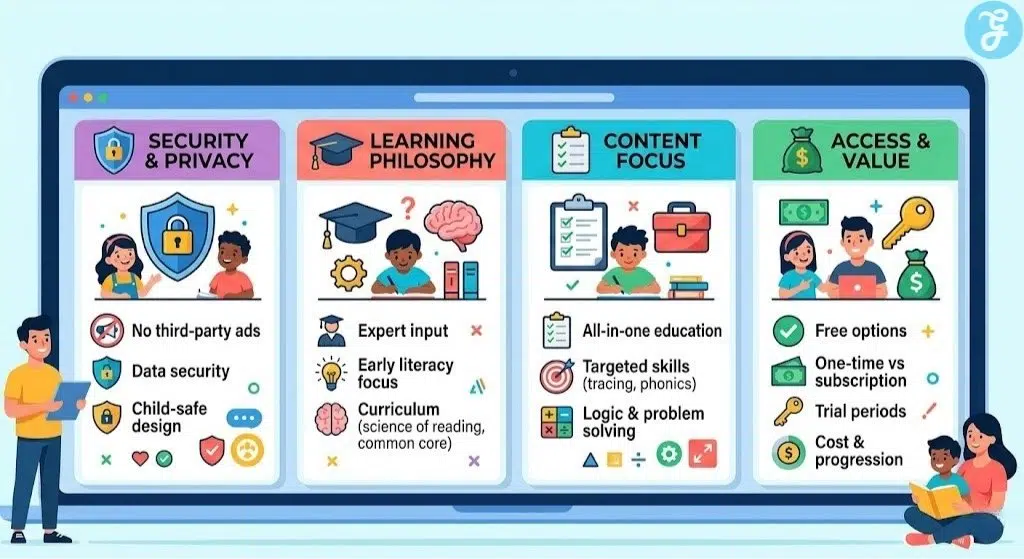
The Selection Framework:
-
Ad Transparency: Ensure the app is free of third-party ads that could lead your child to unsafe content.
-
Expert Input: Look for apps that state they were developed with the help of teachers or psychologists.
-
Subscription Models: Decide if you prefer a one-time purchase or if a recurring subscription fits your budget.
-
Privacy Policy: Check that the app does not collect personal data from your child.
The following information can help you decide which type of app is best suited for your current needs.
Decision Matrix
| Choose a Comprehensive App if… | Choose a Specialized App if… |
| You want a full preschool curriculum | You want to focus only on writing |
| You want to cover multiple subjects | You need a tool for specific phonics sounds |
| You want an all-in-one solution | You want a distraction-free practice tool |
The Final Checklist
-
Does the app have a rating above 4.0 in the App Store?
-
Is the interface simple enough for my child to use independently?
-
Does the app offer a free trial or a way to test the content?
-
Is the app free of disruptive pop-up advertisements?
-
Does the curriculum align with my child’s current age and skill level?
Final Summary: Empowering Young Learners
The right alphabet learning games for kids can transform screen time into a productive and educational experience. By choosing apps that balance fun with structured learning, you can help your child build a strong foundation for reading and writing success. Regardless of which app you choose, the most important factor is consistent and supervised play.
Frequently Asked Questions (FAQs) About Alphabet Learning Games For Kids
At what age should my child start using alphabet games?
Answer: Most experts suggest that children can begin exploring simple letter recognition games around the age of two or three. It is important to monitor their screen time and ensure that the activities remain interactive and age-appropriate.
Are free educational apps as good as paid ones?
Answer: Some free apps like Khan Academy Kids are actually superior to many paid alternatives because they are funded by non-profit organizations. However, many free apps use advertisements to make money, which can be distracting or inappropriate for young children.
How can I tell if an app is truly educational?
Answer: Look for apps that mention a curriculum based on Common Core standards or the science of reading. You can also check if the developers have won awards from reputable organizations like Common Sense Media or Parents’ Choice.
Do these apps help with physical handwriting skills?
Answer: Yes, apps that focus on tracing can help children understand the shapes of letters and the correct stroke order. While they do not replace the need for paper and pencil practice, they are excellent for developing the required fine motor control.
Is it safe to let my toddler play these games alone?
Answer: While many of the apps on this list are designed for independent play, it is always best to supervise your child. This allows you to reinforce what they are learning and ensure they do not accidentally navigate away from the educational content.