Software users expect more than just a functional tool. They want an experience that feels built specifically for their daily tasks. When an app treats every user exactly the same, frustration builds quickly. People waste time digging through menus, searching for specific features, and setting up repetitive tasks. This friction leads straight to canceled subscriptions.
To fix this, companies rely on SaaS AI personalization. This technology tracks how you interact with a platform and adjusts the interface to match your habits. It transforms a static piece of software into a smart assistant.
Instead of forcing you to learn the software, the software learns you. We see this shift happening across all major business applications, from project management tools to complex financial dashboards. By analyzing millions of data points, these platforms predict what you need before you even click.
The strategy works. Businesses using intelligent customization see higher engagement rates and much lower churn. Let’s break down exactly how these platforms track behavior, process data, and deliver a unique experience to every single user.
The Core Mechanics of AI in SaaS Environments
Understanding how software adapts requires a look under the hood. SaaS platforms use a combination of continuous tracking and immediate processing to change what you see on your screen. This creates a feedback loop. Every action you take helps the system understand your goals. Over time, the platform gets better at predicting your next move. This section explores the specific technologies making this possible.
The table below highlights the foundational elements of intelligent software customization.
| Technology Component | Primary Function | Impact on User Experience |
| Event Tracking | Logs every click, scroll, and screen view. | Creates a baseline of user habits. |
| Predictive Analytics | Forecasts future actions based on historical data. | Anticipates needs before the user asks. |
| Natural Language Processing | Analyzes text input in search bars and chat. | Understands user intent and frustration levels. |
| Cloud Computing | Processes massive data sets instantly. | Delivers real-time interface updates without lag. |
Knowing the building blocks helps clarify how the system actually learns.
Machine Learning and Behavioral Tracking
Machine learning algorithms thrive on raw data. In a software environment, this data comes from behavioral tracking. The system watches how long you spend on a billing page or which specific reporting filters you use most often. It looks for patterns.
If you log in every Monday morning and immediately export a PDF report, the algorithm takes note. It builds a digital profile of your workflow. This profile separates you from a colleague who uses the exact same software for entirely different tasks. This constant observation allows the platform to tailor its suggestions, making your daily routine faster and easier.
Gathering data is only the first step; acting on it requires speed.
Real-Time Data Processing
Historical data tells the system what you did yesterday. Real-time data processing dictates what the system should do right now. When you log in, cloud-based pipelines process your most recent actions instantly.
If you abandon a complicated setup process halfway through, the system knows immediately. The next time you open the app, it triggers a helpful tooltip or a simplified checklist to guide you through the rest of the setup. This lack of delay is what makes the software feel responsive and intuitive. Without real-time processing, SaaS AI personalization would feel outdated and irrelevant.
With the mechanics covered, we can look at the actual features you see on your screen.
Top Ways SaaS Platforms Implement AI Personalization
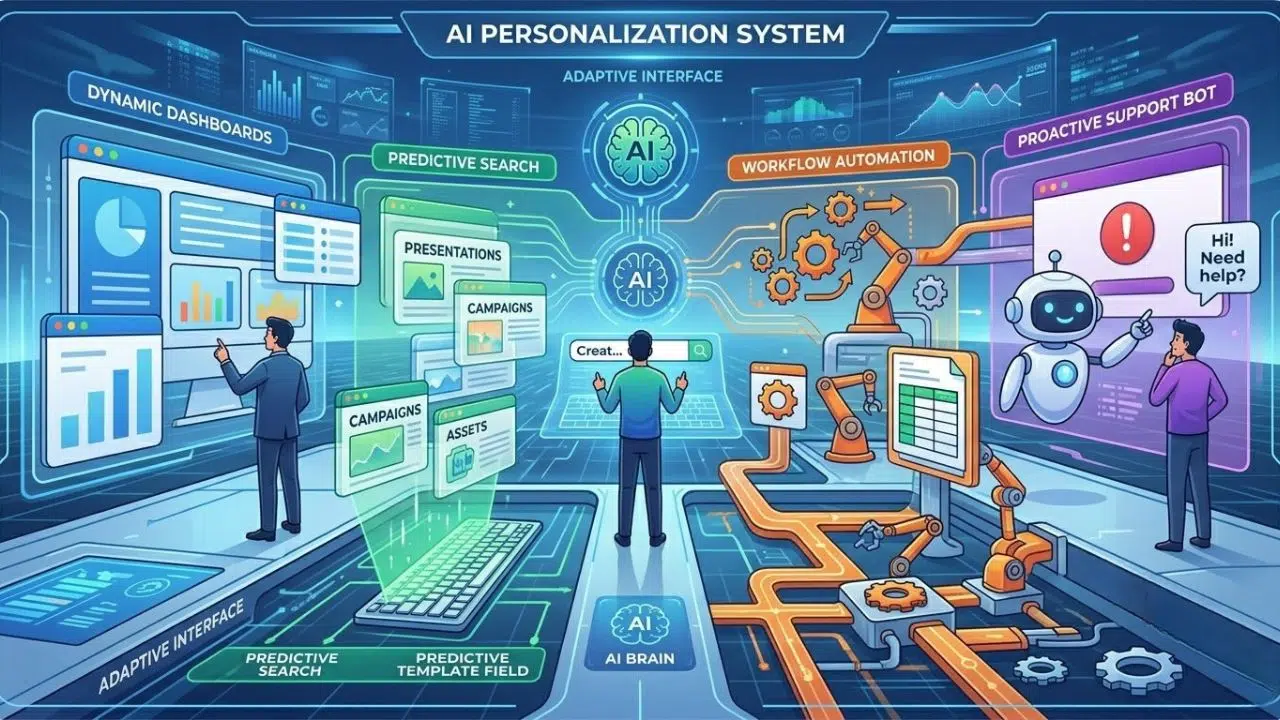
Software providers use intelligent algorithms to remove friction from the user journey. They look at where users get stuck and deploy dynamic features to smooth out the process. This approach directly tackles the generic, one-size-fits-all problem. By focusing on specific touchpoints like dashboards, search functions, and customer support, platforms create highly relevant environments.
The following table summarizes the most common ways companies apply these smart features.
| Implementation Strategy | Core Benefit | Common Use Case |
| Dynamic Dashboards | Reduces cognitive load. | Rearranging metrics based on user role. |
| Predictive Search | Speeds up content discovery. | Suggesting templates before a user finishes typing. |
| Workflow Automation | Eliminates repetitive manual tasks. | Creating automatic data export triggers. |
| Proactive Chatbots | Solves issues before users complain. | Offering help when a user repeatedly clicks an error page. |
Let’s dive into the specific features driving user engagement.
1. Dynamic Dashboard Customization
Standard dashboards are often cluttered with useless information. Intelligent customization solves this by rearranging your workspace automatically. If you only ever check three specific charts, the system pushes those to the top. It hides the metrics you ignore. This ensures you see your most critical data the second you log in.
Best for: Platforms that serve entirely different job roles within the same company.
Why We Chose It: It saves users valuable time by eliminating the need to dig through nested menus.
Things to consider: The algorithm needs a fail-safe so users can easily retrieve hidden features if their workflow suddenly changes.
A clean dashboard helps, but users still need to search for new information.
2. Predictive Search and Content Discovery
A basic search bar requires you to know exactly what you are looking for. Smart search anticipates your question. It analyzes your job title, past behavior, and what similar users search for. When you type a single word, it instantly suggests relevant help documents, video tutorials, or specific application settings.
Best for: Enterprise software with massive feature sets and complex navigation.
Why We Chose It: It reduces frustration and makes navigating a complex platform feel as easy as searching the web.
Things to consider: If the underlying content tags are messy, the machine learning model will return confusing and unhelpful results.
Helping users find things is great, but doing the work for them is better.
3. Automated Workflow Recommendations
People often do things the hard way simply because they do not know a shortcut exists. The software monitors your repetitive actions. If you manually send the same invoice reminder every week, the system spots the habit. It then pops up and suggests a one-click automated trigger to handle that task for you moving forward.
Best for: CRM tools, marketing automation platforms, and project management apps.
Why We Chose It: It actively teaches users how to get more value out of the product without requiring a manual tutorial.
Things to consider: Suggestions must be easy to dismiss so they do not annoy users who prefer manual control.
Sometimes, users hit a wall despite these helpful features.
4. Proactive Customer Support and Chatbots
Waiting for a frustrated user to submit a ticket means you are already losing them. Smart platforms monitor “rage clicks” or time spent staring at an error screen. When it detects a struggle, a chatbot appears instantly. It uses natural language processing to offer a highly specific solution based exactly on the page the user is viewing.
Best for: Highly technical products that require a steep learning curve.
Why We Chose It: It catches users at their highest point of frustration and prevents them from abandoning the software.
Things to consider: The bot must be able to instantly transfer the chat to a human agent if the automated solution fails.
Personalization also changes how companies offer upgrades.
5. Intelligent Pricing and Upsell Triggers
Spamming users with upgrade pop-ups rarely works. Instead, AI tracks usage limits and feature interactions. It waits for the exact moment you need more capacity. If your team is about to hit a storage cap, the system triggers a contextual upgrade offer right there on the screen. It frames the upsell as a solution to an immediate problem.
Best for: Freemium software models and product-led growth strategies.
Why We Chose It: It increases conversion rates by offering the right plan at the exact right time.
Things to consider: Aggressive automated triggers can alienate enterprise clients who prefer negotiating directly with a sales representative.
Tracking all this behavior requires a strict approach to privacy.
Data Privacy and Ethical Implementation
You cannot build a tailored experience without collecting user data. However, collecting that data comes with massive responsibility. Users want a platform that understands their needs, but they reject software that feels invasive. Companies must navigate a fine line between providing utility and respecting boundaries. Transparency is the only way to build trust in this space.
The table below breaks down the key ethical considerations for software providers.
| Ethical Consideration | Why It Matters | Best Practice |
| Transparent Tracking | Users need to know what you monitor. | Provide clear, plain-language data policies during onboarding. |
| Opt-Out Mechanisms | Users should control their own experience. | Allow users to turn off behavioral tracking easily in their settings. |
| Data Anonymization | Protects individual identities. | Train machine learning models using aggregated, stripped data. |
| Security Protocols | Prevents catastrophic data breaches. | Implement end-to-end encryption for all stored behavioral logs. |
The legal landscape also forces companies to adapt their tracking methods.
Balancing Customization with GDPR Compliance
Global privacy laws like GDPR dictate how you can collect data for SaaS AI personalization. You cannot rely on hidden algorithms. You must ask for explicit consent before tracking user behavior. The best platforms turn this requirement into a feature. They clearly explain that sharing data leads to a faster, cleaner user interface. When users understand the direct benefit, they are much more likely to opt-in to behavioral tracking.
Once the system is running ethically, companies need to know if it actually works.
Key Metrics to Measure AI Success
Throwing machine learning at a software product is expensive. Companies need concrete data to prove the investment is paying off. You have to track how these smart features change user behavior over time. If the customized dashboard does not save time or reduce support tickets, the algorithm needs adjustment. Tracking the right numbers keeps the engineering team focused on actual user success.
The following table outlines the most important numbers to watch.
| Metric | Definition | Goal of Personalization |
| Feature Adoption | Percentage of users trying new tools. | Should increase as smart search surfaces relevant features. |
| Time to Value | How fast a new user completes a core task. | Should decrease due to intelligent onboarding flows. |
| Churn Rate | Percentage of canceled subscriptions. | Should drop significantly as the software becomes stickier. |
| Support Volume | Number of manual help tickets submitted. | Should drop as proactive chatbots solve routine issues. |
Let’s look closer at how specific numbers indicate success.
Improving Feature Adoption Rates
A high feature adoption rate proves your platform is successfully introducing users to new tools. When SaaS AI personalization works properly, it highlights features directly related to a user’s current project. If a user tries a new automated reporting tool suggested by the system, that counts as a win. Consistently rising adoption rates mean the software is successfully expanding its footprint in the user’s daily workflow.
Accelerating Time to Value
Time to value measures the speed at which a user realizes your software is worth the money. Smart onboarding drastically reduces this timeframe. Instead of a generic 10-step tutorial, the system asks two questions and drops the user directly into a customized workspace. The faster a user achieves their first win on your platform, the more likely they are to renew their subscription.
Reducing Customer Churn Rate
Churn is the ultimate test of user satisfaction. If your personalized experience is truly helpful, users will not leave. Switching to a competitor means losing the tailored environment they rely on. Tracking churn specifically among users who heavily interact with smart features provides a clear picture of your AI return on investment.
Even with clear metrics, people still have questions about how these systems function.
Final Thoughts
The days of generic software interfaces are over. SaaS AI personalization is now the baseline expectation for modern business tools. By tracking behavior, processing data in real time, and dynamically adjusting the workspace, platforms eliminate friction and drive genuine loyalty.
Companies that understand how to use these smart mechanics ethically will keep their users engaged for years. Those that refuse to adapt will watch their customers leave for software that actually understands how they work.
Frequently Asked Questions
How does AI improve user retention in SaaS?
Artificial intelligence boosts retention by removing the friction that normally makes users quit. When a platform reorganizes itself to fit your exact workflow, it saves you hours of manual clicking. The software evolves from a generic tool into a personalized workspace. Leaving that platform means starting over with a competitor’s blank slate, which creates a massive barrier to exit.
Is AI personalization expensive to implement?
Building a proprietary machine learning model from scratch costs a lot of money and requires specialized engineers. However, the landscape is shifting. Companies now license pre-built personalization engines and cloud APIs. This allows teams to plug smart search or dynamic recommendations into their app without spending millions. The long-term savings from retained customers usually outweighs the initial setup cost.
Can small SaaS startups apply machine learning?
Yes. Startups actually have an advantage because they do not have to overhaul legacy codebases. A small team can integrate smart onboarding or basic behavioral tracking from day one. By using off-the-shelf AI tools, startups can offer a highly refined, customized experience that rivals massive enterprise platforms.