

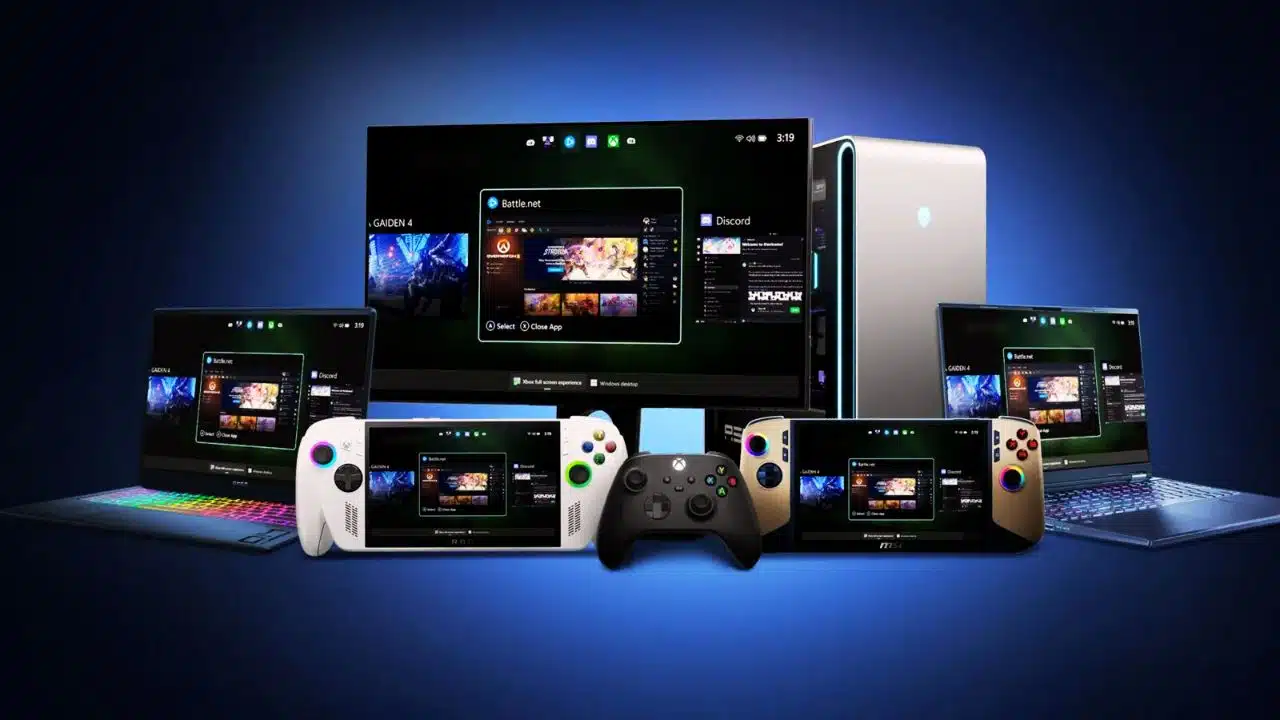
Microsoft Brings Xbox Interface to All Windows 11 Handhelds

xbox interface windows 11 handhelds

Microsoft has extended its Xbox Full Screen Experience to all Windows 11 handheld devices, moving beyond its initial exclusivity to the Asus ROG Xbox Ally. This update introduces a console-like interface optimized for handheld gaming PCs running Windows 11, delivering a streamlined, controller-friendly UI designed to enhance portable gaming.

Console-Style Interface for Handhelds

The Xbox Full Screen Experience replaces the traditional Windows desktop shell on handheld devices, providing a distraction-free, immersive gaming environment. It is designed specifically for controller navigation, allowing users to interact with the system similarly to a gaming console. This new UI acts as a central hub for games across multiple storefronts, making game management simpler and more unified. Users can access Xbox Game Pass, Xbox Play Anywhere titles, and other installed games seamlessly from this new interface.

Performance Enhancements

One key benefit of this experience is that it bypasses loading the full Windows Explorer shell, which frees up approximately 2GB of RAM for games and performance. This is particularly significant for handheld devices that often have limited memory resources, as the memory savings can translate directly into smoother gameplay and better frame rates. Additionally, this system helps reduce unnecessary background activities, contributing to overall efficiency and potentially improving battery life on portable devices.

Availability and Activation

Beginning November 21, 2025, the Full Screen Experience became available across all Windows-based handhelds, not just the Asus ROG Ally series. Users can enable this mode through the Windows 11 settings under the gaming section or toggle it directly with a shortcut (Win + F11). Once activated, devices boot directly into the Xbox Full Screen Experience, allowing a quick and seamless transition into gaming mode without encountering the usual desktop environment.

User Interaction and Features

The interface includes an Xbox guide accessible via the Xbox button on controllers, which enables quick switching between games and apps. This experience supports gamepad-optimized features, including a task switcher designed specifically for handheld gaming PCs. While mouse and keyboard support remain intact, the interface prioritizes controller inputs for ease of navigation on portable devices.

Microsoft’s move to unify the Xbox UI across all Windows 11 handhelds signals a push toward making portable PC gaming as intuitive and efficient as console gaming. This integration could reshape how gamers use Windows handhelds, promising a more focused and resource-optimized gaming experience on the go.



Subscribe to Our Newsletter

Related Articles

Top Trending

Schema for Better AI Search Visibility
8 Schema Types That Boost AI Search Visibility
best tools for async video updates
8 Best Tools for Async Video Updates That Keep Work Moving
Mistakes Parents Made When Teaching Alphabet
8 Mistakes Parents Make When Teaching the Alphabet
Anchor Text Ratio
What Is Anchor Text and What Ratio Looks Natural?
Why We Built 15 Micro SaaS Tools Instead of One Large Platform
Why We Built 15 Micro-SaaS Tools Instead of One Large Platform

Technology & AI

best tools for async video updates
8 Best Tools for Async Video Updates That Keep Work Moving
Why We Built 15 Micro SaaS Tools Instead of One Large Platform
Why We Built 15 Micro-SaaS Tools Instead of One Large Platform
team retrospective tools and formats
10 Best Team Retrospective Tools and Formats
SaaS onboarding reduce early churn
SaaS Onboarding: How to Reduce Early Churn
Tools for SaaS Competitive Analysis
10 Best Tools for SaaS Competitive Analysis

GAMING

Intentional Screen Time
How to Spend Your Screen Time More Intentionally
Complete Guide on Game Programgeeks
Game Programgeeks: A Complete Guide on PC, Game Dev, and Tech
Online Color Game Philippines
Online Color Game Philippines: What Every Beginner Should Know Before Playing
Ways to Reduce Game Development Costs
12 Ways Studios Cut Game Development Costs
NFT game development cost
How Much Does NFT Game Development Cost? A Realistic Budget Breakdown

Business & Marketing

How to Manage Scope Creep Before It Manages You
How to Manage Scope Creep Without Blocking Good Ideas
Made in America work boots
Made in America Still Matters When You’re Buying Serious Work Boots
PropTech Operations Integration
The Next Phase of PropTech Is About Connecting Operations, Not Adding More Apps
How to Run a SaaS Company as a Solo Founder
How to Run a SaaS Company Alone Without Burning Out
SaaS Business Plan: How to Write One Investors Will Read
How to Write a SaaS Business Plan Investors Will Actually Read

EdTech & E-Learning

Mistakes Parents Made When Teaching Alphabet
8 Mistakes Parents Make When Teaching the Alphabet
best digital whiteboards for classrooms
12 Best Digital Whiteboards for Classrooms That Make Lessons More Interactive
Preschool Learning Games on Google Play
10 Best Preschool Learning Games on Google Play
Uppercase or Lowercase First for Children
Uppercase or Lowercase First? What the Research Says
EdTech Podcasts and Newsletters for Educators
10 Best EdTech Podcasts and Newsletters for Educators

Software & Apps

best tools for async video updates
8 Best Tools for Async Video Updates That Keep Work Moving
Why We Built 15 Micro SaaS Tools Instead of One Large Platform
Why We Built 15 Micro-SaaS Tools Instead of One Large Platform
team retrospective tools and formats
10 Best Team Retrospective Tools and Formats
SaaS onboarding reduce early churn
SaaS Onboarding: How to Reduce Early Churn
Tools for SaaS Competitive Analysis
10 Best Tools for SaaS Competitive Analysis























