
Picking a hosting plan feels hard. You need fast servers, remote shell login, and testing area. Many providers lack these tools. You spend hours on config, not coding.
Cybernews tested 58 web hosts over 1,748 hours. We rank the 7 best hosts for devs in 2025. You get data on speed, uptime, cloud hosting, and VPS hosting. We list tools like git integration and security.
Keep reading.
Key Takeaways
- Cybernews tested 58 web hosts over 1,748 hours. It ranks the 7 best hosts for developers in 2025 by speed, uptime, cloud, and VPS tools.
- Hostinger leads with a 0.915-second load time and 0.349-second response, free SSL, Git hooks, SSH, hPanel, and plans from $2.69/mo.
- Liquid Web delivers 100% uptime and 52 ms P95 in stress tests, plus four VPS tiers at $5–$154/mo under a service SLA.
- Kamatera offers pay-as-you-go cloud servers from $4/mo, real-time CPU and RAM scaling, 1.244-second load times, and full SSH and API control.
- All top hosts include SSH access, Git support, staging sites, free SSL, daily backups, and DDoS protection to handle up to 100,000 visits a month.
Key Factors to Consider When Choosing Hosting for Developers
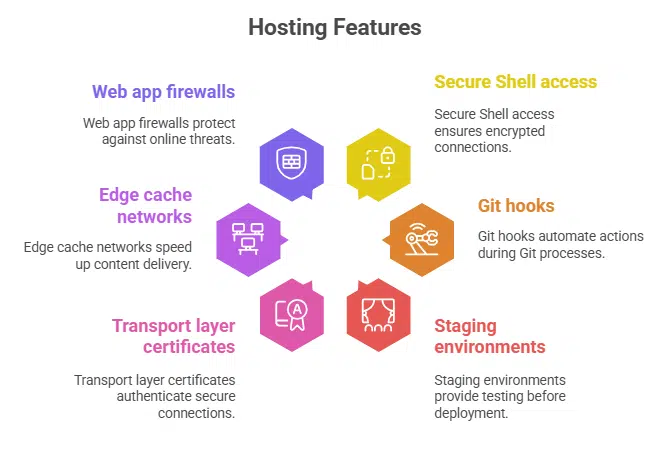
Good hosting keeps your apps online with 99.9% uptime, fast load balancers, and auto scaling on cloud servers. Look for Secure Shell access, Git hooks, staging environments, transport layer certificates, edge cache networks and web app firewalls.
What performance and uptime should I expect from developer hosting?
Developers expect near perfect uptime, often 99.99% or a 100% uptime guarantee. Hostinger, Liquid Web and SiteGround hit 100% in recent tests. Hostinger loaded in 0.915 seconds and responded in 0.349 seconds.
Liquid Web loaded in 0.836 seconds and responded in 0.255 seconds. These statistics come from performance testing.
Sites with heavy traffic need low lag under load. InMotion had 10 ms for P95 with 50 users. Kamatera spiked to 2441 ms in a stress test. VPS hosting or managed hosting may handle bigger loads.
Use SSH access, staging environment and version control to speed up code. A delivery network and SSD in data centers cut load times.
How important is scalability for developer hosting?
Traffic can climb fast when users flock to a new feature. Scalability lets the server adjust resources on demand. Servers stay responsive under heavy loads. Sites avoid costly downtime.
Teams use SSH access, continuous integration flows, and container groups.
Kamatera’s pay-as-you-go cloud hosting plan starts at $4.00 per month. Liquid Web offers four VPS tiers from $5.00 to $154.00, with up to 10 TB bandwidth. Hostinger’s VPS at $4.99 and Cloud Startup at $7.19 let teams spin up servers fast.
InterServer bills only for resources you use, with unlimited websites on higher plans. Sites hitting 50,000 to 100,000 monthly visits often need to scale to cloud or VPS hosting.
Which developer-friendly tools and features matter most?
Developers crave Git integration for smooth code updates. SSH access speeds up command line work. Three staging areas let you test changes before they go live. SiteGround and WP Engine both offer free SSL and daily backups.
Hostinger adds hPanel, PHP, JavaScript, Python, Ruby, C, C++ support.
Backup options matter too. Liquid Web and SiteGround run daily automated backups. InterServer sends automatic copies to protect your data. A control panel like cPanel or native UI cuts setup time.
That frees you to code web applications without server headaches.
What security measures should hosting providers offer?
Good hosts offer free SSL certificates, to encrypt web traffic end to end. Web application firewalls act as a safety gate. Malware scans catch threats early. Server-side patches close security holes fast.
DDoS shields stop flood attacks. DNS tools let you reroute traffic at will.
Daily backups on solid-state drives protect code and data. Caching layers block brute force hits before they reach your app. A staging environment lets you test updates safely. API hooks help you script security tasks.
Free migration moves your site without risk.
How do pricing and value compare among hosting options?
Hostinger starts at $2.69 per month and packs free SSL, domain name management, a one-year email account, and a version control system into its Premium Shared Hosting. Liquid Web fields four VPS plans from $5 to $154 monthly with 1 to 10 TB of bandwidth and familiar control panel tools.
Kamatera lets you pay as you go from $4 monthly, and you can tweak CPU, RAM, and storage on demand. SiteGround’s shared plans kick off at $2.99 to $7.99 per month with an 83% discount and reset at $17.99 on renewal.
InMotion offers shared hosting from $2.24 to $8.09 monthly and VPS plans at $4.49, and its Power tier packs the best bang for your buck. HostGator Cloud rings in at $4.95 for a three-year deal or $3.75 on shared plans, but watch out for upsells on SSL, backups, and SEO tools.
InterServer charges $2.50 to $19.95 monthly, keeps storage and site counts unlimited, and renews at $7. WP Engine slots four managed WordPress plans from $13 to $194 per month with daily backups and staging environments, but it skips a free domain.
Shared hosting stays cheap, but VPS and managed options deliver more developer tools like secure shell access and staging environments. Cloud infrastructure plans from Liquid Web and Kamatera scale seamlessly, and they nudge sites past traffic spikes.
Hostinger: Best Overall Hosting for Developers
Hostinger gives SSH access, daily backups, and a clear control panel to run your code. It uses SSD storage, free SSL, and Git hooks to speed your web apps.
What features does Hostinger offer for developers?
hPanel gives you a clean interface to set up servers, manage databases, and deploy code. It supports PHP, Python, Ruby, JavaScript, and the Laravel framework. You get free SSL, Git version control, DNS tools, and daily backups.
Premium shared hosting comes with 100 GB SSD storage. Cloud Startup allows up to 300 websites. Paid plans include unlimited bandwidth and up to 100 email addresses with one year of free email.
VPS hosting scales CPU and RAM as projects grow. SSH access lets you log in securely. Eight data centers around the globe cut latency. You can manage DNS and version control under one roof.
This mix fits web development and WooCommerce hosting.
What are the pros and cons of using Hostinger?
Readers will find a quick pros and cons chart for Hostinger below.
| Pros | Cons |
|---|---|
|
|
Liquid Web: Scalable Hosting for Complex Projects
Liquid Web grows with your project. It offers SSD storage, cloud hosting with online threat shields, a container orchestrator, and SSH access so you can change settings fast.
What features does Liquid Web provide for complex projects?
Fully managed hosting with daily automated backups and Git integration handles your heavy lifting. It supports JavaScript, PHP, Ruby, Python, Perl and Java for diverse web apps. Developers can choose InterWorx control panel or switch to Plesk Web Pro or cPanel Admin.
WordPress teams get CLI tool magic with WP-CLI. Free SSL certificate and distributed denial of service protection keep data safe.
Reseller hosting plans let agencies sell blocks of resources. Four VPS tiers offer 1 to 10 TB bandwidth for scaling big traffic. A 100% uptime service level agreement banishes downtime worries.
SSH access and staging environment speed up development workflows. Managed cloud hosting combines content delivery network caching and security patches.
What are the pros and cons of Liquid Web hosting?
Liquid Web shines in speed, uptime and support for devs.
| Pros | Cons |
|---|---|
|
|
Kamatera: High-Performance Hosting for Resource-Intensive Needs
Kamatera uses Linux clusters, so you can spin Docker containers fast, and you get full SSH shell and REST API control. It scales CPU, RAM, and SSD in real time, so your heavy database queries and Kubernetes workloads stay smooth.
What features make Kamatera suitable for high-performance needs?
Customizable cloud infrastructure supports any language. It offers vps hosting and cloud hosting. You can scale resources on the fly and pay-as-you-go. The nine pricing plans start at $4.00 a month.
A simple console lets you tweak CPU cores, memory, and storage in seconds.
Users get full control over server setup with SSH access. They deploy multiple apps, frameworks and kubernetes clusters in minutes. The service has 24 data centers across North America, Europe, Asia and the Middle East.
24/7 global support and an uptime guarantee boost reliability for web designers and dev teams. This setup handles heavy database queries and e-commerce hosting without a hitch.
What are the pros and cons of Kamatera hosting?
Developers get a clear view of Kamatera’s strengths and weaknesses below.
| Pros | Cons |
|---|---|
|
|
SiteGround: Business-Focused Hosting for Developers

SiteGround runs on ultra-fast SSD servers, so you get top speed for your applications. You can use secure shell login and a test site for risk-free code updates.
What features does SiteGround offer for business developers?
Business developers get free SSL and a free domain on all shared hosting plans. This choice grants daily backups and staging environments for WordPress projects. Teams can use collaboration tools like collaborator settings and Git integration, plus a white-label client panel on premium plans.
Unmetered traffic and free email accounts also come standard.
Five global data centers lower latency for users worldwide. GrowBig plans run ultrafast PHP for speedy pages. Developers can code in PHP, Python, JavaScript, Perl, or Ruby, with SSH access for secure servers.
Cloud infrastructure stops downtime with DDoS protection and automated backups.
What are the pros and cons of SiteGround hosting?
SiteGround delivers staging environments, free daily backups, version control via Git, and a white-label client panel on higher-tier plans. It logs a 1.023 s LCP, 0.295 s TTFB, and 49 ms average latency to New York. Developers enjoy robust support for wordpress hosting and managed wordpress hosting. Shared hosting starts at $2.99/month and renews at $17.99/month. GrowBig plan brings collaboration tools, a staging environment, unmetered traffic, caching, and free SSL.
No root access or server-level customization comes with shared plans. Developers who need deep system tweaks must choose VPS hosting or managed cloud hosting. SSH access stays limited on lower tiers, which may frustrate those who code at the OS level.
InMotion Hosting: Versatile Hosting with Multi-Language Support
InMotion Hosting juggles multiple languages with ease, like a polyglot at a world fair. It lets you launch staging environments, use Git and SSH tools, manage packages on a Linux distro or Debian-based OS, and tap a JavaScript runtime, all with daily backups.
What features support developers on InMotion Hosting?
cPanel gives clear menus for site setup, and secure shell access lets coders check servers. Free SSL secures sites with a secure socket layer certificate. Shared plans give unlimited bandwidth and free email accounts.
Reseller hosting starts at $15.39 per month, white-label ready. Backups cost $2.99 a month, and the Power plan packs the best resource value. US and Netherlands data centers cut lag for North American users.
Version control hooks let you commit code fast. Managed cloud hosting and daily backups keep your work safe. Ruby, Perl and Python run on all plans. DDoS protection and package management guard your apps.
Staging environments let teams test without risk.
What are the pros and cons of InMotion Hosting?
InMotion Hosting offers SSH access, API access, and multiple staging environments for smooth deployments. Developers get built-in security features and free SSL on every plan. Shared hosting speed stays solid with LCP at 1.016 seconds and TTFB at 0.257 seconds. Stress tests show P95 under 10ms. A white-label reseller tier starts at $15.39 per month and bandwidth stays unlimited.
Renewal rates climb after the first term, so budget might spike like a cat on hot coals. Backups don’t come included. You must pay extra to protect sites. That can drive up monthly costs quickly.
InterServer: Secure and Developer-Friendly Hosting
InterServer locks down your site with DDoS protection and a staging environment so you can test new code safely. You launch Secure Shell login and SQL query tools in the cPanel dashboard, and spin up a cloud platform in minutes.
What developer-friendly features does InterServer include?
Developers grab a free SSL certificate for every domain. The host runs daily backups, so you skip the panic when code breaks. You log in with SSH access and manage files like a pro.
The system uses a familiar control panel that speeds up site tasks. It lets you switch between Linux and Windows server environments, including dedicated .NET hosting. Coding works across PHP, Python, Perl, JavaScript, or Node.js.
Higher-tier plans carry unlimited sites and storage. Standard plan gives smart value at a fair rate. Annual billing grows your savings. A free site move service takes stress out of switches.
You get managed cloud hosting features, like DDoS protection, free email accounts, and database query tools.
What are the pros and cons of InterServer hosting?
You get 99.9% uptime. Providers use SSD storage for rock-solid cloud hosting performance. They offer VPS options and multiple control panels for quick tweaks. Secure shell login and package manager support enable fast developer tools workflows. Free migration cuts downtime when you switch hosts. Free SSL and daily snapshots add more perks. LCP runs at 2.116 seconds on average and TTFB clocks at 0.463 seconds. Stress tests hit 1,311ms at the 95th percentile. Plans cost from $2.50 up to $19.95 per month. Standard plan renews at $7.00 monthly.
Platform lacks built-in staging environments. Managed hosting tools feel sparse. Tech help sticks to basic support only. US-only data center may slow sites abroad. High latency can frustrate global visitors. Novice devs might miss extra hand-holding. Limited managed services may stretch your time.
WP Engine: Premium WordPress Hosting for Developers
WP Engine packs modern caching and an edge network so your WordPress site loads fast. It gives developers a remote shell, a test server, and a command line interface that speeds deploys like a breeze.
What features make WP Engine ideal for WordPress developers?
Developers get three staging environments and a free SSL certificate. They manage code with integrated Git for version control. A native control panel makes plugin updates easy. Linux based servers speed up PHP and WordPress.
Daily automated backups protect site data. Fifteen global data centers cut load times.
Pricing starts at $13 per month with four tiers up to $194. Agencies can use built in reseller tools for client work. This managed wordpress hosting frees devs from server chores. It pairs high performance and simple site builds.
What are the pros and cons of WP Engine hosting?
This managed WordPress hosting runs on purpose-built containers. It scales sites fast. Staging environments let you test updates with a single click and Git integration moves code directly to live servers. Daily backups guard your data under all conditions. Advanced user management splits roles for teams and clients, and a client portal links you and your customers for smooth collaboration. Reseller hosting tools let you handle many client sites from one dashboard and new users get 20 percent off the first bill. Stress tests with 40 virtual users and 4,900 requests hit a P95 time of 248ms with no HTTP failures.
Platform locks you into its WordPress ecosystem. Server tweaks remain limited by design. Startup plans run about $240 per year for a single site. No free domain comes with any plan. Budget-conscious builders might pick simpler shared hosting elsewhere.
Small websites do fine on shared hosting. Developers can launch projects with Hostinger, SiteGround, or Bluehost. Plans cost under $10 per month for free SSL and email accounts. Shared servers handle sites with under 10,000 visits per month.
DDoS protection comes standard on many plans. Teams access basic developer tools like FTP and cPanel.
VPS hosting suits apps that hit 10,000 to 25,000 visits monthly. Liquid Web, Kamatera, or InterServer offer scalable CPU and RAM. You get SSH access, staging environments, and root control.
Cloud hosting splits loads across servers for 50,000 to 100,000 visits. Providers include automated backups and custom server configs. Developers gain flexibility and uptime guarantees for growing codebases.
Developer-Specific Hosting Features to Look For
Test spaces, version control hooks, command-line entry, and tweakable server settings give devs tight control over their apps. They speed workflows, boost security, and cut downtime.
How do staging environments benefit developers?
Developers use staging environments to catch bugs before they hit live sites. SiteGround’s GrowBig plan includes a staging site and collaboration tools. WP Engine gives three separate testing zones for safe updates and experimentation.
InMotion provides multiple test environments for deployment, plus client branding trials on partner packages.
Teams mirror production on isolated development environments hosted on cloud platforms. They connect Git integration and SSH access, and they run daily backups to keep live sites secure.
This practice speeds application development and cuts downtime for clients.
Why is Git integration important in hosting?
Git tracks every change in your code. Hostinger, SiteGround, InMotion, Liquid Web, InterServer, WP Engine all build Git into their plans. SiteGround offers Git on every tier; advanced repo tools come on higher levels.
Liquid Web links Git with a Plesk extension. InMotion runs a repo manager in the server. WP Engine ties Git to WordPress workflows.
Built-in Git cuts third party setup and plugin clutter. You push code over SSH access to a managed cloud server. You spin up a staging environment with one push. Your team runs automated tests and merges branches from the host panel.
Teams release code faster and track changes with ease.
What advantages does SSH access provide to developers?
SSH access lets developers open a secure shell session on a server. It runs over an encrypted channel, so credentials and data stay private. InMotion Hosting adds this feature to every shared hosting plan, so readers get secure command line management.
Hostinger extends this with key management and developer tools for code updates, database tweaks, and server configuration.
Developers automate deployments, script backups, and run maintenance tasks via the shell. They can transfer files with secure file transfer protocol and execute scripts remotely. Most VPS hosting and managed cloud hosting providers include SSH as a core security feature.
SiteGround caps root access on some shared plans, so check plan details.
How do customizable server configurations help developers?
Kamatera offers fully customizable cloud infrastructure. Its management console spins up Linux or Windows servers fast. It gives full OS and software stack control. Pricing runs pay as you go, so devs adjust CPU, RAM, and storage on demand.
Liquid Web handles VPS hosting the same way, letting devs pick OS and control panels to match project specs.
InterServer’s Linux and Windows Server VPS plans work the same. Devs pay only for used resources. They get root and ssh access. They install staging environments, caches, ddos protection, and developer tools in minutes.
That boosts speed for WordPress hosting, e-commerce setups, or cloud hosting projects.
Web Hosting Testing Methodology
An uptime monitoring tool tracks downtime every minute to keep our SLA promises. We run load testing and log response times with a stress testing tool to gauge performance under peak traffic.
How do we evaluate hosting performance and uptime?
We test 58 web hosts over a one-month monitoring period, logging 1,748 hours of performance metrics. We measure Largest Contentful Paint and Time to First Byte with GTmetrix and Pingdom.
Stress tests with ApacheBench push multiple virtual users to spot HTTP failures. We check uptime stats against each provider’s service level agreements, many of which promise 100% uptime guarantees.
We score hosts in four areas. Performance carries a 40% weight. Developer tools earn 30%, covering SSH access, staging environments and Git integration. Ease of use earns 20%, on shared hosting, VPS hosting or managed cloud hosting.
Pricing adds a final 10%. This mix ranks the best web hosting services for WordPress hosting, e-commerce hosting and managed WordPress hosting.
What criteria do we use to rank developer-friendly features?
Tests ran for one month to track uptime, server speed, and traffic spikes. Performance holds 40% of the score. Developer tools take 30%, with ssh access and Git integration. Ease of use drives 20%.
Pricing adds the last 10%.
Reviewers inspect control panels and staging environments for simplicity. Cloud providers earn points for automated backups, daily snapshots, and ddos protection. Teams compare cost to features across vps hosting, shared hosting, and managed hosting plans.
This mix mirrors top developer needs in best web hosting for developers.
Takeaways
Picking your ideal host shapes your developer life. You score wins, build confidence, and cut stress. From shared plans to virtual private servers, the right pick gives you remote login, version control, testing stage, and auto backup.
You get top speed, uptime, and security. You deploy code fast, handle traffic spikes, and rest easy. Now grab your keyboard, spin up a project, and watch it fly.
FAQs on Best Hosting Providers for Developers
1. What makes the best web hosting for developers in 2025?
Top web hosting companies like A2 Hosting and InMotion Hosting deliver turbo servers, an uptime guarantee, and unlimited storage. They let coders test features fast on a virtual machine service (cloud hosting).
2. How does managed WordPress hosting differ from regular WordPress hosting?
Managed WordPress hosting (admin-managed service) handles updates, security features, daily backups, and a staging environment test site sandbox. Basic WordPress hosting often means budget shared space (shared hosting) where you do manual work for WooCommerce hosting or site edits.
3. Can cloud-based services protect against DDoS attacks?
Yes, managed cloud hosting (virtual machine service) usually includes DDoS protection and strong security features. It watches for malicious traffic and blocks DDoS attacks before they hit your site.
4. What developer features should I look for in a hosting plan?
Look for SSH access, Git tools, FTP, and key developer tools that speed code pushes. Also pick plans with staging environments or a test site sandbox and collaboration tools. Automated testing helps you catch errors before going live.
5. Are there affordable hosting plans with an uptime guarantee and free SSL?
Yes, many affordable hosting plans from Hosting.com and other web hosting companies include an uptime guarantee, free SSL, and free email accounts. They also offer daily or automated backups, and you can link Google Workspace for mail, docs, or cookie management.
6. How do I choose between a virtual private server plan and a private server plan for my site?
A virtual private server plan (VPS hosting) gives you shared hardware with dedicated resources. A private server plan (dedicated hosting) uses a whole machine just for you. If you run an online store plan (e-commerce hosting) or a resale plan (reseller hosting), you might need the extra power of a private server. Otherwise a virtual private server plan fits most apps at lower cost.