


Is your website not showing up as high as you’d like in search results? Many people don’t realize that hosting mistakes can hurt their SEO. Slow speeds, downtime, and security issues are all red flags for search engines like Google.
One bad decision with your web hosting provider can lead to lower rankings and fewer visitors. For example, slow page speed increases bounce rates, costing you traffic and hurting engagement.
These problems often start at the core: poor hosting choices.
This blog will break down 10 common website hosting mistakes that harm SEO. You’ll learn how to avoid these errors and improve your site’s performance quickly. Keep reading—better rankings are just a few steps away!
Slow Website Load Speeds
Slow load times can crush search engine rankings and hurt user experience. Nearly 53% of mobile users leave websites that take more than three seconds to load. A delay of just 1-5 seconds increases bounce rates by 90%.
Pages taking as long as 10 seconds see a staggering 123% rise in bounce rates.
Improving website speed is critical for SEO success. Compress images, optimize HTML code, and enable browser caching to reduce delays. Hosting providers play a role too; consider switching if server performance fails to meet expectations.
Google already ranks page speed as an important factor, so faster sites gain better visibility on search engine results pages (SERPs).
Frequent Server Downtime
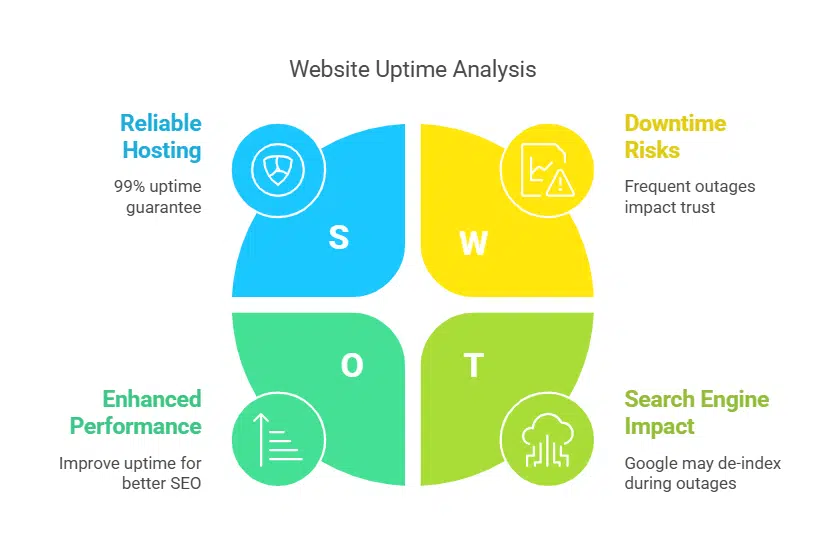
Frequent server downtime disrupts your website’s availability and damages search engine optimization. Google’s crawlers may remove your site from their index during outages, affecting its visibility in search engine results pages (SERPs).
Even brief offline periods can reduce trust with visitors and increase bounce rates. Downtime also affects user experience and may lead to revenue loss from missed sales opportunities.
Hosting providers like Kinsta offer a 99% uptime guarantee, monitoring servers 480 times daily to ensure reliability. Choosing dependable web hosting reduces risks while protecting SEO rankings.
Consistent uptime supports smooth crawling by Google bots, improves click-through rates (CTR), and boosts customer satisfaction.
Lack of SSL Certification (HTTPS)
Websites without SSL certificates display as “Not Secure” in browsers like Chrome. This warning immediately reduces user trust, causing higher bounce rates and lower conversions.
An unsecured site also risks leaking sensitive data, including passwords or payment details.
HTTPS improves search engine optimization by boosting Google rankings. Search engines prioritize secure websites on search engine results pages (SERPs). Switching from HTTP to HTTPS is simple and ensures a safer browsing experience for users while protecting your SEO efforts.
Sharing hosting servers with unreliable neighbors can hurt your SEO efforts. If neighboring websites experience frequent downtime, it could impact the server’s overall performance.
This may lead to slower page speed for your site, affecting user experience and search engine rankings. Google penalizes websites with poor website speed, which can drive potential visitors away.
Unreliable neighbors also pose security threats like DDoS attacks or hacking attempts. These risks might expose sensitive data or disrupt your site’s availability. In shared hosting setups, server resources are divided among multiple users.
Excessive resource usage by one site could slow others down or cause crashes during high-traffic periods, significantly increasing bounce rates in search engine results pages (SERPs).
Poor Server Location and Latency Issues
Server placement affects website speed and search engine optimization. Hosting far from your target audience causes high latency, slowing page load times. This delay deters visitors and increases bounce rates, hurting rankings on search engine results pages (SERPs).
Content delivery networks (CDNs) help reduce latency by storing data closer to users worldwide. Better server locations promote faster loading speeds, improving user experience and engagement.
Faster sites also perform better in mobile-first indexing and maintain visibility in Google searches.
Limited Scalability for Growing Traffic
A hosting plan with limited scalability can severely slow down your website during traffic spikes. As visitor numbers rise, poor support for growth may cause longer loading times or even crashes.
Such issues affect user experience and might increase bounce rates, which harm search engine rankings.
Upgrading to a more scalable solution is essential for growing businesses aiming to maintain performance. Consider cloud-based options like AWS that handle fluctuating demands efficiently.
Scalability in web hosting ensures traffic surges don’t lead to penalties from Google for slower page speeds.
Insufficient Security Measures
Weak security can expose your site to cyberattacks, malware, and data breaches. Hackers exploit these flaws, harming user trust and lowering search engine rankings. Use tools like web application firewalls (WAFs), malware scanners, and intrusion detection systems to block threats effectively.
Encrypt sensitive data using protocols like HTTPS to protect users’ information.
Failure to address vulnerabilities damages reputation and SEO performance. The NIST framework offers a clear path for improving IoT security on websites. Round-the-clock monitoring by security experts ensures quick responses to potential risks.
Prioritize regular updates for software patches to close exploitable gaps in your system before attackers strike.
Missing or Incorrect DNS Configuration
Incorrect DNS settings can disrupt access to your website. A common issue arises from expired domain registration or outdated name server records, which block users from reaching your site.
This impacts user experience and harms SEO by increasing bounce rates and reducing search engine visibility.
Fixing these problems requires regular checks in your domain registrar’s management panel. Ensure accurate DNS records like A, CNAME, and MX are updated correctly. Incorrect configurations may prevent email services or slow down page speed, directly affecting digital marketing efforts and website performance.
Lack of Regular Hosting Support and Monitoring

Inconsistent hosting support increases the risk of server downtime, which affects website speed and leads to higher bounce rates. Downtime can cause temporary de-indexing on search engine results pages (SERPs), hurting your rankings.
Managed hosting services like Kinsta reduce this risk by monitoring websites 480 times daily and ensuring 99% uptime.
Poor monitoring leaves security vulnerabilities unchecked, exposing sites to malware or data breaches. Reliable hosting teams help maintain proper DNS configuration, optimize browser caching, and handle issues quickly.
Proactive support boosts user navigation while protecting site performance for mobile-first indexing requirements.
Choosing a Hosting Plan Without Backup Options
Skipping hosting plans with backup options can cost you everything. Data loss from cyberattacks, server crashes, or human error impacts your SEO and user experience. A lack of regular backups leads to extended downtime and lost rankings in search engine results pages (SERPs).
These issues also hurt page speed, bounce rates, and overall website performance.
Dependable web hosting services include automated backups to address these problems. Choosing plans offering daily or weekly backups ensures quicker recovery during disasters. Google’s algorithm prioritizes stable websites, meaning consistent uptime protects your digital marketing efforts.
Avoid the cheapest plans that offer limited features without proper safety measures for website design data or XML sitemaps essential for SEO success.
Takeaways
Avoiding hosting mistakes can boost your SEO and improve rankings. Choose reliable hosting with strong security, fast speeds, and proper backups. Fix technical issues early to prevent traffic loss or penalties from Google.
A well-hosted site enhances user experience and builds trust with visitors. Make smart choices to keep your website performing at its best!
FAQs on Website Hosting Mistakes That Can Hurt Your SEO
1. What website hosting mistakes can hurt SEO rankings?
Common mistakes include slow page speed, duplicate content, poor responsive design, and lack of mobile optimization. These issues reduce user experience and harm search engine results pages (SERPs) performance.
2. How does web hosting affect page speed?
Web servers with limited resources or improper browser caching can slow down website speed. Slow-loading sites increase bounce rates and negatively impact search engine optimization.
3. Why is mobile optimization important for SEO?
With mobile-first indexing, Google prioritizes mobile-friendly websites in its search algorithm. A poorly optimized mobile website hurts rankings on both desktop and smartphone searches.
4. Can duplicate content lower my SEO ranking?
Yes, duplicate content confuses search engines like Google about which version to rank higher in SERPs, leading to keyword cannibalization or penalties.
Well-crafted title tags and meta descriptions provide clear information about your site’s content to users and search engines alike, boosting click-through rates on SERPs.






















