


A low website quote can leave your team writing the copy, connecting the CRM, and solving launch problems. A larger quote may cover those jobs—or simply include services you do not need. The Web Development Agency vs Freelancer vs No-Code Builder decision starts with the work required and who can take responsibility for it.
For a straightforward business website, evaluate a hosted builder first. Hire a freelancer if you need help turning it into a useful, well-designed site or solving a defined technical problem. Consider an agency when strategy, content, design, migration, and development need coordinated delivery.
Agencies and freelancers are service providers; no-code builders are tools. An agency can build in Webflow, and a freelancer can configure Wix. Decide both who should deliver the website and which platform your team can manage afterward.
Web Development Agency vs Freelancer vs No-Code Builder: Where Each Fits
These are typical project fits. Check the skills and services of the individual provider before deciding.
| Approach | Good project fit | Main responsibility you retain |
|---|---|---|
| Agency | Redesigns involving strategy, design, development, migration, and several stakeholders | Approvals, accurate requirements, and checking what the contract includes |
| Freelancer | A defined build, specialist integration, or redesign with one decision-maker | Filling skill gaps and arranging continuity when the freelancer is unavailable |
| DIY no-code builder | A standard business site or early marketing launch with familiar functions | Content, configuration, quality checks, and ongoing editing |
Use the table as a starting point, then check the website’s most demanding requirement. A polished template is little help if the booking workflow or customer permissions cannot work as required.
Define the Website Before Choosing the Supplier
“We need a modern website” is too vague to price or deliver reliably. A five-page lead-generation site and a customer portal with account permissions can look similar in a presentation while requiring very different work.
Write down the main visitor actions: request a quote, book an appointment, buy a product, search a resource library, or access private information. Then identify what happens after each action. Does a form simply send an email, or must it create a CRM record, assign an owner, and send different messages by region?
Separate launch requirements from later ideas. A newsletter signup needed now should not carry the same weight as a customer portal you may introduce next year.
Before approaching suppliers, prepare:
- A page and content inventory, including material that needs rewriting.
- The required functions, integrations, languages, and editorial permissions.
- A launch deadline tied to a real business event.
- A named person responsible for decisions and another for ongoing updates, if needed.
- Acceptance criteria describing what must work before final payment.
For a redesign, add existing URLs, analytics and Search Console access, and valuable content that must survive the move. Where URLs change, plan mappings to relevant replacement pages, redirects, and updated internal links. Monitor the move after launch; even a carefully managed migration can produce temporary search ranking fluctuations.
When an Agency Is Worth the Investment
An agency earns its place when coordinating the work is a substantial job in itself. If marketing, sales, and regional teams all need input, someone must resolve conflicting requests and keep the project moving.
For example, imagine a manufacturer replacing several regional websites with one multilingual site. Product information needs restructuring, distributors need different enquiry routes, and local teams need controlled editing access. That calls for more than someone who can assemble pages.
Ask who will actually do that work, what is subcontracted, and who handles problems after launch. A proposal promising a full team should identify the roles included and the person accountable for delivery.
Look beyond the portfolio
Request a walkthrough of a comparable project, including its constraints and handover. Ask to see how an editor adds a case study or routes an enquiry. A portfolio screenshot cannot show whether those everyday tasks are awkward.
Confirm whether the proposal covers copywriting, redirects, analytics setup, testing, training, and maintenance. These are easy to assume and expensive to discover later.
A full agency engagement may be excessive for a small site with settled content and standard functions. Ask what its additional services would improve. Pay for coordination when the project needs it, and compare the actual proposal rather than assuming every agency is more expensive than every freelancer.
A Freelancer Works Best With a Clear Scope
A freelancer can be a strong choice when one experienced specialist can own most of the work. A local consultancy needing service pages, case studies, and a CRM-connected enquiry form may benefit more from a capable independent developer than from a large delivery team.
Direct access to the person doing the work can shorten the approval process. Check what that person can realistically cover. A developer who excels at integrations may need finished copy supplied; a designer may need another specialist for a database connection. Budget for those gaps before comparing the quote with an agency proposal.
Continuity deserves a specific conversation. If the freelancer is unavailable when a form stops sending enquiries, who can investigate? Ask about support availability, documentation, and how another professional could take over.
Use milestones tied to reviewable work, such as approved designs, a working staging site, completed testing, and handover. Agree on revision limits and the price of changes outside scope. For an uncertain integration, pay for a small feasibility exercise before commissioning the full build.
For remote work, establish overlapping contact hours and a written place for decisions. Agree who supplies missing content and how delayed approvals affect the schedule, especially when the freelancer has other booked projects.
No-Code Is a Practical Starting Point for Standard Sites
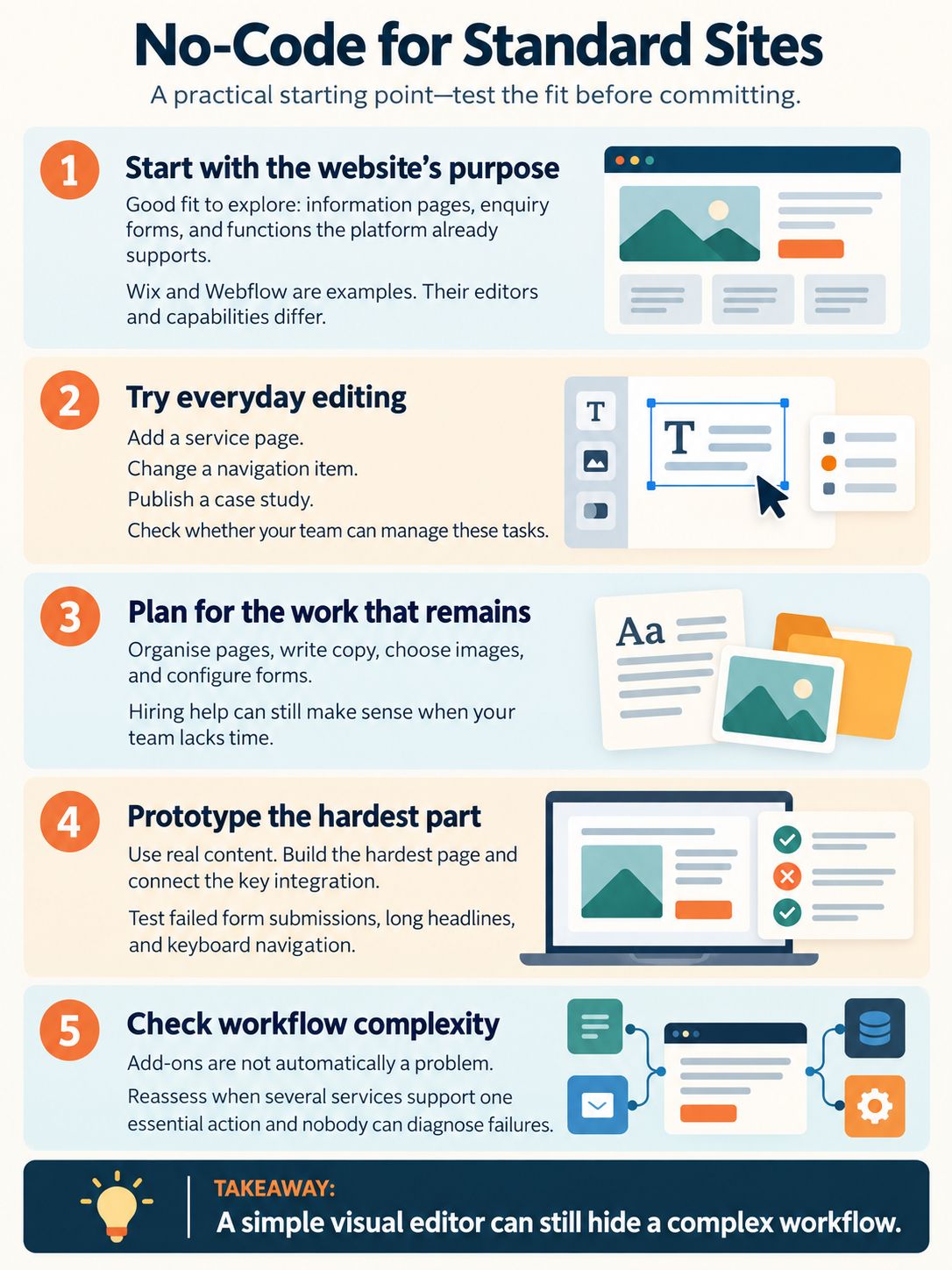
A no-code builder is worth evaluating when the website mainly publishes information, collects enquiries, or uses functions the platform already supports. Wix and Webflow are examples, although their editing models and capabilities differ. A service business with clear pages and a standard enquiry process has good reason to investigate this route before commissioning custom development.
A hosted builder can simplify day-to-day management by providing an existing editing and publishing environment. However, visual editing tools vary in difficulty. Try routine tasks before committing: adding a service page, changing a navigation item, and publishing a case study.
The work shifts rather than disappears. Your team still needs to organise pages, write copy, choose images, and configure forms. If nobody has time for that work, hiring help may be sensible even when the platform itself requires little coding.
The most revealing test is a small prototype using actual content. Build the hardest page and connect the most important integration. Check what happens when a form submission fails, an editor adds a long headline, or a visitor uses the menu with a keyboard.
An add-on is not automatically a problem. Reassess when several services must work together to support one essential action, especially if nobody on your team can diagnose a failure. The visual editor may be simple while the workflow behind it is difficult to maintain.
Compare Total Cost, Including Your Team’s Time
Agency fees, freelancer rates, and platform subscriptions cannot be compared meaningfully without a shared scope. Global price ranges can obscure differences in local rates, project complexity, and included services.
For a fair Web Development Agency vs Freelancer vs No-Code Builder comparison, build a cost sheet covering launch and the following two years:
- Delivery: discovery, design, development, copy, migration, and training.
- Recurring services: hosting or platform plans, domains, paid extensions, and maintenance.
- Internal effort: content preparation, approvals, DIY editing, and troubleshooting.
- Future changes: new pages, integrations, redesign work, and a possible migration.
A quote for design and development may exclude migrating case studies or rewriting service pages. Put those tasks back into the comparison. For DIY, include the staff time spent learning the editor and troubleshooting connections, even if it never appears on an invoice.
Ask every supplier to price the same requirements and list exclusions. Compare renewal costs rather than introductory offers, and verify current plan limits, billing currency, and relevant taxes before committing.
Judge ROI against the site’s purpose. For a lead-generation site, useful measures include qualified enquiries and time spent handling them. A more expensive site is not a better investment merely because it has more custom features.
Ownership and Portability Need Separate Questions
Owning content does not necessarily mean you can move the whole functioning website to another host.
Wix sites rely on Wix’s infrastructure and cannot be moved intact to another host. Managing the domain through another provider does not change that limitation.
Under Webflow’s current export rules, paid Workspace plans support exporting HTML, CSS, JavaScript, and assets; a Site plan alone does not include code export. CMS and ecommerce content and functionality are excluded from that code export. Certain collection data can be exported separately as CSV, but those files do not recreate a working CMS or checkout elsewhere. Form processing and site search also need replacement arrangements, and exported pages lose Webflow password protection.
Ask for a concrete exit plan: which files and data can be exported, which services need replacing, and which functions require rebuilding. Check the latest platform documentation before choosing a plan or arranging a migration.
With custom development, access to source code also does not guarantee an easy handover. The next developer may need deployment instructions, database information, third-party service details, and appropriate licences.
Keep business-critical accounts under business control, including the domain registrar, platform or hosting account, analytics, and relevant code repositories. Agree on supplier access and handover in advance. Record the rights to commissioned work in the contract, and identify third-party assets or licences that affect future use. Do not assume payment automatically settles every ownership question.
For a small brochure site, accepting platform dependence can be reasonable. For a site tied to customer records or essential transactions, give the cost and disruption of leaving more weight.
Test Growth Against Specific Requirements
“Scalable” can mean handling more traffic, publishing more content, adding markets, or supporting increasingly complex business rules. Ask which kind of growth you expect.
A growing resource library needs suitable content organisation and editorial tools. A customer portal needs permissions, reliable data handling, and maintainable workflows. Those are different problems.
Have the provider demonstrate the likely next step. Can the team add a new content type? Can an integration handle failed requests? What happens when several editors work at once? Verify relevant platform limits rather than accepting a general promise that upgrades will solve everything.
Do not commission custom development solely because you expect the business to grow. Identify the requirement that an existing platform cannot handle well, then weigh the benefit of custom work against its maintenance responsibilities.
Make Quality and Support Part of Acceptance
SEO, accessibility, and reliability depend on implementation. Hiring an agency or choosing custom code does not establish quality by itself.
Google’s Search Essentials covers technical requirements, spam policies, and recommended practices, including helpful content and crawlable links. Meeting that guidance does not guarantee crawling, indexing, or rankings. Choose a supplier who can explain what will be checked rather than promise a particular search position.
Before launch, check:
- Mobile layouts using real content and important visitor journeys.
- Forms, notification delivery, integrations, and error messages.
- Keyboard navigation, visible focus, meaningful headings, and labelled form controls.
- Page titles, crawl access, internal links, and redirects where URLs changed.
- Loading behaviour on representative pages, including third-party scripts.
W3C’s accessibility tutorials offer practical guidance for structures, menus, images, and forms. Use defined criteria and appropriate testing; a feature list is not evidence that the finished site is accessible.
Separate launch defects from ongoing maintenance. Agree who handles broken integrations, account issues, software updates where applicable, and urgent incidents. Platform support and supplier support may cover different parts of the system. Specify response expectations and any paid support hours; access to support is not a promise of immediate resolution.
A Hybrid Approach Can Avoid Unnecessary Work
A freelancer-built site in a hosted builder can be a useful middle ground: professional setup, followed by routine updates handled internally. Ask for training using your own content. Watching someone edit a sample page is less useful than publishing your next service page yourself.
For an early-stage startup, a simple marketing site may be enough while the product takes shape. Commission specialist development once a concrete requirement justifies it. Conversely, a workflow that determines whether customers can complete essential transactions deserves technical evaluation from the start.
Before agreeing to a launch date, check who supplies the copy, images, and approvals. A fast build schedule has little value if the content will not be ready.
Final Thoughts
Before spending money, write a one-page brief and name the person who will maintain the finished website. Identify the hardest visitor action, then ask a prospective supplier—or test a builder—to demonstrate it with realistic content.
That makes the Web Development Agency vs Freelancer vs No-Code Builder decision much more concrete. If the workflow works, the scope is clear, and your team can manage routine changes, you have a sound basis for choosing. Pay for the skills and support the project needs, and make the handover part of the purchase.
Frequently Asked Questions
Should you pay for discovery before committing to a website build?
Paid discovery can be worthwhile when integrations, content structure, or requirements are unclear. Agree on concrete deliverables, such as a requirements document, recommended approach, and implementation estimate. For a simple site with a settled brief, a separate discovery engagement may add little value.
Is a fixed-price contract better than hourly billing?
A fixed price suits work with clear deliverables and revision limits. Hourly billing can suit investigation or changing requirements, but request regular cost updates and agree on a spending limit. The billing model alone does not prevent overruns; the process for approving extra work matters more.
Do you need all your website content ready before hiring someone?
No, but bring a page outline and representative content. A real service page, case study, and product description help the supplier assess layouts and workload. If writing is part of the project, assign responsibility and deadlines before the build schedule is agreed.
Can you launch a website in phases?
Yes. Start with the pages and functions visitors need to complete the main action, then schedule the remaining work. Keep unfinished pages out of navigation and confirm that the first release works on its own. For a redesign, account for existing pages and their URLs rather than simply removing everything outside the initial phase.
How can a non-technical owner assess a website proposal?
Ask the supplier to connect each major cost to a requirement in your brief. Request a demonstration of a relevant workflow and an explanation of what your team will handle after launch. If an important integration remains unclear, commission a small feasibility check or an independent technical review before accepting the full proposal.

























