


Spotify has rolled out a new tool designed to appeal to music enthusiasts who want more control over how their playlists sound. The feature, called Mix, is currently in beta testing and is being made available to selected Premium subscribers worldwide. With Mix, users can now create smooth transitions between tracks, blending them seamlessly to mimic a DJ-style set. This eliminates abrupt pauses between songs and allows playlist creators to develop a more dynamic listening flow, whether for personal enjoyment, parties, or workouts.
The introduction of Mix marks another step in Spotify’s strategy to transform its app from a passive streaming platform into an interactive audio experience. Over the last year, the company has invested heavily in personalization tools, voice-driven controls, and experimental AI enhancements. The Mix tool builds on these efforts by giving listeners the power to actively manipulate the sonic journey of their playlists.
How Mix Works in Practice
The Mix button now appears at the top of eligible playlists. Once selected, users have two main options:
-
Automatic blending – Spotify analyzes track data and inserts transitions automatically, generating smooth fades or beat-matched overlaps.
-
Manual customization – Users can dig deeper into the settings, adjusting parameters such as volume levels, EQ curves, and special effects to shape how one song flows into the next.
The app also provides a visual waveform and beat grid for each track. This helps users pinpoint precise moments—such as a chorus ending or an instrumental break—where transitions can occur most naturally. Additional tools display tempo (beats per minute, BPM) and Camelot key information, allowing creators to match songs with similar rhythmic structures or compatible keys. This ensures that the transition between two tracks feels smooth and musically coherent, even when mixing across different artists or genres.
Preset Styles and Creative Options
To make the feature accessible to casual listeners as well as experienced hobby DJs, Spotify has included a set of preset transition styles. These include:
-
Fade – where one track gradually lowers in volume as the next rises.
-
Rise – where the incoming track builds with intensity to meet the previous one.
-
Blend – which attempts to merge overlapping sections based on tempo and EQ balance.
Users can also save multiple versions of their mixed playlists, toggle the mixed mode on or off, and even collaborate with friends who are also Premium subscribers. When sharing a playlist, the custom transitions remain intact, meaning others can enjoy the curated listening experience as intended.
Spotify has also added exclusive cover art tools for mixed playlists. Subscribers can personalize the artwork using stickers, labels, and themed graphics that distinguish mixed playlists from standard ones. This design element ties into Spotify’s push toward personalization and branding of playlists as unique creative projects.
Best Suited for Dance and Electronic Music
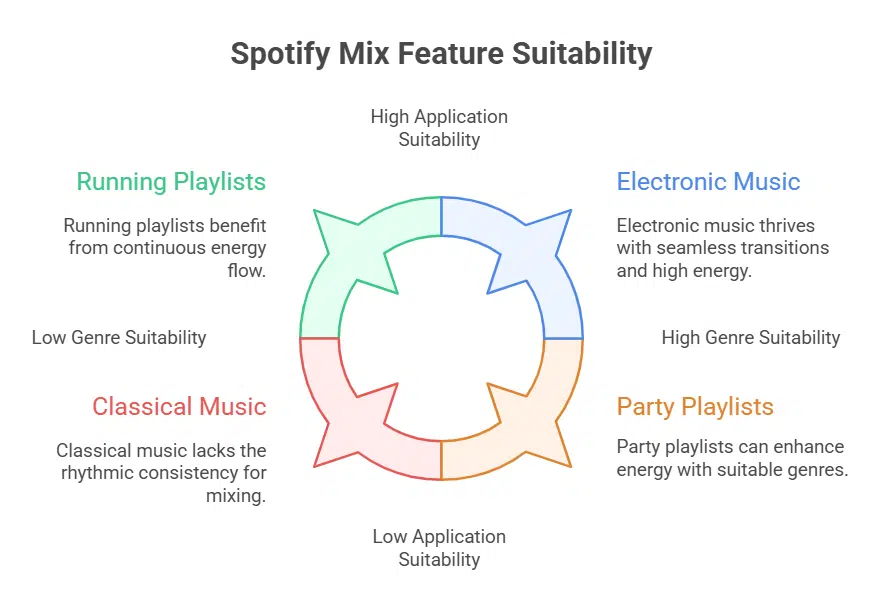
Spotify notes that the Mix feature works especially well with genres traditionally built for transitions, such as house, techno, trance, and drum & bass. These styles already rely on steady BPMs and layered arrangements that allow one track to slide naturally into another.
However, the feature is not limited to electronic music. It can also enhance playlists for running sessions, car rides, or parties, where a continuous flow of energy is often preferable to abrupt silences. By displaying track BPMs and musical keys, Spotify makes it easier to pair rock, pop, or even hip-hop tracks that share similar rhythmic foundations.
This addition effectively gives Spotify subscribers a basic DJ toolkit within the app, without requiring separate mixing software or advanced technical knowledge.
Rolling Out to Premium Subscribers
Mix is not available to all users immediately. Spotify is gradually deploying the feature in beta form, focusing first on Premium subscribers in select markets. This staggered rollout helps the company test functionality, gather feedback, and refine the user experience before a full global release.
To check availability, users need to update their Spotify app to the latest version. If the Mix button appears at the top of playlists, they can begin experimenting with transitions right away. Those who do not yet see it will likely gain access in the coming weeks as Spotify continues its phased launch.
A Growing Set of Personalization Tools
Mix joins a growing portfolio of features aimed at giving users more control over discovery and playback. Recent Spotify updates include the ability to:
-
Customize Discover Weekly by selecting a preferred genre.
-
Snooze tracks that appear too often in algorithmic playlists.
-
Interact verbally with Spotify’s AI DJ, which offers recommendations with commentary.
Meanwhile, Apple Music is preparing to release AutoMix as part of iOS 26, a feature with similarities to Spotify’s Mix. While Apple’s solution focuses heavily on automation, Spotify’s approach provides both automatic and manual options, giving users a higher degree of creative input.
A Competitive Edge in Streaming
By offering DJ-like control without requiring external apps, Spotify positions itself as a more immersive music platform. This strategy could attract both casual listeners looking for smoother party playlists and aspiring DJs experimenting with mixing before investing in professional tools.
Music analysts note that features like Mix reflect Spotify’s ongoing shift from being a library of songs to becoming a creative ecosystem, where users don’t just consume music but actively shape it. In the long run, this could deepen subscriber loyalty and give Spotify an edge in the increasingly competitive streaming market.
The information is collected from CNET and Yahoo.


























