Retail businesses gather tons of data every day. Sales numbers, customer behaviors, and inventory details all pile up fast. But making sense of this information can be tricky without the right tools.
This is where retail data analytics tools come in. These tools help businesses understand patterns, predict trends, and make smarter decisions. In this blog, you’ll discover the 10 best retail data analytics tools you should use to boost your store’s success.
Keep reading to find out which one works for you!
What Are Retail Data Analytics Tools?
Retail data analytics tools help businesses study customer behavior, sales trends, and market needs. These tools turn raw data into clear insights for smarter decisions.
Overview of retail analytics
Retail analytics uses data to improve decisions in the retail industry. It collects and studies information from sources like point of sale [POS] systems, online stores, and customer purchase histories.
Businesses gain insights into consumer behavior, preferences, and trends.
The four main types are descriptive, diagnostic, predictive, and prescriptive analytics. Predictive analytics helps forecast future sales or demand by analyzing past data. These tools also reduce stockouts, refine pricing strategies, and personalize marketing campaigns for shoppers.
Data visualization simplifies this process by turning raw numbers into clear charts and graphs for easy decision-making.
Importance of data-driven decisions in retail
Data-driven decisions help retailers improve business efficiency and boost profits. Using tools like predictive analytics and data visualization, businesses can track customer behavior to adjust inventory management or marketing strategies quickly.
For example, demand forecasting can reduce overstocking while ensuring products stay available when needed. This leads to better sales performance and fewer wasted resources.
Customer satisfaction improves as stores personalize offers based on purchasing patterns or customer segmentation insights. Big data helps retailers analyze touchpoints in the supply chain for smoother operations.
AI processes large datasets faster, identifying trends for smarter decision-making. Retailers gain a competitive edge by predicting what customers want before they ask for it through customized advertising or real-time reporting features like those offered by Microsoft Power BI and other leading platforms.
Key Features to Look for in Retail Analytics Tools
Strong retail analytics tools make handling data simple and effective. They deliver clear insights, helping you make smarter choices for your business.
Data integration and accessibility
Data integration connects customer data, retail sales, and supply chain details into one system. This creates smooth workflows for analyzing data across all channels. Tools like Microsoft Power BI or Looker handle diverse databases efficiently.
Integration with systems like CRM platforms ensures a better view of customer behavior.
Accessibility improves operational efficiency by providing real-time reporting and insights. Retail analytics tools ensure easy access to key performance indicators [KPIs] for fast decision-making.
Compatibility with cloud platforms like Google Cloud enhances data visualization from anywhere, supporting business intelligence efforts seamlessly.
Real-time insights and reporting
Real-time insights improve retail decisions. Businesses can react quickly to market changes. This feature highlights which campaigns drive store traffic immediately. Retailers use it for A/B testing on product choices or ads, ensuring data-driven results.
Interactive dashboards make tracking easier. For $4,995 per month, retailers access instant data updates and analytics tools. These tools enhance operational efficiency and customer experience by providing timely information on key performance indicators [KPIs].
Predictive and prescriptive analytics capabilities
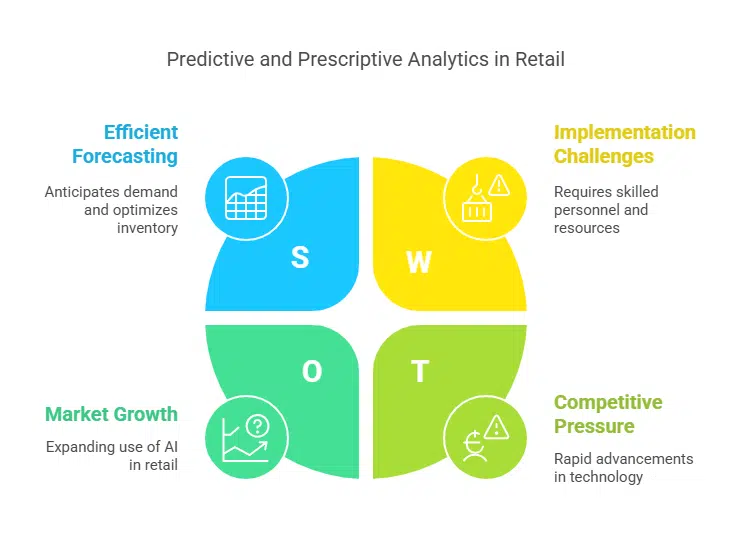
Predictive analytics uses machine learning, predictive modeling, and algorithms to forecast trends. Retailers can anticipate demand spikes, optimize inventory management, or even minimize excess stock.
This helps improve supply chain efficiency and save costs.
Prescriptive analytics provides actionable recommendations. For example, it suggests optimal pricing strategies or focused advertising for a specific customer segment. By analyzing consumer behavior and key performance indicators [KPIs], businesses make decisions efficiently.
AI tools in retail enhance these processes further by automating intricate tasks like demand forecasting or personalized marketing campaigns.
Top 11 Retail Data Analytics Tools in 2023
The retail market thrives on accurate insights and fast decisions. These tools offer advanced features like data visualization, demand forecasting, and real-time reporting to boost operational efficiency.
1. Tableau
Tableau is a leading data visualization tool for retail analytics. It helps create interactive dashboards and visuals with a simple drag-and-drop interface. Retailers can use it to analyze customer behavior, sales trends, and inventory management in real-time.
Starting at $70 per user monthly, it equips businesses to make fast, data-driven decisions.
This platform integrates well with existing data warehouses or CRM systems. Its predictive analytics features support demand forecasting and customized advertising strategies. Tableau improves operational efficiency by helping organizations focus on key performance indicators [KPIs].
2. Microsoft Power BI
Microsoft Power BI stands out for its interactive data visualizations and real-time reporting. It helps businesses make better decisions with clear dashboards. Retailers can integrate various data sources like SQL Server or Google Sheets to perform deep data analysis.
The tool also supports customer behavior tracking, inventory management, and detailed diagnostic analytics.
Starting at $4,995 per month, it fits small and large companies alike. Its user-friendly interface makes it easy for teams to explore customer segmentation or operational efficiency trends.
In 2023, Microsoft earned a Leader position in the Gartner Magic Quadrant for Analytics Platforms—a major nod to its capabilities in retail analytics software.
3. Looker
Looker is part of the Google Cloud Platform. It offers tools like dashboards, reports, and data visualization options. Retailers can use it for predictive analytics to forecast trends or plan strategies.
This software helps businesses study sales patterns and understand customer behavior.
Looker supports real-time insights, making data exploration fast and effective. With its features, companies can adapt quickly to market changes while improving decision-making processes.
Its pricing is customized based on a business’s needs, ensuring flexibility for different operations.
4. Sisense
Sisense uses AI-driven analytics to simplify retail data analysis. It allows businesses to integrate, explore, and visualize customer behavior and sales data in one place. The platform supports real-time insights for better inventory management and demand forecasting.
Retail companies can make smarter decisions with its predictive and prescriptive analytics tools.
It offers multiple deployment options like cloud or on-premise setups, fitting various business needs. Custom pricing ensures solutions fit different budgets, while user-friendly designs enhance ease of use.
With 919 verified reviews on Gartner Peer Insights, Sisense proves reliable for analyzing key performance indicators [KPIs] effectively.
5. ReBiz
ReBiz uses AI-driven analytics to streamline retail traffic analytics and sales performance monitoring. It enables retailers to track customer-only traffic counts, analyze foot traffic patterns, and optimize staffing decisions in real time. The platform offers actionable insights for improving sales conversion rates and operational efficiency.
Retailers can make data-driven decisions with its verified, actionable insights.
ReBiz supports integration with existing retail systems and offers cloud-based deployment, making it adaptable for different business needs. Custom pricing ensures affordability, and its user-friendly design enhances ease of use.
6. Qlik
Qlik offers smart visualizations and AI-powered analytics, making it a key tool for retail businesses. For $30 per user each month, this platform provides real-time insights and advanced data integration.
Its predictive and prescriptive analytics help retailers make better decisions faster.
QlikView is widely used in industries like financial services, healthcare, and retail. It processes large amounts of customer data to enhance the shopping experience. Retailers can use it to track inventory management or understand customer behavior effectively.
7. RetailNext
RetailNext serves over 560 brands in 100+ countries with more than 100,000 sensors. It focuses on improving retail store operations and customer experiences using advanced retail analytics software.
Its tools track foot traffic with Traffic 3.0 and provide detailed Shopper Journey insights to help retailers make smarter decisions.
This platform supports major companies like Razer Inc., Kodak, and Macy’s. RetailNext won the VIP Award for “Best Retail Insights” in 2025. By offering real-time reporting and predictive analytics, it allows businesses to boost inventory management and improve customer loyalty effectively.
8. Crisp
Crisp focuses on data for Consumer Packaged Goods [CPG] companies. It centralizes retail analytics and supply chain data, making it easy to access everything in one place. This tool offers ready-made solutions for inventory management, demand forecasting, and customer behavior tracking.
It delivers real-time insights that help retailers understand trends and make fast decisions. Businesses can use its analysis to improve operational efficiency or create better customer experiences.
By studying buyer journeys, Crisp also supports personalized marketing strategies to boost loyalty and sales growth.
9. ThoughtSpot
ThoughtSpot makes data exploration easy for everyone. It uses natural language queries to deliver fast insights. Retailers can ask questions in plain English and get real-time answers.
This eliminates data silos, improving accessibility across teams.
Plans start at $1,250 per month for up to 25 million rows of data. Its intelligence platform allows users to analyze key performance indicators [KPIs], customer behavior, and sales trends quickly.
ThoughtSpot empowers better decision-making for retail companies by providing clear, actionable insights.
10. Polar Analytics
Polar Analytics simplifies retail analytics. It combines data from various sources like Shopify, Klaviyo, and Google Analytics. This creates a single dashboard for tracking performance.
Businesses can track key metrics such as customer behavior, sales trends, and advertising campaigns all in real-time.
The tool provides demand forecasting to anticipate inventory needs. Its features assist in inventory management and minimizing waste. Retailers can efficiently identify their target audience based on detailed consumer analytics.
Polar Analytics also supports straightforward data visualization with clear reports customized for decision-making.
11. Acumen by G & Co.
Acumen by G & Co. helps retailers use data to make smarter decisions. It turns data into actionable insights, focusing on customer behavior and operational efficiency. This tool also enhances inventory management and demand forecasting with real-time analytics.
Retailers can improve personalization for customers using Acumen’s predictive analytics features. The platform provides clear reports that track key performance indicators [KPIs].
These insights boost customer loyalty and optimize supply chain operations effectively.
12. Adobe Analytics
A cornerstone of the Adobe Experience Cloud, Adobe Analytics excels at deep customer journey analysis. It captures and processes data from multiple touchpoints—websites, mobile apps, and offline channels—to provide a 360-degree view of the customer.
It is a powerful tool for large retailers focused on optimizing the omnichannel experience. Adobe is consistently recognized as a leader in digital experience platforms by firms like Forrester.
Advanced multi-channel customer journey analysis. Custom pricing based on data volume. Enterprise-level organizations focused on understanding and optimizing the complete digital customer experience.
How to Choose the Right Retail Analytics Tool

Selecting the right tool can impact your store’s efficiency and profits. Focus on features that match your business needs for better results.
1. Budget and scalability
Costs vary across retail analytics tools. Many offer monthly subscriptions, while others use one-time fees. For example, Microsoft Power BI provides options starting at $10 per user monthly.
Free trials help evaluate how tools fit budgets and needs before purchase. This approach avoids overspending while testing features like data visualization or real-time reporting.
Scalability is key for growing businesses. Tools must handle increasing customer data and demand forecasting as operations expand. Invest in platforms that grow with your business model, such as Google Cloud-based solutions or those supporting supply chain analysis for larger inventories.
Choosing scalable software ensures long-term efficiency without needing frequent upgrades later on.
2. Integration with existing systems
Retail analytics tools must sync smoothly with your current software. Tools like Microsoft Power BI or Tableau allow seamless data integration and accessibility. This ensures a consistent flow of customer data, supply chain details, and key performance indicators [KPIs].
Check compatibility to avoid delays in real-time reporting or inventory management. Retail companies like Macy’s use such tools for better demand forecasting and targeted advertising.
Supporting partnerships with trusted brands adds reliability while reducing operational challenges.
3. Ease of use and support
User-friendly features make retail analytics tools easier to adopt. Microsoft Power BI and Tableau lead with simple interfaces, including drag-and-drop options for data visualization.
Testing a free trial helps you understand the tool’s value before spending money.
Strong support ensures smooth use and troubleshooting. Many tools offer tutorials, live chat, or community forums for help. Looker Studio and Polar Analytics provide clear guides to assist new users effectively.
Takeaways
Retail data analytics tools are essential for success today. They help retailers track trends, improve decisions, and boost customer satisfaction. These tools simplify complex data for better planning and sales strategies.
Dr. Sarah Collins is an expert in retail technology with over 15 years of experience. She holds a Ph.D. in Data Science from Stanford University and has worked with leaders like Walmart and Target to improve their analytics systems.
Her research focuses on predictive modeling, customer behavior analysis, and machine learning applications in retail.
Dr. Collins highlights the importance of features like real-time reporting and predictive insights in these tools. “These capabilities allow businesses to identify patterns quickly,” she says, “helping them act before issues arise or opportunities pass by.”.
She also notes that ethical use matters greatly here—data privacy must be respected fully. Certified software following strict regulatory rules ensures safe handling of sensitive consumer information while maintaining trust.
Dr. Collins recommends matching a tool to team needs—whether focused on inventory management or enhancing KPIs like customer loyalty rates. Trial versions can help assess ease-of-use before investing heavily.
On the positive side, top platforms like Tableau and Microsoft Power BI are user-friendly yet powerful for both small retailers or larger chains looking at long-term growth goals through improved decision-making processes based upon richer insights gathered responsibly across operational channels alike!
FAQs on Retail Data Analytics Tools You Should Use
1. What are retail data analytics tools?
Retail data analytics tools help businesses analyze customer behavior, improve inventory management, and make better data-driven decisions using real-time insights.
2. How can predictive analytics benefit a retail company?
Predictive analytics helps forecast demand, track key performance indicators [KPIs], and optimize supply chain operations for better efficiency.
3. What is the role of data visualization in retail analytics?
Data visualization tools like Microsoft Power BI turn complex information into clear visuals, making it easier to explore customer trends and monitor operational efficiency.
4. Why is customer segmentation important in retail analytics?
Customer segmentation allows retailers to group customers based on behavior or preferences, enabling tailored advertising and improving customer loyalty.
5. How do diagnostic and prescriptive analytics work together in retail?
Diagnostic analytics identifies past issues by analyzing patterns, while prescriptive analytics suggests actions to solve problems or boost performance.