For injury firms, legal technologies can help preserve records, organize large files, and trace important details back to their sources. The practical challenge is keeping a usable connection between an original photograph, message, or medical record and the version an attorney later reviews or shares.
A searchable file is useful. A searchable file with its source, collection details, and processing history is easier to evaluate when questions arise. Firms handling digital evidence in injury claims need both access and accountability.
The seven categories below address different parts of that work. Product examples illustrate documented capabilities rather than a ranking or a claim of firsthand testing. The legal references concern US federal practice; state rules and case-specific obligations require separate assessment.
1. Legal Hold and Preservation Management Software
Preservation work can fail before anyone reviews a document. A recording may be overwritten, an account closed, or a relevant device replaced while staff assumes someone else has addressed it.
Among legal technologies, hold management software helps assign responsibility and track preservation communications. Relativity’s documentation, for example, describes email notices, custodian questionnaires, automatic follow-ups, and reports recording communications. A custodian is a person who holds or controls potentially relevant information.
For an injury practice, a useful register could identify the record holder, material requested, responsible attorney, response status, and next follow-up. Sending a notice should not automatically mark the material as preserved. Staff still need to confirm what action occurred, and third-party access may require additional legal steps.
Federal Civil Rule 37(e) addresses certain losses of electronically stored information that should have been preserved for anticipated or ongoing litigation. Its remedies depend on specified conditions and findings; a missed reminder does not automatically produce sanctions.
2. Digital Forensic Collection Tools
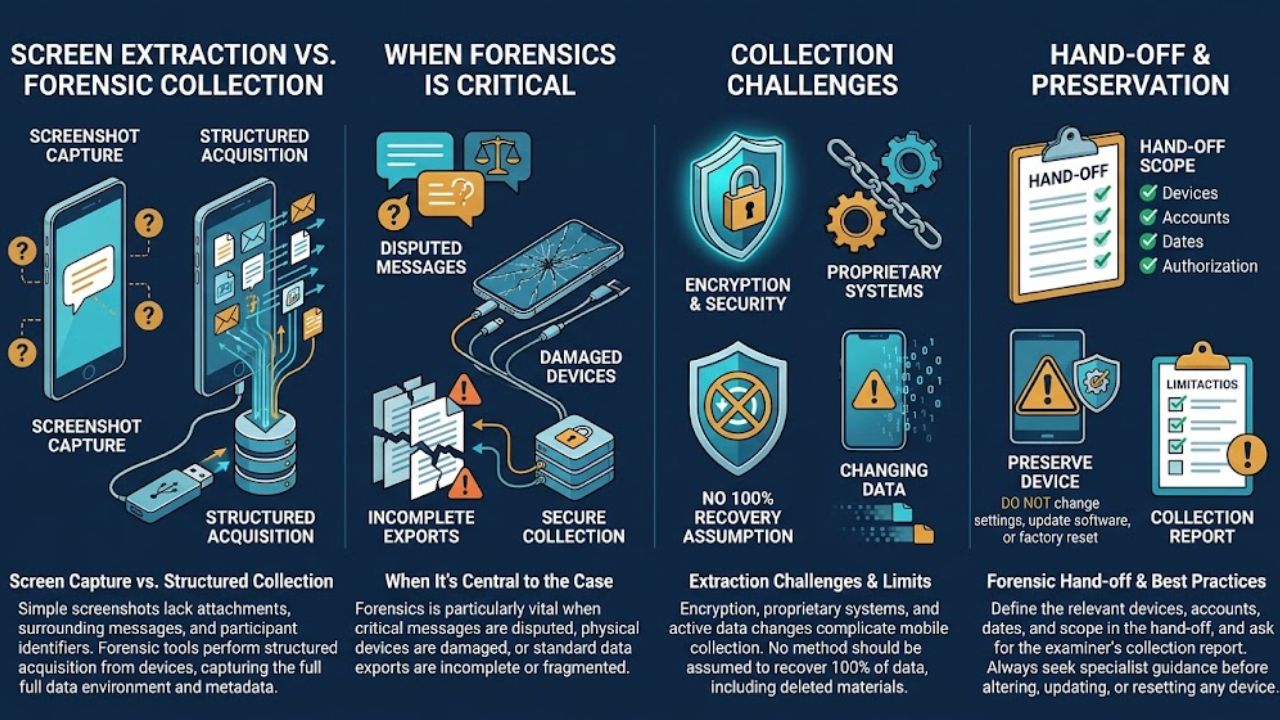
A screenshot may show a conversation while leaving out attachments, surrounding messages, or information needed to identify its participants. Forensic collection tools support more structured acquisition from devices and other supported sources.
These legal technologies are particularly relevant when a disputed message, damaged phone, or incomplete export becomes central to the case. A qualified examiner can select an acquisition method, document the work, and explain what the resulting collection includes and excludes.
The Scientific Working Group on Digital Evidence notes that encryption, proprietary systems, changing device data, and device-specific conditions can complicate mobile collection. No extraction method should be assumed to recover everything, including deleted material.
The firm’s handoff should define the relevant devices, accounts, dates, and authorized scope. It should also request the examiner’s collection report and limitations. Staff should seek specialist guidance before changing settings, updating software, or resetting a device that may contain important evidence.
3. Evidence Repositories With Integrity Checks and Access Logs
Evidence storage needs to preserve a file’s history as well as its contents. Useful repository features include controlled access, activity logs, protected originals, backup arrangements, and exportable records of handling.
These legal technologies can also support hash verification. A cryptographic hash is a value calculated from a file’s contents; comparing values helps check whether a copy matches the file previously hashed. It does not establish whether the original scene was genuine or a statement was truthful.
NIST’s preservation guidance discusses source documentation, hashing, access controls, backups, and cloud security. Although written for evidence handlers rather than specifically for injury practices, it provides a useful technical reference.
When assessing a repository, ask whether the firm can export original files, relevant metadata, and handling logs together. Also establish how information will remain accessible if the subscription ends. A storage dashboard offers limited reassurance if staff cannot retrieve a complete matter when needed.
4. E-Discovery Platforms With OCR and Metadata Processing
An injury file may contain scanned reports, emails, photographs, spreadsheets, and attachments. E-discovery processing brings supported formats into a review environment. Optical character recognition, or OCR, makes text in scanned images searchable.
Everlaw documents native-file processing that includes OCR, deduplication, metadata generation, and extraction of embedded files. Its guidance also identifies OCR limitations involving handwriting and language settings.
For firms using these legal technologies, the important distinction is between a search result and the underlying record. A search for an injury term may miss a poorly scanned page. An extracted date may need its time zone checked. A duplicate document may still have appeared in a different person’s collection.
Review processing exceptions and sample difficult documents before relying on the index. Keep email attachments connected to their parent messages, and retain the native files alongside review versions. Searching helps staff locate evidence; inspecting the source establishes what it actually says.
5. AI-Assisted Medical Chronology Tools
Medical chronology software organizes treatment events into a dated sequence. For injury teams working across multiple providers, a usable chronology can help locate visits, procedures, and records that need closer attention.
EvenUp describes chronology features that link timeline entries to underlying records. Its product materials distinguish an AI output reviewed by the firm’s own team from an option involving professional review. Those are vendor-described workflows, not independently established accuracy results.
These legal technologies need a defined verification process. Reviewers should confirm consequential dates, diagnoses, provider identities, and quoted findings against the source pages. They should check whether the summary distinguishes earlier conditions from later complaints and a patient’s account from a clinician’s assessment.
For example, a note recording pain after an accident should not become a definitive medical conclusion about causation merely because a summary compresses the wording. Record gaps and conflicting entries should remain visible. A chronology organizes the evidence for professional judgment; it should not supply unsupported clinical or legal conclusions.
6. Audio and Video Review With Searchable Transcripts
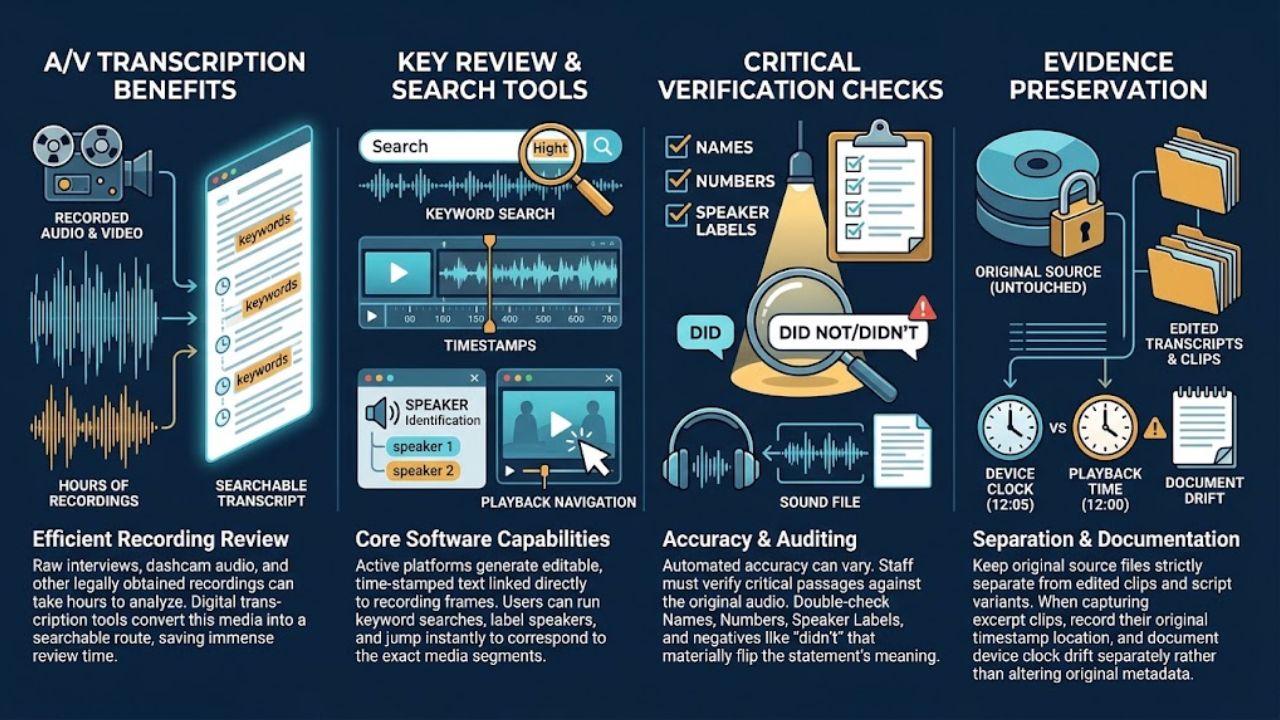
Recorded interviews, dashcam audio, and other lawfully obtained recordings can take substantial time to review. Transcription tools create a searchable route into that material.
CaseGuard describes editable transcripts, keyword searches, navigation to corresponding recording segments, and time-stamped transcripts generated from video. These documented functions illustrate how staff can locate passages for closer review.
The value of these legal technologies depends on checking significant passages against the recording. Review names, numbers, speaker labels, and words that change meaning. An unclear negative, such as “didn’t,” can materially change how a statement reads.
Keep the source recording separate from edited transcripts and clips. When preparing an excerpt, record its location in the source and retain enough surrounding material to assess context. Distinguish elapsed playback time from the recording device’s displayed clock. Where a discrepancy exists, document it separately instead of altering the original to make different records appear consistent.
7. Redaction and Controlled Production Tools
Before records leave the firm, staff need to identify material requiring protection and confirm that the exported files implement the intended redactions. Medical records and recordings may contain sensitive information unrelated to the disclosure’s purpose.
Redaction-focused legal technologies address more than visible black boxes. Everlaw’s production documentation explains that image redactions are burned into produced images and the resulting images are reprocessed so redacted content does not remain in the produced text. It separately addresses native-file and metadata handling.
The practical check belongs on the actual export. Open the files outside the review platform, search for protected terms, try selecting text beneath redactions, and inspect the metadata and attachments included in the package. For media, review the exported sound and picture as well as any transcript.
Preserve the unredacted source under appropriate restrictions and retain a record of production decisions. A redacted review view should never be assumed to describe every file that a recipient will receive.
Build a Workflow That Can Explain Its Evidence
Software supports evidence handling, but admissibility remains a separate question. Federal Evidence Rule 901 generally requires sufficient support that an item is what its proponent claims. Rules 902(13) and 902(14) provide certification routes for specified electronic records and copied data, subject to their requirements, including notice. Authentication alone does not resolve every other evidentiary objection.
Before adopting legal technologies, firms should run a small demonstration using authorized sample material. Ask staff to retrieve a source file, trace a summary back to its page, explain a processing exception, and inspect a redacted export. Review access permissions, retention terms, service-provider access, and any proposed reuse of client data before uploading real matter files.
Choose the capability that addresses a documented weakness first. Assign an owner to each handoff, from collection through production, and make the review steps part of ordinary case work. The firm should be able to explain where an important record came from, what happened to it, and how the shared version relates to the source.
Final Thoughts
The most useful legal technologies help an injury firm explain where a record came from, how it was handled, and whether a shared copy matches the source. Start with the weakest part of that process, whether it is preservation follow-up, medical-record review, or checking redacted exports.
Before adopting a platform, use authorized sample files to test source retrieval, access controls, summary citations, and final exports. Review retention terms and how the provider may access or reuse client data. Assign responsibility for each handoff, so staff know who must check the work. Software can organize the file, but attorneys and qualified specialists still need to assess its meaning and legal use.
Frequently Asked Questions
Can Screenshots Be Used as Evidence in an Injury Case?
Yes, if they meet applicable evidentiary requirements. Preserve original files and surrounding context because screenshots may omit important details.
How Is Digital Evidence Authenticated?
Authentication establishes that a record is what it claims to be, using supporting testimony, system information, or qualifying certifications.
What Is a Chain of Custody for Digital Evidence?
It documents who handled the evidence, when it was collected or transferred, and how it was stored and analyzed.
How Long Should a Law Firm Keep Digital Evidence?
Retention depends on applicable laws, court orders, preservation obligations, and relevant policies. There is no universal deadline for every case.
What Happens if Digital Evidence Is Deleted?
Courts may impose remedies when applicable preservation rules are violated. Deletion alone does not automatically lead to sanctions.