
You spend hours fixing wrong email formats and junk text in forms. Regular expressions, or regexes, work in many scripting languages, like JavaScript, and use braces and the question mark to match a text string.
This guide will show ten useful patterns for pattern matching in your code and help you validate emails, phone numbers, IPs, and more. Read on.
Key Takeaways
- The article shows 10 regex patterns for email, phone, URL, IP, ZIP, dates, whitespace trim, letters-and-digits only, duplicate-word find, and text replace.
- It gives code examples like ^([a-zA-Z0-9-.]+)@([a-zA-Z0-9-.]+).([a-zA-Z]{2,5})$ for email, ^[0]\d{9}$ for phone, and ^(?:(?:25[0-5]|2[0-4]\d|[01]?\d\d?).){3}(?:25[0-5]|2[0-4]\d|[01]?\d\d?)$ for IPv4.
- It shows ZIP code match with /^[0-9]{5}(?:-[0-9]{4})?$/, URL extract patterns for ftp|http|https via (((ftp|http|https):\/\/)(www.))… and duplicate-word find with /\b(\w+)\s+\1\b/gi.
- It covers date tests in MM/DD/YYYY, DD-MM-YYYY, and ISO 8601 using ^(0[1-9]|1[0-2])\/(0[1-9]|[12]\d|3[01])\/(19|20)\d\d$, DD-MM-YYYY form, and ^\d{4}-(0[1-9]|1[0-2])-(0[1-9]|[12]\d|3[01])$.
- The guide first ran on September 20, 2020, updated on May 23, 2023, has 34,443 views, and credits Daniel Oderbolz and Willem (Giga Sage).
How can I match email addresses using regex?
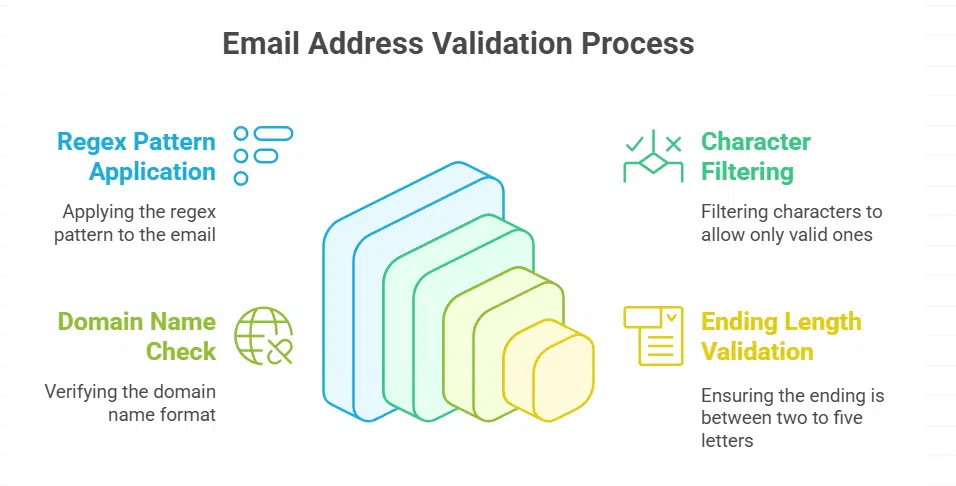
Match email addresses in code using regular expressions and a standard pattern. Place ^([a-zA-Z0-9_\\-\\.]+)@([a-zA-Z0-9_\\-\\.]+)\\.([a-zA-Z]{2,5})$ into your code. It acts like a bouncer, letting only letters, numbers, underscores, hyphens, dots pass.
The pattern then looks for an at sign, a domain name, and a two to five letter ending.
Test the regex in a code editor or a regex tester online. Script language like JavaScript or a scripting tool such as Python can run this check quickly. This trick proves handy for information checks and parameter filtering.
Mastering pattern matching gives you solid ground during job interviews.
What is the best regex for validating phone numbers?
A quick pattern stops wrong entries at the gate for phone number validation. The regex ^[0]\d{9] ensures a 0 then nine digits. You can test it in a scripting language or pattern engine, or play with an online tester.
This uses regular expressions for strict pattern matching, not fluff. It feels like giving your form its own bouncer.
How do I extract URLs from text with regex?
Open your file in VS Code or test it on regex101. Regular expressions can match web links in seconds. Apply a regex that matches ftp, http, https or www. For instance, use (((ftp|http|https):\/\/)(www\.))([-\\w\.\/#$\?=+@&%_:;]+).
This pattern finds most URLs inside regular text and works in PCRE engines too.
Use capturing groups to pull out full links. Run this expression in a scripting language or in grep. Adjust it to handle just ftp links with (((ftp):\/\/)(www\.))([-\\w\.\/#$\?=+@&%_:;]+).
Group one holds the protocol. Group two holds the hostname and path. Shorten code by swapping in the HTTP/HTTPS pattern: (http(s)?:\/\/.)?(www\.)?[-a-zA-Z0-9@:%._\+~#=]{2,256}\.[a-z]{2,6}\b([-a-zA-Z0-9@:%_\+.~#?&//=]*).
What regex pattern matches IP addresses correctly?
A solid regex handles four octets, each from 0 to 255, with no false positives. The pattern ^(?:(?:25[0-5]|2[0-4][0-9]|[01]?[0-9][0-9]?)\.){3}(?:25[0-5]|2[0-4][0-9]|[01]?[0-9][0-9]?)$ catches valid IPv4 addresses.
It hunts rogue bytes like a guard dog. It uses grouping and quantifiers to enforce each byte range.
Test this expression in a code editor or in an online regex tester. Try samples like 192.168.0.1 or 8.8.8.8 to see instant results. The common engine flags any out of range value. The pattern uses a caret at the start and a dollar sign at the end to mark the full string.
How can I validate ZIP codes using regex?
Use the regex ^[0-9]{5}(?:-[0-9]{4})?$ to catch basic ZIP formats. It anchors with ^ and $. This pattern matches five digits then an optional dash and four digits. JS regex engine handles that easily.
const zipRegex = /^[0-9]{5}(?:-[0-9]{4})?$/. Tests return true for 30301 and 30301-1234. They reject 1234 or 123456. Designers often drop this into an HTML5 pattern attribute. .
Server code in Python or server-side script can share the same rule. Python example: import re; if re.match(r’^[0-9]{5}(?:-[0-9]{4})?$’, code): pass. Server-side script uses a matching function with that pattern.
This stops bad codes before database writes. End users get instant feedback.
Matching dates in various formats
Use a regex with anchors and capture groups to snag MM/DD/YYYY, DD-MM-YYYY, and ISO dates, test it in an online tester or your scripting language’s search library, and read on to see live code snippets.
How do I match dates in MM/DD/YYYY format?
A regex pattern checks dates in MM/DD/YYYY format. It uses character classes and quantifiers to block invalid values. For example, ^(0[1-9]|1[0-2])\/(0[1-9]|[12][0-9]|3[01])\/(19|20)\d\d$ matches months 01 to 12, days 01 to 31, and years 1900 to 2099.
Developers test this snippet in Chrome DevTools Console or in Python’s re toolkit. This check speeds up form validation and cuts data errors.
Pattern mastery cuts down on bugs. Mastering quantifiers and character classes helps you craft new checks fast. You can drop this snippet into an Express.js route or a Laravel script.
How can I match dates in DD-MM-YYYY format?
Validating user input fights bad data. A DD-MM-YYYY pattern checks two digits for day, two digits for month, and four digits for year. This trick spots wrong dates fast. Mastering these rules boosts developer efficiency in form handling.
Web code calls the RegExp object, then it runs the test method on user strings. Script tool loads the regex engine from the re module and matches that same rule. Forms reject months past 12 or days past 31.
This guardrails your data and cuts debugging time.
What is the regex for matching ISO date formats?
The regex looks like ^\d{4}-(0[1-9]|1[0-2])-(0[1-9]|[12]\d|3[01])$, it acts like a gatekeeper for dates. Checks four digits for year, a hyphen, two for month, another hyphen, and two for day.
JavaScript’s RegExp or Python’s re module can run this pattern. This code matches ISO 8601 syntax exactly, blocking odd entries.
Blocking wrong shapes cuts data entry mistakes. You can use Visual Studio Code or an online tester as a sandbox, they feel like helpful guides. Tweak for MM/DD/YYYY or DD-MM-YYYY to see how regex adapts, revealing its versatility.
Mastering anchors, quantifiers, and character classes improves your pattern matching skills.
How do I remove extra whitespaces using regex?

Slash s slash s plus g finds clusters of whitespace characters. It runs in a matching tool within JavaScript or other apps. You use it for pattern matching tasks in logs or data. That pattern replaces each group with one space.
You avoid gaps in strings quickly.
Article first appeared on September 20, 2020, and got an update on May 23, 2023. It shows up in guides with over 34,443 views as of May 2023. Daniel Oderbolz and Willem, known as Giga Sage, helped craft this tip.
It guides Readers in data cleanup routines.
How to limit input to only alphanumeric characters with regex?
The regex /^[A-Z0-9]+$/i works like a bouncer at a club, it blocks all nonletters and nondigits. It taps into a Regular Expression and Character Classes to match only alpha and numeric characters.
Web script functions call this pattern in their Input Validation, and many devs test it on a pattern checker.
Examples include A1B2C3, 123ABC and abc123. This snippet first appeared on September 20, 2020, and saw its last update on May 23, 2023. It has drawn over 34,443 views by May 2023, and it plugs right into your toolkit.
How can I find duplicate words in text using regex?
Developers spot repeat words fast with a simple regex pattern. They use /\b(\w+)\s+\1\b/gi to catch duplicates. It rests on pattern matching and a backreference. It grabs a word group, then rechecks it right after a space.
Authors Daniel Oderbolz and Willem (Giga Sage) first shared this trick on September 20, 2020. They updated it on May 23, 2023, and readers have seen it over 34,443 times as of May 2023.
Many test it in an online tester or a code editor before running it in a scripting language.
How do I replace specific words or patterns with regex?
Swapping text with regex feels like magic on a page. This guide first went live on September 20, 2020 and hit 34,443 views by May 23, 2023.
- Select your match engine. JavaScript in a web console or the scripting tool’s replace function both apply.
- Build a search pattern. Use literal text or character classes like \d or \w to grab digits or words.
- Hit global replace. Add the g flag to swap every instance in one go.
- Hold case sensitivity in check. Mix in the i flag for a smooth, case blind swap.
- Escape any special symbol. Slash or dot can blow up your search if you skip backslashes.
- Use capture groups. Wrap parts in parentheses and call them with $1 or $2 in your new text.
- Embed lookarounds. Match a term only if it sits next to a specific word, without grabbing its neighbor.
- Tackle filenames. Clean junk with /[<>:\”*?\\/]+/g and swap invalid characters for a dash or blank.
- Block invalid names. Skip reserved Windows files with /^(CON|PRN|AUX|NUL|COM[1-9]|LPT[1-9])$/i before you save.
- Convert URLs on fly. Plug /\b(https?|ftp|file):\/\/\S+[\/\w]/g into your editor and wrap each link in an tag.
Takeaways
Regex can feel like a toolbox of spells for mailboxes, digits, hyperlinks, and postal codes. I often fire up regex101 or the Find panel in VS Code, play with patterns, tweak them live.
You grab calendar entries or network nodes without breaking sweat. Stand by this list of ten patterns to boost your coding mojo. Pick one, test it, and let your scripts sing.
FAQs on Regex Patterns for Web Developers
1. Why should a web developer learn these ten useful regex patterns?
They act like a magic magnifying glass for text, helping you match strings, test emails, pull URLs, grab CSS class names. You speed up search and replace tasks, validate input, extract data in just a few lines.
2. How do I test an email address with a regex pattern?
Pick a simple rule that matches letter or digit, then @, then domain parts with dots. Run it in your code or editor. If it fits, the email checks out. No fuss, just clear results.
3. What pattern can I use to match phone digits?
Try \d{3}-\d{3}-\d{4} for a basic US style. You tweak the count or separators to catch other formats. It pulls each block of digits in one go, so you work faster.
4. How can I extract both link URLs and CSS class names with regex?
Use /href=”(https?:\/\/[^”]+)”/g to snag link URLs. Then try /\.([a-z][a-z0-9-_]*)/gi to find class names. Loop over matches and you have clean data in a snap.