


When choosing a hosting solution for your website or application, you need one that not only delivers performance but also provides flexibility and full control. If you’re an advanced user, developer, or business owner seeking greater autonomy, the reasons to choose unmanaged VPS hosting can be quite compelling.
Unlike shared hosting or managed hosting plans, unmanaged VPS hosting offers a level of customization and resource management that ensures you get the exact performance and configuration your project requires.
Whether you’re building a website or running complex applications, this type of hosting gives you the power to control every aspect of your server environment.
Let’s dive into the reasons to choose unmanaged VPS hosting and explore how this hosting solution can meet your unique needs.
1. Full Control Over Server Configuration
One of the primary reasons to choose unmanaged VPS hosting is the unparalleled control it provides over your server configuration. Unlike shared hosting where server settings are pre-defined by the provider, unmanaged VPS hosting allows you to tailor your server’s environment to meet the specific needs of your project or business.
Customization at Your Fingertips
With unmanaged VPS hosting, you can select the operating system that best suits your requirements, whether that’s a Linux-based OS like Ubuntu, CentOS, or Debian, or a Windows Server environment.
You also have full control over the server software, allowing you to install and configure various web servers, databases, and other critical components. This is especially beneficial for developers and businesses who require a specific software stack or configuration.
For example, if you run a high-traffic website that needs optimized PHP performance, you can tweak your PHP settings to maximize speed. Similarly, if your project requires specific security settings, you can implement firewalls, encryption, and other protocols without waiting for a managed host to take action.
Actionable Tips:
- Choose the right OS for your needs (Ubuntu for its ease of use, CentOS for enterprise applications).
- Implement a control panel like cPanel if you need a GUI, or opt for a more lightweight solution like Webmin for advanced users.
- Regularly monitor and adjust your server’s configurations as your project evolves.
Optimal Resource Allocation
Another major reason to choose unmanaged VPS hosting is the control over your server’s resources. You can allocate CPU, RAM, and storage exactly as needed. This flexibility ensures that you only use and pay for the resources you actually need, giving you more power without overspending on unnecessary capacity.
For example, during high traffic periods, you can increase your CPU and RAM allocation to meet the demand. Once the surge in traffic subsides, you can scale down your resources to save costs. This scalability allows your server to grow with your needs, making unmanaged VPS hosting a dynamic solution.
2. Cost-Effective Solution for Businesses
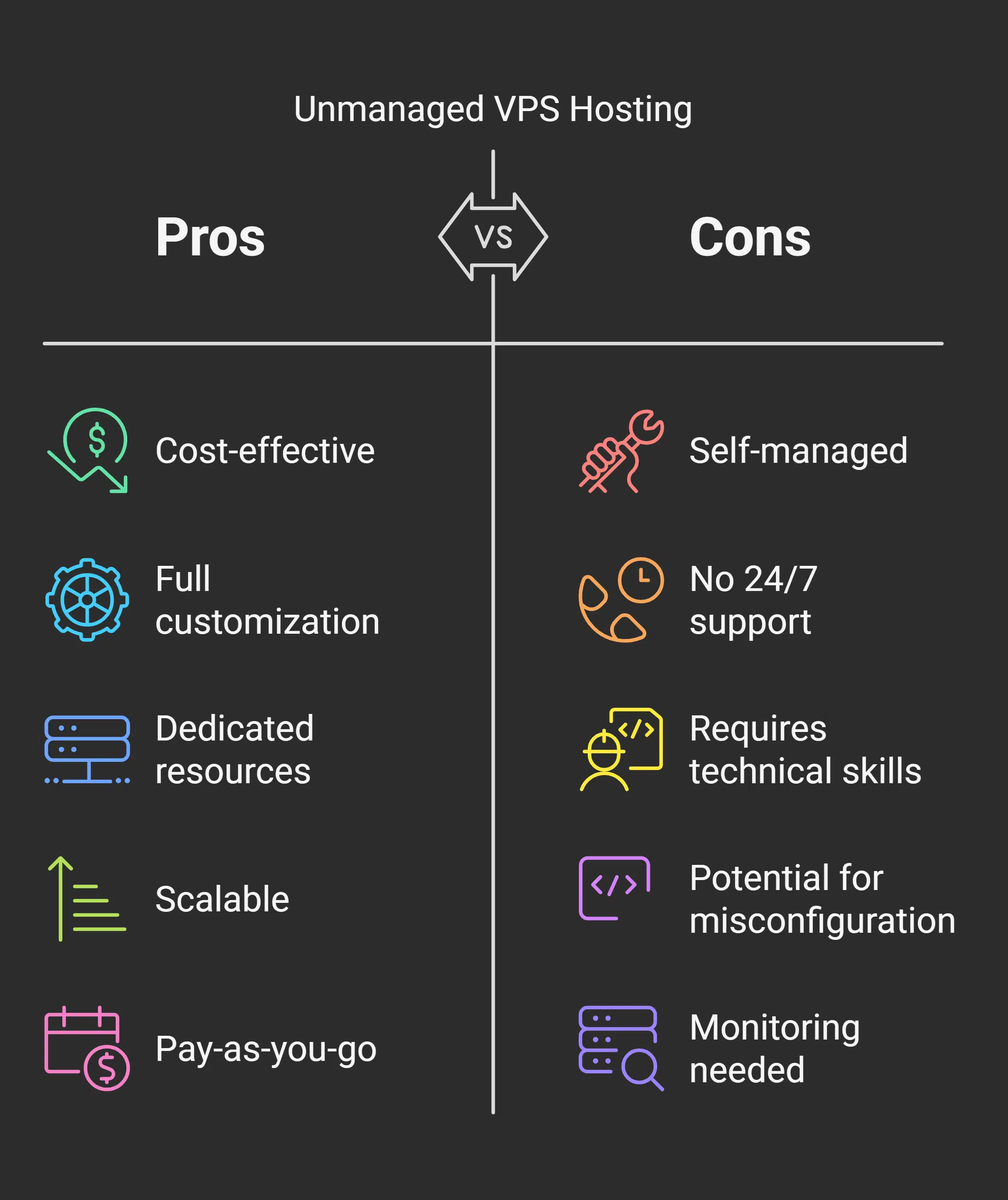
Among the many reasons to choose unmanaged VPS hosting, one of the most significant is its cost-effectiveness. Managed hosting plans typically come with additional services such as technical support and regular maintenance, which can significantly raise costs.
Unmanaged VPS hosting, on the other hand, allows you to pay only for what you need, giving you better control over your expenses.
Pay Only for What You Use
Unlike shared hosting, where you’re locked into a plan that distributes resources among several users, unmanaged VPS hosting provides dedicated resources. This means you can choose the resources based on your needs, ensuring that you’re only paying for what’s necessary.
As your website grows or traffic fluctuates, you can adjust your server’s configuration, optimizing your hosting budget accordingly.
For instance, small businesses or startups can opt for an affordable VPS plan initially and scale it up as their needs increase. This pay-as-you-go model offers a cost-efficient alternative to expensive managed hosting services, especially for businesses with in-house technical expertise.
Cost Comparison:
| Feature | Managed Hosting | Unmanaged VPS Hosting |
| Server Management | Included | Not Included |
| Support Services | 24/7 Support | Self-Managed |
| Customization | Limited | Full Customization |
| Monthly Cost | Higher | Lower (Pay as You Go) |
Actionable Tips:
- Start with a basic plan and scale up based on your growth.
- Opt for unmanaged VPS hosting if you have the skills to handle server maintenance to reduce costs.
- Use monitoring tools like Munin or Nagios to track resource usage and adjust your plan as needed.
Budget-Friendly for Tech-Savvy Users
For those who have the technical skills to manage their own server, unmanaged VPS hosting can be an excellent option. It allows you to forgo the extra cost of managed support while still providing a powerful and scalable solution for your needs.
For businesses with in-house developers or IT teams, this cost savings can be significant.
3. Better Performance with Fewer Limitations
Performance is a critical factor in the success of your website or application, and unmanaged VPS hosting excels in this area. Since you have dedicated server resources, your website or application isn’t competing for resources with other users, ensuring better speed and reliability.
Faster Processing and Increased Speed
The primary reason to choose unmanaged VPS hosting is the ability to boost performance. Shared hosting plans often suffer from slowdowns because multiple websites are using the same resources. With unmanaged VPS hosting, your site or application gets the benefit of dedicated CPU, RAM, and storage, ensuring faster processing and improved response times.
For instance, e-commerce websites can benefit from faster page load times during traffic spikes, which can lead to improved conversion rates and better user experience. When you have full control over the server’s performance, you can implement optimizations that ensure your site remains fast and responsive, even under heavy load.
Actionable Tips:
- Use caching: Install caching mechanisms like Varnish or Memcached to reduce server load and speed up response times.
- Optimize your database: Implement database indexing and query optimization to improve the performance of your application.
- Leverage a CDN: Use a Content Delivery Network (CDN) to distribute static content and enhance load speeds for global visitors.
Control Over Performance Optimization
With unmanaged VPS hosting, you don’t have to rely on your hosting provider’s default settings. Instead, you can fine-tune your server’s performance based on your specific requirements. Whether it’s adjusting web server configurations, upgrading software stacks, or implementing specific security measures, you have the flexibility to ensure that your server is optimized for peak performance.
Actionable Tips:
- Regularly update your server software to improve speed and security.
- Use server-side compression (gzip) to reduce the size of files sent to users.
- Optimize your web server (Apache or Nginx) settings for handling large amounts of traffic.
4. Increased Security and Privacy
For those who prioritize security and data privacy, unmanaged VPS hosting offers significant advantages. Since your server is isolated from others, you are in full control of your server’s security, giving you the ability to implement the necessary safeguards to protect sensitive information.
Customizable Security Settings
One of the reasons to choose unmanaged VPS hosting is the ability to configure and manage your own security protocols. You can set up firewalls, install SSL certificates, and configure secure SSH access to protect your server from potential threats. Moreover, as the only user on the server, you don’t need to worry about vulnerabilities introduced by other websites.
For example, setting up a firewall to block unauthorized IP addresses, using SSH key authentication instead of password login, and encrypting sensitive data can significantly enhance the security of your server.
Actionable Tips:
- Implement iptables or UFW (Uncomplicated Firewall) to block unwanted access to your server.
- Use Fail2ban to protect against brute-force login attacks.
- Regularly update your server software to patch vulnerabilities.
Enhanced Data Privacy
With unmanaged VPS hosting, you have the ability to control how your data is stored and who has access to it. This is particularly important for businesses dealing with sensitive customer information, as you can implement the necessary measures to comply with privacy regulations such as GDPR or HIPAA.
By controlling your server’s security protocols, you can ensure that your data is encrypted, regularly backed up, and accessible only to authorized users.
Actionable Tips:
- Encrypt sensitive data using GPG or OpenSSL to ensure it remains secure.
- Set up regular backups to protect data in case of server failure.
- Use strong passwords and implement multi-factor authentication for access control.
5. Ideal for Developers and IT Professionals

For developers and IT professionals, unmanaged VPS hosting provides the flexibility needed to create and manage custom environments. This is one of the top reasons to choose unmanaged VPS hosting, as it gives you the freedom to work with the latest technologies and development tools without restrictions.
Freedom for Advanced Development Projects
With unmanaged VPS hosting, developers have the freedom to install and configure any software or tools needed for their projects. Whether you need to set up staging and production environments, manage databases, or test different configurations, unmanaged VPS hosting gives you the flexibility to build your development stack.
Actionable Tips:
- Set up a dedicated development environment on your VPS and use tools like Docker for containerization.
- Create separate environments for testing and production to avoid conflicts or errors.
- Automate server configurations and deployments using Ansible, Puppet, or Chef.
No Vendor Lock-In
When you choose unmanaged VPS hosting, you’re not tied to any particular vendor’s software or restrictions. You have the freedom to install any applications or frameworks that are best suited for your development needs.
For example, you can install specific versions of software libraries, set up custom security measures, and tweak your server settings to fit your exact requirements.
Wrap Up
The reasons to choose unmanaged VPS hosting are clear: it provides unparalleled control, cost-effectiveness, improved performance, and enhanced security. For businesses, developers, and IT professionals, unmanaged VPS hosting offers a flexible, scalable, and customizable hosting environment that can be tailored to meet specific needs.
Whether you’re running a high-traffic website, developing custom software, or managing sensitive data, unmanaged VPS hosting ensures that you have full control over your hosting environment.
By leveraging the full range of customization options, security features, and resource management capabilities, you can optimize performance and ensure the long-term success of your project or business.
If you have the technical expertise and need more control over your server, unmanaged VPS hosting is a powerful and cost-effective solution that can support your most complex hosting needs.






















