
Scaling organic traffic does not require an army of writers; it demands a highly effective Programmatic SEO Strategy. Most teams stall because they lack a clean system, reliable datasets, and the strict quality bar needed to prevent weak, thin content.
Mastering this approach means connecting the right tools to build a seamless publishing engine. A practical setup relies on combining Google Sheets, WordPress, Google Search Console, Zapier, WP All Import, Ahrefs, and Semrush. By leveraging this tech stack, it becomes possible to spot scalable long-tail keywords and construct dynamic content templates that remain genuinely useful to readers.
Rather than manually publishing each piece, automation handles the heavy lifting, effortlessly pushing new pages live. Crucially, as the page count multiplies, indexation management stays fully under control. This ensures search engines easily crawl, understand, and rank the expanding site, ultimately turning massive scale into a sustainable competitive advantage.
What is Programmatic SEO?
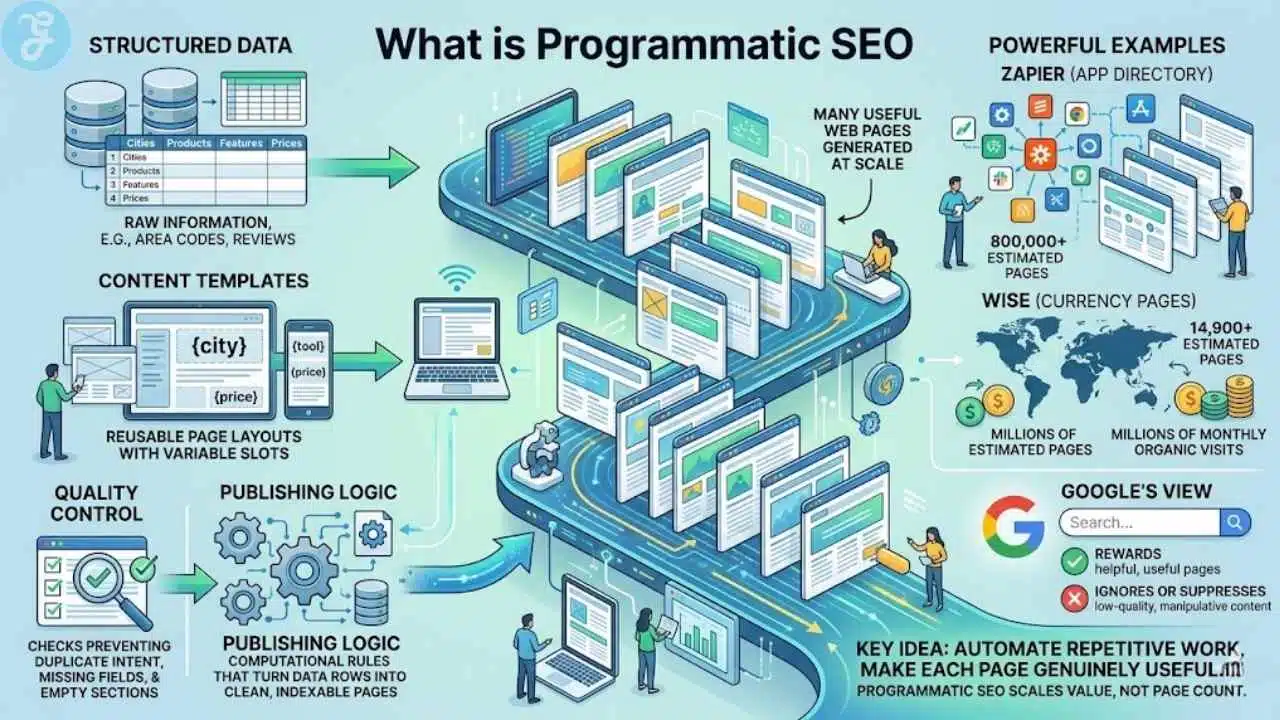
Programmatic SEO is a way to create many useful web pages from one repeatable system. You start with structured data, add content templates, connect the data to those templates, and publish pages that target long-tail search patterns at scale.
The key idea is simple: you are not mass-producing random pages. You are building pages that answer predictable searches with information that changes by place, product, use case, comparison, or other data points.
That is why the best examples tend to come from directories, marketplaces, integration pages, local landing pages, and comparison libraries. In Ahrefs’ analysis of the space, Zapier’s app directory was estimated at more than 800,000 pages, while Wise’s currency pages were estimated at nearly 14,900 pages and millions of monthly organic visits, which shows how powerful the model can be when each page solves a real problem.
Automate the repetitive work, then spend your time making each page genuinely useful.
- Structured data: the raw information, such as cities, products, integrations, reviews, prices, or area codes.
- Content templates: reusable page layouts with slots for variables like {city}, {tool}, or {feature}.
- Publishing logic: rules that turn each row in your dataset into a clean, indexable page.
- Quality control: checks that catch duplicate intent, missing fields, and empty sections before the page goes live.
Google can reward this approach when the page is helpful. Google can also ignore or suppress it when the page exists mainly to manipulate rankings. That line matters more now than ever.
So if you remember one thing, make it this: programmatic SEO scales value, not page count.
How Programmatic SEO Differs from Traditional SEO
Traditional SEO usually starts with one page, one keyword target, and one writing workflow. Programmatic SEO starts with a pattern.
You still need search intent optimization, internal linking, and strong on-page SEO. The difference is that your system has to work across dozens, hundreds, or thousands of web pages at once.
| Aspect | Programmatic SEO | Traditional SEO |
|---|---|---|
| Core method | Builds pages from automation, structured data, and content templates. | Builds pages one by one through manual research, writing, and editing. |
| Keyword model | Targets repeatable long-tail keywords such as tool + use case, city + service, or product + comparison. | Targets individual topics, campaigns, and editorial ideas. |
| Speed | Publishes in batches after the data model and template are ready. | Publishes at the pace of the content team. |
| Data dependence | Relies on clean data sources, unique fields, and update rules. | Relies more on writer expertise, interviews, and custom research. |
| Main risk | Thin content, duplicate intent, bad canonicals, weak internal linking, and poor indexation management. | Slow growth, inconsistent optimization, and higher cost per page. |
| Best fit | Directories, marketplaces, integration pages, area code pages, local pages, and large comparison libraries. | Brand stories, opinion pieces, original research, and high-touch sales content. |
| Maintenance | Updates happen through data changes, template edits, and automated QA. | Updates happen through manual rewrites and editorial refreshes. |
If your site has a strong repeatable pattern, pSEO usually wins on efficiency. If every page needs a fresh point of view or expert argument, traditional SEO still does the heavier lifting.
The Benefits of Programmatic SEO
Programmatic SEO works best when your business already owns, or can build, a useful dataset. That is the piece many articles skim past.
If the data is thin, the pages will be thin. If the data is rich, your pages can become a serious digital marketing asset.
Scalability for thousands of pages
This is the most obvious benefit. Once your content templates, schema rules, and publishing workflow are stable, each new row in your dataset can become a new SEO page with far less manual work.
That is why companies like Zapier, Zillow, TripAdvisor, G2, and Flyhomes are often used as pSEO examples. They are not publishing pages just because they can. They are publishing pages because their products, locations, and comparisons naturally create thousands of real search opportunities.
Targeting long-tail keywords effectively
Long-tail keywords tend to convert better because they are more specific. A search like “crm software” is broad. A search like “crm software for insurance brokers” tells you much more about the user’s goal.
Programmatic SEO shines here because it lets you combine head terms with modifiers at scale. One clean pattern can support hundreds of intent-matched pages without forcing you to write each one from scratch.
Improved efficiency through automation
Automation removes repetitive production work. It does not replace strategy.
When you connect Google Sheets, a CMS, and a publishing tool like WP All Import or a Zapier workflow, your team can spend less time copying text into fields and more time improving the parts that affect rankings and conversion optimization, like unique facts, stronger internal linking, and better page UX.
| What gets faster | How automation helps | Why it matters |
|---|---|---|
| Page creation | Turns each approved row into a draft or live page. | Reduces production bottlenecks. |
| Metadata | Fills title tags, H1s, canonicals, and descriptions from rules. | Keeps on-page SEO consistent. |
| Updates | Refreshes pages when source data changes. | Helps pages stay current without a full rewrite. |
| Quality checks | Flags missing fields, broken sections, and duplicate slugs. | Catches mistakes before they spread sitewide. |
The real win is not “publish more.” The real win is “publish more pages that deserve to exist.”
The Step-by-Step Process to Implement Programmatic SEO
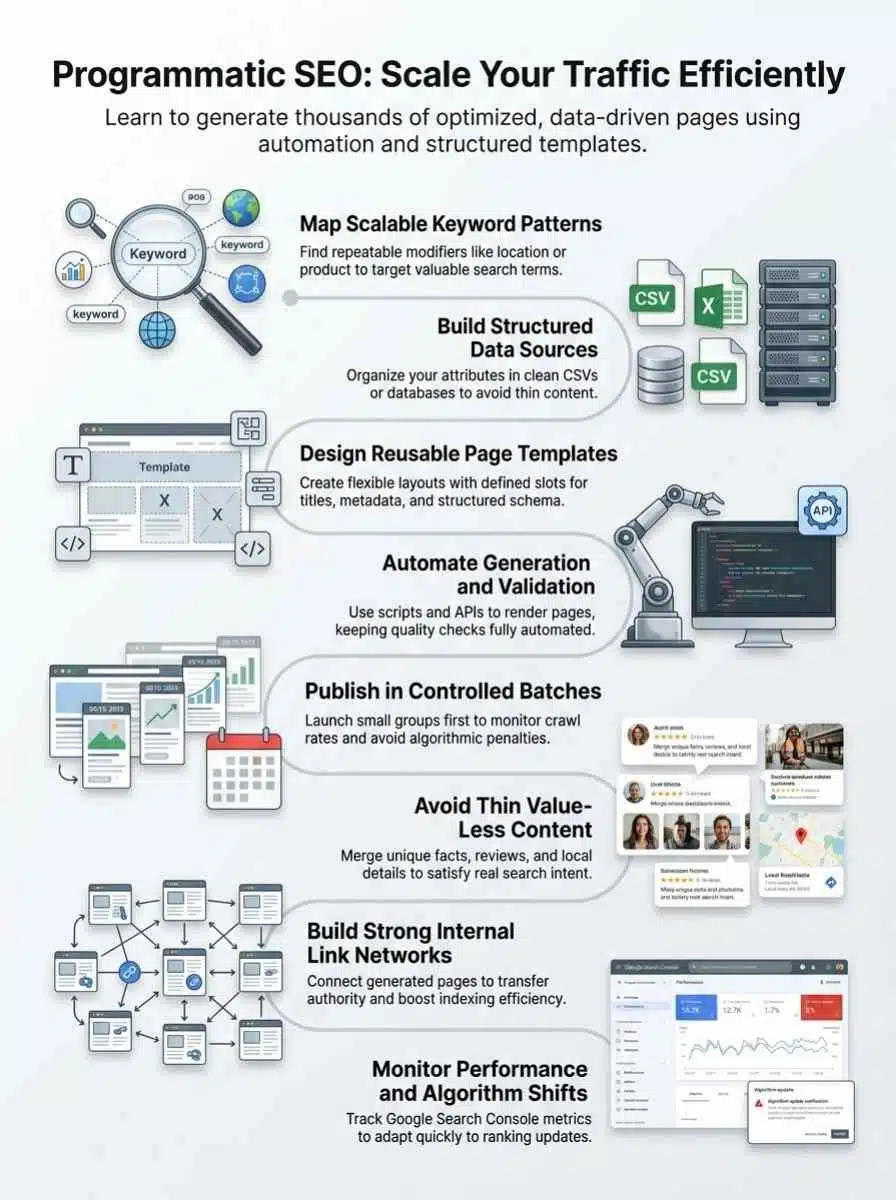
A good pSEO system feels less like content marketing and more like product design. You define the pattern, build the feed, stress test the template, and then scale only after the first batch proves itself.
Identify scalable keyword patterns
Start by looking for repeatable keyword shapes, not isolated ideas. Search Engine Journal describes this well: programmatic SEO usually pairs a head term with a modifier, such as “for SaaS,” “near me,” “2026,” or a city, product, or use case.
Google’s traffic-drop guidance also recommends using the last 16 months in the Search Console Performance report when you analyze page trends. That matters because it helps you spot real seasonality before you build a pattern around misleading short-term data.
- Pull seed queries from Google Search Console, Ahrefs, and Semrush.
- Group them by modifier pattern, like city, industry, feature, or competitor.
- Keep only patterns that map to data you actually have.
- Drop patterns where the searcher clearly wants an editorial answer, not a template-driven page.
A simple test helps here: if you cannot picture the fields needed to make each page meaningfully different, you do not have a pSEO pattern yet.
Build and structure your data source
Your dataset is the engine. If it is messy, the whole system gets messy fast.
For small to midsize projects, Google Sheets can work well. For bigger builds, move to Airtable, PostgreSQL, BigQuery, or another database that handles cleaner validation and easier syncing.
- Create one row per future page.
- Add a stable unique ID for every record, not just a page title.
- Store the slug, canonical target, H1, meta description, and key page facts in separate fields.
- Add a last updated field so stale records are easy to refresh or pause.
- Include at least one genuinely unique data field that changes the value of the page.
WP All Import supports CSV, XML, Excel, and Google Sheets inputs, which makes it a practical fit for WordPress teams that want to start simple before building a heavier pipeline.
Design a reusable page template
Your template should feel sturdy before it feels clever. Readers need a clear answer fast, and Google needs a page structure it can understand.
Build a page that can hold static explanatory copy, variable data blocks, helpful comparisons, and a strong next step. Then validate the structured data with Google’s Rich Results Test before you scale.
- Use one clean H1 that mirrors the page intent.
- Reserve space for unique facts, not just swapped keywords.
- Add comparison tables where readers need help choosing.
- Include FAQ-style content only when it solves a real question on that page.
- Plan internal links from the start, not after launch.
Google’s link guidance says every page you care about should have a link from at least one other page on your site. That makes hub-and-spoke architecture more than a nice idea, it is part of discoverability.
Automate page generation and validation
Now you connect the feed to the CMS. In WordPress, WP All Import is popular because it lets you map fields with a drag-and-drop interface, set a unique identifier, and update existing pages without rebuilding everything from scratch.
For recurring imports, WP All Import documents two common scheduling options: server cron jobs or its built-in scheduling service. That gives you a safe way to refresh thousands of pages after a data update.
Validation matters just as much as publishing. Use a preflight checklist before any batch goes live.
- Check that title tags, H1s, canonicals, and index settings render correctly.
- Verify schema output and make sure it matches visible content.
- Test a sample of pages in the URL Inspection tool.
- Audit internal links and breadcrumbs on rendered pages, not just in the template file.
- Log import failures and keep a rollback copy of the last clean batch.
If you want to automate inspections, the Search Console API has limits. Google lists URL Inspection quotas at 2,000 queries per day per site and 600 queries per minute per site, so sample intelligently instead of trying to inspect every URL on a large launch.
Publish pages in controlled batches
This is where many teams get impatient. They finally have the system working, then they publish everything at once.
Start with a batch that is large enough to show a pattern, but small enough to fix fast. For many sites, that means a pilot batch, a review period, and then progressively larger releases once impressions, crawl activity, and indexing move in the right direction.
Google Search Central caps a single sitemap at 50,000 URLs or 50MB uncompressed. So if you are serious about scale, plan a sitemap index from day one instead of treating it like cleanup work later.
- Launch a pilot batch first.
- Submit only canonical URLs in your sitemap.
- Watch Page Indexing, impressions, clicks, and “Discovered” statuses in Google Search Console.
- Pause and fix issues before you multiply them across the whole site.
Google’s crawl budget documentation says crawl-budget concerns are most relevant for large sites with about 1 million or more unique pages, medium or larger sites with 10,000 or more rapidly changing pages, or sites with a large share of URLs stuck as discovered but not indexed. That is a useful reality check. You do not need enterprise infrastructure on day one, but you do need clean inventory and sensible rollout pacing.
Tools and Technologies for Programmatic SEO
You do not need a huge stack to start. You need the right stack for your page type, your CMS, and your team’s skill level.
No-code platforms
No-code tools are great for proving the model before you invest in a custom developer stack. A common setup is Google Sheets for the data source, Zapier for automation, and WordPress or Webflow for publishing.
Zapier is especially useful for glue work. Its current platform supports 9,000+ app integrations, which makes it handy for moving data between forms, sheets, CRMs, databases, and publishing systems.
A no-code stack is perfect for validating a pattern. It is a bad choice for hiding a weak dataset.
Developer stacks for large-scale projects
Once your system grows, a developer stack gives you more control over speed, validation, rendering, and updates. Many teams use Node.js or Python for data processing, PostgreSQL or BigQuery for storage, and Next.js or another framework for templated page generation.
This is also where you can build smarter safeguards, like slug collision checks, content-hash comparisons, field-level validation, and automated redirects when pages change.
CMS integrations and automation tools
If your team already lives in WordPress, stay there until the system proves itself. WordPress plus WP All Import can take you surprisingly far for local pages, comparison pages, and integration pages.
As of May 2026, Ahrefs lists its Lite plan at $129 per month with 5 projects and 100,000 crawl credits, while Semrush lists its Pro SEO Toolkit at $139.95 per month with 5 websites, 500 tracked keywords, and 100,000 pages to crawl per month. That gives you a simple budgeting benchmark before you add more software.
| Tool | Best use in pSEO | Why teams pick it |
|---|---|---|
| Google Sheets | Small feed management | Fast to edit, easy for non-developers, good for prototypes. |
| Zapier | Automation between apps | Connects 9,000+ apps, great for syncing records and triggering workflows. |
| WP All Import | WordPress page creation and updates | Imports CSV, XML, Excel, and Google Sheets data, supports scheduled runs and chunked large imports. |
| Ahrefs | Pattern research and audits | Useful for keyword expansion, content gap checks, and technical crawls. |
| Semrush | Keyword research and monitoring performance | Strong for long-tail keyword discovery, site audits, and rank tracking. |
| SEOmatic or Ryze AI | Specialized workflow support | Helpful when you want faster drafting and template-driven page operations, but still need a solid human review process. |
Common Mistakes in Programmatic SEO
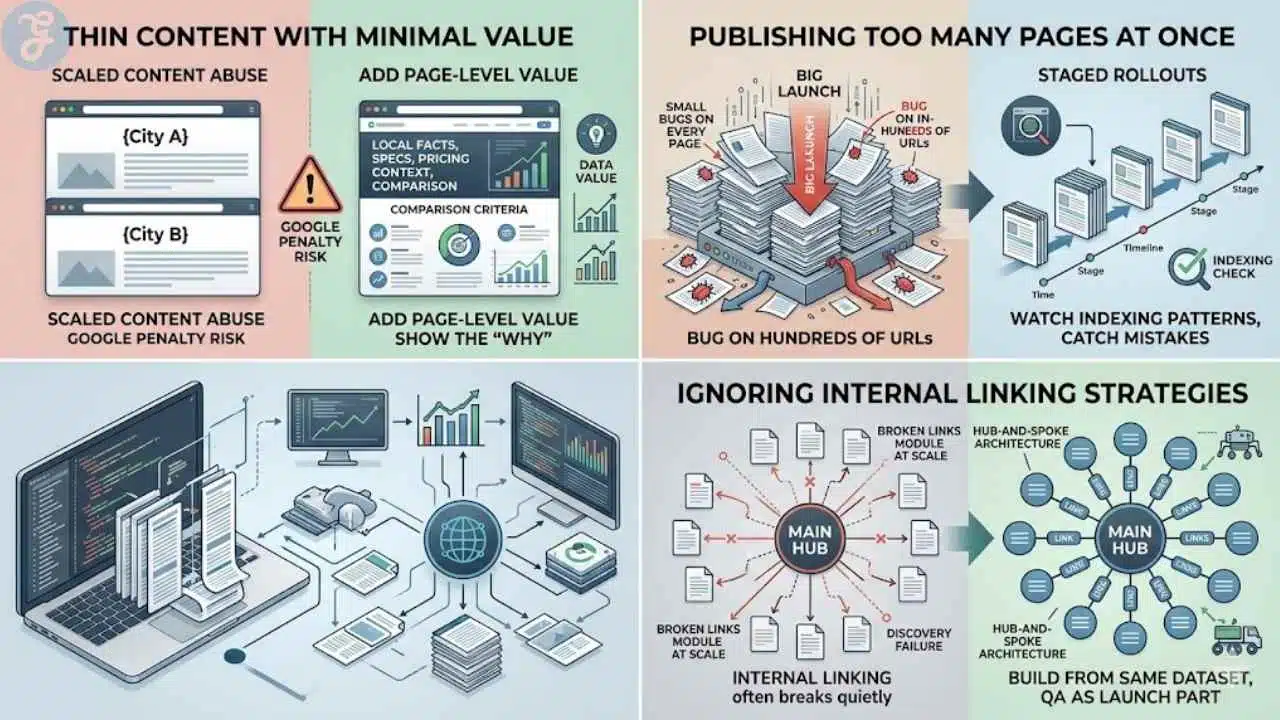
Most pSEO failures are boring failures. The strategy is not broken, the system is.
Thin content with minimal value
This is the biggest mistake. Google’s current spam policies describe scaled content abuse as creating many pages mainly to manipulate rankings rather than help users, especially when the pages are unoriginal or add little value.
If the only thing changing on the page is a city name or product name, you are in danger. You need page-level value that a reader can actually use.
- Add local facts, product specs, pricing context, or comparison criteria that change from page to page.
- Show the “why” behind the data, not just the data itself.
- Include a section that answers the most likely next question after the initial search.
Publishing too many pages at once
Big launches feel efficient, but they make diagnosis slow. If templates, canonicals, or internal links break, you now have the same bug on hundreds of URLs.
Rollouts should be staged. That gives you time to watch indexing patterns, inspect samples, and catch mistakes before Google spends crawl resources on pages you may need to retract.
Ignoring internal linking strategies
This mistake is more common than people admit. The pages exist, but nothing important points to them.
Google explicitly recommends descriptive, crawlable internal links and says every page you care about should be linked from at least one other page on your site. So your hub-and-spoke architecture is not just about PageRank flow. It is also about discovery and context.
A practical tip I see repeated in SEO communities is this: internal linking often breaks quietly at scale. The template renders fine, the pages publish, and only later do you realize your related-links module failed on half the site. Build link modules from the same dataset as the pages themselves, and QA them as part of the launch.
Real Examples of Successful Programmatic SEO
The best examples all follow the same rule. They pair a predictable search pattern with data that is actually useful on the page.
Case studies from leading companies
Zapier is the classic integration-pages example. Each page serves a clear job, helping users understand which apps connect and what workflows they can automate.
Wise is another strong example. Its currency pages are useful because they do more than target a keyword. They provide conversion context, historical information, and a clear next step.
G2, Zillow, TripAdvisor, KrispCall, and Flyhomes all fit the same pattern in different ways. They give the searcher a page built around a real variable, like a location, comparison, review set, or area code, instead of just recycled filler.
The role of templates and data-driven pages
Templates are what make scale possible. Data is what makes scale worthwhile.
KrispCall’s US phone-number content is a good reminder of how this works. An area code page can be useful because the page can include a valid number format, the geography that code serves, and buyer-relevant context for businesses choosing local presence in the US.
That same logic applies to integration pages, local pages, and alternatives pages. If your data helps the user make a decision, your template has a job. If your data just swaps nouns, your template becomes thin content.
| Example type | Typical pattern | Why it works |
|---|---|---|
| Integration pages | {Tool A} + {Tool B} | Captures users who already know the products and want a working connection. |
| Alternatives pages | {Brand} alternatives | Targets high-intent comparison searches close to purchase. |
| Local pages | {Service} in {City} | Works when each page includes local proof, pricing context, and service specifics. |
| Directory pages | {Category} in {Location} | Matches a clear browse-and-compare search behavior. |
Best Practices for Long-Term Success
Scaling is the easy part. Keeping the pages useful a year later is the real challenge.
Maintaining content quality
Create rules that pages must pass before publishing. This should include required data fields, minimum unique-content sections, schema validation, and internal-link presence.
It also helps to keep a “kill list.” If a page never earns impressions, never gains links, and never helps conversions, you may be better off consolidating it than keeping it live forever.
Monitoring performance metrics
Track clicks, impressions, CTR, average position, indexed pages, crawl errors, and orphan pages. Those are the signals that tell you whether your system is creating value or just inventory.
Google’s documentation says the Search Console Performance report is best viewed across 16 months for context. If you need more history, bulk export to BigQuery is the better move.
Google’s Help docs note that Search Console bulk export requires BigQuery billing to be enabled, data keeps accumulating until you set an expiration policy, and the first export can arrive within 48 hours after a successful setup. For large pSEO sites, that is a smart way to keep performance history without losing visibility into older launches.
Adapting to Google’s algorithm updates
Do not wait for a full site drop to check quality. Watch for clusters of pages falling into the same indexing status, especially duplicate-canonical issues, soft 404 patterns, and pages discovered but not indexed.
If an update hits, inspect a sample of winners and losers. You are usually looking for one of four problems: overlap in intent, weak page-level value, bad internal linking, or stale data.
- Refresh templates when user expectations change.
- Consolidate duplicate pages instead of trying to “rewrite around” the same intent.
- Keep canonicals, sitemaps, and internal links aligned.
- Improve pages that have demand, and prune pages that never earned their place.
Final Thoughts
Programmatic SEO works when you treat it like a product system, not a content shortcut. You need strong structured data, content templates that add real value, clean internal linking, and tight indexation management. Start with a small batch. Watch Google Search Console closely. Then scale the pages that prove they deserve more crawl budget, more visibility, and more of your time.
Frequently Asked Questions (FAQs) on Programmatic SEO Strategy for Scalable Organic Growth
1. What is programmatic SEO?
Programmatic SEO uses templates, automation, and structured data to create many pages for search traffic, it helps you target long-tail keyword clusters at scale.
2. How do I generate thousands of pages at scale?
Start with a clean data feed and clear content templates to generate thousands of pages at scale. Hook those to a CMS or static site generator, add structured data, canonical tags, and a sitemap, then watch crawl budget and analytics.
3. Will programmatic SEO hurt my site?
It can hurt you if you publish low-value or duplicate pages.
4. What tools and steps do I need to implement programmatic SEO?
Use automation, a CMS, a template engine, reliable data sources, and analytics, think of it like a content factory line. Plan keyword clusters, internal linking, canonical tags, and ongoing monitoring to scale safely.