

Automation platforms for test and production workflows should be separated before an automation starts changing customer records, sending messages, or calling a paid API. Seven platforms worth considering are n8n, Workato, Microsoft Power Automate, Activepieces, Windmill, Retool Workflows, and Boomi Integration.
Their approaches differ: some move versioned packages between environments, while others use separate instances, projects, or workspaces. The useful question is whether your team can prove which version is running, which credentials it uses, and who can release a change.
A workflow named “Invoice sync — TEST” can still write to a live accounting account. A production workflow can also pick up an unreviewed change if its deployment process simply follows the latest development version. Names and folders help people navigate; they do not establish a reliable release boundary.
This comparison focuses on business automation and integration workflows. It is for operations leads, SaaS teams, and technical owners who need room to experiment without turning every edit into a live change.
What this comparison checked
Official documentation for the 7 platforms was covering environment separation, release movement, permissions, and material prerequisites. This is a documentation-based comparison, with annotated public-documentation captures where available; paid accounts, live deployments, performance, and recovery behavior were not tested.
The list is ordered by deployment approach, not by a measured quality ranking. Each option has a documented way to separate development or testing from production. The comparison distinguishes workflow versions from data connections because a tool can separate one without automatically separating the other.
At a glance: 7 Platforms with Separate Workflows
| Platform | Documented separation | How changes move | Boundary to check |
|---|---|---|---|
| n8n | Separate instances connected to Git | Push from development; pull into production | Business or Enterprise; branch and production-edit controls |
| Workato | Development, Test, and Production environments | Deploy from Development to Test or Production | Contract eligibility, deployment privileges, and target connections |
| Power Automate | Separate Power Platform environments | Move solution-aware flows in solutions | Dataverse, licensing, and target-environment configuration |
| Activepieces | Separate projects used as staging and production | Project Releases from another project or Git | Feature entitlement and connection placeholders |
| Windmill | Separate workspaces with Git promotion | Promote through a pull request to the production branch | Stage 4 requires Cloud or Enterprise Self-Hosted |
| Retool Workflows | Resource environments plus separate deployment instances | Multi-instance releases select a version per instance | Resource switching alone does not isolate workflow versions |
| Boomi Integration | Test and production runtime environments | Deploy a packaged component version | Environment support, runtime setup, and test connection licensing |
Read the final column as a procurement checklist. A platform’s entry-level subscription should not be assumed to include its full release-management setup. Ask for a demonstration using the exact edition, deployment model, and connected systems you intend to buy.
1. n8n: a clear Git boundary between separate instances
n8n’s documented environments model connects each instance to a Git branch. A development instance sends changes to the repository, while a production instance pulls the approved work. Its source-control tutorial lists business and enterprise availability and requires an instance owner or administrator to configure the feature.
The meaningful choice is between one shared branch and separate branches. With separate development and production branches, a pull request provides another decision point before changes reach production. One branch reduces steps, but an automated production pull can make a mistaken development push consequential.
That makes n8n a sensible candidate for a team already comfortable reviewing Git changes. Its tutorial also documents a protected-instance setting to prevent workflow editing in production. Use that control to keep the live version from drifting away from the reviewed version.
Budget for the operational work of maintaining separate instances and a deployment process. Before committing, have an administrator show how connections and environment-specific settings are established on the destination. A workflow that imports successfully has not yet proved it will use the correct account when it runs.
2. Workato: project deployments with a specific direction
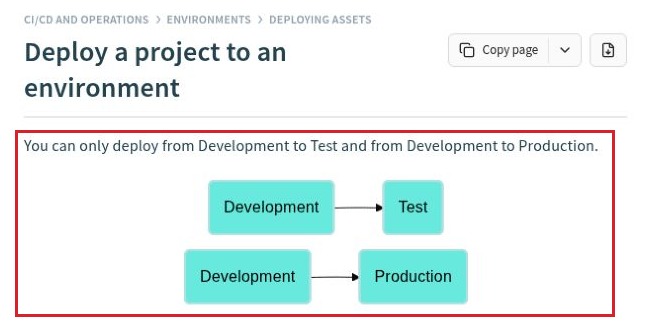
Workato provides development, test, and production environments, but its deployment path deserves attention. The documented routes are Development to Test and Development to Production. Do not design your release procedure around an assumed Test-to-Production button.
For a team managing several related recipes and dependencies, project deployment offers a useful review point. Workato lets the deployer inspect included assets and calculated changes before applying a deployment. This is a more deliberate process than copying one recipe and hoping every supporting asset is present.
The practical consequence of the deployment direction is that your team must keep the approved development state aligned with what passed testing. Record the relevant version or deployment details before anyone continues editing the source project.
Environments are available only under specific pricing plans and contracts. The deployer also needs the appropriate privileges in both source and target environments. When connections are first deployed, they must be re-established in the target before recipes can run. Include that reconnection step in the release checklist, using sandbox accounts for testing and deliberately selected production accounts for live work.
3. Microsoft Power Automate: move flows as solutions
Power Automate fits organizations that already manage business processes inside Power Platform. Its solution-aware flows can travel with a solution between environments, rather than being maintained as unrelated personal copies.
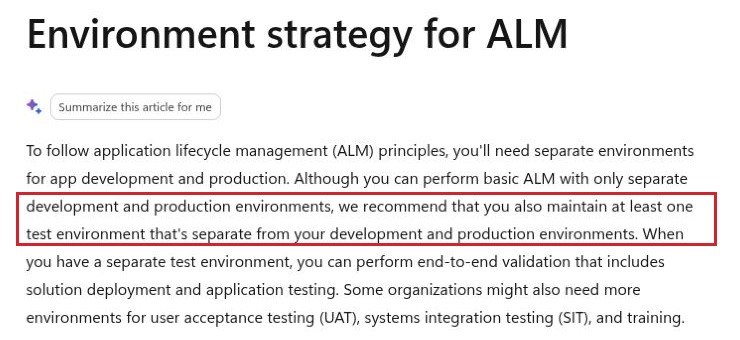
Microsoft describes a progression from sandbox development to testing and then production. Its broader application lifecycle guidance recommends a distinct test environment as well as development and production. That extra stage lets a team validate the deployment itself, including dependencies, before releasing the change.
The setup requires more than access to a flow designer. Solution-aware flows require Dataverse and a suitable environment. If you choose Power Platform pipelines, target environments must meet the applicable managed-environment requirements; licensing needs to be checked for the actual users and workloads.
For an operations team, the buying question is who will own those administrative decisions. Ask that person to demonstrate the entire move with a harmless flow: import the solution, establish the destination connections, inspect its configuration, and enable the intended trigger. This helps reveal the work hidden behind a successful export. A Microsoft-centered stack can be a practical fit, but existing Microsoft access should not be treated as proof that every required automation feature is covered.
4. Activepieces: project-to-project releases with a changes preview
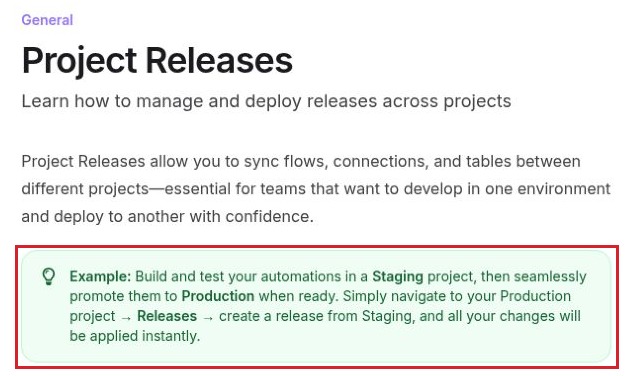
Activepieces documents project releases as a way to move flows, connections, and tables between projects. A team can build in a staging project and apply a release to a production project. Git is another source for a release, rather than the only documented route.
This approach suits teams that want a visible staging-to-production handoff without making every release start in a Git client. The changes preview matters: review additions, updates, and deletions before applying them. Treat the release as a change set, not merely a newer copy of one flow.
There is a concrete connection caveat. Newly created connections arrive as placeholders and need valid credentials after the release is applied. That prevents a deployer from assuming that moving the flow also finishes its authentication setup.
Confirm the Environments feature is enabled for your plan and that the operator has Write Project Release permission. The documentation also describes restoring an earlier release state. That is useful for reverting configuration, but it should not be confused with reversing external actions that a faulty automation already performed. Keep a separate plan for correcting records or messages created after a bad release.
5. Windmill: promotion between workspaces for technical teams
Windmill makes an important distinction between reviewing changes inside one workspace and maintaining a separate production environment. Its documented Stage 4 setup uses multiple workspaces, with staging and production connected to separate Git branches.
Promotion opens a pull request toward the production branch. In the recommended arrangement, developers work in staging, and production changes arrive through the promotion process instead of direct editing. This is a useful fit when engineers want workflow releases to follow a familiar code-review practice.
The edition boundary is specific: Windmill’s Stage 4 multi-workspace approach requires Git sync and is documented for Cloud or enterprise self-hosted. Do not infer that every feature in this setup is included simply because a basic self-hosted workspace is available.
Separate workspaces also create configuration work. The team needs to decide which resources, variables, and settings differ by workspace and keep them aligned with the intended destination. For a technical group, that explicitness can be an advantage. For a small operations team without an owner for Git and deployment configuration, it adds maintenance that may outweigh the benefit. Request a demonstration of the promotion path your team would actually operate.
6. Retool Workflows: distinguish resource environments from releases
Retool offers two concepts that buyers should keep separate. Resource environments hold different configurations and credentials for data sources. Multi-instance releases control which protected workflow version is available on each configured deployment instance.
Paid Retool plans include production and staging resource environments. Business and Enterprise plans add per-environment resource permissions. These controls matter when a workflow should query a staging database during development and a different database in production.
However, switching the resource environment is not the same as isolating a new workflow version. For that requirement, examine Retool’s documented multi-instance release process, which can keep a newer version on a development or staging instance before promoting it. Confirm Source Control eligibility and the required instance setup for your contract.
Retool is a useful shortlist option when the automation is closely tied to internal applications and data operations. In the evaluation, ask for two independent demonstrations: show that the test run uses the intended nonproduction resource, then show that editing the staged workflow does not alter the version serving production. If the demonstration proves only the first, you have verified data-source switching, not the complete release boundary.
7. Boomi Integration: deploy a specific packaged version
Boomi Integration separates building a process from deploying it. A packaged component captures a point-in-time version of a process and its included components. Deployment assigns that version to an environment, so further edits on the Build page do not automatically rewrite the deployed package.
That distinction is particularly useful for integration teams coordinating dependencies across business systems. The release can be identified as a package version, tested, and then deployed to the appropriate production environment. Boomi also documents version and deployment history for tracing those changes.
Do not equate the designer’s Test mode with a complete test environment. The former provides immediate development feedback; the latter involves environment and runtime configuration. Boomi’s process-testing guidance calls out environment support and test connection licenses for deployment to a Test Runtime cloud.
Ask for a quote and implementation plan that reflect the environments, runtimes, and connections you need. The key demonstration is whether the same intended package can run against the correct target configuration without an unnoticed rebuild. This is an integration-management choice with administrative overhead, rather than a simple way to rename an experimental workflow.
How to keep test and production workflows separate
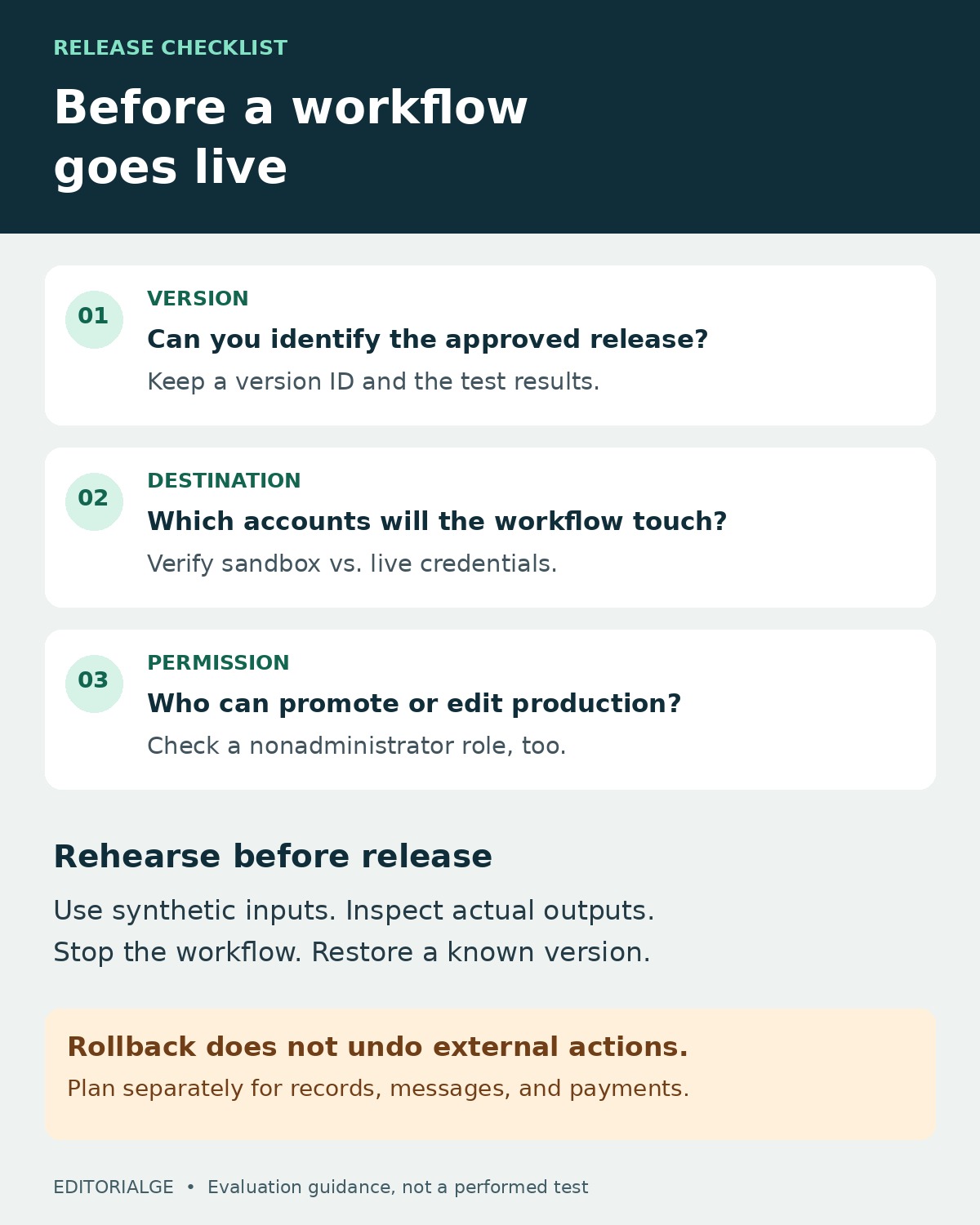
Evaluate test and production workflows with three checks when narrowing the shortlist. First, establish where the workflow version lives. Second, identify the accounts and data it can touch. Third, establish who can move a change into production. A weak answer in any one area can undermine the other two.
For example, consider a hypothetical workflow that reads a submitted request, classifies it, updates a CRM record, and prepares an email. The test version should read synthetic requests, write to a sandbox CRM, and send to a controlled test inbox. A different folder inside the same live CRM is not necessarily sufficient isolation.
If the workflow includes an AI decision, test its output separately from the permission to act. A model can produce an unexpected result even when deployment works correctly. Our comparison of no-code tools for human approval covers the separate question of pausing an action for review.
A small acceptance test to run before buying
The following is a proposed evaluation exercise, not a test performed for this article. Use only systems and synthetic records you are authorized to change.
- Create one workflow with a harmless, visible output in a sandbox destination. Record the version and destination account.
- Run a normal input, an incomplete input, and a duplicate input. Check the actual destination records as well as the workflow log.
- Prepare a revised version in development. Confirm the currently deployed version remains unchanged while the revision is still being evaluated.
- Move the approved version through the documented release path. Review dependencies, destination credentials, trigger settings, and configuration differences.
- Check access with a nonadministrator role. A successful administrator demonstration does not establish what ordinary builders can or cannot change.
- Rehearse stopping the workflow and restoring a previous version in the sandbox. Record which external effects still need correction after the restore.
Keep the results in a short release record: version identifier, test inputs, destination, observed output, reviewer, and recovery steps. Screenshots are useful when they capture those facts, but a screenshot of an environment selector alone does not establish that the boundary held during execution.
Price the complete setup, not one subscription
Request costs for the intended number of environments or instances, production and test connections, relevant users, and expected execution volume. Include the person-hours needed to manage credentials, deployment reviews, and failed runs. This article compares documented capabilities rather than presenting a price ranking across unlike licensing models.
Also decide how representative the test environment must be. A small synthetic dataset may reveal a mapping error but tell you little about a large batch, a rate limit, or a long-running approval. Increase the test’s realism around the risks that matter to your workflow, without copying sensitive production data unnecessarily.
Questions that change the shortlist
Is a draft workflow a separate test environment?
Not by itself. A draft can separate an unpublished edit from a released version, while still using live credentials or destinations when manually run. Check the execution context and the connected accounts, as well as the draft label.
Does separate production require a separate server?
Not always. Some products separate projects or workspaces within a managed service; others use distinct instances or runtime deployments. Determine what is separated in that model—versions, permissions, credentials, and execution resources—and whether it meets your requirements.
Will rollback undo a faulty automation’s changes?
Restoring a workflow version and restoring external data are different jobs. Returning to an earlier release does not, by itself, unsend an email or remove a duplicate record already created in another system. Define how to identify and correct those effects before enabling the workflow.
Choose a release process your team can maintain
The right platform for test and production workflows is the one whose separation your team can demonstrate and keep intact. n8n and Windmill warrant attention for Git-centered teams; Workato and Boomi provide structured integration deployment paths. Power Automate fits a managed Power Platform setup, Activepieces offers project releases, and Retool combines resource configuration with instance-level release controls.
Start with two plausible options and run the same small acceptance exercise in each. Choose after you can identify the approved version, verify its destination accounts, control who releases it, and explain what happens when it fails. Those answers are more useful than a long connector list or an environment named “Production.”