


An older article loses clicks. The tempting response is to change the date, add a few paragraphs, and call it refreshed. But content decay causes different needs: an expired product claim needs verification, a changed search intent needs a new angle, and two competing pages need an archive decision. The same rewrite cannot solve all three.
Start with the evidence behind the decline, then choose the smallest meaningful edit that addresses it. This diagnostic guide complements a broader workflow for refreshing old content for SEO by matching seven observable problems to seven different editorial responses.
Check Whether the Page Actually Needs an Editorial Fix
In Google Search Console, compare the affected page’s Web Search performance with a similar previous period and, where possible, the same season last year. Look at clicks, impressions, click-through rate (CTR), and the queries that changed. Segment by page, country, and device. Google’s guide to debugging search traffic drops recommends checking these patterns and using Google Trends to see whether interest fell across the wider market. Editorialge’s guide to SEO content metrics helps put those numbers in context.
An impressions decline across a seasonal query may reflect demand rather than an aging article. A sudden sitewide fall, an unexpected noindex instruction, or a changed canonical URL calls for a technical investigation. Stable impressions with fewer clicks may point to a less compelling search result, but that pattern alone does not identify the cause. Check the actual page and current results before editing.
Once demand and access have been checked, compare the page’s old and current queries, the promises in its title and introduction, and the information a reader needs to complete the task. The table gives you a starting hypothesis, not a ranking formula.
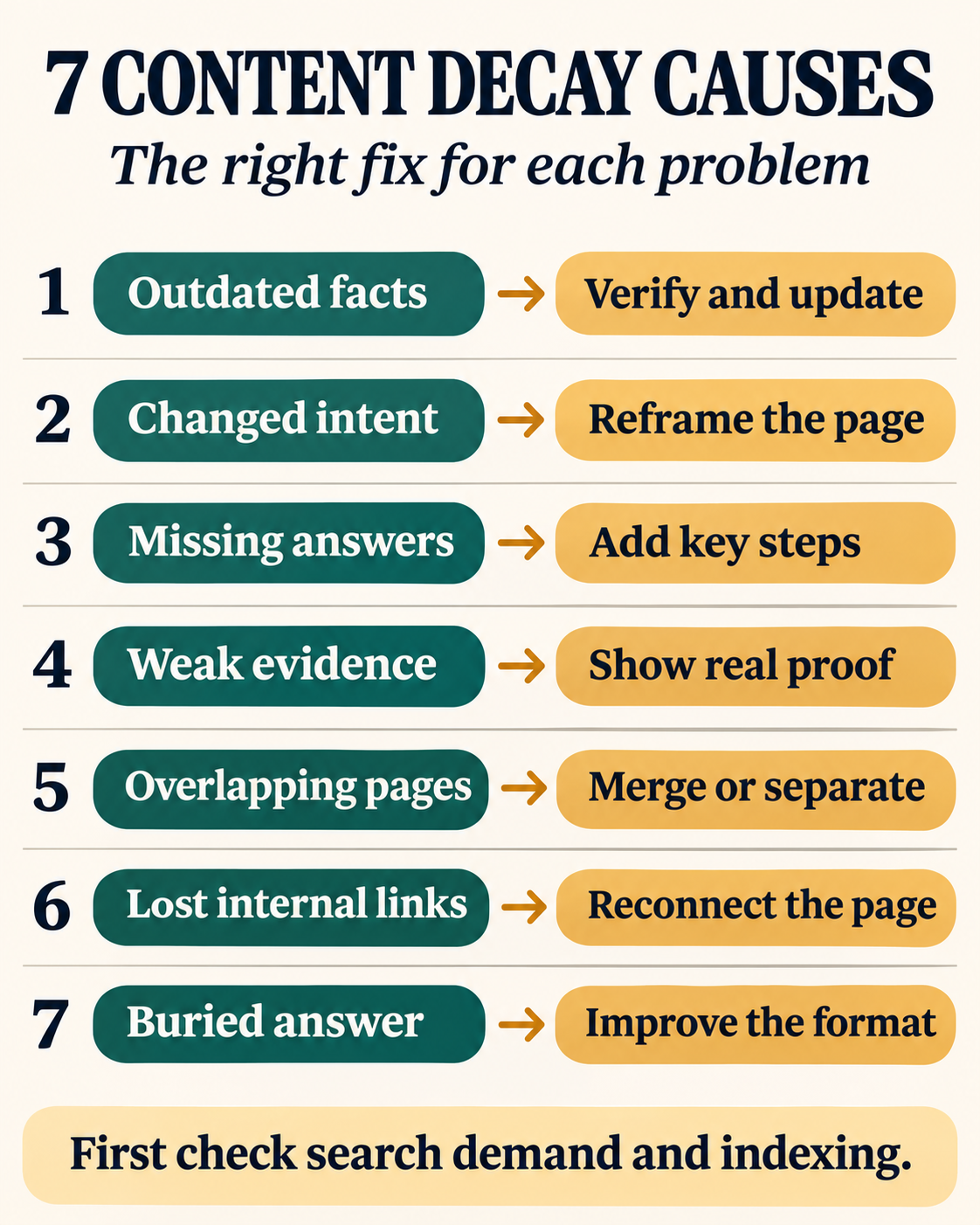
7 Content Decay Causes and What to Fix
| Cause | Evidence to look for | Editorial fix |
|---|---|---|
| 1. Outdated facts | Prices, interfaces, eligibility, or examples have changed | Verify and replace affected claims and steps |
| 2. Changed search intent | Query language and useful result types point to a different task | Reframe the page around the current reader decision |
| 3. Missing answers | Relevant new questions or workflow stages are absent | Add the missing steps, caveats, or decision criteria |
| 4. Weak evidence | Claims are generic, untraceable, or unsupported by original work | Add verified sources, methods, examples, or genuine observations |
| 5. Overlapping pages | Several URLs pursue the same reader task without distinct value | Merge true duplicates or separate their purposes |
| 6. Lost internal connections | Relevant pages no longer link readers to the article | Restore contextual, crawlable links and update the topic path |
| 7. Buried answer | The title promises a solution that the page makes hard to find | Rewrite the lead and structure for the actual task |
1. Facts or Instructions Have Expired
A tutorial can still attract the right audience while giving the wrong instructions. A software comparison may name a discontinued plan, a tax explainer may use last year’s threshold, and a how-to may show controls that have moved. Here, relevance has not necessarily disappeared; the information that made the article useful has aged.
Check high-impact statements against current primary sources. Follow the steps yourself when the task is accessible, record the interface or plan you used, and date any price or eligibility details. Replace broken screenshots only with authentic captures of the current workflow. If a change affects just two sections, repair those sections and leave the accurate parts intact. If the underlying process has been replaced, rebuild the instructions in the order a reader now follows.
Make the visible update date reflect substantial work. Google’s people-first content guidance warns against changing a page’s date merely to make unchanged content appear fresh. For sensitive health, legal, or financial information, route consequential claims through a qualified reviewer before release.
2. The Reader’s Intent Has Changed
Suppose an older page explains what a customer support platform is. The queries now reaching it increasingly ask how to compare shared inboxes or choose a tool for a small team. The page may be accurate, yet its opening does not help the reader make the decision that brought them there.
Compare the affected queries and inspect current results for the main terms. Note whether users seem to need a definition, a procedure, a comparison, or a purchase decision; do not assume that the presence of one result format proves every searcher’s intent. Rework the title, lead, headings, and examples around the dominant task you can genuinely serve. A selection article might add criteria, trade-offs, and a comparison table, while preserving a short definition for readers who need it.
If the new task would alienate the page’s existing audience, keep the original page focused and commission a separate article for the distinct intent. A change in query wording alone is not permission to replace a useful guide with a sales page.
3. The Topic Has Gained Important Questions the Page Does Not Answer
Sometimes the original intent remains, but the task has acquired a step the article never covered. A backup guide might explain how to turn on sync while omitting how to confirm that a deleted file can actually be recovered. A software buying guide might compare features without explaining data export or cancellation. The missing answer can matter more than another paragraph of background.
Look for related queries in Search Console, recurring support questions, changes in official documentation, and places where readers still need to search again. Add the relevant step at the point in the workflow where someone needs it. State prerequisites, limits, and the expected result; a concise checklist or worked example may serve better than a long new section.
Do not append every adjacent keyword. If the new question requires its own audience, evidence, or detailed process, publish a focused companion page and connect the two. The test is whether the added material helps the original reader finish the original task.
4. The Page Makes Claims Without Enough Evidence or Distinct Value
An article can be current and complete but still read like a restatement of vendor descriptions or competing posts. Lines such as “easy to use” and “best for teams” are weak unless the page shows how those judgments were reached. More words will not fix the missing basis for the recommendation.
Audit each meaningful claim. Replace vague praise with an observed workflow, a documented product condition, a sourced example, or a comparison against clear criteria. If a real test is possible, record the task, date, account or plan, output, and limits. If testing is unavailable, say what the documentation establishes and keep any unverified performance judgment out of the copy. For an editorial guide, original value could be a decision tree, a sample audit row, or a useful explanation of when one fix fails.
Ask whether a reader can verify the recommendation and act on it. An extra quotation or decorative “expert tip” does not substitute for a supported claim. The improvement is in the analysis and evidence, not the length.
5. Several Articles Now Compete for the Same Job
An archive may contain a 2023 guide, a 2025 “ultimate” version, and a new checklist that all answer much the same question. Search Console can show queries and URLs trading visibility, but seeing two URLs for one query does not by itself prove harmful cannibalization. Distinct pages can serve different stages of the same topic.
Map each URL to its intended reader, task, unique material, internal links, and historical value. If two pages genuinely duplicate a task, choose the stronger continuing URL, move over material worth preserving, update incoming internal links, and have the web team implement an appropriate permanent redirect for a retired page. If the tasks differ, give each article a clear scope and title, then connect them where a reader naturally moves between them. Editorialge’s keyword cannibalization guide offers a fuller archive audit.
Avoid redirecting a historically valuable page to a loosely related destination or using noindex as a default cleanup tool. Google’s canonicalization guidance treats redirects as a signal for retired duplicate URLs; the destination and reader experience still need to make sense.
6. The Article Has Lost Its Place in the Site’s Reading Path
A helpful page may become hard to find after a hub is redesigned, related articles are replaced, or an internal link points to an obsolete URL. This is an archive maintenance problem. Editing its body alone will not restore the routes that used to bring interested readers to it.
Check relevant hub pages and newer articles that discuss the same task. Confirm that their links resolve to the intended canonical page and that anchor text describes what a reader will find. Add a small number of contextual links where they genuinely support the surrounding explanation. Update the older article’s own links to newer, relevant resources and remove dead paths.
Google’s link best practices recommend crawlable links and descriptive anchor text. Do not treat a link count as a ranking guarantee or add unrelated links across the whole site. The editorial goal is a coherent route through the topic.
7. The Answer Is Buried in the Page’s Format
A search result may promise a direct answer, while the page opens with a long history and hides the practical steps far below. Or an article about selecting software might offer eight isolated product descriptions without a comparison of the conditions that actually matter. The information exists, but the reader must work too hard to use it.
Read the page from the perspective of someone arriving with its leading query. Put a short answer or decision frame near the top, then arrange the supporting detail in the sequence required by the task. Use headings that identify real questions, a table only when it makes differences easier to compare, and examples that resolve a choice. Check the mobile layout and accessibility of any visual summary; text in an image should also be explained in nearby copy.
If impressions are stable but clicks fell, review the title and description alongside the page. Make their promise precise and consistent with the answer; search engines may generate their own snippets, so a metadata edit is a testable improvement rather than a guaranteed traffic fix. Changing a heading without making the article easier to use leaves the underlying problem in place.
A Worked Triage Example
Consider a hypothetical article about choosing a team scheduling app. Its clicks fall from 1,000 to 620 over comparable periods; these figures are illustrative, not Editorialge performance data. The page remains indexed, and interest in its main topic appears steady. Search Console shows that comparison-oriented queries now account for more of its impressions, while the article still opens with a lengthy definition and offers no selection criteria.
The first hypothesis is intent and format, not simply old facts. The editor checks current product documentation for any stale claims, then moves a concise comparison framework near the top and adds criteria such as calendar integration, permissions, and export. If a separate article already covers the exact same comparison, the editor reviews both URLs before choosing which one to revise. The team logs the query set, edit date, and changes, then compares a meaningful post-update period with an appropriate baseline. The example demonstrates a decision process, not a promised recovery rate.
Choose the Fix the Evidence Supports
For each candidate page, record the URL, lost queries, period compared, demand and indexing checks, primary cause, proposed edit, and what you will measure afterward. If the evidence points to several causes, address the one most likely to prevent the reader from completing the task, then reassess. A genuine decline may need both a corrected fact and a better structure, but each edit should have a reason.
These seven content decay causes lead to different work: fact-checking, reframing, completion, stronger evidence, consolidation, internal linking, or clearer delivery. Diagnose first, preserve what still helps, and judge the result against the page’s actual reader goal.