


The best virtual classroom software for independent tutors makes it easy to explain an idea, see a learner’s response and pick up where the previous lesson ended. A video link alone may be enough for conversation practice. Mathematics, language exercises and small-group teaching often need shared writing, reusable materials and clearer control over what students can do.
What We Checked
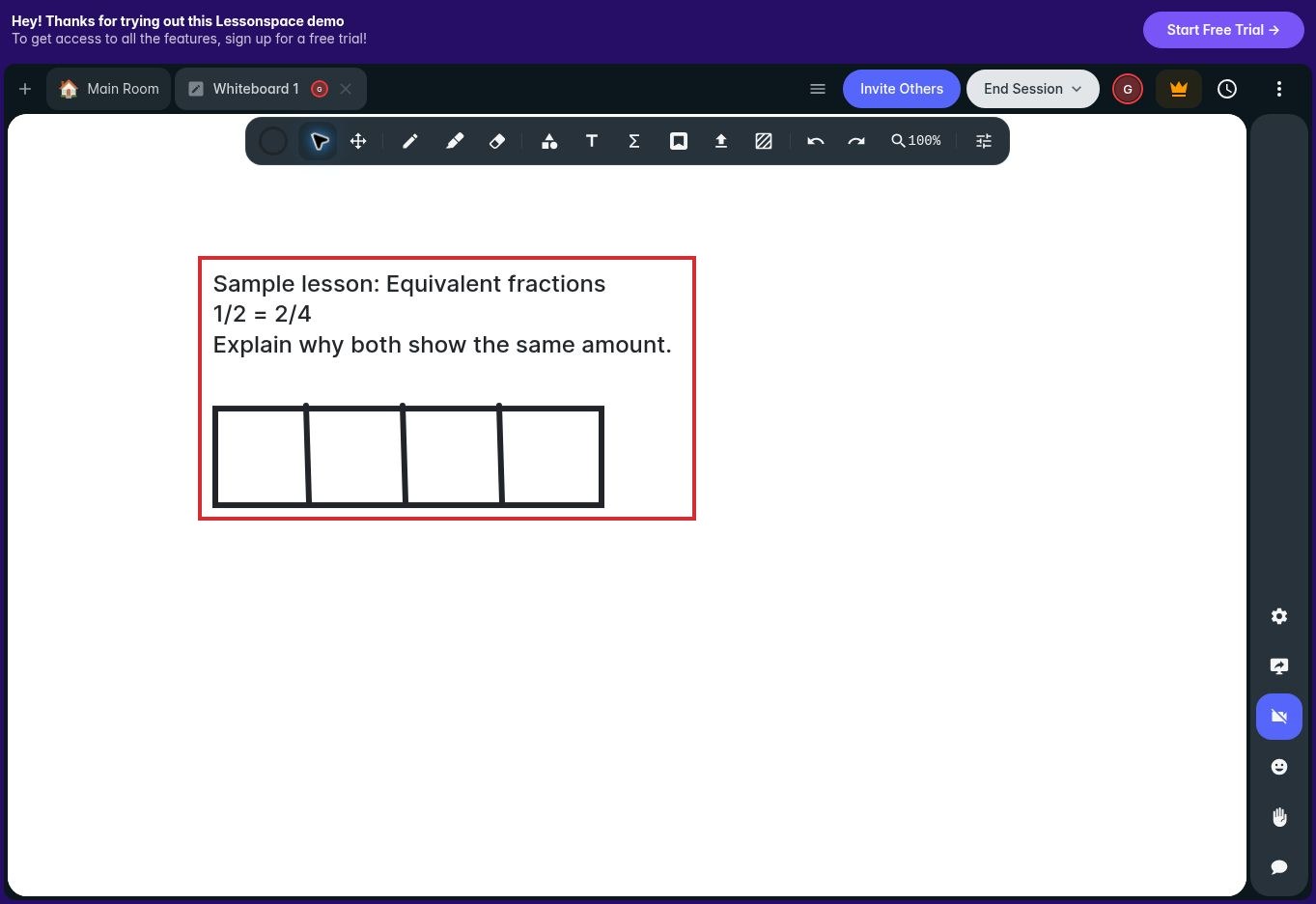
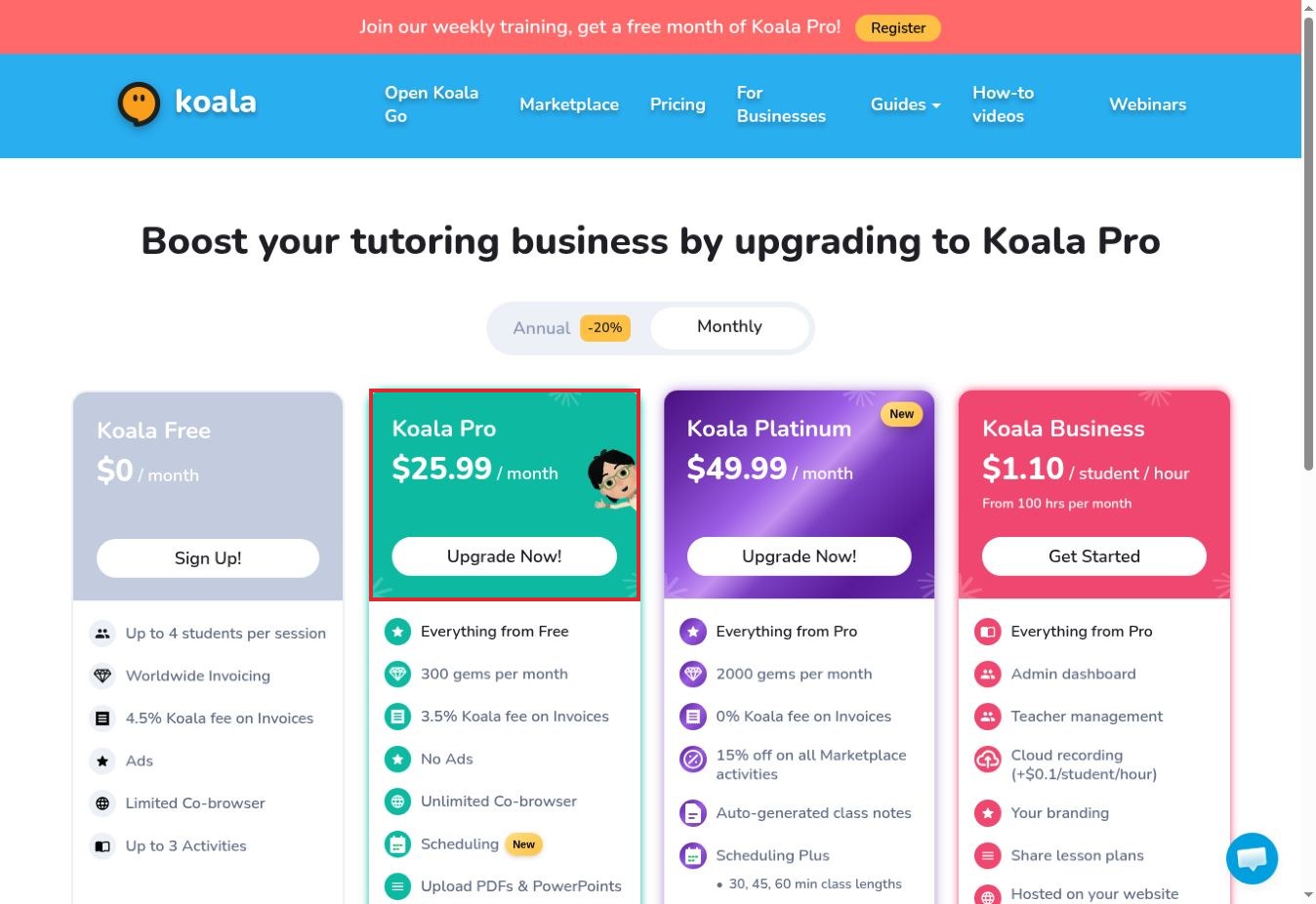
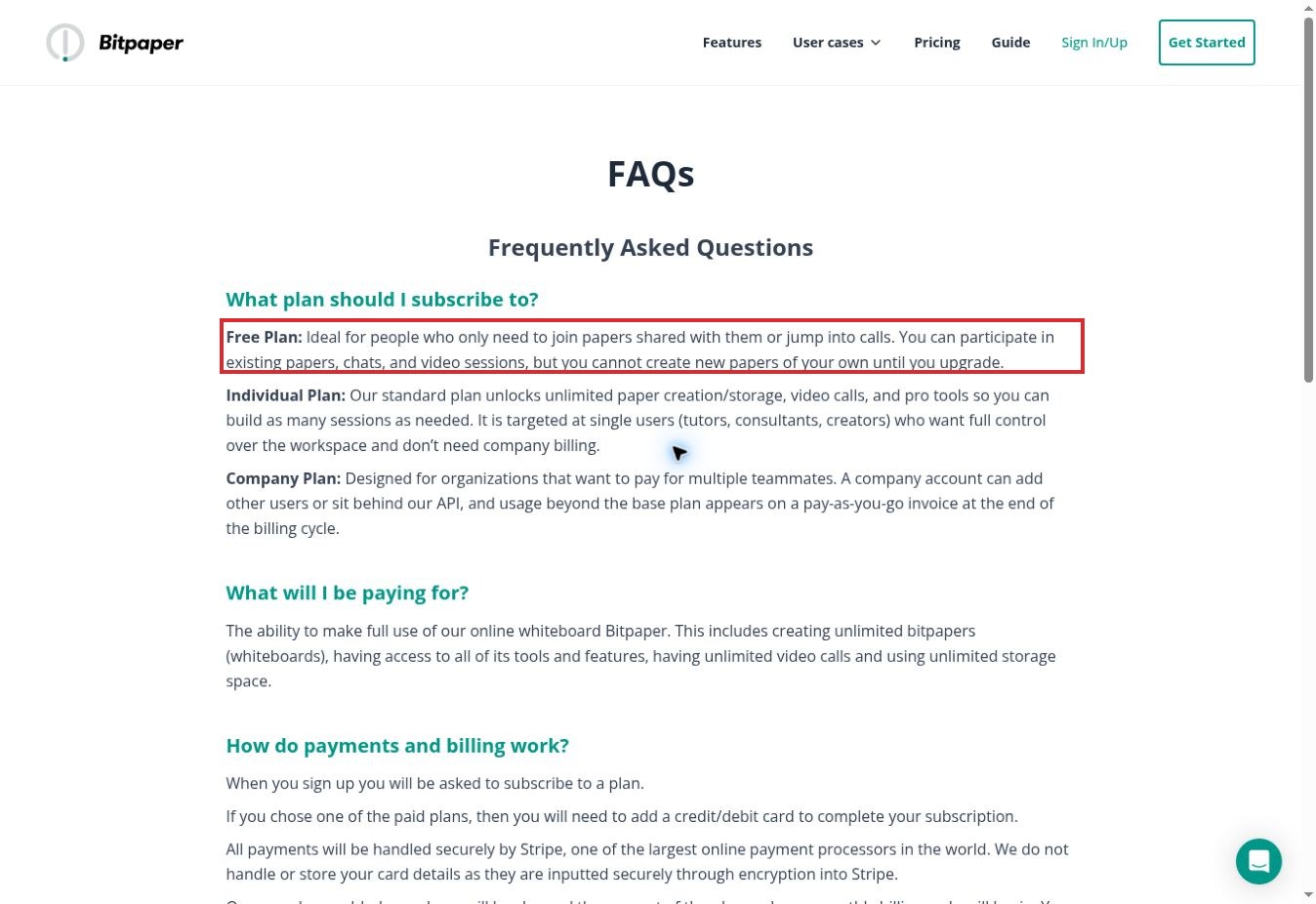
Editorial observations for this draft on November 22, 2026: in Lessonspace’s public demo, an operator created a whiteboard, typed a fictional equivalent-fractions lesson and drew a rectangle divided into four sections. On Koala’s pricing page, switching from annual to monthly billing changed the displayed Pro price from $21.99 per month, billed annually, to $25.99 monthly. Following Bitpaper’s pricing-page FAQ link confirmed that its free account can participate in existing papers but cannot create new ones.
These are three different kinds of evidence: a limited whiteboard authoring check, an interactive pricing check and a documentation check. No student joined the demonstration. Audio, video, simultaneous collaboration, recording, exports, regional connection quality and lesson persistence were not tested. The remaining comparisons use official product documentation. Screenshots below show the actual checks, with red boxes marking the relevant areas.
Which Virtual Classroom Software for Independent Tutors Should You Shortlist?
Start with Lessonspace for a tutoring-focused workspace, LearnCube for a browser-based classroom with teaching materials, and Koala Go for activity-led lessons. Bitpaper is a strong candidate when a shared writing surface is central to the lesson. Zoom and Google Meet remain practical choices when students already know them, although their classroom workflow requires more assembly.
The numbered order prioritizes fit for independent tutors, then specialist alternatives and familiar meeting tools. It is an editorial shortlist, not a measured performance ranking. Sponsorship prospects did not determine inclusion or position. Pricing below is a dated public-page snapshot in US dollars where a dollar price was displayed; local taxes, currency conversion and account-specific offers require checkout confirmation.
| Tool | Best fit | Public price or entry point checked | Main qualification |
|---|---|---|---|
| 1. Lessonspace | Shared lesson materials and writing | Basic $9/month, 10 hours | Usage and larger-group charges matter |
| 2. LearnCube | Browser-based individual teaching | Basic free; Pro advertised from $19 | Confirm the Pro billing period and inclusions |
| 3. Koala Go | Interactive activities and co-browsing | Free; Pro $25.99 monthly | Annual equivalent is a different commitment |
| 4. Bitpaper | Whiteboard-led tutoring | Individual $15/month | Free participation does not include creating papers |
| 5. VEDAMO | Structured small-group classes | 30-day trial; confirm regional paid price | Trial and paid participant limits differ |
| 6. ClassIn | Teaching tools and class organization | Free option; confirm suitable paid configuration | Free comparison lists 40-minute lessons |
| 7. Zoom Workplace | Familiar video plus whiteboard | Basic free; Pro $16.99 monthly | Basic’s 40-minute limit also affects one-to-one lessons |
| 8. Google Meet | Simple conversation and screen sharing | Free personal-account option | Use a separate suitable whiteboard |
| 9. Microsoft Teams | Tutors already using Microsoft business tools | Free meeting option; business plans vary | Whiteboard is not included in the personal-plan comparison |
| 10. WizIQ | Dedicated classroom with lesson resources | Headline from $18/teacher/month | Calculator starts higher; obtain a configured quote |
1. Lessonspace
Lessonspace is the first option to examine when the lesson depends on working together on a board rather than presenting slides. Its classroom combines whiteboard and document tools with communication features. The attraction for a solo tutor is a teaching workspace that can hold the explanation and the learner’s response in the same place.
The public demo allowed a useful, limited check. Creating a whiteboard, adding the sentence “1/2 = 2/4” and constructing a four-part rectangle worked without an account. The screenshot records those actions. The diagram was a starting prompt for a lesson, not a completed assessment or proof that a student understood fractions. No second participant was present.
Basic costs $9 monthly for 10 hours, with extra usage at $1.95 per hour. Starter lists $29 for 30 hours. The billing documentation counts time when at least two connections are active; an extra browser connection can matter even when it belongs to the same person. More than four participants introduces an additional participant-hour charge.
Best for tutors who want a dedicated collaborative surface and can estimate monthly teaching hours. Before paying, test student permissions, reopening the lesson and how a tablet behaves alongside a laptop.
2. LearnCube
LearnCube suits tutors who want browser-based teaching with a whiteboard and a library of materials. Official product pages describe typing, drawing, annotation, multiple whiteboards and uploaded lesson content. That combination is useful for a language tutor who wants to move between a short reading passage, vocabulary practice and a learner’s written answer.
The Basic plan is advertised as free with unlimited one-to-one classes and storage for 10 files. The pricing page attaches an asterisk to the class allowance, so check the applicable conditions during signup. Pro is advertised from $19 and adds group teaching and other capabilities, but the retrieved pricing text did not establish a sufficiently clear billing period. Treat that figure as a starting point to verify, not a confirmed month-to-month bill.
The product’s browser focus can reduce installation work. It does not establish that every student device will provide identical drawing or media behavior. A tutor using a pen tablet should try the actual writing workflow before committing.
Best for individual teaching that reuses documents and exercises. Confirm whether the selected plan includes the recording, storage and class-history features you need; a product-wide feature description is not a promise for every subscription.
3. Koala Go
Koala Go is worth considering for activity-led tutoring, especially when the student needs to interact with material rather than watch a screen. Its positioning emphasizes a shared browser, teaching activities and controls over learner interaction. The product may appeal to tutors who find a conventional meeting interface too passive for their lesson style.
Our pricing-page interaction exposed an important purchasing distinction. Pro displayed $21.99 per month on annual billing, with $263.88 charged for the year; selecting monthly changed the amount to $25.99. Platinum changed from a $39.99 annual equivalent to $49.99 monthly. The annual equivalent should not be presented as a cancel-anytime monthly charge.
Free lists up to four students, advertising, limited co-browsing and up to three activities. The page also separates Koala’s invoicing fee by plan. A lower platform invoice fee should not be assumed to eliminate every payment-processing charge.
Best for tutors who will actively use the activity and co-browsing model. Test one real worksheet or website, student control and tablet compatibility before upgrading. The observed pricing toggle did not constitute a classroom trial.
4. Bitpaper
Bitpaper centers the lesson on a shared online paper. This is a useful approach for mathematics, diagrams, exam practice and other subjects where the tutor needs to see the student’s working. Integrated calls and chat can keep the discussion close to the writing surface.
The current Individual subscription lists $15 per month. The key distinction is the free tier: the official FAQ says free users can participate in existing papers, chats and video sessions, but cannot create papers of their own. A tutor building a reusable lesson collection should budget for the creator subscription rather than assume the learner’s free access applies to the teacher’s workflow.
We followed the pricing page’s FAQ link and captured that explanation. We did not create an account, start a call or test simultaneous drawing. Official call guidance also says screen sharing is not supported on iOS, which matters if a learner’s only device is an iPad or iPhone.
Best for tutors who prefer a flexible writing workspace over a larger classroom-management system. Check what remains editable after cancellation, and export essential teaching material before relying on any subscription as its only home.
5. VEDAMO
VEDAMO combines a virtual classroom with interactive teaching tools, including a whiteboard, screen sharing and breakout rooms. It belongs on the shortlist when a tutor is moving beyond individual lessons into structured groups and wants more control over the session.
The official pricing page describes paid virtual-classroom sessions with up to 50 learners and one concurrent room per account. Those are different limits: supporting a large class does not authorize running several separate lessons at once. The 30-day free trial is described with one learner, so a successful individual trial would not establish how a paid group session performs.
The pricing page offers currency selection, but the numeric paid price was not reliably exposed in the retrieved content. We therefore have not repeated older prices found elsewhere. Ask for the current regional price and confirm storage, archives and any recording-related inclusions.
Best for a tutor planning recurring groups. The pricing page failed to load in our interactive browser, while official text retrieval was available; this is an access limitation of the check, not a finding that the service is unavailable. No VEDAMO lesson was conducted.
6. ClassIn
ClassIn presents a more structured teaching environment. Its independent-teacher page describes a collaborative blackboard, timers, breakout rooms, homework and class reports. These tools can suit a tutor who wants the lesson and follow-up work organized within a teaching platform rather than spread across several unrelated apps.
Plan selection requires care. The international pricing comparison lists a free option with 40-minute lessons, 20 lessons per class and 50 participants. The number of learners who can be visibly “on stage” is a separate constraint. Breakout rooms and other capabilities differ between free and business columns; features on the independent-teacher marketing page should not automatically be attributed to the free plan.
The site also presents different commercial configurations. Obtain a quote for the independent-teacher setup you actually need, and confirm whether the international or local product applies to your account. We did not establish a universally applicable paid solo-tutor price.
Best for tutors who want a classroom structure and will invest time in setup. Trial the required application and student entry process on both ends before moving an existing class.
7. Zoom Workplace
Zoom is a practical option when familiarity is likely to reduce setup work. Video, screen sharing and whiteboard tools can cover many tutoring formats, particularly lessons built around conversation, presentations or a small number of shared activities. It is still necessary to design the learning workflow around those meeting tools.
Basic is free but limits meetings to 40 minutes, including most one-to-one sessions. Pro displayed $16.99 per user monthly or a lower $14.16 monthly equivalent on annual billing. For a tutor selling a continuous 60-minute appointment, the free time limit is a material constraint.
The pricing page lists three editable whiteboards on Basic. Zoom’s newer persistent whiteboard and classic in-meeting annotation are not interchangeable. Check whether students can collaborate during the meeting and whether accessing the board afterward requires their own account.
Best for tutors whose students already use Zoom and whose material fits a meeting-led format. Test a complete lesson-length session, guest permissions and the post-lesson handoff. An existing paid organization does not necessarily mean the tutor’s individual host has the required paid license.
8. Google Meet
Google Meet is a sensible starting point for conversation practice, coaching and screen-sharing lessons. It can reduce the number of new tools a learner must understand, especially when scheduling and documents already sit in Google’s ecosystem.
The free personal-account offering allows one-to-one meetings for up to 24 hours, while meetings with three or more participants have a 60-minute limit. That distinction matters when a parent, observer or additional learner joins. Recording and other advanced features depend on the applicable subscription.
For a writing-intensive lesson, pair Meet with an appropriate shared whiteboard and check its access settings separately. Jamboard is no longer a current solution: Google’s Jamboard service ended in December 2024. Older comparisons that describe it as Meet’s ready-made tutoring whiteboard are out of date.
Best for a simple meeting workflow rather than an all-in-one tutoring classroom. Test admission from a learner account, document permissions and switching between the call and the board. Do not assume an independent tutoring business qualifies for institutional education licensing.
9. Microsoft Teams
Microsoft Teams is most compelling for tutors already using a suitable Microsoft business subscription. Meetings, files and ongoing communication can support a recurring teaching relationship, but the account type substantially changes what is available.
Microsoft’s current comparison lists 60-minute meetings and 100 participants for its free personal option. Crucially, its Whiteboard row shows no inclusion for the free, Personal or Family columns, while business options include it. Buying a consumer subscription solely to obtain the classroom whiteboard workflow would therefore be a poor assumption.
External collaboration also depends on the organization’s configuration. A whiteboard that works for the tutor’s own account may not work the same way for a learner joining from outside the organization. Confirm this with an actual external test account before assigning homework on a board.
Best for tutors who already have the relevant business environment and can verify guest access. For a new solo practice, compare the full subscription and administration effort with a purpose-built classroom. This entry is conditional on the right license and settings, not an endorsement of the free tier as a complete whiteboard classroom.
10. WizIQ
WizIQ offers a dedicated virtual-classroom product with a whiteboard, lesson resources, polls and recording options. It is worth investigating when a tutor wants classroom tools in one service and may later add a more organized course-delivery workflow.
Its public pricing needs clarification before purchase. The page advertises a starting figure of $18 per teacher per month, while the visible classroom calculator starts at $40 for a one-room, 10-attendee configuration. Those figures should not be treated as interchangeable quotations for the same package.
The Professional classroom offering is presented for individual teachers, with different participant options and a 120-minute class duration. Its separate LMS pricing represents another product arrangement. Ask which classroom, recording, storage and support features are included in a written quote.
Best for tutors prepared to compare a configured offer and run a full trial. We verified official descriptions, not a live class or the vendor’s service quality. Make joining, writing, recording access and lesson retrieval part of the acceptance test before transferring students.
How to Compare the Real Cost of a Tutoring Classroom
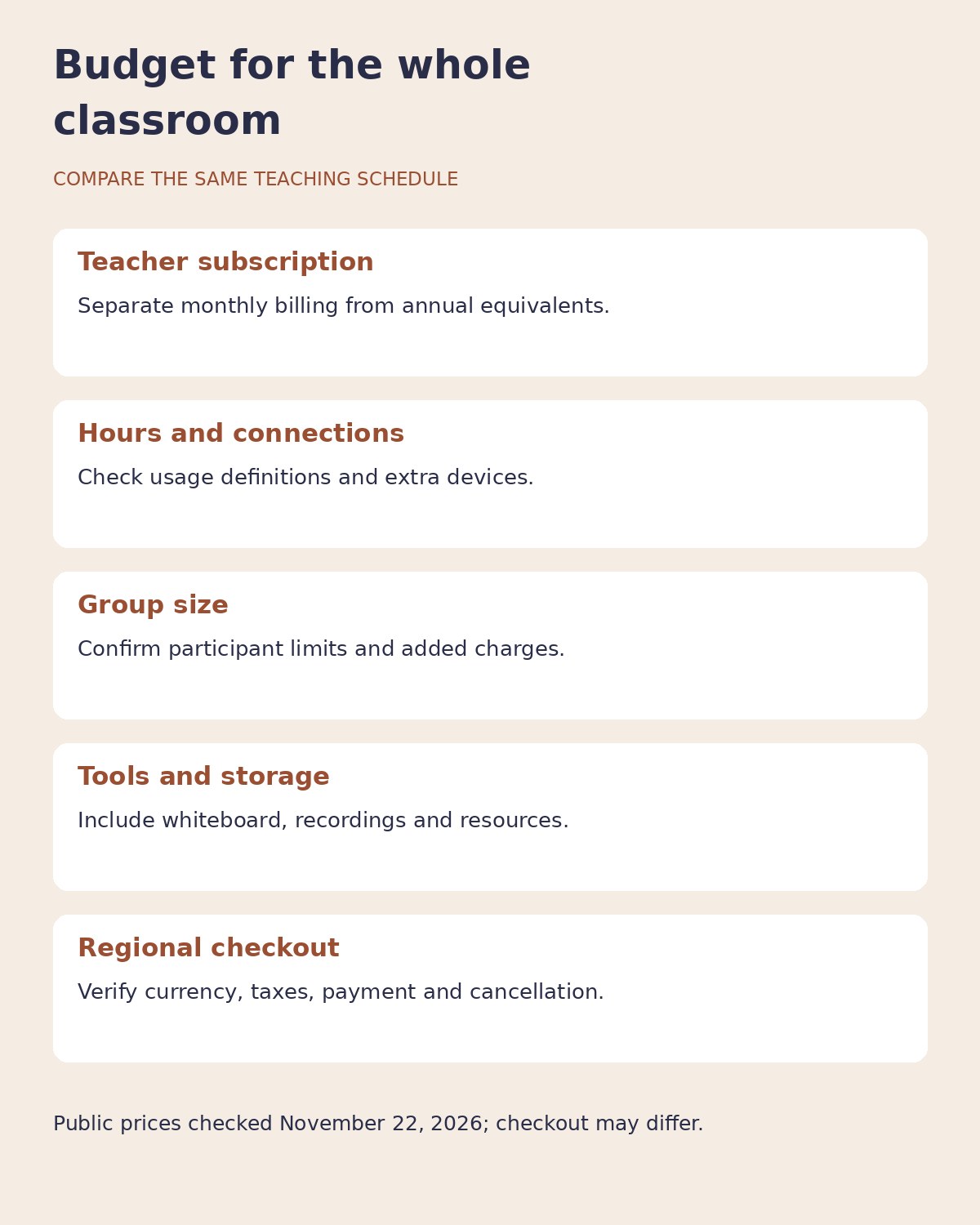
Start with your timetable rather than the smallest advertised number. Twenty one-hour lessons produce 20 teaching hours, but usage-based platforms can count connections or participant time differently. A second device used as a writing tablet may create another connection. Confirm the exact billing definition before calculating the total.
Compare three separate costs: the teacher’s subscription, any usage or group allowance, and the tools needed outside the classroom. A free meeting app plus a paid whiteboard can be a good combination, but it is still a two-product workflow. Recording storage, invoicing charges and paid lesson resources may also change the total.
Check annual billing against your actual teaching season. A lower monthly equivalent is not automatically better for a tutor with a short exam-preparation season. Where a price is quote-only or ambiguous, ask the vendor to state currency, tax treatment, cancellation terms and the exact plan name.
Run the Same Ten-Minute Dummy Lesson
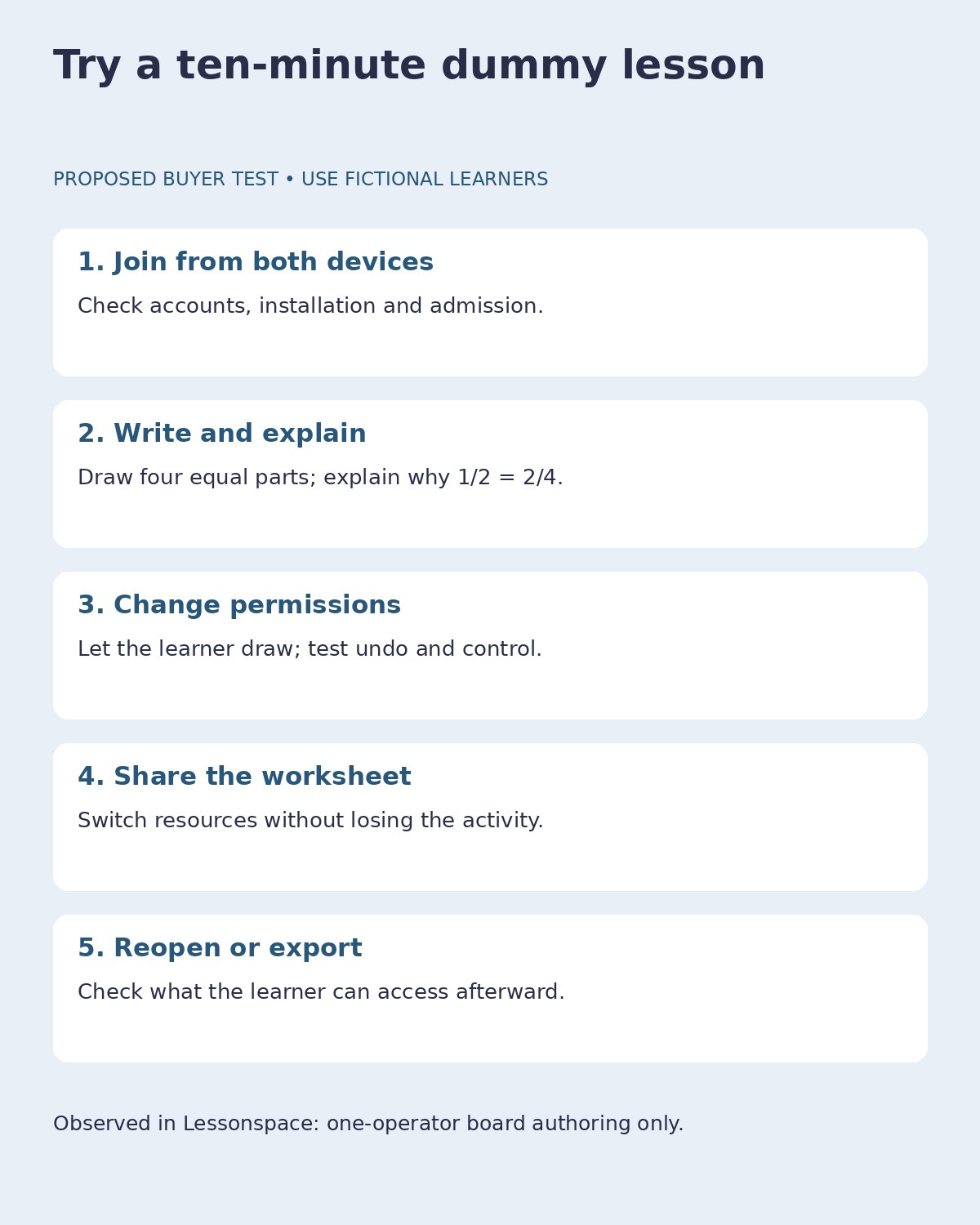
Use a fictional learner and the same simple exercise for every shortlisted tool. Our sample prompt was: “1/2 = 2/4. Explain why both show the same amount.” The authoring check in Lessonspace covered only creating the text and a four-section rectangle. The following steps are a proposed buyer test, not completed results for all ten products.
- Join from the tutor’s device and a separate learner device. Record whether an account or installation is required.
- Add the prompt and draw a rectangle. Ask the fictional learner to mark two of four equal sections and explain the connection to one half.
- Switch writing permission between tutor and learner. Check whether accidental deletion can be undone.
- Share a short worksheet, then return to the board. Notice whether both people can find the same page.
- End and reopen the lesson, or export the board where supported. Verify what the learner can access afterward.
Include one deliberate interruption: disconnect the learner and rejoin. Note what remains available. Use the actual tablet, browser and internet connection intended for lessons; a smooth desktop demonstration does not establish mobile usability or performance in another country.
Keep the Learning Goal Ahead of the Interface
A colorful room is useful only if it helps the student do the work. Carnegie Mellon’s guidance on aligning assessment with instruction explains why the activity must match the intended learning outcome. For equivalent fractions, hearing the learner’s explanation adds evidence that a clicked answer alone cannot provide.
Its explanation of formative assessment also supports a practical buying question: can the tutor use the response to change the next teaching step? A classroom should make that response visible enough to act on.
For preparation, see our guide to AI lesson planning tools for teachers. If tracking progress is becoming a separate administrative burden, compare gradebook and grading software rather than assuming the classroom automatically replaces a record-keeping system.
Frequently Asked Questions
What is the best free option for an independent tutor?
It depends on the lesson. Google Meet can suit one-to-one conversation, LearnCube advertises a free individual-teaching plan, and Koala has a limited free option for activities. Check the exact writing, storage and time limits. Bitpaper’s free participation tier does not allow a tutor to create new papers.
Do students need paid accounts?
Not always, but guest participation, persistent board access and account requirements are different questions. Verify the complete student journey with a separate account or device rather than judging from the teacher’s view.
Which platform works best internationally?
No cross-country performance comparison was conducted for this article. Confirm local availability, payment methods, currency, support hours and the correct regional product. Then run a lesson on the student’s real connection. Public availability does not establish equal latency everywhere.
Should every lesson be recorded?
Recording is optional, not the default measure of a useful classroom. Decide its purpose, obtain the appropriate agreement, restrict access and define retention before enabling it. A short exported explanation may be enough for revision without storing an entire conversation.
Choose the Classroom Around Your Lesson
The best virtual classroom software for independent tutors is the one that supports the lesson you actually teach at a sustainable total cost. Begin with two or three relevant candidates, repeat the same dummy lesson and check the student’s view. Our limited Lessonspace check established that the sample board could be authored; the Koala and Bitpaper checks clarified purchasing conditions. Full teaching trials remain the next step before moving paying learners.