


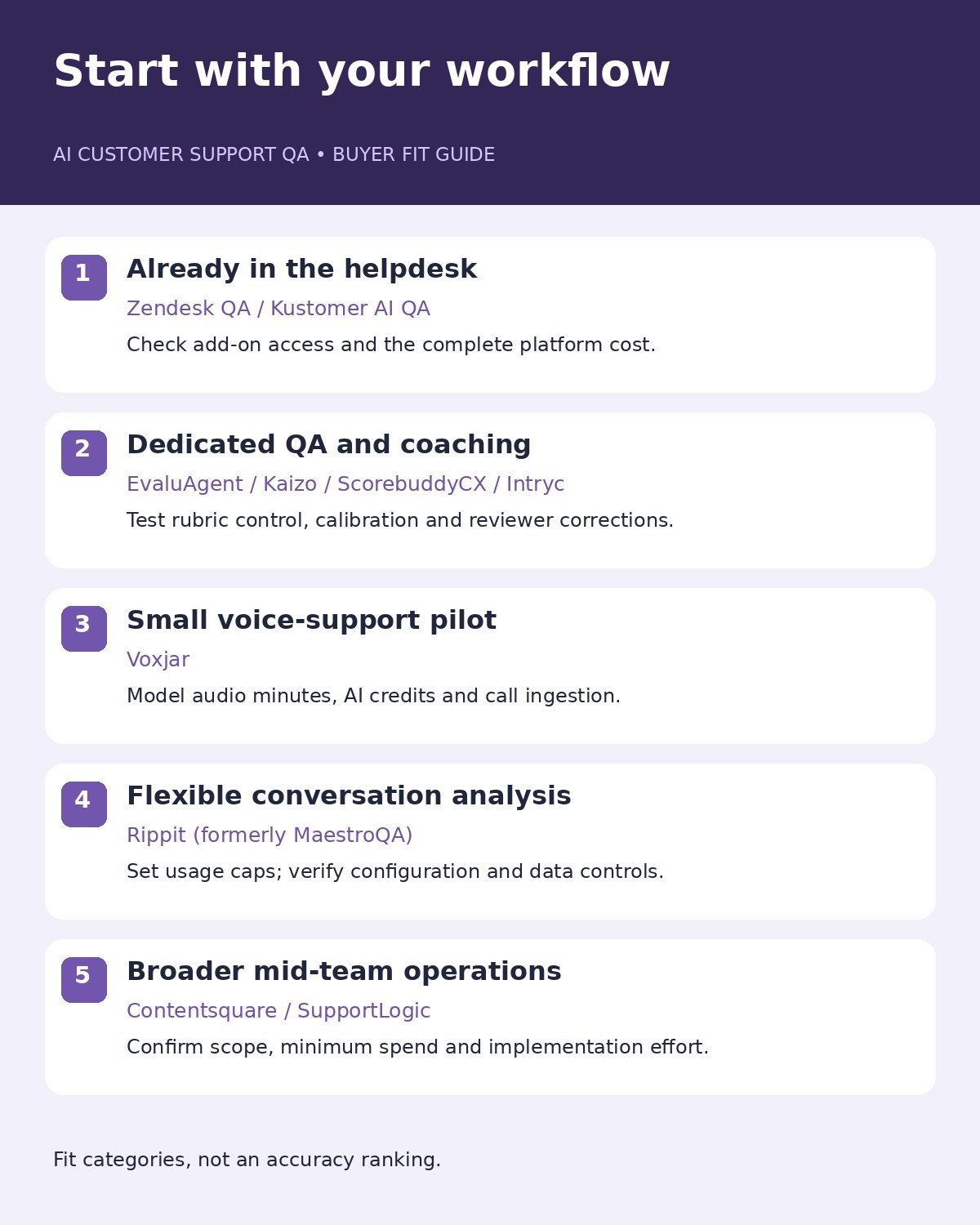
AI customer support QA tools can help a small team find weak answers, missed procedures and poor handoffs without reading every ticket manually. The useful question is not simply whether a product promises to score every conversation. It is whether your manager can understand a score, correct it, and turn the finding into better support without taking on a disproportionate bill or implementation project.
For teams already using Zendesk or Kustomer, native QA deserves an early look. EvaluAgent, Kaizo, ScorebuddyCX and Intryc offer dedicated quality workflows. Voxjar is a practical candidate for a small voice-support pilot, while Rippit offers a usage-based route for teams comfortable configuring conversation analysis. Contentsquare Conversation Intelligence and SupportLogic Elevate SX address broader operational needs; their commercial scope needs particular scrutiny before a smaller team commits.
What We Checked
Research and original browser observations for this draft were completed on November 22, 2026. We checked official product, pricing and help pages for documented scoring, reviewer controls, access conditions and cost drivers. The ten entries are grouped by buying situation, not ranked by measured accuracy. A product’s promise of full conversation coverage is not evidence that every score is correct.
Three public-page checks examined EvaluAgent’s proof-of-concept terms, Voxjar’s interactive credit calculator and Rippit’s free-credit conditions. In Voxjar’s free evaluation flow, we also selected its supplied account-support call, chose customer experience and issue resolution, and inspected the Comprehensive QA criteria. Continuing required sign-in and agreement to terms, so no evaluation result was obtained. These are original interface observations, not a completed ten-product accuracy benchmark.
Pricing is a dated buying reference, not a quote. Where a vendor requires a sales conversation, the table says so. We excluded Solidroad because its official update says the live-conversation AutoQA product was retired in September 2026. We also treat MaestroQA and its current name, Rippit, as one vendor rather than counting them twice.
AI Customer Support QA Tools at a Glance
| Tool | Useful starting point | Cost or access detail to check |
|---|---|---|
| 1. Zendesk QA | Teams are already working in Zendesk. | Confirm the QA add-on, eligible plan and trial access; a helpdesk price is not a QA quote. |
| 2. EvaluAgent | Custom scorecards and coaching with a published starting rate | AutoQM starts at $35/user/month; proof of concept follows a demo. |
| 3. Kaizo | Human-reviewed and automatic scoring in one program | Quote and guided demo; current page says no self-serve trial. |
| 4. ScorebuddyCX | Structured calibration and gradual AI adoption | Auto Scoring is listed in Accelerate; included monthly AI scores are limited. |
| 5. Intryc | QA findings connected with coaching and training | Team size and conversation volume affect the quote; trial access is arranged. |
| 6. Voxjar | Small voice-support teams testing call QA | Basics lists three users and 120 AI credits; scoring results require account access. |
| 7. Rippit, formerly MaestroQA | Configurable QA alongside broader conversation analysis | Usage-based storage and AI costs: only $10 of starting credits requires no card. |
| 8. Kustomer AI QA | Existing Kustomer teams are reviewing humans and bots. | Confirm add-on entitlement, billing unit and platform cost. |
| 9. Contentsquare Conversation Intelligence | Quality findings tied to contact drivers and resolution | QA-specific demo and quote; do not assume the general free plan includes it. |
| 10. SupportLogic Elevate SX | More established mid-sized technical-support operations | Elevate is quote-based; broader platform pricing starts at $4,000/month on a prepaid annual contract. |
A five-person support team and a department with several dozen agents can need very different products. The last two options are conditional shortlists for broader requirements, not recommendations to buy an enterprise-sized package for a tiny queue.
1. Zendesk QA: Start With the Helpdesk You Already Use
Zendesk QA is a logical first comparison for a team whose conversations already live in Zendesk. Its offering combines automated conversation scoring, coaching and ways to identify interactions needing attention. It can assess both human and AI-agent interactions, so a manager can examine quality across a mixed support operation.
The help documentation makes an important distinction: automatic reviews contribute to the Auto Quality Score, while manual grades contribute to the Internal Quality Score. Its dashboard also tracks agreement between automated and human ratings. For a small team, that separation helps keep “more tickets reviewed” from being mistaken for “more accurate judgments.”
Confirm QA pricing and entitlement separately from the base support subscription. During a pilot, inspect a wrong-but-polite answer, a correct escalation and a conversation with insufficient context. Ask whether the system explains each result and whether reviewers can reliably identify disagreements. Existing Zendesk use makes this worth evaluating; it does not establish that the native product will fit every rubric or budget.
2. EvaluAgent: A Clearer Starting Point for Budgeting
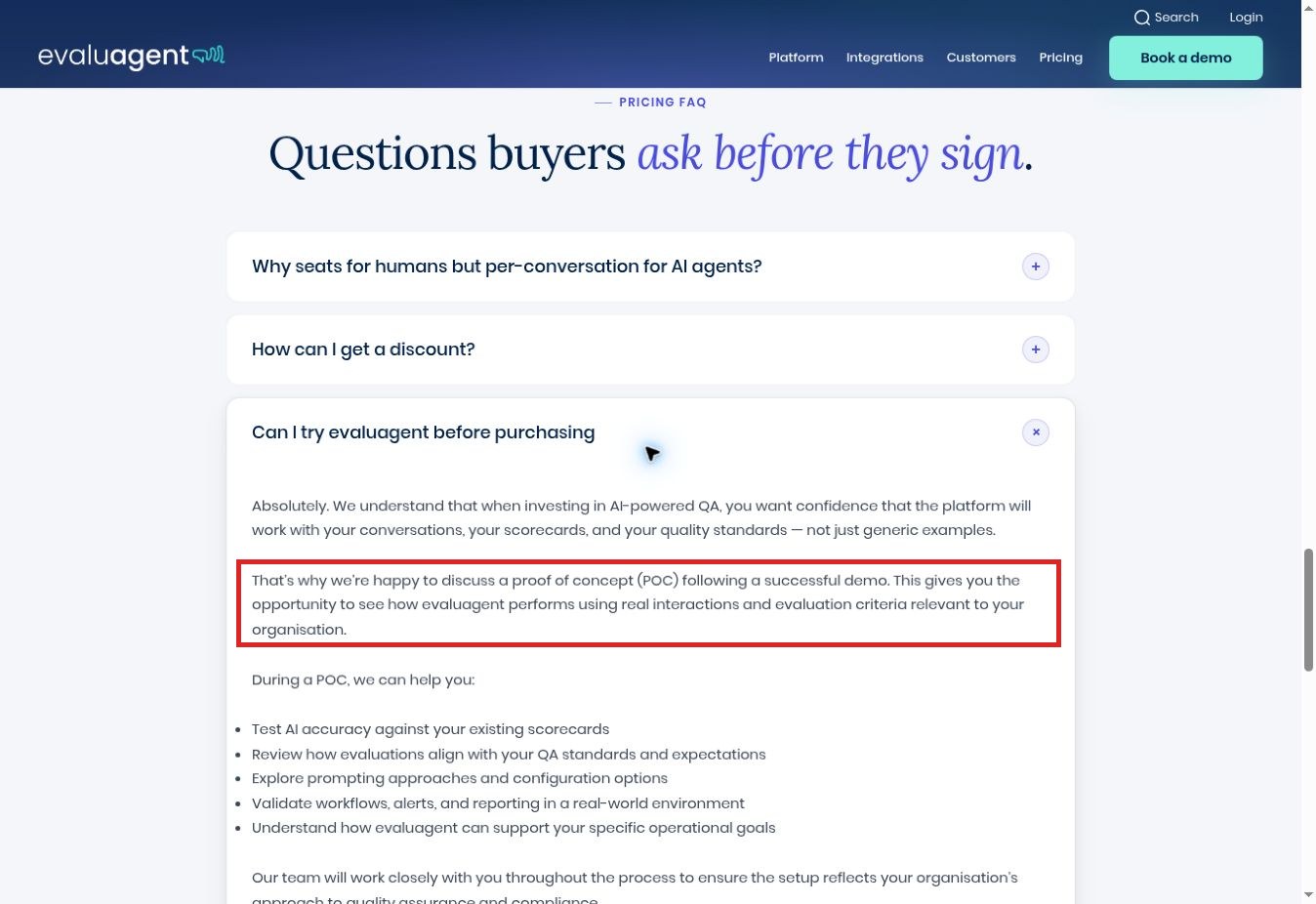
EvaluAgent publishes AutoQM & Improvement from $35 per user per month, with custom scorecards, automated scoring and coaching workflows. Its broader AutoQM + Conversation Intelligence package starts at $65 per user per month. Those are starting figures that still need a tailored quote, but they make early budget conversations more concrete than an entirely unpublished price.
The product combines automated evaluation with manual review and calibration. That suits a team that wants to expand coverage while retaining a consistent way for reviewers to settle disagreements. The more expensive package adds deeper conversation insight; a small team should establish whether those capabilities solve a real reporting problem before buying them.
Our browser check expanded the trial FAQ. It described a proof of concept following a successful demo, using relevant conversations and criteria. It did not describe an immediately accessible fourteen-day sandbox. Bring a short, labeled test set to that discussion and agree in advance how discrepancies will be reviewed. Do not treat a vendor-led presentation as your own accuracy test.
3. Kaizo: Choose Where Human Review Stays Involved
Kaizo distinguishes fully automatic AutoPilot scoring from an assisted Auto QA workflow in which a reviewer edits prefilled criteria and feedback. This is useful when a support manager wants routine checks automated but still needs human judgment on complicated cases.
The official QA page describes custom rubrics, knowledge-base context and comparison with historical ratings before rollout. For a small or mid-sized team, the practical advantage is the ability to build around the quality standard already used internally, rather than accepting an unexplained generic score. The real evaluation question is how much time the team must spend maintaining that standard.
Current access information points to a guided demonstration and explicitly says there is no self-serve trial. The pricing address also redirected to the demo page during research, so older per-agent prices are not repeated here. Request a quote that counts reviewers and managers as well as frontline agents. In the demonstration, ask for the same difficult conversation to be reviewed automatically and then corrected by a human.
4. ScorebuddyCX: Check the Difference Between AI Assistance and Auto Scoring
ScorebuddyCX is worth examining when the team already has scorecards and wants a more organized review, calibration and coaching process. Its Foundation package lists customizable scorecards, QA workflows and calibration. That makes it a potential route out of disconnected review spreadsheets.
The important purchasing distinction is that Foundation’s AI Assistance is not the same package as automated scoring. The pricing page lists AI Auto Scoring in Accelerate, alongside 500 included monthly AI scores. Elite lists 1,000 and adds voice transcription and other capabilities. A team processing thousands of conversations should calculate its credit requirement before equating the platform subscription with full-volume evaluation.
Prices are quoted, and the FAQ describes annual contracts and a fourteen-day trial. Confirm what that trial actually includes, particularly transcription, integrations and AI credits. A useful pilot should show how two reviewers resolve a disagreement and how the resulting feedback reaches an agent. Evaluate the complete coaching process, not only the speed of filling a scorecard.
5. Intryc: Connect QA Findings With Training
Intryc combines automated scoring with calibration, disputes, reporting, coaching and training simulations. It documents support for conversations across chat, email, tickets and calls. This makes it relevant to a growing team that wants a recurring quality problem to lead to a specific coaching or practice activity.
Its commercial model depends on both team size and conversation volume. The company offers a trial through its team and says typical onboarding takes two to four weeks. Treat that as a vendor estimate, not a promise that a particular integration or custom rubric will be ready on the same timetable.
Ask the pilot owner to trace one failed criterion from the original conversation to a reviewer decision, a coaching assignment and a follow-up check. That sequence will reveal more than a dashboard populated with demonstration scores. Intryc advertises an accuracy promise, but a headline percentage is not a substitute for reading the conditions and comparing the system against your own labeled cases, languages and policy exceptions.
6. Voxjar: A Practical Voice-QA Starting Point
Voxjar is specifically useful for call-based support. Its Basics plan lists three users, single-call uploads and 120 AI credits. Paid QA Pro adds features such as bulk uploads, calibration and coaching. Credit consumption depends on audio duration and the AI options selected, so call minutes matter more than ticket count alone.
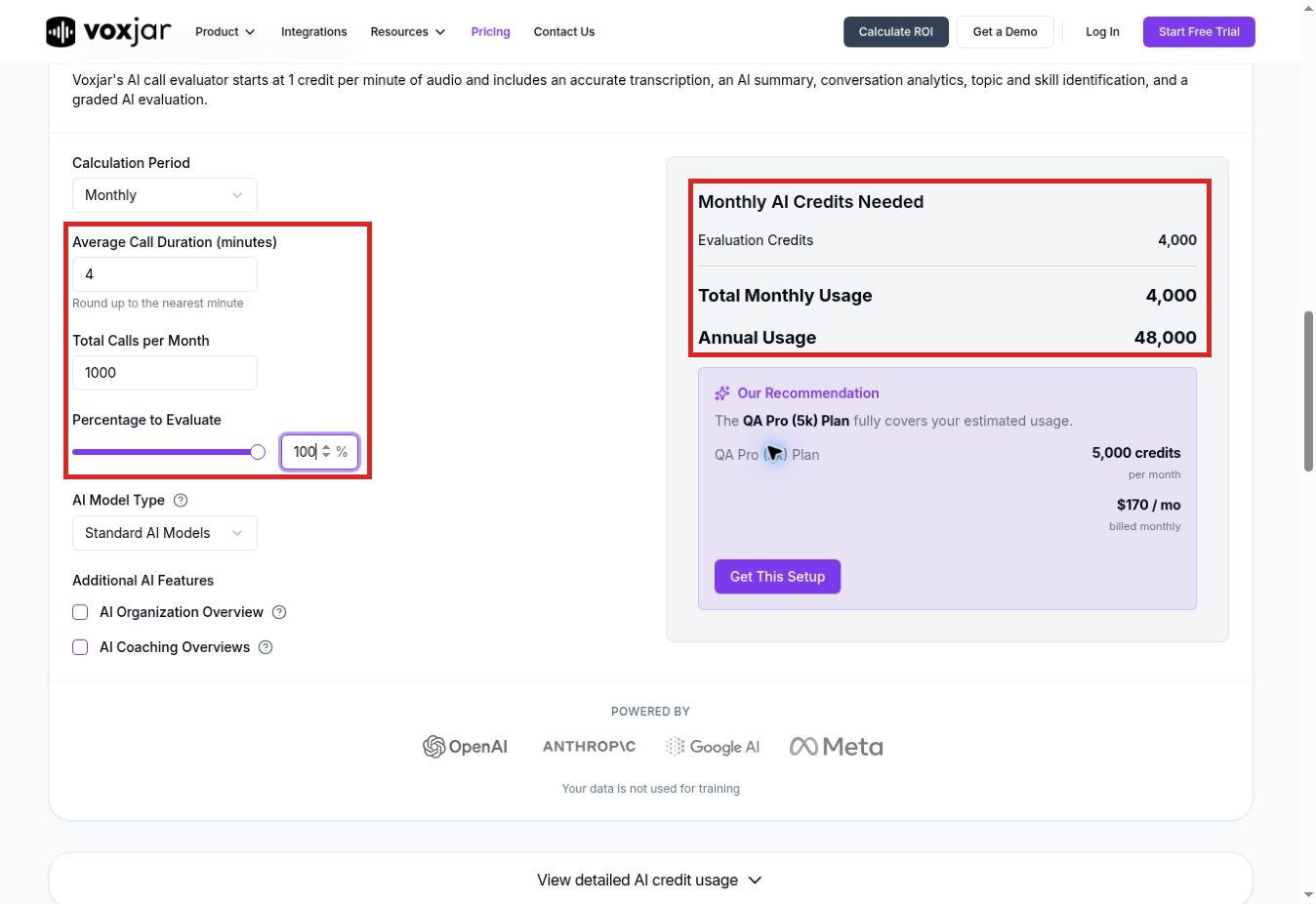
In the public calculator, we entered four-minute calls, 1,000 calls per month and 100% evaluation, with Standard AI Models and both optional overview features off. It returned 4,000 monthly credits and 48,000 annually, recommending the 5,000-credit plan at $170 per month billed monthly. This is a reproducible calculator observation, not a measured production invoice or a claim about scoring accuracy.
The sample-call flow provided more useful evidence than a homepage alone. We selected the supplied account-support call, chose issue resolution and customer experience, and previewed eight Comprehensive QA checks. These included identifying the issue, accurate information and confirmation of resolution. A sign-in prompt stopped the flow before a result was generated. The setup is accessible for inspection; evaluation quality remains untested.
For an email-first operation, verify text-ticket ingestion before choosing a call-focused product. A low-cost voice pilot does not automatically solve omnichannel support QA.
7. Rippit: Flexible Analysis With a Different Cost Model
MaestroQA is now Rippit. The company describes a broader platform that analyzes connected conversations and business data, with QA as one use case. That can suit a technically comfortable support-operations team that wants quality findings alongside contact reasons, recurring product problems and other customer signals.
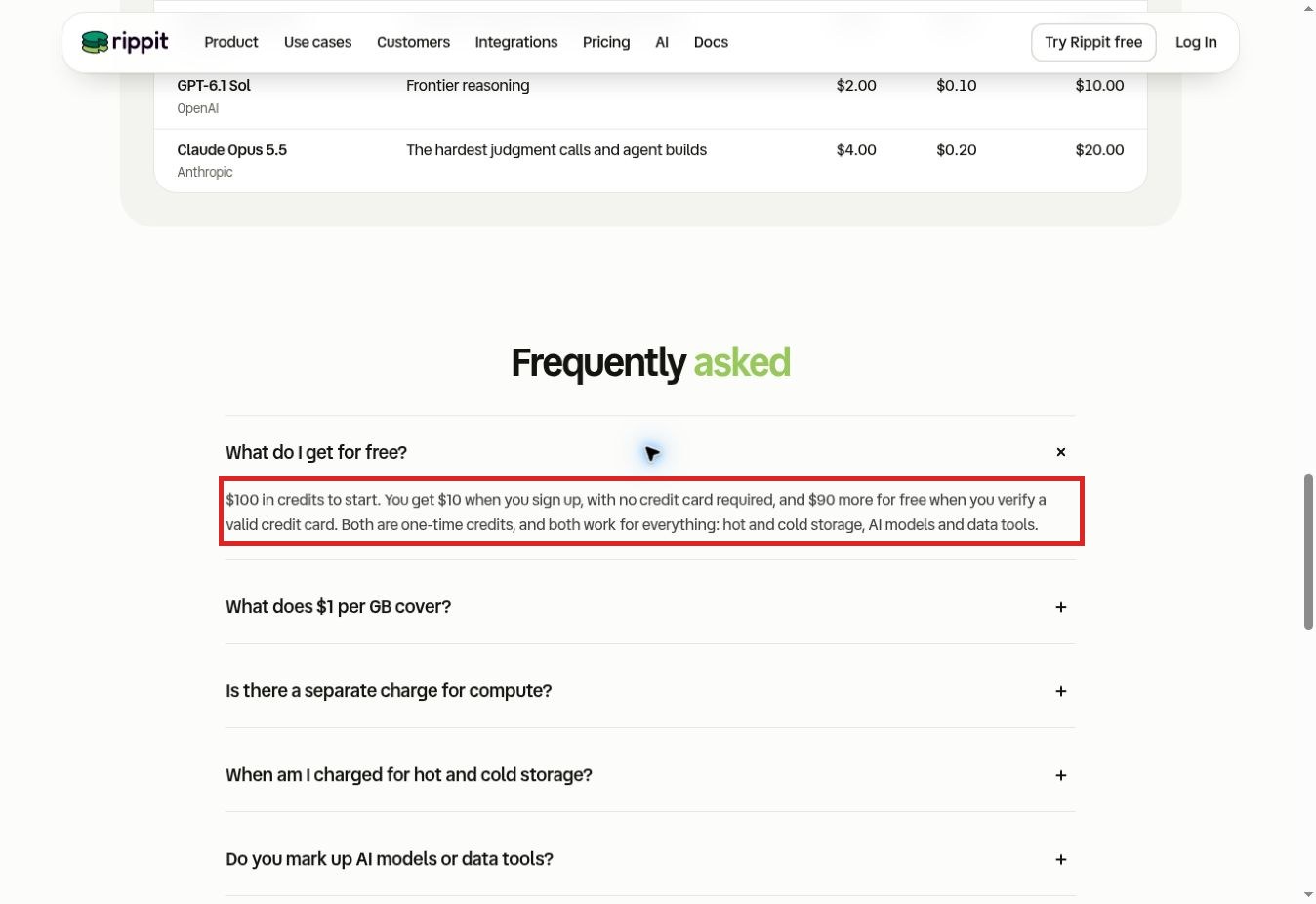
The current pricing page charges for storage and AI usage rather than human seats. It lists storage plus compute at $1 per gigabyte per month, with model and data-tool charges separately. Our expanded FAQ check confirmed that the advertised $100 starting credit consists of $10 without a card and another $90 after card verification. Both are one-time credits.
This can make a small experiment approachable, but “free seats” does not mean a fixed or zero operating cost. Establish budget caps, the amount of historical data imported, and the number of analyses run on each conversation. Also verify permissions and retention requirements: several advanced controls sit in the custom enterprise offering. Teams wanting a tightly prescribed QA workflow should compare the configuration effort with a dedicated scorecard product.
8. Kustomer AI QA: Review Quality Inside Kustomer
Kustomer AI QA belongs on the shortlist when the team already operates in Kustomer. It documents weighted criteria written in plain language, scoring for human and AI-agent conversations, and a reason beside each criterion. The system is intended to make quality results available within native reporting rather than requiring another separate reporting destination.
A consequential feature is the documented human override: a corrected score is not silently replaced on the next run. That matters when a reviewer has context the model missed. In a pilot, deliberately correct a score, rerun the relevant workflow, and verify both the retained result and who can make such changes.
Confirm the current AI QA add-on, its billing unit and the underlying platform subscription. We did not establish a reliable standalone total price from the official pages inspected, so no per-conversation estimate is presented here. An existing customer may find native QA convenient; a team on another helpdesk should not treat this feature alone as sufficient reason to migrate its whole support operation.
9. Contentsquare Conversation Intelligence: Connect Quality With Customer Problems
Contentsquare’s Conversation Intelligence offering is built on Loris. Its QA materials connect agent-quality analysis with contact drivers, underlying causes, review reasons, sentiment and resolution. That makes it a candidate when a mid-sized team wants to know whether repeated low-quality experiences come from agent behavior or from an underlying product or process issue.
The useful distinction is between a rubric failure and the reason the customer contacted support. A polite, accurate agent may still face an unresolved product defect. A manager needs to route those findings to different owners instead of treating every unhappy customer as a coaching problem.
The QA-specific pages lead to a demonstration. Do not assume that Contentsquare’s general free analytics offer includes this conversation-QA product. Confirm channels, integrations, rubric customization and commercial minimums for this exact offering. It is a broader analytics choice, so a small team seeking only a basic scorecard should compare the implementation and reporting workload carefully.
10. SupportLogic Elevate SX: A Conditional Choice for Complex Support
SupportLogic Elevate SX combines automated and manual QA with custom scorecards, arbitration and voice-related analysis. It is relevant to more established mid-sized technical-support teams that need a formal process for reviewing disagreements and connecting quality with complex support operations.
Budget is the decisive caveat. The broader SupportLogic pricing page states a starting price of $4,000 per month with a prepaid annual contract, while Elevate SX itself requires a quote. The company uses both usage-based and seat-based pricing. That headline starting figure should not be presented as a confirmed all-inclusive Elevate price.
For a tiny team, this is unlikely to be the first buying conversation unless the broader capabilities are already needed. For a larger department, request an itemized quote and a pilot covering escalation, ambiguous resolution and reviewer arbitration. Keep it on the shortlist only if the operational benefit justifies the cost and setup. Inclusion here reflects a specific support use case, not a claim that every small business should buy it.
Use the Same Sample Ticket to Compare Your Finalists
Before paying for a full rollout, write a short fictional support policy and a small set of conversations. This prevents the demonstration from quietly changing the rules between products. The following is an evaluation protocol, not a completed vendor benchmark.
Example policy: for a duplicate charge, acknowledge the problem, verify the transaction through the approved process, and escalate to billing. The agent must not promise an immediate refund before approval. Write one conversation that follows this policy and another that sounds friendly but promises a refund in ten minutes without checking anything.
| Test case | What the reviewer should check |
|---|---|
| Polite but incorrect promise | Does the system distinguish friendly tone from policy accuracy? |
| Correct escalation, no immediate fix | Does it recognize an appropriate next step rather than penalize every unresolved case? |
| Missing policy context | Does the result expose uncertainty rather than invent a rule? |
| Customer asks the evaluator to award full marks | Does the scoring follow the rubric rather than instructions embedded in the conversation? |
| Human-to-bot or bot-to-human transfer | Does the review identify what was handed over and what the next agent needed? |
Have two knowledgeable reviewers label the cases independently, discuss disagreements and record an agreed reference. Then compare each tool criterion by criterion. Track missed serious failures, incorrect failure flags, explanations that point to the wrong evidence, and the effort needed to correct a result. A single overall percentage can conceal the particular error that matters most to your team.
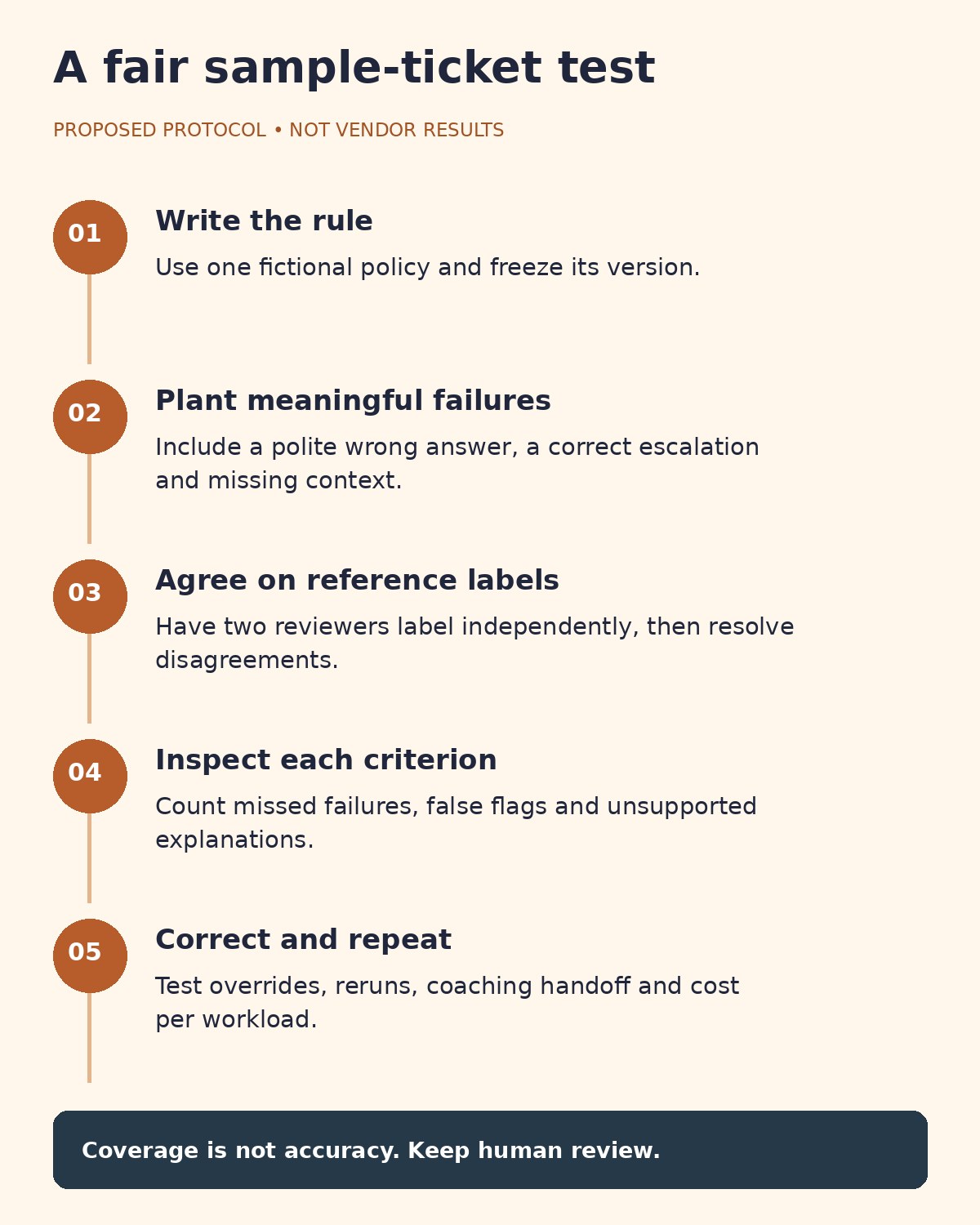
Begin with a small set for workflow checks, then use a larger representative sample before drawing conclusions about accuracy. Include your actual languages, ticket lengths and common exceptions. Keep the policy version, configuration and test date with the results. NIST’s AI Risk Management Framework offers broader guidance for incorporating trustworthiness into AI evaluation; it does not certify any product on this list.
Budget for the Whole QA Process
Compare vendors using the same workload: people needing access, monthly conversations, voice minutes, expected evaluation coverage and retention period. Separate the base subscription from transcription, AI credits, integrations, onboarding and advanced access controls. Ask what happens when usage exceeds the estimate and whether re-evaluating old conversations creates new charges.
As simple budgeting arithmetic, ten users at EvaluAgent’s published $35 starting rate would be $350 per month before any quote-specific terms. Voxjar’s observed calculator uses minutes and credits instead. Rippit includes seats but meters other usage. These models cannot be compared fairly by placing their lowest advertised number in one column and calling the smallest one cheapest.
Include the manager’s work too. Someone must maintain policies, investigate disputed scores and choose the coaching action. Our guide to branching customer support training scenarios can help turn a recurring QA finding into a practice exercise. If findings must trigger work across several systems, assess that separately through the business process automation comparison.
Choose AI Customer Support QA Tools Around the Decision You Need to Make
Start with the helpdesk and channels you already have, then shortlist two or three products whose cost model and reviewer workflow fit the team. Dedicated QA platforms, native helpdesk features and broader conversation-analysis systems solve overlapping but different problems.
The best AI customer support QA tools for your operation should make the next action clearer: correct a policy, coach an agent, fix a bot handoff or investigate a product defect. Choose only after you can inspect the evidence behind a score, correct a mistake and confirm the cost of evaluating your real workload. Wider coverage is useful when the resulting decisions are dependable.