


OCR tools for extracting line items can turn supplier quotes into structured records, but the useful result is more than a column of prices. Airparser and Nanonets document quote-specific workflows. Parseur and Docparser offer configurable table extraction; Azure, Google Cloud and Rossum provide routes for more customized processing. The right choice depends on your document layouts, review process and ability to maintain the setup.
A supplier offering two boxes at $120 per box has not offered two individual units at $120 each. A cheaper price printed beneath the main row may apply only to a larger order. Those distinctions can survive OCR as perfectly readable text and still disappear when the data becomes a spreadsheet.
This guide focuses on preserving that meaning while extracting descriptions, quantities, units and prices. The 7 tools are grouped by practical fit, not ranked by measured accuracy.
What We Checked
For this, we checked current official extraction documentation, quote-specific guidance and a vendor-published procurement case. We inspected and captured the public Airparser, Parseur and Docparser instructions shown below. The marked areas identify schema choices and layout conditions that matter when setting up extraction.
This is a research-based comparison with documentation observations. We did not run supplier quotes through these services, measure extraction accuracy or verify a production-purchasing integration. The worksheet later in the article is an original proposed acceptance check using synthetic values, not output from any listed product. Product-specific claims describe documented capabilities; your own samples still need validation.
Compare OCR Tools for Extracting Line Items
Start with the operating model you can support. A configurable mailbox and a cloud extraction API may both return structured data, but they leave very different amounts of work with your team.
| Tool | Useful starting point | Quote-processing route | Main implementation question |
|---|---|---|---|
| Airparser | Quotes arriving by email | Documented supplier-quote schema with repeating items | Will field instructions preserve your pricing conditions? |
| Parseur | Operations teams defining fields without custom extraction code | Custom AI table fields | Which exceptions need more instructions or a separate template? |
| Docparser | Recurring, predictable table layouts | Table rules, column dividers and row filters | How much upkeep will layout changes require? |
| Nanonets | Quote-to-requisition verification projects | Configured extraction and downstream matching | What must be implemented beyond extracting the quote? |
| Azure Document Intelligence | Teams with development capacity | Custom extraction model and structured JSON | Who owns labeling, evaluation and review routing? |
| Google Cloud Document AI | Teams designing their own document schema | Custom Extractor | Does the schema preserve the relationships between rows? |
| Rossum | Teams configuring structured document review | Custom tables and fields | How will quote-specific conditions be captured and checked? |
1. Airparser: A Direct Starting Point for Emailed Quotes
Airparser has a supplier-quote workflow that separates document-level fields from a repeating group of line items. Its guidance covers quote references, validity and currency alongside item descriptions, quantities, units and prices. It also distinguishes the Text Engine for selectable-text files from the Vision Engine for scans and images. That makes it a sensible starting point when the immediate problem is a purchasing inbox full of attachments.
Define the record you want before deciding where to send it. For example, keep the printed unit of measure beside the unit price; do not rely on a downstream spreadsheet to reconstruct a missing “per box” condition.
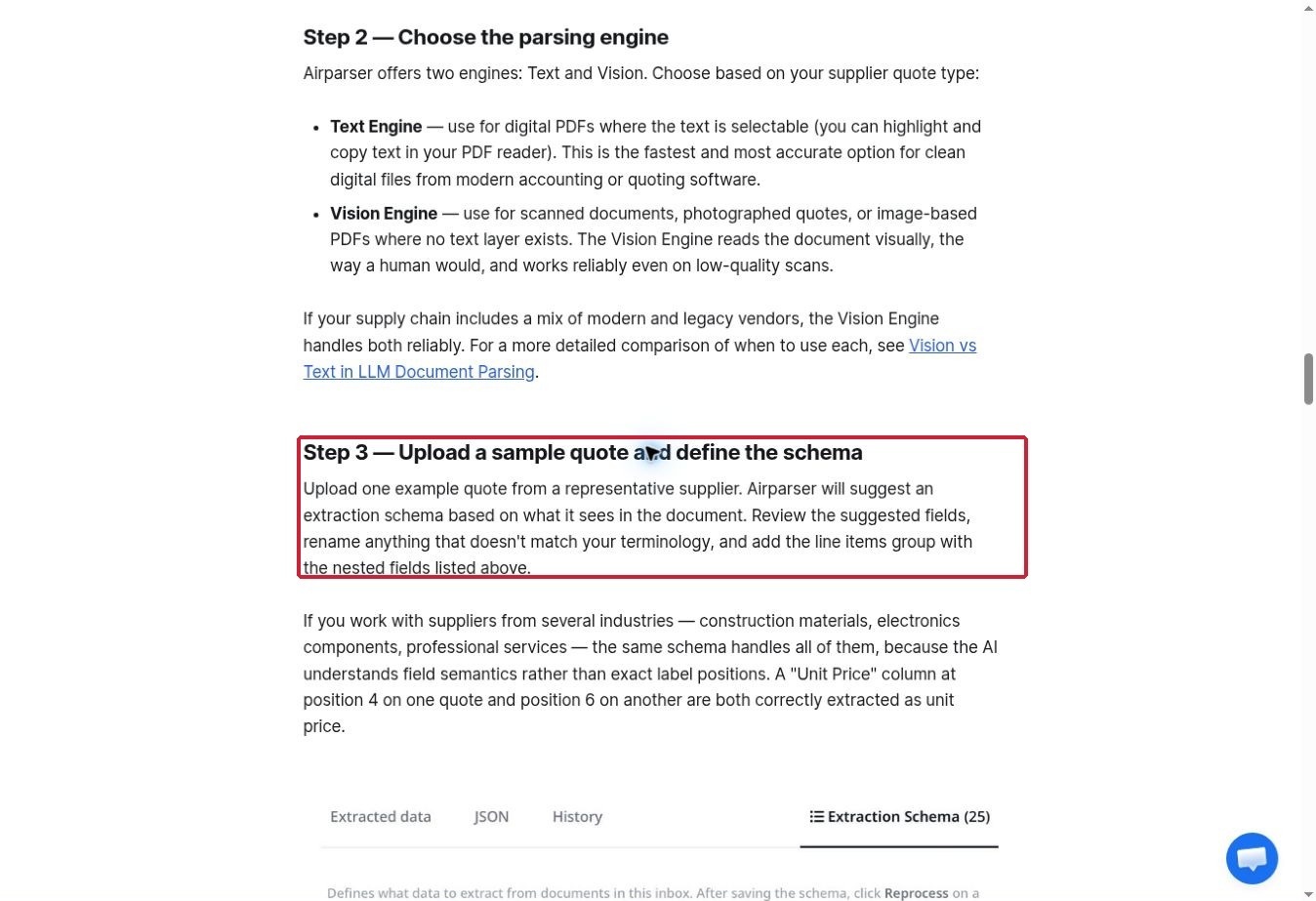
The practical limitation is semantic ambiguity. A supplier’s “rate” might describe a package, a day or an individual component. Airparser documents refining field descriptions and representing quantity tiers, but those options do not prove that your unusual quotation will be interpreted correctly. Use a second supplier’s layout as an acceptance sample before enabling routine exports.
2. Parseur: Custom Table Fields for an Operations-Led Setup
Parseur’s AI parsing documentation distinguishes a single field from a table containing repeated values. You define the table, add its columns, give the fields instructions and reprocess the document after changes. That is the relevant capability for a quote with several products; a single “description” field is not an adequate substitute.
Its documented controls also include failing processing when a required field cannot be found. A team could make the quote reference a required field while allowing genuinely absent lead times to remain unresolved. Choose those rules deliberately: rejecting every quote with an optional field missing can create as much manual work as accepting everything.
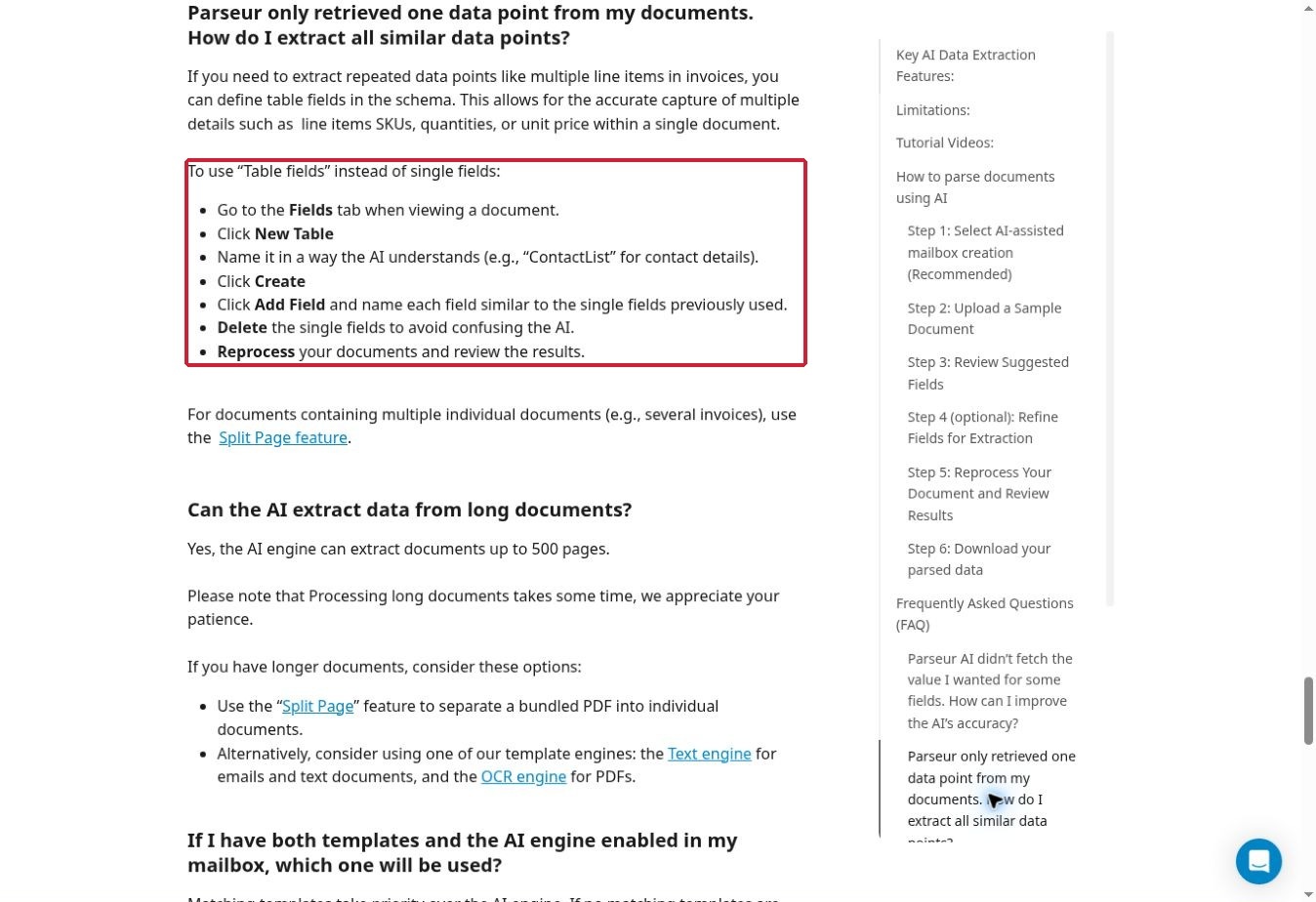
Parseur acknowledges that AI extraction can need templates and separate mailboxes for outliers or manual corrections. For supplier quotes, this means the initial setup should include examples that challenge the schema, not only the neatest PDF. A blank price, a wrapped description and an optional accessory make better checks than three copies of the same layout.
3. Docparser: Explicit Rules for Familiar Layouts
Docparser’s documented table workflow lets you establish column boundaries and filter the resulting rows. Its guidance explains that those boundaries retain their positions across pages; different table layouts need separate rules. This approach is worth considering when a limited group of suppliers repeatedly sends similarly arranged quotes.
The benefit is a setup your operator can inspect in concrete terms: where the description ends, where the quantity begins and which rows a filter retains. The maintenance cost is equally concrete. A supplier moving a price column or introducing a second table can require a rule change.
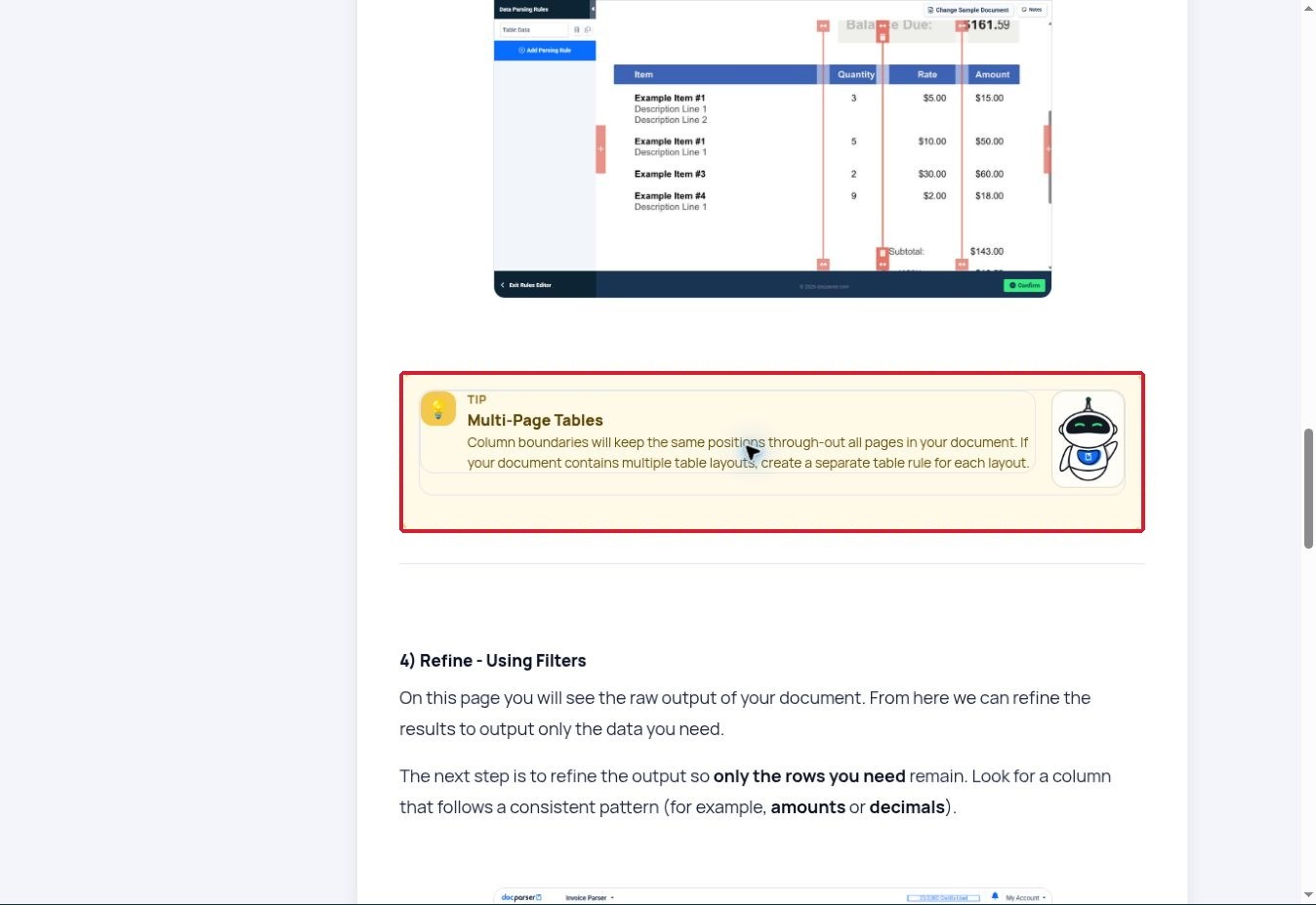
Docparser also documents combining multiple rules for entries spread across more than one row. That matters when a part number sits beneath its description.
Be careful with numeric filters: an unpriced option or a “price on request” item may be commercially important even though it fails an amount-based rule. Keep a review route for omitted rows rather than assuming every filtered result is complete.
4. Nanonets: Quote Extraction Within a Verification Workflow
Nanonets describes a Schneider Electric implementation in which vendor quotes are extracted and compared with purchase requisitions before the downstream purchase-order step. The vendor-published case identifies header data, totals and line-item descriptions, quantities and prices as extraction targets. This is relevant evidence of a configured quote workflow, rather than an invoice feature being relabeled as quotation support.
It is not evidence that every Nanonets account comes with that entire process ready to run. Treat the case as a discussion of architecture: intake, extraction, matching and exception review. Ask which parts your proposed implementation includes and which belong to your own procurement system.
For this use case, the most useful demonstration would show a mismatch that stops the workflow. Send a synthetic quote with a different quantity from the requisition and inspect where the discrepancy appears. A successful extraction demonstration alone cannot establish that the later matching and approval rules are correct. No customer-case performance figures are used here as independent product benchmarks.
5. Azure Document Intelligence: Custom Extraction for a Development Team
Microsoft’s custom-model documentation describes extracting user-defined fields from documents into structured JSON. Custom templates and custom neural approaches serve different layout needs. The documented v4.0 custom neural model also provides table, row and cell confidence information, which can help a team design review rules.
For supplier quotes, the reason to consider Azure is control over a purpose-built extraction process. You can design the output around your purchasing data model instead of trying to force every quotation through an invoice-shaped record. This is a development route: someone must own examples, label where needed, evaluate, and connect to the destination system.
Confidence should inform review rather than replace it. A high-confidence value can still be the wrong commercial field if the model or mapping associates an alternative price with the main item. Evaluate row membership and unit relationships separately from character recognition. This guide does not establish that an unconfigured Azure model will handle your quote layouts.
6. Google Cloud Document AI: A Schema You Define
Google distinguishes its generic Form Parser from its custom extractor. The former extracts common structures such as key-value pairs and tables; the latter lets you define the fields you want. Google’s overview describes foundation-model, custom-model, and custom-template approaches within that extraction offering.
Custom Extractor is the more relevant route when a quotation needs specific fields such as a validity date or item-level pricing condition. Define those relationships before building an export. A list of correctly recognized amounts is not useful if the system cannot keep each amount attached to its product, unit and quantity range.
This option suits a team willing to build and evaluate a schema rather than expecting a complete purchasing workspace. Include documents with repeated table headers and continued descriptions in your evaluation set. If you already use Google Cloud, that familiarity may simplify operational ownership, but it does not establish better extraction accuracy. A quote-specific model and review process still need validation.
7. Rossum: Custom Tables With a Defined Review Structure
Rossum’s documentation describes predefined line-item and tax tables, adding custom data fields, and creating new custom tables. Those capabilities make it a candidate for a quotation-processing project that needs more structure than a flat collection of recognized text.
The distinction is between a configurable foundation and a verified quotation solution. A predefined line-item table does not, by itself, establish support for alternate offers, quantity breaks or quote validity. Before selecting Rossum, map those requirements to the proposed schema and ask to see how a reviewer corrects a row whose price or condition has been associated incorrectly.
A useful pilot should also preserve the original quote reference when corrections are exported. Otherwise, a clean-looking record can become difficult to trace once several revisions of the same quote arrive. Choose this route when the team can define and maintain that review process; do not purchase it solely because a demonstration recognizes a familiar invoice table.
A Quote Acceptance Check You Can Reuse
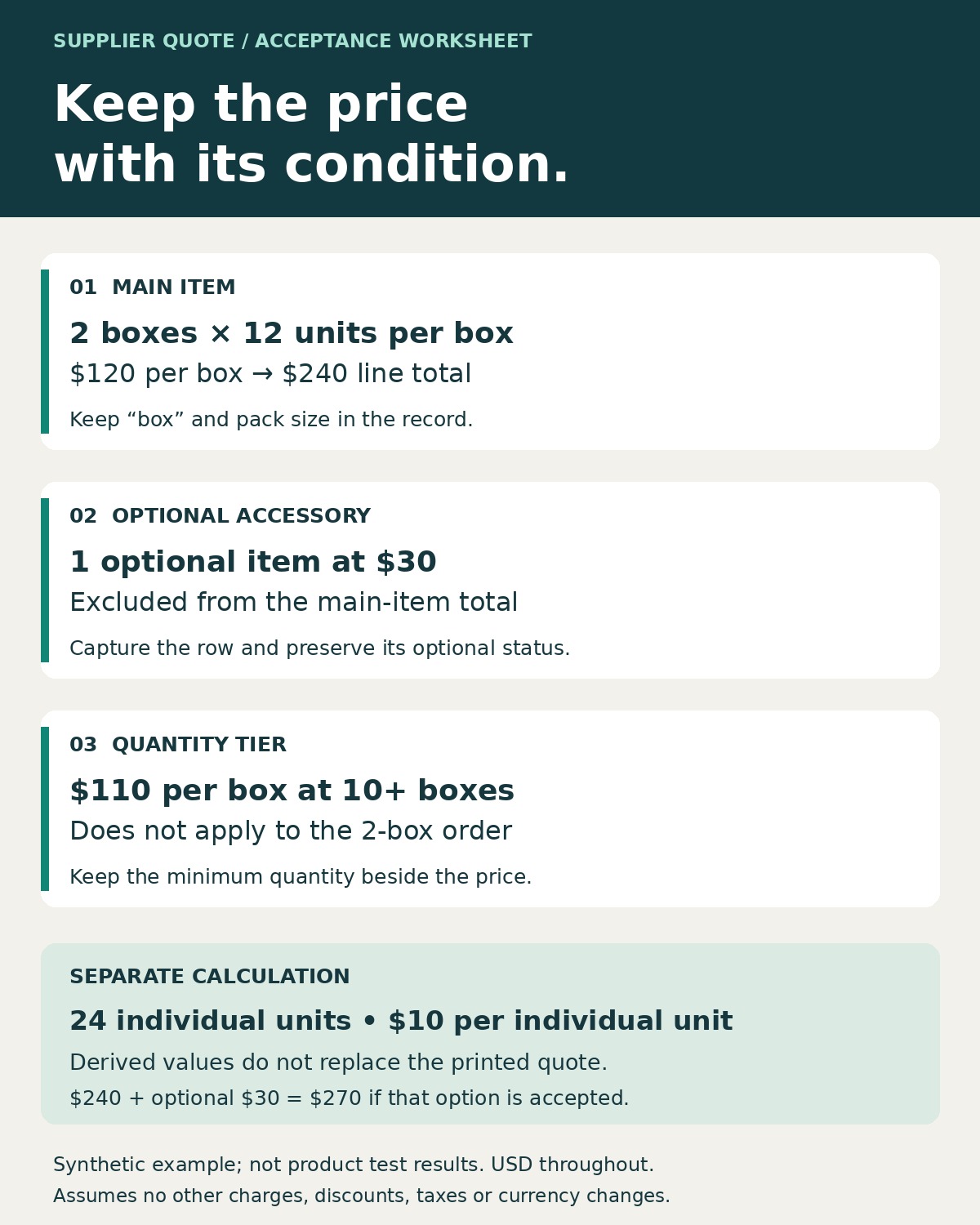
Use the same synthetic document and expected record with each shortlisted tool. The following example separates extraction from calculation and purchasing judgment. It is an illustrative worksheet, not a test we ran.
| Printed quote information | Expected captured meaning | Reject or review when |
|---|---|---|
| Main item: 2 boxes; 12 units per box; $120 per box; $240 line total | Quantity 2; unit “box”; pack size 12; quoted unit price $120; quoted line total $240 | “Box” disappears, quantity becomes 24 without explanation, or $120 is labeled as the price per individual unit |
| Optional accessory: 1 item at $30; excluded from the main total | A separate optional row with its exclusion preserved | The accessory is dropped or automatically added to the main-item total |
| Alternative tier: $110 per box for an order of 10 or more boxes | A conditional price attached to the same item and its minimum quantity | $110 replaces $120 for the two-box order |
For the main item, a separate calculation gives 24 individual units and $10 per unit: two boxes multiplied by 12 units, and $120 divided by 12. Keep those derived values apart from the printed values. The $240 main-item total excludes the optional accessory; accepting that accessory would make this simplified example $270 before any other charges.
Next, make small changes to the sample. Wrap the description onto a second line. Continue a table on another page. Remove the lead time entirely. Replace a number with “to be confirmed.” The expected behavior is not to fill every cell. It is to preserve the available information, retain uncertainty and flag cases requiring a person to decide.
Record the tool configuration and the corrections needed for each document. That gives you a more useful comparison than a single accuracy percentage with no explanation of what counted as correct. Missing an optional description word and switching a price between two products should not be treated as equivalent problems.
Build the Export Around Review, Not Just Extraction
A workable output keeps three layers separate: the supplier’s printed values, your normalized comparison values and the purchasing decision. Preserve a stable quote reference and revision identifier with every exported row. If a supplier sends an updated PDF, the new values should not silently overwrite an earlier offer that someone has already reviewed.
Before importing the results, check required fields, data types, duplicate identifiers and how blank values are represented. Editorialge’s guide to validating CSV files before an import explains useful file-level checks. Its CRM-specific mappings differ from procurement mappings, but the distinction between a valid file and correctly interpreted business data still applies.
Estimate operating effort alongside subscription or usage charges. Ask how reprocessing is counted, what happens when a layout changes, who reviews exceptions and how corrections reach your destination. Obtain current terms for your actual document volume and setup; this comparison does not provide a verified price ranking.
Common Questions About Supplier-Quote Extraction
Can an invoice OCR tool read supplier quotes?
Some configurable platforms can be adapted, but invoice support alone is insufficient evidence. Quotes can contain alternatives, expiry dates and quantity-dependent prices that do not belong in a simple invoice record. Confirm the extraction route and test the quote fields you actually need.
Should missing prices become zero?
No. A blank amount, “included,” “optional” and “price on request” mean different things. Preserve the original wording and route unresolved amounts for review. A zero is appropriate only when it represents the source or an explicitly documented business rule.
Can extraction automatically choose the cheapest supplier?
Extracted prices can support comparison after units, quantities, inclusions and conditions are aligned. The parser should not silently decide that two differently described offers are equivalent. Keep selection and purchasing approval as explicit steps in your own workflow.
Choose the Workflow You Can Maintain
Start with Airparser, Parseur or Docparser when the immediate need is a configurable path from documents to rows. Explore Nanonets when quote-to-requisition verification is part of the project, and Azure, Google Cloud or Rossum when your team needs a more customized extraction or review structure.
The most useful OCR tools for extracting line items preserve the relationships that make a supplier quote meaningful. Shortlist by setup fit, run the same acceptance worksheet on your own representative samples, and inspect the exceptions before connecting the result to a purchasing system.