Building an MVP sounds simple until you have to decide what actually belongs in the first version. I have seen founders call almost everything an MVP: a landing page, a clickable prototype, a no-code workflow, a rough dashboard, or a nearly finished product with too many features. The real issue is not the label. The issue is whether the MVP helps you learn something important before you waste time and money.
A minimum viable product is not a smaller version of your dream product. It is the smallest useful version that tests a real assumption with real users. Done well, it helps you validate demand, understand user behavior, improve positioning, and prepare for a stronger MVP launch.
In 2026, MVP development best practices matter even more because AI tools, no-code builders, templates, and cloud platforms make it easy to build fast. But fast building without clear learning still creates waste.
This guide explains how to plan, build, test, launch, and improve an MVP with practical, founder-friendly steps.
What MVP Development Best Practices Really Mean?
MVP development best practices are the habits, decisions, and workflows that help founders build the smallest useful product that can create real learning. The goal is not to build something tiny for the sake of being tiny. The goal is to build just enough to test the riskiest assumption. A minimum viable product should answer one clear question. Will users try this? Will they pay? Can they complete the workflow? Does the solution reduce pain? Will they come back? Can the product be delivered reliably? The answer depends on the product stage.
The mistake I see often is turning an MVP into a mini full product. Founders add dashboards, settings, integrations, analytics, onboarding flows, admin controls, and AI features before they have enough evidence that the core workflow matters.
A real MVP has discipline. It cuts good ideas, not only bad ones. It protects learning speed. It gives early users enough value to react honestly. It also gives the team enough technical structure to improve without rewriting everything after launch.
| MVP Element | What It Means | Why It Matters |
| Core assumption | The main belief you need to test | Keeps the MVP focused |
| Core user | The first audience you build for | Prevents broad, weak product decisions |
| Core workflow | The one job the product must support | Reduces feature bloat |
| Minimum feature set | Only what is needed for useful testing | Speeds development |
| Success metric | The signal that proves learning | Avoids vague feedback |
| Feedback loop | How users report problems and needs | Improves iteration |
| Technical foundation | Enough reliability to support early users | Prevents fragile launches |
| Launch segment | The first group that tests the MVP | Keeps launch controlled |
The best MVP is not always the smallest possible thing. It is the smallest version that can teach you something trustworthy.
Why MVP Development Matters More in 2026?
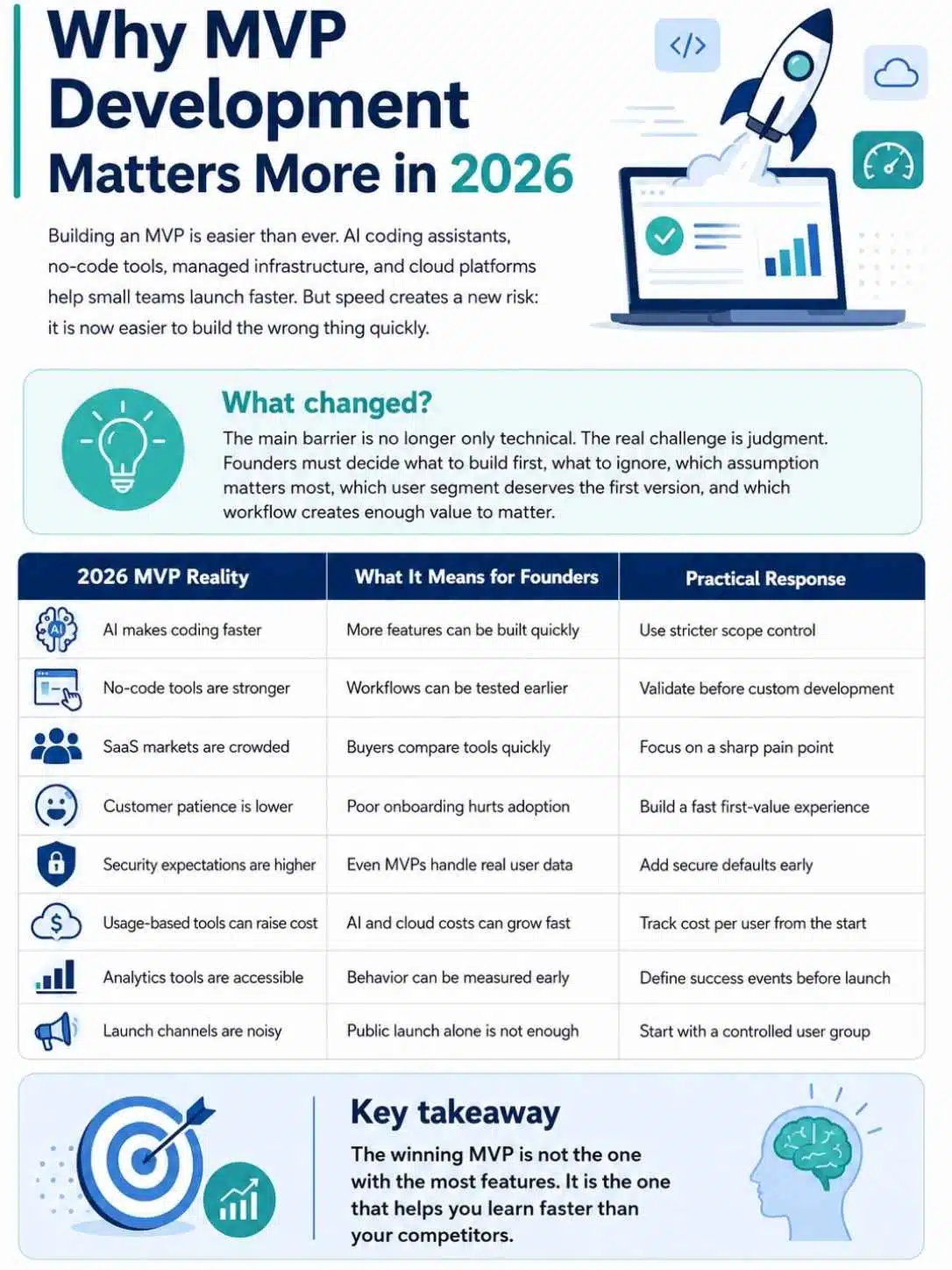
Building an MVP in 2026 is easier than it used to be. Founders can use AI coding assistants, no-code tools, managed authentication, hosted databases, payment links, design systems, templates, analytics platforms, and cloud hosting. A small team can launch a working SaaS prototype faster than ever. That speed is helpful, but it creates a new problem. It is now easier to build the wrong thing quickly.
The barrier is no longer only technical. The real barrier is judgment. What should you build first? What should you ignore? Which assumption matters most? Which user segment deserves the first version? Which workflow creates enough value for someone to care? Modern MVP development is less about proving you can build software and more about proving that the software deserves to exist. The first version should connect customer pain, product behavior, and business learning.
A strong MVP also protects your future SaaS roadmap. If you validate the core workflow early, the next product decisions become easier. That connects naturally with Building a SaaS Product from Idea to Launch, where the full path from idea to MVP to launch becomes clearer.
| 2026 MVP Reality | What It Means for Founders | Practical Response |
| AI makes coding faster | More features can be built quickly | Use stricter scope control |
| No-code tools are stronger | Workflows can be tested earlier | Validate before custom development |
| SaaS markets are crowded | Buyers compare tools quickly | Focus on a sharp pain point |
| Customer patience is lower | Poor onboarding hurts adoption | Build a fast first-value experience |
| Security expectations are higher | Even MVPs handle real user data | Add secure defaults early |
| Usage-based tools can raise cost | AI and cloud costs can grow fast | Track cost per user from the start |
| Analytics tools are accessible | Behavior can be measured early | Define success events before launch |
| Launch channels are noisy | Public launch alone is not enough | Start with a controlled user group |
The winning MVP is not the one with the most features. It is the one that helps you learn faster than your competitors.
Start With the Riskiest Assumption
Every MVP should start with a risk, not a feature list. A risk is the thing that could make the product fail if you are wrong. For some SaaS products, the biggest risk is demand. People may not care enough. For others, the risk is usability. Users may want the outcome but fail to complete the workflow. For AI products, the risk may be accuracy, cost, trust, or response quality. For B2B tools, the risk may be buyer approval, team adoption, integrations, or security.
If you skip this step, the MVP becomes a pile of guesses. You may build features that feel important but do not test the real danger. I like to write one sentence before starting development: “This MVP exists to learn whether…” That sentence forces focus.
Example: “This MVP exists to learn whether small agencies will use one shared approval workspace instead of chasing client feedback across email and Slack.”
Now the scope becomes clearer. You do not need invoicing, full project management, custom branding, advanced reporting, or five integrations in version one. You need enough to test client approvals.
| Risk Type | MVP Question | Best Test |
| Demand risk | Do users care enough to try it? | Landing page, outreach, waitlist, demo |
| Payment risk | Will customers pay for this? | Paid pilot, payment link, early invoice |
| Usability risk | Can users complete the workflow? | Prototype, usability test, limited MVP |
| Technical risk | Can the product work reliably? | Technical spike, proof of concept |
| Retention risk | Will users come back? | Weekly use test, cohort tracking |
| Trust risk | Will users share data or invite teams? | Security messaging, controlled pilot |
| Workflow risk | Does this fit how users already work? | Concierge MVP, workflow interviews |
| Cost risk | Can the product be profitable? | Usage tracking, cost-per-action model |
A strong MVP tests one major risk at a time. If you try to test everything at once, you may learn nothing clearly.
Define the First User Segment Clearly
One of the most useful MVP development best practices is choosing a narrow first user segment. A broad MVP usually becomes messy because different users want different things.
“Small businesses” is not a strong first segment. “Marketing agencies with 5 to 20 employees managing at least 10 active client projects” is much better. It tells you who to interview, what workflow to build, what language to use, and what success looks like.
A narrow segment does not mean the product must stay small forever. It gives you a clean starting point. If the first group gets real value, you can expand later. When the audience is too broad, MVP feedback becomes confusing. One user wants reporting. Another wants automation. Another wants mobile access. Another wants integrations. You may think the market is unclear, but the real issue is that your user segment is too loose.
| First Segment Question | Why It Matters | Example Answer |
| Who feels the pain most often? | Finds urgent users | Small agencies with repeat client approvals |
| Who can try the MVP quickly? | Speeds feedback | Agency owners and project managers |
| Who controls the decision? | Supports payment testing | Founder or operations lead |
| What workflow do they share? | Shapes MVP scope | Collecting client feedback and approvals |
| What tool do they use now? | Reveals replacement behavior | Email, Slack, Google Docs |
| What outcome matters most? | Defines product promise | Faster approval and less chasing |
| Where can we reach them? | Supports MVP launch | LinkedIn, agency groups, direct outreach |
| What would make them stay? | Tests retention | Every project uses the approval workspace |
The first user segment should feel almost uncomfortably specific. That is usually a good sign.
Keep the MVP Scope Ruthlessly Small
Scope is where many MVPs lose their purpose. A founder starts with one workflow, then adds “just one more thing.” A teammate suggests reporting. A prospect asks for an integration. A designer wants a better settings page. Someone adds AI because it sounds modern. Soon the MVP is no longer minimum. It is delayed, expensive, and harder to test.
Good MVP scope should be built around the smallest complete user journey. That means the user can arrive, understand the product, complete the core action, receive value, and give feedback. Anything outside that journey should be questioned. This does not mean the MVP should be ugly or broken. It means it should be focused.
A useful method is the “must, should, later” list. Must-have features are required for the core learning. Should-have features are helpful but not essential. Later features can wait until real usage proves they matter.
| Feature Type | What It Means | Example for Client Approval SaaS |
| Must-have | Needed to test the core workflow | Create project, invite client, collect approval |
| Should-have | Helpful but not essential | Basic reminders and status view |
| Later | Not needed for first learning | White-label branding, advanced analytics |
| Risky feature | Expensive or complex to build | Full Slack integration |
| Trust feature | Needed for serious users | Basic permissions and secure access |
| Feedback feature | Helps learning | Simple feedback button or form |
| Admin feature | Useful for teams later | Role management |
| Growth feature | Helps expansion later | Templates, referrals, integrations |
A good MVP backlog should have more “later” items than “must-have” items. That shows discipline.
Build One Complete Workflow, Not Many Half-Features
A common MVP mistake is building many partial features instead of one complete workflow. Users do not judge your product by how many menu items exist. They judge it by whether they can get one important job done. One complete workflow is better than six unfinished modules.
For example, if you are building an onboarding SaaS, do not build a half-working checklist, half-working dashboard, half-working email system, and half-working analytics page. Build one clean onboarding flow that helps a customer complete the first setup and receive useful feedback.
A complete workflow has a beginning, middle, and end. The user starts with a need, takes action, sees progress, receives value, and knows what to do next. This is where MVP design becomes practical. The product does not need every edge case. But the main path must work.
| Workflow Stage | MVP Requirement | Example |
| Entry | User understands what to do | Clear empty state and CTA |
| Setup | User adds minimum required data | Create project or upload file |
| Action | User performs the main task | Invite client or run report |
| Processing | Product handles the task reliably | Send notification or generate output |
| Result | User receives value | Approval status or useful insight |
| Follow-up | User knows next step | Reminder, share, export, or repeat |
| Feedback | User can report friction | Feedback button or short prompt |
| Repeat use | User has a reason to return | Next project, weekly report, new task |
A complete workflow gives you real behavioral data. Half-features only create confusion.
Choose the Right MVP Type
Not every MVP needs code. This is one of the hardest lessons for technical founders. Building an MVP does not always mean building software first. Sometimes the best MVP is a landing page. Sometimes it is a manual service. Sometimes it is a clickable prototype. Sometimes it is a no-code workflow. Sometimes it is a paid pilot. Sometimes it is a technical proof of concept.
The MVP type should match the assumption you need to test.
If you need to test whether people want the solution, a landing page or outreach test may be enough. If you need to test whether the workflow creates value, a concierge MVP may work better. If you need to test whether the technology can perform accurately, build a technical spike.
| MVP Type | Best For | Example |
| Landing page MVP | Testing demand and positioning | Page with demo or waitlist CTA |
| Concierge MVP | Testing value manually | Human-made weekly reports |
| Wizard-of-Oz MVP | Testing product experience before automation | User sees product-like output, team does backend manually |
| Clickable prototype | Testing usability | Figma prototype for workflow testing |
| No-code MVP | Testing simple workflow | Airtable, Softr, Bubble, Zapier setup |
| Paid pilot | Testing willingness to pay | Limited customer group pays for early access |
| Technical spike | Testing feasibility | AI accuracy, data sync, API integration |
| Public beta | Testing broader adoption | Controlled release to target users |
The MVP type should be chosen after the question is clear. Do not start with the build method. Start with the learning goal.
Design the First-Value Moment
The first-value moment is the point where the user says, “Okay, I see why this matters.” In an MVP, this moment must happen quickly. Many MVPs fail because users enter an empty dashboard and do not know what to do. The product may have useful features, but the first experience feels cold. Users leave before they see value.
For SaaS products, the first-value moment might be a generated report, a completed checklist, a successful import, a shared approval, a cleaned dataset, a useful AI summary, or a visible status change.
Before building, define that moment clearly. Then design the MVP around reaching it.
Ask: what is the smallest action a user can take to experience the promise?
| Product Type | First-Value Moment | MVP Design Focus |
| AI reporting SaaS | User receives a useful report | Simple data input and fast output |
| Client approval SaaS | Client approves or comments in one place | Easy invite and feedback flow |
| Lead enrichment SaaS | User sees cleaner lead data | Upload and enriched result |
| Customer success tool | User sees churn-risk signal | Import accounts and health view |
| Content planning SaaS | User receives a practical content brief | Simple topic input and plan output |
| Finance dashboard | User sees useful monthly metric | Connect or upload financial data |
| Onboarding SaaS | New user completes setup checklist | Guided workflow and progress |
| Sales tool | Rep gets call notes or next steps | Recording, summary, CRM-ready output |
Do not hide value behind too much setup. If setup is unavoidable, guide it carefully.
Build Enough Quality to Earn Trust
Some founders confuse MVP with low quality. That is risky. An MVP can be small, but it should not be careless. Early users will forgive missing features more easily than they forgive broken trust. If login fails, data disappears, payments break, permissions leak, or the product feels unsafe, users may not return.
The MVP should be simple, but the core workflow should work reliably. It should handle obvious errors. It should save data. It should protect user accounts. It should explain what is happening. It should not crash during the first test.
This is especially true for B2B SaaS. Even early users may share real business data. They need to feel the product is rough but serious.
| MVP Quality Area | Minimum Standard | Why It Matters |
| Core workflow | Works from start to result | Tests real usage |
| Data saving | User work is not lost | Builds trust |
| Authentication | Secure login and account access | Protects users |
| Permissions | Users see only what they should | Prevents serious mistakes |
| Error handling | Clear messages for common failures | Reduces frustration |
| Performance | Main actions feel responsive | Prevents drop-off |
| Mobile basics | Key pages do not break badly | Supports real behavior |
| Support path | Users know how to ask for help | Improves feedback |
Minimum viable does not mean minimum responsible.
Use Secure Defaults From Day One
Security should not wait until after MVP launch. You do not need enterprise-grade compliance on day one, but you do need secure basics. A SaaS MVP may include user accounts, emails, billing, uploaded files, customer records, business documents, API keys, or AI prompts. That data deserves care. If you build weak foundations early, fixing them later becomes painful.
Secure defaults include managed authentication, strong password policies or OAuth, role-based access, tenant separation, input validation, encrypted connections, safe file handling, secure environment variables, dependency checks, rate limits, backups, and basic audit trails for sensitive actions.
OWASP guidance is useful here because many MVPs are web apps with APIs. Broken access control, insecure design, authentication weaknesses, misconfiguration, and vulnerable dependencies can hurt even small products.
| Security Practice | MVP Version | Why It Matters |
| Managed auth | Use a trusted auth provider | Reduces login risk |
| Role checks | Basic owner, admin, member roles | Prevents wrong access |
| Tenant boundaries | Every record tied to workspace | Protects customer data |
| Input validation | Validate forms and API requests | Reduces abuse and bugs |
| Secrets management | Keep keys out of code | Prevents leaks |
| Dependency scanning | Check known vulnerabilities | Reduces avoidable risk |
| Backups | Automated database backups | Protects early customers |
| Rate limits | Limit expensive or sensitive actions | Controls abuse and cost |
An MVP with real users should be treated like a real product.
Add Analytics Before the MVP Launch
You cannot improve what you cannot see. MVP analytics should be set up before launch, not after. This does not mean tracking everything. Too much data can be just as confusing as no data. Start with the few events that tell you whether users understand and use the core workflow.
For example, track signup, onboarding started, onboarding completed, project created, invite sent, report generated, approval received, payment started, payment completed, and user returned. These events show where people drop off.
The best MVP analytics connect behavior to learning. If users sign up but never complete setup, onboarding is weak. If they complete the workflow but never return, retention is weak. If they use the product but do not pay, pricing or value may be unclear.
| MVP Event | What It Reveals | Example |
| Signup started | Interest level | Visitor begins registration |
| Signup completed | Signup friction | Account created |
| Onboarding completed | Setup clarity | User reaches ready state |
| Core action completed | Product value | First report generated |
| Invite sent | Collaboration value | User brings someone else in |
| Payment started | Buying intent | User opens checkout |
| Payment completed | Revenue validation | Subscription or pilot paid |
| Return visit | Retention signal | User comes back within a week |
| Feedback submitted | Learning signal | User reports need or issue |
Good analytics help you avoid relying only on opinions.
Use Feedback Loops That Are Easy for Users
Early users are busy. They will not always write detailed feedback unless you make it easy. A good MVP should include simple feedback channels. This can be an in-app feedback button, short survey, direct email, customer interview, onboarding call, Slack channel, or follow-up message after the user completes the core action.
The mistake is asking broad questions like “What do you think?” That produces vague answers. Ask specific questions tied to behavior.
Ask:
- What were you trying to do?
- Where did you get stuck?
- What did you expect to happen?
- What would make this useful enough to keep using?
- What would stop you from paying?
- What did you still do outside the product?
Feedback should be connected to observed behavior. If users say the product is useful but do not return, behavior matters more.
| Feedback Method | Best Use | Practical Tip |
| In-app feedback button | Capturing friction quickly | Keep it one click away |
| Post-action prompt | Learning after value moment | Ask one short question |
| Customer interview | Deep workflow learning | Focus on recent behavior |
| Support chat | Finding urgent confusion | Tag repeated issues |
| Email follow-up | Reaching inactive users | Ask what stopped them |
| Beta community | Fast iteration with early adopters | Keep expectations clear |
| Session review | UX friction | Watch real workflow behavior |
| Churn question | Understanding drop-off | Ask before or after cancellation |
The best feedback loop feels natural. It does not interrupt users at the wrong moment.
Use Feature Flags for Safer MVP Releases
Feature flags let you turn features on or off without deploying new code. For an MVP, this can be extremely useful. You can expose a feature to a small group, test with one customer, roll back quickly, or hide unfinished work from public users.
This matters because MVPs change quickly. You may test a new onboarding flow, AI feature, pricing gate, export option, or dashboard view with only a few users before rolling it out more widely. Feature flags also help when something goes wrong. If a feature breaks or creates unexpected behavior, you can disable it without emergency deployment.
The risk is flag clutter. If you never remove old flags, they become technical debt. Use clear names, owners, and cleanup dates.
| Feature Flag Use Case | Why It Helps | MVP Example |
| Controlled rollout | Test with a small group first | Enable new report view for 5 users |
| Beta features | Let selected users try early ideas | AI summary feature for pilot customers |
| Quick rollback | Disable risky feature fast | Turn off broken export flow |
| Pricing tests | Compare packaging safely | Show different plan limits |
| Onboarding tests | Improve activation | Test new setup checklist |
| Permission testing | Reduce access risk | Enable admin roles for one workspace |
| AI safety | Control unpredictable behavior | Disable model output if quality drops |
| Cleanup discipline | Prevents code clutter | Remove unused flags after test |
Feature flags are not only for large teams. They help small teams launch with more control.
Build With Observability, Not Guesswork
Once real users touch the MVP, bugs become business problems. Observability helps you understand what is happening inside the product through logs, metrics, traces, alerts, and error tracking. For an MVP, you do not need a complex monitoring setup. You do need enough visibility to know when core actions fail. If report generation breaks, payment webhooks fail, emails stop sending, AI jobs time out, or file uploads crash, you should know quickly.
OpenTelemetry has become an important observability standard because it helps teams collect telemetry such as logs, metrics, and traces. But the exact tool matters less than the habit: instrument the product so you can debug fast.
Early observability should focus on the core workflow, not every tiny detail.
| Observability Area | What to Track | Why It Matters |
| Errors | Exceptions and failed requests | Finds bugs quickly |
| Logs | Important user and system events | Explains what happened |
| Metrics | Latency, job count, usage, failures | Shows product health |
| Alerts | Critical failures | Prevents silent breakage |
| Background jobs | Completed, failed, retried tasks | Protects async workflows |
| Payment webhooks | Billing sync success and failure | Protects revenue access |
| Email delivery | Sent, bounced, failed messages | Supports onboarding and reminders |
| AI tasks | Timeouts, retries, cost, quality flags | Controls AI risk |
The fastest way to lose early trust is to let users discover failures before you do.
Keep the Technical Architecture Simple
An MVP should not be over-engineered, but it should not be a messy experiment either. The best architecture is simple, understandable, and flexible enough to change.
For most early SaaS products, a modular monolith is often enough. That means one main application with clear internal modules. You do not need microservices unless you have a real reason. You do not need Kubernetes unless your team can operate it and the product needs it. You do not need five databases when one good database can support the first version.
The technical goal is not to impress engineers. The goal is to support the core workflow safely and quickly. A simple architecture also makes iteration easier. When feedback comes in, you can change the product without fighting your own system.
| Architecture Choice | MVP-Friendly Approach | Why It Helps |
| App structure | Modular monolith | Easier to build and debug |
| Database | One primary database | Reduces sync problems |
| Hosting | Managed deployment | Speeds launch |
| Auth | Managed or proven auth | Avoids security mistakes |
| Billing | Established billing provider | Handles subscriptions and webhooks |
| File storage | Object storage | Better for uploads and exports |
| Background jobs | Simple queue | Handles slow tasks |
| API design | Clean internal boundaries | Supports future integrations |
Build simply enough to move fast. Structure carefully enough to avoid chaos.
Prioritize Manual Work Where It Helps Learning
Not everything in the MVP needs automation. Manual work can be a strength when it helps you learn. This is especially true before building an MVP with complex workflows. If you can manually deliver the outcome for five early customers, you may learn faster than if you automate too soon.
For example, if the product promises weekly insights, create the first reports manually. If the product promises onboarding automation, guide users manually first. If the product promises lead scoring, score the first leads by hand.
Manual work reveals the messy details: missing data, confusing steps, user expectations, edge cases, and the parts customers actually value.
| Manual MVP Area | What You Do Manually | What You Learn |
| Reports | Create reports by hand | Which insights matter |
| Onboarding | Guide users personally | Where setup breaks |
| Lead scoring | Score leads manually | Which signals are useful |
| Data cleanup | Clean imports by hand | What data problems repeat |
| Support | Personally answer questions | Which issues confuse users |
| Customer success | Review accounts manually | What drives retention |
| AI review | Human-check outputs | Where model quality fails |
| Workflow setup | Configure accounts manually | What should be automated later |
Manual does not mean unprofessional. It means close to the customer.
Prepare the MVP Launch Before the Product Is Finished
A good MVP launch starts before the product is complete. If you wait until the MVP is fully built to think about launch, you may end up with no users ready to test it.
MVP launch planning should include target users, outreach list, onboarding process, feedback schedule, success metrics, support plan, and follow-up rhythm. You should know who will test the product, why they care, and what you want to learn from them.
For most early SaaS products, a controlled launch is better than a big public launch. Start with a small group of qualified users. Watch them use the product. Fix obvious friction. Then expand. A quiet launch with 10 serious users is often more valuable than a public launch with 1,000 curious visitors who never come back.
| Launch Preparation | What to Prepare | Why It Matters |
| Target list | 20 to 50 qualified prospects | Avoids random traffic |
| Launch promise | Clear outcome statement | Sets expectations |
| Onboarding guide | Simple first-use steps | Reduces confusion |
| Feedback channel | Email, form, chat, or calls | Captures learning |
| Success metrics | Activation, usage, payment, retention | Measures progress |
| Support process | Who responds and when | Protects trust |
| Bug response | How issues are triaged | Speeds fixes |
| Follow-up plan | Check-ins after first use | Improves retention and learning |
An MVP launch is not a marketing event first. It is a learning event.
Choose the Right MVP Launch Type
There are several ways to launch an MVP. The right launch type depends on your product, confidence level, audience, and learning goal.
A private alpha works when the product is rough and needs close testing. A closed beta works when the product is usable but still needs guided feedback. A paid pilot works when the value is serious enough to test payment. A public launch works when onboarding is ready and the product can handle broader traffic.
Do not rush into a public launch because it feels exciting. Public attention is useful only if the product can convert that attention into learning, usage, or revenue.
| Launch Type | Best For | Risk |
| Private alpha | Very early product testing | Feedback may be too small |
| Closed beta | Focused user learning | Requires careful follow-up |
| Paid pilot | B2B value and payment testing | Needs hands-on support |
| Founder-led launch | Direct outreach to ideal customers | Time intensive |
| Community launch | Niche communities and early adopters | Must avoid spammy promotion |
| Product Hunt-style launch | Public awareness | May bring low-fit traffic |
| Content-led launch | SEO and education | Takes longer to compound |
| Partner launch | Access to trusted audience | Depends on partner fit |
Choose the launch that gives you the clearest learning, not the loudest applause.
Measure MVP Success With the Right Metrics
MVP success is not only traffic. It is not only signups. It is not only positive comments. The right metrics depend on the assumption you are testing.
If the risk is demand, measure qualified signups, demo requests, and paid intent. If the risk is activation, measure whether users complete the first workflow. If the risk is retention, measure whether users return. If the risk is payment, measure trials-to-paid, pilots, or invoices paid.
Avoid vanity metrics. A thousand visitors mean little if none match your ICP. A hundred signups mean little if nobody completes the core action. A lot of praise means little if nobody pays or returns.
| MVP Goal | Metric to Watch | Strong Signal |
| Validate demand | Qualified signup rate | Right users request access |
| Validate activation | First workflow completion | Users reach first value |
| Validate usability | Task completion and support issues | Users succeed without heavy help |
| Validate retention | Return usage | Users come back naturally |
| Validate payment | Paid pilots or subscriptions | Customers commit money |
| Validate referral | Invites or shares | Users bring others in |
| Validate value | Repeated core action | Users keep using the main workflow |
| Validate reliability | Error rate and failed jobs | Core product works consistently |
A good MVP dashboard should show learning, not just activity.
Use DORA-Inspired Delivery Habits
Even a small MVP team benefits from disciplined delivery. You do not need a large DevOps process, but you do need to ship changes safely and learn from failures. DORA’s software delivery metrics are useful because they focus on delivery performance. For an MVP team, the spirit is simple: ship small changes, reduce time from code to production, keep failures low, recover quickly, and protect reliability.
This matters because MVP development involves frequent iteration. You may change onboarding, pricing, copy, workflow steps, permissions, or reports based on feedback. If every release feels dangerous, iteration slows down.
Build a simple release habit early: Small pull requests, basic tests, preview environments, automated deployment, error tracking, rollback plan, and release notes.
| Delivery Practice | MVP Version | Why It Matters |
| Small releases | Ship focused changes | Easier to debug |
| Basic automated tests | Cover critical paths | Prevents repeated breakage |
| Preview environments | Test before production | Reduces release risk |
| Deployment pipeline | One reliable deploy process | Speeds iteration |
| Rollback plan | Know how to undo changes | Protects early users |
| Error monitoring | Detect failures quickly | Improves trust |
| Post-release check | Review core flows after deploy | Catches issues fast |
| Reliability habit | Track uptime and failures | Keeps MVP usable |
The goal is not corporate process. The goal is fast, safe learning.
Avoid Building for Users You Do Not Have Yet
Many MVPs become bloated because founders build for imaginary future customers. They add enterprise features before enterprise buyers exist. They build admin dashboards before teams use the product. They add localization before any international demand appears. They build advanced roles before one real customer asks for them.
Future-proofing feels responsible, but it can slow the learning you need now. Build for the first real user segment. Keep notes on future requests, but do not let them control the MVP. If a feature is not needed to test the core assumption, put it in the later list.
This does not mean ignoring architecture. You can design clean foundations without building every future feature.
| Future Feature | MVP Decision | Better Timing |
| Enterprise SSO | Skip unless selling enterprise now | Add when enterprise deals require it |
| Advanced analytics | Start with simple usage view | Add after core workflow is used |
| Multiple integrations | Build one critical integration | Expand after demand repeats |
| Custom branding | Delay unless it drives payment | Add for higher tiers |
| Complex roles | Start with simple roles | Add when teams need them |
| Mobile app | Use responsive web first | Add when mobile usage is proven |
| Multi-language support | Start with target market language | Add after market expansion |
| Full automation | Use manual steps where helpful | Automate repeated validated work |
Build for the user in front of you, not the user in your pitch deck.
Handle AI Features Carefully in an MVP
AI can make an MVP powerful, but it can also make it unstable. AI outputs may be wrong, slow, expensive, inconsistent, or hard to explain. If the MVP depends on AI, you need guardrails. Start by defining what AI must do and what humans must still review. Not every AI feature should be fully automated in version one. For sensitive workflows, human review can protect trust.
Track AI usage from the beginning. Measure cost per action, output quality, completion rate, retry rate, user edits, and user satisfaction. If one customer can generate huge AI cost inside a cheap plan, the MVP may look successful while losing money.
Also avoid making AI the whole value proposition unless it truly is. Customers care about the outcome, not the model.
| AI MVP Area | Best Practice | Why It Matters |
| Use case | Tie AI to one clear outcome | Prevents vague AI features |
| Prompt control | Version prompts carefully | Improves consistency |
| Human review | Review sensitive outputs | Builds trust |
| Usage limits | Set caps or credits | Controls cost |
| Output feedback | Let users rate or edit results | Improves quality |
| Queue processing | Run slow AI tasks async | Protects user experience |
| Error handling | Explain failed generation | Reduces frustration |
| Cost tracking | Measure per-user AI spend | Protects margins |
AI can speed MVP development, but it should not replace product judgment.
Create a Practical MVP Checklist
A checklist helps turn MVP theory into action. It also reduces the chance that you forget basic but important work before launch.
The checklist should cover problem clarity, user segment, scope, workflow, analytics, security, support, launch, feedback, and success metrics. Keep it short enough to use but complete enough to catch common mistakes.
Before every MVP launch, I like to ask: Can a real user complete the core workflow, receive value, and tell us what happened? If the answer is no, the MVP is not ready.
| Checklist Area | Question to Answer | Ready Signal |
| Problem | Do we know the painful job? | Clear problem statement |
| User segment | Do we know the first users? | Specific ICP |
| MVP goal | Do we know what we are testing? | One main assumption |
| Core workflow | Can users complete the main task? | End-to-end path works |
| Onboarding | Can users start without confusion? | Clear first steps |
| Analytics | Can we measure behavior? | Key events tracked |
| Security | Are basic protections in place? | Auth, permissions, backups |
| Feedback | Can users report issues easily? | Feedback channel ready |
| Support | Can we respond quickly? | Owner and process assigned |
| Launch plan | Do we know who gets access first? | Target list ready |
A checklist is not bureaucracy. It is a launch safety net.
A 30-Day MVP Development Plan
A focused 30-day MVP development sprint can work well if the scope is tight. The goal is not to build a perfect product. The goal is to build and launch something useful enough to learn from real users.
The first week should clarify assumptions and scope. The second week should build the core workflow. The third week should add onboarding, analytics, feedback, and quality basics. The fourth week should launch to a controlled group and start learning.
This plan works best when the idea has already gone through basic validation. If demand is still unclear, run interviews, landing pages, or a concierge MVP first.
| Timeline | Main Task | Output |
| Days 1 to 3 | Define assumption and first segment | MVP learning goal and ICP |
| Days 4 to 5 | Map core workflow | End-to-end user journey |
| Days 6 to 8 | Cut feature scope | Must-have and later list |
| Days 9 to 15 | Build core workflow | Working product path |
| Days 16 to 18 | Add onboarding and empty states | First-value experience |
| Days 19 to 21 | Add analytics and feedback | Key events and feedback channel |
| Days 22 to 24 | Add quality and security basics | Auth, errors, backups, permissions |
| Days 25 to 27 | Test with internal and friendly users | Bug fixes and workflow improvements |
| Days 28 to 30 | Launch to first real users | Controlled MVP launch |
The 30-day plan is not magic. It works only when the team protects scope.
Example: Building an MVP for a Client Approval SaaS
Let’s use a practical example. Suppose you are building a SaaS product that helps small design and marketing agencies collect client approvals faster.
The full product vision may include project templates, comments, file previews, reminders, Slack integration, client portals, analytics, billing, white-label branding, and AI-generated summaries. That is too much for the MVP.
The riskiest assumption is simpler: Will agencies use one shared approval workspace instead of chasing feedback across email and Slack? The MVP should test that.
| MVP Decision | Practical Choice | Reason |
| First segment | Small agencies with 5 to 20 employees | Clear workflow and buyer |
| Core workflow | Create approval request and invite client | Tests main value |
| Must-have features | Project, file/link, comment, approve, status | Supports full approval path |
| Later features | Branding, analytics, integrations, templates | Not needed for first test |
| First-value moment | Client approves or comments in one place | Shows clear value |
| Launch group | 10 agency owners or project managers | Focused feedback |
| Success metric | Approval request completed and reused | Measures workflow value |
| Payment test | Paid pilot or early plan | Tests business value |
This MVP is small but useful. It does not try to replace project management. It solves one painful workflow.
If users repeatedly create approval requests and invite clients, the product has a real signal. If they do not, the team learns before building the full platform.
Common MVP Development Mistakes
Most MVP mistakes come from trying to look more mature than the product really is. Founders want the first version to impress people. That instinct is understandable, but it often creates waste.
The MVP should not be embarrassing, but it also does not need to look like a Series B product. Early users care more about whether it solves a painful problem.
Another common mistake is treating feedback as a feature request list. Users will ask for many things. Your job is to understand the pain behind the request and decide whether it supports the main workflow.
| Mistake | Why It Hurts | Better Move |
| Building too many features | Delays learning | Build one core workflow |
| Choosing too broad an audience | Feedback becomes messy | Pick a narrow first segment |
| Skipping analytics | Learning becomes guesswork | Track core events |
| Ignoring onboarding | Users do not reach value | Design the first-value path |
| Treating MVP as low quality | Breaks trust | Keep it small but reliable |
| Avoiding payment tests | Hides weak demand | Offer paid pilot or early plan |
| Copying competitors | Adds unnecessary scope | Focus on your wedge |
| Following every feature request | Creates product bloat | Look for repeated patterns |
The MVP is not a popularity contest. It is a learning tool.
Red Flags That Your MVP Is Off Track
An MVP can drift away from its purpose. The earlier you notice, the easier it is to correct.
One red flag is unclear learning. If the team cannot explain what the MVP is meant to prove, development will spread in too many directions. Another red flag is slow shipping. If every feature takes too long because the stack or scope is too complex, the MVP is already fighting its own process.
Also watch user behavior. If users sign up but do not complete the core action, your onboarding or value promise may be weak. If they complete it once but never return, retention may be weak. If they like it but refuse to pay, value or pricing may be weak.
| Red Flag | What It May Mean | What to Do |
| Team cannot name the main assumption | MVP lacks focus | Rewrite the MVP goal |
| Scope keeps expanding | Fear is driving development | Cut back to core workflow |
| Users do not complete setup | Onboarding is unclear | Simplify first steps |
| Users complete once but do not return | Retention is weak | Study repeat use case |
| Feedback is all over the place | Audience is too broad | Narrow user segment |
| Bugs block core workflow | Quality is too low | Stabilize main path |
| Nobody wants to pay | Value may be weak | Test pricing and pain again |
| Launch keeps getting delayed | MVP is too large | Remove nonessential features |
Red flags are not failure. They are signals. Use them early.
What to Do After the MVP Launch?
The work after MVP launch matters more than the launch itself. This is where many founders lose discipline. They either panic and build every requested feature, or they ignore feedback and stick to the original vision too tightly.
After launch, study user behavior and feedback together. Look at who used the product, what they did, where they stopped, what they repeated, what they asked for, and whether they showed payment intent.
Then decide whether to iterate, pivot, expand, or pause.
| After Launch Step | What to Do | Why It Matters |
| Review activation | See who reached first value | Finds onboarding friction |
| Review retention | See who came back | Tests recurring value |
| Interview users | Understand behavior | Explains data |
| Study support issues | Find repeated confusion | Improves UX |
| Track payment intent | Measure business value | Supports pricing decisions |
| Fix core bugs | Protect trust | Stabilizes product |
| Prioritize repeated needs | Avoid one-off requests | Guides roadmap |
| Decide next stage | Iterate, pivot, or scale | Keeps strategy clear |
An MVP launch should lead to sharper decisions. If it only creates a longer feature list, the team is not learning deeply enough.
How MVP Development Supports the Full SaaS Journey?
MVP development is one stage in a larger SaaS build process. It comes after idea validation and before broader launch, growth, and scaling. The MVP should turn research into product behavior. It takes what you learned from interviews, market validation, pricing conversations, and tech stack planning, then tests it with real users.
This is why the MVP should not be treated as a random prototype. It is the bridge between the idea and the business. A strong MVP gives you evidence for the product roadmap, onboarding, pricing, positioning, support, and launch strategy.
That bigger path belongs inside Building a SaaS Product from Idea to Launch, where MVP planning connects with product development, launch, and growth.
| SaaS Stage | Main Question | MVP Connection |
| Idea validation | Is the problem real? | MVP tests solution behavior |
| Tech stack selection | Can we build reliably? | MVP proves core architecture |
| Pricing strategy | Will users pay? | MVP tests paid intent |
| MVP development | Can users get value? | Core learning stage |
| MVP launch | Can we reach and activate users? | First market test |
| Product roadmap | What should we build next? | Based on real usage |
| Go-to-market | Which channels work? | Launch feedback guides acquisition |
| Scale | Can we grow safely? | MVP reveals weak foundations |
A good MVP does not answer every question. It answers the next most important one.
Final Thoughts
MVP development best practices are not about building less because you are lazy. They are about building less so you can learn more. The best MVPs are focused, useful, measurable, and honest. They do one important thing well enough for real users to react. They are not overloaded with future features. They are not careless experiments. They are structured learning tools.
In 2026, founders can build faster than ever. That makes discipline even more important. AI tools and no-code platforms can speed up development, but they cannot decide what matters. The founder still has to choose the right user, the right assumption, the right workflow, and the right launch path.
Start with the riskiest assumption. Narrow the first user segment. Build one complete workflow. Track behavior. Launch to a small qualified group. Listen carefully. Improve based on evidence. That is how an MVP becomes more than a first version. It becomes the first serious step toward a product customers actually want.
Frequently Asked Questions (FAQs) About MVP Development Best Practices
What are MVP development best practices?
MVP development best practices are practical methods for building a minimum viable product that tests one clear assumption with real users. They include narrowing the audience, cutting scope, building one complete workflow, adding analytics, launching to a controlled group, collecting feedback, and improving based on behavior.
What is a minimum viable product?
A minimum viable product is the smallest useful version of a product that lets a team learn from real users with the least unnecessary effort. It is not a rough copy of the final product. It is a focused experiment built to test a meaningful business or product assumption.
How do I start building an MVP?
Start by defining the riskiest assumption. Then choose a narrow first user segment, map one core workflow, list must-have features, remove everything nonessential, build the smallest working version, add analytics, and launch to a small group of qualified users.
What should be included in an MVP?
An MVP should include only what is needed for users to complete the core workflow and experience the product’s main value. It should also include basic onboarding, secure login if needed, error handling, analytics, feedback collection, and enough reliability to earn trust.
What should not be included in an MVP?
An MVP should usually avoid advanced analytics, multiple integrations, complex admin systems, white-labeling, enterprise features, full automation, heavy customization, and extra dashboards unless they are required to test the main assumption.
How long should MVP development take?
A focused MVP can often be built in 30 to 90 days, depending on complexity, team size, and technical risk. If the MVP takes much longer, the scope may be too large or the assumptions may not be clear enough.
Is a landing page an MVP?
A landing page can be an MVP if the main goal is to test demand, positioning, or signup intent. But it does not test product usability or retention. It is best used before or alongside a product MVP.