

In today’s educational landscape, technology bridges the gap between classroom learning and home engagement. For families within Baltimore County Public Schools, Schoology BCPS serves as the central hub for this connection. Far more than just a digital grade book, it is a comprehensive Learning Management System (LMS) designed to streamline communication, organize coursework, and provide real-time insights into student progress.
Whether you are a parent trying to check on assignments or a student submitting a project, navigating this platform efficiently is key to academic success. This guide is crafted to help you master the platform, troubleshoot common issues, and understand how to leverage its full potential. We move beyond the basics to provide professional insights that make your experience seamless and productive.
What is Schoology BCPS? A Centralized Learning Ecosystem
At its core, Schoology is BCPS’s online LMS, accessible 24/7 from any device with an internet connection . It provides teachers with a toolkit to create engaging content, design lessons, and assess student understanding in a structured digital environment . But from a user perspective, it functions as a personalized portal for education.
For students, it’s where they find course materials, participate in interactive discussions, and receive feedback on their work. For parents, it acts as a window into the classroom, offering visibility into upcoming assignments, grades, and teacher communications. The platform supports a variety of learning objects, including videos, audio files, text documents, and assessments, allowing for a rich and varied educational experience .
Key Features That Define the BCPS Experience
- Unified Communication: Teachers can send updates, reminders, and announcements directly to students and parents, ensuring everyone is on the same page .
- Course Organization: All class materials are stored in one digital space. Students can easily find resources, syllabi, and assignments without the risk of losing physical papers .
- Digital Assessment: From quizzes to long-form essays, students can submit work digitally. Teachers can then provide responsive feedback, grades, and comments directly through the platform .
- Mobile Accessibility: With the Schoology mobile app, families can stay connected on the go, making it easy to check grades or messages from a smartphone .
How to Access Schoology BCPS: A Step-by-Step Guide
Gaining access to Schoology is a straightforward process, but it requires a specific initial step for parents: creating a unified myBCPS account. Unlike students, who are often automatically provisioned, parents must establish their own identity to connect with their child’s educational data.
For Parents: Creating Your Account and Connecting to Your Child
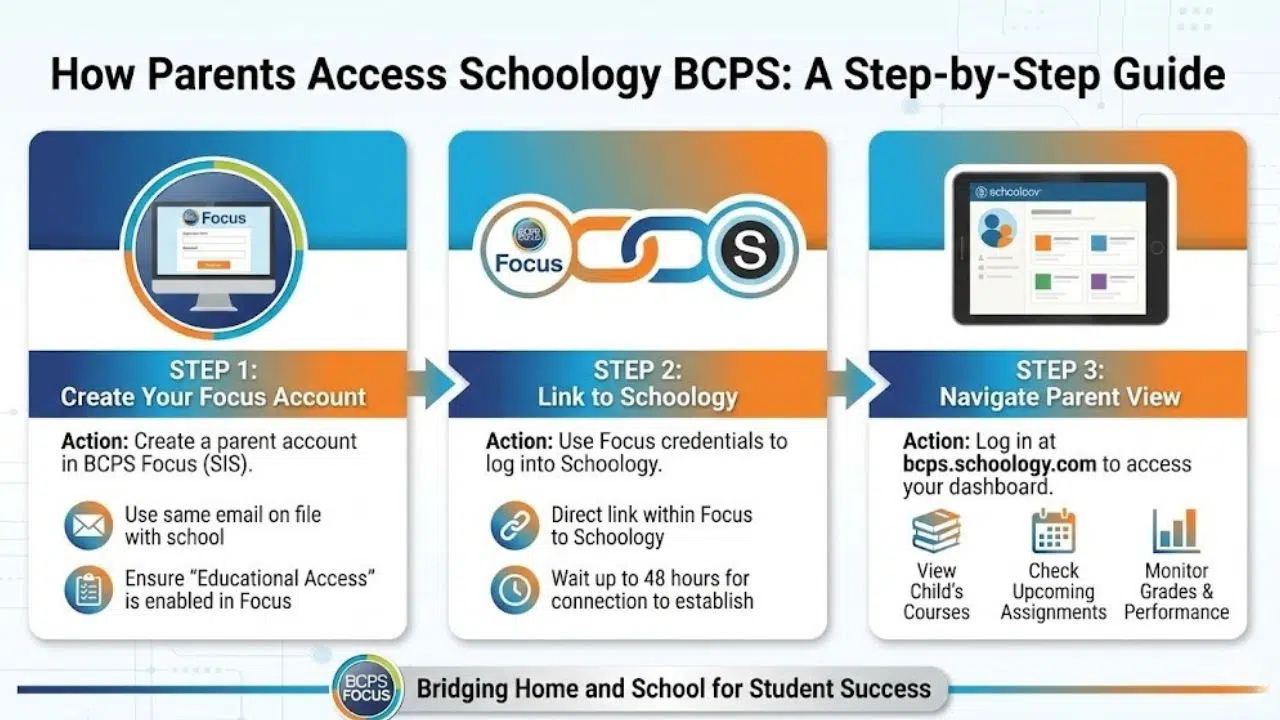
The process begins with BCPS’s Student Information System, known as Focus. To access Schoology, you must first create a parent account in Focus using the same email address you have on file with your child’s school .
- Set Up Your Focus Account: Follow the official BCPS directions to create your parent account. It’s crucial that you are marked in Focus as having “educational access” to your student .
- Link to Schoology: Once your Focus account is active, you can use those same credentials to log into Schoology. There is a direct link within Focus that will take you to Schoology, but be patient it can take up to 48 hours for the account connection to be fully established .
- Navigate the Interface: After logging in at bcps.schoology.com, you will have a parent view. From here, you can access your child’s courses, view upcoming assignments, and monitor their grades .
For Students: Direct Access
Students typically have a more direct path. They can access Schoology by:
- Clicking the BCPS Schoology link located in the “BCPS Links” folder within their Chrome browser on a school device .
- Logging into the BCPS Apps Portal and clicking on the Schoology icon .
- Visiting the website directly and logging in with their BCPS credentials.
Maximizing the Parent and Student Experience
Simply logging in is only the first step. To truly benefit from Schoology BCPS, users should actively engage with its features. Moving beyond passive viewing transforms the platform from a simple reporting tool into an interactive learning partner.
Tips for Parents: From Monitoring to Engaging
- Use the “Weekly Snapshot” Email: Don’t want to log in every day? Turn on the weekly snapshot report in your Schoology settings. This feature automatically emails you a summary of your child’s grades and upcoming assignments, keeping you informed without constant manual checking .
- View the Course from Your Child’s Perspective: One of the most powerful tools for parents is the ability to “view as” or access their child’s account view. This lets you see exactly what your student sees the assignments, the teacher’s instructions, and the resources available allowing you to provide better homework support .
- Monitor Progress, Not Just Grades: Use the gradebook to look for trends. Are grades slipping in a particular subject? Is there a pattern of missing assignments? Catching these trends early allows for timely intervention and communication with teachers.
Tips for Students: Owning Your Learning
- Organize Your Dashboard: Use the calendar and todo list features. Schoology automatically populates deadlines, helping you manage your time effectively across all your courses.
- Participate in Discussions: Many teachers use the discussion boards for formative assessments. Engaging thoughtfully in these discussions not only deepens your understanding but also shows your teacher your engagement with the material .
- Leverage Feedback: When teachers leave comments on your submitted assignments, read them carefully. The feedback feature is designed to help you improve, not just to justify a grade .
Troubleshooting Common Schoology BCPS Issues
Even the most robust platforms can occasionally present challenges. Here are solutions to the most common issues reported by BCPS families.
Issue: Error message when trying to connect to Schoology from Focus.
- The Fix: This often happens if you click the Schoology link before the 48-hour account synchronization period is complete . Wait the full 48 hours. If the problem persists, double-check that you are marked as having educational access in Focus. If not, you may need to contact the school’s main office.
Issue: Trouble with the Google Drive integration in Schoology.
- The Fix: If you receive error messages when trying to attach or access Google Drive files (like Docs or Slides), you likely need to resync your account. Due to updates (like the one on April 9, 2024), the connection can break. Look for the “resync” option within the Google Drive app in Schoology to re-establish the link .
Issue: Not sure if the platform is down.
- The Fix: Before assuming the problem is on your end, check the official status. You can visit the PowerSchool Status Page (PowerSchool is the parent company of Schoology) for real-time updates on whether the service is working normally or experiencing an outage .
Issue: Forgot how to do something specific in the platform.
- The Fix: BCPS maintains a wealth of resources. Visit the Educational Technology YouTube Channel and look for the “Schoology in BCPS Playlist” for short, targeted video tutorials .
Frequently Asked Questions
How do I create a parent account for Schoology BCPS?
To create a parent account, you must first set up a myBCPS parent account in the Focus system. Use the same email address you provided to your child’s school. Once your Focus account is active and you are granted educational access, you can use those credentials to log in to Schoology. Allow up to 48 hours for the systems to fully connect .
Why can’t I see my child’s classes in Schoology?
There are usually two reasons for this. First, the 48-hour synchronization period between Focus and Schoology may not have completed. Second, your Focus account may not have the correct permissions. Verify with your school that you are properly marked as a guardian with educational access .
What is the difference between BCPS Focus and Schoology?
Focus is the Student Information System (SIS). It’s the district’s master database for attendance, report cards, scheduling, and demographic information. Schoology is the Learning Management System (LMS). It is the digital classroom where the teaching and learning happen homework, class discussions, projects, and detailed grades .
Is there a Schoology app for my phone?
Yes. The Schoology mobile app is available for free on both Android and iOS devices. You can use it to check grades, view assignments, read messages, and even submit work directly from your phone. Search for “Schoology” in your device’s app store .
How do I turn on weekly email updates from Schoology?
Log in to your Schoology parent account. Go to your settings or account preferences. Look for the option related to notifications or “Weekly Snapshot” reports. Toggle the setting on to receive a regular email summary of your student’s grades and upcoming assignments .
My student is a Multilingual Learner. Are there accessibility features?
Yes. Schoology and the BCPS integration include features to support diverse learners. BCPS has compiled specific resources for translation, accessibility, and modification features available for Multilingual Learners and students with special education needs .
Embracing the Digital Classroom
Schoology BCPS is more than just a technological requirement; it is a dynamic tool that, when used effectively, can significantly enhance the educational journey. For parents, it offers peace of mind and the information needed to support their children. For students, it provides a centralized, organized platform to take ownership of their learning.
While the initial setup may require a bit of patience particularly the 48-hour sync period the long-term benefits of transparency and communication are invaluable. By utilizing the resources provided by BCPS, such as the video libraries and support pages, families can become confident and proficient users .
We encourage all BCPS families to explore the platform actively. Log in, click around, and discover the features that work best for you. And remember, if you encounter a hurdle, a vast network of support resources is just a click away. Embrace the tool, and you’ll find yourself better connected to the vital work of education.

























