A recruiter calls about a position you applied for three weeks ago. You remember the company, but which resume did you send? Was there a salary range? Did you already follow up?
That is the job a tracker should do. The best job search trackers keep each application, document version, contact, and next step easy to find. They differ, though, in how much work they do for you. A follow-up date in one app may trigger a notification; in another, it is simply a date you have to remember to check.
Privacy matters, too. A tracker may hold your resume, salary expectations, interview notes, and plans to leave your current job. Before choosing one, look at both who can see your records and what information the service can access.
I’ve used Notion and Google Sheets for tracking. For the other seven tools, I reviewed their published features, plan details, and privacy information. Free limits and features were checked in October 2026 and may change.
How These Job Search Trackers Compare
Start with the way you search. If you apply across many job boards, a browser extension may save time. If you want to keep your search simple or confidential, a manually updated tracker may be enough.
| Tracker | Best for | Follow-up support | Free access | Privacy setting to check |
| Teal | Keeping jobs, contacts, and resumes together | Follow-up dates, guidance, and email templates | Unlimited job tracking | Optional Google account connections |
| Huntr | A visual board with contact and activity records | Dated tasks and overdue activity views | Up to 100 tracked jobs | Board sharing and organization access |
| Simplify | Tracking alongside application autofill | Notes and email tools; AI drafts require Simplify+ | Tracker and Copilot autofill are free | Gmail connection and recruiter visibility |
| Careerflow | Tracking with built-in reminders | Reminders for follow-ups, deadlines, and interviews | Free plan; published limits conflict | Marketing and advertising preferences |
| Jobscan | Tracking alongside resume analysis | Follow-up tracking and interview reminders | Free tracker; separate limits on resume scans | Uploaded resumes and scan history |
| Kickresume | Tracking alongside resume creation | Follow-up dates; use a separate alert if needed | Free, with unlimited tracked applications | Employer-sharing consent and AI features |
| Notion | Building a tracker your way | Notifications when date reminders are configured | Free personal plan | Page and workspace permissions |
| Airtable | Connecting applications, contacts, and interviews | Reminders require an automation | Free plan with record and automation limits | Shared-view and base links |
| Google Sheets | A simple application log | Follow-up dates need a separate calendar alert | Free with a personal Google account | File-sharing access |
One distinction applies to every option: a saved job is not a submitted application. Even when an extension adds a record automatically, check the employer’s confirmation and make sure the tracker shows what actually happened.
9 Job Search Trackers for Applications, Follow-Ups, and Privacy
Each tool below can help you organize a search. The useful question is how much setup, checking, and personal information it asks of you in return.
1. Teal: Best for Keeping Your Search in One Place
Teal lets you save a role manually or use its Chrome extension to bring in a posting. You can then update its stage, add notes and contacts, and keep track of the resume version associated with that opportunity.
Its follow-up date, stage-specific guidance, and email templates help you decide what to do next. You still need to review the record and send the message yourself. That makes Teal a good fit if you want structure without handing over the whole application process.
Free plan: Job tracking is unlimited. Some advanced resume and AI features are paid.
Privacy check: Teal can store substantial career information, including resumes and interview notes. Connecting Google Contacts or Calendar adds another source of data; you do not need that connection to start tracking applications.
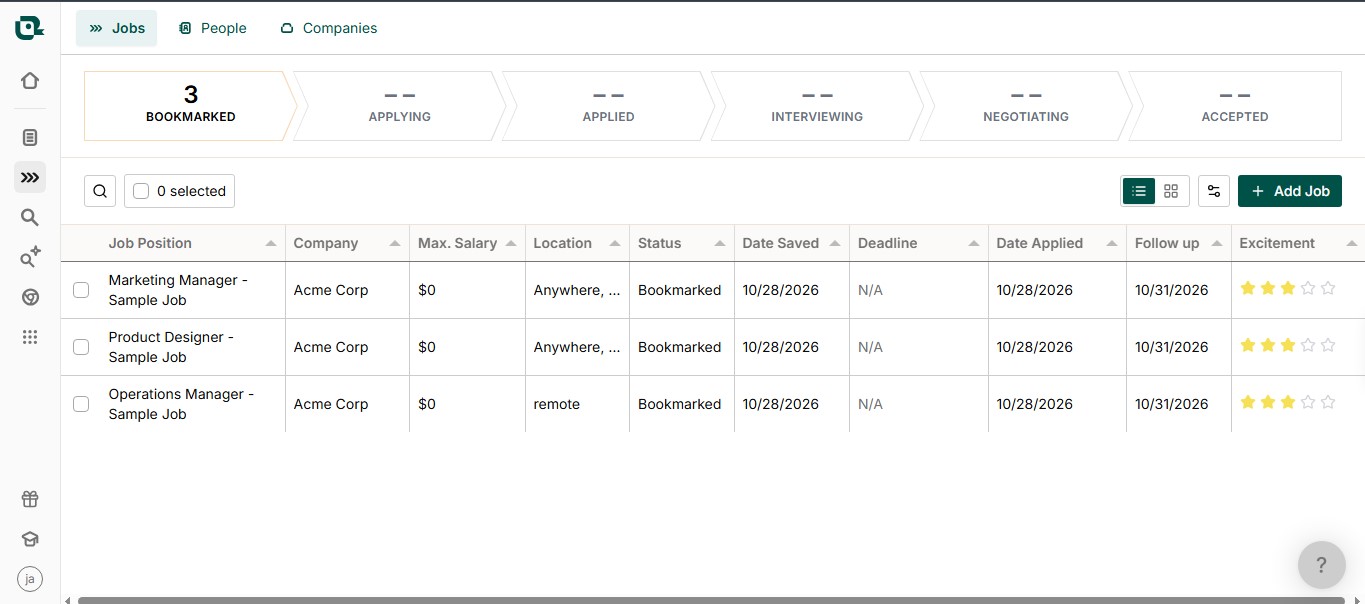
2. Huntr: Best for a Visual Board and Recruiter Contacts
Huntr organizes opportunities as cards you can move through a board. Its browser extension saves job postings, while individual cards can hold documents, notes, company details, and contacts.
You can create dated activities for steps such as following up or sending an interview thank-you. Huntr also shows activities by due date and completion status. That is helpful for reviewing what is overdue, but check your notification settings if you need an alert outside the app.
Free plan: Huntr’s Basic plan allows up to 100 tracked jobs. Its Pro plan removes that tracking limit.
Privacy check: If you share a board, the other person can see its contents. If you accept an invitation through a school, career program, or other organization, check what its staff can access before adding private notes.
3. Simplify: Best for Combining Autofill and Tracking
Simplify’s Copilot extension can help fill supported job applications and, in some cases, detect a submission and add it to the tracker. You can also save a job before applying, enter one manually, or import records from a spreadsheet.
That convenience calls for a quick check after every application. If Copilot does not detect a submission, update the status yourself. A record marked Saved should not be treated as proof that the employer received anything.
Simplify keeps notes and documents with a tracked role. Its paid Simplify+ plan adds AI drafts for follow-ups, referral requests, and interview messages. Drafting an email is a separate feature from reminding you when to send it.
Free plan: The job tracker and Copilot autofill are available for free.
Privacy check: Connecting Gmail is optional and gives Simplify access to messages for its job-search features. Also review Show Profile to Recruiters. When you enable recruiter discovery, your profile may be presented for relevant opportunities, including roles you have not applied for.
Explore the most popular job search apps here.
4. Careerflow: Best for Follow-Up Reminders
Careerflow allows manual entry and job saving through a browser extension. Its tracker holds application stages and notes, and its help information describes reminders for application deadlines, follow-ups, and interviews.
That makes it worth considering if a date sitting in a table is not enough to prompt you. As with any tracker, enter the date that fits the employer’s timeline and update the record when you hear back.
Free plan: Careerflow has a free tracker, but its own pages disagree about its limit. Its pricing page describes tracking as limited, one help page says free users can track up to 10 jobs, and another FAQ says there is no limit. Check the allowance displayed in your account before building a large tracker there.
Privacy check: Review its policy and preferences for marketing and personalized advertising. Add a full resume or use other career tools only if those features serve your needs.
5. Jobscan: Best if You Already Use Resume Analysis
Jobscan’s Job Tracker has a board for saved roles, applications, interviews, and offers. You can add a job yourself or save a listing through its Chrome extension. A job card can hold contacts, interview details, notes, and the resume you used.
It also connects to Jobscan’s resume analysis. That can make it easier to keep a tailored document with its application, but keep the match score in perspective. A score from a resume tool does not tell you how an employer will evaluate your application.
Check out impressive resume writing tips here.
Free plan: The tracker is free. Resume scans and advanced optimization tools have their own free limits or paid features.
Privacy check: Jobscan saves resume scans in account history. Decide whether you need to upload a document for analysis or simply want to record its filename in the tracker.
6. Kickresume: Best if You Build Your Resume There
Kickresume places its application tracker alongside its resume and cover-letter tools. You can see applications by stage, store the job and contact details, and keep a record of which document version belongs to each role.
It supports follow-up dates. If you need a notification on a particular day, set one in your calendar or phone rather than relying on a date field alone.
Free plan: Kickresume says its tracker is free and supports unlimited tracked applications. Other parts of its resume and AI toolkit have separate plan rules.
Privacy check: Review consent choices if you do not want your resume shared with partner employers or recruitment agencies. Using its AI features also involves sending relevant information to AI providers for processing.
7. Notion: Best for a Tracker You Can Shape Yourself
I’ve used Notion as a tracker, and the flexibility is what stands out to me. I can choose the fields I need and switch between a table for dates and a board for application stages. That freedom also means I have to maintain the system myself; Notion will not know that I applied or heard back unless I update the record.
You can build a database from scratch or start with a job application template. Add a Date property for your next action and configure a reminder if you want Notion to notify you. A date written in an ordinary note is easy to overlook and does not, by itself, set up that database notification.
Free plan: A personal tracker works on Notion’s Free plan, which limits individual file uploads to 5 MB. Check a template’s price before using it, since marketplace templates can be free or paid.
Privacy check: Keep the tracker in a private area of your workspace. Pages in a shared or default teamspace can be available to other members, and a public link changes who can open the page. Check Share before adding confidential career plans.

8. Airtable: Best for a Detailed Application Database
Airtable offers a job-hunting template that can connect applications with contacts, interviews, documents, and next actions. It is useful when you want more than one list and would benefit from sorting or filtering related information.
The template includes fields for follow-up dates, but automatic reminders take setup. You must create an automation and make sure its trigger and message work as intended. That is more effort at the start, though it gives you control over the reminder.
Free plan: Airtable currently allows 1,000 records per base and 100 automation runs per workspace each month on its Free plan. Records across the base count toward the limit, including those in separate jobs and contacts tables.
Privacy check: Review any shared-view or base link before sending it. An unrestricted link can give anyone who has it access to the information you made available.
9. Google Sheets: Best for a Simple, Manual Log
I’ve also used Google Sheets for tracking. I like that I can start with a few columns, sort applications by date or status, and change the layout without learning a dedicated job-search app. It works especially well when I keep the sheet small enough to update after each application.
The manual work is the trade-off. Sheets does not detect a submission or know that a recruiter replied. A follow-up-date column will not send a due-date alert through the sheet’s standard edit notifications. For a follow-up I do not want to miss, I add a separate calendar reminder.
Free access: A basic sheet works with a personal Google account, subject to the account’s available storage.
Privacy check: Open Share and set General access to Restricted. Check whether anyone you invite has viewing or editing access. The sheet may reveal far more than a list of company names once you add salary notes and interview details.
What to Put in Your Job Application Tracker
A useful record should let you recognize the opportunity immediately and know what happens next. Start with these fields:
- Company and exact job title
- Posting link or saved job description
- Application date
- Current status
- Resume version sent
- Contact name, if you have one
- Next action and its date
- Employer confirmation or reference number, if provided
Enter an application when you submit it, while the details are fresh. If you only bookmarked a role, mark it Saved. If an employer has not responded, record No response or close it for your own planning; silence is not the same as a rejection.
You do not have to upload every resume, email, or interview document to make the tracker useful. A descriptive filename and a note about where you stored the document may be enough.
Make Follow-Ups Helpful, Not Automatic
Before setting a reminder, read the job posting and confirmation email. If the employer gives a timeline or asks applicants not to contact the hiring team, follow that direction.
When contact is welcome and no timeline is given, a brief follow-up after roughly one to two weeks may be appropriate. If there is a closing date, allow time for applications to be reviewed after it passes. Keep the message specific:
Subject: Following up on the [Job Title] application
Hello [Name], I applied for the [Job Title] role on [date] and remain interested in the opportunity. Please let me know if I can provide anything else as you review applications. Thank you for your time.
After an interview, record the decision timeline the interviewer gave you. Set your next reminder around that timeline instead of using the same follow-up schedule for every company.
Privacy Checks Before You Add Your First Application
A tracker has two separate privacy questions: Who can see the records you share? And what can the service process to provide its features? Review both.
- Keep a confidential search in a personal account: A shared work or school workspace may give other members access you did not expect.
- Check extension permissions: Look at which sites a job-saving extension can access and limit that access where your browser allows it.
- Connect your inbox only when you need the feature: Manual tracking may be enough without giving another service access to recruiting messages.
- Review sharing and recruiter visibility separately: A private board, a public link, and a discoverable candidate profile have different audiences.
- Store only what helps you act: Identity documents and banking information do not belong in an ordinary application tracker.
A tracker also cannot verify that a posting or recruiter is legitimate. Check the employer through an independent channel before sharing sensitive information or paying anything connected to a supposed offer.
Commonly Asked Questions about Job Search Trackers
What is the best free job search tracker?
Teal is a strong dedicated option if you want unlimited job tracking. Google Sheets is simpler for a manual log, while Notion offers more control over the layout.
Can a tracker automatically record every application?
No. Extensions may capture supported submissions, but they can miss others. Keep the employer’s confirmation and check your tracker afterward.
Will an employer see my job search tracker?
Usually only if you share it or enable a relevant visibility feature. The service providing the tracker may still process the information you enter under its own policies.
Does a follow-up date automatically send a notification?
Not always. Some tools send configured reminders; others only store a date. Check the feature before relying on it.
When should I follow up after applying?
Follow the employer’s instructions first. If contact is welcome and no timeline was given, a short message after about one to two weeks is often reasonable.
Can Google Sheets remind me to follow up?
A date in a cell will not trigger a standard due-date alert. Add a calendar reminder if you need a notification.
Keep the Record, Keep Control
The right job search tracker is one you will update and trust. Choose a dedicated app if saving jobs and connecting application details will save you time. Choose Notion, Airtable, or Google Sheets if control over the layout matters more to you.
Whichever you use, confirm each submission, record the next step, and check the privacy settings before adding personal details. The tracker should make your search easier to manage without creating another task you have to chase.