

For years, iPad owners have asked Instagram to create a native app for Apple tablets. Until now, the experience on iPad was essentially a stretched version of the iPhone app.
That setup often produced blurry visuals, awkward layouts, and missing features—leaving many users disappointed. On September 3, 2025, Meta finally delivered: a fully optimized Instagram for iPad is now rolling out globally, marking the company’s first dedicated iPad application.
Reels Take Center Stage
One of the biggest changes is how the new app opens. Instead of beginning with the traditional photo feed, the homepage defaults to Reels—Instagram’s fast-growing short video format. Meta says this design choice reflects how users consume content on larger screens like the iPad: as “lean-back entertainment”, more like watching TV or streaming platforms.
By putting Reels first, Instagram is also signaling how seriously it views competition with TikTok, which continues to dominate the short-form video space. In fact, Meta revealed earlier this year that Reels now account for over 20% of user time on Instagram, showing its importance in the platform’s overall growth strategy.
Familiar Features, Redesigned for Bigger Screens
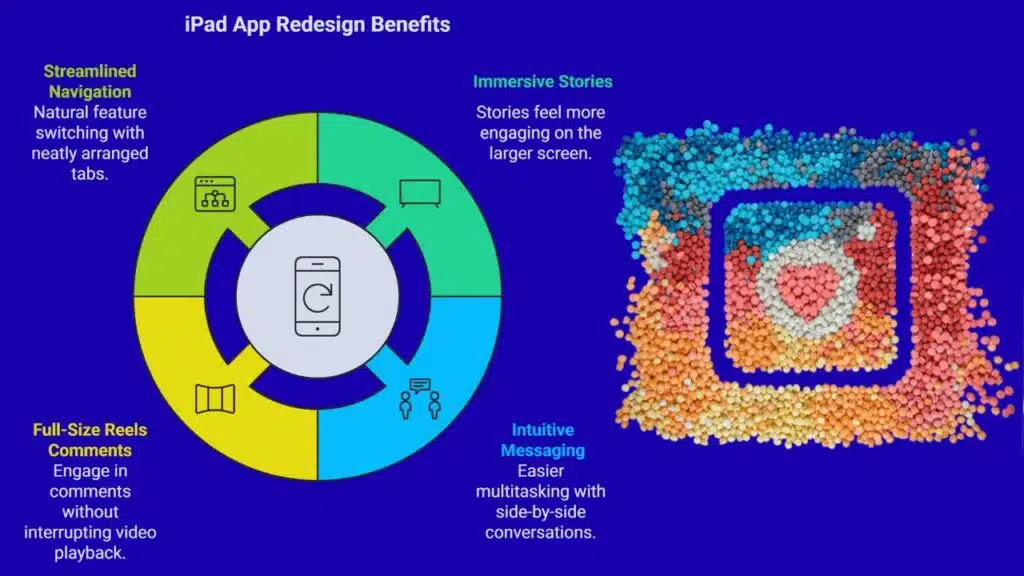
The new iPad app doesn’t just scale up the old interface—it’s been reimagined to make full use of the larger display.
- Stories at the top: Just like on phones, Stories remain easy to access, but they now feel more immersive on the iPad’s widescreen layout.
- Messaging panel: Chats are more intuitive, with a layout that lets you view conversations side-by-side instead of navigating back and forth. This makes multitasking smoother and faster.
- Reels comments: You can now expand comments on Reels without shrinking the video, keeping playback at full size while joining the conversation.
- Streamlined navigation: Tabs for notifications, messages, and your profile are neatly arranged, so switching between features feels natural.
These updates aim to make Instagram feel like a native iPad app rather than a stretched-out phone version.
The New “Following” Tab
Another major addition is the redesigned Following tab, which gives users more control over how they browse content. There are three different views:
- All – a mix of content from accounts you follow plus recommended posts.
- Friends – content only from accounts that follow you back, offering a more personal feed.
- Latest – a chronological list of posts, restoring an option many users have long requested.
This flexibility gives users multiple ways to prioritize the content they care about most. Unlike the past, where Instagram’s algorithm heavily dictated what appeared, the iPad app puts choice back into users’ hands.
Optimized Layouts and Multitasking
The app takes advantage of iPadOS features like split-screen multitasking. For example, users can keep Instagram open alongside Safari or Notes, or watch Reels while browsing notifications at the same time. The bigger screen also improves readability for captions, comments, and messages—something that was often frustrating with the blown-up iPhone version.
Why Meta Waited So Long
Instagram’s leadership has often faced criticism for neglecting iPad users. Adam Mosseri, head of Instagram, previously admitted that building an iPad app “just wasn’t a priority” due to resource constraints. Meta historically focused on iPhone and Android because of their much larger user base.
But the rise of video-first platforms like TikTok, combined with the growing use of tablets for entertainment, has shifted priorities. By finally launching an iPad app, Meta is acknowledging that tablets are not just productivity tools—they are central to how people consume media and shop online.
Wider Context: Meta’s Push on Engagement
The launch also comes after Meta reported strong growth across its platforms. In its July 2025 earnings report:
- 3.48 billion people use Meta’s family of apps daily, up 6% year-over-year.
- Ad conversions on Instagram improved by 5%, thanks to better recommendation algorithms.
- A new ranking system increased time spent on Instagram by 6%.
- Meta’s early AI tools for small businesses are gaining traction, especially in e-commerce.
These metrics show Instagram’s central role in Meta’s broader strategy: keeping users engaged longer and helping advertisers reach them more effectively.
Early Experiments with AI and 3D
This update builds on Meta’s ongoing push into immersive technologies. Back in June 2025, Meta began testing AI-generated 3D photos inside Instagram, designed to work with its Meta Quest AR/VR headsets. The goal is to merge social media with immersive computing, making experiences like virtual storytelling and 3D memories a reality. The iPad app is another step in that direction, providing a larger canvas for new features that may integrate with AR and VR down the line.
Global Rollout and What’s Next
- Now available: The Instagram iPad app is rolling out worldwide and can be downloaded free from the App Store. It requires devices running iPadOS 15.1 or later.
- Android tablet version coming soon: Meta has confirmed that a dedicated app for Android tablets is also in development, though no exact release date has been given.
- Designed for long-term use: Meta emphasizes this isn’t just a cosmetic update—it’s a long-term investment in making Instagram better on larger screens.
After years of waiting, iPad users finally have a true Instagram experience tailored to their devices. By putting Reels front and center, redesigning layouts, and offering greater control over feeds, Meta is betting that tablets will become an important battleground in the fight for user attention.
The launch highlights Meta’s broader vision: to evolve Instagram beyond a photo-sharing app into a multifunctional, video-driven, AI-enhanced platform that competes directly with TikTok while preparing for the next wave of AR and VR social experiences.
With the iPad version out and an Android tablet version on the way, Instagram is signaling that it intends to meet users wherever they are—on phones, tablets, or eventually inside immersive headsets.
The Information is Collected from The Verge and The Hindu.


























