
When your planner is gathering dust and overdue reminders keep piling up, restart a productivity system by clearing out tasks that no longer matter, choosing one place to track current commitments, and setting a short daily check-in. You don’t need to rebuild your old routine or switch apps.
Start with what needs your attention now, then keep only the tools and habits that help you follow through. A system that fits your current workload and responsibilities is easier to return to—and easier to maintain—than an elaborate setup designed for a different season of life.
Restart a Productivity System with a Clean Reset
A productivity system often begins as a helpful place to keep deadlines, notes, and next steps. Over time, maintaining it can start to compete with the work it’s meant to support. Sorting every idea, updating labels, and keeping several apps in sync can turn a simple setup into another source of unfinished work.
The problem may be less obvious. Perhaps you record tasks but don’t decide which ones matter most. Or your routine assumes every day is predictable, even though meetings, urgent requests, or family responsibilities regularly change your plans.
A lapse is a reason to inspect the setup, not proof that you need a more elaborate one. Ask what changed and what you still need the system to help you manage.
Clear the Backlog First
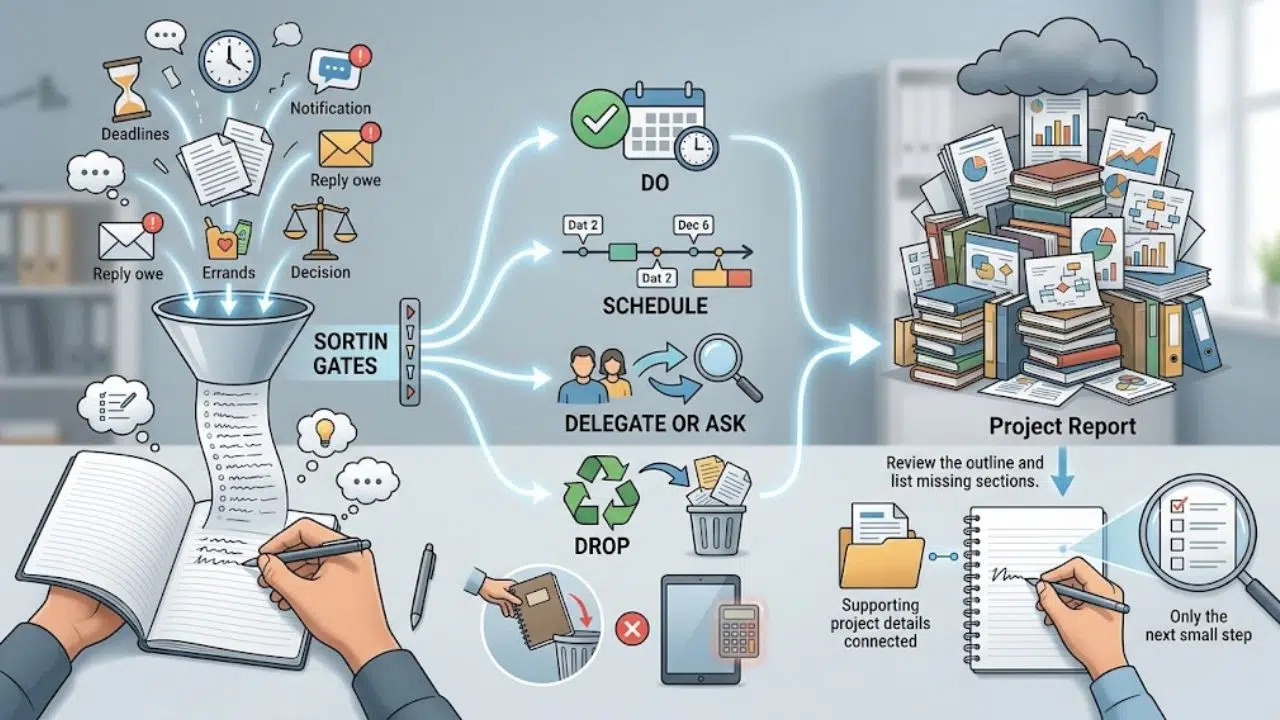
Don’t begin by reorganizing every old task. That can take time away from current work and make the backlog feel permanent.
Open one blank page or list and write down what’s on your mind: deadlines, unfinished work, replies you owe, errands, and decisions you’ve been putting off. Don’t sort as you go. This is a quick inventory, not an archive you have to perfect.
Then choose what to do with each item:
- Do: It still matters and can be handled soon.
- Schedule: It matters, but not today.
- Delegate or ask: Someone else needs to act, or you need more information.
- Drop: It no longer matters, or you no longer intend to do it.
Be especially careful with tasks that have been sitting on your list for months. If you can’t say why one still matters, don’t carry it forward automatically. A new app won’t make an outdated commitment useful.
Write the Next Action
“Prepare the report” can hide several decisions and steps. Make it easier to start by writing down the first action: “Review the outline and list missing sections.” You’re not promising to finish the whole report in one sitting. You’re making the first move clear.
For a large project, keep that next step on your main list and put supporting details in a separate note. The main list should help you choose what to do, not reproduce the entire project.
Choose One Place for Commitments
Pick one place to record tasks and deadlines. It might be a paper notebook, calendar, or task app you already use. Choose the one you’ll check and maintain, not the one with the most features.
A calendar works well for appointments and commitments tied to a date or time. A task list is better for actions you need to complete. One tool can handle both if you can tell the difference at a glance.
If you already use several tools, decide which one is the source of truth. For example, keep appointments in your calendar and project actions in a task manager. Copy a task elsewhere only when the second entry has a clear purpose, such as a deadline reminder. Otherwise, duplication creates another place to update when plans change.
Start with a Short Daily Check-In
Choose a time you can usually manage: before opening email, after lunch, or before you finish work. Take a few minutes to ask:
- What has a real deadline today?
- What would count as meaningful progress?
- What can wait?
Choose a small number of priorities based on the day ahead. A full task list is not a daily plan. If your calendar is packed, one important task may be enough. Leave some room for work you can’t predict.
If you keep skipping the check-in, move it to a more reliable point in your day or make it shorter. Don’t respond by adding steps. The routine should reduce decisions, not create more.
Plan Around the Day You Actually Have
A plan that assumes a quiet, interruption-free day is likely to fall apart. Before choosing tasks, look at meetings, travel, care duties, and other fixed commitments. Then decide what fits into the time that remains.
If you regularly carry the same task forward, treat that as useful information. The task may be too large, poorly defined, or less urgent than it looks. Break it into a first step or move it out of today’s priorities.
For example, “work on the proposal” is hard to measure. “Open the draft and write a rough outline” tells you what to do and gives you a natural stopping point. It also makes it easier to resume later.
Use a Three-day Reset
A short reset can help you test a simpler setup without committing to a full overhaul.
- Day one: Gather current commitments in one place. Remove tasks that no longer matter, then choose one or two that need attention first.
- Day two: Check your calendar. Pick priorities that fit the actual day and write a first step for anything that feels too large.
- Day three: Notice what you used. Keep the helpful parts. Change anything you ignored, found confusing, or couldn’t maintain.
Treat this as a flexible outline, not a streak to protect. If a day gets disrupted, continue at your next check-in. You don’t need to wait for Monday or the start of a new month.
Set Reminders for a Specific Reason
A reminder helps when it brings an action to your attention at the right time. A screen full of alerts that all feel urgent is easier to dismiss.
Before setting one, name the task and the moment when a prompt could help. “Submit the form by Thursday” may need a deadline alert. “Make progress on my long-term goal” is too vague; it may call for a smaller next step or a planned work session.
Research on implementation intentions examines plans that connect a situation to an action: If this happens, then I’ll do that. A meta-analysis reviewed how these plans relate to goal achievement. For everyday planning, that might mean, “After my first meeting, I’ll review the project notes for 15 minutes.” It makes the intended action more specific, though it cannot guarantee the task gets done.
Leave Room for Missed Days
Your setup should make it possible to return after an interruption. It shouldn’t depend on maintaining a perfect streak.
A real-world study of habit formation found that missing one opportunity to perform a behavior did not materially affect the formation process. That finding doesn’t tell us what happens in every situation, but it does caution against treating one missed check-in as a reason to abandon a routine.
Choose a minimum version for busy days. It might be checking tomorrow’s calendar and picking one priority. If you’ve missed several days, don’t try to clear the entire backlog before continuing. Check what’s due next, capture anything important you might forget, and choose one useful action.
Review before Adding More
After a week or two, look at where the system caused friction. Which part did you actually use? Where did tasks get lost? What felt unnecessarily complicated?
Change one thing at a time. If you never open the app, try putting it somewhere easier to reach. If your daily list keeps growing, choose fewer priorities. If you forget to plan, connect the check-in to something already fixed in your day, such as making tea or opening your laptop.
A short list and a regular check-in may be enough. A team project with many dependencies may need more structure. Keep the system proportional to the work; don’t hold on to features just because they were useful in a different season.
How Our Content Team Keeps the Work Moving
Our content workflow is one example of that extra structure. We use a few shared steps so an article does not depend on one person remembering what happens next.
Start with the Content Calendar
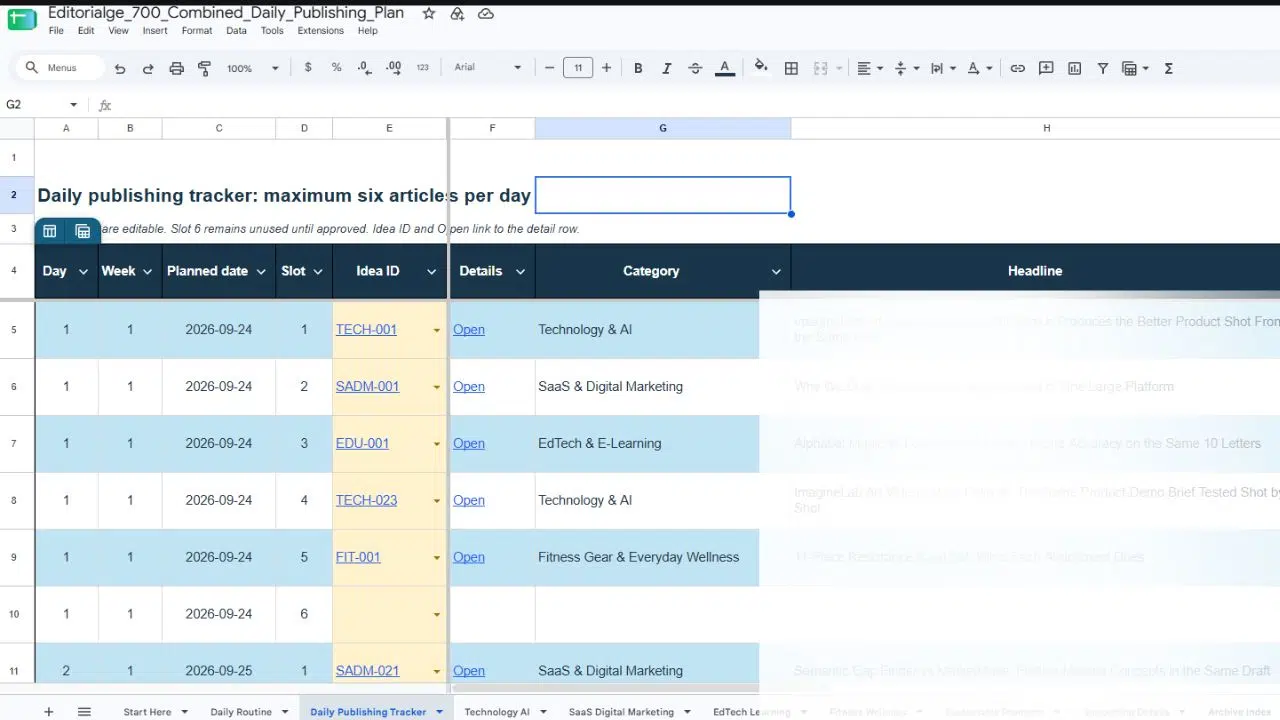
We keep upcoming topics, writer assignments, deadlines, publishing schedules, and article progress in a shared Google spreadsheet. When plans change, the calendar helps us see which article is affected and who is responsible for it. It is the place we check before taking on another topic or asking where a draft stands.
Keep Daily Communication Simple
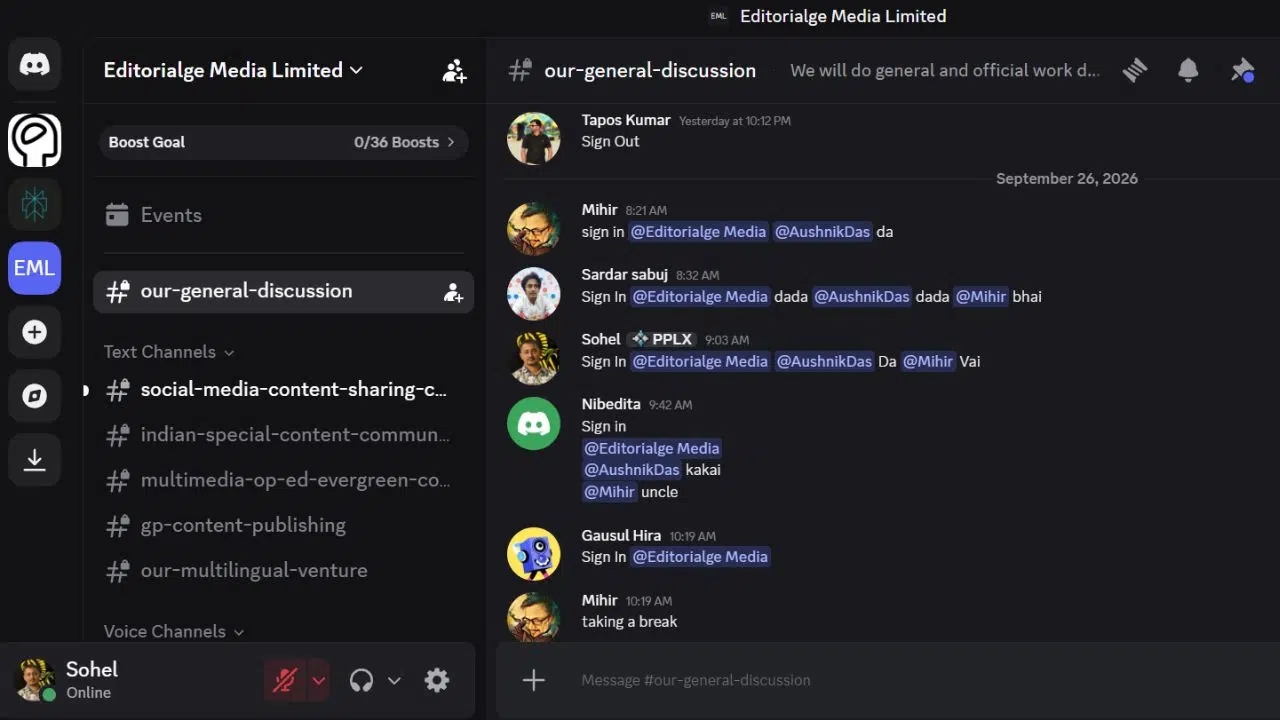
Our team works a six-day week and uses Discord to coordinate tasks, ask questions, and share updates. We also sign in and out there each day, so colleagues can see working hours and availability. A writer can flag a question while drafting; an editor can make it clear when a revision needs attention. The updates help the work move between people without turning the calendar into a conversation thread.
Give Every Draft a Review
After a writer completes an article, an editor checks its accuracy, factual consistency, structure, readability, grammar, SEO requirements, and overall quality. If changes are needed, the draft goes back to the writer. The editor reviews the corrections and approves the article before it moves to publishing.
Make the next step clear
This is the path an article follows:
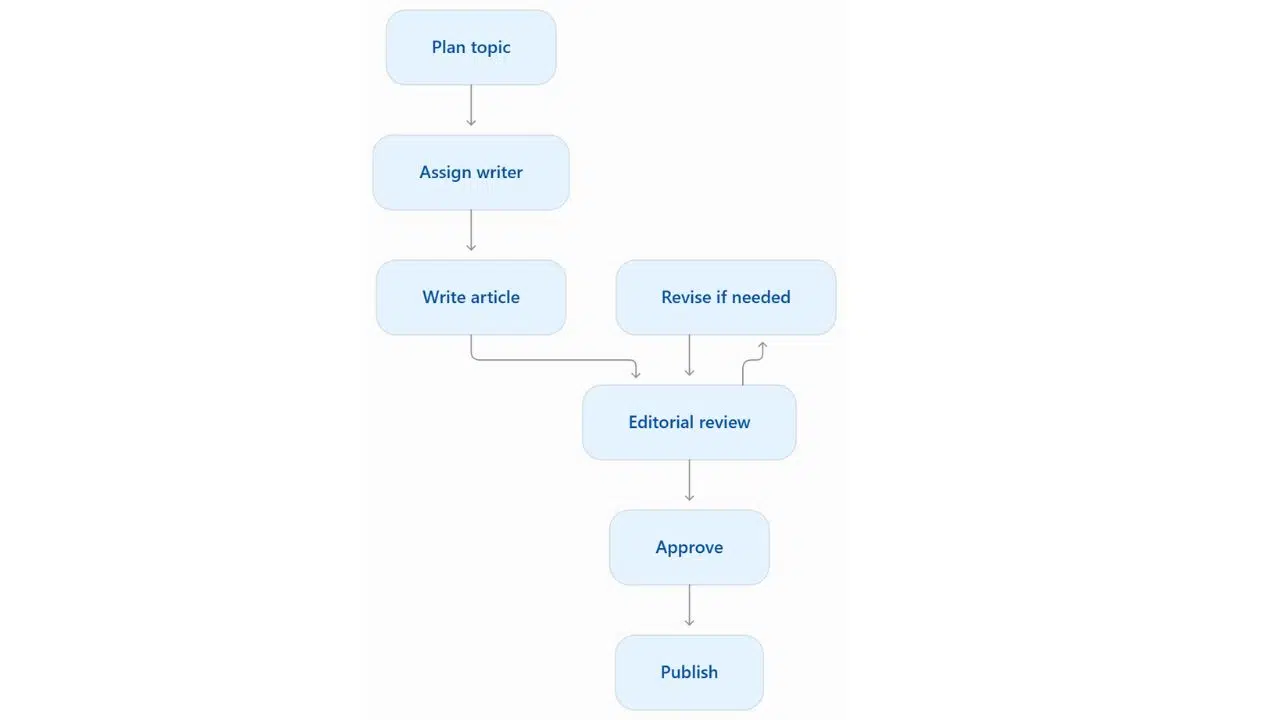
The calendar makes assignments and schedules visible; daily communication helps us handle questions and handoffs. The review step gives us a consistent point to check quality. It does not prevent interruptions, but it helps us see what needs to happen next when work resumes.
Avoid these Restart Mistakes
- Rebuilding everything at once: A new set of labels and dashboards can feel productive, but it delays the work the system is meant to support.
- Keeping every old task: Decide whether an item still matters before moving it.
- Planning an ideal week: Use the calendar and responsibilities you actually have, with some room for unexpected work.
- Switching tools to avoid a decision: A different app won’t clarify an unclear priority or an overfull list.
- Waiting for a perfect start date: Choose the next check-in you can manage. A modest restart today is more useful than a detailed plan that stays untouched.
Final Thoughts
To restart a productivity system, decide what still deserves your attention, keep commitments in one trusted place, and choose a few priorities that fit the day you have. Start with the smallest routine you’re likely to use again.
If a part of the setup creates more work than it removes, simplify it. Your next step can be as modest as opening your calendar and deciding what needs attention first.
Frequently Asked Questions (FAQs)
Should I switch to a new productivity app?
Only if your current tool is causing a specific problem you can name. If the real issue is an overloaded list or unclear priorities, those problems can follow you to a new app.
How many tasks should I plan for each day?
There’s no universal number. Choose priorities based on your available time and fixed commitments. If tasks keep rolling over, reduce the list before adding a more complex planning method.
What should I do after missing several days?
Check what’s due next, capture anything important that isn’t recorded, and choose one useful action. You don’t need to finish a full catch-up session before using the system again.