

Learning how to choose project management software starts with identifying where your team’s work is breaking down. The right platform is rarely the one with the most features. It is the simplest tool that solves your coordination problems, fits the way people work, and remains affordable after plan restrictions, add-ons, and administration are counted.
I would not begin with a list of popular products. Look at a recent project first. Find out where responsibilities became unclear, information went missing, or progress became difficult to see. Those problems should shape the software requirements, not the other way around.
This is not about finding the universally “best” platform. It is about choosing a system your team can use consistently without turning software maintenance into another project.
Project management software ranges from basic shared boards to complex platforms containing budgets, workload forecasts, automations, portfolios, and executive reports. A small team does not automatically need the second kind.
A simple task-management tool may be sufficient when the team mainly needs to record work, assign owners, set deadlines, and see basic progress. It can work well when projects have few dependencies, one person can understand the overall workload, and budgets or billable hours are managed elsewhere.
More complete project management software becomes useful when the team must coordinate:
- Several projects and shared resources
- Tasks with important dependencies
- Client or stakeholder approvals
- Budgets, estimates, or billable time
- Repeatable request and intake processes
- External collaborators with restricted access
- Workload or capacity across multiple people
- Reporting across several active projects
The distinction matters because every additional layer of structure creates work. Custom fields must be maintained. Dashboards are only useful when people update the underlying information. Automations need monitoring, and detailed workflows can slow down tasks that were simple to begin with.
If a shared board, a calendar, and a reliable weekly review would solve the problem, an elaborate platform may give the team little more than an expensive place to remain disorganized.
Match Features to the Work Your Team Actually Does
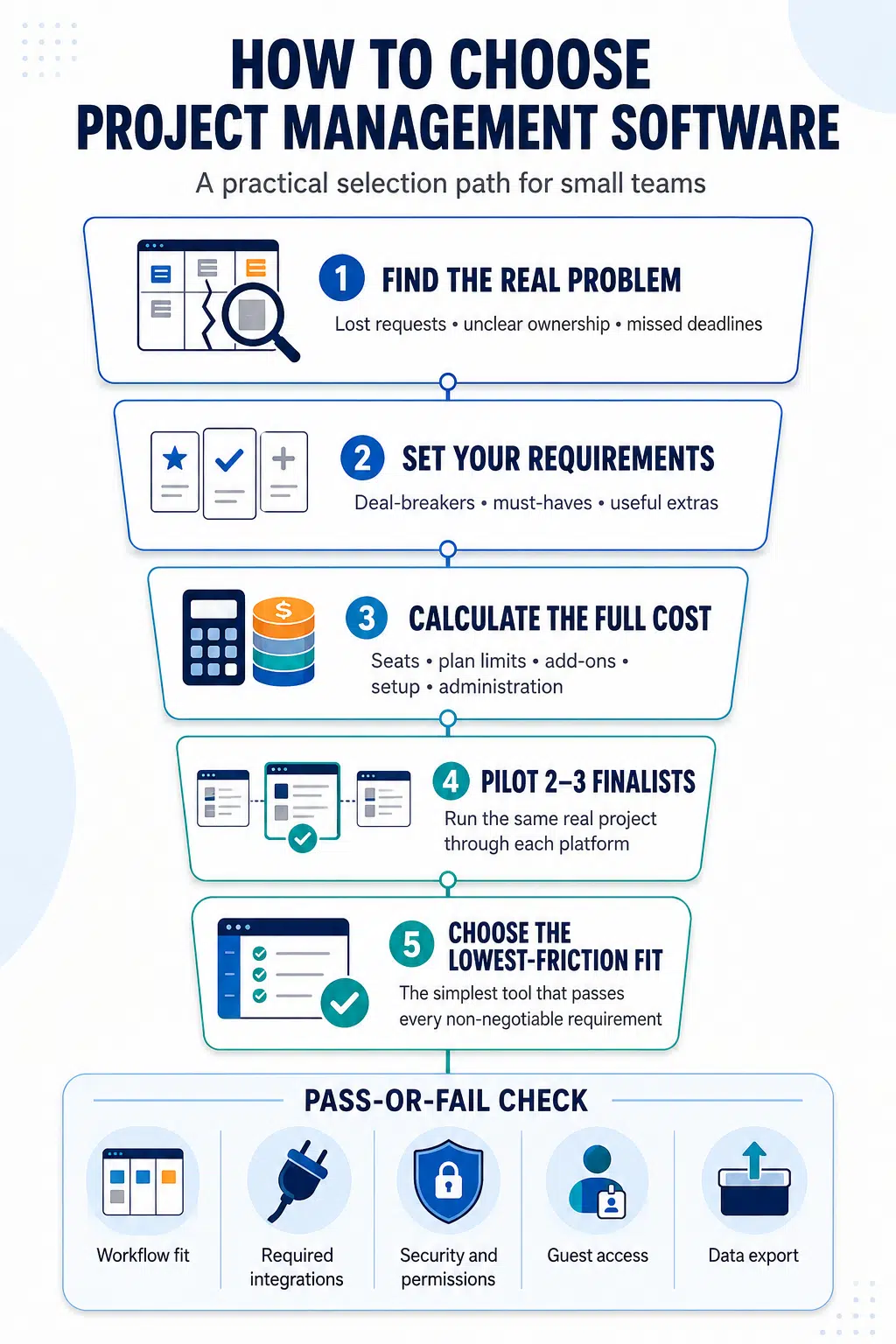
Product pages make almost every feature appear important. Small teams need a stricter filter. A useful way to evaluate requirements is to place them into four groups:
- Deal-breakers: Conditions the platform must satisfy, such as a required integration, permission model, or security control.
- Must-haves: Capabilities people will need during normal work.
- Useful extras: Features that could improve the experience but are not essential.
- Distractions: Attractive capabilities with no defined owner or repeated use case.
This prevents a heavily promoted feature from outweighing basic workflow fit.
Get the everyday features right
Most small teams need tasks with clear owners, due dates, understandable statuses, searchable discussions, and a useful list, board, or calendar view. Reusable templates and recurring tasks can also reduce repetitive setup.
The quality of these basic features matters more than their presence on a comparison chart. Creating a task, changing its deadline, finding an earlier decision, and seeing overdue work should feel straightforward. If common actions require extensive training, people will gradually return to email, chat, and private notes.
Notification control is easy to underestimate. Too few notifications allow important changes to disappear. Too many teach users to ignore all of them. During a trial, check whether each person can control what reaches them without missing work that requires attention.
Add specialist features only when the workflow requires them
Dependencies and timeline views help when a delay in one area affects later work. They add less value when tasks can be completed independently.
Time tracking and budgets matter for agencies, consultancies, and other teams that estimate or bill for their work. Workload planning becomes useful when specialists are shared across several projects. Forms help when a team receives repeated requests that need consistent information.
Guest access deserves particular attention if clients or contractors will use the platform. Check what guests can see, what they can change, and whether they require paid seats. The label “guest access” does not reveal how practical or restricted that access will be.
Sprint planning and backlog tools suit teams using iterative development processes. Formal approvals and audit histories may matter in publishing, finance, legal work, or regulated environments. Portfolio reporting becomes valuable when decision-makers genuinely need visibility across several projects, not simply because the dashboard looks impressive.
AI features should face the same test. Summaries, task creation, request classification, and automated reports can save time when connected to a repeated task. “Includes AI,” however, says little about whether the feature is accurate, useful, or included in the plan you intend to buy.
Check what information the AI can access, whether usage is metered through credits, and how much correction its output requires. Without a clear use case, AI is a product headline rather than a selection criterion.
Check What the Feature Page Cannot Prove
A platform can contain every requested feature and still be unpleasant to use. Some of the most important differences only appear when people try to complete ordinary work.
Everyday usability
A clean interface in a screenshot is not evidence of easy daily use. Give potential users a few realistic tasks and watch where they hesitate.
They should be able to create and assign work, understand what needs attention, update a status, find an earlier discussion, and adjust a deadline without relying on an administrator. Managers should be able to identify blockers and produce a useful progress view without building a complicated reporting system.
Let contributors test the platform as well as managers. A team lead may be impressed by a dashboard while everyone responsible for feeding that dashboard finds the update process tedious.
A useful system should reduce reporting work. If people must update the project platform and then recreate the same information in spreadsheets or slides, the team has added a second reporting layer rather than improving visibility.
Fit with existing tools
An integration logo confirms that a connection exists. It does not prove that the connection supports your workflow.
Find out what information moves between the systems, whether the sync works in both directions, how frequently it updates, and which plan is required. Test what happens when a field changes or the integration fails.
The purpose is not to connect every application the team uses. Focus on the points where information is currently lost, copied repeatedly, or entered twice.
Security and permissions
A small team can still store contracts, customer information, internal plans, financial details, and sensitive client files in a project platform. The level of scrutiny should match the information involved.
At minimum, review multifactor authentication, administrator and guest permissions, account removal, encryption, backups, recovery procedures, security notifications, and data-processing terms. Audit histories and data-location requirements may also matter for sensitive or regulated work.
The UK National Cyber Security Centre identifies encryption, modern authentication, authorization, logging, and auditing as important areas when assessing cloud services. It also emphasizes the customer’s responsibility for configuring permissions, onboarding, offboarding, integrations, and data handling correctly.
A platform can provide strong security controls and still be used insecurely. The team needs an agreed process for granting access, reviewing permissions, and removing people who no longer require the system.
Support and vendor reliability
Check the support included with the plan you intend to purchase. A product may advertise priority support or an account manager even though those services are restricted to higher tiers.
Look for usable documentation, clear support channels, public service-status information, and a realistic process for recovering access or resolving billing problems. A small team may not need a dedicated representative, but it does need somewhere to turn when a platform central to active work stops behaving as expected.
Data export and exit options
Data portability should be examined before purchase, when the team still has leverage and alternatives.
A spreadsheet export may preserve task names, owners, and due dates while losing attachments, comments, dependencies, automations, dashboards, permissions, archived work, or activity history. NIST’s cloud standards work identifies data and metadata portability as important to reducing migration costs and vendor lock-in.
During the trial, export a sample project and inspect the result. Check whether attachments are included, whether a complete account export is available, who can request it, and which relationships between records will be lost.
You may never need to migrate. Even so, a workable exit gives the business more control if prices, ownership, requirements, or the product itself changes.
Shortlist Two or Three Tools and Test Real Work
Comparing ten similar platforms usually creates more tabs and spreadsheets than useful evidence. Use your deal-breakers to eliminate unsuitable options, then choose two or three finalists that appear to fit the workflow, budget, and technical requirements.
A guided tour is useful for learning where features are located. It should not replace a pilot.
The Association for Project Management describes a pilot as a small-scale implementation used to assess viability and reveal deficiencies before substantial resources are committed. For this decision, choose a real project that represents normal work without carrying unusual risk.
Run comparable work through each finalist. Include a deadline change, an ownership change, a blocked task, an earlier decision that must be found, and a status update for someone outside the immediate project. If external collaboration or a particular integration matters, test that too.
Several team members should participate. Managers, contributors, administrators, and guests encounter different forms of friction.
Ask participants to record specific observations. “It was easy” is not especially useful. “I could see my priorities without changing views” is. So is “the guest could see more information than expected” or “changing a deadline required four separate steps.”
Before ending the pilot, export the project. This is the easiest point at which to discover what the platform allows you to take with you.
Roll It Out Without Creating More Bureaucracy
Once a platform has been selected, resist the temptation to configure every available feature before anyone begins using it.
Start with one system owner, a small number of agreed statuses, clear rules for task ownership and due dates, and one or two useful views. Create templates only for work that is genuinely repeated. Add integrations when they solve a specific problem, not because they are available.
Move active projects and essential reference material first. Migrating years of outdated tasks can make the new system harder to search before the team has established useful habits.
People also need to know what the platform will replace. Clarify whether new requests belong in email, chat, a form, or the project system. If every channel remains equally valid, the new platform will never provide a dependable picture of the work.
Review the setup after one meaningful work cycle. Remove fields nobody updates, simplify templates, adjust notifications, and check whether reports are based on reliable information.
Login counts are a weak measure of adoption. Look instead for clearer ownership, fewer lost requests, shorter status discussions, earlier visibility of blockers, and less duplicated reporting.
Choose the Tool That Adds the Least Unnecessary Work
The right project management software for a small team is not necessarily the cheapest, most flexible, or most widely recommended option. It is the platform that solves genuine coordination problems without demanding more administration than the work justifies.
It should pass every real deal-breaker, support the team’s common workflows, remain affordable on the required plan, protect the information stored in it, and provide a workable way to export important data. Most importantly, it should perform well when ordinary team members use it for ordinary work.
A project platform should make ownership, priorities, and progress easier to understand. If maintaining the software becomes a separate project, the team has probably selected more system than it needs, or configured a suitable system too heavily.
Frequently Asked Questions on How to Choose Project Management Software
1. What features should a small team look for in project management software?
Most small teams need clear task ownership, due dates, understandable statuses, searchable comments, useful project views, manageable notifications, and reusable templates. Dependencies, time tracking, workload planning, guest access, approvals, and detailed reporting should be added when the workflow genuinely requires them.
2. How many project management tools should a team compare?
After eliminating platforms that fail the team’s deal-breakers, two or three finalists are usually enough for a meaningful pilot. A small shortlist allows the team to test each platform more thoroughly.
3. How long should a software pilot last?
A pilot should cover at least one representative work cycle. It needs to include normal ownership changes, deadlines, collaboration, reporting, and data export. Encountering realistic situations matters more than reaching an arbitrary number of trial days.
4. What is the difference between task management and project management software?
Task-management software primarily organizes pieces of work, owners, deadlines, and statuses. Project management software may also provide dependencies, timelines, budgets, workload planning, approvals, resource management, client access, and reporting across several projects.
























