

Google is rolling out one of the biggest updates to the Play Store in years. The refresh is not just a visual redesign — it is a structural and functional overhaul that introduces AI-powered features, a redesigned Apps tab, a new You tab for personalization, a broader Play Games platform, and fresh tools to make app discovery easier.
The most eye-catching addition is the integration of Gemini Live, Google’s AI assistant, into gaming via an in-game overlay called Sidekick. But that’s just part of the package: the Play Store is also getting gamer profiles, generative AI avatars, expanded Play Points integration, and the full launch of Google Play Games across both mobile and PC.
Sidekick and Gemini Live: Real-Time Gaming Assistance
A New Overlay for Gamers
The centerpiece of this update is Sidekick, an AI-powered overlay that players can pull up during any supported game. Once enabled, Sidekick adds a menu of quick actions right on top of the gameplay screen. Players can:
-
Take screenshots of their current match
-
Record and save video clips
-
Instantly start streaming their gameplay to YouTube
-
Monitor achievements, rewards, or progress
-
Launch Gemini Live for direct AI support during gameplay
The idea is to give gamers a one-stop in-game assistant that helps them manage content creation, share gameplay, and receive guidance without breaking immersion or leaving the app.
Gemini Live in Action
The most powerful feature of Sidekick is its direct link to Gemini Live, Google’s real-time AI assistant. Unlike traditional gaming guides, Gemini can analyze what is happening on the screen and respond with context-aware advice. For example, it can help explain a game mechanic, suggest the best strategy to beat a boss, or recommend where to go next based on the player’s current progress.
Gemini Live already works in the standalone Gemini app with camera-based queries. In the gaming setting, however, its role shifts from answering questions about the real world to guiding players through digital environments. Google says this integration is meant to keep players “in the game” while still accessing help instantly.
Compatibility and Challenges
Not every title will support Sidekick immediately. Google is launching it gradually in select markets and games, with developers being encouraged to add support over the next year.
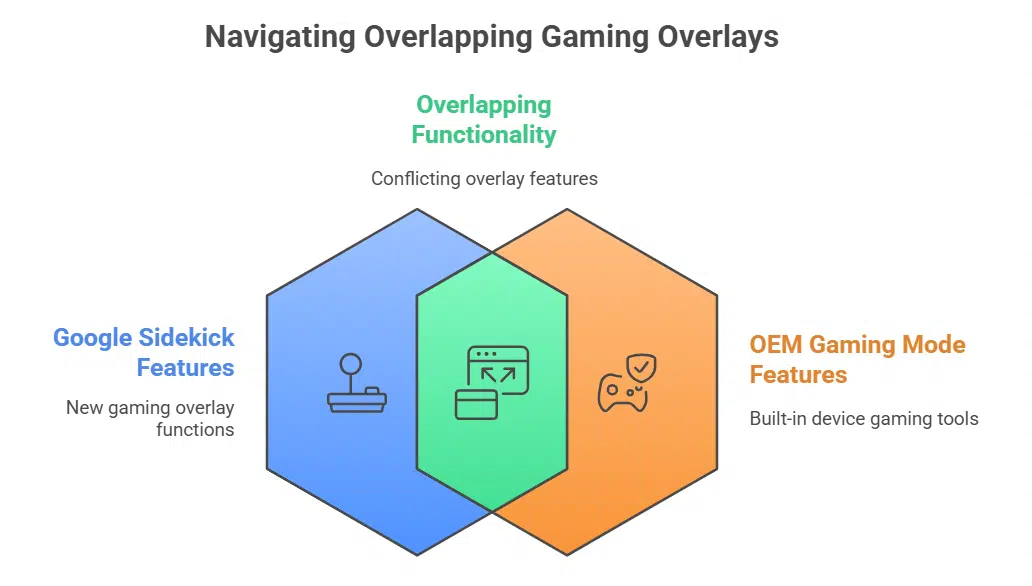
There is also a challenge on devices from manufacturers like Vivo, Oppo, and OnePlus, which ship with their own built-in gaming modes. Since these overlays often provide similar functions — performance boosters, screen recording, or floating toolbars — players may encounter a clash between Sidekick and the OEM’s game mode. To avoid having two overlapping menus, users may need to manually disable one.
The New “You” Tab: A Personalized Hub
One Place for Everything
Another major part of the revamp is the introduction of a You tab. This new section serves as a personal dashboard where users can manage their digital lives across the Play ecosystem. It combines:
-
Subscriptions and rewards: easy access to Play Points, paid services, and ongoing offers.
-
Personalized recommendations: apps, games, audiobooks, podcasts, and other content tailored to the user’s interests and activity.
-
Progress and updates: activity stats, achievements, and reminders across different apps and devices.
This personalized hub is designed to replace scattered menus with one unified view, reducing the friction of managing multiple apps and services.
Gamer Profiles and AI Avatars
For gamers, the You tab also includes a Gamer Profile. This profile tracks stats and achievements across devices, offering a central identity for all Google Play gaming activity.
Users can also create AI-generated avatars to represent themselves in games. These avatars, built using generative AI, let players express their personality visually. The addition reflects Google’s push to make Play Games more social and immersive, turning gaming progress into a shareable identity.
A Redesigned Apps Tab and Smarter Discovery
Curated and Guided Discovery
The Apps tab is also being redesigned. It will now highlight themed collections and curated spaces tied to current events, holidays, or trends. Instead of simply browsing lists of apps, users will see editorially selected categories that evolve throughout the year.
Search is being upgraded with a Guided Search function. Rather than typing in an app’s name, users will be able to search by goals or themes — for instance, “budgeting tools,” “home workout routines,” or “deck-building games.” The Play Store will then surface relevant apps and games grouped by purpose.
Expanded App and Game Pages
Game detail pages are also receiving updates. Beyond downloads and reviews, these pages will now show player stats, developer posts, and community updates. Google is also adding Q&A functionality, allowing players to ask or answer questions about a title directly within its store page.
Google Play Games: General Availability at Last
Cross-Platform Support
After more than three years in beta, Google Play Games is officially launching for the general public. The platform will now run across both mobile and PC, offering seamless synchronization of achievements, saves, and progress.
At launch, Play Games supports more than 200,000 titles, covering both casual and competitive genres. For players who like switching between phones and desktops, the cross-platform support means no more starting over on a different device.
Competitive Features and Play Points Leagues
Google is also expanding the Play Points program into competitive play. New Leagues will let users compete with others in top games while earning Play Points. The first league event will be held in Subway Surfers from October 10 to October 23, giving players a chance to earn rewards while competing in a global leaderboard.
Rollout Timeline and Availability
The rollout begins this week in Play Points markets — countries where Google’s loyalty rewards program is already live. Additional countries will start receiving the updates from October 1, 2025 onward.
The staggered release ensures Google can monitor performance, gather feedback, and fix compatibility issues before expanding Sidekick and Gemini Live worldwide.
What This Means for Users
-
Gamers: No more alt-tabbing or searching guides mid-match. Gemini Live can now answer questions on the fly.
-
App seekers: Finding the right tool or game is easier with curated collections and goal-oriented search.
-
Creators: Sidekick makes content creation — like streaming or recording — simpler, without external apps.
-
Social players: Gamer Profiles and AI avatars add personalization and community identity.
-
PC + mobile users: Google Play Games now brings true cross-platform consistency with synchronized data.
The Google Play Store update is not just cosmetic. It repositions the store as a personalized ecosystem powered by AI. For gaming in particular, the integration of Gemini Live with Sidekick has the potential to change how players interact with both games and communities.
If Gemini proves effective at real-time guidance, Google could set a new standard for game assistants. But compatibility issues, adoption by developers, and the balance between helpful AI and user control will determine how well this ambitious rollout is received.
With its broader “You” tab and the general release of Play Games, the Play Store is evolving from a simple marketplace into a platform for discovery, identity, and play.

























