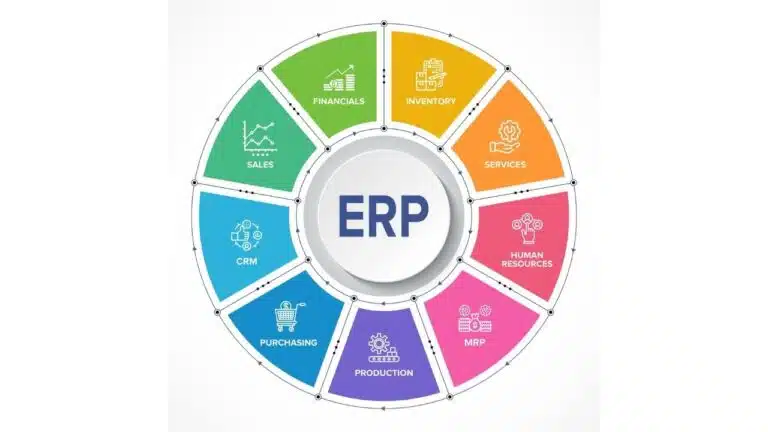
Choosing an enterprise resource planning system for your business is a difficult task, especially if you prioritize finance management functionality over other modules like personnel management and resource allocation.
While juggernauts such as SAP, Microsoft, and Oracle dominate the $52.33 billion ERP market, some businesses (particularly smaller ones) avoid these expensive software-as-a-service (SaaS) solutions in order to save money.
Instead, they turn to lesser-known but nevertheless potent ERP systems like Epicor, Priority Software, and Workday. These systems strike the ideal balance between proper enterprise resource planning and financial management systems, while also providing all necessary functionality out of the box. This stands in stark contrast to ERP solutions such as SAP, which, despite offering robust functionality for end-to-end business process management, rely far too heavily on add-ons and bespoke functional modules developed by third parties, as well as some level of customization.
There is also a third option—i.e., tapping into a custom erp software development company to build an enterprise resource planning solution tailored to a company’s specific needs, be it finance, human resources, or supply chain management. Manufacturing factoring is a financial solution that enables manufacturing businesses to improve their cash flow by selling their unpaid invoices to a specialized factoring firm in exchange for an upfront cash payment. The factoring firm then takes on the responsibility of collecting the invoice payments directly from the manufacturers’ customers. Once the customers have paid the invoices in full, the factoring company remits the remaining balance to the manufacturer, minus a small factoring fee for the service provided.
Regardless of how you implement ERP, it is critical to understand what finance-related modules and features the system needs to help your organization achieve its goals.
What Are the Must-Have Finance Management Features for an ERP Solution?
Disclaimer: For the purpose of this article, we will not compare any specific software products and their functionality. Instead, we’ll describe the essential modules that empower finance departments to make better-informed decisions, control operational expenses, adjust pricing strategies, and plan revenue streams effectively.
On a broader scale, we could single out the following ERP finance management features:
- Accounting and reporting. This fundamental feature of enterprise resource planning systems boasts rich functionality, including general ledger, accounts payable, accounts receivable, and fixed asset management. The general ledger module tracks all financial transactions in your company, categorizes them, and generates financial statements, including balance sheets. Accounts payable helps manage the money an enterprise owes to creditors, suppliers, and partners. The module’s critical functionality includes invoice preparation and payment, as well as expenditure tracking. The accounts receivable module enables your finance department to track the money owed by your customers. On a granular level, its primary functionality is to process invoices, track money flowing into your accounts, and ensure business profitability. Lastly, there is the fixed asset management feature. It helps businesses monitor the whereabouts, state, and usage trends of fixed assets while also assessing their depreciation and planning maintenance. To simplify accounting operations, ERP software for financial departments should include trustworthy analytics and reporting tools. Depending on your ERP vendor, these tools can vary from simple business intelligence (BI) solutions that provide visual representations of financial information to augmented analytics and conversational interfaces based on artificial (AI) and generative artificial intelligence (Gen AI), respectively. Additionally, leveraging ERP integration helps streamline workflows by automatically connecting data from the ERP across other apps, especially payroll. With integration, all payroll data is automatically shared with the ERP in real time, resulting in a secure, accurate, and timely accounting process.
- Budgeting and forecasting. To better plan expenses, make financial predictions, and improve a company’s bottom line, your ERP finance management solution must include budgeting and forecasting instruments. Specifically, we’re talking about cost/profitability analysis, budget preparation, performance monitoring, forecasting, and scenario planning modules. Built-in ERP tools for cost and profitability analysis help evaluate performance across different units within your company, as well as your key products and customer segments. This helps prioritize your expenditures, diversify portfolios, adjust marketing campaigns, and develop viable growth strategies. With the help of the budget preparation feature, your CFO will be able to set realistic financial targets based on historical data and current trends and allocate resources more effectively. With performance monitoring tools, companies can track deviations from the agreed-upon budget and revenue goals. The forecasting and scenario planning functionality enables your employees to dig deeper into historical data, as well as your current performance and market trends, to develop more informed strategies for specific financial periods. In present-day enterprise resource planning systems, budgeting and forecasting modules often utilize different subsets of artificial intelligence, including supervised, unsupervised, and reinforcement learning and deep neural networks. By incorporating AI capabilities into ERP products, businesses can analyze larger amounts of structured and unstructured data, resulting in a more comprehensive assessment of their performance and the automation of time-consuming tasks.
- Risk management and compliance. ERP systems can assist organizations in complying with a range of financial regulations. This is essential for upholding legal and ethical standards in financial reporting and operations. ERP solutions support a variety of regulations, including Generally Accepted Accounting Principles (GAAP) for financial statements, International Financial Reporting Standards (IFRS) for global accounting operations, Anti-Money Laundering (AML) regulations, and region-specific laws such as the General Data Protection Regulation (GDPR), which governs the use of personal data. Furthermore, it is recommended that you choose an ERP product with pre-installed control, audit, and reporting tools. These tools may include role-based access to specific data and software functionality, automated workflows and approvals, audit trails enabling managers to easily spot who made recent changes to the system and what was changed exactly, data validation and accuracy checks, and real-time financial data monitoring solutions, among others. With this functionality at hand, your organization will have no problem protecting sensitive data, preventing fraud, and avoiding hefty fines for compliance violations.
Most modern ERP solutions with finance management capabilities are equipped with these features, although the details can vary depending on the software provider and the business requirements.
To select the solution that best meets your business needs, you must first conduct independent research on ERP solution providers, request pricing information from vendors, and compare software functionality to your requirements.
Should you decide to explore the financial services option and build an ERP system from the ground up, it is advisable that you select a provider with a proven track record of both financial technology (FinTech) and ERP projects.