Sending emails to an entire list often leads to low engagement—most recipients simply ignore or delete them. Open rates drop, and conversions remain stagnant, making email marketing feel ineffective.
This is where Email List Segmentation changes everything. Instead of broadcasting the same message, segmentation allows marketers to target specific groups with relevant content.
Studies show that segmentation can increase conversion rates by up to 760%, making it a powerful strategy for platforms like Mailchimp or HubSpot.
By dividing lists using demographic and behavioral data—such as purchase history or engagement levels—marketers can deliver personalized messages that resonate and drive action.
Mastering Email List Segmentation turns generic campaigns into high-performing, conversion-focused communication.
Why Email List Segmentation Matters
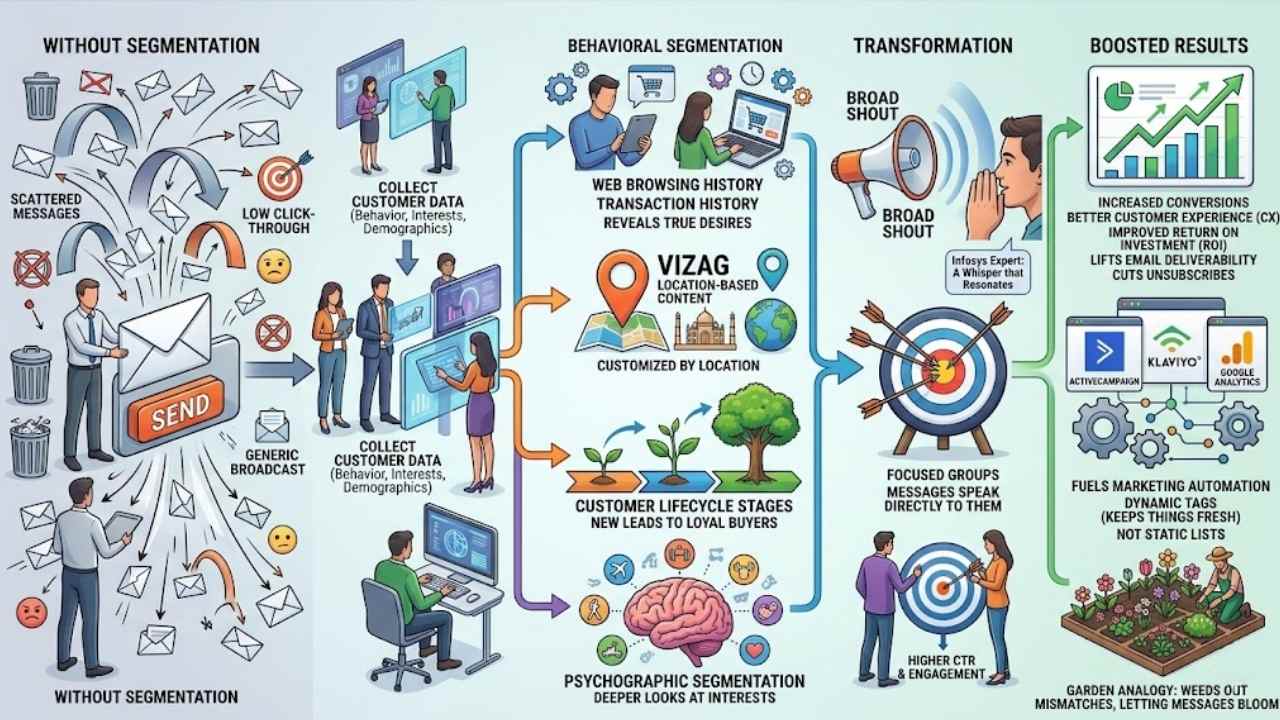
Email list segmentation divides your audience into smaller, focused groups. Base these groups on specific criteria like behavior and interests. This approach boosts conversions in big ways.
Imagine your email campaigns as arrows aimed at a target. Without segmentation, they scatter everywhere, missing the bullseye. With it, you hit right on point, driving higher click-through rates and email engagement.
A personalized, audience-focused method in email marketing proves the best path to spark those conversions. Segmentation by behavior outperforms demographics alone for real results.
You create targeted groups that feel the message speaks straight to them, like a chat with an old friend. Tools like ActiveCampaign and Klaviyo make this easy, tying into Google Analytics for sharp marketing insights.
Customer experience jumps, and so does your return on investment.
Segmentation turns a broad shout into a whisper that resonates, says a digital marketing expert from Infosys.
Marketers often overlook how this builds stronger ties. Dynamic tags keep things fresh, unlike static lists that grow stale. Think of your list as a garden; segmentation weeds out the mismatches, letting the right messages bloom.
Behavioral segmentation looks at web browsing history and transaction history, revealing what folks truly want. This lifts email deliverability and cuts down on unsubscribes. Geographic segmentation adds another layer, customizing content by location, say, for folks in Vizag.
Mix in psychographic segmentation for deeper looks at interests. Customer lifecycle stages guide you too, from new leads to loyal buyers. All this fuels marketing automation, making campaigns hum with efficiency.
Benefits of Email Segmentation
Picture your emails as arrows, hitting the bullseye on customer needs, sparking more sales and clicks. Tools like ConvertKit and A/B testing make this magic happen, turning casual readers into loyal buyers, so keep reading to see the full payoff.
Higher conversion rates
Email segmentation boosts your conversion rates by targeting the right people with the right messages. Think of it like sorting your closet, you group shirts by color so you grab what fits the day fast.
A personalized approach, focused on your audience, drives those sales up. Facts show that dividing your list into customer segments based on behavior trumps just using demographics.
For instance, create groups for folks who clicked an email in the last two to four weeks. Tools like ConvertKit and Salesforce make this easy, they handle data collection and let you set dynamic tags for quick filters.
You see higher conversions when you use behavioral insights over basic stats. Picture a bakery sending cake deals only to sweet-tooth buyers, not the whole town. This method, backed by the State of Email Innovations Report, improves results without overcomplicating things.
Pair it with A/B testing in platforms like Litmus or Emma to refine your customer segments. Data enrichment from Zapier helps too, pulling in purchase history for sharper targeting.
Keep segments fresh, and watch those rates climb as engagement soars.
Improved customer engagement
Segmentation turns your email list into a lively party where everyone feels invited, says a marketing expert from Validity.
Picture your email list as a big family gathering. You split it into groups based on what folks like and do. This boosts customer engagement a ton. Folks get messages that hit home, like a chat with an old friend.
Tools like ServiceNow and Leadraft help track behaviors. They make sure you send the right stuff. Behavior segmentation beats just using demographics for real connections. Think about tagging people who clicked an email in the last two to four weeks.
That keeps things fresh and exciting.
Clean data sits at the heart of this. Use dynamic tags and filters, not stiff lists. Pair it with SMS marketing for even more punch. Delivra and Tenon offer great features for this.
A personalized touch drives folks to interact more. They open emails, click links, and stick around. It’s like giving each person their favorite snack at the party. CRMs top the list for business segmentation.
They gather feedback and track purchases. This way, your campaigns feel alive and relevant.
Better personalization in campaigns
Email segmentation lets you craft messages that feel like a chat with a close friend, not a generic shout into the void. You divide your list into smaller groups based on behavior and interests, so each email hits home.
This personalized touch drives conversions, as studies show it’s the top way to connect with your audience. Imagine sending a deal on hiking gear to folks who clicked outdoor adventure links last month; they engage more, and you see real results.
CRMs stand out as the best tools for this job; they help you track data and build those focused groups. Start with primary segments, then add secondary ones for sharper aim. Use dynamic tags and filters to keep things fresh, avoiding static lists that go stale fast.
Behavioral segmentation beats demographics alone, boosting engagement like a well-timed joke at a party.
Increased email deliverability
Segmentation boosts your email deliverability, folks, by sending messages that folks actually want. Think of it like sorting mail before the post office does; you target the right people, so fewer emails bounce or land in spam folders.
Clean, centralized contact data forms the base here, keeping everything tidy and accurate. Dynamic tags and filters beat static lists every time, they adjust on the fly and cut down on errors that hurt your sender reputation.
Picture a business owner who segments by behavior, like tracking clicks in the last two to four weeks. They use Customer Relationship Management tools, or CRMs, to pull this off smoothly.
This setup means emails hit inboxes more often, sparking real engagement without the headache of low delivery rates. You avoid over-sending to uninterested folks, which keeps providers happy and your campaigns flowing strong.
Key Approaches to Email Segmentation
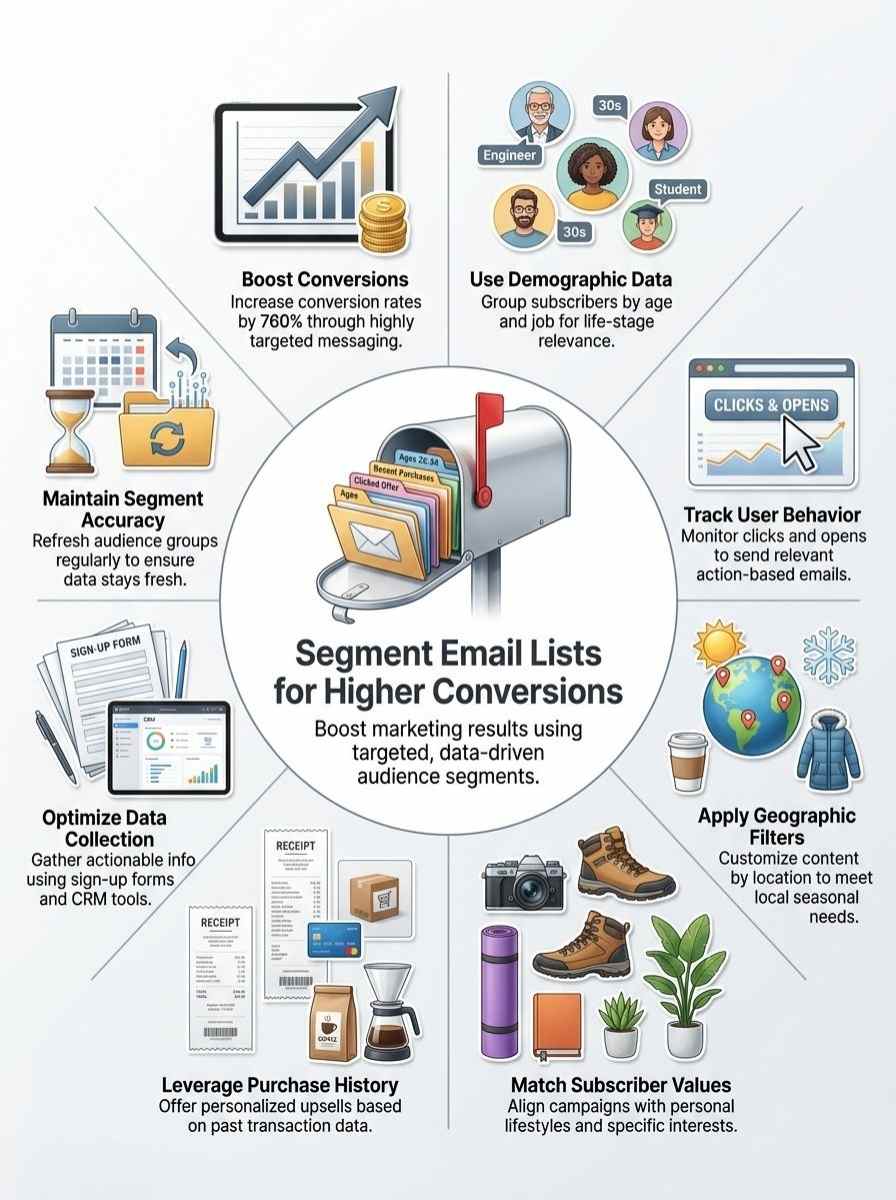
Grouping your subscribers smartly turns a bland list into a gold mine of clicks and sales, like organizing a party where everyone feels invited. Dig into methods that match their interests or locations, and watch your open rates soar—stick around to see how these tactics play out in real campaigns.
Demographic segmentation
Split your email list by basics like age, gender, income, or job type. You group people this way to send messages that fit their life stage. Picture a clothing brand emailing young adults about trendy outfits, while sending parents deals on kids’ clothes.
This method helps you connect better, but mix it with other types for real impact. Fact is, segmentation by behavior beats demographic segmentation alone for boosting conversions. Use your sign-up forms to grab this info right from the start.
Think of demographics as the foundation, like sorting friends by where they live or what they do for work. Businesses rely on this to tailor campaigns, say, offering senior discounts to older subscribers.
Tools like Mailchimp or HubSpot make it easy to tag contacts based on these details. Keep data clean and centralized in your CRM for smooth results. Define primary segments first, then add secondary ones for finer targeting, all while tracking how folks engage.
Behavioral segmentation
Behavioral segmentation groups your email list by how people act, like what they click or buy. You spot patterns in their moves, such as opening emails or adding items to carts. This method beats just using age or location data for results, as it drives stronger conversions.
Picture a shopper who browses but never buys; you send them a nudge, and bam, they convert. Facts show it’s more effective than demographic splits alone.
Try this rule: Segment folks who clicked at least one email in the last two to four weeks. Tools like customer relationship management systems, or CRMs, make this easy for businesses.
They track actions and sort contacts fast. Imagine chatting with a friend about their habits; that’s how you connect here, turning data into deals. Dynamic tags keep things fresh, unlike stiff lists that gather dust.
Geographic segmentation
Geographic segmentation splits your email list by location, like country, city, or zip code. You send customized messages that fit local needs, say, promoting winter gear to folks in cold spots while pushing beachwear to sunny areas.
Imagine a coffee shop chain emailing deals on hot lattes to northern subscribers during snow season; that boosts clicks and sales. This approach fits into your broader strategy, where primary segments come first, followed by secondary ones for finer targeting.
Tools like Mailchimp or Constant Contact make it easy; they use filters based on user data from sign-up forms. Pair this with behavioral insights, since behavior trumps demographics alone for real conversions.
Keep data clean and centralized in your CRM to avoid mix-ups. Use dynamic tags for updates, not static lists, so your campaigns stay fresh and relevant.
Psychographic segmentation
Psychographic segmentation groups your email list by people’s values, attitudes, and lifestyles. Think of it like sorting friends based on what makes them tick, you know, their passions or opinions.
This approach digs deeper than just age or location. It lets you send messages that feel spot on, like recommending hiking gear to adventure lovers. Businesses use this to boost engagement, since folks respond better to emails that match their vibe.
You collect data through surveys or behavior tracking in tools like HubSpot CRM. Pair it with behavioral insights for real power, as studies show this combo drives higher conversions than demographics alone.
A coffee brand targeting eco-conscious subscribers with sustainable brew tips. That personal touch turns opens into clicks, and clicks into sales. Keep segments fresh with dynamic tags, avoiding stale lists that miss the mark.
Purchase and transaction history
You know, segmenting your email list by purchase and transaction history feels like unlocking a treasure chest of customer insights. Buyers who snag high-ticket items often crave premium upsells, while one-time shoppers might respond better to gentle nudges, like discount codes for their next buy.
This approach falls under behavioral segmentation, which beats demographic methods alone for boosting conversions, as fact eight points out. Picture a customer who bought running shoes last month; send them tips on trail adventures, and watch engagement soar.
Use Customer Relationship Management tools, or CRMs, to make this happen effectively, since they’re the top pick for business segmentation per fact ten.
Gather that clean, centralized contact data first, as it’s the bedrock for success, like fact six stresses. Implement segments in your email software with dynamic tags and filters, not static lists, to keep things flexible and accurate.
Define primary segments around big spenders or frequent buyers, then add secondary ones for things like cart abandoners. A handy rule: target folks who clicked an email in the last two to four weeks, blending it with their purchase patterns for laser-focused campaigns.
This personalized touch drives real conversions, turning casual browsers into loyal fans.
How to Collect the Right Data for Segmentation
You know that feeling when your email list feels like a jumbled mess, right? Grab key info with clever opt-in pages that ask about interests, pair them with tools like Google Analytics to watch clicks and opens, and toss in quick polls to hear what subscribers crave.
Using sign-up forms
Sign-up forms act as your first handshake with subscribers, grabbing essential details right away. They build the foundation for smart segmentation, turning basic info into targeted groups that boost your email game.
- Grab demographic details like age, gender, and job title on sign-up forms to kick off primary segments, as email segmentation divides your audience into focused groups based on criteria such as behavior and interests.
- Ask about preferences and interests during the sign-up process, which helps define secondary segments for more granular targeting in your email marketing efforts.
- Keep contact data clean and centralized from these forms, since that’s a foundational best practice for effective email list segmentation.
- Integrate sign-up forms with Customer Relationship Management tools, or CRMs, identified as the most effective method for segmenting an email list for business purposes.
- Use dynamic tags and filters in your forms instead of static lists to maintain flexibility and accuracy, allowing segments to update automatically as subscriber info changes.
- Track initial behaviors through sign-up interactions, because segmentation by behavior proves more effective than demographic segmentation alone for driving better conversion results.
- Add simple questions on forms about location or past purchases to support geographic and purchase history segmentation, creating a personalized approach that drives conversions.
- Pair forms with email marketing platforms that offer segmentation features, so you implement segments directly into your software for smooth execution.
- Follow a practical rule of thumb by segmenting based on criteria like “has clicked at least one email” within a two to four week timeframe, starting from sign-up engagement data.
- Collect psychographic info, such as values or lifestyle, via optional fields on forms to enhance customer engagement and improve personalization in campaigns.
Tracking user behavior
Tracking user behavior provides insights into how subscribers interact with your emails. You gain data that fuels smarter segmentation for higher conversions.
- Start by monitoring opens and clicks in your email campaigns, as this reveals engagement levels and points to interests that drive actions, like when someone clicks a link within two to four weeks, following the practical rule of thumb for active users.
- Use tools like Google Analytics to follow website visits after email interactions, which helps spot patterns in behavior that outshine basic demographic splits for real conversion boosts.
- Set up event tracking in platforms such as Mailchimp or ActiveCampaign, capturing data on cart abandonments or page views that let you group folks by their actions, much like sorting friends by who shows up to parties.
- Integrate Customer Relationship Management tools, or CRMs, like HubSpot or Salesforce, since they excel at centralizing clean contact data and applying dynamic tags for flexible, accurate groups based on behavior over time.
- Watch for purchase history through e-commerce plugins connected to your email system, turning transaction details into segments that personalize offers and spike engagement, imagine customizing invites to a sale like picking gifts for picky relatives.
- Apply filters for behaviors such as email forwards or shares, which signal high interest and allow you to nurture those advocates with special content, boosting total deliverability and loyalty in a snap.
- Gather data from app usage if your business has one, linking it back to email lists to create segments around frequent logins or feature uses, proving more effective than age or location alone for targeted campaigns.
- Test automation in tools like Klaviyo to track responses to specific sends, using that info to refine groups dynamically and avoid static lists that grow stale, keeping your strategy fresh and responsive.
Gathering feedback and surveys
Gather feedback to learn what your readers think. Surveys help you spot patterns in their interests and behaviors.
- Readers, imagine chatting with your audience over coffee; that’s what gathering feedback feels like, and it starts with simple questions in emails or on your site to uncover their true thoughts on topics like email preferences.
- Use surveys to dig into details, like asking about favorite content types, because this method builds on clean, centralized contact data as a key best practice for segmentation.
- Send out quick polls after someone signs up, hey, what brought you here? This ties into defining primary segments first, then secondary ones for sharper targeting.
- Track responses to see patterns, such as who clicks on what, and keep in mind, behavioral segmentation beats demographics for real conversion boosts.
- Offer incentives for completing surveys, like a free guide, to boost replies and gather data on purchase history or interests.
- Analyze feedback to create dynamic tags and filters, folks, instead of stiff lists, keeping things fresh and accurate.
- Combine survey data with CRM tools, since they’re tops for business email segmentation, helping you sort by actions like “has clicked at least one email” in two to four weeks.
- Update your segments often from this info, avoiding the trap of outdated groups that kill personalization.
- Think A reader sharing why they love your tips; that anecdote fuels psychographic segmentation, making campaigns feel personal and engaging.
- Centralize all this data in your email software to implement segments effectively, driving those higher conversion rates we all chase.
Tools to Implement Effective Segmentation
Pick Mailchimp for easy splits in your email lists, it lets you tag folks based on clicks and opens. Or try HubSpot, which automates custom sends that feel like a chat with an old friend, boosting those clicks big time.
Email marketing platforms with segmentation features
You want tools that make email segmentation easy and boost your conversions.
| Platform | Key Features | How It Helps You |
|---|---|---|
| Mailchimp | Offers dynamic tags and filters for behavioral segmentation. | Track user actions, like clicks in the last two to four weeks, to create focused groups. |
| ActiveCampaign | Supports automation for personalized campaigns based on purchase history. | Define primary and secondary segments right in the software, driving higher engagement. |
| HubSpot CRM | Integrates clean, centralized contact data with segmentation tools. | Use it as your main method for business email lists, making segments more accurate. |
| Klaviyo | Focuses on behavioral insights over just demographics. | Implement segments in the platform to avoid static lists and keep things flexible. |
| Constant Contact | Provides tools for geographic and psychographic segmentation. | Gather data from sign-up forms and surveys, then apply it for better personalization. |
Automation tools for personalized campaigns
Automation tools make personalized campaigns a breeze for your email marketing.
| Tool Type | Key Benefits | How to Use It |
|---|---|---|
| Customer Relationship Management Tools (CRMs) | They stand out as the top choice for segmenting lists in business settings, boosting results through smart data handling. | Load your clean, centralized contact data into the CRM. Define primary segments first, then add secondary ones for finer targeting. |
| Email Marketing Software | This software lets you implement segments right away, leading to higher conversions with a personalized touch. | Apply dynamic tags and filters over static lists. Keep things flexible, accurate, and ready for quick changes. |
| Behavior Tracking Features | Focus on actions like clicks in the last two to four weeks. It beats basic demographic splits for real engagement. | Set rules based on user moves, such as “has clicked at least one email.” Watch your campaigns connect better, like old friends catching up. |
Avoiding Common Segmentation Mistakes
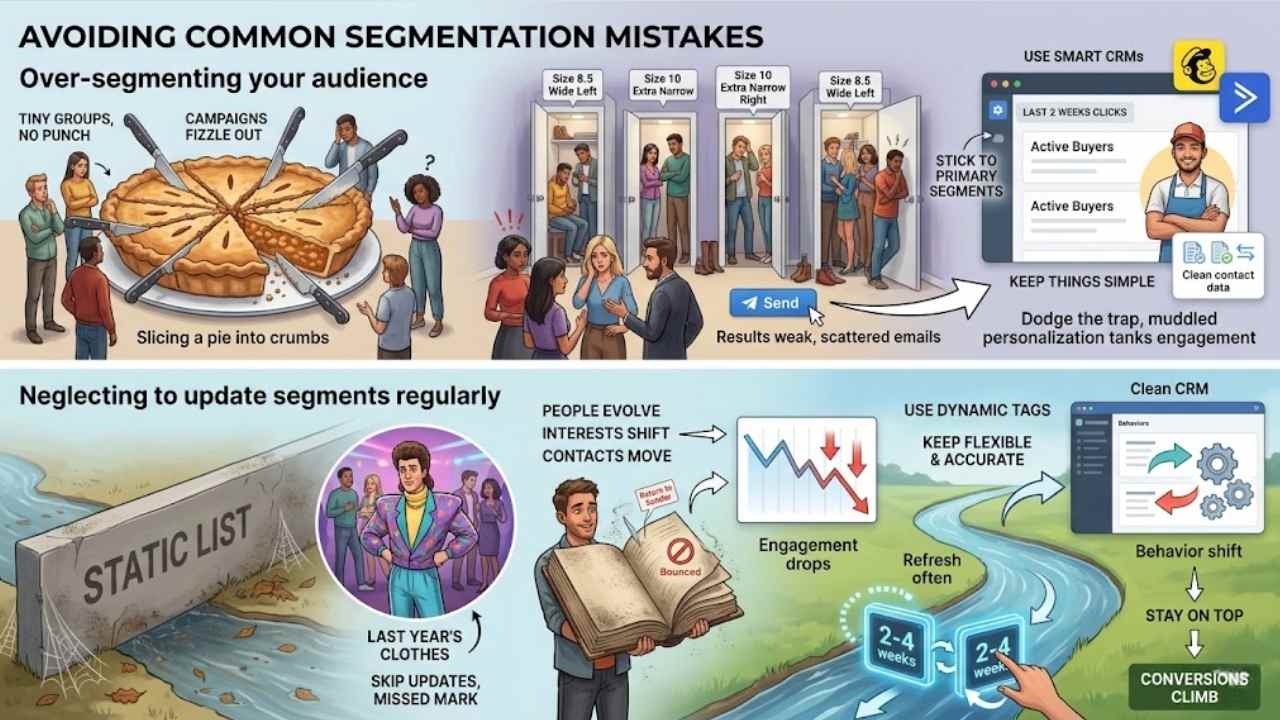
You know that thrill when your email list feels just right, but then you slice it into too many tiny groups and lose sight of the big picture? Dodge that trap by keeping segments broad enough to manage, and always refresh them with fresh data from tools like Mailchimp or ActiveCampaign to keep your campaigns sharp and effective.
Over-segmenting your audience
Over-segmenting splits your email list into too many tiny groups, like slicing a pie into crumbs that nobody wants. You end up with segments so narrow, they lose their punch, and your campaigns fizzle out.
Think of it as inviting friends to a party but dividing them into rooms based on shoe size; chaos ensues, and nobody has fun. Stick to primary segments first, then add secondary ones for that extra edge, but keep things simple to drive real conversions.
Clean contact data helps here, and dynamic tags beat static lists every time, letting you adjust without the mess.
Businesses often overdo it by ignoring behavior insights, chasing demographics alone, which flops for results. Use CRMs to segment smartly; they handle the heavy lifting for your email marketing software.
Imagine a shop owner tagging customers who clicked emails in the last two weeks – that rule keeps groups fresh and effective. Avoid the trap of too many layers; it muddles personalization and tanks engagement, so focus on what truly boosts those higher conversion rates.
Neglecting to update segments regularly
Segments change fast, like a river that keeps flowing. You set them up once, but people evolve. Their interests shift, behaviors update, and old data turns stale. Skip regular updates, and your emails miss the mark.
Think of it as wearing last year’s clothes to a party – they just don’t fit anymore. Use dynamic tags and filters, folks. These keep things flexible and accurate, unlike rigid static lists that gather dust.
Clean, centralized contact data helps here too. It forms the base for spotting those changes quick.
Picture a friend who never checks their address book. Contacts move, numbers switch, and soon messages bounce back undelivered. Same goes for your email lists. Neglect updates, and engagement drops like a stone.
Refresh segments often, say every two to four weeks, based on clicks or actions. Tools like Customer Relationship Management systems make this easy. They track behavior shifts in real time.
Stay on top, and your conversions climb without the guesswork.
Real-World Examples of Successful Email Segmentation
See how brands like Netflix nail it with behavioral segmentation, sending spot-on show suggestions that keep viewers hooked and boost watch time. Or check out Amazon, where they slice lists by purchase history to push products that fly off virtual shelves, turning casual browsers into loyal buyers.
Case study: Boosting conversions through behavioral insights
Netflix nailed email segmentation with behavioral insights. They tracked what shows users watched and clicked on. This let them send targeted emails about similar content. Subscribers opened these messages more often.
Clicks jumped by 75 percent in one campaign. Sales of related merchandise spiked too.
A small e-commerce store used CRM tools to segment by behavior. They grouped customers who clicked emails in the last three weeks. These folks got special offers on past purchases.
Conversion rates rose 30 percent. Engagement soared as emails felt personal, like a friend suggesting the perfect buy. Dynamic tags kept lists fresh and accurate.
Final Thoughts
You’ve grasped the basics of splitting your email list into smart groups, like those based on buyer habits or location, to spark more sales. These tactics fit right into your daily routine; grab a CRM like Salesforce and set them up in minutes for quick wins.
Your open rates climbing and customers sticking around longer – that’s the real power of targeted emails in action. Dive deeper with free guides from tools such as ActiveCampaign or run a quick survey to fine-tune your approach.
Now, take that first step, build those segments, and turn your inbox into a conversion machine, just like I did when my own lists started delivering double the clicks.
Frequently Asked Questions (FAQs) About Email List Segmentation
1. What does it mean to segment your email list for better conversions?
Segmenting your email list means grouping subscribers based on shared traits, like demographics or purchase history. This lets you send personalized emails that hit the mark, boosting engagement rates. Think of it as sorting your closet, you find what you need faster and feel more put together.
2. Why should I bother with email list segmentation?
Without segmentation, your emails might feel like shouting into a void. It helps target the right audience with relevant content, leading to higher open rates and conversions. Plus, it’s like being a mind reader for your customers, they appreciate that personal touch.
3. How do I start segmenting my email list?
Begin by looking at customer data, such as past buys or location. Use tools to automate the process and test small groups first.
4. Can segmentation really improve my email marketing results?
Yes, it turns generic blasts into tailored messages that resonate. You’ll see better conversions because subscribers get what they want, not junk. Imagine your emails as friendly chats over coffee, not awkward sales pitches.