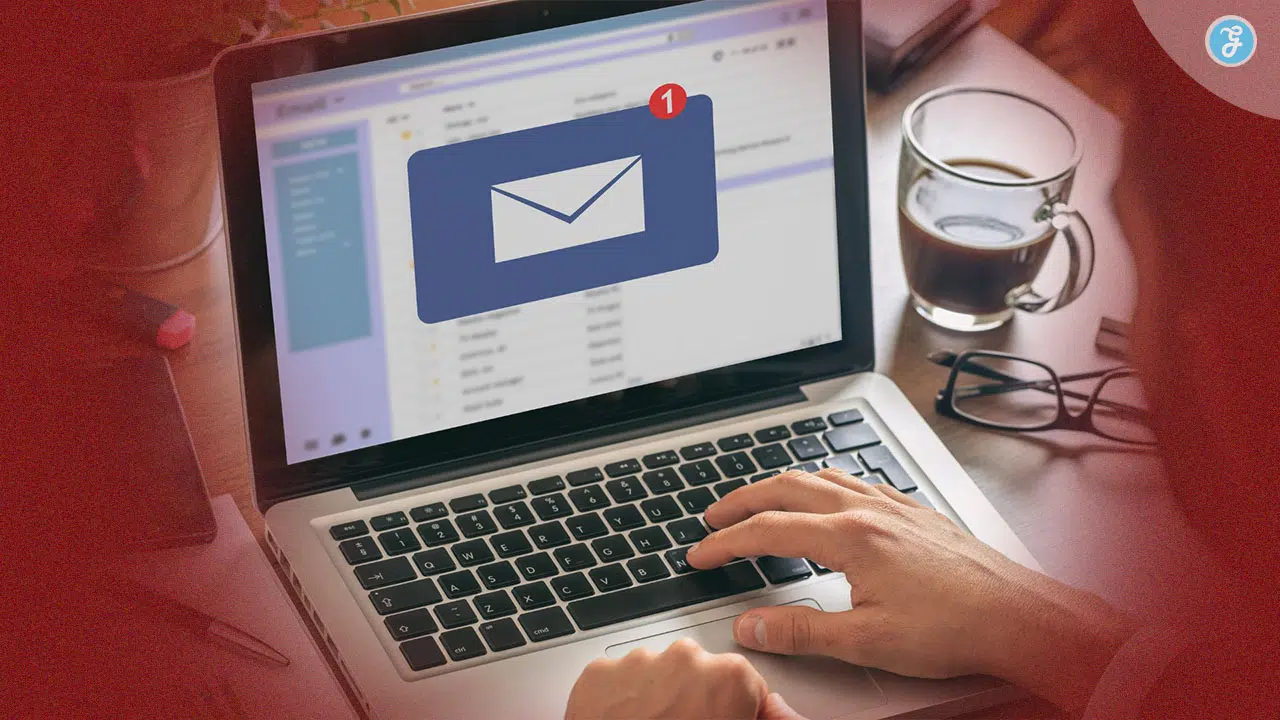
You send an email to subscribers filled with valuable offers and updates, but it ends up in the spam folder. A common frustration in email deliverability, where messages fail to reach the inbox.
This issue weakens email marketing performance, reduces engagement, and leads to lost revenue. Inbox placement depends on mailbox providers like Gmail, which use advanced spam filters to protect users and decide where emails go.
A strong benchmark is a delivery rate of 99% or higher to maintain a good sender reputation. Key improvements include setting up authentication protocols like SPF, DKIM, and DMARC to verify email legitimacy.
Best practices in email deliverability also include maintaining clean email lists, reducing bounce rates, and avoiding spam complaints. Regular monitoring and inbox placement testing using tools like Litmus or Twilio SendGrid help identify issues early.
Improving email deliverability ensures messages consistently reach the inbox, boosting visibility, engagement, and campaign success.
Understanding Email Deliverability
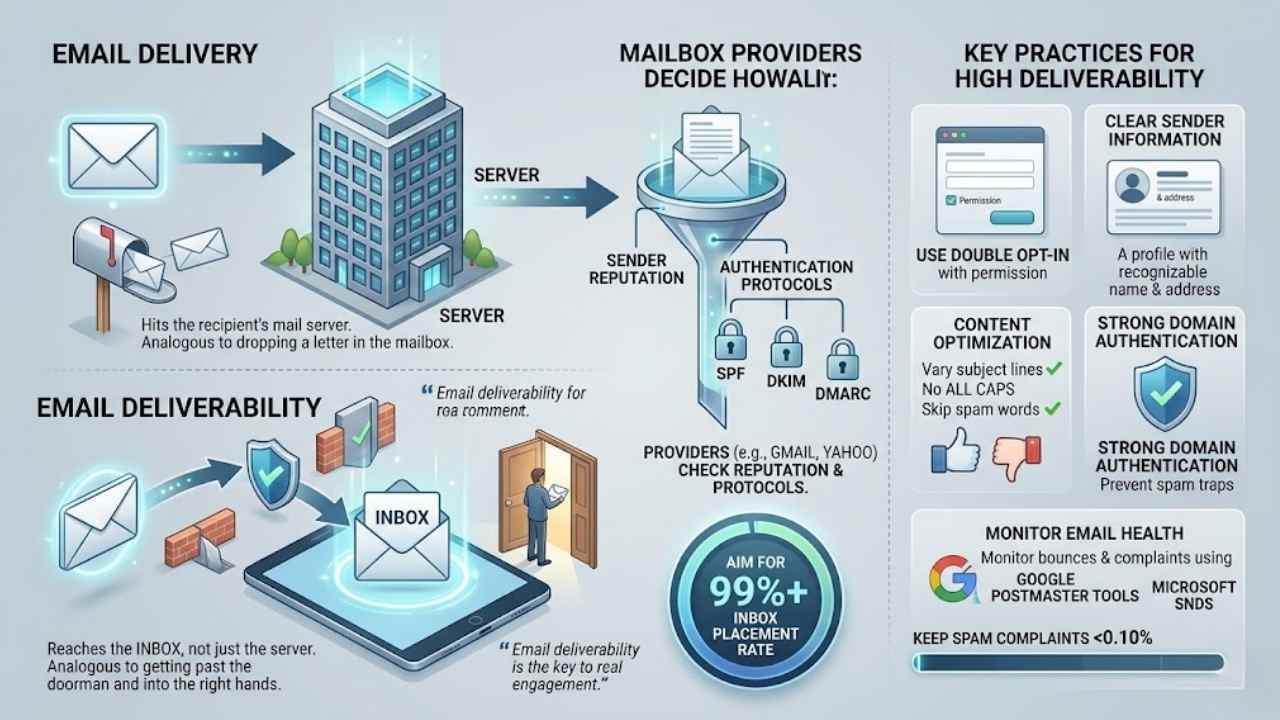
Email deliverability means your messages reach the inbox, not just the server. Think of delivery as dropping a letter in the mailbox, while deliverability gets it past the doorman and into the right hands, boosting your sender score with tools like Google Postmaster Tools.
What is email deliverability?
You send marketing emails, and they reach the recipient’s server. That counts as delivery. Deliverability takes it further, it means your messages land in the inbox, not the spam folder.
Think of it like mailing a letter that arrives at the house but gets tossed in the junk pile instead of the kitchen table. Providers like Gmail and Yahoo check sender reputation and email authentication protocols such as SPF, DKIM, and DMARC to decide this.
Aim for an inbox placement rate of 99% or higher to keep good standing with ISPs. Keep spam complaint rates below 0.10% too, as high complaints hurt your sending reputation.
Email deliverability is the key to real engagement, it’s what turns your sends into actual reads. – From the State of Email Deliverability report.
People often mix up delivery with deliverability, but the difference matters a lot for email strategy. Strong domain authentication boosts validity and helps avoid spam traps. Use clear sender information, like a recognizable name and address, to build trust and cut down complaints.
Send only to those who opted in through a double opt-in process. Vary subject lines, skip ALL CAPS, and dodge spam trigger words to improve email metrics and engagement. Monitor bounces with tools like Google Postmaster or Microsoft SNDS for better email health.
The difference between delivery and deliverability
Email delivery happens when your message hits the recipient’s mail server, no questions asked. Think of it like dropping a letter in the mailbox; it arrives at the house, but that does not mean anyone opens the door.
Providers check basics, sure, but spam filters might still kick in. Delivery rates tell you if emails bounce or not, yet they miss the bigger picture.
Deliverability goes further; it lands your email right in the inbox, dodging the spam folder trap. This hinges on sender reputation, plus tools like SPF, DKIM, and DMARC to prove you are legit.
Gmail and Yahoo demand these protocols for trust, folks. High deliverability boosts engagement metrics, while poor scores hurt your IP allocation and domain name server setup. Aim for 99% or better to keep mailbox providers happy, and watch those spam complaints stay under 0.10%.
Why Email Deliverability Matters
Your emails hit the spam folder instead of the inbox, and suddenly, sales drop like a rock. That slip-up tanks your business reputation, slashes email engagement, and leaves tools like Marketing Hub gathering dust while competitors thrive.
The cost of poor deliverability
Poor email deliverability hits your wallet hard. Emails landing in spam folders mean lost sales and wasted marketing efforts. Think about it like throwing money down the drain, every ignored message cuts into your revenue.
Businesses face high costs from email bounces and low email engagement. Spam complaint rates above 0.10% can lead to blacklisting by providers like Gmail and Yahoo. This damages your sender reputation fast.
You end up spending more on fixes, like using tools such as Everest or BriteVerify to clean lists. Low deliverability also hurts your CRM data quality, making sales hub and service hub efforts flop.
Bad deliverability is like shouting into the void; nobody hears you, and your business suffers, says a marketing expert.
Missed opportunities stack up with poor inbox placement. Customers ignore your emails, so engagement drops. This leads to fewer opens and clicks, tanking your marketing hub performance.
High bounce rates signal problems to providers, risking blocks on your email domain. You might need IP warm up or email warmup to recover, but that takes time and cash. Tools like Mailcharts or DemandTools help monitor, yet prevention beats cure.
Keep rates below that 0.10% mark for spam complaints to avoid these pitfalls.
Impact on business reputation and engagement
Bad email deliverability hits your business reputation hard. Your messages landing in spam folders over and over, folks start seeing your brand as unreliable, like that flaky friend who never shows up.
Mailbox providers, such as Gmail and Yahoo, flag senders with low rates, and that tanks trust. You need to aim for a deliverability rate of 99% or higher to stay in good standing. Keep spam complaint rates below 0.10%, too, or risk getting blacklisted on deny lists.
Use clear sender information, with an easily identifiable name and email address, to build that trust and cut complaints. Implement protocols like SPF, DKIM, and DMARC, as required by big players like Yahooglesoft, to show you’re legit.
Engagement drops fast when emails miss the inbox. Subscribers ignore your content, open rates plummet, and clicks vanish, leaving your campaigns feeling like a ghost town. Personalize those emails, vary subject lines, and avoid spam trigger words to keep things fresh and filter-free.
Only send to folks who opted in, and watch bounce rates with tools like email health monitors. Run A/B testing on email content, even seed testing, to boost opens and interactions.
Limit links per email, make them quality matches, and optimize for mobile devices to spark real conversations.
Key Factors That Affect Email Deliverability
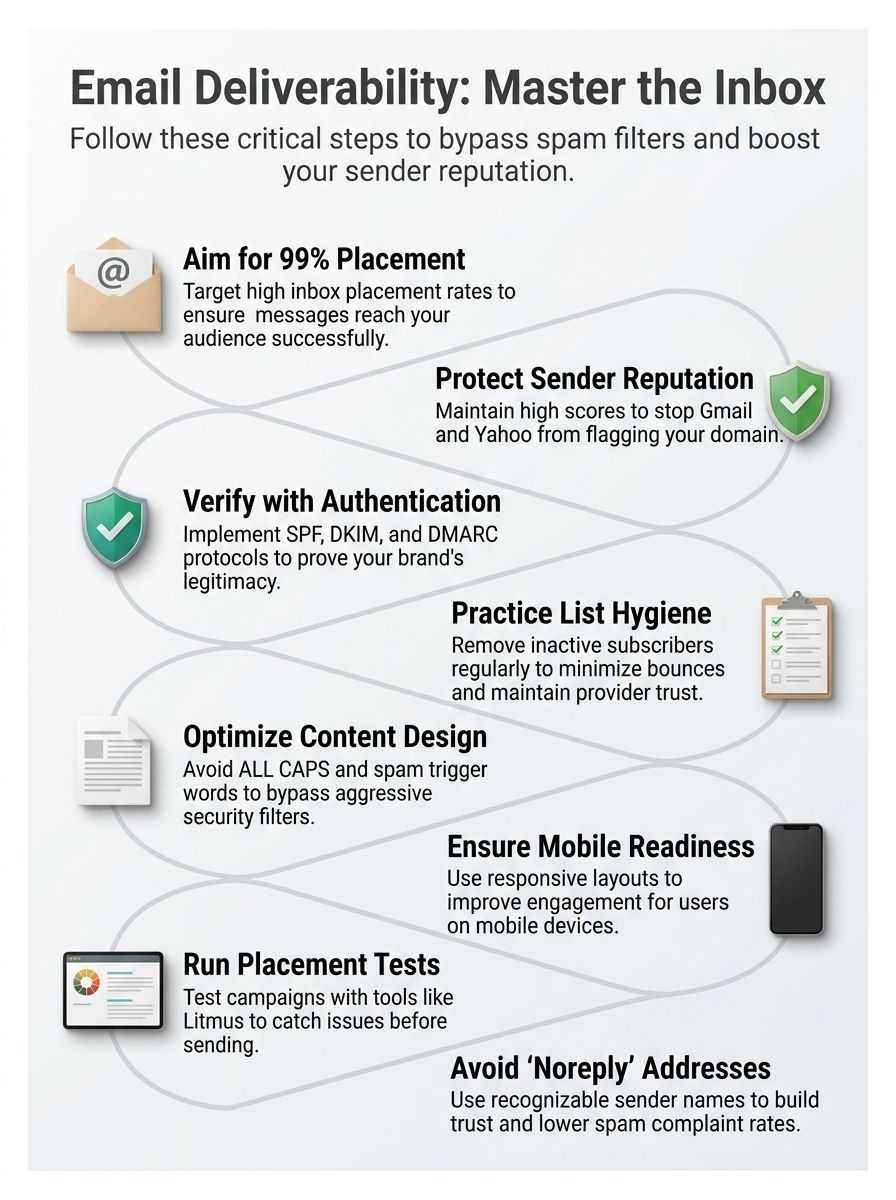
Ever wonder why some emails hit the inbox like a champ, while others vanish into spam oblivion? Dig into sender scores, setup for SPF and DKIM checks, plus smart content tweaks, and you’ll boost your chances—stick around to master these game-changers.
Sender reputation
Sender reputation acts like your email’s report card, folks. It shapes how mailbox providers view you. Providers track your habits to decide if your messages hit the inbox or spam.
Build a strong one by hitting a deliverability rate of 99% or higher. Keep spam complaint rates below 0.10%, too. Gmail and Yahoo demand you set up SPF, DKIM, and DMARC for solid email authentication.
These protocols prove you’re legit, cutting down on fake sender tricks.
Stick to clear, recognizable sender names and addresses to spark trust. Folks spot them fast, which drops complaints. Send only to opted-in subscribers, no cold emails to strangers.
Use tools like an email health tool or preference center to check your status. Ramp up inbox placement with sender certification, and tap Yahoo feedback for tips. Optimize via Mailgun’s email API for better tracking subdomains and BIMI setup.
This keeps your reputation shiny, like a well-oiled machine.
Email authentication protocols (SPF, DKIM, DMARC)
Email authentication protocols act like security guards for your messages. They help prove your emails come from you, not some imposter. SPF, or sender policy framework, checks if the sending server has permission from your domain.
It lists approved IP addresses in your DNS records. DKIM, domainkeys identified mail, adds a digital signature to your emails. This signature verifies the content hasn’t changed during transit.
DMARC builds on both by setting rules for what happens if checks fail. Big players like Gmail and Yahoo demand these protocols for better email infrastructure. Set them up right, and you boost trust with mailbox providers.
Think of it as locking your front door before heading out. Without these tools, your emails might get flagged as suspicious. Senders who skip SPF, DKIM, or DMARC risk landing in spam folders more often.
Mailgun optimize can help you implement them smoothly. EAA standards push for this setup too. Get these in place, and watch your inbox placement improve.
Email content and design
Your email’s content and design play a big role in dodging spam filters, folks. Keep things clean and simple to land in the inbox. Limit links in each message, because too many can set off alarms with providers like Gmail and Yahoo.
Stick to quality links that match your topic, and you’ll boost deliverability without a hitch. Vary those subject lines, mix them up like a good playlist, to keep filters from flagging you.
Skip ALL CAPS in subjects or body text; it screams spam, and no one wants that headache. Use clear sender info, like an easy-to-spot name and address, to build trust and cut down complaints.
Design for mobile first, since most folks check email on their phones. Personal touches make a difference, but avoid spam trigger words in subjects that trip up filters. Implement SPF (Sender Policy Framework) and DKIM (DomainKeys Identified Mail) to verify your sends; these protocols help with authentication and keep you in the clear.
Ramp up your inbox presence slowly with an AI assistant tool to test designs, ensuring they look sharp across devices. Quality content draws readers in, sparks engagement, and keeps your reputation solid.
Best Practices to Improve Email Deliverability
Want to keep your emails out of the spam folder, like a pro? Start with inbox ramp up, that slow build of sending volume to warm up your sender score, and watch your messages land right where they belong.
Maintain a healthy email list
A healthy email list acts like the heartbeat of your campaigns, keeping messages flowing smoothly to eager readers. You build it by focusing on quality over quantity, which boosts your inbox ramp up and avoids those pesky spam traps.
- Clean your list regularly to remove inactive subscribers, because stale contacts drag down your deliverability rate, and you want to hit that 99% mark or higher for good standing with mailbox providers like Gmail and Yahoo.
- Send emails only to folks who have opted in to receive them, as this simple step cuts spam complaints and keeps rates below 0.10%, preserving your sender reputation.
- Verify addresses before adding them, since shooting messages to unverified ones spikes bounce rates, hurts engagement, and signals trouble to providers.
- Use clear sender info with an easily identifiable name and address, you know, like introducing yourself at a party, to build trust and slash those complaint numbers.
- Segment your list based on user behavior, so you tailor content that feels personal, ramps up opens, and maintains that healthy vibe without overwhelming anyone.
Personalize your emails
Personalization turns your emails into welcome notes, not junk mail. It boosts opens and clicks while dodging spam traps.
- Customize emails with the recipient’s name in the subject line or greeting to make them feel seen, like a friend calling you by name at a party, which builds trust and cuts spam complaints.
- Segment your list based on past behavior, such as purchase history, so you send offers that match interests, much like a barista recalling your usual coffee order.
- Use dynamic content tools to swap in details like location or recent buys, keeping things fresh and relevant, which helps vary subject lines and avoid spam filters.
- Include clear sender info, with an easily identifiable name and email address, as Gmail and Yahoo demand protocols like SPF, DKIM, and DMARC for security, fostering that trust factor.
- Send only to folks who opted in, respecting their choice like a polite guest at your door, which keeps complaint rates below 0.10% and maintains your sender reputation.
- Dodge spam trigger words in personalized subject lines, opting for natural phrases instead, to land in inboxes rather than spam folders.
- Limit links to a few quality ones that match the email’s theme, avoiding the overload that trips filters, while you personalize the call-to-action for better engagement.
- Optimize for mobile with short, snappy personalized messages, since most folks check email on phones, ensuring they read well on small screens.
- Aim for a 99% deliverability rate by testing personalized campaigns, monitoring bounces, and keeping your list healthy with verified, opted-in addresses.
Avoid spam trigger words
Spam trigger words can sneak into your emails and trip up filters, landing your messages in the junk folder. You want to dodge these pitfalls to keep your inbox placement strong and your readers engaged.
- Steer clear of common spam trigger words in subject lines, like “free,” “guarantee,” or “urgent,” because they often set off email filters and hurt your deliverability rate.
- Mix up your subject lines with fresh phrasing each time, as repeating the same style can flag your emails as suspicious to providers like Gmail and Yahoo.
- Skip using ALL CAPS in both subject lines and email content, since this shouts spam to filters and makes readers hit the complaint button faster.
- Limit links in your emails to just a few quality ones that match your message, for too many can mimic spam patterns and push complaint rates over that safe 0.10% mark.
- Pick words that build trust instead of hype, imagine chatting with a friend over coffee, and watch how this simple swap boosts engagement without triggering alarms.
Optimize for mobile devices
Most folks open emails on their phones first. You can boost your deliverability by making those messages shine on small screens.
- Design emails with responsive layouts that adjust to any device size, like phones or tablets, so readers don’t pinch and zoom, which keeps them engaged and cuts down on spam complaints.
- Keep text short and punchy, since mobile users skim fast, and tie this in by limiting links per email, as too many can trip spam filters and frustrate folks on the go.
- Pick clear fonts and big buttons for easy taps, avoiding ALL CAPS in content or subject lines, because that screams spam and turns off readers checking mail during a quick coffee break.
- Test emails on tools like Litmus or Email on Acid to see how they render on mobiles, helping you spot issues early and aim for that sweet 99% deliverability rate with providers.
- Use quality images that load quick on cellular data, matching them to your links for better trust, and note that varying subject lines stops filters from flagging you as repetitive.
- Add recognizable sender names and addresses right up top, building trust fast on mobile previews, which helps keep spam complaints under 0.10% and strengthens your reputation.
- Send only to opted-in lists, personalizing content for mobile readers, like using their first name, to spark real engagement without overwhelming tiny screens.
How to Test and Monitor Email Deliverability
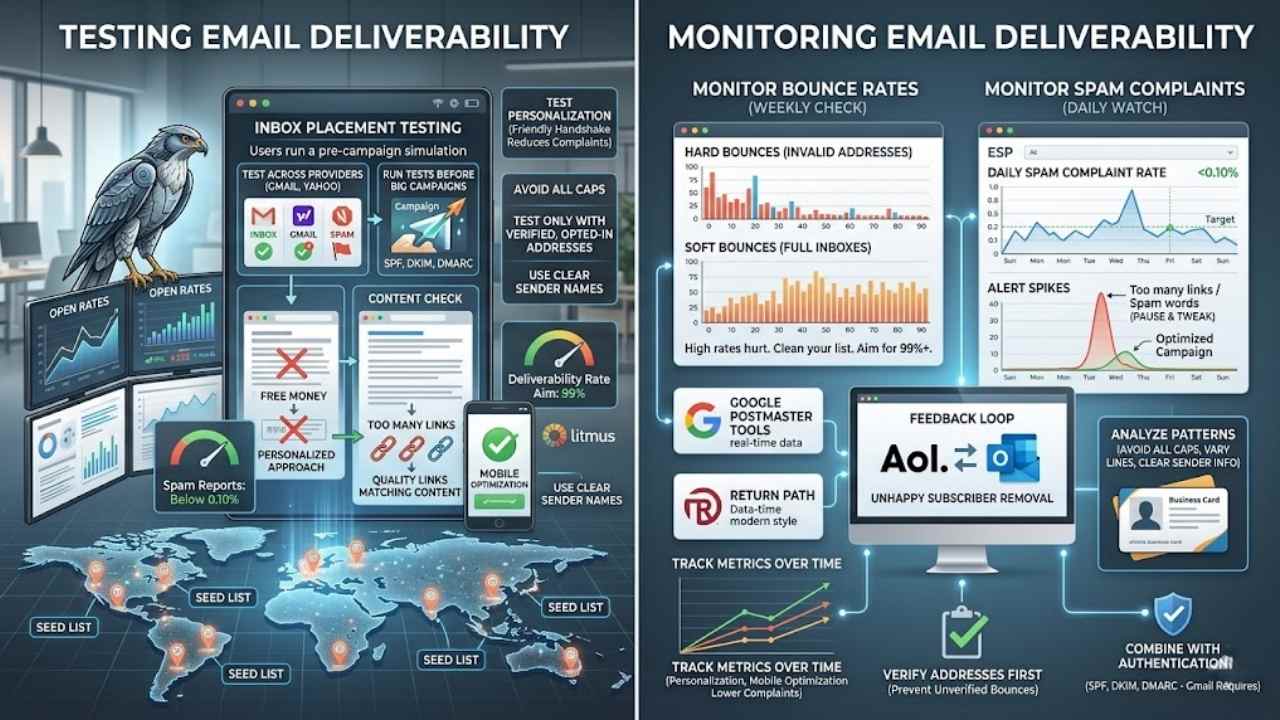
You know that gut feeling when your emails vanish into thin air? Track them with seed lists, those sneaky test addresses that show where messages land, and watch open rates like a hawk to spot issues fast.
Use inbox placement testing
Inbox placement testing acts like a sneak peek into your email’s journey. You catch problems early, boosting your chances of landing in the inbox.
- Tools like Litmus or Return Path let you test where emails end up across providers, such as Gmail and Yahoo, which demand SPF, DKIM, and DMARC setups to avoid spam flags.
- Run these tests before big campaigns; they reveal if your sender reputation slips, helping you aim for that 99% deliverability rate to keep mailbox providers happy.
- Check bounce rates and complaints during tests, since staying below 0.10% on spam reports builds trust and cuts the risk of blacklisting.
- Spot issues with email content, like too many links or spam trigger words in subject lines, and fix them to vary your approaches and dodge filters.
- Test personalization features; they show how clear sender names and opt-in lists improve engagement, much like a friendly handshake that reduces complaints.
- Monitor mobile optimization in tests, because poorly designed emails trigger spam more often, and you want folks opening on phones without a hitch.
- Use quality links that match your content; tests highlight if mismatched ones hurt deliverability, so swap them out for better results.
- Avoid ALL CAPS in subjects or body text during testing; it screams spam, and varying your lines keeps things fresh, like mixing up your playlist to avoid boredom.
- Test only with verified, opted-in addresses to steer clear of mistakes, ensuring your “from” info feels recognizable and not like a shady noreply setup.
Monitor bounce rates and complaints
You must track bounce rates to spot email list issues early. Complaints signal problems with your content or audience fit, so monitor them often.
- Check bounce rates weekly to catch hard bounces from invalid addresses and soft bounces from full inboxes; high rates hurt deliverability, so aim to keep deliverability at 99% or higher by cleaning your list right away.
- Watch spam complaint rates daily through your email service provider’s dashboard; stay below 0.10% to avoid flags from mailbox providers like Gmail and Yahoo, which enforce strict rules.
- Use tools like Google Postmaster Tools or Return Path to get real-time data on bounces and complaints; these platforms help you see trends and fix issues before they tank your sender reputation.
- Review complaint feedback loops from providers such as AOL or Microsoft Outlook; this lets you remove unhappy subscribers quickly and only send to opted-in people who want your emails.
- Set up alerts for sudden spikes in bounces or complaints; for example, if rates jump after a campaign with too many links or spam trigger words like “free money,” pause and tweak your approach to build trust.
- Analyze patterns in complaints tied to subject lines or content; avoid ALL CAPS and vary your lines to dodge filters, plus use clear sender info with a recognizable name and address to cut complaints.
- Combine bounce monitoring with authentication checks like SPF, DKIM, and DMARC; providers like Gmail require these, and poor setup can boost bounces while harming your standing.
- Track metrics over time to spot improvements; for instance, personalizing emails and optimizing for mobile can lower complaints, but always verify addresses first to prevent bounces from unverified ones.
Common Mistakes to Avoid
Your emails as party invites that get tossed in the trash before anyone reads them, all because of simple slips like mailing to folks who never asked for it. Dodge these traps, from ignoring list checks to picking a dead-end sender address, and watch your messages hit the mark every time.
Sending emails to unverified addresses
You send emails to unverified addresses, and trouble brews fast. Those addresses often belong to folks who never opted in, like strangers on a bought list. Spam complaints skyrocket this way, pushing rates above that safe 0.10% threshold with mailbox providers.
Your sender reputation takes a hit, landing more messages in the spam folder instead of the inbox. Picture it as tossing invitations to a party where no one RSVP’d, they just mark you as a nuisance.
Stick to verified lists only. Send emails solely to people who have opted-in to receive communications, building trust from the start. This simple step keeps bounce rates low and engagement high.
Mailbox providers like Gmail and Yahoo reward clean practices, especially when you pair them with protocols like SPF, DKIM, and DMARC. Avoid the trap, or watch your deliverability dip below that ideal 99% mark, hurting your business vibe.
Using a “noreply” email address
Many senders pick “noreply” addresses to dodge replies, but that choice backfires big time. Picture your email as a one-way street; recipients spot it and feel shut out, like talking to a brick wall.
They might mark you as spam out of frustration, spiking complaint rates. Switch to a real address that invites responses instead. Clear sender names and emails foster trust, just as fact eight suggests, and keep those complaints under 0.10%.
Spam filters eye suspicious senders, and “noreply” waves a red flag. Readers crave connection, so use identifiable info to seem human, not robotic. This simple tweak boosts engagement and helps hit that 99% deliverability goal.
Opt for addresses tied to your team or brand. Trust grows when people know they can reply, cutting down on flags and building lasting bonds.
Final Thoughts
You’ve learned how sender reputation, authentication like SPF and DKIM, plus smart content choices boost your email’s inbox chances. These tips work fast and keep things simple, so you can apply them without hassle.
What if you checked your next campaign for spam triggers right now? Strong deliverability builds trust, cuts costs, and lifts engagement for your business. Dig into tools like inbox testers or bounce monitors for ongoing wins.
Imagine, my own emails once vanished into spam folders until I cleaned my list and added personalization, turning chaos into connections. Go ahead, aim for that 99% rate, and watch your messages thrive.
Frequently Asked Questions (FAQs) About Email Deliverability
1. What is email deliverability, and why should I care about it?
Email deliverability means getting your messages right into the inbox, not lost in spam. Think of it like knocking on a friend’s door instead of shouting from the street; you want that warm welcome. It boosts your open rates and keeps your audience engaged, like a good chat over coffee.
2. How do I stop my emails from landing in spam?
Build a strong sender reputation by using authentication tools like SPF and DKIM. Keep your lists clean, and always include an easy unsubscribe link.
3. Why do spam filters flag my emails?
Spam filters act like picky bouncers at a club, turning away anything suspicious. They check for things like bad subject lines or too many images; fix those, and you’ll slip right in.
4. Can I improve my email deliverability with better content?
Yes, craft subject lines that spark curiosity without tricks. Personalize your messages to feel like a note from a pal, and watch your inbox hits soar; it’s like adding sugar to make the medicine go down easy.