
Choosing e-commerce operations software in Hong Kong starts with a practical question: where does an order get stuck? Match the software to that bottleneck, verify the company behind the contract, and compare the full cost of running your workflow. Then check permissions and data export before committing to an annual plan.
A storefront, a shipping platform and a shared customer inbox solve different problems. Buying all three does not automatically connect them. For an independent brand, the expensive gap is often between systems: an address correction that never reaches the warehouse, a refund that leaves stock wrong, or a customer conversation that nobody owns.
This guide gives founders and operations teams a way to evaluate that handoff. It uses three documented public-page checks as examples, alongside a repeatable trial plan you can run with sample orders. It is a buying method, not a ranking of Hong Kong-owned vendors.
What We Checked
On November 19, 2026, we changed the billing selector on Spaceship Pro’s pricing page, expanded SHOPAGE’s promotional-price FAQ, and opened SleekFlow’s contact-overage explanation. Those checks support observations about published pricing and conditions. They do not demonstrate shipment reliability, actual billing, refund processing, or account-level permissions. Company, legal and product documentation informed the wider research; no live merchant order or customer data was used.
Compare E-Commerce Operations Software in Hong Kong by Job
Begin with one week of exceptions from your own business. Group them by cause rather than by the department that complained. If staff spend their mornings copying delivery addresses, a new marketing tool is unlikely to solve the problem.
| Your bottleneck | Software category to evaluate | Evidence to request | Common buying mistake |
|---|---|---|---|
| Orders and stock disagree across channels. | Storefront, POS, or order management | A stock change followed through every connected channel. | Assuming a connector syncs every field both ways |
| Packing and carrier booking require repeated entry. | Shipping management | An imported order, corrected address and matching label | Treating the subscription as the total shipping bill |
| Customers repeat questions to different staff. | Shared inbox or conversational commerce | Assignment, handoff and order context under a restricted role | Comparing seats while ignoring contact and message charges |
| Warehouse exceptions are hard to trace. | Fulfillment software and services | Receiving, picking, returns and reconciliation records | Confusing software access with warehouse service fees |
| Reporting depends on manual spreadsheets. | Reporting or integration tools | A usable export with stable order identifiers | Accepting a dashboard screenshot as proof of portability |
Write one acceptance statement for each essential job. For example: “A support agent can correct an unfulfilled order’s delivery note, the warehouse receives the change, and the record shows who made it.” This is much easier to demonstrate than “seamless integration.” For help defining the underlying work, see our guide to business processes to fix before automation.
1. Verify the Contracting Company and Local Fit
Keep four questions separate: who owns or operates the product, who signs your contract, which markets the service supports, and where your data is stored. A Hong Kong sales office answers none of the other three automatically.
Record the legal entity from the current terms or order form, its official address, the document date and the product covered. Match the name against the invoice or proposal. If the website gives several entities, ask which one will serve your account. Do not resolve a mismatch by choosing the address that best fits your shortlist.
The Hong Kong Companies Registry provides company search services and particulars reports, including registered-office information for relevant companies. This is a route for checking corporate records; it does not certify software quality, feature availability or hosting location.
Next, verify your actual operating needs: Hong Kong order origin, settlement currency, payment-provider eligibility, carrier collection area, address formats and support hours. If staff work in English and Traditional Chinese, inspect the merchant interface and help materials in both. A translated landing page is not proof of bilingual operational support.
2. Separate the Subscription From the Workflow Bill
Ask each vendor for the same cost breakdown. Keep the billing currency visible and distinguish an advertised monthly equivalent from the cash due at purchase. A low monthly figure can still require a substantial upfront payment.
| Cost layer | What to record |
|---|---|
| Platform | Plan, billing term, renewal rate, included seats and stores |
| Usage | Labels, orders, contacts, messages, API calls and overage rules |
| External services | Payment processing, carrier charges, storage, pick/pack and returns |
| Implementation | Migration, connectors, training and internal staff time |
| Exit | Export access, migration help, notice period and remaining commitment |
Estimate an ordinary month and a peak month. Use your own order, message and return volumes. If a usage tier triggers an automatic charge, include it in the peak case even when the base subscription remains unchanged.
Spaceship Pro: Changing the Billing Selector
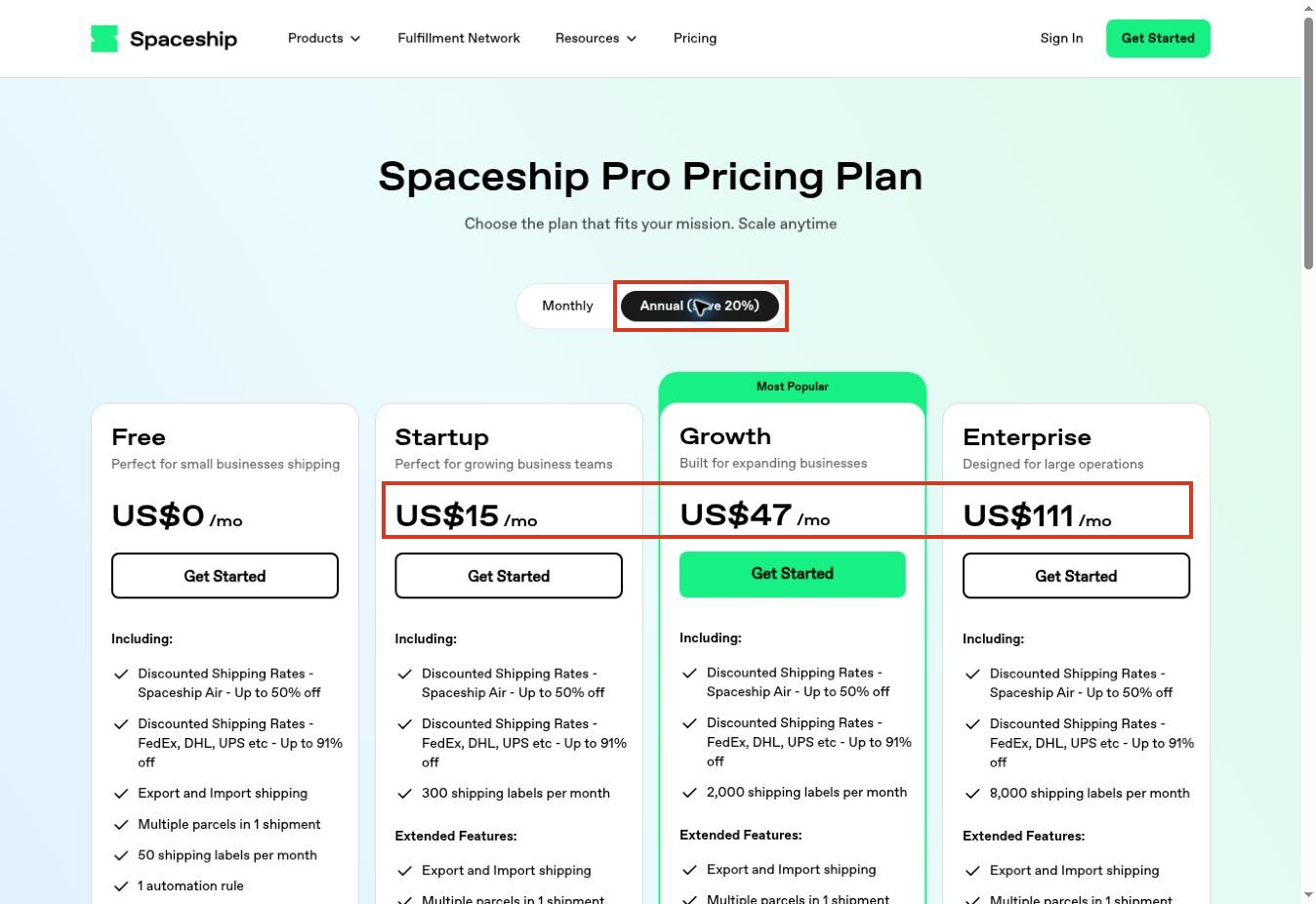
Our public-page check changed the selector from monthly to annual. Startup, Growth and Enterprise displayed US$19, US$59, and US$139 per month in the monthly view, then US$15, US$47, and US$111 in the annual view. These were the displayed rates on November 19, 2026; no checkout or invoice was tested.
The pricing FAQ separately explains that platform access does not include shipping, fulfillment and other value-added services. The useful lesson is to keep the software subscription and the physical movement of goods in different budget rows.
Spaceship Pro is an example to investigate when shipping administration is the bottleneck. Before selecting it, confirm the relevant label allowance, your carrier arrangements, return requirements, and export access. A plan comparison cannot establish whether your warehouse handoff works.
SHOPAGE: Reading the Promotional Price Basis
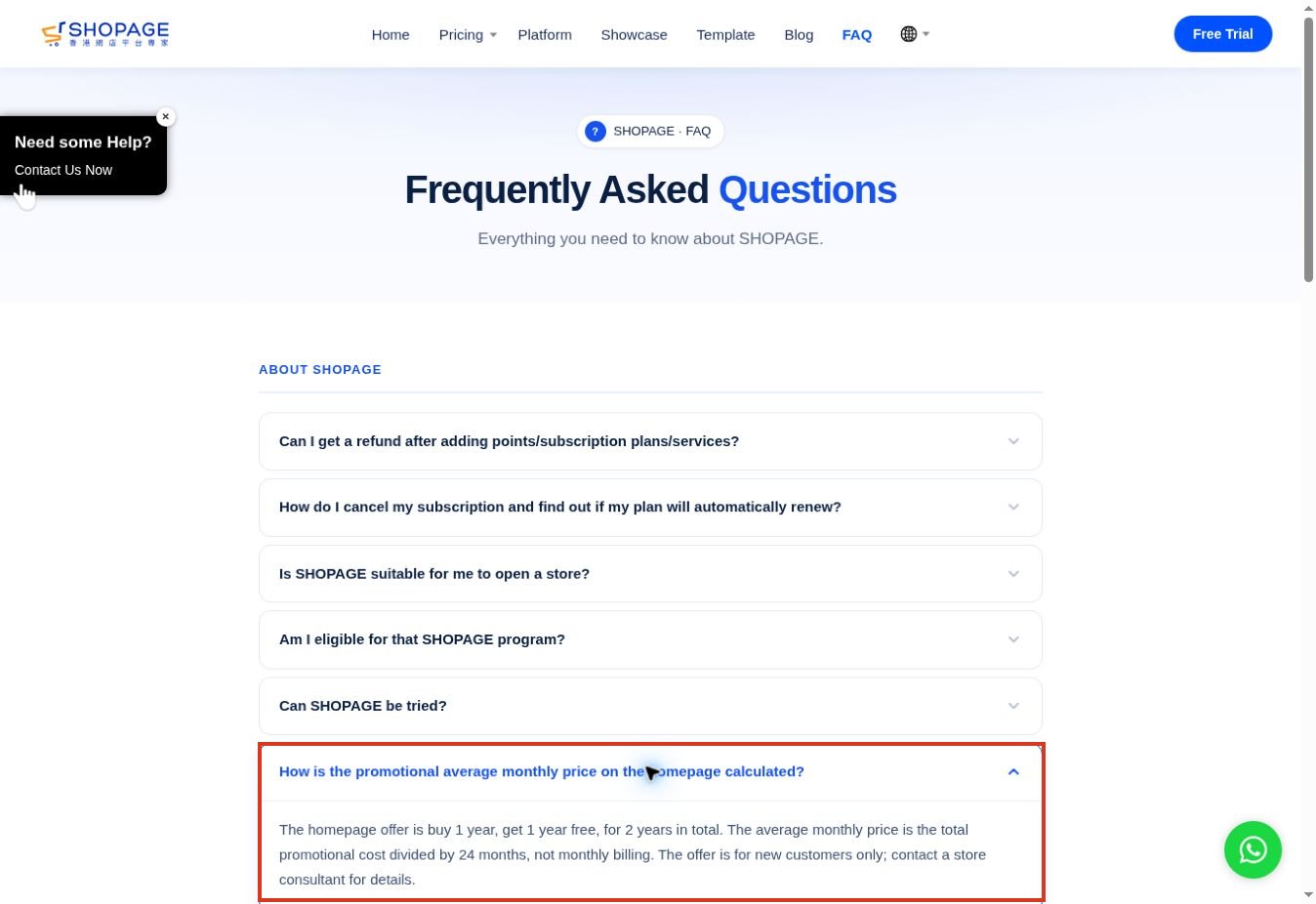
We expanded SHOPAGE’s FAQ about its promotional average monthly price. The explanation described a buy-one-year, get-one-year offer, with the promotional total averaged over 24 months. It also stated that this was not monthly billing and was for new customers.
That distinction matters if you are comparing a store platform with a cancellable monthly subscription. Record the amount payable now, the service period, renewal price and the cancellation conditions. Do not multiply a promotional monthly equivalent by 12 and assume you have found the annual invoice.
SHOPAGE is a storefront and retail-operations example for this exercise. The check did not test its order management, integrations or export. A final purchase comparison should use a dated quote for the exact plan rather than a promotional headline alone.
SleekFlow: Checking the Overage Explanation
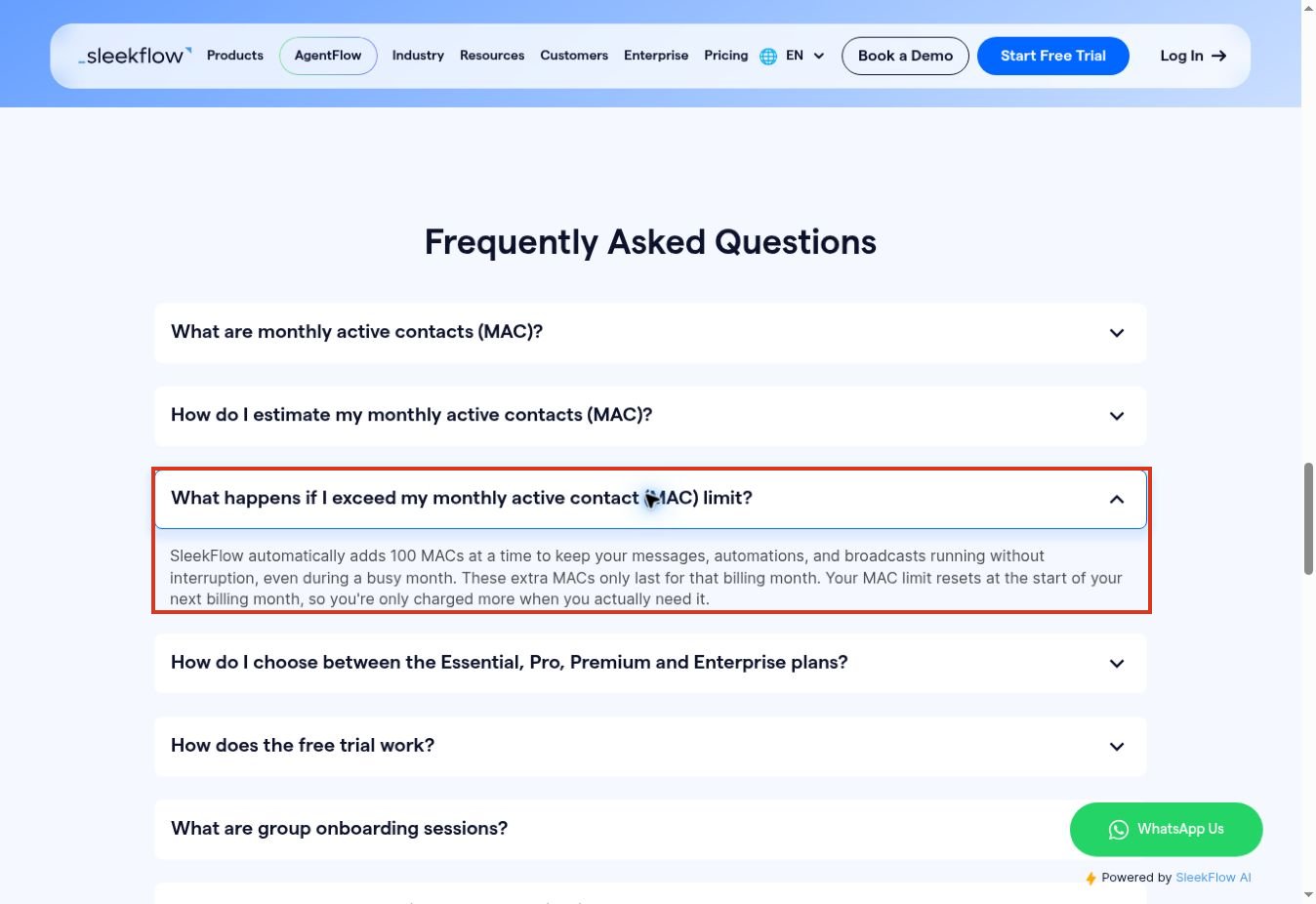
We opened SleekFlow’s FAQ about exceeding monthly active contact limits. It described automatic additions in blocks of 100 contacts for that billing month, with the allowance resetting at the next billing month. This verifies the explanation displayed, not a charge applied to an account.
For a brand with seasonal campaigns or heavy support traffic, contact volume belongs beside seat count in the budget. Confirm the price of each extra block, how a contact becomes billable, and which channel charges are separate.
SleekFlow is a customer-conversation example, rather than a replacement for inventory or warehouse software. If order context is essential, ask for a demonstration using your intended store integration and a restricted support role.
3. Inspect Each Integration as a Handoff
“Integrates with Shopify” is a starting point, not an acceptance result. Ask which records move, in which direction, what triggers an update and what happens after failure. Product creation, stock changes, cancellation, partial fulfillment and refunds are separate events.
Build a small mapping sheet with the source field, destination field, direction, trigger and failure owner. Use one stable order identifier across systems. Then ask the vendor to show an interrupted sync and its recovery path. A retry should not create a duplicate shipment or repeat a customer notification.
Check who maintains the connector. A vendor-built integration, a third-party app and a custom automation can have different subscriptions and support boundaries. Get a clear answer about who investigates when both systems say the other one caused the error.
4. Test Permissions and Data Export Early
Run the demonstration with the roles your team will actually use: an owner, a support agent and a warehouse operator. An owner account can conceal restrictions that only appear after staff are invited.
Define the permitted actions before testing. A support agent might need to read order status and add a note, while a manager approves refunds. A warehouse operator may need packing details without unrestricted access to customer exports or billing settings. Check whether these boundaries are available on the quoted plan.
For portability, request a sample export and open it. Look for order IDs, line items, product variants, timestamps, currency, fulfillment state and refund references. Verify whether customer notes, attachments and conversation history require separate exports or a higher plan.
Do not confuse international import/export shipping with exporting your business data. They are unrelated features. Likewise, an API is not a complete exit plan until you know its limits, available records and the effort needed to retrieve them.
5. Run a Small, Repeatable Acceptance Trial
The following is a proposed trial script, not work completed in the public-page checks above. Use a sandbox or isolated test store with synthetic names, products and addresses. Agree with the vendor on how to prevent real charges, carrier collections and customer messages.
| Test case | Action | Pass evidence |
|---|---|---|
| Normal order | Import one order with two product variants | Matching IDs, quantities and amounts in the receiving system |
| Address correction | Edit an unfulfilled order’s delivery details | The intended downstream record changes without duplication |
| Partial fulfillment | Fulfill one line while leaving the other open | Accurate remaining quantity and customer-facing status |
| Cancellation or refund | Use the approved test mechanism | Correct order state, stock treatment and action history |
| Restricted access | Repeat relevant actions as a staff role | Allowed work succeeds; prohibited actions remain unavailable |
| Exit rehearsal | Export the sample records | Readable files with enough detail to reconcile the test orders |
Save the input, expected result, actual result, plan, date and evidence for each case. Record setup time separately from the time needed to complete a normal task. If a vendor helps configure the trial, note that assistance; a guided demonstration is not the same as an unassisted onboarding result.
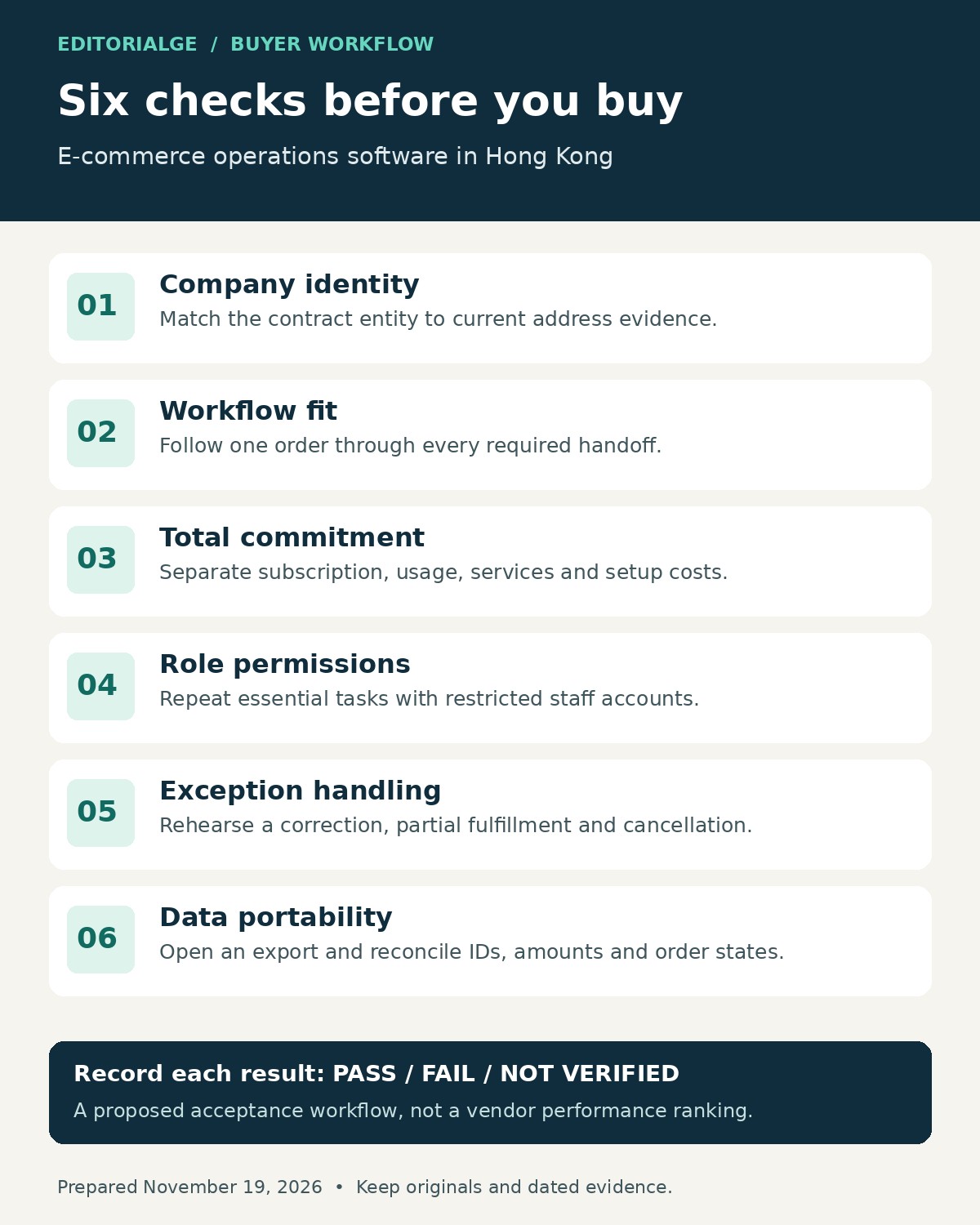
Use three outcomes: pass, fail or not verified. “Not verified” should remain visible instead of being converted into a favorable score. Repeat a failed case after a fix and retain both results so the final decision reflects what changed.
6. Choose by the Scenario You Actually Operate
If you already have a working storefront but struggle with labels and dispatch, evaluate a shipping layer first. Replacing the store introduces migration work that may not address the immediate bottleneck.
If staff handle customer questions across several channels, prioritize assignment, order context, restricted access and conversation continuity. Include contact and messaging usage in the cost model. A rich inbox will not resolve unreliable stock records on its own.
If online and physical-store inventory diverge, prioritize the stock model and POS-to-store handoff. Demonstrate returns and exchanges as well as sales. Those exceptions reveal whether the system follows your stock rules.
If your main problem is unclear responsibility, fix the process before adding another tool. Decide who owns each exception and how unresolved work is escalated. You can browse our SaaS and business tools coverage for adjacent categories once the job is defined.
Limits and the Final Buying Checklist
Public documentation can establish advertised terms and features, but it cannot prove your configuration will work. Prices may vary by billing term, market, add-on and negotiated contract. Corporate location also says nothing by itself about data residency or support response times.
Before signing, make sure your file contains:
- The exact contracting entity and an explained address match.
- A dated quote with currency, renewal terms, usage charges and exclusions.
- Evidence for each essential integration, permission and export requirement.
- A named internal owner for onboarding and failed handoffs.
- A record of unresolved gaps and who has accepted their operational impact.
- An exit procedure that your team can execute with the purchased plan.
A missing essential capability should stop the purchase until it is resolved or the operating process changes. An optional convenience can remain a tradeoff. Keeping those two categories separate makes the decision easier to defend.
Choose the Workflow Before the Vendor
The right e-commerce operations software in Hong Kong is the option that supports your actual order flow at a cost you can explain. Start with the bottleneck, verify the counterparty, inspect the billing conditions and rehearse the exceptions. A small evidence file is more useful than a long shortlist whose integrations, permissions and exit options remain assumptions.
Frequently Asked Questions (FAQs)
Does a Hong Kong office mean the software is Hong Kong-based?
It establishes an office presence, not necessarily the location of the product owner or your contracting entity. Check the current legal documents and the entity on your proposal. Confirm hosting and support arrangements separately.
Can a shipping platform replace an e-commerce store?
Do not assume so. Shipping management addresses fulfillment-related work, while a storefront handles the selling experience. Compare the particular product’s scope and the connection between them before removing an existing system.
What should a small brand test first?
Test the handoff that causes the most repeated work, then one exception such as an address change or partial fulfillment. Include a restricted staff account and an export before committing to a long subscription.
Are annual plans always better value?
No. Compare the upfront commitment, renewal price, cancellation terms and likely usage. An annual discount can be worthwhile after a successful trial, but it can also lock in a workflow that still needs costly workarounds.
Were these products fully tested?
No. The documented checks covered three public pricing-page interactions on November 19, 2026. The account-level trial in this guide is a procedure for buyers to run, not a claim of completed shipment, refund or integration testing.