

Freelancers juggle multiple clients, deadlines, and tasks, making accurate time tracking a constant challenge. Missed hours and underbilling can quickly lead to lost income and added stress.
Without a reliable system, invoicing turns into guesswork, and productivity suffers. Many freelancers struggle to account for their time effectively, impacting both earnings and workflow.
With over 161,994 new sign-ups to Clockify in a single month, the growing demand highlights the importance of efficient Time Tracking Apps For Freelancers.
This guide explores top tools like Toggl Track, Harvest, Timely, and My Hours—covering key features, pros, and cons. It also includes insights on mobile and desktop apps, automatic time tracking, and Pomodoro mode to help streamline productivity and maximize billable hours.
Find the right solution to simplify time management and stay in control of every project.
Why Freelancers Need Time Tracking Apps

Freelancers, you know the drill—deadlines loom, clients demand results, and your income depends on every hour you work. Time tracking software, like tools for project management and task management, turns chaos into control, letting you log hours with ease and spot ways to amp up productivity.
Track billable hours accurately
You know that sinking feeling when you undercharge for a gig because you lost track of your hours? Time tracking apps fix that mess by logging every minute you spend on client work.
Clockify lets you track billable hours and hourly rates, so it calculates your earnings spot on. Toggl Track helps you tag entries as billable or non-billable, then slaps on the right rate automatically.
Harvest logs time by project and category, making sure no billable work slips through the cracks.
Memtime catches your computer activity on autopilot, so you assign time to billable projects with ease. EARLY tracks time budgets by client or project, keeping those billable hours in check.
With Clockify, you generate invoices packed with accurate billable hours and auto-calculated amounts based on rates. Toggl Track sets different hourly rates for tasks or projects, boosting your accurate billing game.
TrackingTime dishes out detailed analytics on tracked hours, helping with spot-on billing every time.
Improve productivity and time management
Freelancers often juggle multiple projects, and that’s where time-tracking apps shine. These productivity tools help you spot wasted minutes, like when distractions creep in during a busy day.
Clockify lets you assess productivity levels and track project ROI, giving clear insights into your work habits. Toggl Track offers visibility into hours spent, plus progress toward project limits, which boosts your total efficiency.
Its timeline view and idle detection cut down on distractions, keeping you focused and on task. Think of it as a personal coach, nudging you to stay in the zone.
Tools like Memtime provide proactive time-blocking features, so you focus better and manage time with ease. TrackingTime stresses pre-scheduled task planning, complete with customizable daily, weekly, and monthly views for smooth resource management.
EARLY brings a Pomodoro timer for those focused work intervals, ramping up your productivity in short bursts. Plus, its Insights feature generates detailed time reports on usage, helping refine your approach.
Harvest explores profitability analysis by client, project, team member, and task, making time entry a breeze while sharpening your time management skills.
Streamline invoicing and reporting
Time tracking apps make invoicing a breeze for freelancers. They pull your billable hours straight into reports and bills. Clockify generates online reports in PDF, CSV, and Excel formats.
You export them or link them for clients. Toggl Track builds branded invoices from time reports, complete with pre-filled hours, descriptions, and totals. Harvest lets you create invoices quickly from tracked time.
Their Client Dashboard shares invoices and payments through a unique URL.
These tools turned my chaotic billing into smooth automation, shares a freelance writer who uses Zapier with apps like EARLY for easy reporting.
Other options shine too. TrackingTime provides exportable summary and detailed reports for sharing. Memtime exports tracked data to spreadsheets for invoicing. Think of it like a trusty sidekick handling the paperwork, so you focus on work.
Pair them with QuickBooks Time for accurate billable rates, or use a Chrome extension for quick timing on macOS. Tools like Hubstaff or Time Doctor add AI time tracking and automation to keep everything flowing.
Clockify: Best Overall Time Tracking App
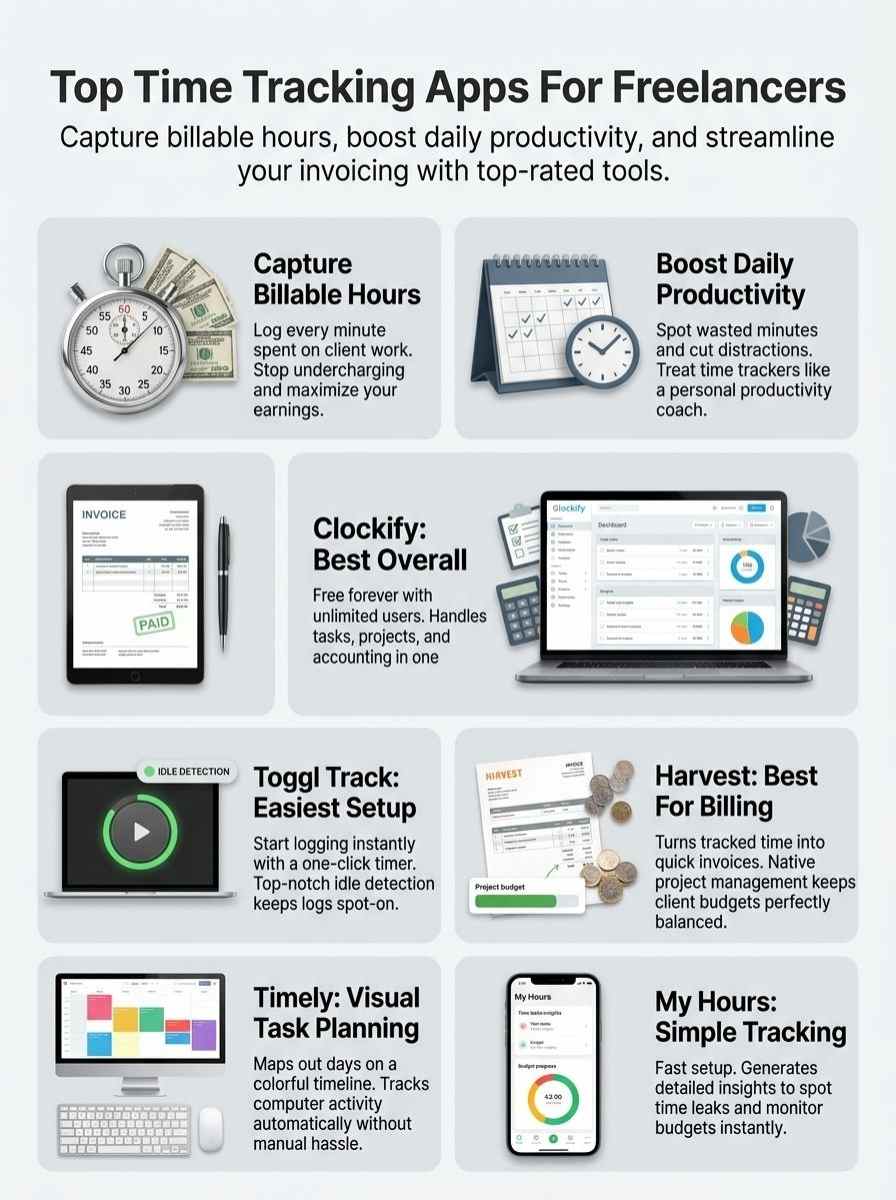
Freelancers, imagine turning chaotic workdays into smooth sails with a tool that tracks every minute without fuss. Clockify shines here, offering free time logs that beat out options like TimeCamp for sheer flexibility, pulling you in to explore its dashboard magic.
Features & Description (Clockify)
Clockify stands out as a versatile tool for freelancers juggling multiple gigs. You start tracking with a simple one-click timer, and you can add missed time manually if life gets in the way.
It handles timekeeping through timers, timesheets, kiosks, calendars, and auto trackers, making sure every minute counts. Freelancers organize projects by client and task, then assign hourly rates per project for easy billing.
Reports cover rates, projects, activity, and even location details, giving you clear insights. Management options include scheduling, time off requests, approvals, expenses, and invoicing, all in one spot.
Clockify integrates smoothly with apps like Scoro, Plaky, Pumble, and Paymo, plus project and task management tools for seamless workflows.
This app runs on desktop and mobile platforms, including iOS, Android, Mac, Windows, and Linux setups. Browser extensions for Chrome, Firefox, and Edge let you track time right inside web apps, like Timecamp or DeskTime.
You boost productivity with features that nod to the Pomodoro method, similar to BeFocused or Time Out apps. Clockify works well alongside tools from Setapp or MacPaw, and it rivals employee timesheet apps from Deltek Replicon or ActiTime.
Trackers like Timemator or Timeular fit into its ecosystem, while integrations with Timeneye, Float, Avaza, or Proofhub expand options. CleanMyMac X users appreciate its light memory footprint, keeping your device running smooth.
Freelancers Union members often praise how it streamlines solo work without the hassle.
Pros & Cons (Clockify)
Clockify offers solid perks for freelancers juggling multiple gigs, but like any tool, it has its drawbacks.
| Pros | Cons |
|---|---|
| Stays free forever, with unlimited users and projects. You get robust reporting and invoicing options. Plus, 24/7 customer support stands ready, and you can cancel anytime. | May feel simpler than apps loaded with advanced automation or AI smarts. |
| Handles tasks, projects, and accounting all in one spot, like a Swiss Army knife for your workflow. | Misses some advanced features that premium rivals pack in. |
| Delivers accurate invoicing through auto-calculated billable hours and reports you can export easily. | |
| Fits a wide range of freelancer styles, from solopreneurs to virtual assistants and even moonlighters. | |
| Lets you manage finances by setting budgets and making invoices right from your tracked hours, saving you headaches. |
Toggl Track: Best for Ease of Use
Toggl Track shines when you want a time tracker that feels like a breeze, letting you log hours without the usual headaches of clunky interfaces. Imagine this app as your laid-back sidekick, jumping in to help freelancers juggle tasks with simple clicks and zero drama.
Features & Description (Toggl Track)
Freelancers love Toggl Track for its simple setup that lets you start a one-click timer, or switch to automated tracking that runs quietly in the background. This app shows a timeline view of your daily activity, and it sends alerts for idle time so you stay on top of things.
You can log time manually, sync with your calendar, and set different hourly rates for tasks or projects, marking them as billable or non-billable, like sorting apples from oranges.
Organize everything by clients, projects, and tasks to keep chaos at bay.
Set project estimates in Toggl Track, and get notifications as limits creep up, helping you avoid surprises. The app offers summary and detailed reports you can export as PDFs or CSV files, perfect for invoicing at all hours.
Plus, its built-in Pomodoro timer pushes focused work intervals with automated break reminders, much like a friendly coach nudging you along. If your Mac gets cluttered from constant use, apps like CleanMyMac X can tidy it up, keeping your freelance flow smooth.
Pros & Cons (Toggl Track)
Toggl Track shines in simplicity, but like any tool, it has its ups and downs.
| Pros | Cons |
|---|---|
| Jump right in without setting up clients, projects, or tasks ahead of time; it’s ready for instant use, like flipping on a light switch. | Advanced options, such as time rounding and billable rates, demand a paid upgrade, so you might feel the pinch if you need those extras. |
| New updates boost dashboards and reporting, making data views fresh and sharp, almost like getting a software glow-up. | The free version caps at 5 users; add more folks, and you pay up, which can cramp team growth on a budget. |
| Spot idle time with top-notch detection to keep logs spot-on, helping you avoid those “where did the day go” moments. | |
| Link up with Zapier for smooth automation, turning routine tasks into hands-off wins, as if your app reads your mind. |
Harvest: Best for Invoicing and Budget Management
Freelancers, imagine turning your chaotic billing into a smooth ride, like steering a bike downhill without brakes. Harvest steps in as your trusty sidekick, making invoices pop up fast and budgets stay in check, so you focus on the work that pays.
Features & Description (Harvest)
Harvest lets you log time fast. Pick a project and category with one click on the plus sign. See your tracked entries in a list right away. It packs invoicing, expense tracking, and project management into one tool.
Access reports that show time logs, uninvoiced work, and profitability breakdowns by client, project, team member, or task. Share invoices and payments through the Client Dashboard using a special URL.
Hook up with third-party apps like CleanMyMac X for smoother workflows. Automate tasks by linking to Zapier. Jump into a simple timesheet as soon as you log in. This setup feels like a breeze, saving you headaches on busy freelance days.
Pros & Cons (Harvest)
Harvest offers solid tools for invoicing, but like any app, it has upsides and downsides.
| Pros | Cons |
|---|---|
|
|
Everhour offers similar simplicity but lacks Harvest’s native features, so weigh that if you shop around.
Timely: Best for Visual Task Planning
Freelancers, picture juggling tasks like a circus performer, but with Timely, you map out your day on a colorful timeline that makes planning feel like a breeze. This app turns chaotic schedules into clear visual boards, helping you spot overlaps and stay on top of deadlines without the usual headache.
Features & Description (Timely)
Timely turns your schedule into visual blocks on a calendar, making planning a breeze. You switch easily between daily, weekly, and monthly views, like flipping pages in a book. Manage tasks by project, client, or priority, much like you do in Asana.
Imagine, you block out time for big jobs, and the app pushes you to plan smarter. It integrates with productivity tools, say cleanmymacx, through a Chrome extension for quick timer starts.
The app tracks computer activity on its own, no effort needed from you. Categorize that work after the fact, simple as pie. Check the interface for a running log of what you did, plus a project page for adding entries by hand or import.
Go proactive with time-blocking to schedule like a pro. Export all that data for reports, keeping things smooth and useful.
Pros & Cons (Timely)
Freelancers often find Timely’s seamless automatic tracking a game changer, logging hours without any manual hassle. This time tracker comes with a simple feature set that fits right into your workflow. You gain proactive time-blocking to map out tasks ahead, avoiding last-minute scrambles. Picture a minimalist interface, where you review and assign work in seconds, like flipping through a notebook. Opt for the higher-tier plan, and it connects deeply with project management tools, boosting your solo operations.
Privacy concerns pop up with Timely’s AI tracking, feeling a bit like eyes on your screen. It runs desktop-only, so forget mobile access during coffee runs. TrackingTime steps in as a solid alternative, with effective time blocking and a straightforward interface that feels intuitive. Grab its free plan for unlimited users, though limited features might leave you wanting more. Freelancers love how TrackingTime’s unique visualization boosts task scheduling and management. Both Timely and TrackingTime fit perfectly for those needing visual planning tools, turning chaotic days into smooth rides.
My Hours: Best for Simplicity and Ease of Setup
Freelancers, imagine: you open an app that feels like a friendly chat, no steep learning curve in sight. My Hours sets up fast, tracks your hours with clean reports, and keeps things light so you focus on work, not tech headaches.
Features & Description (My Hours)
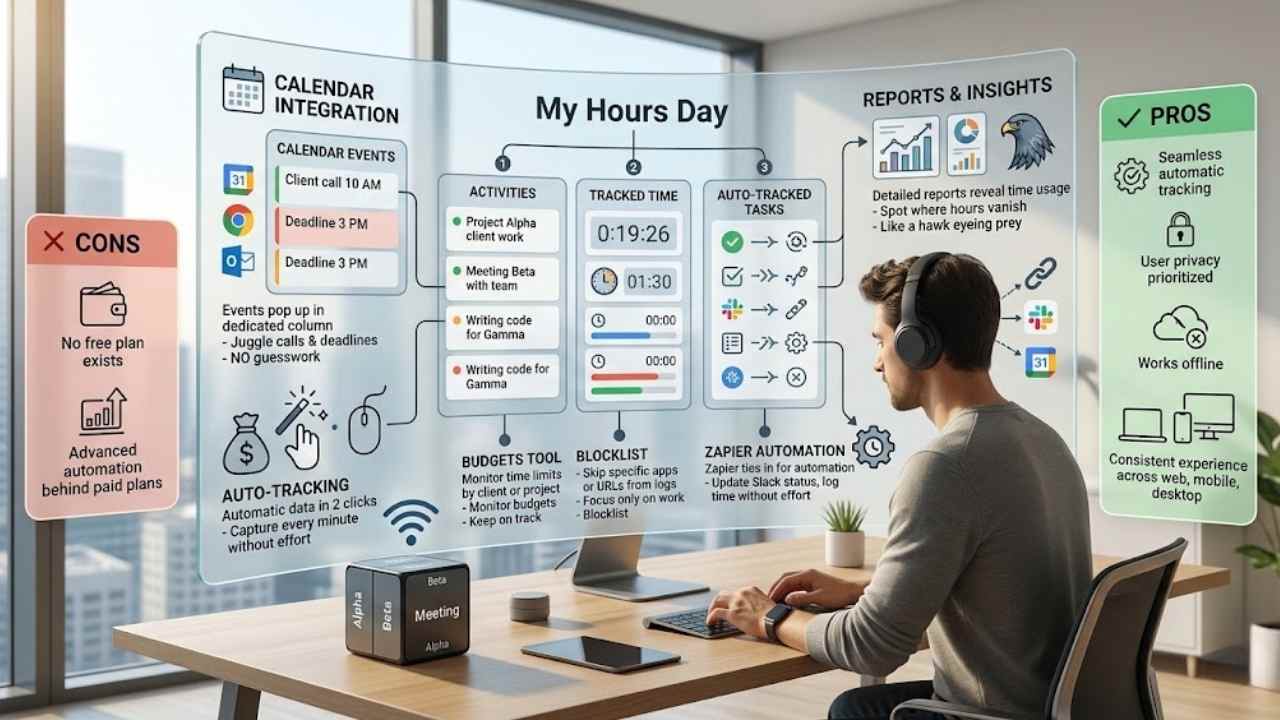
My Hours stands out with its Day view layout. This setup shows columns for your activities, tracked time, and auto-tracked tasks, all in one spot. You spot patterns fast, like a hawk eyeing its prey.
The app integrates with your calendars too. Events pop up in a dedicated column, so nothing slips through the cracks. Imagine you’re juggling client calls and deadlines, and My Hours keeps everything visible, no guesswork needed.
Users add automatic data to tracked logs in just two clicks. That’s quick, almost like magic. The Insights feature creates detailed reports on how you use time, revealing where hours vanish.
Set up the Budgets tool to monitor time limits by client or project, keeping you on track. A physical tracker syncs right with the app; flip it to a selected side, and tracking starts.
Use the Blocklist to skip certain apps or URLs from logs, focusing only on what matters. Plus, Zapier ties in for automation, say, updating your Slack status or logging time without extra effort.
Pros & Cons (My Hours)
Freelancers love My Hours for its seamless automatic tracking that captures every minute without much effort. This app puts user privacy first, so you feel secure while logging hours. It even works offline, perfect for those spotty internet days on the road. Quick time recording happens with just a few clicks, keeping things simple and fast. You get a consistent experience whether on web, mobile, or desktop apps. Integration with Zapier lets you automate workflows, like syncing tasks to your calendar.
No free plan exists, which might sting for budget-tight beginners. Advanced automation sits behind paid plans, so you pay extra for those bells and whistles. Still, the Insights and Budgets features guide your project management, helping you spot time leaks like a hawk. Imagine juggling gigs without the hassle; this tool makes setup a breeze, almost like chatting with an old friend.
Final Thoughts
You’ve seen how apps like Clockify, Toggl Track, Harvest, Timely, and My Hours help freelancers track hours with ease. These tools make billing accurate and boost your daily grind, like a trusty sidekick in your work adventures.
Imagine slashing wasted time, you gain more freedom and cash flow in this gig economy. Check out their free trials or explore user forums for extra tips. Go pick one today, and watch your freelance life level up.
Frequently Asked Questions (FAQs) About Time Tracking Apps for Freelancers
1. What’s the top time tracking app for freelancers like me who juggle multiple gigs?
Toggl stands out as a favorite, you know, because it tracks hours like a hawk eyeing its prey, and it integrates smoothly with tools like Google Calendar. Plus, its reports help you bill clients without the headache.
2. How do these time tracking apps actually boost my freelance game?
They automate logging your work hours, so you avoid the old “where did the time go” puzzle. Imagine turning chaotic days into clear invoices; that’s the magic. Freelancers often say it’s like having a silent partner who never slacks off.
3. Are there free options among the best time tracking apps for freelancers?
Clockify offers a solid free version that covers basics like project timers and simple reports.
4. What features make a time tracking app the best choice for busy freelancers?
Look for easy invoicing and idle detection to catch those coffee break slip-ups. Apps like Harvest shine here, with reminders that nudge you back to work, almost like a friendly coach. And don’t forget mobile access; it’s a lifesaver when you’re on the go, chasing deadlines from coffee shops.





















