A good controller does not magically make you better at games. Sorry, painful truth first. But a bad controller can absolutely make you worse, annoy you every five minutes, ruin long sessions, and slowly convince you that stick drift is a personal attack.
That is why choosing from the best game controllers is not only about brand loyalty. It is about platform support, comfort, stick quality, trigger feel, battery life, customization, latency, durability, and how you actually play. A controller that feels perfect for racing may not be ideal for shooters. A premium Pro Controller may be wasted if you mostly play cozy games. And a cheap wired controller may quietly outperform a fancy one if all you need is reliable inputs.
This comparison covers 10 strong controllers for different types of players, including PC, Xbox, PlayStation, Nintendo Switch 2, mobile gaming, competitive play, budget gaming, and accessible playstyles. The goal is simple: help you find the right controller without falling for expensive nonsense wearing RGB lights.
Our Selection Criteria
A controller has to do more than look good in product photos. The best ones feel comfortable, connect reliably, support the right platforms, and match real gaming needs.
I compared these controllers based on comfort, platform support, customization, input quality, battery life, special features, and overall value. I also considered whether each controller has a clear reason to exist instead of being another plastic rectangle with confidence.
| Selection Factor | What It Means |
|---|---|
| Platform Support | PC, Xbox, PS5, Switch, mobile, or multi-platform use |
| Comfort | Grip shape, weight, button position, and long-session feel |
| Input Quality | Sticks, triggers, D-pad, face buttons, and response consistency |
| Customization | Remapping, profiles, paddles, trigger stops, and software support |
| Durability Features | Hall effect or TMR sticks, replaceable modules, or stronger build quality |
| Value | Whether the controller earns its price for the intended player |
Whom This Is For
This guide is for players who want a controller that actually fits their setup. That includes casual players, PC gamers, console players, competitive players, mobile gamers, families, and people who simply want one reliable controller without needing a spreadsheet.
You do not need the most expensive option. You need the right one. Those are very different things, although marketing departments would prefer you never notice.
10 Best Game Controllers Compared
The controllers below are ranked by overall usefulness, value, platform relevance, and how clearly they serve different types of players.
1. Xbox Wireless Controller
The Xbox Wireless Controller is still one of the safest all-around controller choices, especially for PC and Xbox players. Microsoft lists it as compatible with Xbox Series X|S, Xbox One, Windows 10/11, Android, and iOS, with Xbox Wireless and Bluetooth support. It also uses AA batteries and offers up to 40 hours of battery life depending on usage.
The reason it stays relevant is comfort and compatibility. On Windows, it usually just works. No drama. No weird setup ritual. No “download this suspicious software and pray” situation. The shape is familiar, the buttons feel dependable, and the hybrid D-pad is better than older Xbox designs.
It is not a pro controller. You do not get rear paddles, Hall effect sticks, trigger stops, or deep customization out of the box. But for most players, that is fine. This is the “buy it and play” controller.
Best for:
- PC and Xbox players who want reliability
- Casual and everyday gaming across many genres
Why We Chose It:
- Wide compatibility across Xbox, PC, mobile, Android, and iOS
- Comfortable shape that works for most hand sizes
- Strong plug-and-play support on Windows
- Good battery life with AA or rechargeable battery options
Things to consider:
- No built-in rechargeable battery by default
- No rear buttons or premium competitive features
2. Sony DualSense Wireless Controller
The DualSense Wireless Controller is the best standard controller for PS5 players who care about immersion. Sony highlights haptic feedback and adaptive triggers as major features, and those features still matter most in first-party PlayStation games.
This controller feels special when a game actually uses it well. Adaptive triggers can make bows, guns, cars, and tools feel different. Haptics can add texture to rain, terrain, footsteps, and impact. That sounds like marketing fluff until you play a game that uses it properly, then suddenly a normal rumble motor feels like a confused washing machine.
For PC, the DualSense also works, but support depends heavily on the game and connection method. It is great for PS5 first, useful for PC second.
Best for:
- PS5 players who want the full PlayStation experience
- Story, action-adventure, racing, and immersive single-player games
Why We Chose It:
- Excellent haptics and adaptive triggers in supported games
- Comfortable symmetrical stick layout
- Built-in microphone and speaker add convenience
- Strong default PS5 controller with a premium feel
Things to consider:
- Battery life is not as strong as some competitors
- PC feature support varies by game and connection method
3. Nintendo Switch 2 Pro Controller
The Nintendo Switch 2 Pro Controller is the best official pick for Switch 2 players who want a traditional full-size controller. Nintendo lists features including HD Rumble 2, motion controls, built-in amiibo functionality, a Capture Button, a C Button for GameChat, remappable GL/GR buttons, a 3.5mm audio jack, and a USB-C charging cable. It is only for use with the Nintendo Switch 2 system.
Battery life is one of its strongest points. Nintendo’s UK accessory page lists an estimated battery life of about 40 hours and a charging time of about 3.5 hours.
This controller makes sense if you are already in the Switch 2 ecosystem. It gives you native support and a clean Nintendo experience without third-party compatibility anxiety.
Best for:
- Nintendo Switch 2 players
- Docked gaming, action games, platformers, racing, and long sessions
Why We Chose It:
- Native Switch 2 support with Nintendo-specific features
- HD Rumble 2, motion controls, amiibo support, and GameChat access
- Remappable GL/GR buttons add flexibility
- Excellent estimated battery life
Things to consider:
- Only for Switch 2 use
- It does not focus on anti-drift stick technology
4. Xbox Elite Wireless Controller Series 2
The Xbox Elite Wireless Controller Series 2 is for players who want Microsoft’s premium Xbox and PC controller experience. Microsoft highlights adjustable-tension thumbsticks, shorter hair trigger locks, a wrap-around rubberized grip, remappable buttons through the Xbox Accessories app, and up to 40 hours of rechargeable battery life.
This is the controller you buy when you know exactly why paddles, trigger locks, profiles, and stick tension matter. In shooters, rear paddles can help you jump, crouch, reload, or swap without moving your thumbs off the sticks. In racing and action games, trigger tuning and profiles can also help.
It is expensive, and it is not the newest-feeling pro controller anymore compared with some Hall effect or TMR rivals. But it still has one major advantage: it feels deeply integrated with Xbox and Windows.
Best for:
- Serious Xbox and PC players
- Players who want paddles, profiles, trigger locks, and premium comfort
Why We Chose It:
- Strong official Xbox and Windows integration
- Adjustable thumbstick tension and trigger locks
- Rechargeable battery with long listed battery life
- Premium grip and customization options
Things to consider:
- Expensive compared with standard controllers
- Some newer third-party controllers offer Hall effect or TMR sticks
5. Sony DualSense Edge
The DualSense Edge is Sony’s official pro controller for PS5. Sony lists remappable buttons, adjustable triggers, stick sensitivity and vibration intensity settings, quick-swap control profiles, changeable stick caps, and back buttons.
The big advantage is that it keeps the DualSense identity. You still get PlayStation’s haptics and adaptive trigger experience, but now with competitive-style customization. That makes it a better fit for PS5 players who want back buttons and profiles without losing first-party features.
The problem is price and battery life. It is a premium purchase, not a casual upgrade. If you play mostly cinematic single-player games, the standard DualSense is probably enough. But if you play shooters, action games, or competitive titles on PS5, the Edge makes more sense.
Best for:
- PS5 players who want a first-party pro controller
- Players who want back buttons without losing DualSense features
Why We Chose It:
- Keeps haptics and adaptive triggers
- Adds back buttons, profiles, stick tuning, and trigger adjustment
- Strong PS5 integration
- Better for competitive play than the standard DualSense
Things to consider:
- Very expensive
- Battery life is weaker than many premium competitors
6. Razer Wolverine V3 Pro
The Razer Wolverine V3 Pro is a strong competitive controller for Xbox and PC players. Razer lists it as a wireless esports controller for Xbox and PC with Hall Effect thumbsticks, Bluetooth wireless, and pro-focused features.
Razer’s newsroom also highlights mouse-click back paddles, claw-grip bumpers, Pro HyperTriggers, and Hall effect technology for the Wolverine V3 line.
This controller is clearly made for fast inputs. If you play shooters, action games, fighting games, or competitive multiplayer, the Wolverine V3 Pro feels more aggressive than the standard Xbox pad. Buttons are clickier, extra inputs are easier to map, and the design is built around performance.
It is not the controller I would recommend to someone who mostly plays farming games or relaxed RPGs. That would be like buying racing tires for a bicycle. But for competitive players, it deserves attention.
Best for:
- Competitive Xbox and PC players
- FPS, action, fighting, and fast multiplayer games
Why We Chose It:
- Hall effect thumbsticks help reduce drift concerns
- Extra back buttons and claw-grip bumpers support advanced play
- HyperTrigger-style inputs are useful for shooters
- Strong performance-first design
Things to consider:
- Expensive
- Overkill for casual players
7. GameSir G7 SE
The GameSir G7 SE is one of the best budget performance controllers for Xbox and PC. GameSir lists it for Xbox Series X|S, Xbox One, and Windows 10/11, with anti-drift Hall Effect sticks, Hall effect analog triggers, two quick-latch back buttons, a magnetic swappable faceplate, software customization, and wired USB-C connection.
This controller is popular for a reason. It gives you features that used to feel premium, especially Hall effect sticks and rear buttons, at a much lower price than most pro controllers. Since it is wired, latency and battery concerns are basically removed. Very rude of it to be practical.
The downside is also obvious: it is wired. If you hate cables, you will hate the compromise. But for desk gaming, PC setups, and budget Xbox play, it is hard to ignore.
Best for:
- Budget Xbox and PC players
- Players who want Hall effect sticks without paying premium prices
Why We Chose It:
- Hall effect sticks and triggers at a budget-friendly level
- Two rear buttons add practical control options
- Wired connection avoids battery concerns
- Good choice for PC desk gaming and Xbox setups
Things to consider:
- Wired only
- Build feel is good for the price, not luxury-tier
8. 8BitDo Ultimate 2.4G Wireless Controller
The 8BitDo Ultimate 2.4G Wireless Controller is a strong value pick for PC, Steam Deck, Android, and Apple device users. 8BitDo says the controller has Hall Effect joysticks and is compatible with Windows, Apple, and Android devices. It also includes a charging dock and auto reconnect behavior when removed from the dock.
This is a good controller for players who want something more feature-rich than the standard Xbox pad without paying pro-controller money. The charging dock is genuinely useful. It reduces the “where did I put the cable?” problem, which has haunted gamers since cables learned how to disappear.
It is especially appealing for PC and Steam Deck players. The shape is comfortable, the dock is convenient, and the Hall effect sticks give it a durability advantage over many traditional-stick controllers.
Best for:
- PC, Steam Deck, Android, and Apple device players
- Players who want wireless value plus a charging dock
Why We Chose It:
- Hall effect joysticks
- Charging dock included
- Useful for PC and handheld-style setups
- Strong value compared with many premium controllers
Things to consider:
- Not the best native choice for PlayStation or Xbox consoles
- 8BitDo model names can be confusing, so check compatibility before buying
9. Victrix Pro BFG Reloaded
The Victrix Pro BFG Reloaded is one of the best controllers for players who want modular hardware. Turtle Beach describes it as a wireless modular controller with three customizable modules, Hall Effect technology, 11 interchangeable components, mappable buttons, 5-stop clutch triggers with hair-trigger mode, Sony 3D Audio support on the PlayStation version, and a 6-button Fightpad module using Kailh microswitches.
The big attraction is flexibility. You can change modules, use a fightpad layout, adjust triggers, and build the controller around different genres. That makes it especially useful for players who jump between shooters, fighting games, action titles, and competitive games.
This is not a simple controller. It is for people who enjoy tweaking. If you want something basic, it may feel like buying a Swiss Army knife just to open a packet of chips.
Best for:
- Players who want modular layouts
- Fighting game players, competitive players, and customization fans
Why We Chose It:
- Modular design supports different game styles
- Hall Effect technology improves durability confidence
- Fightpad module makes it useful for fighting games
- Strong alternative to first-party pro controllers
Things to consider:
- Expensive
- Not ideal for players who hate configuration
10. Backbone One USB-C
The Backbone One USB-C is the best pick here for mobile gaming, cloud gaming, and remote play. Backbone lists its USB-C Xbox Edition as compatible with Android and iPhone USB-C devices, including newer iPhone models, and positions it for native mobile games, Xbox Cloud Gaming, console remote play, and PC remote play.
This is not trying to replace your main console controller. It turns your phone into a handheld-style gaming device. That makes it useful for Xbox Cloud Gaming, PlayStation Remote Play, Steam Link-style setups, mobile games, and travel.
The real value is convenience. You snap in your phone, use physical controls, and avoid the misery of touchscreen buttons. Touchscreen controls are fine for menus. For action games, they often feel like trying to play piano on a wet window.
Best for:
- Mobile gamers and cloud gaming users
- Players who use remote play or travel often
Why We Chose It:
- Turns compatible phones into handheld-style gaming devices
- USB-C connection gives a direct plug-in experience
- Useful for cloud gaming and remote play
- More comfortable than touchscreen controls for many games
Things to consider:
- Requires a compatible phone
- Not a replacement for a full-size home controller
An Overview Of The Best Game Controllers
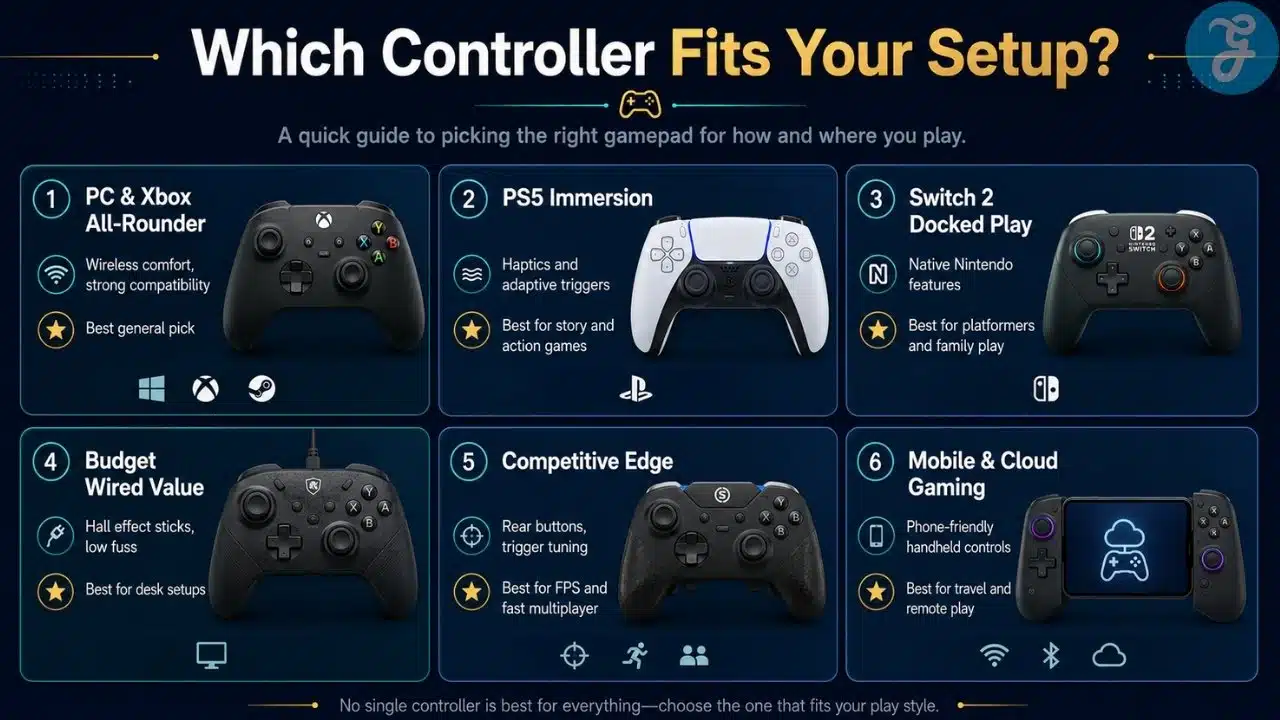
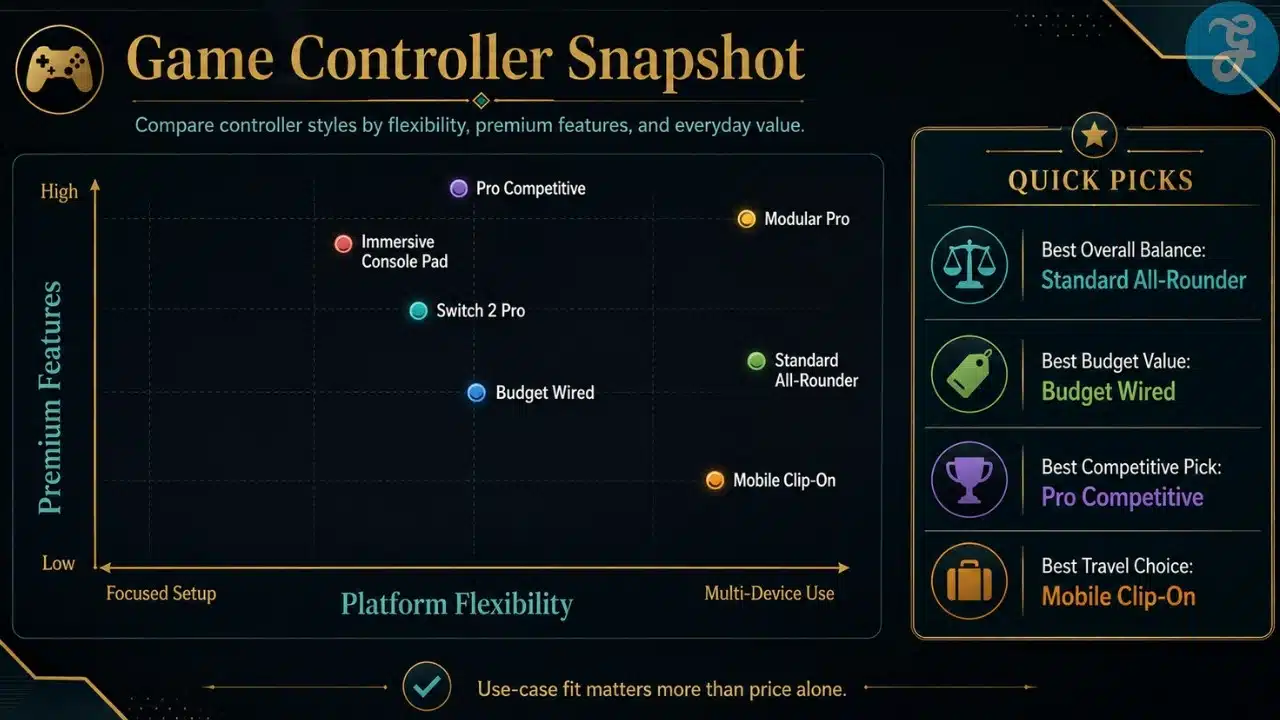
The best game controllers are not fighting for the same player. That is the important part. The Xbox Wireless Controller is the safest general-purpose pick. The DualSense is best for PS5 immersion. The Switch 2 Pro Controller is the obvious native Nintendo choice. The Elite Series 2 and DualSense Edge serve first-party premium buyers. The Wolverine V3 Pro, GameSir G7 SE, 8BitDo Ultimate, Victrix Pro BFG, and Backbone One each solve more specific problems.
Here is the clean comparison:
| Controller | Best For | Main Strength | Main Limitation |
|---|---|---|---|
| Xbox Wireless Controller | PC and Xbox users | Comfort and compatibility | No pro features |
| DualSense Wireless Controller | PS5 players | Haptics and adaptive triggers | Battery life and PC feature limits |
| Nintendo Switch 2 Pro Controller | Switch 2 users | Native Nintendo features | Switch 2 only |
| Xbox Elite Series 2 | Premium Xbox/PC play | Paddles, profiles, trigger locks | Expensive and aging stick tech |
| DualSense Edge | Premium PS5 play | Pro features plus DualSense tech | Expensive and weaker battery |
| Razer Wolverine V3 Pro | Competitive Xbox/PC play | Fast inputs and extra buttons | Overkill for casual players |
| GameSir G7 SE | Budget Xbox/PC performance | Hall effect sticks at lower price | Wired only |
| 8BitDo Ultimate 2.4G | PC/Steam Deck value | Dock, Hall sticks, good value | Console compatibility limits |
| Victrix Pro BFG Reloaded | Modular play | Swappable parts and fightpad module | Price and setup complexity |
| Backbone One USB-C | Mobile/cloud gaming | Phone-based handheld control | Requires compatible phone |
Our Top 3 Picks And Why?
If I had to choose only three, I would pick Xbox Wireless Controller, GameSir G7 SE, and DualSense Wireless Controller.
The Xbox Wireless Controller is the best default pick for PC and Xbox because it is comfortable and widely compatible. The GameSir G7 SE is the best value pick because Hall effect sticks and rear buttons at its price are hard to ignore. The DualSense is the best immersive controller because PlayStation’s haptics and adaptive triggers still feel special when games use them properly.
| Pick | Why It Stands Out |
|---|---|
| Xbox Wireless Controller | Best safe all-around controller |
| GameSir G7 SE | Best budget performance value |
| DualSense Wireless Controller | Best immersive PS5 experience |
How To Choose The Right Controllers For Yourself
Choosing the right controller starts with platform, not hype. A controller can be amazing on one system and annoying on another. Always check compatibility before buying, especially with PlayStation, Switch, mobile, and wireless third-party options.
The Selection Framework
- Choose by platform: Xbox and PC players can safely start with Xbox Wireless, Elite Series 2, GameSir G7 SE, 8BitDo Ultimate, or Wolverine V3 Pro. PS5 players should look at DualSense, DualSense Edge, Victrix Pro BFG, or Access Controller-style options if accessibility matters. Switch 2 players should prioritize Switch 2 Pro Controller or confirmed Switch 2-compatible options.
- Choose by game type: For shooters, look for rear buttons, trigger stops, and strong sticks. For RPGs and adventure games, comfort matters more. For fighting games, consider a strong D-pad or modular fightpad. For mobile, choose a phone-first controller like Backbone One.
- Choose by stick technology: Hall effect and TMR sticks are worth considering if you worry about drift. Traditional sticks can still feel great, but drift resistance is becoming a serious buying factor.
- Choose by budget: Standard controllers are enough for most players. Pro controllers only make sense if you actually use the extra buttons, profiles, trigger locks, or modules.
The Final Checklist
Before buying a controller, ask yourself:
- Does it officially support my platform?
- Do I need wireless, or is wired fine?
- Do I actually need back buttons or trigger stops?
- Do I care about Hall effect or TMR sticks?
- Is this controller for one genre or general gaming?
- Will I use its software and profiles, or ignore them forever?
The Final Button Press
The best game controllers are not always the most expensive ones. Sometimes the best choice is the boring reliable controller that works every time. Sometimes it is the budget wired pad with Hall effect sticks. Sometimes it is the premium pro controller because you genuinely need those extra inputs. And sometimes it is a mobile controller because your phone has quietly become your handheld console.
For most PC and Xbox players, the Xbox Wireless Controller is still the safest starting point. For value-focused players, the GameSir G7 SE is hard to beat. For PS5 immersion, the DualSense remains excellent. For competitive play, look at the Razer Wolverine V3 Pro, DualSense Edge, or Victrix Pro BFG Reloaded. For mobile gaming, Backbone One USB-C makes the most sense.
A controller should disappear in your hands. You should be thinking about the game, not the grip, the cable, the battery, or why your character keeps drifting left like they have personal problems.
Frequently Asked Questions About Best Game Controllers
What Is The Best Game Controller Overall?
The Xbox Wireless Controller is the best overall pick for most PC and Xbox players because it is comfortable, reliable, and widely compatible. For PS5 users, the DualSense is the better default choice because of haptics and adaptive triggers.
Which Controller Is Best For PC Gaming?
The Xbox Wireless Controller is the safest PC pick because Windows support is strong. The 8BitDo Ultimate 2.4G and GameSir G7 SE are also excellent options if you want extra value, Hall effect sticks, or a charging dock.
Which Controller Is Best For Competitive Gaming?
The Razer Wolverine V3 Pro, Xbox Elite Series 2, DualSense Edge, and Victrix Pro BFG Reloaded are strong competitive picks. Look for rear buttons, trigger stops, reliable sticks, and remapping support.
Are Hall Effect Sticks Worth It?
Yes, especially if you worry about stick drift. Hall effect sticks use magnetic sensing instead of traditional contact-based parts, which can improve long-term durability. That said, comfort, button feel, software, and platform support still matter too.
Should I Buy A Wired Or Wireless Controller?
Wireless is better for couch gaming and clean setups. Wired is better if you want lower hassle, no battery charging, and often a lower price. For desk-based PC gaming, a wired controller like the GameSir G7 SE can be a very smart choice.