

In the fast-paced world of web development, efficiency, scalability, and responsiveness are key factors that define a successful project. CSS frameworks have revolutionized front-end development, offering pre-styled components, responsive grids, and robust utilities that streamline the process of building visually appealing websites.
Whether you’re a seasoned developer or just starting, leveraging the best free and paid CSS frameworks for web developers can save time, reduce complexity, and enhance user experience.
But with so many frameworks available, how do you choose the right one for your needs? This article explores the top 10 best free and paid CSS frameworks for web developers, breaking down their features, benefits, and ideal use cases to help you make an informed decision.
What is a CSS Framework?
A CSS framework is a pre-prepared library that provides a foundation for styling web pages. It includes predefined classes, grids, UI components, and utilities that allow developers to create responsive and aesthetically pleasing websites without writing extensive custom CSS.
Key Benefits of Using a CSS Framework:
- Faster Development – Reduces the time spent writing CSS from scratch.
- Consistent Design – Ensures uniformity across web applications.
- Responsive Layouts – Provides built-in responsiveness for mobile-friendliness.
- Cross-Browser Compatibility – Ensures that websites look consistent across different browsers.
- Ease of Maintenance – Updates and modifications become easier with structured styling.
Why Use a CSS Framework for Web Development?
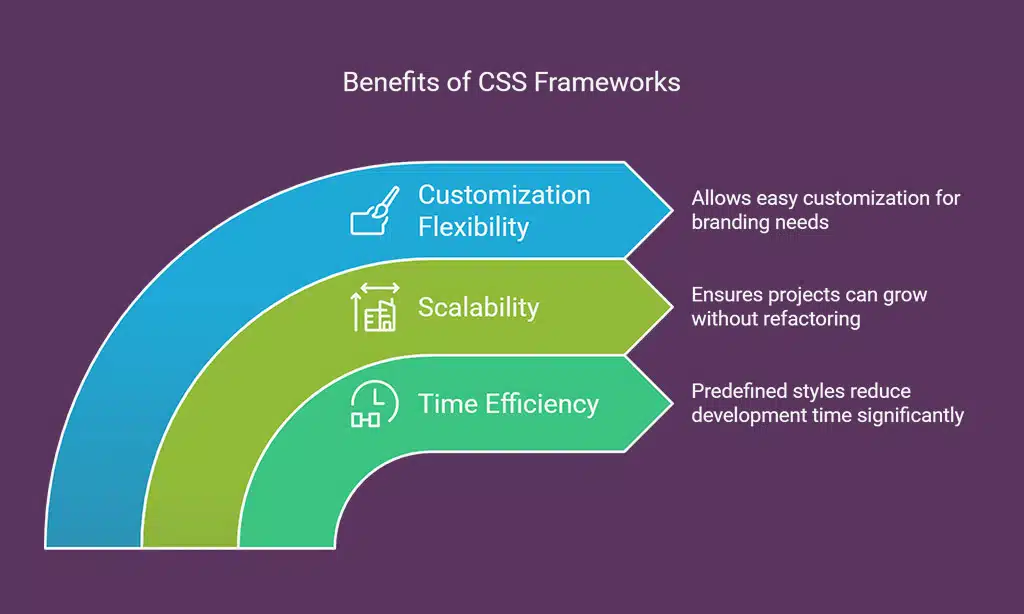
Modern websites demand rapid development cycles while maintaining high-quality UI/UX standards. Here’s why best free and paid CSS frameworks for web developers are essential:
- Time Efficiency: Predefined styles reduce development time significantly.
- Scalability: Ensures that projects can grow without refactoring the entire CSS structure.
- Customization Flexibility: Most frameworks allow easy customization for branding needs.
- Community Support: Large developer communities provide extensive documentation and support.
Top 10 Best Free and Paid CSS Frameworks for Web Developers
Choosing the right CSS framework can significantly impact your development workflow, whether you are working on small projects or large-scale enterprise applications.
The best free and paid CSS frameworks for web developers offer diverse features that cater to different needs, from rapid UI development to creating pixel-perfect designs. By understanding the strengths and limitations of each framework, developers can ensure they select the best tool to build modern, efficient, and visually appealing websites.
1. Bootstrap
Bootstrap is the most popular front-end framework, offering an extensive collection of responsive UI components. Known for its robust grid system, pre-styled elements, and ease of use, Bootstrap is ideal for both beginners and professionals. It powers websites like Twitter, Spotify, and LinkedIn, making it a trusted choice for scalable web development.
| Feature | Details |
| Type | Free |
| Grid System | Flexible and responsive |
| Components | Buttons, forms, modals, tooltips, etc. |
| Best For | Beginners and professional developers |
2. Tailwind CSS
Tailwind CSS is a utility-first framework designed for rapid UI development. It allows developers to create highly customized designs without writing unnecessary CSS. Unlike traditional frameworks, Tailwind removes predefined styles, making it lightweight and efficient. It is commonly used by startups and SaaS applications.
| Feature | Details |
| Type | Free |
| Customization | Highly flexible and modular |
| Performance | Eliminates CSS bloat |
| Best For | Custom UI development |
3. Bulma
Bulma is a lightweight CSS framework built on Flexbox, providing an easy-to-use syntax for creating responsive designs. Its minimalistic approach makes it ideal for projects that require clean and simple UI structures. Frequently used for blogging platforms and dashboards, Bulma offers a modern design alternative to Bootstrap.
| Feature | Details |
| Type | Free |
| Grid System | Flexbox-based |
| Ease of Use | Beginner-friendly |
| Best For | Minimalist web projects |
4. Foundation by Zurb
Foundation is a powerful front-end framework that focuses on accessibility and responsive design. Used by major enterprises, it supports ARIA accessibility, making it an excellent choice for government and corporate websites. Its mobile-first approach ensures seamless scalability.
| Feature | Details |
| Type | Free |
| Accessibility | ARIA support |
| Customization | High-level customization capabilities |
| Best For | Enterprise-grade applications |
5. Materialize
Materialize follows Google’s Material Design principles, providing ready-made UI components for creating modern web applications. It is best suited for developers seeking a Material Design aesthetic with minimal effort. Many startups and SaaS platforms utilize Materialize to maintain a sleek interface.
| Feature | Details |
| Type | Free |
| Design Language | Material Design |
| UI Components | Cards, buttons, modals, toolbars |
| Best For | Mobile-friendly applications |
6. UIkit Pro
UIkit Pro is a lightweight and modular CSS framework designed for developers needing a structured and scalable design system. The premium version includes additional animations, widgets, and enhanced support.
| Feature | Details |
| Type | Paid |
| Modularity | Highly modular |
| Animations | Advanced interactive elements |
| Best For | Professional UI design |
7. Metro 4 UI
Metro 4 UI is inspired by Microsoft’s Metro design language, providing a clean, modern aesthetic with intuitive UI components. This framework is perfect for corporate dashboards, SaaS products, and real estate platforms.
| Feature | Details |
| Type | Paid |
| Grid System | Customizable and dynamic |
| Use Cases | Corporate dashboards, SaaS apps |
| Best For | Flat-design websites |
8. Tailwind UI
Tailwind UI is a premium library for Tailwind CSS, offering pre-designed templates for faster web development. It is widely used by startups and eCommerce platforms that need elegant, pre-built components.
| Feature | Details |
| Type | Paid |
| Components | Pre-built UI elements |
| Customization | Highly flexible |
| Best For | Enterprise and startup projects |
By leveraging the best free and paid CSS frameworks for web developers, you can optimize your workflow and build stunning websites efficiently. Let us know which framework you prefer in the comments!
9. Foundation Pro
Foundation Pro is an enterprise-grade version of Foundation that offers premium features, including professional templates, enhanced customization options, and dedicated support. It is ideal for businesses requiring a scalable and responsive UI framework for their web applications.
| Feature | Details |
| Type | Paid |
| Customization | Extensive customization options |
| Support | Premium customer support |
| Best For | Corporate applications, large-scale projects |
10. MDBootstrap (Material Design for Bootstrap)
MDBootstrap is a powerful framework that integrates Bootstrap with Google’s Material Design, offering a seamless design experience. It provides an extensive range of UI components, animations, and effects, making it a great choice for high-end web applications.
| Feature | Details |
| Type | Paid |
| Design Language | Material Design + Bootstrap |
| UI Components | Enhanced animations, modern UI |
| Best For | SaaS applications, professional projects |
How to Choose the Right CSS Framework?
Selecting the right CSS framework depends on various factors such as project requirements, ease of use, and scalability. Here’s how you can decide:
| Requirement | Recommended Framework |
| For Beginners | Bootstrap, Bulma |
| For Custom UI Development | Tailwind CSS, UIkit |
| For Enterprise Solutions | Foundation Pro, UIkit Pro |
| For Material Design Lovers | Materialize, MDBootstrap |
| For Metro-style Designs | Metro 4 UI |
Takeaways
CSS frameworks continue to shape the web development landscape, offering powerful tools that simplify styling and enhance user experience. Whether you’re looking for a free option like Bootstrap or Tailwind CSS, or a premium solution like Tailwind UI or MDBootstrap, there’s a framework tailored for every project.
By leveraging the best free and paid CSS frameworks for web developers, you can optimize your workflow, improve design consistency, and build stunning websites efficiently. Try out different frameworks and find the one that best suits your development needs.
Which CSS framework do you prefer? Share your thoughts in the comments!


























