

Last week, I downloaded seven educational apps onto an iPad Pro running iOS 17 and handed the device to my seven-year-old nephew. He was visiting for a week, and I wanted something more useful than a steady stream of videos without making his stay feel like extra school.
I completed the setup, stayed nearby during each session, and watched what happened when the instructions became confusing, the maths became harder, or a subscription prompt interrupted the activity. The results were not especially tidy.
Prodigy Math made him eager to answer more questions because the maths powered spells and battles. ScratchJr took about 15 minutes of explanation before it made sense, then held his attention for an hour. Duolingo ABC was polished and genuinely educational, but it was too slow for a child who already read confidently.
That week reinforced something app-store rankings rarely show: the best apps early elementary children use successfully are not always the ones with the largest libraries or most impressive claims. The app has to match the child’s current level, keep the learning activity central, and avoid placing too much friction between opening the app and doing something useful.
This ranking combines that supervised week with verified information about each app’s current age range, features, and access model. It reflects one child using one tablet, not a controlled study or a universal verdict.
How I Tested the Seven Apps?
I downloaded and supervised:
- Khan Academy Kids
- Prodigy Math
- ScratchJr
- Epic
- PBS KIDS Games
- Moose Math
- Duolingo ABC
I was not trying to measure formal learning gains in a week. I looked for practical signs that matter during ordinary home use:
- How long setup took
- Whether he understood where to tap
- How much adult help he needed
- What happened after a wrong answer
- Whether the learning stayed central once rewards appeared
- How quickly he lost interest
- Whether useful content was available without payment
- Whether the app encouraged reading, reasoning, coding, or creating
The rankings are therefore partly about fit. Duolingo ABC may be the strongest option here for a child still learning letter sounds. It ranked last for my nephew because he had already moved beyond much of that material. An app can be well made and still be the wrong choice for a particular seven-year-old.
What Most People Get Wrong About Early Elementary Apps
The word “educational” does not tell parents enough. An app can contain maths questions while using the same locked rewards, upgrade pressure, and artificial scarcity found in ordinary mobile games. Another can be free, safe, and thoughtfully designed but far too easy for the child using it. The more useful question is whether the learning activity drives the experience.
Prodigy worked because solving maths questions helped my nephew do what he wanted inside the game. ScratchJr worked because changing the code changed the characters. He could see the result of his thinking. The most disruptive moment of the week happened before a lesson had properly started. I handed him the iPad before completing every onboarding screen. He became stuck during account setup and tapped an in-app purchase prompt. The interruption shifted his attention away from the activity entirely.
No purchase was made, but the session was effectively over.
The lesson was simple: Adults should pre-play a new app before handing it to a child. Complete the account screens, review the subscription terms, check purchase controls, and open the exact activity the child should begin with.
Five minutes of preparation made later sessions noticeably easier to manage.
1. 123 Magic Number Fun: Math Kid
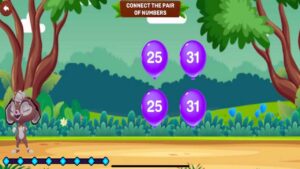
123 Magic Number Fun earns its place because it keeps early math practice focused rather than burying children under unrelated activities. In my evaluation, its clearest strength was the way it moved between number recognition, counting, tracing, and basic operations without making the experience feel scattered. It is designed for ages two to eight, though preschoolers will gain most from the early-number activities.
The app offers 12 mini-games, including guided tracing from 1 to 50, object counting, matching, number sequencing, dot-to-dot art, missing-number problems, and equation-based racing. The animated bunny and colorful settings lighten repetition, while the mix of seeing, hearing, writing, and using numbers supports different practice modes. Parents could schedule three 10-minute sessions weekly: tracing on Monday, counting on Wednesday, and simple operations on Friday.
The limitations matter. This is not a complete math curriculum, and the official materials do not document detailed progress tracking, adaptive difficulty, or specialized support for dyscalculia. It also contains ads and in-app purchases. Still, families wanting varied, low-pressure number practice on Android will find it a sensible, age-flexible choice.
2. Khan Academy Kids
Khan Academy Kids was the best all-round choice in this test. Setup took exactly two minutes. Once inside, my nephew could move through maths, reading, logic, books, and creative activities without encountering advertisements or a subscription screen. He especially liked geometry and problem-solving activities involving Sandy the Dingo.
The rewards felt connected to normal progress rather than positioned as the main reason to continue. That distinction mattered. He was solving the puzzle first and receiving the reward afterward, rather than chasing a locked object that required payment. Khan Academy Kids currently serves children ages two to eight and includes more than 5,000 games, lessons, books, and videos. It covers phonics, reading, counting, early operations, shapes, logic, creativity, and social-emotional learning. The full programme remains free, without advertising or subscriptions.
The breadth is also its main weakness. A child can move from geometry to a story, then to drawing or a song, without spending much time on the skill an adult intended them to practise.
A better session starts with a small target:
- Complete two geometry activities
- Read one short book
- Finish one logic exercise
- Stop before browsing takes over
Khan Academy Kids is unusually good value. Its range and production quality are closer to what many families expect from a paid learning subscription, yet the whole app remains free.
3. Prodigy Math
Prodigy Math created the strongest immediate engagement. My nephew could cast spells, battle creatures, explore a fantasy world, and improve his character by solving maths problems. He did not ask when the practice would end. He wanted to keep going so he could level up. Prodigy covers more than 1,500 maths skills across Grades 1 through 8 and supports several regional curricula, including the United States, United Kingdom, India, Canada, and Australia. The standard maths questions and core educational tools remain available without payment.
The membership promotion was difficult to miss. Paid plans add game items and account features, and the locked rewards were visible enough that parents using the free version should expect questions about upgrading. That does not erase the value of the free experience, but it changes the adult’s role. A child who is easily frustrated by unavailable items may spend more time thinking about membership than mathematics.
Prodigy is particularly useful when the child understands the basic method but resists repetition. It is less effective when a learner needs a calm explanation of why place value, division, or fractions work. After a session, ask for one similar problem on paper. If the child can solve it without the spells and battles, the practice is transferring. If not, the game may be carrying too much of the experience.
4. ScratchJr
ScratchJr had the roughest beginning and one of the best outcomes. It took about 15 minutes of sitting beside my nephew to explain the character area, start commands, movement blocks, and sequencing. The interface uses pictures rather than typed code, but it is not automatically obvious to every child.
Once it clicked, he spent an hour animating characters. ScratchJr is a free introductory coding app designed primarily for children around ages five to seven. Children connect visual programming blocks to make characters move, speak, jump, change direction, and interact. They can also edit characters, switch backgrounds, and record sounds. The first project should be tiny. A complicated story introduces too many controls at once.
A much easier starting sequence is:
- Choose one character.
- Add a start block.
- Add two movement blocks.
- Change the background.
- Add one speech bubble.
- Run the sequence.
- Change one block and predict the result.
ScratchJr ranked third because it moved my nephew from consuming content to creating something. The iPad remained involved, but the activity required planning, testing, correction, and choice. It is not an app to hand over cold. Fifteen minutes of adult help at the beginning made the difference between confusion and an hour of focused creative work.
5. Epic

Epic was the strongest digital-reading option in the group. We used a paid family subscription. The catalogue gave my nephew immediate access to fiction, nonfiction, comics, audiobooks, Read-To-Me titles, and learning videos without waiting for a library visit.
Epic currently offers more than 40,000 books, audiobooks, and learning videos for children 12 and under through its family plan. It also provides separate school-access options, with the exact collection and hours depending on the school’s plan. The large catalogue creates a familiar streaming problem: too much choice can result in more browsing than reading.
Parents can reduce that friction by narrowing the decision before handing over the device:
- Pick one subject or genre
- Shortlist two or three books
- Read several pages before switching
- Use Read-To-Me when it matches the child’s reading needs
- Ask one question afterward
Epic makes the most sense for children who read regularly and benefit from instant digital access. It may offer less value to a family with a strong local library and a child who consistently prefers print. It is useful as an alternative to passive video time, not as a reason to replace physical books.
6. PBS KIDS Games
PBS KIDS Games offers the widest collection of free standalone activities in the test. The app currently includes more than 280 curriculum-based games for children ages two to eight. Subjects include maths, reading, science, engineering, art, emotional skills, and healthy routines. Selected games can be downloaded, and more than 50 are available in Spanish.
Familiar characters from programmes such as Wild Kratts, Daniel Tiger’s Neighborhood, Odd Squad, and Sesame Street can help children begin without much explanation. The main limitation is structure. PBS KIDS Games feels like a safe collection of activities rather than one connected course. A child can move from number patterns to drawing, then to a science or feelings game.
That variety is useful for short sessions and travel, but adults should choose the game when there is a specific learning aim. Its programmes and curriculum references are strongly connected to the United States. Children elsewhere can still use the games, although some characters and school language may be less familiar.
7. Moose Math
Moose Math is narrower than Khan Academy Kids, and that simplicity can be helpful. The free app contains five multi-level activities covering counting, addition, subtraction, sorting, and basic geometry. Children complete tasks in settings such as a juice shop and pet shop while collecting items to build a town.
There are fewer menus, fewer subjects, and fewer opportunities to wander into unrelated content. For a child who becomes distracted by large libraries, that can be an advantage. Moose Math remains free without advertising or subscriptions. It does not offer the same long-term range as Khan Academy Kids, so children who have already mastered basic early-number work may outgrow it quickly.
The useful test comes after the screen is turned off. If the child makes five inside the app, ask them to make five with coins, blocks, spoons, or fingers. Tapping the correct picture shows recognition. Recreating the idea shows stronger understanding.
What I Would Set Up Before Handing Over the iPad?
The first session should not begin with account creation.
Before giving a child a new app:
- Create the required adult and child profiles.
- Enter the correct age and grade.
- Review subscriptions and automatic renewals.
- Enable purchase approval or disable in-app purchases.
- Complete the opening tutorial.
- Download any offline material.
- Turn off unnecessary notifications.
- Open the exact first lesson or activity.
- Put only the chosen apps on the main screen.
I would also avoid introducing seven new apps in one sitting. Novelty makes it hard to tell whether the child likes the learning method or simply likes opening something new. One maths app, one reading app, and one creative app provide enough variety for a useful starting set. The broader Best Educational Apps for Kids by Age guide can help families avoid mixing preschool, early elementary, and older-student products without a clear reason.
Final Thoughts
The best apps early elementary children use successfully are usually the ones that match one current need without creating unnecessary friction. Khan Academy Kids was the best overall option in this one-week test. Prodigy Math generated the strongest enthusiasm for maths, although its membership prompts need adult management. ScratchJr required the most help at the beginning but led to the longest stretch of creative, self-directed work.
Epic provided a strong paid reading library. PBS KIDS Games offered breadth, Moose Math kept early-number practice simple, and Duolingo ABC remained a credible literacy app that happened to be too easy for this reader. The next step is not downloading all seven. Choose the child’s most immediate need: maths practice, phonics, independent reading, or creative problem-solving. Set up one suitable app, complete the onboarding yourself, and remain nearby for the first session.
Then watch what happens when the activity becomes difficult. Does the child think, experiment, ask for help, or immediately look for another reward? That response tells you more than the store rating.
Frequently Asked Questions (FAQs) About Best Apps For Early Elementary
Which App Is Best for a Child Who Resists Schoolwork?
Prodigy Math was the strongest attention-holder during this test because the maths directly powered battles, spells, and character progress. It may suit children who understand basic methods but dislike repetitive worksheets. Parents should still check whether the child is learning or mainly chasing game rewards. Ask for one similar problem on paper after the session.
Which App Is the Best Free Option Without Ads or Subscriptions?
Khan Academy Kids is the strongest all-round free choice in this group. It covers maths, reading, logic, books, creativity, and social-emotional learning without advertisements or subscription prompts. Moose Math and Duolingo ABC are also free and ad-free, but they serve narrower needs. Moose Math focuses on early number skills, while Duolingo ABC is better for children still developing phonics and basic reading.
How Long Should a Six- to Eight-Year-Old Use an Educational App?
A clear task is more useful than a rigid timer. For example, ask the child to complete two maths activities, read one short book, or finish one ScratchJr animation. Stop when attention drops or the child begins tapping without thinking. Short, focused sessions followed by drawing, reading, building, or paper practice usually provide more value than long stretches of educational screen time.
Should Parents Stay Beside the Child During the First Session?
Yes, especially during setup. ScratchJr needed about 15 minutes of adult explanation before the interface made sense. Other apps included account screens, subscription messages, or purchase prompts that could interrupt a child before the learning began. Complete the onboarding, check purchase controls, and open the intended activity first. Once the child understands the app, adult supervision can become lighter.
Can These Apps Replace Classroom Teaching or Reading Practice?
No. They work best as supplements. Khan Academy Kids and Prodigy can reinforce maths. Duolingo ABC can support early literacy. Epic can improve access to books, and ScratchJr can introduce coding and creative problem-solving. Children still need conversation, physical books, handwriting, practical activities, feedback from adults, and opportunities to explain what they have learned away from the screen.























