
AI productivity agents are software systems that use AI models, workplace information, and connected tools to complete multi-step tasks for a user. They can gather context, choose an action, inspect the result, and continue working within limits set by the application.
A standard AI assistant might draft a meeting agenda from notes pasted into a chat. A productivity agent could find the relevant project files, check the calendar, identify unresolved tasks, prepare the agenda, and save a draft message for attendees.
That ability to take action is the meaningful difference. It is also where the risk begins. Once an AI system can read files, update records, create events, or communicate with other people, a vague instruction or incorrect assumption can affect real work.
Useful agents therefore need narrow responsibilities, limited access, reliable source information, visible logs, and approval before consequential actions.
What Are AI Productivity Agents?
The phrase AI productivity agents usually describes AI agents designed for professional work. Typical uses include research, meeting preparation, inbox triage, project coordination, document handling, data analysis, and software development.
It is not a formally standardized software category. Vendors use the word agent for products with very different levels of independence.
A practical workplace agent commonly includes:
- An AI model that interprets instructions and selects actions
- Rules defining its role and boundaries
- Access to selected documents, messages, databases, or applications
- Tools for searching, calculating, drafting, or updating
- Temporary state or memory for tracking the task
- Permission and approval controls
- Logs showing which tools and records it used
One useful distinction separates workflows from agents. A workflow follows a path designed in advance. An agent has more freedom to decide which steps and tools are needed.
The distinction is not absolute, and industry terminology varies. Many real systems combine both: a controlled workflow may contain one agentic step, while an agent may operate inside strict rules.
The amount of autonomy matters more than the label.
Agent, Assistant, Workflow, or Automation?
These systems overlap, but they are not interchangeable.
| System | How it operates | Example |
| Chat assistant | Responds to a prompt or conversation | Summarizes notes supplied by the user |
| Fixed automation | Follows predefined triggers and rules | Saves email attachments to a chosen folder |
| AI workflow | Uses AI within a controlled sequence | Extracts invoice fields and routes exceptions |
| AI agent | Chooses steps and tools within set boundaries | Reviews project records and prepares a status brief |
For predictable work, fixed automation is normally the better choice.
A weekly report that always pulls the same five fields from the same database does not need an autonomous planner. Adding an agent introduces model calls, latency, cost, and another layer that can misunderstand the task.
Agents become more useful when the objective is clear but the route varies. Preparing a project update may require different documents, searches, and follow-up questions each week. That variability is where rule-based automation begins to feel brittle.
How AI Productivity Agents Work
Most agents operate through a repeating cycle: understand the goal, gather context, take an action, inspect the result, and decide what should happen next.
1. The Agent Receives a Defined Goal
A user might ask:
Prepare a concise brief for tomorrow’s product review and identify decisions that still need an owner.
The agent has to turn that request into smaller tasks. It may need to identify the correct project, find recent updates, compare progress with the previous plan, locate unresolved decisions, and format the result for the people attending.
A broad instruction gives the system too much room to improvise.
“Manage my inbox” could mean reading, deleting, prioritizing, replying, forwarding, or archiving messages. “Find unanswered messages from active clients that are more than two business days old and prepare reply drafts” is easier to evaluate and much safer.
2. It Retrieves Relevant Context
The agent may need information from:
- Email and calendars
- Project-management tools
- Documents and spreadsheets
- Customer or product databases
- Company policies
- The current conversation
- Earlier steps in the same task
More context is not always better. Loading every available file can bury the relevant material, expose unnecessary information, and increase processing cost.
The application should retrieve only what the task requires.
Standards such as the Model Context Protocol can help AI applications connect with tools and data sources through a common interface. That connection does not guarantee that the retrieved information is current, accurate, or safe to use. The host application still controls authentication, permissions, and which information enters the agent’s working context.
3. It Chooses the Next Step
For a project brief, the agent might decide to:
- Find active workstreams.
- Retrieve updates from the reporting period.
- Compare progress with milestones.
- Identify overdue tasks and missing owners.
- Draft the summary.
- Check whether important statements have supporting records.
- Request approval before sharing it.
Some systems build a full plan at the beginning. Others choose one action at a time and revise the route as new information appears.
A missing document may require clarification. Two conflicting task statuses may require another search. A failed database request may need different parameters.
This adaptability gives agents their value. It also allows one bad decision to affect everything that follows.
4. It Calls an Approved Tool
The model itself cannot send an email, update a project record, or query a live database. Those actions require tools supplied by the surrounding application.
An agent may be allowed to:
- Search approved information
- Read or draft a message
- Retrieve a document
- Query a database
- Perform a calculation
- Run code in a controlled environment
- Create a calendar event
- Update a task or record
Agent frameworks such as OpenAI’s Agents SDK support components including tools, handoffs, guardrails, and execution tracing. Low-code platforms such as Microsoft Copilot Studio provide another route for connecting models with knowledge sources, triggers, and business tools.
The platform does not solve the hardest design questions. Teams still need to decide what the agent may access, what it may change, and when a person must approve the action.
Tool descriptions also need care. Two tools with similar names or vague parameters can lead the model to choose the wrong action even when its broader plan is reasonable.
5. It Inspects the Result
After a tool runs, the output returns to the agent.
A calendar search may find two meetings with almost identical names. A document search may return an archived plan. A database request may fail because a required field is missing.
The agent may retry, use a different tool, ask the user for clarification, or stop.
That action-and-observation loop is more flexible than a fixed script. It also creates compounding risk. An agent that selects the wrong project at the start may complete every later step correctly while working from the wrong records.
A polished final answer does not prove that the process behind it was sound.
6. It Stops or Requests Approval
Reading a document is not the same as deleting it. Drafting a client response is not the same as sending it. Preparing a calendar change is not the same as cancelling a meeting.
Permissions should reflect those differences.
A sensible setup may include:
- Read-only access as the default
- An allowlist of approved tools
- Approval before external communication
- Approval before deletion or modification
- Limits on recipients, records, or spending
- Clear stopping and escalation rules
Human approval is not a complete safety system. A reviewer may miss an error, especially when the agent produces a confident summary. Approval works best when the system also shows the source information and the actions it plans to take.
A Realistic Workplace Example
Consider an agent asked to prepare a Monday leadership brief.
It could:
- Find the meeting on the calendar
- Retrieve linked project documents
- Pull completed and overdue tasks
- Review recent meeting notes
- Identify decisions without an owner
- Draft a one-page update
- Link important statements to their sources
- Flag missing or contradictory information
- Save the draft for review
This task suits an agent because it crosses several systems and contains enough variation to frustrate a rigid script.
The final distribution step should remain separate. A wrong status inside a private draft can be corrected. Automatically sending it to senior leaders turns a routine error into a credibility problem.
Where AI Productivity Agents Help Most
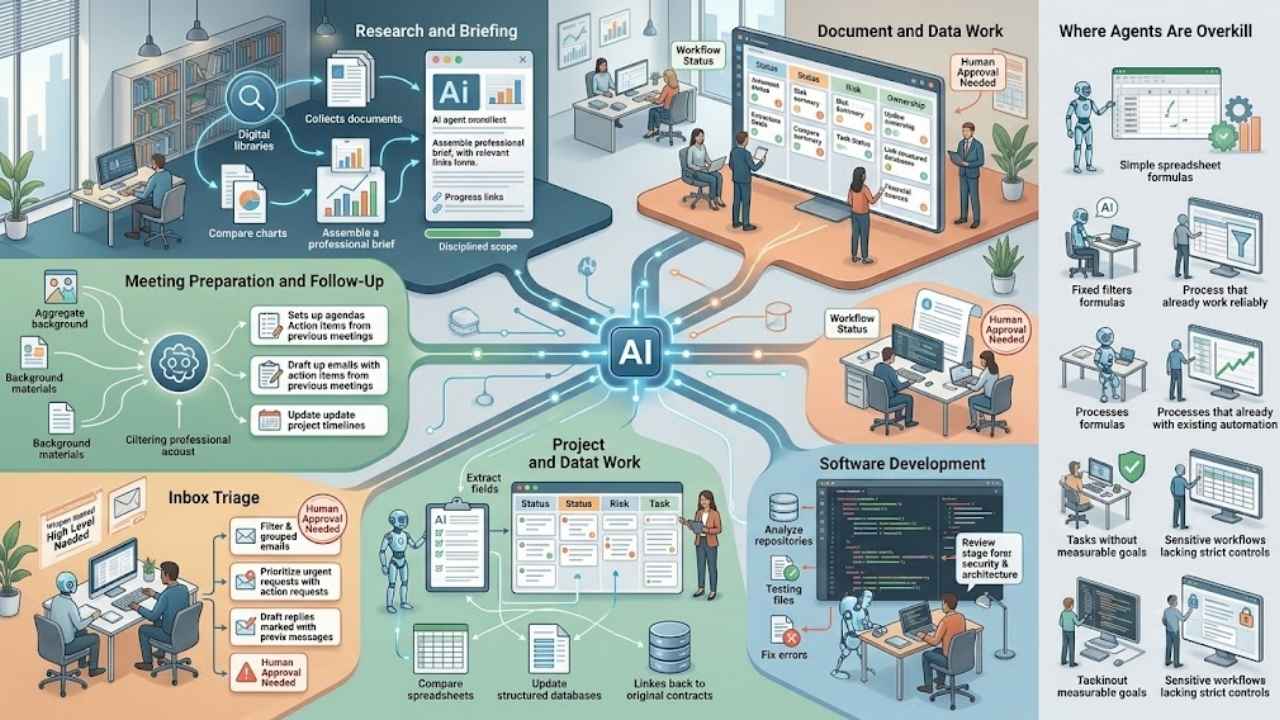
AI productivity agents are most useful when a task spans several tools, involves repeated coordination, and still requires some judgment. They work best in workflows with a clear outcome, reliable source data, and defined limits on what the agent can access or change.
Research and Briefing
An agent can search approved sources, collect relevant documents, compare information, and prepare a brief with supporting links.
The scope needs discipline. “Review UK customer-support software developments from the past year using company documentation and established industry sources” is workable. “Research everything about customer service” is too broad to evaluate properly.
Meeting Preparation and Follow-Up
Agents can collect background material, prepare agendas, identify unfinished actions, and draft follow-up messages.
A transcript summary alone is useful, but it is not especially agentic. The stronger use case connects the meeting to earlier decisions, project records, deadlines, and the next actions.
Inbox Triage
An agent can group messages, identify requests with deadlines, find unanswered client emails, and prepare replies.
Automatic sending is unsuitable for many professional inboxes. The agent may misunderstand tone, confidentiality, authority, or an implied promise. Draft-first workflows are safer for most users.
Project Coordination
Agents can gather status updates, compare them with deadlines, find tasks without owners, and prepare risk summaries.
They should not quietly change priorities or assign employees based on a broad interpretation of urgency. Those choices require explicit rules or human responsibility.
Document and Data Work
An agent can extract fields, compare versions, update structured records, and analyze spreadsheets through connected tools.
The workflow should keep links to the original source and distinguish extracted facts from generated interpretation. That matters when the material contains contracts, financial information, employee records, or customer data.
Software Development
Coding agents can inspect repositories, edit files, run tests, and react to failures. The ability to receive machine-checkable feedback makes coding a natural agentic task.
Passing tests is only one part of review. It does not establish security, maintainability, performance, or alignment with the product requirement.
Where Agents Are Usually Overkill
An agent is probably unnecessary when:
- The process follows stable and predictable rules.
- A spreadsheet formula, search, filter, or script solves the problem.
- The task has no measurable completion condition.
- Reliable source information is unavailable.
- One wrong action would be hard to reverse.
- The process handles sensitive information without suitable controls.
- Existing automation already performs the work reliably.
The description of agents as “digital employees” is usually exaggerated. Employees understand relationships, accountability, organizational history, and unstated priorities in ways current agents do not reliably reproduce.
A more accurate description is a flexible software operator working inside a limited process.
The Risks That Matter in Daily Work
Hallucinations Can Become Actions
A chatbot may produce an incorrect statement. An agent may use that statement to update a database, create a task, or draft a customer response.
Important claims should remain traceable to approved sources. Consequential actions should not rely on unsupported model judgment.
Broad Permissions Increase the Damage
An agent preparing a report may need to read project records. It probably does not need permission to delete them, change account settings, or send external messages.
Least-privilege access is the safer starting point. Permissions can be expanded later if the narrow version proves dependable.
External Content May Contain Hidden Instructions
An email, webpage, or document may include instructions designed to manipulate the agent. This is known as indirect prompt injection or agent hijacking.
External material should be treated as untrusted data, not as authority over the agent. Sensitive tool calls need separate validation and, where appropriate, approval.
Errors Compound
An agent may retrieve the wrong file, summarize it accurately, create tasks from the summary, and produce a polished report.
The final result may look coherent even though the workflow failed in its first step. Intermediate checks are therefore more valuable than a final grammar review.
Cost and Delay May Cancel the Benefit
Every model call, search, retry, and tool action adds expense and time.
An agent should be compared with the existing manual process and with simpler automation. A sophisticated workflow that saves five minutes but requires ten minutes of review has not improved productivity.
How to Evaluate an AI Productivity Agent
Do not judge the system only by the document or message it produces.
A useful evaluation should ask:
- Did it finish the requested task?
- Were the facts and calculations correct?
- Can important claims be traced to approved records?
- Did it choose the correct tools and data?
- Did it avoid unauthorized actions?
- How often did a person have to intervene?
- Did it save time after review?
- What did each completed task cost?
- Can reviewers reconstruct what happened?
Evaluation should cover the full trajectory: the original request, retrieved information, tool calls, intermediate decisions, changes to external systems, and the final result.
A good-looking answer can hide a poor process.
A Safer Adoption Path
Start with one narrow task that already has a clear owner and measurable outcome.
- Map the current process and its exceptions.
- Separate fixed rules from steps requiring judgment.
- Give the agent only the information and tools it needs.
- Begin with read-only access where possible.
- Keep external communication and destructive actions behind approval.
- Test missing data, ambiguous instructions, tool failures, and hostile content.
- Compare the result with current automation and manual work.
- Review traces and record repeated failures.
- Expand the scope only after the narrow workflow is dependable.
The strongest first agent is rarely the most ambitious one. A narrow system that reliably prepares a draft is more useful than a broad system that occasionally completes an entire workflow without supervision.
Final Thoughts
AI productivity agents can gather information, select tools, complete several steps, and prepare or carry out actions across workplace systems. They are most useful when a task has a clear result but enough variation to make fixed automation awkward. They are less convincing when the process is predictable, the evidence is weak, or mistakes would be difficult to reverse.
Start with a narrow responsibility, restricted access, visible sources, and explicit approval points. A dependable agent should remove routine coordination work without quietly taking ownership of decisions that still belong to people.