

Web developers often build visually impressive sites that still confuse users. When navigation isn’t intuitive, visitors leave quickly—turning strong features into missed opportunities. Ignoring usability can make even the best-coded pages feel frustrating and ineffective.
According to Forrester, a well-designed UI can increase conversion rates by up to 200%, while strong UX can boost them by as much as 400%. That’s why understanding UX/UI Design Basics for Web Developers is essential.
This guide explores core UX principles, user research, and wireframing, along with practical tools like Figma. By combining front-end skills with design thinking, developers can create websites that are both visually appealing and easy to use—delivering better experiences and stronger results.
What is UX/UI Design?
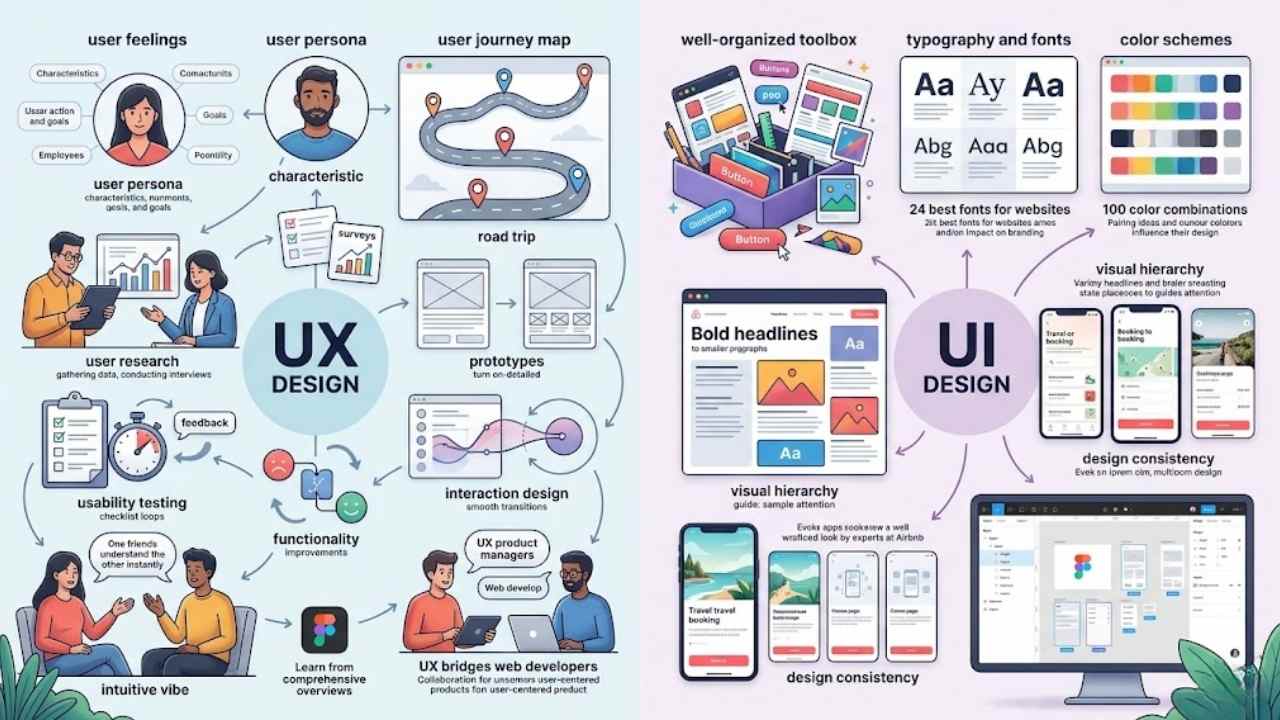
Ever felt that rush when a website just clicks with you, making every scroll and tap feel smooth as butter? That’s User Experience, or UX, the art of crafting how folks feel and flow through digital products like apps or sites.
On the flip side, User Interface, or UI, handles the visual vibes, think buttons, colors, and layouts that draw you in and keep things intuitive, like a well-organized toolbox for front-end developers.
Definition of UX (User Experience)
User Experience, or UX, refers to the general feelings, ease of navigation, and efficiency that users experience while interacting with a product. UX design emphasizes the general product feel and satisfaction.
Designers focus on optimizing user satisfaction through research, surveys, wireframe creation, and functionality. They gather user data through surveys and interviews. UX design creates user-friendly and intuitive products through ongoing research and design refinement.
Think of it like crafting a smooth road trip, where every turn feels natural and every stop adds joy. UX/UI designers conduct user research, create user personas and user journey maps, develop wireframes and prototypes, design page layouts and interactive elements, and collaborate with web developers.
This work bridges web development with user-centered approaches, much like a bridge connects two bustling cities.
UX for Product Managers offers advice on collaborating with design from the outset to build user-centered products. Tools like Figma help in this process, providing a comprehensive overview of UX design principles.
Front-end developers benefit from understanding these basics, as they enhance digital products. Interaction design plays a key role here, ensuring usability testing refines the experience.
Imagine chatting with a friend who just gets you, that’s the vibe UX aims for in web design.
What is User Experience (UX) Design? is a comprehensive overview of UX design, its principles, and relevant tools like Figma.
Definition of UI (User Interface)
UI design shapes the look and feel of a website or app. It focuses on visual elements, layout, and interactive components. Picture a clean page with buttons that pop, colors that draw you in, and fonts that make reading a breeze.
UI design emphasizes aesthetic elements like color schemes, layouts, fonts, and buttons. Experts at Airbnb know this well; they craft interfaces that feel inviting and easy to use.
Visual style combines these features consistently across a site or app, creating a seamless vibe. UI comprises the visual components, including layout, typography, colors, and buttons that form the product’s structure.
Designers often turn to tools like Figma for prototyping, ensuring everything aligns just right.
Visual hierarchy plays a big role here; it uses size, color, and placement to highlight key elements and guide your attention. Think about how a bold headline grabs you first, while smaller text follows.
Articles like “What Is the Difference Between UI and UX?” break down how UI differs from UX design, with UI handling the visuals. Front-end developers benefit from knowing this stuff.
The guide “24 Best Fonts for Websites” from 2026 shows how to pick the right typeface for branding, and it highlights Figma’s role in the process. Another resource, “100 Color Combinations to Influence Your Next Design,” stresses color pairing in UI design and lists 100 combos for ideas.
Design consistency keeps everything uniform, making sites more intuitive for users.
The Role of UX/UI in Web Development
UX/UI shapes how sites feel and work, making them easy for folks to use every day. Think of it as the bridge that connects code with real people, boosting satisfaction and keeping visitors coming back.
Enhancing usability and user satisfaction
Think about how great UX/UI design makes websites feel effortless, like a smooth ride on a well-paved road. It boosts usability by putting users first, through smart research, surveys, and wireframe creation that optimize satisfaction.
Airbnb nails this with intuitive interfaces and user journeys that make booking a breeze, turning visitors into loyal fans. Plus, improved UX can spike conversion rates by up to 400%, proving its real-world punch.
Design-centric companies have outperformed the S&P Index by 219% over a ten-year period (Design Management Institute).
Web developers who grasp these ui/ux design principles create apps that are intuitive, accessible, and visually consistent. They focus on user experience design to refine the entire product feel, using best practices like usability testing with actual users and quick adjustments from feedback.
This bridges design and functionality, helping front-end developers collaborate better and iterate faster on projects.
Bridging the gap between design and functionality
Web developers and designers team up to build user-friendly interfaces. They collaborate closely, with UX designers handling user research and creating user personas. These personas guide the process.
Designers also map user journeys and develop wireframes. They prototype interactive elements too. Front-end developers check if designs work in code. They spot technical issues early.
Teams build trust and value each other’s ideas in design and development. UI designers refine layouts for compatibility with code needs. Developers write code while keeping project goals real.
This coordination sparks high-quality products. UX design keeps refining through research, making sites intuitive. Think of it like a bridge, where both sides meet in the middle for smooth traffic.
Key Principles of UX Design
Think of UX design as the friendly guide that puts users at the center, like creating a map everyone can follow without getting lost. Developers craft personas to understand folks better, then build wireframes for smooth paths, making sites feel welcoming and easy for all.
User-centricity puts users at the heart of your design process. You focus on their needs to build intuitive navigation that feels natural. UX designers gather user data through surveys and interviews.
They create user personas and user journey maps to guide this work. Picture Airbnb’s booking flow, it shines with easy paths that boost satisfaction. Developers, embrace this core principle; it stresses consistency and feedback for better results.
Intuitive navigation means users move around without confusion. Start with research to spot pain points early. Build wireframes and prototypes to test ideas fast. Ongoing refinement creates user-friendly products.
Team up with designers from the start, as UX for Product Managers suggests. This approach optimizes satisfaction and bridges gaps in full stack development.
Accessibility for all users
Accessibility stands as a core principle in UX design for front-end developers. It makes sure everyone can use your site, no matter their needs. Think about folks with disabilities; they deserve smooth experiences too.
Designers team up with web development crews through solid talks to build top-notch products. This teamwork boosts usability and keeps things inclusive. Excessive animations? They can bug users sensitive to motion, like causing dizziness or worse.
Use media queries to cut back on those movements. Offer still options instead when animations add no real value. That way, your UI and UX design stays kind to all.
Text size matters big time for readability in user interface design. Less than 14px? Some folks can’t read it at all. I find 12px a strain myself and go for at least 16px on everyday screens.
UI setups often glitch if users tweak their default fonts. Build yours to handle scalable sizes without breaking. Want an 18px base? Set font-size to 112.5% since browsers mostly start at 16px.
Tie this into viewport tweaks for better flow across devices. These design basics keep your site welcoming, like an open door for every visitor.
Clear feedback and interaction
Core UX principles for developers stress feedback and clarity in every step. Hover and focus states give users quick hints on interactions. Designers craft these states apart in tools like Figma.
They show them off in prototypes. Front end developers often slip up by adding hover states to static spots. This tricks users into false clicks. Feedback mechanisms build intuitive paths, as UX/UI best practices show.
Animation smooths shifts between layouts. It boosts how users grasp element ties. Skip purely flashy moves; they must link layouts with flow. In user interface (UI) design, animations guide eyes to element spots.
Try a 500ms slide-down for that. Speed matters a lot. Match it to UI changes, but keep it snappy to skip user frustration. Principles of UX/UI design tie this to prototype and wireframe work for front-end web development.
Key Principles of UI Design
Ever wonder why some websites feel like a cozy chat with an old friend, while others leave you scratching your head? Explore visual order, type choices, color schemes, and steady layouts—they make all the difference in grabbing attention and keeping users hooked, much like a well-told story pulls you in page after page.
Visual hierarchy and alignment
Visual hierarchy grabs your eye first with size, color, and placement. It highlights key elements and guides attention, like a roadmap for your gaze. Designers use this to make sites pop, pulling you toward buttons or headlines that matter most.
Think of it as a spotlight on stage, shining on the star while dimming the background noise. Alignment ties it all together, creating bonds between parts and boosting user experience by sharpening focus on linked items.
Designers set max widths for page content, lining up elements to invisible borders for that clean feel. They tuck icons into square frames to keep spacing even, no matter the icon’s shape.
Align those frames right, not just the graphics inside, to hold layout ties strong. Multiple alignment layers strengthen links, say, matching button labels to list items. Equal gaps bring order, but uneven ones add spark or pull your eye.
Visual style mixes these traits consistently across a site or app, echoing brand storytelling. Explore prototype and wireframe work to practice this in tools like Figma, or check Codecademy for online learning on alignment basics.
Typography and color palettes
Pick a couple of font styles at most for your website, folks. Limit them to two for real clarity. Go with sans-serif fonts for body text; they read easy on screens. Check out “24 Best Fonts for Websites” from 2026.
That guide breaks down picking the right typeface for branding. It even spotlights Figma’s role in the design process. “25 Best Sans Serif Fonts for Designs and Websites” lists trending options that fit all sorts of apps.
Imagine your site’s words as a friendly chat over coffee, not a jumbled mess.
Colors tell your brand’s story like a good yarn around the campfire. Pair them smart to boost UI design. “100 Color Combinations to Influence Your Next Design” shares 100 combos for inspiration.
Use shades to strengthen branding and spotlight call-to-action buttons. Match up elements like buttons, select lists, and input fields with shared traits: border color, background color, shadow style, internal spacing.
Switch things on hover or focus, say border color, background color, icon color. Keep the rest steady. Custom CSS properties lock in those visual styles everywhere.
Consistent spacing and layout
Consistent spacing conventions, like margins and padding, create visually tidy layouts in UI design. They convey relationships and emotional content between elements, drawing from the proximity principle in Gestalt psychology.
This principle shows how spacing affects our perception of connections among items. Group related elements with tighter spacing, and use generous spacing to separate different groups.
Designers often space elements evenly or add extra room at the bottom to draw viewer focus and boost usability.
Spacing in UI elements ties to text size, so code it with units for flexibility. Take padding of 8px; it turns into 0.33em when text hits 24px. Change a button’s text size, and the padding adjusts on its own, highlighting the perks of relative units.
For top readability, keep the longest text line under 80 characters, the max comfortable length. Tools like Figma help developers prototype and wireframe these layouts, while design systems ensure consistent spacing across projects.
Benefits of UX/UI Knowledge for Web Developers
Hey, imagine you’re a web developer who grasps the double diamond process, crafts quick prototypes with wireframes, and builds a minimum viable product that nails user personas—suddenly, you team up smoother with designers, speed through iterations for top-notch usability, and snag that edge in the job market, like a secret weapon in your code toolkit, so keep scrolling to dive deeper into how this boosts your game.
Improved collaboration with designers
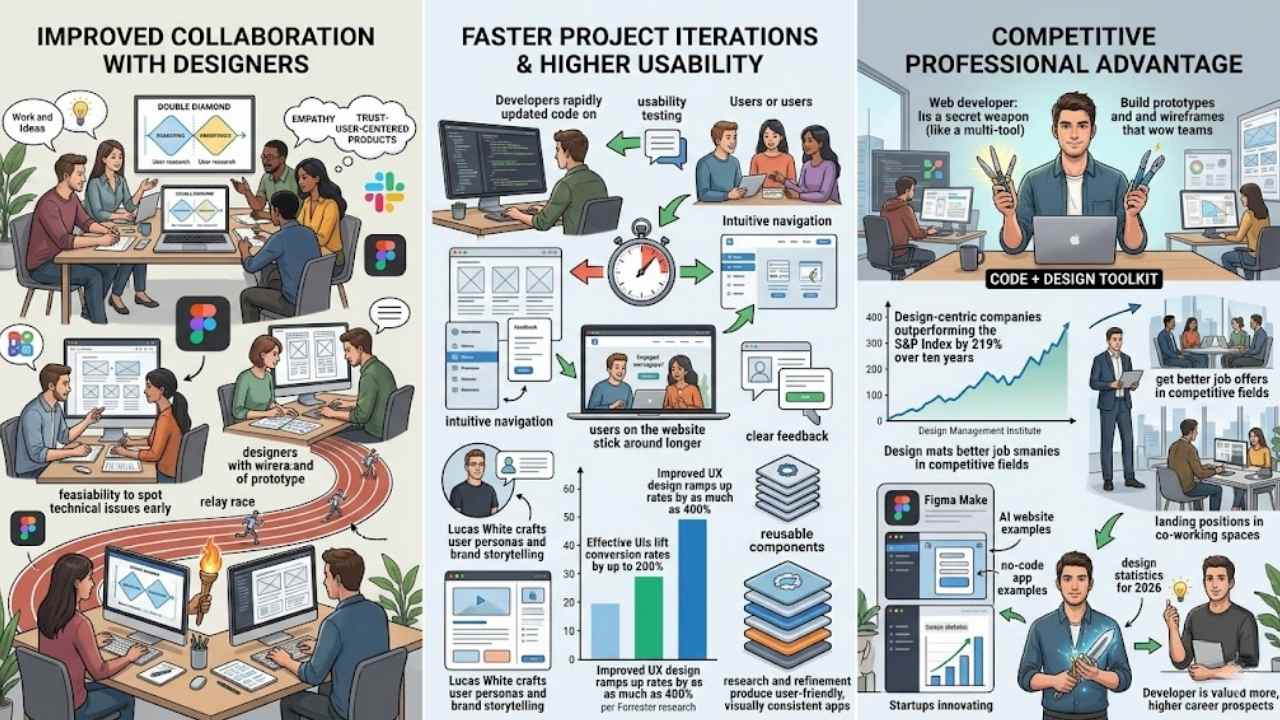
Web developers gain a lot from knowing UX/UI basics, like better teamwork with designers. You see, collaboration kicks off right from the start in the product design life cycle, using methods like the double diamond to brainstorm ideas and conduct user research.
Designers create user personas and journey maps, then build prototypes and wireframes, all while chatting with you about feasibility. This setup lets you spot technical issues early, fix them fast, and help finalize designs that fit development needs.
Think of it as a smooth relay race, where trust builds high-quality sites without the usual hiccups.
Imagine you’re in a project with six key stages, from initial brainstorming to implementation, and everyone’s input matters. You evaluate designs for real-world use, while UI folks tweak layouts and interactive elements to match your tech stack.
Tools like Figma make sharing prototypes easy, speeding up iterations to a minimum viable product (MVP). Effective chats, maybe over LinkedIn or in design communities at places like New York University, foster that empathy.
Teams prioritize each other’s views, creating user-centered products that shine, just as advice in UX for Product Managers suggests.
Faster project iterations and higher usability
UX/UI knowledge speeds up your work as a developer. You spot issues early with prototypes and wireframes. This cuts down on endless code tweaks. Teams fix problems fast through usability testing with actual users.
Feedback drives quick adjustments. Imagine nailing a vibe coding session where everything clicks. Higher usability comes from intuitive navigation and clear feedback. Users stick around longer on sites that feel right.
Picture Lucas White at Ridgeline, crafting personas for user experience. He blends brand storytelling with accessible layouts. Studies show improved UX boosts conversion rates by up to 400%.
Forrester research highlights effective UIs lifting those rates by 200%. Design-centric firms outperform the S&P Index by 219% over ten years, per the Design Management Institute. You build reusable components that save time.
Research and refinement make apps user-friendly and visually consistent.
Competitive professional advantage
Web developers gain a real edge in the job market by mastering UX/UI skills. Think about it like this, you become the go-to person who codes and designs with users in mind, creating prototypes and wireframes that wow teams.
Design Management Institute data shows design-centric companies outperformed the S&P Index by 219% over ten years. That means your knowledge boosts company success and your career prospects.
Forrester research proves effective user interfaces can lift website conversion rates by up to 200%. Plus, improved UX design ramps up those rates by as much as 400%. You stand out, landing better roles in competitive fields like SaaS and retail, where AI website examples highlight the power of strong design and hierarchy.
Picture a developer crafting personas for user experience, weaving in brand storytelling that draws people in. Tools like Figma Make from “7 of the Best AI App Builders for 2026” let you build interactive apps fast, without extra help.
“11 No-Code App Examples” inspire startups to innovate, showing how UX/UI know-how turns ideas into hits. “79+ Design Statistics for 2026” reveals AI’s role in design tools and collaboration, giving you that professional boost.
Teams value you more, and clients notice the difference in usability. Your skills open doors to exciting projects, setting you apart in tech.
How Web Developers Can Learn UX/UI
Hey, web developers, imagine turning your code into something users love, like a chef perfecting a recipe with just the right ingredients. Start by creating user profiles to grasp who visits your sites, then sketch layouts and build mockups in apps like Adobe XD to test ideas fast, and watch your skills soar.
Study design basics and industry practices
Web developers start strong by exploring design basics like visual hierarchy and color theory. Grab resources such as “100 Color Combinations to Influence Your Next Design,” which shares practical tips on pairing shades for better UI impact.
Visual design acts as a silent storyteller, conveying your brand’s message beyond mere words. Check out “24 Best Fonts for Websites” from 2026 to pick typefaces that boost branding and storytelling.
Tools like Figma help you create prototypes and wireframes, making concepts real.
Industry practices come alive through stats and trends. Explore “79+ Design Statistics for 2026” for insights on AI’s role in design tools and team collaboration. “60+ Web Design Statistics for 2026” reveals facts on bounce rates, accessibility, and AI effects.
Read “12 Defining Web Development Trends for 2026” to see how AI-driven workflows shape sites. Compare options in “Static vs. Dynamic Websites,” with Figma tips for building user personas in user experience.
These guides keep you current, like a map through shifting sands.
Practice through real-world projects
Jump into real-world projects to sharpen your UX/UI skills. You build prototypes and wireframes for portfolio websites, drawing from “23 Inspiring Portfolio Website Examples + Tips.” This hands-on work lets you create user personas in user experience design.
Apply those ideas to landing pages, like the ones in “16 Landing Page Examples + Tips,” to boost brand storytelling. Hey, it’s like being a chef who tastes their own cooking, you spot what works right away.
Try out AI tools for quick app builds, such as those in “7 of the Best AI App Builders for 2026,” including Figma integrations. Explore “29 AI Website Examples” to see design hierarchy in action across SaaS and retail.
Practice with no-code options from “11 No-Code App Examples” to craft apps without deep coding. Use “10 Vibe Coding Tools” to turn natural language prompts into apps. Pack visual styles as themes with code and assets, just like the pros do, for smoother software designs.
Seek feedback and participate in design communities
Web developers, you refine your UX/UI skills by seeking feedback in design communities. Share your prototypes and wireframes with others online. They spot issues you miss. Join forums or groups to discuss user personas in user experience.
This builds trust, like teams do in real projects. Usability testing with actual users helps too. Make adjustments based on what they say. Developers evaluate design feasibility this way.
Address technical issues early.
Picture chatting in a community about brand storytelling through your work. UI designers finalize designs for compatibility, and you learn from that. Participate often to collaborate better.
Use tools like Figma for prototyping. It has an AI code generator, as noted in “11 of the Best AI Coding Tools and Assistants for Developers.” That guide compares features for coders.
Check “How to Start a Presentation” for tips on sharing ideas with Figma examples. Teams prioritize input, so listen up. Practice leads to better page layouts and interactive elements.
Tools to Support UX/UI Design for Developers
Web developers, imagine sketching quick prototypes that wow your team, right? Grab Figma for those fast wireframes, or tap into Bootstrap’s component libraries to keep your layouts sharp and consistent, sparking ideas for your next project.
Figma and Prototyping Tools
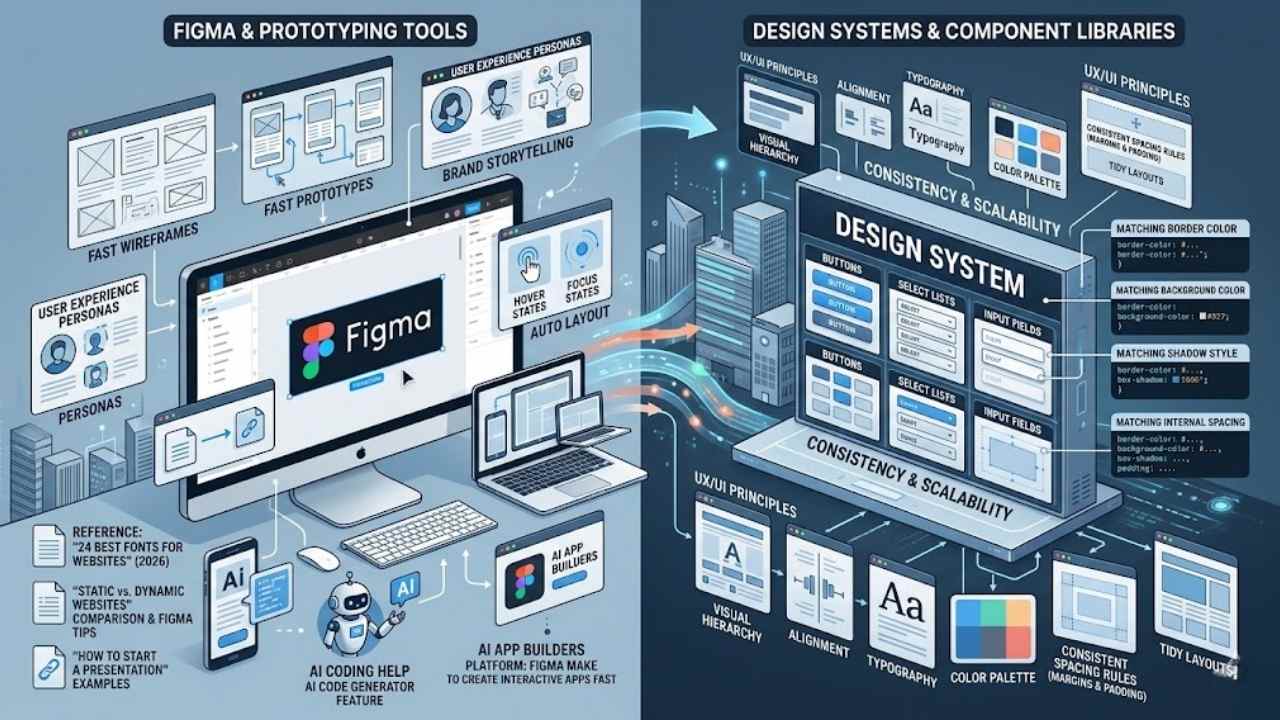
Figma leads the pack as a top tool for prototyping, wireframing, and team design work. Developers love how it lets you build prototypes and wireframes that show user experience through personas, plus brand storytelling.
Imagine you sketch out a site, add hover and focus states right in Figma, and showcase them in your prototypes. Its auto layout feature makes responsive designs a breeze, keeping things flexible across devices.
Articles like “24 Best Fonts for Websites” from 2026 highlight Figma’s key role in picking type that fits the design flow.
Jump into “Static vs. Dynamic Websites” for a solid comparison of site types, complete with Figma tips to create them. That piece breaks down benefits and drawbacks, so you pick what suits your project.
Figma even ties into presentations; check “How to Start a Presentation” for examples and tricks that reference Figma to kick things off strong. Tools get smarter too, “11 of the Best AI Coding Tools and Assistants for Developers” compares features and spotlights Figma’s AI code generator for quick coding help.
And “7 of the Best AI App Builders for 2026” lists options that use platforms like Figma Make to whip up interactive apps fast.
Design systems and component libraries
Design systems and component libraries keep your UI/UX design consistent and scalable, folks. You build a solid UI kit that captures key UX/UI principles, like visual hierarchy, alignment, spacing, typography, and color palette.
Imagine buttons, select lists, and input fields all match in border color, background color, shadow style, and internal spacing. Custom CSS properties lock in those visual styles across every element.
Teams thrive when they trust and prioritize each other’s input in design and development.
Visual styles pack into themes with code and assets, ready to apply to your software designs. Stick to consistent spacing rules, say with margins and padding, and you get those tidy layouts that wow users.
This setup boosts your prototype and wireframe work, ties into user experience personas, and even amps up brand storytelling in your projects.
Final Thoughts
You’ve grasped the basics of UX and UI design, from user personas and wireframes to visual hierarchy and color palettes. These principles make web development more intuitive and boost user satisfaction.
Imagine applying them to your next project; it’s straightforward and yields quick wins, like higher conversion rates up to 400 percent. Why not start with a simple prototype in Figma to see the impact? Join design communities for feedback and explore resources like component libraries to keep learning.
Go ahead, blend these skills into your work; you’ll craft sites that users love and give you a real edge.
Frequently Asked Questions (FAQs) on UX/UI Design Basics for Web Developers
1. What’s the deal with prototype and wireframe in UX/UI design for web developers?
Think of a wireframe as your site’s rough sketch, like a blueprint before building a house. It lays out the basic structure without fancy colors or images. Then, a prototype turns that into an interactive model, letting you test ideas early and avoid big mistakes down the road.
2. How does persona help with user experience in web design?
Picture this, you’re crafting a site but don’t know your users, it’s like throwing darts in the dark. A persona is a made-up character based on real user data, guiding you to make choices that feel just right for them. It boosts user experience by keeping things personal and spot-on.
3. Why mix brand and storytelling in UX/UI for developers?
Your brand is the heart of your site’s story, like a good yarn that pulls people in. Weave storytelling into the design to make users feel connected, turning a plain page into an adventure.
4. Can you explain how to start with prototype and wireframe basics?
Grab a simple tool, sketch your layout fast. Build from there into a clickable prototype, testing with a persona to refine user experience. Remember, it’s all about iterating, like tweaking a recipe until it’s perfect.























