


When a child struggles to read, downloading a popular app may seem like the most practical place to start. I would start somewhere else: with the reason reading is difficult.
Technology for struggling readers works best when it has a specific job. It may reinforce a skill, read difficult text aloud, reduce visual distractions or help a child work more independently. What it cannot do is replace appropriate reading instruction.
The goal is not to put more reading on a screen. It is to choose support that matches the child’s actual needs.
Identify What Is Making Reading Difficult
“Struggling reader” can describe several different problems.
One child may have difficulty connecting letters with sounds or blending sounds into words. Another may recognize words accurately but read so slowly that the meaning of the sentence gets lost. Some children understand a story when it is read aloud but struggle to understand the same story independently.
Vocabulary, attention, language development, vision, hearing and anxiety may also influence what reading looks like.
Parents can watch for patterns such as:
- Guessing words from pictures or first letters
- Avoiding unfamiliar words
- Reading accurately but very slowly
- Frequently losing their place
- Understanding spoken information better than written information
- Reaching the end of a passage without knowing what it meant
- Becoming unusually tired, anxious or upset during reading
These signs can guide a conversation, but they cannot diagnose the problem. When difficulties persist, the child’s teacher or reading specialist should be able to explain which skills have been assessed, what instruction is being provided and how progress is being measured.
Screening can identify a possible risk and show whether further support is needed. It is not the same as a complete evaluation or diagnosis.
Separate Reading Instruction From Reading Access
This is the distinction I consider most important. Reading instruction teaches the child how to read. Depending on the child’s needs, it may include explicit, systematic teaching in sound awareness, phonics, decoding, fluency, vocabulary or comprehension.
Reading access helps the child obtain information that current reading difficulties might otherwise place out of reach. Text-to-speech, audiobooks and accessible digital books are common examples.
A child might use text-to-speech to study a grade-level science chapter while separately receiving decoding instruction. The tool is not teaching the child to decode the chapter. It is allowing the child to learn science while those reading skills are still developing.
These two forms of support should work together. A tool that provides access does not need to improve decoding to be valuable, but it should never be presented as a replacement for reading instruction.
Match the Technology to the Reading Need
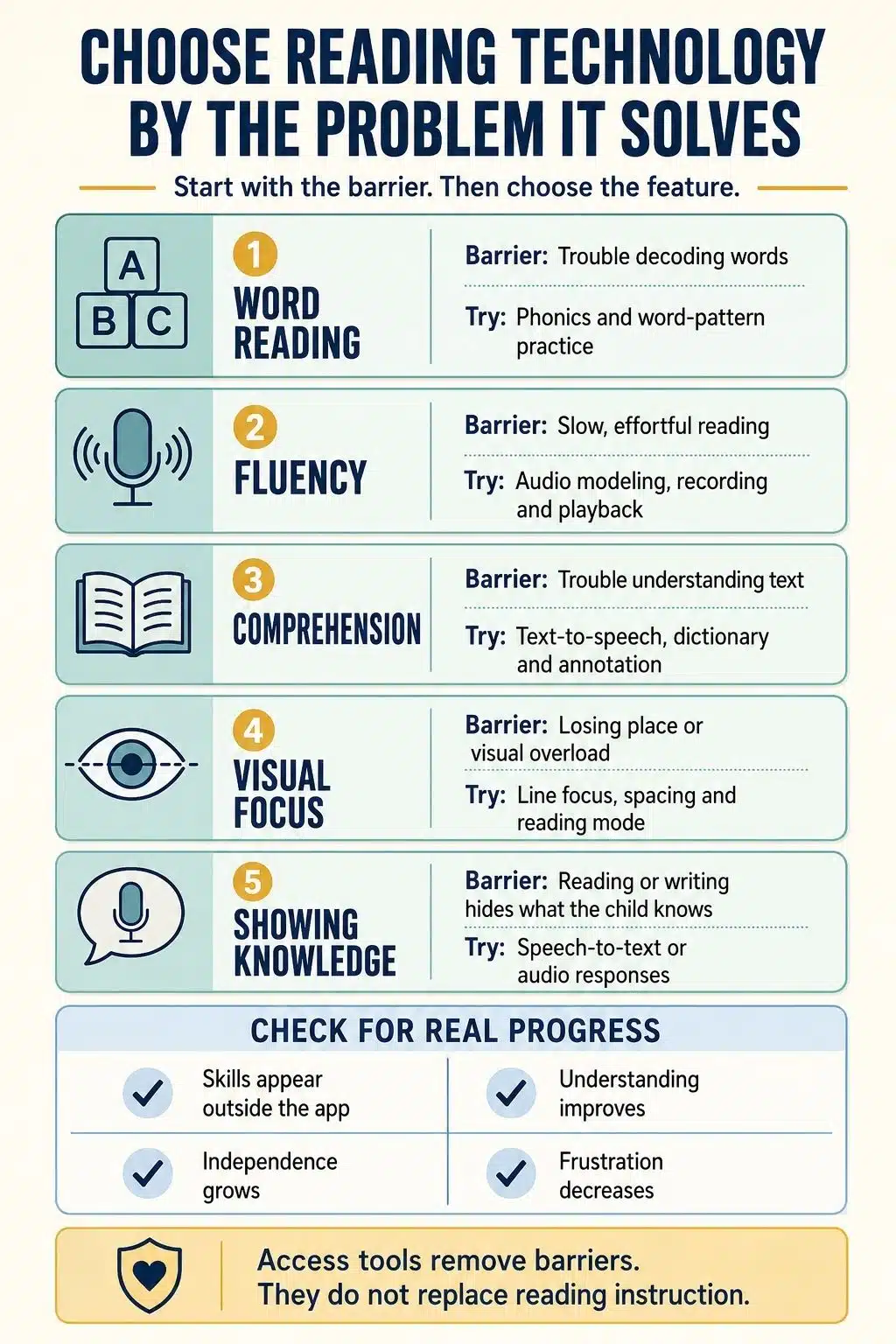
Technology becomes useful when it addresses a specific reading barrier. The right tool should match the child’s needs, whether that means practising decoding, improving fluency, understanding difficult text or reducing visual distractions. The following approaches show how different features can support different parts of reading.
Use Focused Practice for Decoding
Children who struggle to decode words need practice that connects directly with what they are being taught.
If a child is learning a particular letter–sound pattern, the technology should provide practice with that pattern. It should require the child to examine the letters, blend the sounds and read the word, not guess from a picture or tap options until one works.
Clear correction matters. A reward animation after an incorrect answer does not explain the mistake. The child needs to see or hear the correct process and then try again.
Technology can make repetition easier, but repeating the wrong strategy will not improve reading.
Use Modeling and Playback to Develop Fluency
Fluent reading includes accuracy, suitable pacing and phrasing that reflects the meaning of a sentence. It is not simply reading as fast as possible.
Audio models can demonstrate how fluent reading sounds. Recording and playback tools can then help a child notice missed words, awkward pauses or sentences that sound disconnected.
A simple activity is to select a short, manageable passage, listen to a fluent reading, read it aloud and try it again after feedback. The passage should be challenging enough to practise but not so difficult that every sentence becomes a struggle.
Speed should never become the only target. A child who races through a passage while missing words and meaning is not reading fluently.
Use Text-to-Speech and Audiobooks for Access
Text-to-speech reads digital text aloud. Some tools can highlight the word or sentence being spoken, helping the child follow the text visually.
Read-aloud technology can improve comprehension for some struggling readers, but it does not help every child in the same way. The useful question is not whether the feature is generally considered helpful. It is whether this child understands more and works more independently when using it.
Following highlighted text while listening may help some children connect spoken and written language. For others, tracking every word creates additional pressure. The setting should be adjusted according to the child’s response.
Audiobooks can also protect access to stories, ideas and vocabulary that may be beyond the child’s current independent reading level. Listening is not a substitute for learning to decode, but it can prevent a reading difficulty from restricting knowledge and curiosity.
Support Vocabulary and Comprehension
Digital dictionaries, audio pronunciation, pictures and short definitions can reduce the interruption caused by unfamiliar words. Annotation tools can help a child highlight important details, record questions or divide a long passage into manageable sections.
Technology should not remove the conversation around reading. After a short section, I might ask:
- What was that part mainly about?
- Which word was unfamiliar?
- What do you think will happen next?
- What information supports your answer?
- Is there anything that no longer makes sense?
The purpose is not to test the child after every paragraph. It is to help the child notice when meaning has been lost and learn how to recover it.
Reduce Unnecessary Visual Friction
Some children find crowded digital pages difficult to follow. Reading modes, line focus, larger text, increased spacing, contrast controls and adjustable backgrounds may make the page more comfortable.
These settings are worth testing because preferences differ. However, greater comfort should not be confused with reading instruction.
The same caution applies to specially marketed dyslexia fonts. A child may prefer one font, but research has not found reliable evidence that these fonts improve reading skill, speed or accuracy for everyone with dyslexia.
Use display settings when they reduce friction. Do not expect them to correct an underlying reading difficulty.
Help the Child Demonstrate Knowledge
Reading difficulties can interfere with written assignments even when the child understands the subject.
Speech-to-text, audio responses and digital organizers may help a child explain an idea without spending all their energy on handwriting or spelling. This is especially useful when the purpose of the assignment is to assess subject knowledge rather than reading or writing mechanics.
The task should determine whether the support is appropriate. If the child is practising decoding, the child needs to read. If the child is explaining the water cycle, voice typing may provide a more accurate picture of scientific understanding.
Adjust the Approach for the Child’s Age
Beginning readers usually need short, guided practice that reinforces the reading instruction they are already receiving. An adult should remain close enough to notice whether the child is reading carefully or simply guessing and tapping.
Older struggling readers may still need decoding and fluency support, particularly with longer, multisyllabic words. They also need access to age-appropriate material. Giving an older child immature books simply because the words are easier can quickly damage motivation.
Multilingual learners require additional care. Difficulty reading in English may be connected to English vocabulary, previous schooling, the quality of instruction, an underlying reading difficulty or several factors at once. Translation and audio tools can improve access, but they cannot replace language and literacy instruction.
Choose Tools Without Believing Every Claim
Terms such as “adaptive,” “personalized” and “research-based” sound reassuring, but they do not tell parents whether a program suits their child.
Before downloading or purchasing a tool, I would ask:
- What specific reading problem does it address?
- Does it match the instruction the child is receiving?
- Does it explain and correct mistakes?
- Can I understand the progress information?
- Does improvement appear outside the program?
- Can the difficulty and accessibility settings be adjusted?
- Are games and rewards distracting from the reading?
- Does the tool contain advertising or unnecessary autoplay?
- What information does it collect about the child?
Many devices already include text-to-speech, voice typing, dictionaries, reading modes and display controls. Testing these features first can help clarify what the child needs before the family pays for another subscription.
Privacy also deserves attention. Check whether the service requires a child account, records voice data, displays targeted advertising or shares information with other companies. A useful feature does not justify unnecessary collection of a child’s information.
Build a Routine That Can Be Sustained
Not every reading activity needs to happen on a device. A balanced routine may include:
- Targeted practice connected to current instruction
- Audiobooks or text-to-speech for suitable content
- Shared reading with an adult
- Conversation about ideas and unfamiliar words
- Practice with ordinary printed and digital text
The amount of practice should reflect the child’s age, attention and instructional plan. A short session completed carefully is more useful than a long session spent guessing or arguing.
The child should also understand why a tool is being used. Saying, “This will read the chapter aloud so you can focus on the science,” gives the support a clear purpose. It also prevents the child from seeing technology as evidence that they have failed.
Measure Progress Beyond App Scores
Points, levels and daily streaks show activity. They do not automatically show that reading is improving.
Real progress should begin to appear outside the tool. A child may recognize a practised pattern in an unfamiliar book, read with fewer pauses, explain a passage more clearly or use an accessibility feature with less help.
The technology may need to change when:
- The child succeeds only inside the app
- Guessing replaces careful reading
- Rewards receive more attention than words
- The tool performs a skill the child needs to practise
- The child cannot explain the material afterward
- Frustration or dependence continues to increase
A useful tool should either develop a skill or provide meaningful access. Keeping a child occupied is not enough.
When Technology Is Not Enough
Persistent reading difficulty should not be managed through a succession of apps. If progress remains limited, reading causes significant distress or the child repeatedly avoids it, speak with the school. Ask what has been assessed, which skills need support, what intervention is being provided and how improvement will be monitored.
Technology can remove barriers and support practice. It cannot identify every reason a child is struggling, and it cannot replace knowledgeable instruction.
Final Thoughts
The best technology for struggling readers is not necessarily the newest or most expensive. It is the tool that performs a clearly defined job and fits into a sensible reading plan.
My approach is straightforward: teach the skills that need to be taught, provide access where barriers remain and regularly check whether the child is becoming more capable and independent.
Frequently Asked Questions on Technology for Struggling Readers
1. Is text-to-speech cheating?
No, when the purpose is to access information rather than test independent reading. It may be unsuitable during a decoding assessment, but it can be entirely appropriate when a child is learning science, history or another subject.
2. Can an app teach my child to read?
An app can reinforce specific reading skills, but it should not automatically be treated as a complete reading program. Struggling readers often need explicit instruction, informed correction and progress monitoring from a knowledgeable adult.
3. Should struggling readers use audiobooks?
Yes. Audiobooks can provide access to age-appropriate stories, vocabulary and knowledge. They should complement reading instruction and independent practice rather than replace them.
4. What is the best technology for a child with dyslexia?
There is no single best tool. Text-to-speech, audiobooks, line focus, voice typing and decoding practice serve different purposes. The right combination depends on the child’s needs, age, tasks and reading instruction.
5. When should I ask the school for more support?
Ask when the difficulty persists, progress is limited, or reading regularly causes avoidance or distress. Request specific information about assessment results, current instruction and how progress is being measured.

























