

Teams rarely announce that they are rejecting new collaboration software. They simply keep sending updates by email, storing files in familiar folders and asking for project status in private messages. The new platform stays open in another tab, officially adopted, practically ignored.
That is why I would not begin with product comparisons or feature lists. I would begin with the work itself. A collaboration platform earns its place when it removes a frustration employees already feel. If it creates extra steps, duplicates an existing system or makes people reorganize their day for no clear benefit, even capable software will struggle to survive.
The right choice gives important work a dependable home and makes the expected way of working easier than the alternatives.
Find the Problem Another Tool Must Solve
Before comparing products, follow one recent project from beginning to end. Where was the brief stored? How were responsibilities assigned? Where did feedback appear? Could someone find the final decision a month later? How often did a manager have to ask for an update?
This usually reveals something more specific than “we need better collaboration.” Perhaps tasks are discussed but never assigned. Several versions of the same document circulate. Remote employees miss decisions made in meetings. Contractors cannot access what they need, or they can see far too much. People maintain private task lists because the official system takes too long to update.
These are useful requirements because they describe an observable problem.
It is also possible that the team does not need more software. Unclear responsibilities, inconsistent communication and poor meeting habits cannot always be fixed by adding another platform. If the current tool already supports the necessary work but leaders refuse to use it consistently, the selection process should pause there.
A new system should remove friction, not give the same confusion a new interface.
Give the Platform a Clear Job
Most collaboration platforms now combine several functions: messaging, task management, documents, meetings, file sharing, search and automation. That breadth can be useful, but it also encourages teams to buy software before deciding what they expect it to own.
The team needs to agree on where different kinds of work belong. Quick questions may live in chat, while assigned work belongs in the project system. Long-term instructions need a knowledge base. Final files require an agreed storage location. Decisions should be recorded somewhere people can retrieve later.
Without these boundaries, employees must guess whether the latest information is in an email, channel, task comment, meeting transcript or document. The platform may contain everything and still make nothing easy to find.
My practical rule is that a new tool should either replace an existing one or take clear ownership of a part of the workflow. If it does neither, it is probably adding another destination rather than improving collaboration.
This is also where the all-in-one versus specialist-tool decision becomes clearer. An all-in-one platform can reduce logins, administration and switching. A specialist tool may support an important workflow more effectively. Neither approach is automatically better. The sensible choice is the smallest set of tools that covers the team’s real needs without forcing people to duplicate work.
Test Collaboration Software Against Everyday Work
A feature comparison can make several products look almost identical. Real tasks expose the difference.
Instead of asking whether a platform offers task management, check whether an employee can create a task, assign it, change its deadline and understand its current status without needing help. A search feature matters only if someone can use it to find the latest approved brief or the reason behind an earlier decision.
A proper evaluation should include ordinary situations such as:
- Catching up after several days away
- Handing work from one department to another
- Finding the current version of a file
- Giving a contractor access to one project
- Updating work from a phone
- Turning a meeting decision into an assigned action
- Removing a departing employee without losing important information
Consider a marketing team that stores briefs in cloud folders, tracks deadlines in a spreadsheet and discusses revisions through chat. A new platform may promise to bring those activities together. The useful test is not whether it can display a board and accept comments. The team needs to complete a real content cycle: submit a brief, assign a draft, request revisions, approve the final version and retrieve the decision later.
That process will reveal missing permissions, duplicate notifications and awkward handoffs that rarely appear in a product demonstration.
The most frequent actions should also be the easiest. If a routine update requires several menus and compulsory fields, employees will eventually create a faster process somewhere else.
Let the Team Trial It Properly
Employees should have a meaningful role in choosing the software they will use, but the decision should not become a popularity contest.
Familiarity can influence preference. So can attractive design, novelty or one impressive feature that matters to a vocal department but has little value elsewhere. The team needs agreed criteria before anyone begins testing.
A useful pilot group includes people with different roles and levels of technical confidence. Managers and individual contributors may notice different problems. Frequent users can test depth, while occasional users reveal whether the system remains understandable without daily practice. Remote, mobile and field-based employees should be included where relevant.
I would also involve at least one person who is not naturally enthusiastic about changing tools. Early adopters are often willing to explore hidden settings and invent workarounds. Less patient users are more likely to expose friction that will affect the wider team.
The trial itself must be allowed to fail. Loading a few sample tasks and inviting friendly users proves very little. Use real workflows, realistic permissions and the integrations the team expects to depend on.
Before the trial starts, record the current pain points. How long does it take to find an update? How many systems must people check? Which handoffs regularly break down? Then run the pilot long enough to cover a complete work cycle, including deadline changes, absences and information retrieval.
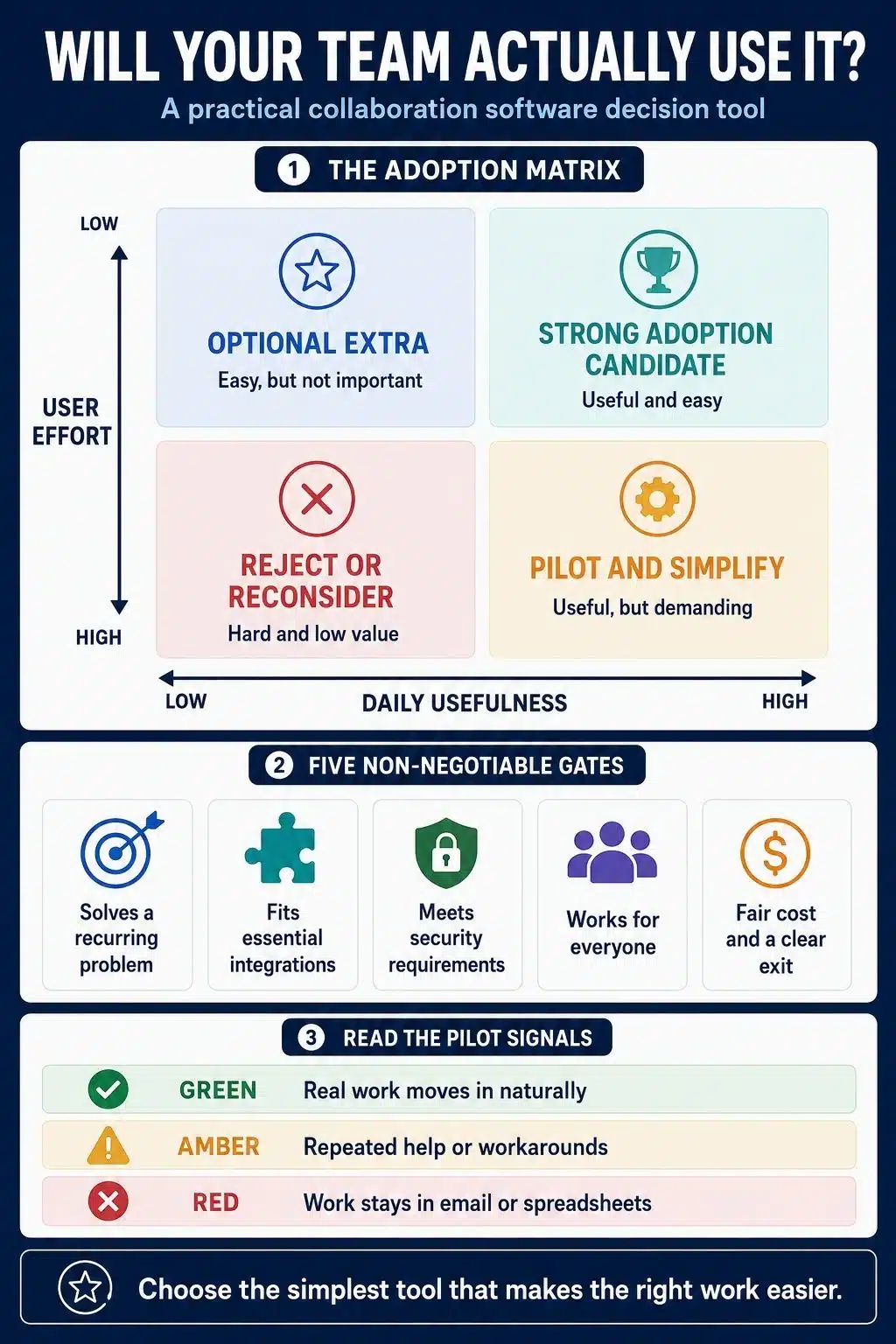
Watch the workarounds. If employees continue copying information into spreadsheets, maintaining private task lists or sending important details outside the platform, that behavior deserves more attention than a positive satisfaction score.
Look Beyond the Friendly Interface
A clean interface helps, but several quieter capabilities have a greater effect after the initial excitement fades.
Search is one of them. Collaboration software quickly becomes a storehouse of files, conversations and decisions. If users cannot retrieve that information, the platform preserves activity without preserving useful knowledge.
Notification control matters for the opposite reason. A tool that alerts everyone about everything can create the appearance of participation while damaging concentration. People need control over what they follow, when alerts reach them and which updates can wait. Good collaboration should support asynchronous work without treating every delayed reply as a problem.
Mobile performance also deserves a real test. A mobile app may exist but still make common actions difficult. Check whether users can review, comment, upload and update work comfortably, especially if some employees rely on phones or unstable connections.
Accessibility cannot be reduced to a statement on a vendor page. Test keyboard navigation, visible focus, screen-reader behavior, captions, text resizing, contrast and the usability of core actions. A platform is not easy to adopt if part of the team cannot use it properly.
Integrations need the same skepticism. An integration directory only confirms that two products can connect. It does not show whether the connection supports the required workflow, moves information in both directions or creates duplicate alerts. Test a complete handoff and decide who will maintain the connection after the trial.
Calculate the Cost of the Version You Need
The advertised price per user is rarely the full cost.
A team may also pay for migration, training, premium support, storage, recordings, automation or AI usage. Contractors and guests may need licenses. Important administrative capabilities, including advanced exports, identity management, audit logs and data controls, may be limited to higher plans.
Compare the cost of the version the organization actually requires, not the inexpensive plan used to attract interest. Allow for the temporary cost of running old and new systems during migration as well.
Security should be treated as a non-negotiable requirement rather than a feature that can be balanced against convenience. Depending on the organization, that review may need to cover:
- Multifactor authentication and single sign-on
- Permissions and external sharing
- Employee onboarding and offboarding
- Encryption and data handling
- Audit and access logs
- Retention and deletion controls
- Backup and recovery
- Third-party applications
- Incident response commitments
The exit route matters too. Determine what the organization can export, which content may be excluded and whether the exported data can be used elsewhere. A downloadable archive is not necessarily a practical migration path.
AI summaries, assisted search and automation should be assessed separately from the main product. Check how company data is processed, whether AI respects existing permissions, whether administrators can disable it and whether generated answers lead back to their source. A convenient AI feature should not distract from a poor underlying workflow.
The Messy Reality: Software Cannot Set the Rules
A team can select a capable platform and still undermine it during rollout.
If managers continue making decisions through email, employees will follow them there. If the old tool remains easier and fully active, people will return to it. If every department creates its own naming system, templates and channels, the new workspace will become difficult to navigate surprisingly quickly.
Before launch, settle a few practical questions:
- What information must be stored in the platform?
- Which system is the authoritative source?
- When is a direct message appropriate?
- What genuinely requires an immediate response?
- Who manages permissions and workspace structure?
- When will the previous system become read-only?
- Where can employees get help?
Training should focus on the work people need to complete, not on touring every feature. Show employees how to find information, update their responsibilities and handle the few situations they encounter most often. Advanced functions can wait.
It is also worth asking who benefits from the new process. If employees are expected to perform additional administrative steps only so management can watch their activity, resistance is understandable. Adoption becomes easier when workers gain something tangible too: fewer status requests, clearer priorities, easier handoffs or less time spent searching.
Measure Adoption Without Rewarding Noise
Account creation and login numbers show whether people can access the platform. They do not prove that collaboration has improved.
Message volume is even less reliable. More messages may signal participation, but they can just as easily indicate confusion, interruption or unnecessary discussion.
Measure progress against the original problem. Are active projects being managed in the agreed system? Can employees find documents and decisions more quickly? Are responsibilities clearer? Have duplicate updates declined? Do managers need fewer status meetings? Is the old system becoming genuinely unnecessary?
Support requests and repeated workarounds can also reveal where adoption is struggling. If the same task regularly causes confusion, the answer may be better training, simpler configuration or a different tool.
The aim is not to make employees spend more time inside collaboration software. It is to reduce the time they spend looking for information, repeating updates and asking what happens next.
Choose the Tool That Can Become a Habit
The best collaboration software is not necessarily the product with the longest feature list, the newest AI assistant or the strongest brand recognition. It is the one that solves an important recurring problem without creating several new ones.
I would choose the least complicated option that fits the team’s real workflows, meets its security and accessibility needs, and gives important information a dependable home. Then I would support it with realistic testing, clear working rules and a firm plan for retiring overlapping processes.
When the software makes employees’ own work easier, it needs far less enforcement. It stops feeling like another company system and becomes the natural place where work gets done.
Frequently Asked Questions on Choosing Collaboration Software
1. What is the most important feature in collaboration software?
Workflow fit matters more than any single feature. The software should make common tasks easier and give responsibilities, decisions and information a clear place to live.
2. Should employees help choose collaboration software?
Yes. Include people from different roles and with different levels of technical confidence. Their feedback should come from completing agreed tasks, not simply choosing the interface they like most.
3. Is free collaboration software enough for a small team?
It can be if the workflow is simple. Before depending on a free plan, check its limits on users, storage, history, integrations, exports and administrative controls.
4. How long should a collaboration software trial last?
The trial should cover at least one complete work cycle. It needs enough time to test routine updates, handoffs, changed deadlines, absences and information retrieval, not just the initial setup.
5. How do I know whether the team has genuinely adopted the software?
Look beyond logins. Genuine adoption means real work happens there, employees can find what they need, duplicate updates decline and the old process is no longer necessary for everyday work.

























