
A student can ask an AI chatbot to explain a difficult concept, rewrite a paragraph, generate an image, summarize a reading, or draft most of an assignment before a teacher has finished taking attendance. Knowing how to operate the tool is the easy part.
Schools have a harder job: teaching students when an AI answer deserves trust, when it needs checking, what information should never be uploaded casually, and when using AI crosses the line from useful support into replacing the learning itself.
That is why how to teach AI literacy in schools cannot be reduced to prompt writing. Students need enough understanding to question AI output, recognize its limitations, think about bias and privacy, explain how they used it, and know when a decision still requires human judgment.
Those skills also need to work after today’s most popular chatbot has been replaced by something else.
AI Literacy Is Not the Same as Learning to Use an AI Tool
A student who can produce an impressive prompt may still be poor at judging the answer. Another may know terms such as machine learning and training data but fail to notice when a chatbot invents a source.
AI literacy has to cover both understanding and judgment.
UNESCO’s 2024 AI Competency Framework for Students describes 12 competencies across four areas: a human-centred mindset, ethics of AI, AI techniques and applications, and AI system design. It organizes learning through three progression levels: Understand, Apply, and Create.
The OECD and European Commission published another framework for primary and secondary education on June 18, 2026. It organizes AI literacy around four dimensions—engaging with, creating with, managing, and shaping AI—and identifies 19 competences across knowledge, skills, and attitudes.
Teachers do not need to turn either framework into a checklist for every lesson. Their value is in showing how much broader AI literacy is than software training.
A useful school program should gradually help students learn to:
- recognize situations where AI may be involved;
- understand basic ideas such as data, models, patterns, predictions, and generated content;
- question whether an AI output is reliable;
- verify important claims with appropriate evidence;
- recognize that bias can enter through data, design choices, or the way a system is used;
- protect personal, sensitive, and confidential information;
- decide when AI assistance is appropriate for schoolwork;
- disclose meaningful AI assistance when required;
- understand that responsibility does not disappear because a machine produced the recommendation.
Not every student needs to learn how to build an AI model. Every student increasingly needs to know how to make sensible decisions around one.
How to Teach AI Literacy in Schools at Different Ages
The same lesson should not follow a student from primary school to graduation.
For younger children, start with concrete ideas. A teacher might ask students to sort cards by a rule, then introduce examples that do not fit neatly. The class can discuss why rules sometimes fail and why a machine following patterns may also make mistakes.
Later primary students can begin examining recommendations, translation, image recognition, or predictive text. They do not need a technical explanation of neural networks. They need to understand that digital systems use information and patterns to produce results.
By lower secondary school, students can handle harder questions: Why might a chatbot make up a fact? What information should not be pasted into an AI tool? Why could two prompts produce different answers? How might incomplete data affect a system’s decisions?
Upper secondary students can go further into accountability, automated decision-making, system design, bias, disclosure, and evidence. An older student should be able to examine not only whether an AI system made a mistake, but also who might be harmed by that mistake and who should be able to challenge it.
These are teaching directions, not universal grade standards. Curriculum rules, student readiness, platform restrictions, and legal requirements differ among countries and school systems.
Begin With Systems Students Already Recognize
Starting an introductory lesson with technical vocabulary is usually unnecessary.
Ask students where they think AI may be involved in familiar services:
- a video recommendation;
- predictive text;
- spam filtering;
- automatic translation;
- navigation;
- photo editing;
- a music playlist;
- image recognition;
- a chatbot.
Then move beyond simply identifying the technology.
What information does the system receive? What result is it trying to produce? Who decided what counts as a useful result? What could happen if the system is wrong?
Consider a video recommendation system. Students may initially think its purpose is to show them “good videos.” A more useful discussion asks what good means. Is the system optimizing relevance, watch time, clicks, subscriptions, or something else?
That question introduces an important idea without a complicated technical lesson: AI systems operate within objectives chosen by people and organizations.
It also helps students avoid another common misconception. “AI” is not one single technology. A recommendation engine, spam filter, image classifier, and generative language model can all involve artificial intelligence while behaving very differently.
Teach Students Why a Fluent Answer Can Still Be Wrong
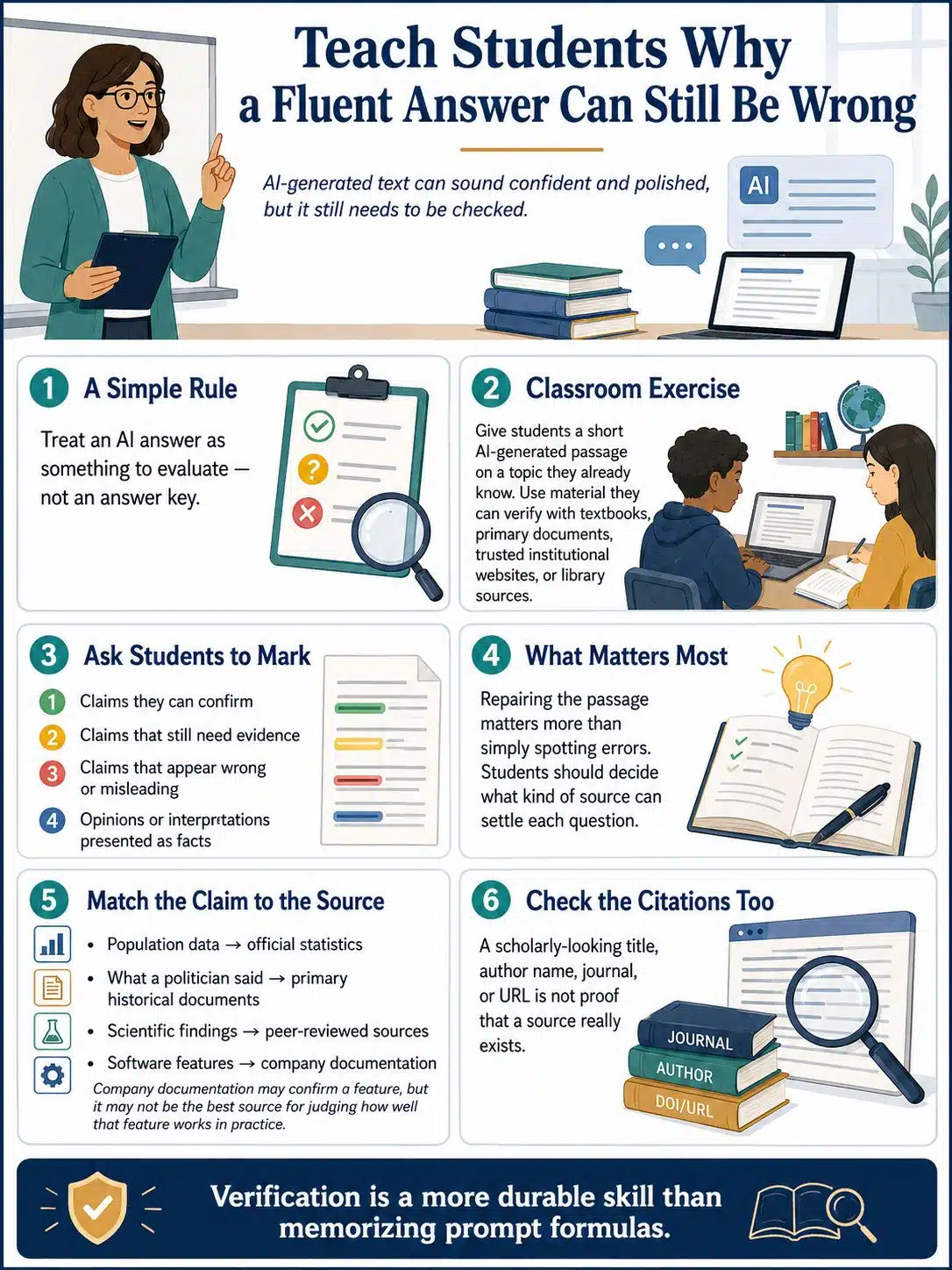
Generative AI creates a particular classroom problem because incorrect information can arrive in polished prose.
Students therefore need a simple working model: an AI-generated answer is an output to evaluate, not an answer key.
A useful exercise is to prepare a short AI-generated passage on a topic the class has already studied. Include material that students can verify from textbooks, primary documents, trusted institutional websites, or library sources.
Ask them to mark four kinds of statements:
- claims they can confirm;
- claims that still need evidence;
- claims that appear wrong or misleading;
- opinions or interpretations that should not be presented as established facts.
Then have them repair the passage.
The repair is more important than spotting the error. Students need to decide what kind of source can settle each question.
Official statistics may be appropriate for population data. A primary historical document may be better for what a politician actually said. A peer-reviewed source may be appropriate for a scientific finding. A company’s documentation can establish whether its software officially supports a feature, but it may be a poor source for judging whether that feature works well in practice.
Students should also check citations produced by AI. A scholarly-looking title, author name, journal, or URL is not evidence that the source exists.
When deciding how to teach AI literacy in schools, this verification habit is more durable than teaching a collection of prompt formulas.
Bias Makes More Sense When Students Can Investigate It
“AI can be biased” is true but not much of a lesson by itself.
Give students something they can interrogate.
An image-generation activity, for example, might ask a system to depict several occupations without specifying demographic characteristics. Students can compare the results and discuss recurring patterns.
The limitation matters: a handful of generated images cannot establish how an entire model behaves. That limitation should become part of the exercise. Students need to learn that investigating bias also requires care about evidence.
Another class could consider a fictional scholarship-ranking system.
What information should it use? Should postcode matter? Attendance? Previous grades? Family income? Teacher recommendations? Could apparently neutral information indirectly disadvantage some applicants? What happens when the system ranks a student incorrectly? Is there an appeal?
UNICEF’s current Guidance on AI and Children includes privacy, safety, non-discrimination, fairness, transparency, accountability, inclusion, and children’s best interests among its requirements for child-centred AI.
Those principles become far more meaningful when students have to apply them to a decision affecting a real person.
Make Privacy Rules Specific Enough to Follow
“Don’t give AI personal information” sounds sensible until students have to decide what counts as personal information.
Schools should use concrete examples.
Material that may require protection includes:
- student records and grades;
- disciplinary information;
- health or disability information;
- private messages;
- login credentials;
- identifiable photographs;
- confidential assessments;
- unpublished school documents;
- personal information about another student.
Teachers face the same issue.
Copying an identifiable student’s essay, learning difficulty, behavior report, or confidential assessment into an unapproved public AI system can create privacy and data-governance concerns even when the teacher’s intention is harmless.
Schools therefore need a distinction between approved educational tools and whatever AI service happens to be available online.
Before approving a product, schools should review current privacy terms, data handling, age requirements, security arrangements, accessibility, administrative controls, and relevant local laws. A review from two years ago is not enough if the product’s terms or data practices have since changed.
A useful rule for both teachers and students is simple: public availability does not automatically make a service appropriate for school use.
High-Stakes Educational AI Needs More Scrutiny
A chatbot used to generate practice questions is not the same kind of system as software that influences admission, assessment, placement, or disciplinary decisions.
That distinction matters both educationally and legally.
The EU AI Act classifies certain AI systems used in education or vocational training as high-risk when they are intended for purposes such as determining admission or access, assigning people to educational programs, evaluating learning outcomes in specified circumstances, materially influencing the level of education a person may receive, or monitoring prohibited behavior during tests.
This does not mean that every AI product used by an EU school is automatically a high-risk system.
The intended purpose and manner of use matter.
For school leaders, the practical lesson is that an AI purchasing decision should receive more scrutiny when the software can materially affect a student’s opportunities. Procurement, privacy, accessibility, security, human oversight, and legal review may all become relevant.
Schools elsewhere should check their own national or regional requirements rather than copying EU rules into local policy.
Academic Integrity Rules Need to Tell Students What They Can Actually Do
A blanket statement such as “AI is banned” becomes difficult to interpret when generative features appear inside search engines, writing software, translation tools, and other services students already use.
Assignment-level guidance is usually clearer.
For one task, a teacher might say:
No AI assistance. The purpose is to demonstrate an unaided skill.
For another:
Limited AI assistance is allowed. Students may use AI to generate practice questions or brainstorm possible topics, but not to write the assessed response.
A third assignment might require AI deliberately:
Use AI and evaluate it. Students submit the generated material, identify errors or weaknesses, revise it, and explain what they changed.
Those categories do not need to become school-wide jargon. What matters is that students know the rules before completing the work.
Disclosure should also be proportional. A student should not need an elaborate declaration because spell-check corrected a typo. If an AI system generated ideas, substantial text, analysis, code, images, or other material that meaningfully affected the submitted work, the school’s expectations should be clear.
Be Careful With AI-Detection Scores
Detection software can look like an easy solution to academic-integrity disputes. It is not a strong enough foundation for a misconduct decision on its own.
TeachAI’s current school guidance says technologies claiming to identify generative-AI content are not sufficiently accurate for reliable determinations of cheating or plagiarism and discourages relying on them to determine responsibility.
A more defensible approach looks at the learning process: drafts, source notes, version history where available, oral explanation, classroom work, and whether the student can explain the submitted argument.
That also produces better teaching information. A percentage from a detector cannot tell a teacher what the student understands.
Redesign Some Assignments So Thinking Becomes Visible
Generative AI has exposed a weakness that existed before ChatGPT: a polished final document may reveal very little about how a student reached the answer.
Teachers do not need to turn every assignment into surveillance. They can simply ask for more evidence of reasoning.
Useful approaches include asking students to:
- annotate a weak AI-generated explanation;
- compare an AI response with a primary source;
- explain why one source was rejected;
- submit an outline and revision notes;
- defend part of an argument orally;
- connect a conclusion to a class experiment or local observation;
- identify which AI suggestions they accepted and which they ignored.
A history essay built around specific primary documents from class is harder to outsource meaningfully than “Write 800 words about the Industrial Revolution.”
A science task that requires students to explain their own experimental results tests something different from asking for a generic explanation of the scientific concept.
The aim should not be to create assignments that AI can never touch. It is to make the student’s reasoning visible enough to assess.
A Practical Six-Lesson Starting Point
Schools that have not yet built an AI curriculum do not need to wait for one.
A short introductory sequence can establish the basic habits:
Lesson 1: Where is AI already present?
Use familiar digital services and separate AI from ordinary automation where possible.
Lesson 2: Patterns can help—and mislead.
A sorting or classification activity introduces data, rules, ambiguous examples, and mistakes.
Lesson 3: Check the answer.
Students investigate a prepared AI response and repair unsupported claims.
Lesson 4: Who might be treated unfairly?
Use an automated decision scenario to examine bias, evidence, consequences, and appeals.
Lesson 5: What should not be uploaded?
Work through realistic privacy scenarios involving grades, photographs, student records, or personal conversations.
Lesson 6: Use AI and account for the result.
Where the school has an approved tool, students complete a small AI-assisted task, verify the output, and explain where human judgment was required.
Schools without student access to generative AI can still teach every lesson. Prepared screenshots, printed outputs, hypothetical scenarios, and paper-based classification activities are enough.
That matters. AI literacy should not become a privilege available only to schools that can afford the newest paid platforms.
Teachers Need More Than Tool Demonstrations
Students will struggle to follow coherent rules if one teacher encourages AI for almost everything, another bans it completely, and a third has never discussed it.
Professional development should create some shared ground.
Teachers need working knowledge of AI limitations, verification, privacy, bias, academic integrity, accessibility, age-appropriate use, and assessment design. They also need to know which tools their school has approved.
UNESCO’s AI Competency Framework for Teachers reflects this broader need. It contains 15 competencies across five dimensions: human-centred mindset, ethics of AI, AI foundations and applications, AI pedagogy, and AI for professional learning, with Acquire, Deepen, and Create as its progression levels.
A workshop devoted entirely to generating lesson plans may be useful software training. It is not sufficient teacher AI literacy.
Assess Judgment Instead of Rewarding Vocabulary
A student can memorize the definition of an algorithm without being able to spot a dangerous use of one.
Scenario-based assessment is often more revealing.
Suppose a school is considering an AI system that recommends which students should receive additional tutoring.
Ask students:
- What information would the system need?
- Which data could create privacy concerns?
- What might introduce unfairness?
- What happens when the recommendation is wrong?
- Should a teacher review every recommendation?
- Can students or parents challenge the decision?
- What should the school ask the vendor before using the system?
That task tests technical understanding, fairness, privacy, evidence, and human oversight at the same time.
It also resembles the kind of AI decision students will encounter outside school far more closely than a vocabulary quiz does.
What School Leaders Should Put in Place First
A school does not need a 40-page AI policy before teachers can begin teaching AI literacy. It does need a few basic decisions.
Clarify:
- which AI tools students and staff may use;
- what information may not be entered into those tools;
- how teachers should set AI rules for assessed work;
- how substantial AI assistance should be disclosed;
- who reviews new AI products before adoption;
- what teachers should do when they suspect inappropriate AI use;
- how families will be informed about school expectations.
Then review those decisions regularly.
The weak approach is to write a policy around one current product and assume the problem has been solved. Products change, features move behind different plans, data practices change, and new forms of AI appear inside ordinary software.
Policies should describe principles and decision processes, not just a blacklist of brand names.
What Schools Commonly Get Wrong
Teaching only prompting. Students may learn how to produce better outputs without learning whether those outputs deserve trust.
Treating AI literacy as an anti-cheating program. Academic integrity matters, but students also need to understand AI as technology, media, infrastructure, and a system that increasingly affects decisions.
Showing only successful demonstrations. A carefully chosen demo can make AI appear much more reliable than it is. Students need controlled opportunities to inspect weak, uncertain, and misleading output too.
Making a commercial product the curriculum. Interfaces, models, subscription plans, and features change. Verification, privacy, evidence, accountability, and critical judgment transfer much better.
Waiting for perfect policy. Schools can teach source checking, disclosure, data protection, and basic AI concepts while longer-term policy work continues.
Final Thoughts
The most useful answer to how to teach AI literacy in schools is not to add a few chatbot lessons to the timetable.
Start by giving students habits they can carry from one system to another: ask what the AI is doing, check important claims, protect sensitive information, look for people who may be affected by an automated decision, disclose meaningful assistance, and keep human judgment involved where the stakes are high.
For schools starting from scratch, the first step can be modest. Agree on basic privacy and assignment rules, give teachers one shared verification activity, and introduce a short age-appropriate AI literacy sequence.
The technology will keep changing. Students’ ability to question it is the part worth building to last.