Building or buying a high-end desktop computer is a massive thrill. You plug in the graphics card, install your favorite titles, and expect absolute perfection right out of the box. However, raw hardware only gets you halfway to the finish line. The true secret to a flawless experience lies in PC game performance optimization. It is the careful and deliberate tuning of software, BIOS configurations, and operating system quirks that turns a stuttering mess into a buttery smooth masterpiece.
Many players assume that having a powerful processor and a massive graphics card guarantees perfection. That assumption usually shatters the first time they enter a crowded open-world city and watch their frame rate plummet. We are going to dive deep into the actual science of making games run beautifully.
The Foundation of Frame Delivery in the BIOS
Let us address the most common mistake made by new computer builders. You buy a highly rated, expensive kit of DDR5 memory, install it on your motherboard, and boot up the system. What most people do not realize is that the memory will run at a remarkably slow default speed until you explicitly tell the motherboard to do otherwise.
This is where Extreme Memory Profiles (XMP) for Intel or Extended Profiles for Overclocking (EXPO) for AMD come into play. Accessing your BIOS and flipping this single switch forces your RAM to run at its advertised speeds. This is not traditional, risky overclocking. It is simply unlocking the exact performance you already paid for. Faster memory bandwidth directly influences your minimum frame rates, especially in heavily CPU-bound scenarios like massive multiplayer games or complex strategy titles. Without this step, your processor is constantly waiting for data to arrive, causing micro-stutters that ruin the experience.
Modern Metrics and Telemetry
If you cannot accurately measure your system output, you cannot optimize it. Older guides frequently recommended software like FRAPS to measure frame rates. You need to completely disregard that advice immediately. It is an outdated relic that causes more system instability than it solves. Today, proper telemetry requires modern tools like RivaTuner Statistics Server, CapFrameX, or the built-in performance overlays from NVIDIA and AMD.
We are no longer just looking at a high average frame rate. An average means absolutely nothing if the game feels terrible to play. True PC game performance optimization focuses entirely on frame time consistency and the specific metric known as one percent lows. Frame time is the exact number of milliseconds it takes for your hardware to render a single image. If one frame takes 16 milliseconds and the very next takes 45 milliseconds, you will feel a massive, jarring stutter. This happens even if your corner counter says you are getting a steady sixty frames per second. Tuning your system is entirely about flattening that frame time graph to create a perfectly paced delivery of images.
Taming the Graphics Processing Unit
When people think about PC game performance optimization, they usually jump straight to the graphics card. While buying a better card is the easiest brute force solution, tuning your current hardware yields incredible results. Instead of pushing for dangerous overclocks that crash your games, modern hardware tuning focuses heavily on undervolting. Utilities like MSI Afterburner allow you to slightly lower the voltage supplied to the GPU core while maintaining the exact same clock speeds.
This process drastically reduces thermal output and power consumption. A cooler graphics card actually boosts to higher frequencies and sustains those maximum boost clocks for much longer periods. Thermal throttling is the enemy of smooth gameplay. When a card gets too hot, it aggressively drops its speed to protect itself, resulting in massive frame drops. By undervolting and setting an aggressive custom fan curve, you force the hardware to stay within its optimal temperature window.
CPU Bottlenecks and Strict System Hygiene
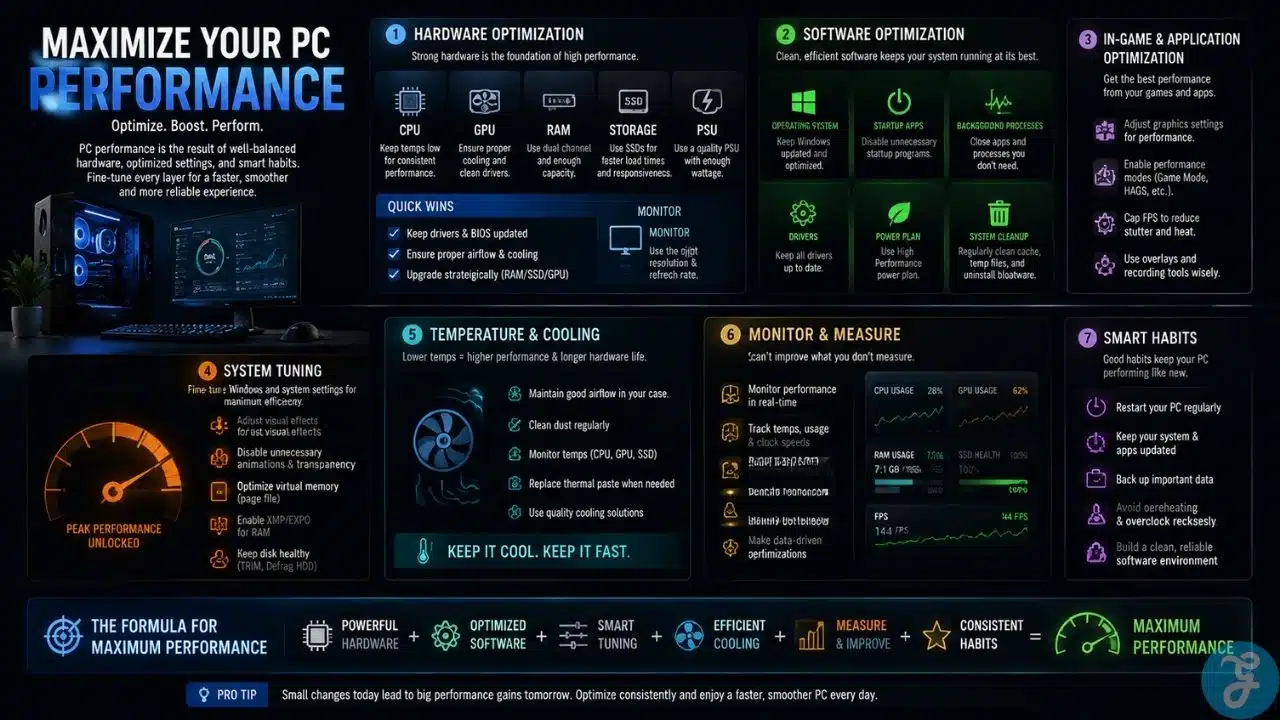
Your graphics card can only draw frames as fast as your processor can prepare them. If your processor is choking on background tasks, your graphics card will sit completely idle while waiting for instructions. You must maintain strict digital hygiene. You do not need five different game launchers, a hardware RGB lighting controller, an active voice chat overlay, and a web browser loaded with tabs running in the background while you are trying to play a competitive shooter. Close them down entirely.
Additionally, you must dive into the Windows power settings. Ensure your computer is set to the High Performance or Ultimate Performance power plan. Standard balanced plans allow Windows to aggressively put your processor cores to sleep to save a few watts of power. Waking those cores up takes a fraction of a second, which translates directly into game stuttering. You want your processor fully awake and instantly ready when the game engine demands immediate action.
The Impact of Storage and Asset Streaming
We have moved far beyond the days when a hard drive only dictated how long you stared at a loading screen. In modern titles, storage speed directly impacts gameplay fluidity. Open world games are constantly streaming high-resolution textures, audio files, and geometry data from your storage drive directly into system memory. If you are playing a modern AAA game on an older mechanical hard drive or a cheap, slow solid-state drive, the game engine will stall while waiting for those assets to load.
Upgrading to a high quality NVMe M.2 solid state drive is mandatory for proper PC game performance optimization. Technologies like Microsoft DirectStorage are beginning to allow games to bypass the CPU entirely, streaming assets directly from your NVMe drive straight to the graphics card memory. Ensuring your games are installed on your fastest drive eliminates traversal stutter when moving quickly between zones in massive open world environments.
Booting up a new release usually means staring down a massive wall of confusing graphical settings. Turning every single slider to ultra is a rookie mistake. Game developers often include extreme visual settings designed for hardware generations that do not even exist yet. To master the optimization process, you have to know which settings eat your hardware resources for breakfast without giving you any meaningful visual return.
Volumetric lighting and volumetric clouds are massive performance killers. Dropping them from ultra to high or even medium will often save you twenty frames per second while looking visually identical during fast motion. Shadow resolution is another major culprit. Perfectly sharp, high-resolution shadows require immense computational power. Dialing shadows back to a medium setting provides a softer, more realistic look while freeing up vital resources.
Furthermore, you must understand Anti-Aliasing. Traditional methods like MSAA are incredibly taxing on your hardware. Switching to TAA provides a smoother image at a fraction of the performance cost, though it can introduce slight blurring in motion. Balancing these specific toggles is where the real art of tweaking comes into play.
The Magic of Intelligent Upscaling
We cannot talk about tweaking performance without addressing the absolute biggest shift in modern gaming graphics. Rendering games at a native resolution is rapidly becoming a thing of the past. Technologies like NVIDIA DLSS, AMD FSR, and Intel XeSS are completely redefining how games perform.
These intelligent software upscalers render the internal game engine at a significantly lower resolution, which dramatically increases your frame rate. They then use advanced algorithms and artificial intelligence to construct a final image that perfectly fits your monitor resolution. Turning on DLSS Quality mode at 1440p or 4K resolution will often give you a massive boost in fluidity while looking completely indistinguishable from a native rendering. In some cases, the AI reconstruction actually handles fine details like chain link fences better than native rendering does. Leveraging these tools is absolutely mandatory if you want to turn on heavy, demanding effects like hardware ray tracing.
Synchronizing the Display
The final piece of the puzzle happens after the frame leaves your graphics card and travels to your monitor. Screen tearing occurs when your graphics card pushes a new frame to the monitor while the monitor is still busy drawing the previous one. The traditional solution to this was Vertical Sync (V-Sync), which locks your frame rate to the refresh rate of your monitor. Unfortunately, V-Sync introduces a massive amount of input lag, making your mouse movements feel heavy and disconnected.
Modern optimization relies entirely on variable refresh rate technologies like NVIDIA G-Sync or AMD FreeSync. These technologies allow the monitor to dynamically adjust its refresh rate on the fly to perfectly match the exact output of your graphics card. If your graphics card outputs 83 frames in a second, your monitor refreshes exactly 83 times. This eliminates screen tearing entirely without adding the unbearable input lag of traditional V-Sync. Ensuring this feature is enabled in your monitor hardware settings and your driver control panel is a critical final step.
The Endless Pursuit of Perfection
Tinkering with your machine is half the fun of the desktop platform. PC game performance optimization is an ongoing journey rather than a single, final destination. Every time a major graphics driver update drops, a massive game patch is released, or you upgrade a physical component, the mathematical variables change.
By focusing heavily on the metrics that actually matter, utilizing intelligent upscaling technologies, managing your thermal output, and keeping a firm grip on your system background processes, you can guarantee that your hardware is giving you every single ounce of value. The goal is not just to see a high number in the corner of your screen. The ultimate goal is total, unbreakable immersion where the hardware completely disappears and you are left entirely in the game world.