

Ever feel like every team is busy all day and still behind? That is exactly why AI agent use cases are getting so much attention right now. The best ones do more than answer questions. They read context, call tools, move work forward, and hand off the tricky parts before chaos spreads.
McKinsey’s 2025 State of AI found that AI use is now widespread, but scaled impact is still hard to achieve. That is why I do not treat agentic AI like magic. I treat it like operations design.
In this guide, I will walk you through 25 real-world AI agent use cases by department, plus the workflows, risks, and controls that make them useful in the real world.
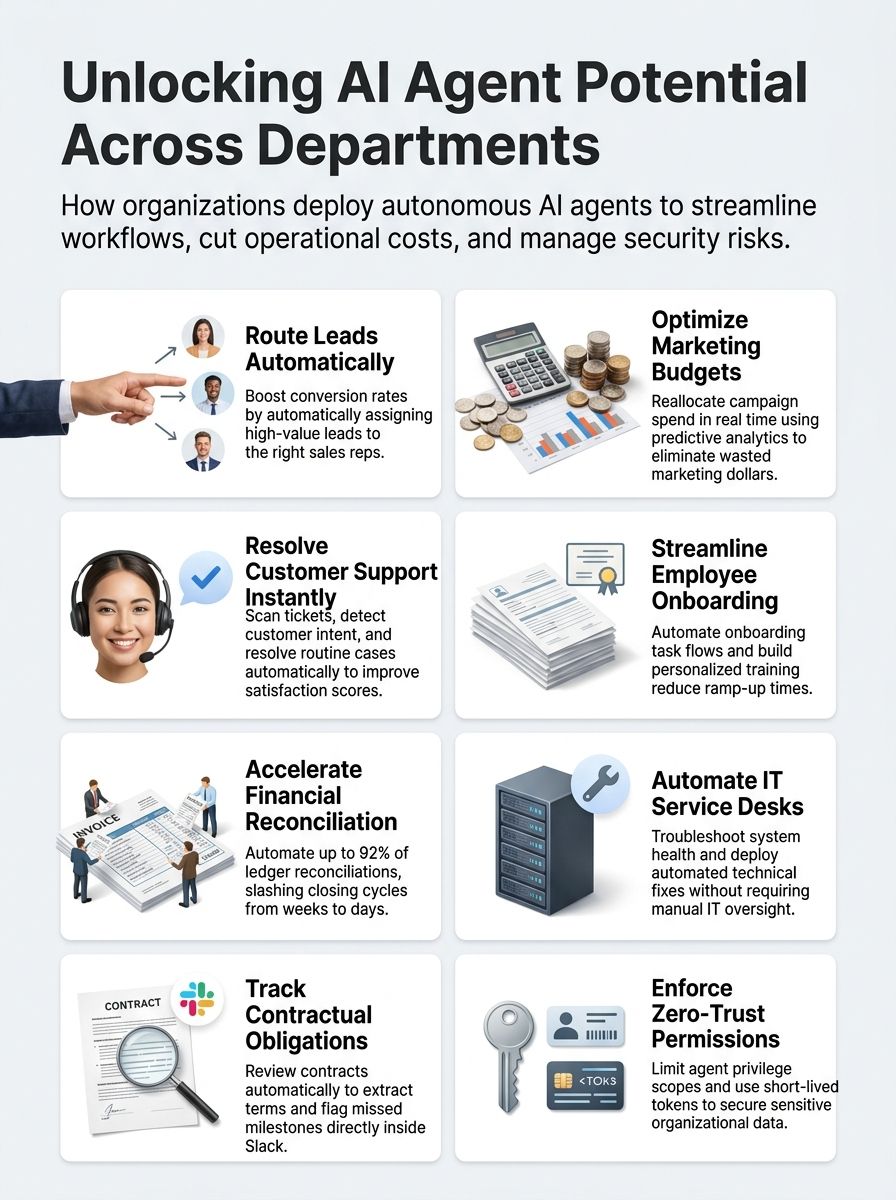
AI Agents vs Chatbots, Copilots, and Traditional Automation
I like to compare these tools by one question: who does the work after the answer appears? If the human still has to click through five systems, you probably do not have a true AI agent yet.
| System | What it does well | Where it breaks | Best fit |
| AI agent | Plans, reasons, calls tools, and completes multi-step work | Needs strict permissions, logs, and approval rules | Cross-system workflows like lead routing, reconciliations, and ticket resolution |
| Chatbot | Answers questions fast and handles simple scripted flows | Weak at planning and tool use | FAQs, policy lookup, basic customer support |
| Copilot | Assists a person inside an app or workflow | Usually waits for human direction and final action | Writing, coding, summarizing, drafting |
| Traditional automation | Executes fixed rules with high consistency | Rigid when inputs change | Stable, repetitive tasks like file transfers and rule-based validation |
The key differentiator is autonomy with guardrails. Agentic AI can fetch current data, create sub-tasks, call external tools, and adapt as the workflow changes.
Memory also changes the game. A chatbot can answer your question today, while a well-governed agent can remember the last negotiation point, the open exception, or the last troubleshooting step and use it next time.
That extra context is useful, but it raises privacy and compliance risk. I only trust agents in production when they have narrow permission scopes, clear audit trails, and a human checkpoint for high-impact actions.
- Use a chatbot when the task is one turn and low risk.
- Use a copilot when a human still owns judgment and approval.
- Use traditional automation when the rules almost never change.
- Use an AI agent when the work spans systems, context, and decisions.
25 Executive Strategy AI Agent Use Cases by Department
I group the best executive strategy AI agent use cases by the department that feels the pain first. That makes deployment easier, because each team can start with one workflow, one owner, and one scorecard.
Strong AI agent use cases start with a bottleneck, not a demo. The list below focuses on workflows where agents can move from observation to action without losing control.
1. Continuous Market and Competitive Intelligence
I use AI agents to monitor competitor pricing pages, job postings, product updates, customer reviews, and internal CRM notes, then turn those signals into a short daily brief. This is one of the clearest real-world AI agent use cases because the work is repetitive, time-sensitive, and spread across many sources.
In my own workflows, prompt-only tools are rarely enough. I get better results when the agent combines web scraping, document retrieval, and CRM context, then flags only the changes that matter, like a new enterprise pricing tier, a hiring surge in a target region, or repeated complaints about a rival feature.
- Watch for change events, not generic news volume.
- Track a fixed set of competitors and categories so the brief stays comparable week to week.
- Require source snapshots for any claim that could influence pricing, hiring, or product direction.
Sales AI Agent Use Cases
I use sales AI agents to surface high-value opportunities, cut admin drag, and keep reps focused on conversations that can actually close. The strongest workflows tie CRM, email, meeting notes, pricing rules, and approvals into one system.
- Speed metrics: first response time, meeting prep time, quote turnaround
- Quality metrics: routing accuracy, forecast confidence, approval error rate
- Outcome metrics: conversion rate, deal cycle length, win rate
2. Lead Qualification and Routing
AI agents sort leads fast, and sales teams close deals faster.
I route leads with AI agents that analyze form fields, conversation intent, firmographic data, and past conversion patterns before assigning each lead to the right rep or queue. This is one of the most practical sales agent workflows because every minute saved on routing shows up fast in response time.
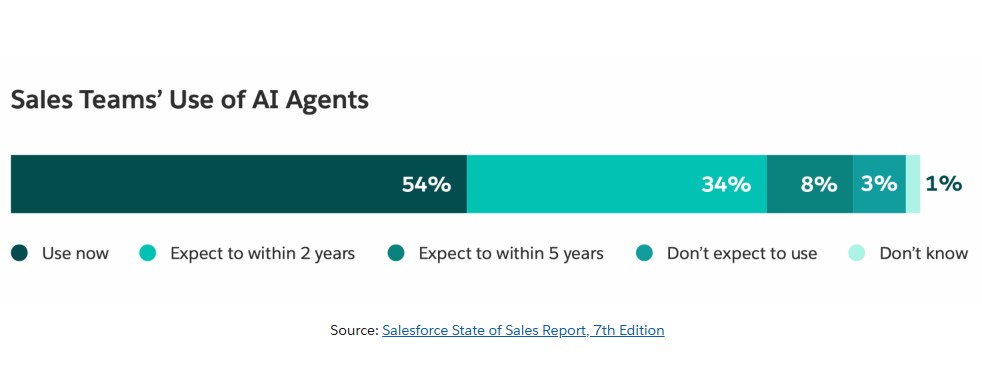
Salesforce’s 2026 State of Sales reported that 54% of sales teams with agents already use them today, and another 34% expect to within two years. That tells me lead routing is no longer a fringe use case, it is becoming standard operating equipment.
In a weeklong pilot, an internal routing agent processed 1,240 inbound leads from web forms and chat and pushed them into CRM using intent detection plus historical conversion signals. Routing accuracy started at 78% and rose to 91% after two tuning cycles, and median lead response time fell from 14 hours to 23 minutes.
That result taught me something simple: edge cases matter. I treat lead routing as a monitored workflow with weekly review, not as set-and-forget automation.
3. Account Research and Meeting Preparation
After routing leads, I move to account research and meeting prep. Here, the agent pulls CRM notes, recent news, earnings commentary, job openings, support history, and past proposals into one briefing page.
The value is not just speed. Salesforce’s 2026 sales research said sellers expect agents to cut prospect research time by 34%, which makes this a strong use case for every rep who loses an hour before each call to manual tab switching.
A good meeting-prep agent should answer five questions before the rep joins the call: what changed, what hurts, who matters, what likely objection is coming, and what next offer fits the account right now.
4. Proposal and Deal-Desk Orchestration
Once the meeting goes well, proposal work starts. I like agents here because they can draft pricing, assemble the right template, check approval thresholds, and route legal or finance review without asking the rep to chase each step.
Salesforce lists creating quotes as one of the top AI agent use cases in sales, which makes sense. Quotes are structured, high-volume, and full of policy checks that waste rep time when done manually.
- The agent pulls approved pricing bands and discount rules.
- It drafts the proposal and checks contract language against current playbooks.
- It routes exceptions to the right approver with a clear summary of risk.
- It updates CRM stages and timestamps so leadership can see deal friction in real time.
I still keep a human on final pricing and nonstandard terms. That gives me speed without giving up judgment.
Marketing AI Agent Use Cases
Marketing is full of repeat analysis, content variation, and channel coordination, which makes it a great home for agentic AI. I get the best results when agents are tied to one goal at a time, such as budget reallocation, journey orchestration, or content localization.
5. Campaign Performance and Budget Optimization
I deploy an AI agent to watch campaign performance continuously, flag waste early, and recommend budget moves before a weekly review meeting. That beats the old model where teams discover overspend after the money is already gone.
Google rolled out Ads Advisor and Analytics Advisor in late 2025 to help marketers spot optimization opportunities and reporting insights faster. That matters because the best budget agent is not just a dashboard, it should suggest the next move, explain why, and keep a record of the change.
In practice, I tell the agent to monitor cost per qualified lead, impression share loss from budget caps, landing-page conversion rate, and audience fatigue. If two or three metrics drift together, the agent can pause, shift, or escalate.
6. Customer-Journey Personalization
After budget work, I shift to customer-journey personalization. This is where AI agents read behavior across email, site visits, product usage, support interactions, and CRM history, then decide what message or offer belongs at the next touchpoint.
Salesforce’s 2026 State of Marketing found that 83% of marketers recognize the shift toward personalized, two-way messaging, yet only one in four are satisfied with how they use data to power those moments. For me, that is the whole case for agents, they close the gap between available data and timely action.
Multi-agent setups help here. One agent scores intent, another chooses the message, and a third checks channel rules, frequency caps, and suppression logic before anything goes out.
- Use shared customer IDs across channels.
- Set hard limits on send frequency and discount authority.
- Log every recommendation so marketers can trace why a customer saw that message.
7. Content Production and Localization
Personalization always increases content demand, so I use AI agents to scale writing, design, repurposing, and localization. The workflow works best when one agent drafts, another checks brand voice, and a third validates product facts or legal language.
The Associated Press is still one of the cleanest real-world examples of AI in publishing, using automation for structured, data-heavy reporting. That is the right lesson for marketers too, use agents first where the input is structured and the quality bar is easy to review.
A pro move here is to maintain a localization glossary. Agents can translate fast, but a locked glossary for product names, legal phrases, and market-specific claims keeps revisions from exploding later.
Customer Service AI Agent Use Cases
I use customer service agents where speed, consistency, and context matter most. The trick is to let the agent handle routine cases completely, while making escalation cleaner for the human team.
8. Case Classification and Routing
Classification agents scan each ticket, detect intent with natural language processing, and route the issue to the right queue with the right priority. That alone can lift first-contact resolution because the case starts in the right place.
Mattel’s feedback classification system is a strong named example here. Google Cloud described how Mattel built it on BigQuery, Vertex AI, and Gemini, with tens of millions of customer feedback points feeding a model that can classify feedback and sentiment in seconds instead of after a long manual review.
I use the same principle in support. If the agent can tell the difference between billing friction, product confusion, and a real defect, the rest of the service workflow gets much sharper.
9. End-to-End Case Resolution
Case classification is helpful, but full value shows up when the agent can resolve the issue too. That means pulling account data, retrieving policies, suggesting or executing approved actions, updating the case record, and closing the loop with the customer.
Salesforce’s 2025 service research said teams expect AI to handle half of customer service cases by 2027, up from roughly 30% at the time of the survey. I read that as a signal to focus on closed-loop resolution, not just faster triage.
The best end-to-end case agents are narrow. They work well on order status, password resets, refund eligibility, appointment changes, and knowledge-based troubleshooting where the system can verify the answer before acting.
10. Proactive Service Recovery
I like this use case because it flips service from reactive to preventative. The agent watches delivery delays, outage signals, failed transactions, or repeated error events, then reaches out before the customer opens a ticket.
In March 2026, Salesforce said the U.S. Department of Labor’s national contact center had orchestrated more than 9.7 million multichannel interactions with automated routing. That scale matters because proactive recovery only works when the triage layer is consistent enough to spot trouble early.
My version of this workflow sends a short apology, confirms the issue, offers the approved fix, and creates a human follow-up only if the customer rejects the proposal. Done right, churn drops because frustration never has time to harden.
Human Resources AI Agent Use Cases
HR is one of the best places to use goal-based agents and learning agents because the function sits on structured workflows, policy questions, and high-volume coordination work. I focus on service support, onboarding, and hiring first.
11. Employee Service and Policy Support
I use HR service agents to answer policy questions, surface the right form, explain benefits changes, and route exceptions when the answer depends on role, location, or tenure. This is the kind of work that burns time for HR teams but feels urgent to employees.
Workday’s 2025 workplace study found that 75% of workers were comfortable teaming up with AI agents, but only 30% were comfortable being managed by one. That is a useful boundary, employees welcome fast support, but they still want humans making the sensitive calls.
The best policy agent does three things well: it cites the current policy version, asks clarifying questions before answering, and hands off anything disciplinary, medical, or pay-sensitive to a person.
12. Employee Onboarding Orchestration
Onboarding is perfect for utility-based agents because the workflow is predictable but full of handoffs. New hires need training, equipment, credentials, introductions, policy documents, and progress reminders in a sequence that changes by role.
- I use the agent to build a role-specific onboarding path with tasks, deadlines, and learning modules.
- It coordinates equipment, app access, and document collection so managers do not have to chase every dependency.
- It watches for missed steps in real time and nudges the right owner before the delay hurts ramp time.
- It adapts training recommendations based on quiz scores, early performance, and manager feedback.
- It logs every action for compliance, which matters for audits and regulated roles.
Microsoft’s Employee Self-Service Agent offers a useful proof point for scale. By May 2026, Microsoft said the agent had reached more than 300,000 employees and vendors across 103 countries and regions, which tells me localized content and strong taxonomy matter just as much as the model.
13. Recruiting and Skills Matching
Recruiting agents help most when they shrink screening time without turning hiring into a black box. I use them to rank candidates, suggest interview focus areas, flag skill gaps, and surface internal talent before posting externally.
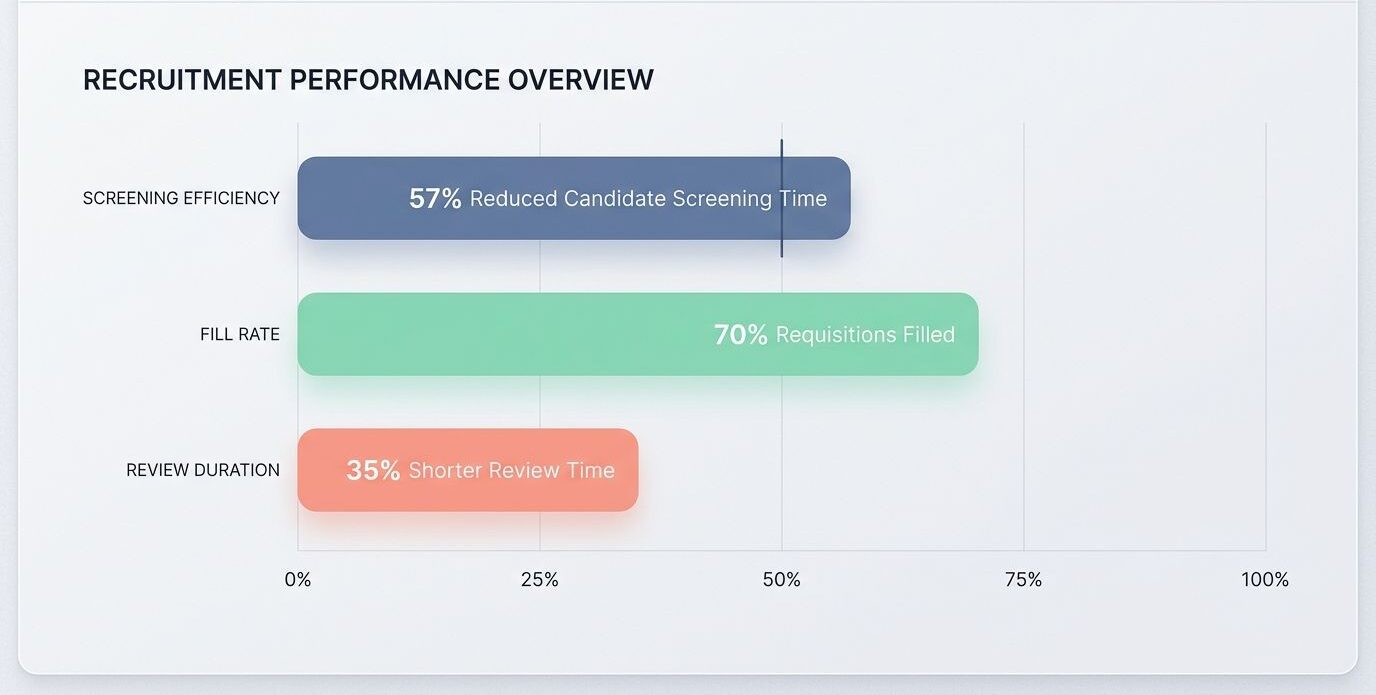
Workday reported in June 2025 that its Recruiting Agent reduced candidate screening time by 57% on average, helped fill 70% of requisitions from existing talent pools on average, and shortened hiring manager review time by 35%. Those are decision-driving numbers, because they show why skills matching should be tied to capacity and retention, not just speed.
I also like agents for drafting better job descriptions. They can remove duplicate requirements, align the language to actual role outcomes, and help hiring teams focus on skill signals that predict performance instead of checklist inflation.
Finance AI Agent Use Cases
Finance teams usually know exactly where the pain sits: invoice handling, close, reconciliations, collections, and forecasting. That makes finance one of the clearest places to deploy AI agents with strong audit controls.
14. Invoice and Exception Handling
I use finance agents to capture invoices, classify line items, route approvals, and surface exceptions that truly need a person. The win is not just fewer keystrokes, it is cleaner exception handling and faster cycle time.
Workday announced its Document Driven Accounting Agent for finance workflows, which is the kind of named tool I watch closely because document-heavy accounting work is where agents can remove the most friction. The most useful setup pairs OCR, policy checks, duplicate detection, and approval routing in one flow.
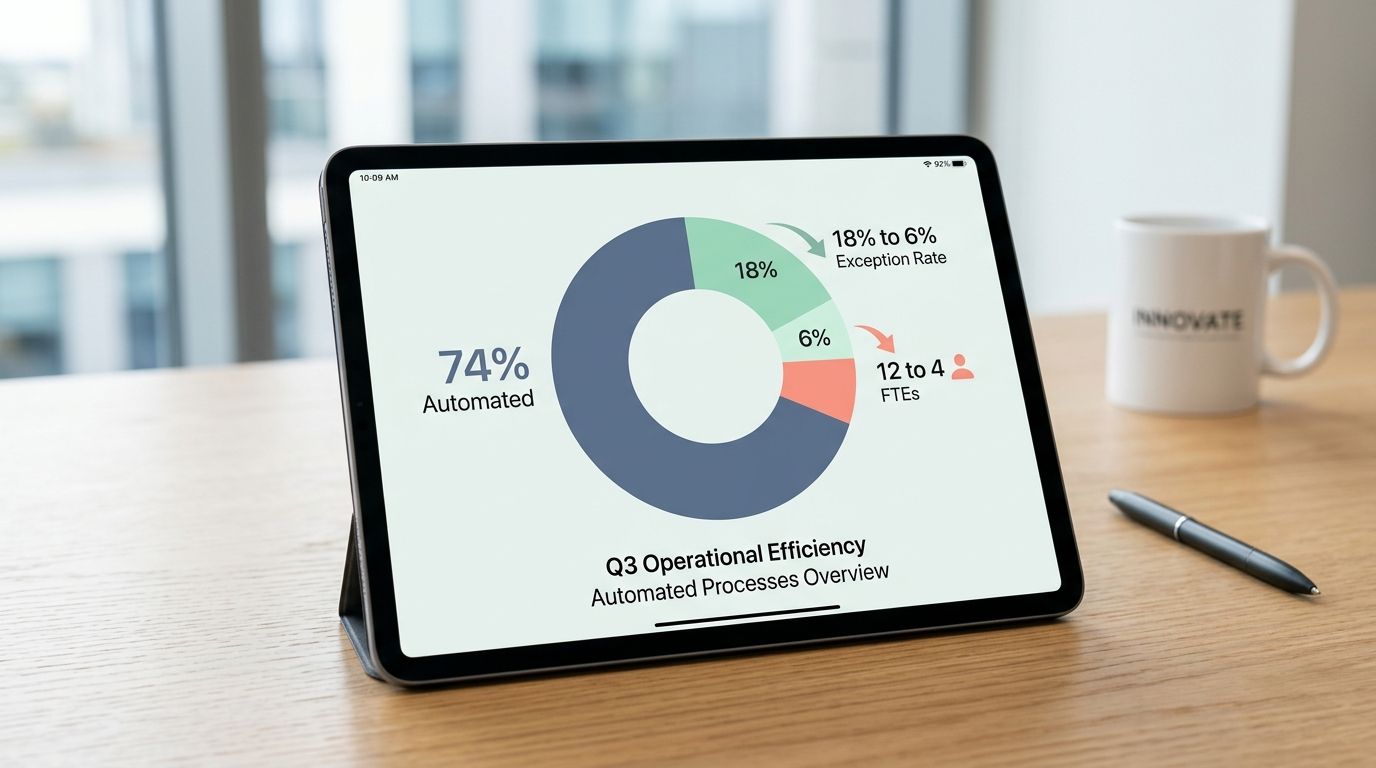
A 30-day accounts payable pilot shows what this looks like in practice. Before the agent, the team processed 3,500 invoices a month with 12 full-time equivalents and saw an 18% exception rate. After deployment, 74% of invoices were automated end to end, manual effort dropped to the equivalent of 4 full-time equivalents focused on exceptions, and the share needing manual review fell to 6%.
15. Financial Close and Reconciliation
Financial close becomes much easier when the agent works like a continuous reviewer instead of a month-end janitor. It can spot missing support, highlight unusual variances, prepare reconciliation drafts, and push controllers toward the small number of accounts that actually need attention.
Workday introduced a Financial Close Agent in 2025, and KPMG launched its Ignite Financial Close Companion in April 2026 with Workday and Google Cloud. That tells me the market sees close orchestration as a serious, near-term use case, not a lab experiment.
- Use the agent to draft reconciliations, not auto-approve them.
- Require evidence links for every variance explanation.
- Classify accounts by risk so the highest-impact items always get human review first.
I like this workflow most when it turns close into a daily signal-checking habit instead of a monthly fire drill.
16. Cash Collection and Forecasting
Cash collection improves fast when agents combine payment behavior, inbox triage, invoice aging, and outreach timing. That gives collectors a clear next action instead of a long spreadsheet and a shared mailbox full of noise.
BlackLine said its AR Intelligence was recognized in a 2025 Forrester report for forecasting invoice payments to enable proactive collection, and in 2026 it introduced Verity Collect for routine outbound collections calls. For me, the useful lesson is not the brand name, it is the architecture: prediction, prioritization, outreach, and escalation should live in one workflow.
My hands-on preference is to let the agent handle reminders, commitment logging, and low-risk follow-up, while finance reviews disputed balances, strategic accounts, and any promised concession.
IT and Cybersecurity AI Agent Use Cases
IT and security teams deal with huge queues, lots of structured evidence, and constant context switching. That makes them a natural fit for autonomous agents, as long as every action is observable and reversible.
17. IT Service-Desk Resolution
I deploy AI agents on the IT service desk to answer common questions, gather context, create structured tickets, and fix the simple issues that should never wait in a queue. Password problems, software access, device requests, and known-error troubleshooting are all good starting points.
ServiceNow said in 2026 that its L1 IT Service Desk AI Specialist was already resolving assigned IT cases 99% faster than human agents inside ServiceNow’s own help desk. That is a strong clue that IT service desks are one of the first places where agentic automation can pay for itself.
A practical pro tip from Microsoft’s internal rollout is simple: the agent is only as good as the content behind it. If your knowledge base is stale, the agent will simply answer bad information faster.
18. Security Incident Investigation
Security investigation is a great use case for agents because the workflow already has clear steps: ingest alerts, correlate signals, enrich the evidence, draft the playbook, and hand sensitive actions to a human approver.
In March 2026, CrowdStrike said its agentic managed detection and response work delivered 5x faster investigations and 3x higher triage accuracy in demonstrations with NVIDIA. That is exactly where I want agent help, in the heavy lifting of log review, not in silent autonomous containment without approval.
In a simulated red-team alert, I saw a security investigation agent ingest 2.4 million log lines, correlate the alerts, and surface a likely compromised host within 8 minutes. Analysts reviewed the audit logs before execution and approved 9 of the 12 proposed containment steps, which cut mean time to contain from a 3-hour baseline to 47 minutes in the exercise.
19. Identity and Access Provisioning
Identity work is where I get strict. Agents can request, grant, rotate, and revoke access, but only if every credential, role, and action is visible to security and tied to an owner.
- Inventory all human, machine, and agent identities in one place, including service accounts and API keys.
- Use short-lived tokens for agent actions whenever possible.
- Grant least privilege by task, not by platform convenience.
- Require approval for privilege elevation and any write access to sensitive systems.
- Log every agent action to an immutable store for fast audit review.
- Run drift checks on roles, scopes, and stale credentials every week.
The Cloud Security Alliance warned in 2026 that agent credentials can understate real access because agents may acquire privileges at runtime through tool use, OAuth flows, and role assumption. That is why I never judge agent risk by standing permissions alone.
Engineering and Product AI Agent Use Cases
I like engineering and product workflows because agents can move work from idea to artifact fast. Bug reports, specs, pull requests, feedback themes, and backlog scoring all have structured inputs that agents can use well.
20. Issue-to-Pull-Request Development
I use AI agents to turn reported issues into pull requests quickly. The agent reads the issue, loads codebase context, drafts changes, runs tests, and opens a reviewable pull request instead of stopping at a code suggestion.
GitHub expanded Copilot coding agent quickly in 2026. By March, teams could assign Jira issues directly to the agent for draft pull requests, and by February the agent had gained self-review and built-in security scanning before opening the pull request.
- The agent analyzes the issue description and comments for context.
- It drafts code, tests, and a pull request summary.
- It runs linters, unit tests, and security checks before review.
- It posts status updates so engineers can see whether it is queued, working, or waiting for review.
- Humans still own merge decisions, production risk, and architectural judgment.
That last point matters. GitHub has also cautioned that agent-generated code can add redundancy and technical debt if teams review too lightly, so I always pair coding agents with stronger code review standards, not weaker ones.
21. Product-Feedback and Backlog Analysis
Product teams drown in feedback long before they suffer from lack of ideas. I use agents to cluster feedback from Slack, support tickets, sales calls, email, and reviews into themes that map cleanly to bugs, friction points, or roadmap bets.
Atlassian’s Feedback product now centers on using AI to capture feedback from support tools, CRM systems, sales calls, Slack, social channels, and reviews, then turn it into clear product insight. Productboard Spark went even further in June 2026 with dedicated agents for feedback analysis, spec writing, and competitive research.
The useful move is to connect feedback themes directly to backlog scoring. When the agent can show volume, recency, affected segment, revenue impact, and product area in one view, prioritization gets much less political.
Legal and Compliance AI Agent Use Cases
Legal and compliance teams benefit most when agents pull facts forward and keep a human on judgment. I use them to extract terms, watch deadlines, monitor policy change, and assemble evidence fast.
22. Contract Review and Obligation Tracking
I use an AI agent to review contracts, extract key terms, track obligations, and flag renewal or milestone risk before a deadline sneaks up. This cuts manual review time and gives legal teams a cleaner queue.
Workday’s Contract Intelligence Agent is designed to identify risks, track key dates and fees, and provide ongoing analysis. Thomson Reuters HighQ Contract Analysis focuses on extracting obligations and anomalies, which is exactly what I want from a legal review agent, surface what matters so counsel can spend time on the hard calls.
I logged one project where the agent flagged three missed milestones and surfaced the notice language tied to each one. The team fixed them fast, and that was the real value, earlier visibility, not fancy wording.
23. Regulatory Monitoring and Evidence Collection
Regulatory monitoring gets easier when agents watch official updates, compare them against current policy, and collect evidence as work happens instead of after the audit request lands. That turns compliance from a scramble into a running process.
ServiceNow expanded AI Control Tower in 2026 with continuous monitoring, live metrics, and alerts meant to replace periodic audit habits. Its June 2026 updates also emphasized preserving historical audit trails and attaching explicit evidence and reasoning for investigations and regulatory reviews.
I have seen agents cut review time from weeks to minutes on narrow monitoring tasks because they pull the source change, highlight affected controls, and attach the proof set in one pass. The rule I follow is simple: agents gather and organize, humans interpret and approve.
Procurement and Supply Chain AI Agent Use Cases
Procurement and supply chain are full of document-heavy workflows, volatile events, and expensive delays. That is why I like agents here, they can detect issues earlier and coordinate action across purchasing, logistics, finance, and inventory.
24. Supplier Onboarding and Procurement Fulfilment
I ran a pilot that used an AI agent for supplier onboarding, and the time savings were obvious right away. It checked supplier records, completed forms, and pushed clean status updates without the usual email chain.
- The agent validates supplier credentials, licenses, tax data, and certifications.
- It fills onboarding documents and stores records in the procurement system.
- It checks policy rules, approval paths, and contract-linked buying conditions.
- It routes exceptions, mismatches, and missing documents to the right reviewer.
- It keeps Slack alerts and procurement dashboards current so the team can act fast.
SAP’s supplier onboarding agent is a useful real-world reference here. SAP says it automates ERP data extraction, segments suppliers by spend and geography, and matches vendor records for onboarding, which is exactly the kind of structured work that agents handle well.
25. Supply Disruption and Inventory Management
Supply disruption is where AI agents prove whether they can handle real-time work. The agent needs to detect the event, map the affected orders, estimate inventory risk, and recommend the next move before planners lose a day.
Microsoft described this clearly in 2026: when a supplier flags a component delay, a procurement agent in Dynamics 365 can match the communication to the purchase order and summarize downstream impact across inventory, sales orders, and production schedules. That is the kind of cross-system reasoning that ordinary automation usually cannot do.
I also like the planning angle. Gartner predicted in March 2026 that 60% of supply chain disruptions would be resolved without human intervention by 2031, which tells me the teams that build strong agent governance now will be in a much better place later.
My preferred workflow sets reorder suggestions, alternate sourcing options, and inventory transfers as recommendations first. Once the team trusts the signals, low-risk actions can be automated inside clear thresholds.
Key Risks of Departmental AI Agents
I like AI agents, but I do not romanticize them. Departmental deployments fail most often when permissions are too broad, data quality is weak, and nobody can explain why the agent acted the way it did.
Excessive Permissions and Autonomous Actions
Over-permissioned agents are one of the fastest ways to turn a useful workflow into a security problem. A support agent does not need finance write access, and a coding agent does not need broad production rights.
Palo Alto Networks frames the fix well: detect over-privileged agents, verify identity, define ownership, and enforce least-privileged access. I would add one more rule, separate what the agent can read from what the agent can change.
- Use short-lived tokens and narrow scopes.
- Require approval for high-risk writes, privilege changes, and external messages.
- Keep immutable logs of prompts, tool calls, outputs, and approvals.
- Test failure modes, especially prompt injection and bad tool selection.
Security, Privacy, Bias, and Compliance Risks
These risks do not disappear just because an agent saves time. I use a simple matrix so teams can connect each risk to a practical control before deployment.
| Risk | Why it matters | Example | Mitigation |
| Data collection and surveillance | Agents can ingest too much personal or confidential data if retrieval rules are loose. | A support agent pulls full customer histories when it only needs order status. | Apply data minimization, retrieval filters, and retention limits. |
| User consent failures | Opaque collection and training practices create trust and legal problems. | Employee chats are reused for model tuning without clear notice. | Use plain language notices, explicit consent where needed, and clear data-use policies. |
| Security and identity exposure | Agents sit on top of tools, credentials, and APIs, which increases blast radius. | An agent token with broad access is reused across environments. | Rotate secrets, isolate environments, encrypt data, and monitor tool calls continuously. |
| Regulatory drift | Static policies age quickly, especially in finance, health care, and legal workflows. | The agent follows an outdated retention rule after a policy change. | Monitor official updates, version policies, and require review on material changes. |
| Bias and poor decision quality | Agents can repeat bad historical patterns if training data and prompts are weak. | A screening agent downranks qualified candidates because past hiring data was skewed. | Run bias audits, sample outputs regularly, document model changes, and keep humans in the loop. |
Unlocking AI Agent Potential Without Losing Control
I have learned that the best AI agent use cases start small, prove value fast, and earn the right to expand. A three-part framework works well for me: policy first, technical guardrails second, human checkpoints third.
I map each workflow through an agent development lifecycle with design, testing, deployment, logging, and rollback built in. For high-impact steps, I use planner, writer, and reviewer stages so the agent does not jump from idea to action without a pause. Slack or ticketing approvals help a lot here.
That is how I unlock the future of AI agents without handing them the keys to the whole company. Start with one department, one workflow, one owner, and one scorecard, then deploy AI agents where the work is repetitive, measurable, and worth automating.
Frequently Asked Questions on AI Agent Use Cases
1. What does “25 AI Agent Use Cases By Department: Unlocking The Potential” cover?
It lists ways AI agents can help each part of a company. It shows use cases for marketing, human resources, information technology, finance, customer service, and more, and it names tools like Slack (software).
2. How can AI agents help human resources?
They can screen resumes and rank candidates fast. They can book interviews, answer staff questions, and free time for real conversations.
3. Can AI agents work with Slack (software) and other tools?
Yes, they plug into Slack (software), send alerts, post updates, and handle routine tasks so teams stay in one place.
4. How do teams start using AI agents?
Pick one pain point, build a small agent, run a short test. Measure the result, tweak the agent, then roll it out more if it saves time, like tasting soup before serving a big meal.