The client has seen the desktop design. The designer has started on mobile. Then the project changes hands, and the new lead finds three files called “final.” Which one can she show the client on Monday? Eight handoff fields can give her an answer before she opens the wrong file or asks the client to approve the same work twice.
Keep one dated record for each unfinished project. Give it a recognizable project name and put it where the incoming lead already looks for assignments. The examples below follow a fictional agency handing over a website redesign between desktop approval and mobile review.
Which handoff fields should you read first?
| If you’re about to… | Start here | Question to settle |
|---|---|---|
| Reply to the client | Scope, commitments and decisions | What have they already approved or been promised? |
| Edit a deliverable | Status and working files | Where can you safely resume? |
| Take over a stalled project | Ownership, blockers and next action | Who can move it forward, and when? |
The UCSF project manager transition checklist covers responsibilities, decisions, dependencies, and access when an active project changes hands. These eight fields adapt those concerns to a client engagement, where an internal target date and a promise made to a customer can be quite different.
1. Agreed deliverable and acceptance criteria
Write down what the client will receive and what counts as acceptance. Link to the approved project brief or latest signed change, then summarize the part that affects the remaining work. A successor should be able to answer a scope question during a call without rereading the whole agreement.
For the redesign, a usable entry reads, “Deliver desktop and mobile homepage layouts. The marketing director signs off in writing after reviewing both. Development belongs to the client’s web team.” That last sentence matters if the client asks the incoming designer when the new homepage will go live.
2. Current state of each deliverable
“Design 80% complete” leaves the incoming designer to guess where the remaining work sits. Describe the last verifiable event for each unfinished or recently approved item. In this example, the client approved desktop version 3 on November 18. Mobile version 2 has a first-pass layout, placeholder hero copy, and no client review. Both can be true even when the board gives the whole project one green status.
Attach the approval to the desktop entry. If the outgoing lead remembers a verbal sign-off, record who attended and that written confirmation is pending. Someone taking over tomorrow can then decide whether to send a review request or simply confirm what was agreed.
3. Working files and access
Point directly to the editable source and identify the exact page, branch or version to continue. Then identify the client-facing copy. A folder full of exports can look perfectly orderly while offering the next designer nowhere to make a change.
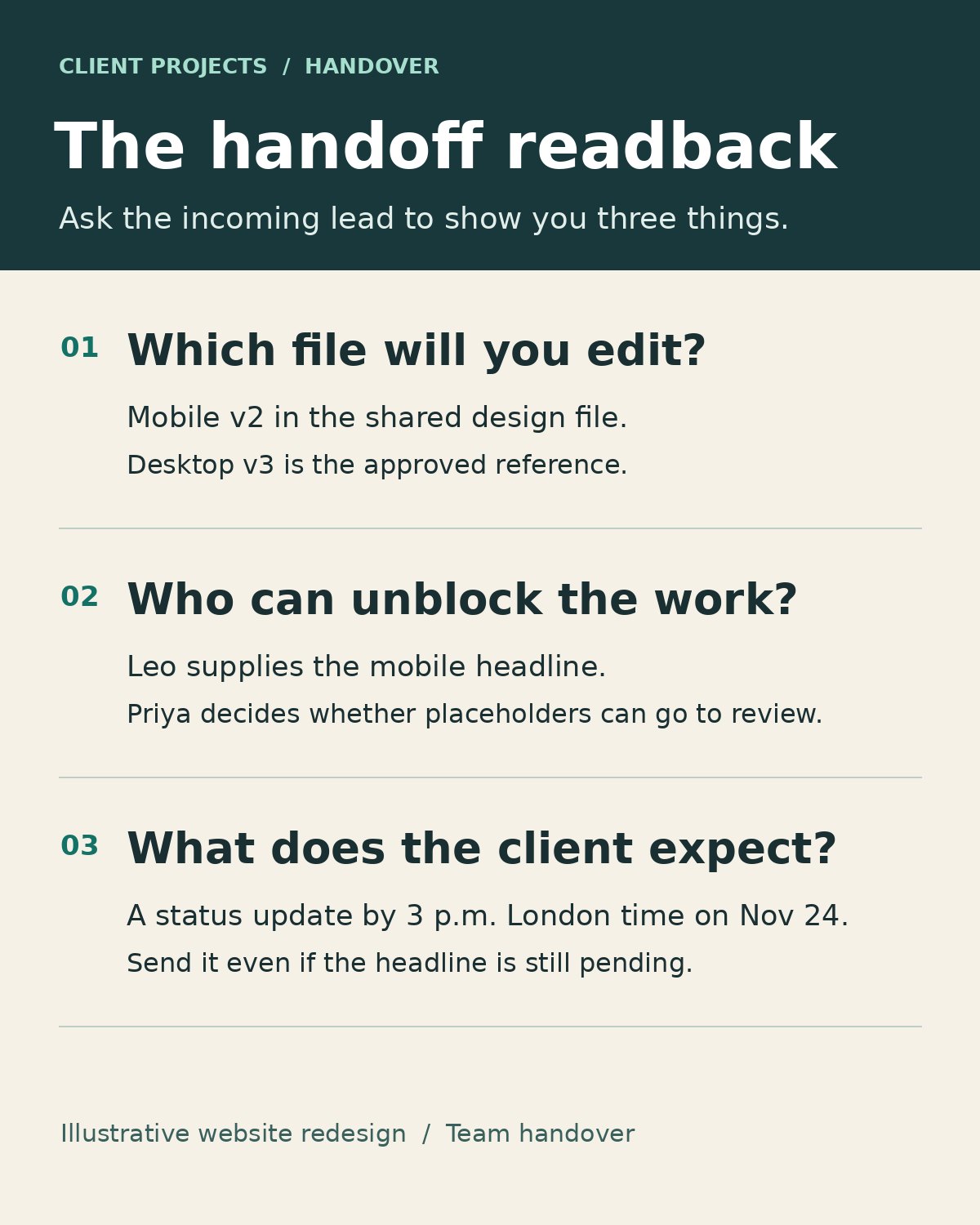
A useful note might say, “Edit the Mobile v2 page in the team design file. The Desktop v3 PDF in Client Review is the approved reference.” Ask the incoming owner to open the source with their own account and confirm they can edit it. If they can only view it, name the workspace administrator who can grant access. Keep passwords out of the record.
Who owns the deadline after the outgoing lead leaves? Who can actually approve a change? Record those names alongside their responsibilities and the effective handover time. Otherwise, the colleague who attends every meeting may end up being treated as the person who can authorize an extra round of work.
In the example, Maya becomes delivery lead on Monday morning. Leo, the client’s content editor, supplies copy. Priya, the marketing director, approves the design. Maya can now ask Leo for a missing headline without sending him a request to sign off on the whole homepage. For a prolonged pause, identify who watches the client inbox until delivery formally resumes.
5. Last client update and next promised contact
Capture the last message that changed the client’s expectations, with its date and a link to the thread. Record the next promised contact in the client’s time zone. Read the wording carefully. “We’ll update you Friday” and “We’ll deliver Friday” create different obligations.
Suppose the outgoing lead wrote, “You’ll hear from us by 3 p.m. London time on November 24, even if the copy is still under review.” The next lead owes a status update at that time. She can keep that promise even if she has no mobile preview to send.
6. Decisions made and requests still open
Preserve decisions someone might otherwise reopen. Write down what was decided, who decided it, and where to find the rationale. In the redesign, Priya chose a static hero because the client’s team needs to replace the image in-house. That detail helps a new designer understand why an earlier animated concept was set aside.
Give an undecided request its own line. “Priya asked what a second mobile concept would cost. Maya owes an estimate. Work has not been authorized.” Recording a request this way lets the client explore an idea while the team assesses its effect on scope.
7. Blocker, dependency and follow-up trigger
State what is missing and which piece of work it holds up. “Waiting on client” can stop an entire team unnecessarily. Here, Leo’s final headline holds up the mobile hero review. The designer can still check the navigation and footer against the approved desktop layout.
Give the dependency a follow-up trigger. If Leo’s copy has not arrived by noon London time on November 24, Maya will ask Priya whether the team may submit a layout with placeholder text. Record who owns that follow-up. A paused project may have no restart date, but it can still have a person responsible for checking the condition that would restart it.
8. First next action and evidence of completion
Write the first action the incoming owner can take, with a deadline and an observable finish. For Maya, that reads, “On November 23, open Mobile v2 and send Leo the hero frame with its available space marked. Link the sent message in the project record.” Anyone covering for Maya can tell whether that step happened.
Choose a step within the new owner’s control. “Get the headline approved” depends on another person’s response. Sending the frame gives Leo what he needs and produces a record that the next person can find. When the copy arrives, replace the completed action with the next one.
Put the handoff fields to work before the next client call
Give the incoming lead the record and ask her to show which file she would edit, who she would contact about the missing headline, and what she would promise the client on Tuesday. Let her use the record without coaching. If she opens the desktop PDF or promises a finished mobile layout, fix the entry that led her there.
Once Maya can open Mobile v2, reach Leo, find the wording of the promised update, and ask her to acknowledge ownership in the project thread. The client’s next message then reaches someone who knows exactly where the work stopped.