
A supplier sends a two-page Chinese VAT invoice. Your OCR integration reads the invoice number and total correctly, then sends only the first page of purchases to your accounting system. The bill looks complete until someone tries to match it to a purchase order. Prevent that failure by treating each invoice as one header linked to a set of numbered lines. Save the source page for every value and reconcile the lines before releasing the bill for approval.
What we checked
On November 18, 2026, the editorial review examined the public VAT invoice documentation from Tencent Cloud, Baidu AI Cloud and Alibaba Cloud. Tencent documents page selection and a separate array of item details. Baidu describes different recognition coverage for different invoice formats. Alibaba identifies RecognizeInvoice as its own VAT invoice extraction operation. These observations establish what to investigate in a pilot. No live supplier document was submitted and no accuracy, latency or retention measurement was made.
Choose a starting point for your pilot
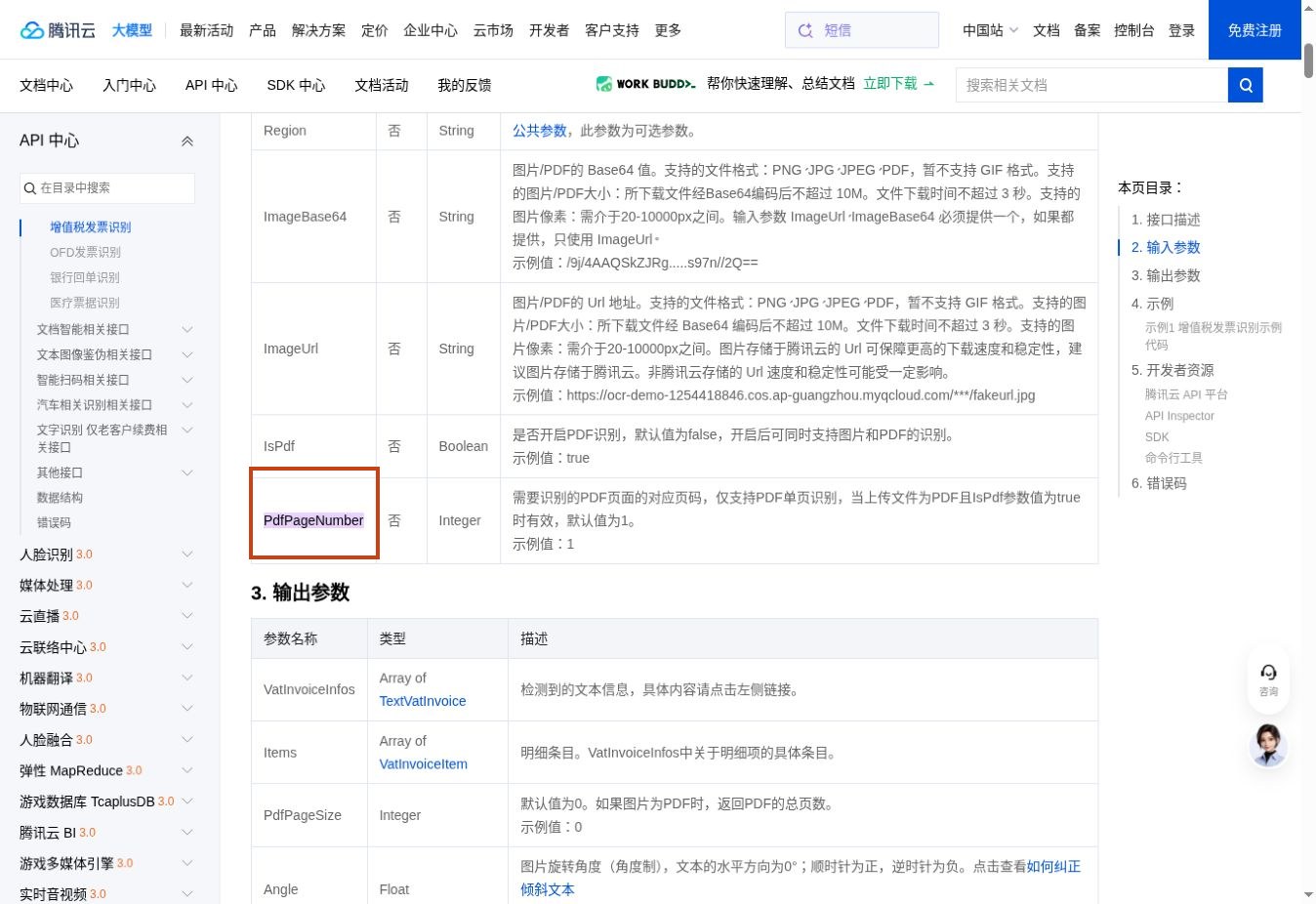
Tencent Cloud lists the Items array in the output schema. Map these rows separately from the invoice header. Checked November 18, 2026.
| API | What the documentation tells you | First pilot question |
| Tencent Cloud VatInvoiceOCR | Returns invoice fields and an Items array. PDF recognition uses a page parameter. | Can your importer retrieve every page and join the rows once? |
| Baidu VAT invoice OCR | Documents seller, buyer, goods and tax information. Coverage depends on invoice type. | Do your ordinary, special and roll invoices return the fields your ERP requires? |
| Alibaba Cloud RecognizeInvoice | Extracts VAT invoice details including identifiers and tax-inclusive total. | Does a response for your actual layout contain enough detail to match a purchase order? |
Start with the API whose documented behavior addresses your most expensive failure. If clerks already enter totals quickly but spend their time repairing missing lines, use line completeness as the deciding measure. A header-only result may still suit a team that records a single expense per bill.
Build the mapping before choosing an API
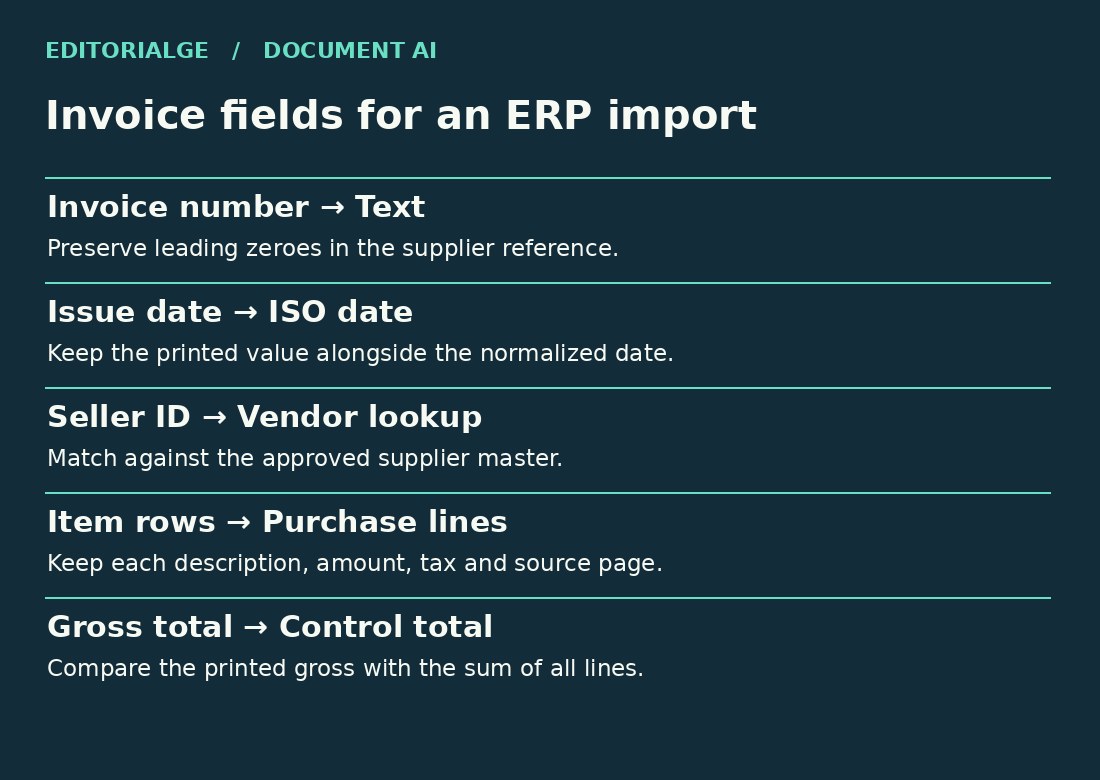
Ask the accounts-payable clerk for a sample ERP import template. Mark each field as required, optional or assigned by a person. A field can be easy to recognize and still be unsafe to populate automatically. The printed supplier name, for example, is evidence for matching a vendor record. Only the ERP can supply its internal vendor ID.
| Printed field | Target field | Mapping rule |
| 发票号码 · Invoice number | invoice_number | Store the original string. Preserve leading zeroes. |
| 开票日期 · Issue date | issue_date | Keep the printed value and normalized ISO date. |
| 销售方名称 · Seller name | seller_name_raw | Match to an approved vendor using the seller identifier when available. |
| 项目名称 · Item name | lines[].description | Keep line order, source page and original description. |
| 金额 / 税额 · Amount / tax | lines[].net / tax | Parse exact decimals. Send missing values to review. |
| 价税合计 · Total including tax | gross_total | Compare with the sum of line amounts and taxes. |
Keep three records together: the source document, the original API response and the mapped invoice. This lets a reviewer distinguish a recognition error from a mapping bug. It also allows a corrected mapping to be replayed without paying for recognition again, where your retention agreement permits storage.
Handle the second page explicitly
Tencent Cloud documents Pdf Page Number as a single-page selector. Set it explicitly when processing a multipage invoice. Checked November 18, 2026.
Tencent’s documented PDF switch defaults to false. With PDF recognition enabled, Pdf Page Number selects one page and defaults to page one. The response includes Pdf Page Size. Read the first response, enumerate the remaining pages and persist each result against its page number. A retry for page two should replace that page’s extraction within the same job. Appending it blindly can double the bill.
Count the pages received before reconciling totals. When one file contains several invoice numbers, group by document identity and check the source images before merging. A repeated header on a continuation page can be legitimate. Two unrelated invoices in the same scan need separate ERP records.
Follow one invoice from capture to approval
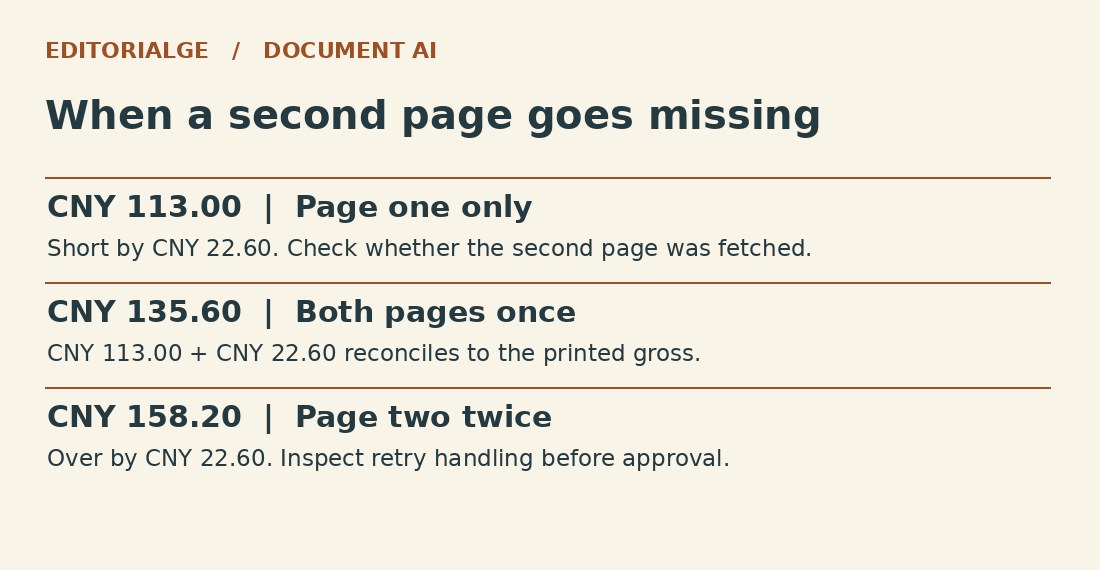
Consider a fictional two-page supplier invoice numbered 00004217. Page one contains two units at CNY 50.00 each, with CNY 13.00 tax printed on the line. Page two contains one unit at CNY 20.00 with CNY 2.60 tax. The printed gross total is CNY 135.60. All numbers here are illustrative, including the printed tax amounts.
| Processing result | Gross derived from lines | Decision |
| Both pages imported once | 113.00 + 22.60 = 135.60 | Amounts reconcile. Continue vendor and purchase-order checks. |
| Only page one imported | 113.00 | Hold. Page two and CNY 22.60 are missing. |
| Page two appended twice | 158.20 | Hold. Inspect the duplicate page and its request history. |
Even the passing row has another failure mode. If the import converts 00004217 into the integer 4217, it can lose the reference the supplier uses for follow-up. Test the final exported file and the ERP record. A correct JSON response is only the start of the transaction.
Measure errors where they create work
Build a small pilot set from invoice types your team actually receives. Include a clean electronic invoice, a skewed photo, a multipage scan and a document with a discount or credit line. Use documents you may process under the provider agreement. Have a reviewer transcribe the expected header and rows before inspecting any API output.
Report the number of exact matches over the number of expected fields for invoice identifiers. For line completeness, count expected lines recovered exactly once. For gross totals, use a decimal comparison under the rounding rule your finance team approves. Run the same inputs twice under the same settings and compare the mapped results. Record changed fields even when both runs return a successful HTTP response.
Make the purchase decision
Ask for the dated rate card for the specific endpoint and region. Confirm whether a multipage job, failed request or retry consumes another billable unit. Estimate cost per accepted invoice by adding billed calls, storage and review labor, then dividing by the number your team can actually import. Avoid assigning a zero cost to exceptions simply because the API returned a response.
Before uploading production invoices, confirm permitted use of extracted output, processing location, log retention, deletion terms and access to stored images. Keep unresolved terms in the purchase record. Choose the provider whose output your team can reconcile reliably at an acceptable cost per approved bill.