
You print a QR code for your menu, counter, or parking sign, and you worry that someone will stick a fake one on top. That worry is fair, because criminals do this. For QR code security for small businesses, the best defense is a safe generator, editable codes, smart placement, a routine check, trained staff, and clear customer warnings.
Here are the eight steps: vet your generator, switch to editable codes, brand your displays, place codes where staff can see them, inspect on a schedule, train staff, read your scan data, and warn customers. If you already found a fake, jump to the sticker response plan below. We also flag where tool makers promise more than they can deliver.
Why Do QR Code Scams Matter for Small Businesses?
Your customers scan your codes without much thought. They trust that the code on your table or sign is yours. A fake code breaks that trust fast. The FBI has warned that criminals send QR code scans to malicious sites to steal data. They also plant malware on the victim’s device and redirect payments to themselves.
One real case shows how it works. In Austin, Houston, and San Antonio, malicious QR code stickers sent parking payments to criminals. The problem is not the code itself. Experts say QR codes are not malicious on their own. The worry is how easily criminals can make their own fake codes.
Kaspersky reported that its detections of QR code phishing jumped from 46,969 in August 2025 to 249,723 in November 2025. That is more than a fivefold rise. Those numbers count one company’s detections of QR code phishing. They do not measure how many shop stickers exist, how many criminals are active, or how many of your customers are hit. They do show the tactic is growing.
For a small business, the cost is more than one lost payment. A customer who pays a scammer thinking it was you may not come back. You pay in refunds, time, and trust.
What QR Code Scams Should Small Businesses Watch For?
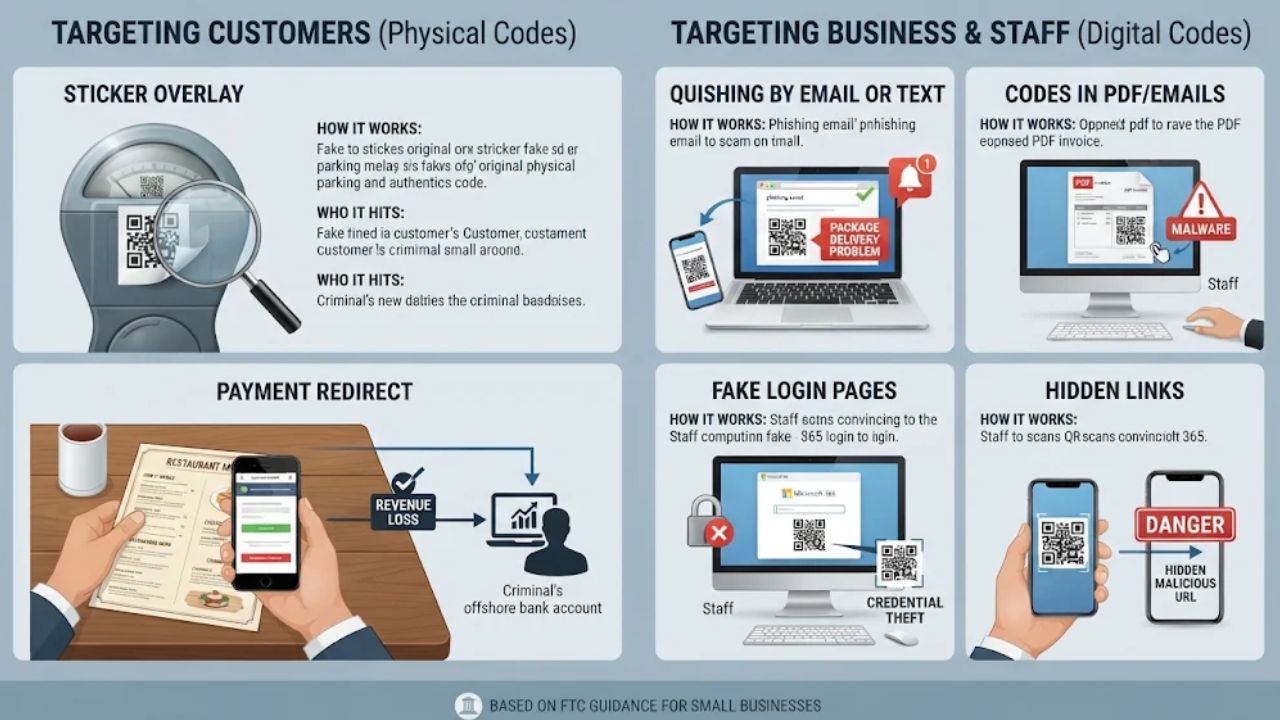
Most scams fall into two groups. Some hit your customers through the codes you put out. Others hit you and your staff through codes in emails and messages.
The table below sums up the main types. The sticker overlay gets the most attention in this guide because you can do the most about it with printed codes.
| Scam | How it works | Who it hits |
| Sticker overlay | A criminal sticks a fake code over a real one. This is easy because making a code is simple. Fake codes have been placed on parking meters. They have also shown up in places like parking garages. | Customers who scan your menu, sign, or payment code |
| Payment redirect | The fake code sends a payment to the criminal instead of to you. | Customers and your income |
| Quishing by email or text | A message asks you to scan a code to fix a problem. One FTC example is a fake claim that a package could not be delivered. | You and your staff |
| Codes in PDFs and email bodies | The codes often appear in email bodies or, even more often, in PDF attachments. | Staff who open invoices and notices |
| Fake login pages | Codes lead to pages that copy Microsoft or company logins, fake HR notices, and fake invoices paired with phone scams. | Staff with work accounts |
| Hidden links | A QR code is a simple, low-cost way to hide a bad link. This helps it slip past many protective tools. | Anyone who scans |
In the sticker case, the code on your wall is fake. In the quishing case, the code arrives in your inbox. You need a plan for both. The FTC gives simple advice for the second kind. Do not scan a code in an email or text you did not expect, especially if it pushes you to act right away.
8 Ways to Use QR Codes Without Inviting Fraud
Start with the steps that cost the least time. You do not need all eight on day one. The time notes below are suggested budgets, not promises, since your count of codes will change them.
1. Pick a Safe QR Code Generator
Why: The generator decides who controls your link. If the tool is sloppy, a scammer or the tool maker can change where your code points.
Suggested time budget: About 30 minutes to compare two or three tools.
Use plain criteria. Pick a tool that:
- Lets you change the destination later (see step 2).
- Uses HTTPS links and lets you use your own web domain.
- Has a clear privacy page that says what it does with scan data.
- Lets you turn a code off and shows who in your account made changes.
- Does not put ads on your landing page or send people through hidden redirects.
Before you pay, test a few more things. Check whether the account supports multi-factor sign-in and lets you limit who can edit. Ask what the renewal price is. Ask what happens to your printed links if you stop paying.
Treat these as features to verify, not promises every vendor keeps. Be careful with free tools. Some are fine, and some are not, so read the terms before you print anything. If a tool will not say where scans go, skip it.
A limit on vendor claims: Many generator sites say QR codes are safe. One Bitly-owned site says, “The short answer is yes, QR Codes are secure.” That is a company that sells QR codes. It is not a neutral test.
The same goes for badges and certifications on a vendor’s page. They can tell you the company follows some rules. They do not prove your code is safe.
HTTPS also has a limit. It protects the connection, but it does not prove a destination is honest. A certified tool cannot stop a stranger from sticking a fake over your printed code.
Check: Can you answer three questions about your tool? Who can change the link? Can you turn it off fast? What data does it keep? If not, keep looking.
2. Switch to Editable Codes
Why: A static code holds one fixed link. An editable code (many vendors call it dynamic) points to a short link that you can change. That means you can change the destination without reprinting.
This helps when your own link is wrong or has been altered. You can fix it fast, with no new print run. It applies to your real link, not to a sticker placed over your code. To switch, you must replace each printed static code with a new editable one. Then scan it and confirm the final page is the right one.
Suggested time budget: About an hour for a few main codes, plus print time. More codes means more time.
Honest limit: An editable code only controls your own code. It cannot control a sticker someone puts on top of it. You still have to find the fake and peel it off.
Be careful with vendor claims here too. The Bitly blog says these codes “offer fraud-prevention features.” The company sells them. The real benefit is speed in fixing your own link, so you still need placement and checks.
Check: Open your account. Change a test code to a new page and scan it. If you cannot do this in a few minutes, your setup is too hard for a bad day.
3. Brand Your Codes and Displays
Why: A code that looks like yours is harder to swap quietly. If your table tent has your logo, colors, and a short line of text, a plain black-and-white sticker looks wrong at once.
Suggested time budget: About an hour to set up. Plan to refresh it when displays wear out.
- Put your name and logo on the holder or sign around the code.
- Add a line such as Scan to view our menu, so people know what to expect.
- Print your web address in words below the code. Then a customer can check that it matches.
- Use the same look on every code, so a different one stands out.
- Print clear, sharp files so the code scans well.
Honest limit: Branding helps people notice a fake. It does not stop one. A scammer can copy your logo, so treat branding as one layer, not a shield.
Check: Show a staff member a photo of your code and a plain code. Can they tell which is yours in two seconds?
4. Place Codes Where You Can See Them
Why: Sticker attacks need a few quiet seconds and a spot nobody watches. Codes in view of staff are harder to cover.
Suggested time budget: About 30 minutes to walk your space and decide.
- Put payment codes where staff can see them from where they usually stand.
- Use holders, frames, or stands that cover the whole code, not loose paper.
- Use tamper-evident labels that show damage if someone peels them. They add a clue, not total protection.
- Store table tents behind the counter after hours, so no one can swap them overnight.
- Avoid codes in far corners, outside walls, or places that no one checks.
We suggest one question for each code: who would notice if this changed? If the answer is no one, move it or watch it more closely.
Check: Walk your space as a customer. Is there a code you could not see from the counter? Fix that one first.
5. Inspect Codes on a Schedule
Why: Even good placement fails if no one looks. A set routine catches what busy days miss.
Suggested time budget: A few minutes a day for busy spots and a longer weekly pass for the rest. Adjust once you see how long a round takes.
Match how often you check to how much money and traffic a spot sees. Payment use and exposure beat the basic schedule. Here is a simple start:
| Location | How often | What to look for |
| Checkout and payment codes | Daily, at open and close | New stickers, raised edges, a different look |
| Table tents and counter stands | Daily, and put them away after hours | Swapped cards, extra labels, wear |
| Outdoor or unattended payment codes | Daily, before first use | Anything stuck over the original |
| Wall signs and window signs without payments | Weekly | Stickers on top, scratches, misalignment |
| Packaging, flyers and receipts | Weekly | Odd codes, wrong prints from a supplier |
Also check any spot right after a customer or staff member reports something odd. Name one owner and one backup for each location.
At each check, run a finger over the code and feel for edges. Scan it with a phone. Confirm the page matches what you approved.
That approved page may not be on your own domain. A payment processor often uses its own. So write the approved address and the expected payment recipient in your log, and compare each scan to them.
A sheet of paper by the till works as a log. Write the date, who checked, and OK or a note.
Check: Can you tell, from the log, who last checked each code and when?
6. Train Your Staff
Why: Your staff stand next to your codes all day. They are your best alarm. A short, clear routine helps everyone act the same way.
Suggested training plan: One short session at first, then a quick refresher at team meetings.
Cover these points:
- Spot tampering. Look for a sticker over a code, a code that looks new, or a code that does not match your style.
- Report without blame. Make it safe to say this looks wrong. Give them one person to tell.
- Listen to customers. A customer who says the code went somewhere odd may have found a fake.
- Handle codes in messages. Do not scan a code in an unexpected email or text, especially one that rushes you.
- Watch for fake logins. Scam codes often lead to pages that copy Microsoft or company logins. Type the real address yourself instead.
- Keep devices ready. Update the phone’s operating system, use strong passwords and turn on multi-factor authentication.
Multi-factor sign-in helps if a staff member enters a password on a fake page. It adds a second step a thief may not have. It does not make a bad page safe, so training still counts.
Check: Ask a staff member what to do if they find a sticker on your payment code. They should answer in one breath.
7. Read Your Scan Analytics for Fraud Signs
Why: Tools for editable codes can track where, when and how often codes are scanned, so you can spot red flags quickly.
Suggested time budget: Start with about 10 minutes a week and adjust.
Know what the data includes. One vendor says its tracking collects only aggregated, non-personal data. That means location at the country or city level, scan frequency, timestamps, and device operating systems. Do not expect names or exact positions.
Each week, compare every code with its usual activity. Then ask if a busy spell or a promotion explains the change. If not, inspect that spot and check where the code leads.
These patterns are reasons to look closer:
- A sudden drop at one location. Say your table codes get steady scans, and one week the count falls while the cafe is as busy as ever. Go look at that table.
- Scans from places you do not serve. If you run one cafe in one city and see many scans from far away, ask why.
- Scans at odd hours. Lots of activity when you are closed deserves a look.
- A sharp spike. A big jump with no promotion could mean someone is sharing your link.
- A shift in operating-system mix. This is a weak clue on its own.
Honest limit: Your analytics only count scans of your real code. A scan of a fake sticker never reaches your dashboard. A drop may be one reason to check a spot, but it is a prompt to investigate, not proof of fraud.
Use a separate code for each location if your tool allows it. Then a drop at one table, door or sign points you to the right place.
Check: Can you see scans by code and by day? If your tool only shows one total, you will miss a local problem.
8. Teach Customers How to Scan Safely
Why: If a customer knows what to look for, they can catch a fake before it costs them. They are also more likely to tell you.
Suggested time budget: About 20 minutes to make a small sign.
Put a short note near your codes. Base it on FTC advice. Ask customers to:
- Look at the web address before they open it. Check that it is not spoofed, and watch for misspellings or a switched letter.
- Be wary of a code in an email or text they did not expect, especially one that rushes them.
- Tell your staff if a code looks stuck on, scratched, or different.
Also say what you will never do. For example, a sign could say that you will never ask customers to download an app to pay. Only write this if it is true for your business.
Say where your real codes live, such as the menu stand and the till. Keep the sign short, because three lines work better than a page.
Check: Ask a regular to read your sign and tell you what it says. If they can, it works.
What to Do If Someone Puts a Fake QR Code Over Yours
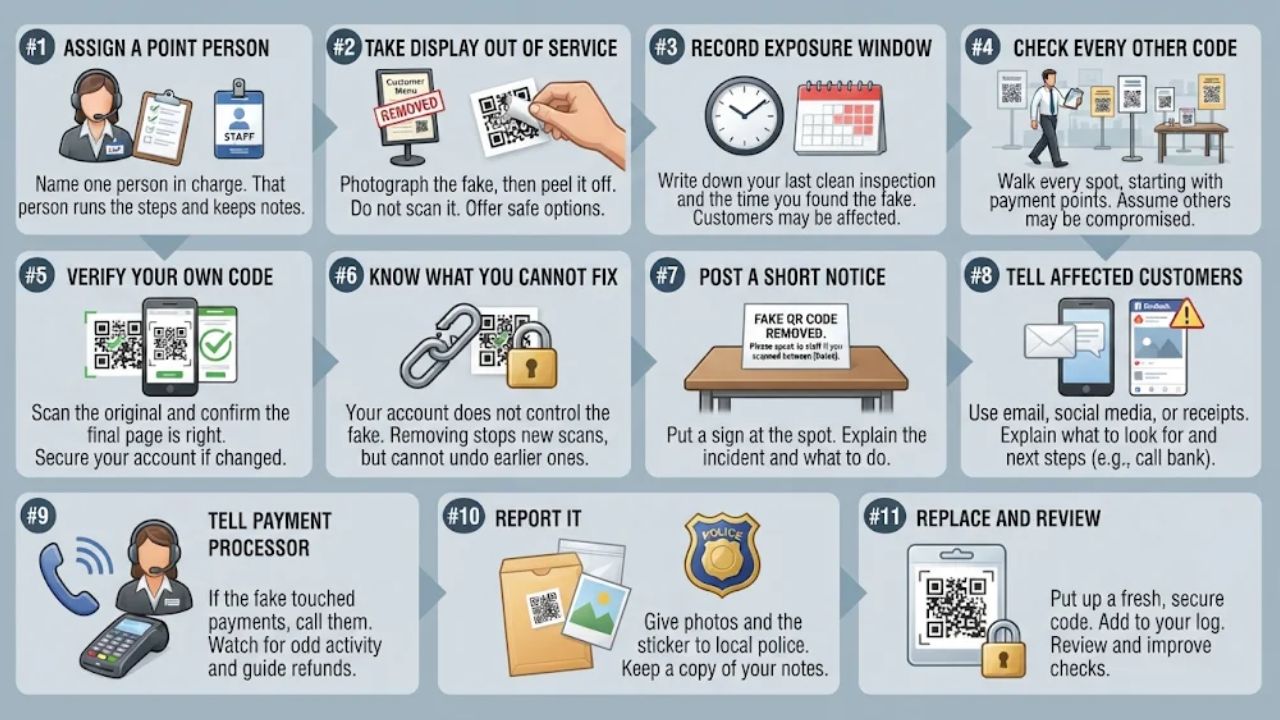
Stay calm and work through the steps in order. The time this takes depends on how many codes you have and how many customers scanned.
- Name one person in charge. That person runs the steps and keeps notes.
- Take the display out of service. Photograph the fake in place, with the date and time. Then peel it off carefully and keep it in a bag. Do not scan it on a device that holds important data. Offer a safe option, such as staff taking orders or payments by hand.
- Record the exposure window. Write down your last clean inspection and the time you found the fake. Customers who scanned in that window may be affected.
- Check every other code. Walk every spot on your inspection table, starting with payment points. Do not assume this was the only one.
- Verify your own code. Scan the original and confirm the final page is right. If your own link was changed, turn the code off or point it to a verified notice page until you have secured your account and set the right destination.
- Know what you cannot fix. Your account does not control the fake. You cannot switch off a sticker that points to the criminal’s link. Removing it stops that display from sending new scans there, but it does not undo earlier scans.
- Post a short notice. Put a sign at the spot. Say that a fake QR code was placed there, that it has been removed, and that anyone who scanned a code there between the dates you list should talk to you. Fill in the real dates.
- Tell customers who may be affected. Use your email list, social posts, or the receipt line. Say what happened, what to look for, and what to do next, such as calling their bank if they paid.
- Tell your payment processor. If the fake touched payments, call them. They can watch for odd activity and guide you on refunds.
- Report it. Give your photos and the sticker to the local police. Keep a copy of your notes.
- Replace and review. Put up a fresh code in a holder with a tamper-evident label. Add a line to your log. Ask what let it happen, then move the code or check it more often.
Write these steps on one page and keep it where staff can find it. On a bad day, no one wants to think hard.
Start With These Three Steps This Week
You do not need to do all eight things at once. These three are a practical place to start.
- Walk your space today. Find every QR code you have. Check each for stickers, then start the daily and weekly schedule above.
- Move key codes to editable ones. Start with payment and menu codes. Changing a destination without reprinting is a big help in a crisis.
- Write your one-page response plan. Put the steps above on a sheet and show it to your staff.
Criminals use QR codes because making fakes is easy. Good QR code security for small businesses makes fakes easier to spot, faster to remove, and less costly when they appear. A few minutes of routine does that better than any badge or promise from a vendor.
Frequently Asked Questions About QR Code Security for Small Businesses
1. Why do QR codes pose a fraud risk for small businesses?
Scammers use a tactic called “quishing” where they paste fake codes over real ones, and one scan can redirect customers to phishing sites. According to the FBI’s 2024 Internet Crime Report, QR code-related fraud complaints jumped by over 300% from the previous year. A quick visual check of every printed code keeps your brand and your buyers safe.
2. How can I make sure my QR codes are safe to scan?
Use a trusted generator like Bitly or Flowcode, and test each code before you print it. Add your logo and a short URL so people can spot a real code at a glance.
3. How often should I check my QR codes?
Check them weekly, since scammers can swap a code in minutes during busy hours.
4. What should I do if a customer reports a fake QR code?
Remove the code immediately and alert your customers via email and social media. Replace it with a new code, report the incident to ReportFraud.ftc.gov, and monitor scan data for unusual spikes.