
A busy week rarely begins as a tidy schedule. It starts with meetings, deadlines, errands, unfinished work, and commitments scattered across messages, notes, and calendars. You can use AI to plan your week by turning that material into a practical first draft.
The useful part is giving the system clear limits and letting it sort, group, and rearrange work. These methods begin with basic planning and end with reminders and midweek changes. A general assistant can handle them, although calendar-connected tools automate more steps.
How to Use AI to Plan Your Week Safely
Provide five inputs before requesting a schedule: fixed commitments, deadlines, estimated task lengths, preferred working hours, and personal time that cannot move. Without these limits, AI may fill every open space or treat guesses as firm facts.
Ask for a draft before allowing a connected tool to create, move, or invite people to events. For confidential work, start with a simplified list and neutral labels rather than granting calendar access immediately.
1. Sort a Messy Task List
AI can convert rough notes into categories. Paste a brain dump and ask it to separate tasks, appointments, decisions, and ideas, flagging anything without a deadline or clear next action.
Try: “Organize this list, but do not schedule it. Ask me about unclear deadlines and time estimates.” With vague input, a task such as “website” may become an unrealistic one-hour block. Clarify the action first.
2. Test Your Priorities

People often mark too many tasks as urgent. Ask AI to compare deadline, consequence, effort, and dependency, then identify the three items that would cause the biggest problem if left unfinished.
Treat the result as a second opinion. A model cannot know that a short client reply protects an important relationship or that a family commitment outranks an optional meeting unless you provide that context.
3. Place Fixed Commitments First
Add classes, shifts, appointments, school pickup, prayer time, travel, and meetings before flexible tasks. Then use AI to plan your week around what remains.
Include the friction calendars hide: time zones, preparation, travel, waiting, and what follows an event. A 30-minute appointment may occupy much more of the day once the journey is included.
4. Reserve Time for Demanding Work
A task list shows what exists; time-blocking reveals whether it fits. Ask AI to place difficult tasks during stronger concentration periods and divide long work at sensible stopping points. A report could become separate drafting and editing blocks.
Motion and Reclaim can schedule tasks using availability, deadlines, duration, and priority. Motion adjusts placement as constraints change, while Reclaim applies priority rules around existing events. These services suit frequently changing calendars; a general assistant and ordinary calendar may be enough otherwise.
5. Add Breathing Room
Automatically generated schedules often look better on screen than they feel. To use AI to plan your week realistically, request gaps between meetings, protected meal times, travel allowances, and some unassigned space.
Buffers absorb late calls, technical problems, and inaccurate estimates. If the draft occupies nearly every free minute, defer lower-value work. Cutting sleep or breaks does not solve overload.
6. Reduce Meeting Back-and-Forth
Calendar-aware assistants can find shared openings. At the time of writing, Gemini in Google Calendar can suggest times from participants’ availability on a computer, but it requires an eligible Workspace plan. Copilot can recommend mutually available times in Outlook for Microsoft 365. Access may vary by account and organization.
Review invitations before sending them. Free time does not reveal whether someone needs lunch, works in another time zone, or should attend. A shorter meeting with fewer people may be better.
7. Batch Small Tasks
Use AI to plan your week in batches when small jobs scatter your attention. Group email replies, calls, invoices, forms, errands, or household administration by context. Two admin periods may be easier than a dozen scattered reminders.
Do not group tasks solely because they appear similar. A sensitive performance email needs more care than a routine confirmation, while an errand with restricted opening hours cannot join an evening batch.
8. Include Personal Commitments
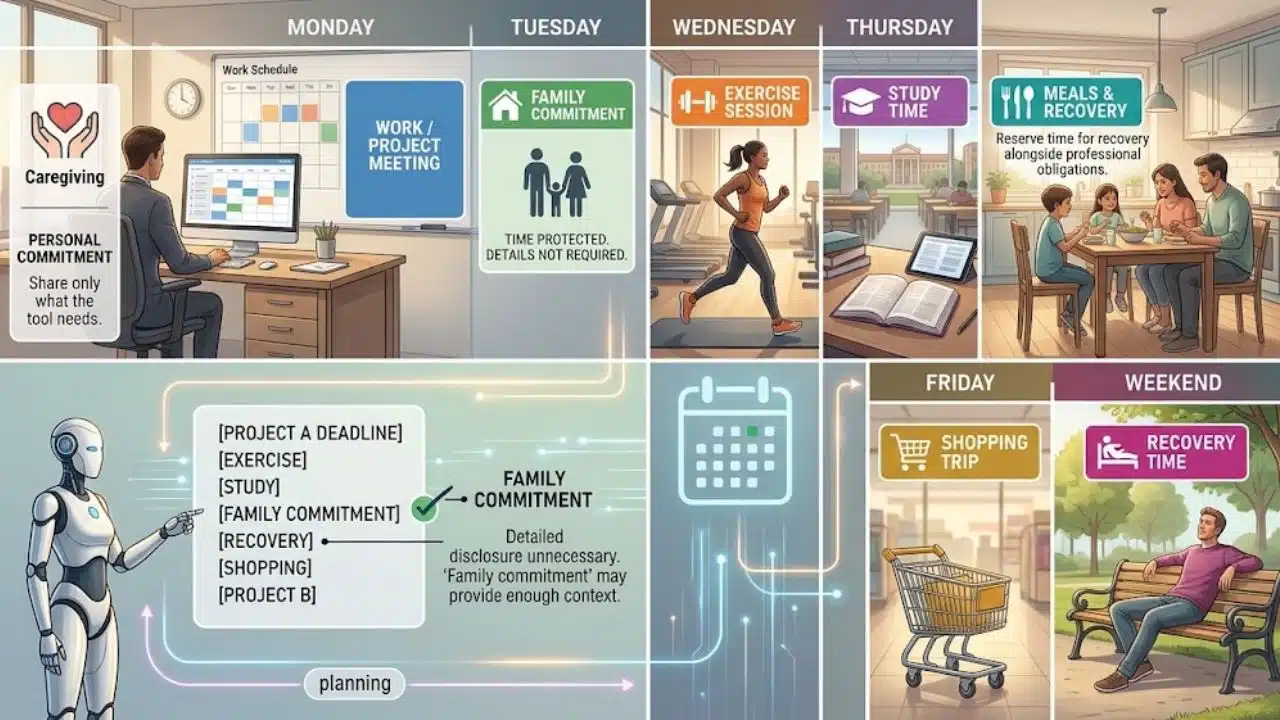
To use AI to plan your week as a whole, include life outside work. AI can reserve time for caregiving, exercise, study, shopping, meals, and recovery alongside professional obligations. This is especially useful for parents, students, and people managing several roles.
Detailed disclosure is unnecessary. “Family commitment” may provide enough context to protect the time. Share only what the tool needs.
9. Create Timely Reminders
A reminder should arrive when action is possible, not when a deadline expires. AI can turn a Friday submission into earlier prompts to collect material, draft, review, and send. This is another way to use AI to plan your week without rebuilding the calendar.
ChatGPT currently supports eligible one-time and recurring scheduled tasks with notifications. Limits and timing options vary by plan, app version, and workspace settings. A normal phone or calendar reminder remains the better choice when a dependable alert is all that is required.
10. Replan After Disruptions
The larger benefit appears when a delay, urgent request, sick day, or cancelled meeting changes the available time.
Use AI to plan your week again with the new facts and firm boundaries: “Move unfinished flexible tasks, preserve Thursday’s deadline, do not schedule after 6 p.m., and show what must be deferred.” This creates a more honest revision than forcing every displaced task into smaller gaps.
What Weekly Plans Miss
AI arranges only the information it receives. It does not automatically understand energy, emotional load, unreliable transport, a child’s changing routine, or the preparation hidden inside a task. A schedule can be mathematically possible and personally miserable.
Check whether the plan leaves room for disruption, places demanding work sensibly, or repeatedly postpones the same task. Repeated movement often signals too much work or a poor estimate.
Connected planning tools may receive permission to read calendar information or create and modify events. Exact access and data handling differ across providers, account types, and workplace policies. Review requested permissions and the relevant privacy terms before sharing confidential work, medical details, travel information, or a highly detailed family calendar.
Final Thoughts
Start with one week. Provide a cleaned-up task list and fixed commitments, request two schedules, and choose the version with more breathing room. Later, correct any unrealistic estimates.
The safest way to use AI to plan your week is to delegate sorting and rearranging while keeping judgment, privacy, and trade-offs in human hands. A useful plan should make the week more believable, not merely make the calendar look full.
Frequently Asked Questions (FAQs)
Can AI plan a week without calendar access?
Yes. Paste a cleaned-up list of commitments and tasks, then request a proposed schedule in text. This provides AI planning help without connecting personal accounts.
Is a paid AI scheduling tool necessary?
Usually not for a stable schedule. A general assistant and existing calendar may be enough. Automatic schedulers become more useful when frequent changes create substantial rescheduling work.
What information should stay out of a planning prompt?
Avoid unnecessary passwords, financial account details, medical information, confidential client material, private meeting notes, and other people’s sensitive data. Use general labels when the details do not affect scheduling.