Wondering how to protect a small business from cyber attacks without turning your budget into another monthly headache? The good news is that the strongest first steps are often simple: protect accounts, keep devices updated, back up files, and give people a clear way to report anything suspicious.
Cyber threats affect small businesses, remote teams, and solo owners because daily work now runs through email, cloud-based systems, phones, laptops, payment tools, and shared files.
You do not need a large IT department to make progress. Start with the low-cost controls that block common attacks, then build better habits one step at a time.
Common Cyber Threats Faced by Small Businesses
Most cyber attacks against small businesses start with a small opening: a convincing email, a reused password, an old browser, or a vendor account with too much access. Attackers look for the quickest route to sensitive information, payment card security data, customer records, and business email.
Verizon’s 2026 Data Breach Investigations Report found that people remain a major target, with mobile social engineering attacks showing a 40% higher success rate than traditional email phishing. That makes employee training, multi-factor authentication, and clear payment checks practical budget priorities.
Phishing Attacks
Phishing is a social engineering scam that tries to get someone to click a fake link, open a harmful attachment, share a password, or approve a payment. A message may look like it came from a bank, a delivery service, a vendor, or even your own manager.
The Federal Trade Commission advises small businesses to use email authentication, automatic software updates, backups, and regular staff training. If your company uses its own business email address, ask your provider about SPF, DKIM, and DMARC, which help receiving mail systems spot messages that impersonate your business.
- Pause before payment changes: Call a known phone number to confirm any new bank details or urgent invoice request.
- Check the full sender address: Display names can be copied, but the actual address often exposes an impersonator.
- Report, do not just delete: Give staff one mailbox or contact person for suspicious messages so you can warn everyone else.
- Practice with realistic examples: Include email, text-message, and voice scams because attackers use all three.
Free resources from the Federal Trade Commission, the National Cybersecurity Alliance, and the Small Biz Cyber Planner 2.0 can help you build training without buying a large learning platform.
Ransomware
Ransomware locks files or systems and demands money for access. It can enter through phishing, stolen credentials, unpatched software, exposed remote access, or drive-by downloads from compromised sites and ads.
A ransomware event can halt scheduling, billing, payroll, customer service, and access to sensitive information. Paying a ransom does not guarantee that criminals will restore your data or keep copies from being misused.
Use the 3-2-1 backup approach: keep three copies of important data, store them on two types of media, and keep one copy offsite. For cloud-based systems, check whether your plan includes a true backup and recovery option, because file retention alone may not let you restore deleted or encrypted data.
Test one real restore at least quarterly. Restoring a sample folder, accounting file, or customer database tells you whether the backup is usable before a ransomware incident forces the question.
Malware
Malware is harmful software that can steal data, monitor activity, damage files, or give hackers remote control of a device. It often hides in attachments, fake software updates, browser extensions, pirated programs, and old applications that no longer receive software updates.
Put security software on every company device, including laptops used at home. Microsoft Defender provides built-in antivirus software on supported Windows devices, while paid endpoint tools can add centralized alerts and response features as your business grows.
- Turn on automatic operating-system, browser, and app updates.
- Remove software that staff no longer use, especially old remote-access tools.
- Limit local administrator rights so a standard user cannot install random programs.
- Use full-disk encryption on laptops that store customer or employee data.
Do not overlook printers, routers, point-of-sale devices, and network storage. These devices need firmware updates too, and they can become an easy path to unauthorized access if they keep default passwords.
Business Email Compromise
Business email compromise, often called BEC, is a payment fraud scheme. Criminals pose as a vendor, executive, lawyer, or employee and ask someone to send money, buy gift cards, or change account details.
The FBI’s Internet Crime Complaint Center has described BEC as a multibillion-dollar fraud problem. For a small business, one rushed wire transfer can cause more damage than the cost of months of basic security tools.
| Common BEC request | Safer response |
|---|---|
| “Our bank details changed. Please pay this new account.” | Verify the change through a known phone number, not the email reply button. |
| “I need this wire sent in the next hour.” | Require a second approver for transfers and payment changes. |
| “Send me the employee tax files now.” | Confirm the request through another channel before sharing sensitive information. |
Create a two-person approval rule for payments above an amount that fits your business. Also give finance staff permission to slow down, even when the request appears to come from an owner or senior manager.
Affordable Cybersecurity Measures for Small Businesses
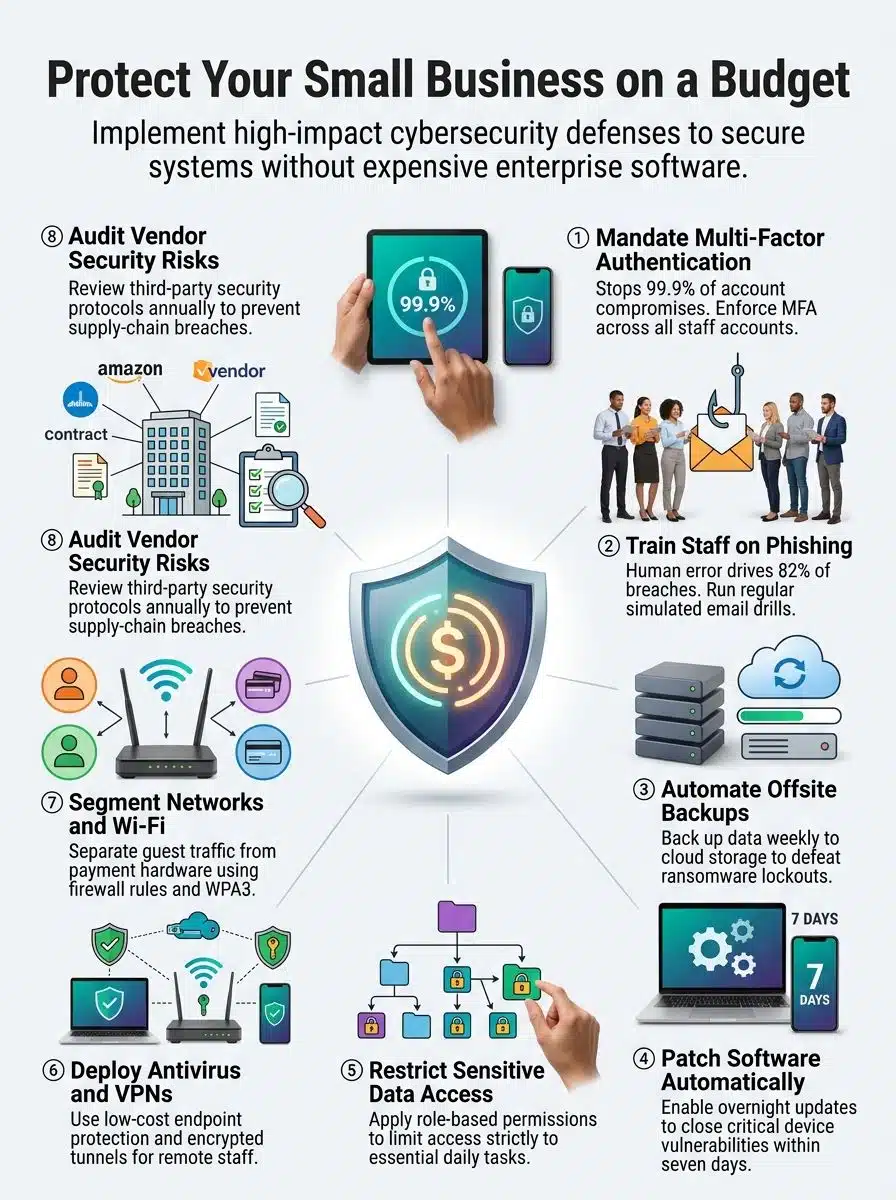
Small businesses get better results by making a few controls routine than by buying a long list of tools that nobody manages. Start with people, accounts, backups, software updates, and Wi-Fi security.
Train Employees on Cybersecurity Basics
Employee training works best when it is short, specific, and repeated. A yearly slide deck is easy to forget, while brief sessions tied to real tasks help people spot trouble during a busy workday.
Focus your training on the actions that protect the business: reporting suspicious messages, checking payment requests, locking devices, protecting passwords, and asking before sharing sensitive information.
- Run a 10-minute phishing refresher each month or quarter.
- Show one fake invoice, delivery alert, or password-reset message that matches your industry.
- Teach staff to report mistakes quickly, without blame or embarrassment.
- Include remote workers, temporary staff, and anyone who can access cloud storage or payment systems.
- Repeat the payment-verification process until everyone knows who must approve a change.
Track simple results, such as the number of suspicious emails reported and the number of employees using MFA. These numbers show whether training is changing daily business practices.
Use Strong Passwords and Enable Multi-Factor Authentication
Strong passwords still matter, but passwords alone are easy to steal through phishing and credential stuffing. Multi-factor authentication adds another proof of identity, such as an authenticator app prompt, a code, biometric sign-in, or a physical security key.
CISA recommends phishing-resistant MFA where available. A physical security key, such as a YubiKey, provides stronger phishing protection than a text-message code because it is harder for criminals to intercept or trick someone into sharing.
- Require multi-factor authentication for email, cloud storage, remote access, payroll, banking, and administrator accounts.
- Use a password manager so every account can have a long, unique password.
- Start with administrator and finance accounts if you cannot roll out MFA everywhere in one day.
- Store recovery codes in a protected business record, not in an employee’s personal inbox.
- Remove old accounts quickly when an employee, contractor, or vendor leaves.
Avoid forced password changes on a fixed schedule unless there is evidence of compromise. Long, unique passphrases stored in a password manager are easier for staff to use and reduce password reuse.
Regularly Back Up Critical Business Data
Data backup protects your ability to keep working after ransomware, accidental deletion, hardware failure, theft, or a fire. Start by listing the files and systems you could not operate without for even one day.
Include accounting records, customer files, contracts, email, employee documents, point-of-sale reports, and key cloud folders. Assign one person to check that backups actually ran.
- Choose the data that needs backup and write down where it lives.
- Set automatic backups for files that change often.
- Keep an offsite or offline copy that ransomware cannot reach through the network.
- Test a restore and record how long it takes.
- Fix missed backup jobs as soon as you find them.
If you handle payment card security data, avoid storing card numbers unless your payment provider requires it. Reducing the sensitive information you keep also reduces what attackers can steal.
Keep Software and Systems Updated
Software updates close known security gaps before hackers can use them. Turn on automatic updates for operating systems, browsers, office apps, antivirus software, phones, and business tools whenever the option is available.
Make a short inventory of every device and service your business uses. Include routers, printers, Wi-Fi equipment, laptops, tablets, point-of-sale terminals, cloud-based systems, and employee-owned devices that connect to work accounts.
- Apply high-risk security fixes quickly, based on the vendor’s severity guidance.
- Schedule normal updates outside business hours when possible.
- Replace software that no longer receives security patches.
- Review browser extensions and remove anything staff do not need.
- Check router and printer firmware at least quarterly.
A simple spreadsheet with device name, owner, software version, and last update date is enough for many small businesses. It gives you a clear list instead of guessing during an incident.
Implement a Firewall and Secure Wi-Fi Networks
A firewall filters network traffic and helps block unwanted connections before they reach your devices. Most business routers include firewall settings, but they need secure configuration and regular firmware updates.
The FTC lists WPA2 and WPA3 as the wireless encryption standards that protect information sent over a Wi-Fi network. If your router only supports older security settings, replace it rather than treating it as a minor issue.
- Change the router’s default administrator password and network name.
- Use WPA3 where available, or WPA2 if WPA3 is not supported.
- Put guest Wi-Fi on a separate network from point-of-sale devices, printers, and work computers.
- Disable remote router administration unless your IT provider truly needs it.
- Close unused ports and review firewall logs if you see repeated failed login attempts.
For remote work, ask staff to avoid public Wi-Fi for sensitive tasks. If they must connect away from home or the office, use a trusted mobile hotspot or a company-approved VPN and MFA.
Cost-Effective Tools to Enhance Security
You can build a sensible security stack without buying enterprise products. Choose tools that solve a specific problem, assign an owner, and review the settings after setup.
Deploy Free or Low-Cost Antivirus Software
Antivirus software scans for known malicious files and suspicious behavior. For supported Windows devices, Microsoft Defender gives many small businesses a useful starting point because it is already built into the operating system.
If you manage several devices, consider a business endpoint protection service that gives you one place to check alerts, updates, and device status. Endpoint detection and response, or EDR, adds monitoring that can help you investigate suspicious activity beyond a basic antivirus scan.
| Tool type | Best use | What to check before choosing |
|---|---|---|
| Built-in antivirus software | Baseline malware protection for individual devices | Automatic updates and real-time protection are turned on |
| Managed endpoint protection | Several company devices or remote workers | Central alerts, device inventory, and support options |
| EDR service | Businesses handling more sensitive information | Who reviews alerts and responds after hours |
Do not install several antivirus products on one device. They can conflict with each other and make troubleshooting harder.
Utilize Virtual Private Networks (VPNs)
A virtual private network, or VPN, encrypts traffic between a device and the VPN service. It can help protect data in transit when staff work from untrusted networks, such as hotel or coffee-shop Wi-Fi.
NordVPN is one consumer-facing option for protecting internet traffic on laptops and phones, but a VPN does not replace strong passwords, multi-factor authentication, software updates, or endpoint security. If staff need access to a private office network, have your IT provider set up remote access with MFA and limited permissions.
- Require MFA before remote users can reach business systems.
- Use separate accounts for each worker instead of sharing one VPN login.
- Disable access when staff or vendors leave.
- Limit remote users to the folders and systems they actually need.
Leverage Secure Cloud Storage for Data Protection
Secure cloud storage gives you an offsite place for working files and backups. It can also make a stolen laptop less disruptive because staff can sign in from another approved device after you secure the affected account.
Choose a provider that supports multi-factor authentication, sharing permissions, activity logs, and version history. Those features help you control who can view or edit files and recover from accidental changes.
Keep cloud storage organized. Separate active working files from backup copies, review shared folders every quarter, and remove public links or former employee access that no longer serve a business purpose.
Best Practices for Small Businesses on a Budget
The best budget plan is a repeatable routine. You want staff to know what they can access, what they should report, where backups live, and who takes charge if something goes wrong.
Limit Access to Sensitive Data Based on Roles
Role-based access control, often called RBAC, gives each person access based on their job. A receptionist may need the appointment calendar, while payroll records, banking details, and administrator controls should stay limited to a small group.
Use the least-privilege approach: give people the minimum access needed for their role, then add more only when there is a real business reason. This limits damage from insider threats, a lost device, or a stolen account.
- Review access when someone changes roles, leaves, or starts a contract.
- Separate administrator accounts from daily email and web-browsing accounts.
- Limit download and sharing rights for sensitive folders.
- Review permission lists at least quarterly.
Pay close attention to shared mailboxes, cloud folders, accounting tools, and customer databases. These systems often collect access over time because nobody removes old permissions.
Monitor and Audit Vendor Security Practices
Vendors can create risk when they process customer information, manage payroll, provide IT support, host files, or connect to your network. Ask clear questions before you give a vendor access to sensitive information.
The FTC advises businesses to put security expectations in writing, verify that vendors follow them, and limit access to the time and data needed for the job.
- Ask what data the vendor collects, stores, shares, and deletes.
- Ask whether the vendor uses encryption, MFA, backups, and incident-response procedures.
- Give vendors separate accounts rather than shared employee logins.
- Set an end date for vendor access and review it at least yearly.
- Require prompt notice if the vendor experiences a breach involving your data.
SOC 2 reports and ISO 27001 certifications can be helpful signals for larger vendors, but they are not a substitute for reviewing what access the vendor will actually have. Match your questions to the data and systems involved.
Create and Enforce a Simple Cybersecurity Policy
A short cybersecurity policy turns good intentions into daily rules. It should be easy for staff to read and specific enough that someone knows what to do without waiting for an IT expert.
NIST’s Cybersecurity Framework 2.0 Small Business Quick Start Guide organizes work around six functions: Govern, Identify, Protect, Detect, Respond, and Recover. Use those headings as a plain-language checklist for your policy and risk assessment.
- Protect accounts: Require strong passwords, password-manager use, and multi-factor authentication.
- Protect devices: Turn on automatic software updates, security software, and screen locks.
- Protect data: Define your data backup schedule, storage location, and restore-test routine.
- Report threats: Name the person or service staff should contact for phishing, lost devices, or suspicious activity.
- Respond to incidents: List who disconnects affected devices, contacts IT help, and communicates with customers if needed.
- Review access: Include onboarding and offboarding steps for employees, contractors, and vendors.
Review the policy every year and after any cyber incident. A one-page policy that people follow beats a long document that sits unread in a folder.
Educate Employees to Recognize Phishing and Fake Links
Phishing training should help staff make one safe choice under pressure: stop, verify, and report. Teach them that a polished message can still be a scam, especially if it creates urgency, fear, or secrecy.
Use examples that match the work your team does. A bookkeeper needs fake invoice examples, a clinic needs records-request examples, and a retail team needs delivery and payment-alert examples.
- Check the sender’s real address, not just the display name.
- Hover over a link before clicking, then compare it with the expected destination.
- Verify urgent payment, payroll, gift card, and bank detail changes by phone.
- Do not enter work passwords after following an unexpected message link.
- Report suspicious emails, texts, and voice calls right away.
Run simulated phishing tests with a coaching mindset. The goal is not to embarrass people. It is to find confusing patterns and give staff a safer habit before cyber criminals test them for real.
Final Words
To protect a small business from cyber attacks, start with the steps that give you the most protection for the least cost: multi-factor authentication, strong passwords, employee training, data backup, software updates, Wi-Fi security, and limited access to sensitive information.
Pick one task this week. Turn on MFA for work email, test a file backup, or create a two-person payment approval rule. Small actions build real data protection over time.