Most software trials are designed to help you reach the impressive part quickly. You import a small file, choose a template, run an automation, or generate a polished result within minutes. That is useful for a demonstration. It is not enough for a buying decision.
To test software before buying, you need to see how the product handles ordinary work: incomplete data, account permissions, team access, repeated tasks, failed integrations, exports, billing limits, and cancellation. A product can look excellent during the first hour and become frustrating once it is part of a daily workflow.
The real question is not whether the software has good features. It is whether those features solve a specific problem well enough to justify the subscription, setup time, training, and future dependence on the service.
Define the Job Before You Create an Account
Start with one clear task. “Find a better project management tool” is too broad. A useful test statement would be more specific:
The software must let three remote team members assign client work, attach files, set approval deadlines, and prepare a weekly progress update without maintaining a separate spreadsheet. That gives the trial a purpose. It also makes it harder to become distracted by attractive features that have little to do with the actual problem.
Write down the following before signing up:
- The main task the software must complete
- The features that are genuinely required
- One limitation that would rule it out
- The people who will use it
- The current process it must replace or improve
The comparison with the existing process matters more than most feature comparisons. A new platform does not need to be impressive on its own. It needs to be better than the email thread, spreadsheet, free app, shared folder, or manual process already in use.
For a freelancer, client access may matter more than advanced reporting. For a small marketing team, reliable approvals and version history may be more valuable than another library of templates. A shop owner may care about inventory syncing while having little use for a sophisticated analytics dashboard.
Read the Pricing Page More Carefully Than the Homepage
The homepage shows what the product can do. The pricing page usually shows what you are actually allowed to do.
Before starting a trial, confirm:
- Whether a payment method is required
- Whether the trial renews automatically
- Which plan begins after the trial
- Whether the displayed monthly price requires annual payment
- Which currency and taxes apply
- How many users, projects, exports, or automations are included
- Whether the features shown during the trial belong to a higher tier
Common restrictions appear around storage, guest access, version history, export quality, API access, scheduled reporting, approval tools, automation runs, AI credits, and customer support. These limits are not minor details. They often determine the real price.
A project management tool may look affordable until every contractor and client needs a paid seat. A design platform may include editing but restrict high-quality exports. An AI product may offer enough free usage for a convincing demonstration but not enough for a normal month of work.
Pay particular attention to products that price by usage. Credits, minutes, tokens, contacts, transactions, storage, and automation runs can be difficult to estimate from a small trial. Test enough activity to understand what normal use would cost.
Know Who Controls the Subscription?
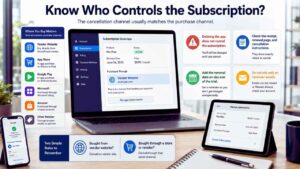
The company providing the software may not be the company handling the payment. A subscription purchased directly from a vendor is usually managed through that vendor’s website. One purchased through Apple, Google Play, Microsoft, Amazon, or another retailer may need to be canceled through the same channel.
This distinction causes avoidable billing problems. Deleting an app or closing an account does not necessarily cancel the subscription attached to it. Google Play explicitly warns that uninstalling an app does not cancel its subscription. Apple recommends canceling an Apple-billed free or discounted trial at least 24 hours before it ends when the user does not want it to renew. Microsoft directs customers who purchased through another retailer to manage the subscription through that retailer.
These are platform-specific policies, not universal rules. Check the receipt, renewal page, and cancellation instructions for the service you are testing. Add the renewal date to a calendar on the first day of the trial. Do not depend on a reminder email arriving at the right time.
Build a Safe Trial Environment
A realistic trial does not require importing everything. Use sample records, duplicated files, test contacts, or one low-risk project at first. Avoid uploading an entire customer list, private contracts, payroll information, unpublished material, health records, or production credentials just to explore the interface.
Account ownership deserves attention as well. A business subscription should not depend on one employee’s private email address unless there is a clear process for transferring control. That becomes a practical problem when the person leaves, changes roles, or loses access.
Connection requests also need a careful look. A tool linked to Google Drive, Gmail, Calendar, Microsoft 365, Slack, Dropbox, a website, or a social account may request permission to do more than sign you in.
Depending on the integration, it may be able to view, copy, create, edit, upload, or delete information. Removing access later can stop future activity, but it may not erase information the provider has already copied. Grant only the access required for the test. Remove unused connections when the evaluation ends.
How to Test Software Before Buying: Complete One Real Workflow
A product tour shows where the buttons are. A real workflow shows whether the software is useful. Choose one representative task and take it from beginning to end. A freelancer evaluating invoicing software might create an invoice, send a test copy, record a payment, and export the transaction. A marketing team might import a small contact list, build a segment, send a test campaign, and review the report. A creator testing video software could edit a short clip, add captions, export it, and open the file on another device.
The task should include the boring parts, not only the feature highlighted in the sales demo. Use imperfect data. Add a duplicate contact. Leave a required field empty. Upload a large or unsupported file. Change a deadline after another user has already commented. Rename a folder connected to an automation.
Real work contains mistakes, late changes, and inconsistent information. Software that performs well only with clean demo data will become a burden quickly. Keep a short record of what happens. Note setup time, confusing settings, failed imports, repeated manual steps, slow pages, and workarounds. One extra click is not a serious problem. Repeating that click 40 times a week may be.
Test the Failure, Not Just the Feature
Many software evaluations stop after the main task works once. That is too generous. Delete an item and try to restore it. Disconnect an integration. Invite someone with the wrong role. Change the time zone. Attempt an export after editing the original record. Then examine the recovery process.
Does the product explain what failed? Can the mistake be reversed? Is there version history? Does the software preserve earlier data, or does it quietly overwrite it? Weak error handling creates more damage than a missing decorative feature. This matters most in software connected to customer records, publishing schedules, invoices, orders, or shared project files.
Repeat the central workflow on another day or device. A successful first attempt may depend on a small dataset, a cached connection, or a generous trial allowance.
Look for the Limits Hidden Behind a Good First Impression
A tool can feel complete during a trial because the dataset is small and only one person is using it. Push beyond that clean setup. Invite another user. Add several projects. Run the automation repeatedly. Upload different file types. Search through enough records to see whether the interface remains manageable. Try the mobile app rather than assuming it mirrors the desktop version.
The most expensive surprise is often not the subscription itself. It is discovered that a normal workflow requires a higher plan. Guest access, advanced permissions, custom branding, audit logs, premium connectors, two-way syncing, API access, and longer version history are common upgrade points. Verify the tier for every feature that affects the buying decision.
Annual billing deserves particular caution. A discount is valuable only when the product has already proved that people will use it. For unfamiliar software, monthly billing is usually the safer starting point, even when the annual plan looks cheaper.
An Integration Logo Does Not Prove Much

Sales pages often display long rows of familiar app logos. That does not show how well the connections work. An integration may only transfer data in one direction. It may ignore attachments, custom fields, comments, consent records, or deleted items. It may update slowly or require a separate automation service.
Test the exact data flow you need. Create a record in one system and edit it in the other. Change the same field in both places. Remove the linked account temporarily. Add a duplicate. Rename a connected folder.
Then check what the software does when the sync fails. A useful product should show which item failed and provide a reasonable path to fix it. A vague “sync unsuccessful” message is not enough for a workflow involving orders, customer information, invoices, or publishing.
Consider who owns the connection. An integration linked through one employee’s account may stop working when that account is disabled or its permissions change. Business-critical connections should use an account the organization can manage.
Let Someone Else Try It Without a Guided Tour
The person choosing the tool is often more motivated than the people expected to use it. Ask one intended user to complete a small task without step-by-step coaching. See where that person pauses, misreads a label, misses a notification, or returns to the old process.
For team software, look closely at roles, guest access, approvals, search, comments, mobile access, version history, and notification controls. Do not judge adoption by whether people say they like the interface. Judge it by whether they can complete routine work without asking an administrator to repair every mistake.
A product that saves the buyer 20 minutes but creates confusion for five other users is probably not an improvement.
Review Security in Proportion to the Risk
Every software buyer should perform a basic security check. A company handling financial, employee, health, legal, or customer information needs a more detailed one.
At minimum, look for:
- Multifactor authentication
- Separate admin and standard-user roles
- A clear privacy policy
- A documented deletion process
- A way to remove users and connected apps
- Security contact information
- Information about active sessions or login activity
Multifactor authentication should be treated as a standard expectation for software holding valuable business or personal information. Its absence does not automatically make a product unusable, but it should affect the decision.
For higher-risk systems, review data-storage locations, subprocessors, retention periods, breach-notification terms, contractual controls, and relevant compliance reports. Do not rely on a security badge alone. Confirm what product, service, and time period the documentation covers.
Test the Exit Before the Tool Becomes Important
Export is one of the most underrated parts of a software trial. Download the sample data and inspect it outside the platform. Check whether the export includes files, attachments, dates, comments, tags, custom fields, contact details, and relationships between records.
A CSV file may technically count as an export while still leaving out the information needed to rebuild the workflow elsewhere. A proprietary archive may be difficult to use without the original software. Also distinguish between cancellation and account deletion. Cancellation usually stops future renewal. Account deletion may remove access or begin a data-removal process. One does not always perform the other, especially when billing is handled through an app store or retailer.
Post-cancellation access varies. Some providers allow access until the end of the paid period. Trial access may end immediately or continue until the scheduled expiry. Payment plans can have separate obligations. Read the confirmation screen before completing either action, and save the cancellation email.
Contact Support While the Problem Is Small
A trial is the right time to find out whether support can solve a real problem. Ask one specific question about an export format, plan limit, user role, integration, migration issue, or billing arrangement. A fast response is useful, but accuracy matters more. A reply that links to a generic help page without answering the question is a warning.
Search the help center for several tasks you are likely to perform later. Instructions should match the current interface and explain more than the ideal setup path.
For software tied to orders, publishing, customer communication, or payments, support hours matter. Email-only help may be perfectly reasonable for an occasional design app and inadequate for a system used throughout the working day.
Make the Decision Against Mandatory Requirements
Avoid producing one blended score that lets attractive extras compensate for serious failures. Separate mandatory requirements from optional benefits.
The product should be rejected if it fails something essential, such as:
- Accurate data export
- Required file compatibility
- Appropriate user permissions
- Reliable syncing
- A workable billing model
- A necessary security control
- Acceptable performance on the devices being used
Templates, dashboards, AI suggestions, and interface polish should influence the decision only after those basics are satisfied. Write a short purchase note before paying. Include the selected plan, expected number of users, likely monthly cost, main benefit, known weakness, account owner, and review date.
For example:
The monthly team plan supports the client approval process and removes the need for separate weekly status spreadsheets. Mobile editing is limited, and the main integration should be reviewed after one month. Start with four seats and do not move to annual billing until the team is using it consistently. That is more useful than recording that everyone “liked the tool.”
A Focused Five-Day Trial
A short, deliberate evaluation is usually better than an unstructured two-week trial.
Day 1: Review pricing, renewal, ownership, permissions, required features, and the intended plan.
Day 2: Complete the main workflow with sample or low-risk data.
Day 3: Add another user and test collaboration, roles, notifications, and mobile access.
Day 4: Create errors, repeat integrations, approach a limit, and contact support.
Day 5: Export the data, remove unnecessary permissions, confirm the cancellation route, and write the decision.
There is no need to continue once the software fails a mandatory requirement. Exploring more templates will not repair a weak export, unreliable sync, or unsuitable pricing model.
Final Thoughts
The best way to test software before buying is to make the trial resemble normal work rather than a sales demonstration. Use realistic data without exposing sensitive information. Complete the full workflow. Involve another user. Test a failure. Check the actual plan limits. Export the data and confirm who controls the subscription.
For most unfamiliar tools, starting with a monthly plan is the sensible choice. Annual billing should follow proven use, not a convincing demo or an urgent discount banner. Good software should make routine work simpler after the novelty fades. That is the standard worth paying for.
Frequently Asked Questions (FAQs) About Test Software Before Buying
How Long Should You Test Software Before Paying?
A few focused days are usually more useful than using the full trial without a plan. The software should complete at least one real workflow, involve another user where relevant, and survive a basic failure test before you pay. A longer trial may be necessary for tools tied to monthly reporting, payroll, accounting, publishing cycles, or seasonal work.
Is a Free Plan Enough to Evaluate a Paid Tool?
A free plan can reveal whether the interface and basic workflow make sense. It may not include the features that determine whether the paid product is worth buying. Check exports, user roles, integrations, automation limits, support access, storage, and version history. These are often restricted to higher tiers.
Should You Choose Monthly or Annual Billing First?
Monthly billing is usually safer for a new tool. It gives you time to confirm that the software works under normal pressure and that people continue using it after the trial ends. Annual billing makes more sense once the product has proved its value and the discount outweighs the loss of flexibility.
What Is the Biggest Warning Sign During a Software Trial?
A serious warning sign is needing repeated workarounds for an essential task. One awkward setting may be manageable. Regular manual fixes, missing exports, unreliable syncing, confusing permissions, or unclear billing usually become more frustrating over time.