Choosing the best knowledge base tools sounds simple until your team starts losing answers across Slack, Google Docs, help tickets, onboarding notes, and old spreadsheets. I have seen this problem many times. The information exists, but nobody knows where the latest version lives.
New hires ask the same questions. Support agents repeat the same replies. Product updates ship, but the docs stay outdated. Then the team blames people, when the real issue is the system. A good knowledge base tool should do more than store articles. It should help teams create, organize, verify, search, update, and reuse knowledge. In 2026, this matters even more because AI assistants, support bots, and internal search tools are only useful when the underlying knowledge is accurate.
This practical tools for different needs: Internal wikis, customer help centers, product documentation, support teams, and fast-growing SaaS teams.
For a wider bootstrapped growth roadmap can connect with Growth Tactics for Bootstrapped SaaS.
Why Knowledge Base Tools Matter More in 2026
Knowledge base tools are no longer just a place to store company policies or help articles. They now support onboarding, customer support, product education, sales enablement, AI answers, internal search, self-service, and team decision-making. The biggest shift is that knowledge has become operational. If a support article is outdated, an AI answer may repeat the wrong instruction.
If an internal wiki is messy, new employees waste time asking basic questions. If product documentation is stale, users lose trust. Good documentation tools now need structure, ownership, permissions, search quality, version control, AI readiness, and analytics. A folder full of random docs is not enough anymore.
| What Teams Need in 2026 | Why It Matters | What to Look For |
| Accurate answers | AI and support teams depend on clean knowledge | Verification, ownership, and review workflows |
| Fast search | Employees and customers need answers quickly | Strong internal search and AI-powered answers |
| Easy editing | Knowledge gets stale if updates are hard | Simple editor, templates, and content blocks |
| Clear structure | Teams need to know where information belongs | Spaces, categories, collections, and page hierarchy |
| Support deflection | Customers want self-service before contacting support | Help center, chatbot, widget, and analytics |
| Internal alignment | Teams need one source of truth | Permissions, comments, page owners, and integrations |
| Documentation freshness | Product changes quickly | Versioning, stale content alerts, and review reminders |
The best knowledge base tools solve different problems. Notion is great for flexible internal team wikis. Confluence works well for structured teams already using Atlassian products. Document360 is strong for serious customer-facing documentation. Zendesk Knowledge fits support-heavy teams. Help Scout Docs works well for small and mid-sized support teams that want simple self-service.
Guru is strong for verified internal knowledge. GitBook is a strong choice for product and developer documentation. The mistake is choosing only by popularity. The better approach is to ask where your knowledge breaks today. Is it hard to find? Hard to trust? Hard to update? Hard to publish? Hard to connect with support? The answer should guide the tool choice.
1. Notion
Notion is one of the most flexible knowledge base tools for teams that want an internal wiki, company handbook, meeting notes, project docs, SOPs, content calendars, product notes, and lightweight databases in one workspace. I like Notion because it is easy for non-technical teams to start using.
A founder, editor, marketer, HR manager, or product lead can create a page, organize subpages, add tables, embed files, and build a useful team hub without waiting for a developer. It works especially well for small SaaS teams, content teams, startup operators, and remote teams that need one shared place for working knowledge.
| Notion Detail | Practical Take |
| Best for | Startups, small teams, content teams, product teams, remote teams, and internal wikis |
| Main strength | Flexible workspace for docs, wikis, databases, projects, and team knowledge |
| Useful features | Teamspaces, pages, databases, templates, verified pages, page owners, comments, AI search and writing support |
| Knowledge type | Internal knowledge, company wiki, SOPs, meeting notes, content systems, project documentation |
| Watch out for | Can become messy if the team does not create structure early |
| Budget note | Good for teams that want one flexible workspace instead of many separate tools |
| My practical advice | Use Notion when flexibility matters more than strict documentation control |
Notion is best when the team wants to build a living knowledge system. For example, a SaaS team can use it for product decisions, marketing briefs, hiring notes, meeting summaries, customer research, and internal processes. The challenge is structure. Notion gives you freedom, but too much freedom can create clutter. I have seen teams create beautiful dashboards and then abandon them because nobody owned the pages.
To make Notion work, create a simple top-level structure from day one: company, product, marketing, sales, support, operations, and people. Assign page owners for important documents. Use verified pages for key information. Review important pages monthly. If you treat Notion like a dumping ground, it becomes messy. If you treat it like a managed internal wiki, it becomes one of the most useful tools in the company.
2. Confluence
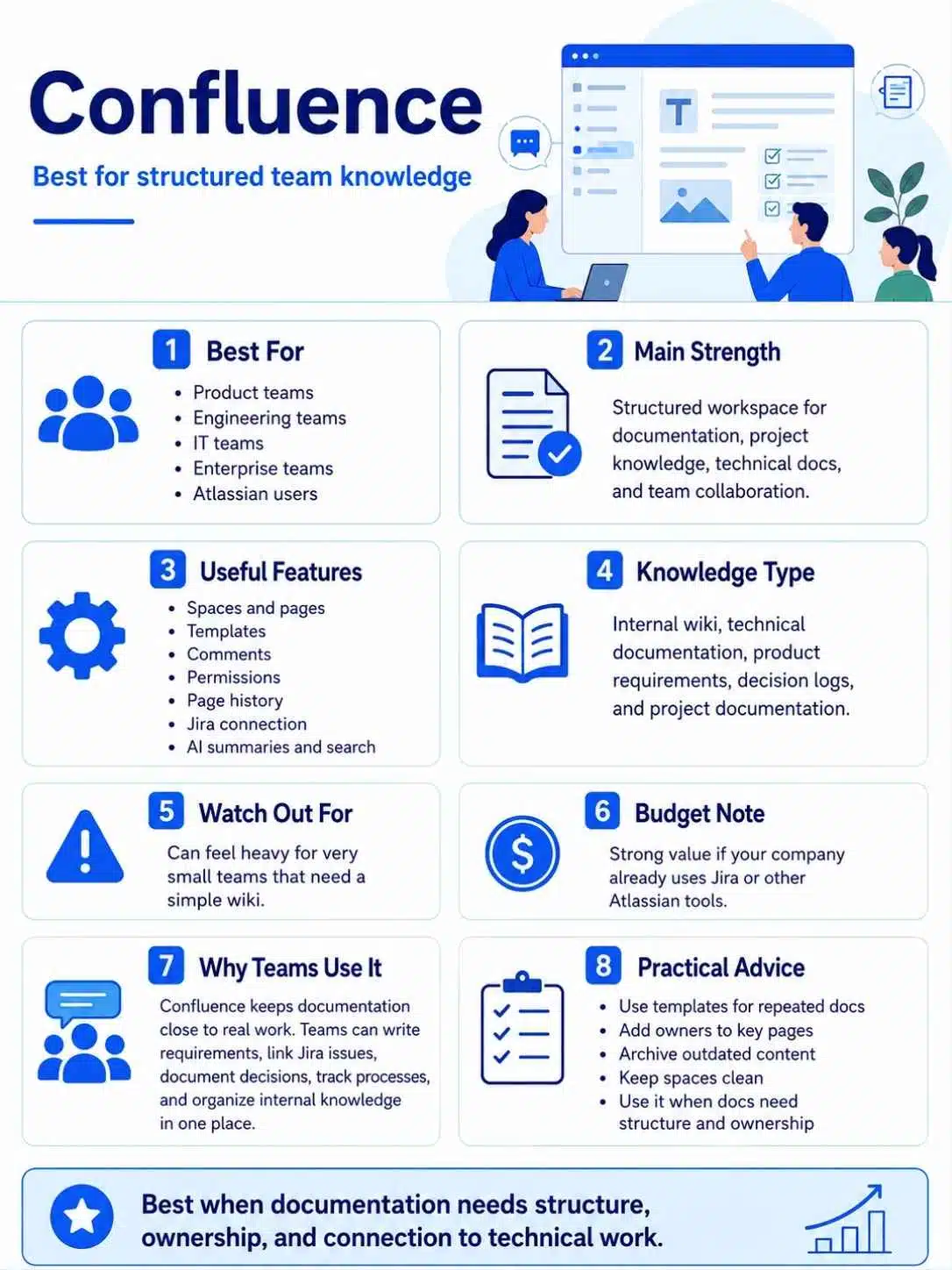
Confluence is one of the best knowledge base tools for structured teams, technical teams, enterprise departments, and companies already using Jira or other Atlassian products. It is built for team collaboration, documentation, project knowledge, technical notes, product requirements, decision records, and internal wikis.
In my experience, Confluence works best when teams need a more formal knowledge structure than Notion. It is especially useful for engineering, product, IT, operations, compliance, and cross-functional teams that need permissions, page history, templates, and tighter connection with project workflows.
| Confluence Detail | Practical Take |
| Best for | Product teams, engineering teams, IT teams, enterprise teams, and Atlassian users |
| Main strength | Structured workspace for documentation, project knowledge, technical docs, and team collaboration |
| Useful features | Spaces, pages, templates, comments, permissions, page history, Jira connection, AI summaries and search support |
| Knowledge type | Internal wiki, technical documentation, product requirements, decision logs, project documentation |
| Watch out for | Can feel heavy for very small teams that need a simple wiki |
| Budget note | Strong value when your company already uses Jira or other Atlassian tools |
| My practical advice | Use Confluence when documentation needs structure, ownership, and connection to technical work |
Confluence shines when knowledge needs to stay close to projects. A product team can write requirements, link Jira issues, document decisions, and keep meeting notes in one place. An engineering team can document architecture, incident reviews, release processes, and technical standards. A support team can maintain internal troubleshooting guides. The key is governance. Confluence can become powerful, but it can also become a graveyard of outdated pages if nobody maintains it.
Use templates for repeated document types, such as project briefs, decision records, postmortems, onboarding guides, and product specs. Add owners to important pages. Archive outdated content. Keep spaces clean. If your team already uses Jira, Confluence is often the most natural documentation layer.
3. Document360
Document360 is a strong option for teams that need professional customer-facing documentation, product manuals, SOPs, self-service portals, API-style help content, and structured knowledge bases. It is more specialized than Notion or Confluence. That specialization matters if your documentation needs public publishing, category management, article workflows, analytics, feedback, custom domains, AI search, and support ticket deflection.
I see Document360 as a good fit for SaaS companies, software vendors, customer support teams, product documentation teams, and companies that treat documentation as part of the product experience.
| Document360 Detail | Practical Take |
| Best for | SaaS companies, support teams, product documentation teams, and customer-facing knowledge bases |
| Main strength | Purpose-built knowledge base platform with strong documentation and self-service features |
| Useful features | Category manager, article editor, AI search, AI chatbot, feedback manager, analytics, workflow builder, custom domain, permissions |
| Knowledge type | Help center, product docs, SOPs, user guides, FAQs, customer self-service, internal documentation |
| Watch out for | May be more than needed if you only need a simple internal wiki |
| Budget note | Better suited for teams that see documentation as a serious support or product asset |
| My practical advice | Use Document360 when customer self-service and documentation quality matter deeply |
Document360 is useful when documentation has to be maintained like a product. A SaaS team can build product guides, onboarding docs, troubleshooting articles, release notes, FAQs, and internal process docs. The analytics and feedback features are important because they show what users search for, where articles fail, and which content needs improvement.
This is where many teams miss the point. A help center is not finished after publishing. It needs constant improvement based on failed searches, support tickets, product changes, and customer feedback. Document360 fits teams that are ready for that discipline. If your support team gets the same questions every day, a structured knowledge base like this can reduce repeated tickets and make the customer experience smoother.
4. Zendesk Knowledge
Zendesk Knowledge is one of the best knowledge base tools for support-heavy teams already using Zendesk or planning to build customer service around AI, agents, tickets, and self-service. It is designed to connect support knowledge with customer interactions.
That makes it useful for companies with high ticket volume, large support teams, multiple channels, and complex customer questions. The biggest advantage is that knowledge does not sit separately from support. It can power help centers, agent answers, AI-powered self-service, and consistent responses across customer service workflows.
| Zendesk Knowledge Detail | Practical Take |
| Best for | Customer support teams, enterprises, service teams, SaaS support operations, and Zendesk users |
| Main strength | Connects knowledge with tickets, AI, agents, and customer self-service |
| Useful features | Help center, knowledge articles, AI-powered answers, agent assist, content creation support, search, customer self-service |
| Knowledge type | Support knowledge, help center content, customer FAQs, troubleshooting guides, service documentation |
| Watch out for | May feel too support-focused if you only need an internal company wiki |
| Budget note | Best value when Zendesk is already your customer support platform |
| My practical advice | Use Zendesk Knowledge when support efficiency and consistent customer answers are the main goal |
Zendesk Knowledge is strong when customer questions need reliable answers across many support channels. For example, a SaaS company can use it to document billing issues, account setup, product troubleshooting, feature guides, policy explanations, and common customer workflows. Support agents can reuse approved answers, while customers can self-serve before submitting tickets. The important thing is article quality.
AI features and agent assistance only work well when the underlying knowledge is accurate, current, and complete. If the help center is outdated, automation can make wrong answers spread faster. Teams using Zendesk Knowledge should create a review process, assign article owners, track failed searches, and update docs whenever support trends change.
5. Help Scout Docs

Help Scout Docs is a strong choice for small and mid-sized teams that want a clean, simple customer knowledge base without a heavy enterprise setup. It works especially well for support teams already using Help Scout Inbox and Beacon. The experience is straightforward: create help articles, organize them into collections, publish a help center, and surface answers through Beacon on your website or inside your app.
I like Help Scout Docs for teams that want self-service but do not want to manage a complicated documentation system. It fits SaaS startups, ecommerce brands, education teams, service businesses, and customer support teams that care about friendly support.
| Help Scout Docs Detail | Practical Take |
| Best for | Small support teams, SaaS startups, ecommerce teams, education teams, and Help Scout users |
| Main strength | Simple customer-facing knowledge base connected to support and Beacon |
| Useful features | Docs site, article collections, Beacon widget, AI Answers, search, customer self-service, support connection |
| Knowledge type | Help articles, FAQs, product guides, onboarding support, customer self-service content |
| Watch out for | Not ideal for complex internal wiki management or deep technical documentation |
| Budget note | Good fit when the team wants support software and help docs together |
| My practical advice | Use Help Scout Docs when simple, friendly customer self-service is the priority |
Help Scout Docs works best when your support content is written in plain language. A small team can quickly publish answers to common questions like account setup, billing, refunds, product usage, troubleshooting, and onboarding. Beacon makes the knowledge base more useful because customers can find help without leaving the page they are on.
AI Answers can also help customers get direct replies from existing help content. But the same rule applies: the content must be good. If articles are thin, vague, or outdated, the answers will not help enough. I would use Help Scout Docs when the team wants to reduce repeated support questions while keeping the support experience human and simple.
6. Guru
Guru is a strong knowledge management software option for teams that need verified internal knowledge where employees already work. It is especially useful for sales, support, customer success, operations, HR, and enablement teams that need quick, trusted answers. Guru’s strength is not just storing knowledge.
It is helping teams trust the answer. That matters because internal knowledge often becomes stale. Someone writes a process once, the company changes, and the old answer keeps circulating. Guru focuses on verified knowledge, ownership, and surfacing answers inside daily workflows.
| Guru Detail | Practical Take |
| Best for | Sales teams, support teams, customer success teams, operations teams, HR teams, and enablement teams |
| Main strength | Verified internal knowledge that appears where teams work |
| Useful features | Knowledge cards, verification workflows, AI search, browser extension, Slack and workplace integrations, ownership controls |
| Knowledge type | Internal FAQs, sales enablement, support answers, process notes, policy knowledge, team playbooks |
| Watch out for | Not the best choice for public product documentation or long-form developer docs |
| Budget note | Strongest when repeated internal questions are slowing teams down |
| My practical advice | Use Guru when the main problem is whether employees can trust the answer they find |
Guru is useful when teams keep asking, “Is this still correct?” A sales rep may need the latest pricing policy. A support agent may need the approved troubleshooting step. A customer success manager may need the correct onboarding process. An HR manager may need updated leave policy guidance. Guru helps by assigning ownership and verification to knowledge.
That creates accountability. In practical use, Guru works best when answers are short, clear, and maintained. It is not where I would write a 5,000-word product manual. It is where I would store trusted answers that employees need during real work. If your team spends too much time asking the same internal questions, Guru can save serious time.
7. GitBook
GitBook is one of the best documentation tools for product teams, developer-focused SaaS companies, API documentation, product guides, and technical knowledge bases. It is built around modern documentation workflows, including Git sync, AI assistance, product documentation, public docs, internal docs, and user-facing knowledge.
GitBook fits teams that want polished documentation that can stay close to product development. I see it as a strong choice for SaaS products where documentation is part of the customer experience, especially if developers, product managers, and technical writers all contribute.
| GitBook Detail | Practical Take |
| Best for | Developer tools, SaaS products, API docs, product teams, technical writers, and documentation-led companies |
| Main strength | Modern product documentation with AI support and Git-based workflows |
| Useful features | Git Sync, AI Assistant, documentation spaces, public docs, product guides, stale content detection, collaborative editing |
| Knowledge type | Product docs, API documentation, developer guides, user guides, release documentation, technical knowledge |
| Watch out for | May be more technical than needed for a simple HR or company policy wiki |
| Budget note | Best value when documentation needs to stay close to product and engineering updates |
| My practical advice | Use GitBook when your docs are part of how users learn, adopt, and trust your product |
GitBook is especially useful when documentation changes with the product. A developer tool can use it for API references, SDK guides, quickstarts, integration docs, changelogs, and troubleshooting. A product-led SaaS company can use it for user guides and technical onboarding. The Git-based workflow is useful when engineering and documentation need to stay connected. Stale documentation is one of the biggest trust killers for technical products.
If users follow a guide and the product no longer matches the instructions, they lose confidence quickly. GitBook fits teams that want documentation to feel current, searchable, and product-aware. It may not be the best choice for a casual internal wiki, but it is excellent for serious product documentation.
Quick Comparison of the Best Knowledge Base Tools
The best knowledge base tools serve different audiences. Some are better for internal team knowledge. Some are better for public help centers. Some are better for technical documentation. Some are better for support teams that need AI-powered self-service. Before choosing, decide whether your main audience is employees, customers, developers, support agents, or all of them.
A tool that works beautifully for internal SOPs may not be ideal for API docs. A customer help center may not be enough for sales enablement. The best choice depends on your knowledge type, team size, support needs, and maintenance discipline.
| Tool | Best For | Strongest Use Case |
| Notion | Flexible internal teams | Internal wiki, SOPs, team docs, company knowledge |
| Confluence | Structured and technical teams | Product docs, technical knowledge, decision records, project documentation |
| Document360 | SaaS and support documentation teams | Customer knowledge base, self-service, product guides |
| Zendesk Knowledge | Support-heavy teams | Help center, AI-powered customer support, agent knowledge |
| Help Scout Docs | Small and mid-sized support teams | Simple customer self-service and help articles |
| Guru | Revenue, support, and operations teams | Verified internal knowledge and trusted answers |
| GitBook | Product and developer teams | API docs, product documentation, technical guides |
If I were choosing for a small SaaS team, I would start with the audience. For internal processes and team knowledge, Notion is usually the easiest starting point. For product and engineering documentation, Confluence or GitBook makes more sense. For customer support documentation, Help Scout Docs is simple, while Zendesk Knowledge is stronger for larger support operations.
For serious standalone documentation, Document360 is a strong pick. For internal answers that need verification, Guru is the better fit. Do not choose a tool because it has the most features. Choose the tool that your team will actually maintain.
How to Choose the Right Knowledge Base Tool
Choosing knowledge base software should start with the problem, not the brand name. Many teams buy a tool and then try to force their knowledge into it. That usually fails. Start by asking where knowledge breaks. Is information hard to find? Is it outdated? Is it scattered across tools? Are customers asking the same questions?
Are new hires slow to ramp up? Are support agents giving inconsistent answers? Are product docs falling behind releases? Each problem points to a different tool type. A team with messy internal SOPs does not need the same system as a developer platform with complex API docs.
| Question | What It Reveals | Best Tool Direction |
| Who is the main audience? | Employees, customers, developers, or support agents | Pick internal wiki, help center, or product docs tool |
| How often does content change? | Maintenance needs | Look for ownership, review, and stale content features |
| Do customers need self-service? | Support deflection need | Choose Help Scout, Zendesk, or Document360 |
| Do developers use the docs? | Technical workflow need | Choose GitBook or Confluence |
| Do employees need trusted answers? | Verification need | Choose Guru or Confluence |
| Does the team need flexibility? | Workspace style | Choose Notion |
| Do you need AI answers? | AI readiness | Choose tools with clean content, permissions, and answer controls |
A good buying process has four steps. First, list the top 20 questions your team or customers ask repeatedly. Second, identify where the answers live today. Third, decide who owns each answer. Fourth, test one tool with real content before moving everything. Do not migrate 500 messy documents into a new tool and expect magic.
Clean the knowledge first. Merge duplicates. Remove outdated pages. Rewrite unclear answers. Assign owners. Then move the cleaned content into the tool. The tool should support your knowledge process, not replace it.
Best Knowledge Base Tool by Team Type
Different teams need different knowledge systems. A startup founder may need a lightweight internal wiki. A support team may need a public help center. A developer tool may need technical docs. A sales team may need verified battlecards and pricing answers. A product team may need decision records and specs.
A remote company may need onboarding guides and async documentation. This is why one universal recommendation can mislead readers. The better approach is matching the tool to the team’s daily work.
| Team Type | Best-Fit Tools | Why It Works |
| Early SaaS team | Notion, Help Scout Docs, GitBook | Flexible internal docs, simple support docs, product documentation |
| Product and engineering team | Confluence, GitBook | Technical docs, decision records, product specs, Git-based workflows |
| Customer support team | Zendesk Knowledge, Help Scout Docs, Document360 | Help articles, self-service, AI answers, ticket reduction |
| Sales and customer success team | Guru, Notion, Confluence | Verified internal answers, playbooks, onboarding knowledge |
| Developer tool company | GitBook, Document360, Confluence | API docs, technical guides, product documentation |
| Enterprise team | Confluence, Zendesk Knowledge, Guru | Governance, permissions, structured knowledge, support workflows |
| Remote team | Notion, Guru, Confluence | Company wiki, trusted answers, async documentation |
For most small teams, I would avoid overbuilding the knowledge system too early. Start with one internal wiki and one customer-facing documentation tool if needed. For example, Notion plus Help Scout Docs can work well for a small SaaS support team.
Notion plus GitBook can work well for a product-led startup with developer documentation. Confluence plus Zendesk Knowledge can work well for a larger organization with structured product and support teams. The right setup should reduce repeated questions, not create more admin work.
Common Mistakes Teams Make With Knowledge Base Tools
Most knowledge base failures are not caused by bad software. They happen because teams treat documentation as a one-time project. Someone builds the knowledge base, imports old docs, creates a few categories, and then nobody owns it. Six months later, the content is outdated again.
Another common mistake is writing articles that are too long, vague, or internal-facing for customers. A support article should answer the question quickly. An internal SOP should explain ownership and steps clearly. A technical doc should match the current product. Each type of knowledge needs a different writing style.
| Mistake | Why It Hurts | Better Habit |
| No content owner | Pages become stale | Assign owner to every important page |
| Too many duplicate articles | Search becomes confusing | Merge similar pages and redirect users |
| Weak titles | People cannot find answers | Use question-based and task-based titles |
| Long, vague articles | Readers give up | Use steps, screenshots, examples, and summaries |
| No review cycle | Old answers stay live | Review high-impact pages monthly or quarterly |
| Poor structure | Teams do not know where to add content | Use categories, spaces, and templates |
| Ignoring failed searches | Missing content stays missing | Track search gaps and write needed articles |
One practical rule is simple: if a question gets asked three times, document it. If an article gets used often, assign an owner. If a product changes, update the related docs before or during launch. If support keeps sending the same manual reply, turn it into a help article.
If new hires keep asking the same onboarding questions, add them to the internal wiki. Good knowledge management is not about writing everything. It is about documenting repeated, high-value, and high-risk information first.
Must-Have Features in Knowledge Management Software
The best knowledge management software should make it easy to create, find, trust, and improve information. Many teams focus only on the editor. The editor matters, but it is not enough. Search quality, permissions, article ownership, feedback, analytics, integrations, and review workflows matter just as much.
In 2026, AI features are also becoming important, but AI should not be the first thing you evaluate. First ask whether the tool can manage accurate knowledge. AI on top of messy content only creates faster confusion.
| Feature | Why It Matters | Practical Example |
| Strong search | Helps people find answers fast | Search by title, keyword, tag, and content |
| Content ownership | Keeps information accountable | Each page has an owner |
| Review reminders | Prevents stale content | Important docs reviewed every quarter |
| Permissions | Protects sensitive knowledge | HR or finance docs visible only to certain teams |
| Templates | Improves consistency | SOP, FAQ, guide, and decision templates |
| Analytics | Shows what people need | Track popular articles and failed searches |
| AI answers | Speeds up discovery | Users ask questions and get answers from trusted docs |
| Integrations | Brings knowledge into workflows | Slack, Teams, Jira, Zendesk, GitHub, Drive |
A feature is only valuable if your team uses it. For example, review reminders are powerful, but only if someone actually reviews pages. AI answers are useful, but only if source content is clean. Permissions are important, but too many restrictions can make knowledge hard to access.
Analytics can improve documentation, but only if the team reviews the data. When testing a tool, do not just click around the demo. Create real articles. Search for them. Update them. Assign owners. Try the support widget. Test permissions. Ask a teammate to find an answer. That gives you a much better feel for whether the tool will survive real usage.
A Practical 30-Day Knowledge Base Setup Plan
A knowledge base should start small and useful. Do not try to document the entire company in one month. That creates weak articles and burnout. Start with the most repeated questions, most painful support issues, and most important internal processes.
The goal of the first 30 days is to build a useful foundation that people actually trust. A small, accurate knowledge base is better than a huge messy one. Once the structure works, expand it.
| Week | Main Goal | Actions | Output |
| Week 1 | Audit existing knowledge | Collect repeated questions, old docs, support replies, SOPs, and onboarding notes | Content inventory |
| Week 2 | Create structure | Define categories, owners, templates, and naming rules | Knowledge base framework |
| Week 3 | Publish high-value content | Write or clean the top 20 to 30 articles | First useful knowledge base |
| Week 4 | Test and improve | Track searches, ask users for feedback, fix confusing pages | Cleaner and more trusted system |
In week one, collect what already exists. Do not rewrite everything yet. Look at support tickets, Slack questions, onboarding checklists, sales objections, customer emails, product guides, and internal docs. In week two, create a structure that matches how people search. Use plain category names. In week three, write the most useful articles first.
These might be “How to reset your password,” “How to invite a teammate,” “How billing works,” “How to request design approval,” or “How we publish a product update.” In week four, test with real users. Ask them to find answers without help. Watch where they struggle. Improve those pages. This simple process is better than a big messy migration.
How Knowledge Base Tools Help SaaS Teams Grow
Knowledge base tools are not only operational tools. They can support growth. A clear help center reduces friction for trial users. Strong product docs help users reach value faster. Internal playbooks help sales and support teams answer consistently. Public documentation can bring search traffic.
Good onboarding docs reduce churn risk. Verified internal knowledge helps teams move faster. For SaaS companies, documentation is often part of the product experience. If users cannot understand the product, they may leave before they see value.
| Growth Area | How Knowledge Base Tools Help |
| Acquisition | Public docs and help articles can attract search traffic |
| Activation | Onboarding guides help users reach the first win faster |
| Support | Self-service reduces repeated tickets |
| Sales | Internal knowledge helps reps answer objections correctly |
| Retention | Better docs help users solve problems before they churn |
| Product adoption | Feature guides help users discover useful workflows |
| Team scaling | New hires learn faster with clear internal documentation |
This is why knowledge base tools connect naturally to a broader bootstrapped growth system like Growth Tactics for Bootstrapped SaaS. A good knowledge base can support marketing, sales, onboarding, support, and retention at the same time. It turns repeated answers into reusable assets. It helps small teams look more organized and reliable.
It also protects founder time because people stop asking the same basic questions every week. The return is not always visible in one dashboard, but it shows up in fewer repeated tickets, faster onboarding, better customer experience, and cleaner internal operations.
Final Thoughts
The best knowledge base tools help teams stop repeating the same answers and start building reusable knowledge. Notion is great for flexible internal wikis. Confluence is strong for structured and technical teams. Document360 is built for serious documentation and self-service. Zendesk Knowledge fits support-heavy organizations. Help Scout Docs gives smaller teams a clean help center. Guru helps employees find verified internal answers. GitBook is excellent for product and developer documentation.
The right choice depends on your main problem. If your team cannot find internal answers, choose a strong wiki or knowledge management tool. If customers keep asking the same questions, build a better help center. If product docs are falling behind releases, choose a documentation tool that fits your product workflow. If employees do not trust old answers, use a system with ownership and verification.
A knowledge base is not just a library. It is a working system. Keep it accurate, easy to search, clearly owned, and close to the daily work. That is when it becomes valuable for support, onboarding, product adoption, and long-term growth.
Frequently Asked Questions (FAQs) About the Best Knowledge Base Tools
What are the best knowledge base tools in 2026?
The best knowledge base tools in 2026 include Notion, Confluence, Document360, Zendesk Knowledge, Help Scout Docs, Guru, and GitBook. Each tool fits a different use case, such as internal wikis, customer help centers, verified internal knowledge, product documentation, or developer docs.
What is the best knowledge base tool for small teams?
Notion is often a strong choice for small teams that need a flexible internal wiki. Help Scout Docs is a good fit for small support teams that need a simple customer-facing help center. GitBook works well for small product teams that need clean product documentation.
What is the best knowledge base tool for customer support?
Zendesk Knowledge is strong for larger support teams using Zendesk. Help Scout Docs is better for small and mid-sized support teams that want a simple help center. Document360 is a strong option for teams that need a more advanced standalone documentation platform.
What is the best internal wiki tool for teams?
Notion and Confluence are two of the strongest internal wiki tools for teams. Notion is more flexible and easier for small teams. Confluence is more structured and often better for product, engineering, IT, and enterprise teams.
What is the difference between a knowledge base and a wiki?
A wiki is usually an internal collection of team knowledge, processes, notes, and documentation. A knowledge base can be internal or customer-facing and is usually more structured around helping people find answers. Many modern tools support both use cases.
What is the best documentation tool for SaaS products?
GitBook and Document360 are strong documentation tools for SaaS products. GitBook is especially useful for product and developer documentation, while Document360 works well for structured product guides, help centers, FAQs, and customer self-service.