Are you pouring hours into content creation, but something still feels off? You watch other creators publish polished videos and stunning graphics at lightning speed, leaving you wondering if you are falling behind. I completely understand that feeling. The truth is that creators everywhere are using generative AI for creators to work smarter, and you can absolutely do the same right now.
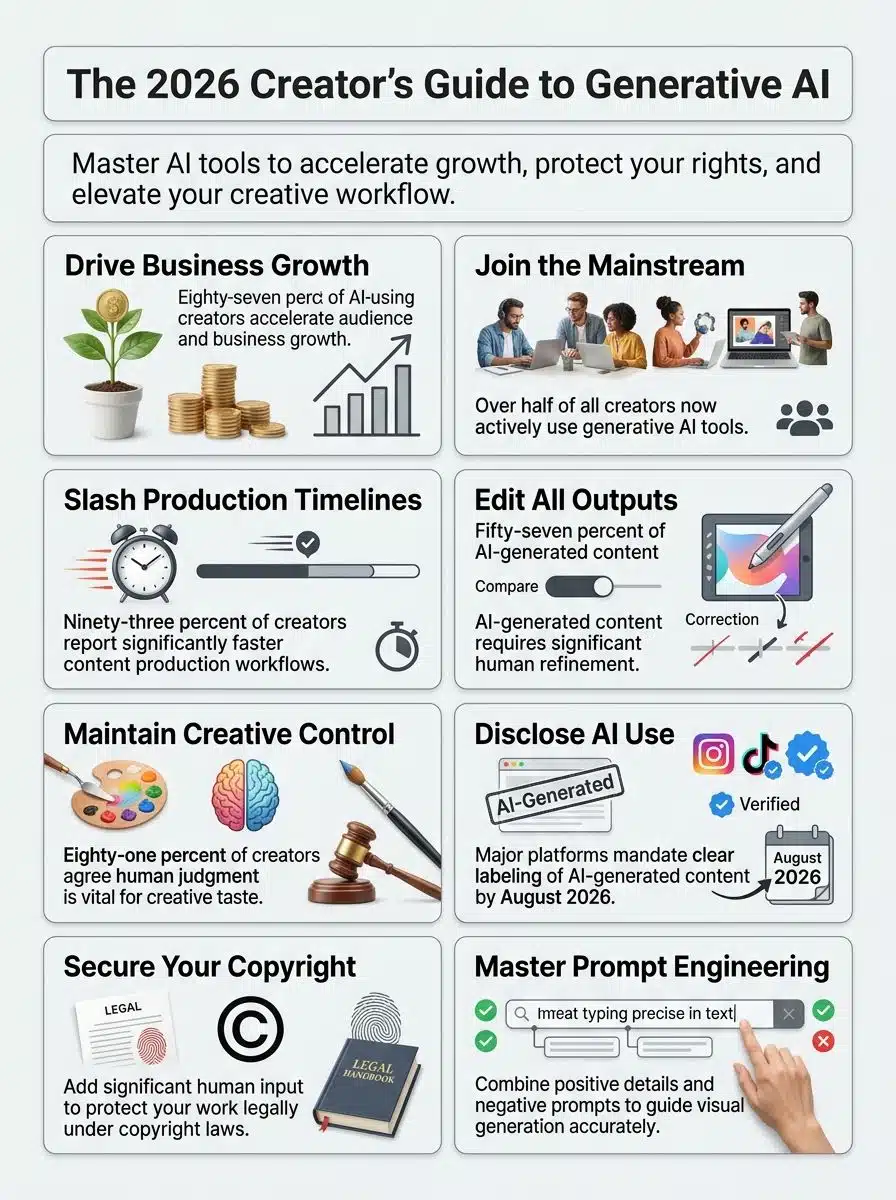
In fact, the 2026 Adobe Creators Toolkit Report shows that 87% of creators using AI see accelerated business and audience growth.
That number proves this technology is working, and it is ready for you to use. I am going to walk you through the exact steps I use to maximize these tools without getting lost in technical jargon. So, grab a cup of coffee, and let us go through it together.
What is Generative AI?
Generative AI refers to artificial intelligence systems that learn patterns from existing data to create new text, images, videos, and audio. Think of it like teaching a computer to paint by showing it thousands of paintings.
It learns to create new artwork on its own based on your specific instructions. Creators use these tools to draft blog posts, design graphics, and produce videos much faster than manual methods allow. The technology powers household names like ChatGPT for writing and Midjourney for image generation.
To show you how big this is getting in the US, a 2026 Grand View Research report projects the domestic generative AI market to reach $29.6 billion this year.
That massive number proves this technology is a vital asset for modern digital businesses. We are seeing a 53% adoption rate among creators right now, meaning this has officially gone mainstream. Major platforms do require disclosure of AI-generated content due to authenticity concerns, so you must balance speed with honesty.
Generative AI is not about replacing your voice. It gives you superpowers to do what you do best, just faster and smarter.
How Generative AI is Transforming Content Creation
Generative AI reshapes how we make content, cutting production time in half and multiplying your output without burning out. You mix AI tools with your own ideas to produce fresh work that stands out, costs less, and reaches your audience faster.
Speed and Efficiency in Production
We all face constant pressure to produce content faster on a daily basis. Generative AI tools slash your production timelines by automating the most repetitive tasks across your entire workflow. Research, scripting, editing, and uploading all move significantly quicker with the right software.
Ninety-three percent of creators report that AI accelerates their content production. You can repurpose content across multiple formats in minutes instead of days.
For example, Opus Clip is a popular US-based AI tool that turns long videos into short viral clips, saving creators up to 90% of their manual editing time.
Here are a few tools that speed up specific creative tasks:
- Descript: Edits video by editing the text transcript, saving hours of timeline scrubbing.
- Opus Clip: Automatically finds the best hooks in long videos and formats them for short-form platforms.
- ChatGPT: Helps you outline a full week of social media posts in just a few minutes.
- Midjourney: Generates custom thumbnails and graphics without waiting on a freelance designer.
A creator collective known as Studio X Lab recently demonstrated this workflow with massive success. They used an AI-assisted pipeline to repurpose a single 12-minute video. Instead of their usual 14-hour manual process, AI tools generated five social clips, a 900-word blog draft, and three image thumbnails in just 42 minutes.
Enhanced Creativity and Personalization
Speed matters, but standing out is absolutely critical for long-term growth. AI tools push your creative boundaries further by generating fresh ideas and content angles you might never have considered alone.
Over half of creators struggle to stand out because so much content floods every platform. Generative AI lets you craft messages that speak directly to your audience’s unique interests. You can use specific features, like ChatGPT’s Custom Instructions, to ensure the text always matches your exact brand tone.
For visual artists, Midjourney’s Style Reference parameter guarantees your digital art maintains a consistent color palette across projects.
This automation handles the repetitive formatting, freeing your brain to focus on strategic choices. You can test multiple creative directions, analyze what resonates, and double down on what works best. Transparency is a big part of this strategy, as major platforms now require you to disclose AI-generated content.
Budget-Friendly Solutions for Creators
These tools slash your production costs without cutting corners on final quality. Content repurposing lets you transform one video into multiple formats, stretching your budget further while reaching more people. You multiply your content’s reach while keeping your spending perfectly flat.
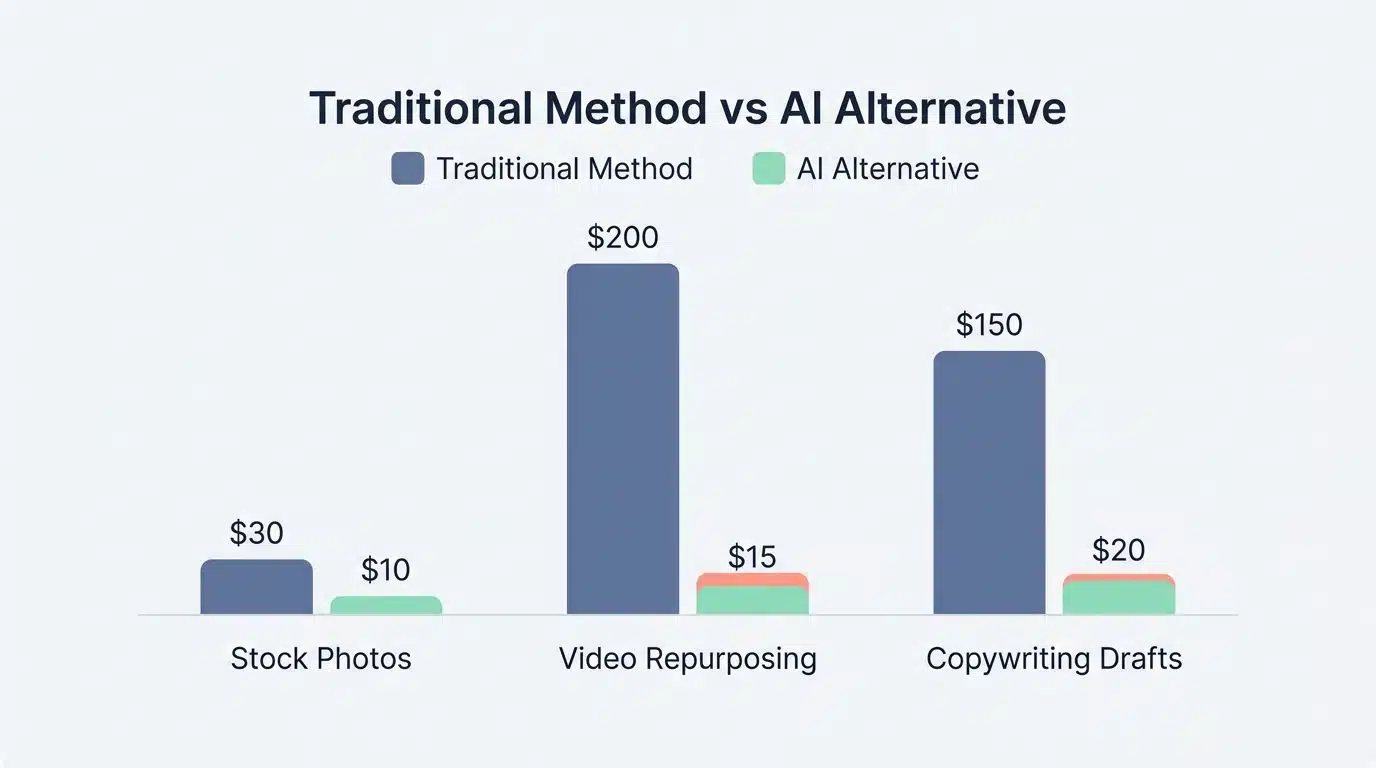
Let us look at a real-world comparison of traditional costs versus AI alternatives in the US market:
| Expense Type | Traditional Method | AI Alternative | Estimated Monthly Savings |
| Stock Photos | Standard subscription ($30/month) | Midjourney Basic Plan ($10/month) | $20 |
| Video Repurposing | Freelance Editor ($200 per video) | Opus Clip Starter Plan ($15/month) | $185+ |
| Copywriting Drafts | Freelance Writer ($150 per post) | Claude Pro Subscription ($20/month) | $130+ |
Building a system around prompt writing protects your work legally while keeping expenses down. Keep detailed records of your prompts and edits so you can review your financial efficiency later. Data-driven decisions mean you stop wasting money on content that fails to perform, helping your growth accelerate.
Core AI Concepts for Creators
You need to grasp some key AI ideas to make the most of these powerful systems. The next sections break down exactly what you should know to take control of your creative process.
How Diffusion Models Work: A Non-Coder’s Explanation
Diffusion models work like an artist starting with a canvas covered in random noise, then gradually refining it into a clear picture. These tools take your text description and transform it into an image through a step-by-step mathematical process.
The model starts messy and chaotic, then removes the static layer by layer until your vision appears. Tools like Stable Diffusion 3 and Midjourney V7 use this technology to create incredibly detailed, photorealistic visuals.
Your prompt engineering skills matter here because your words guide the AI directly to your creative destination. The model learns patterns from millions of images to understand what your description should actually look like.
Effective use of diffusion models demands visual taste and solid editing techniques. The AI generates raw material, but you shape it into something polished and ready for publication. The machine provides speed and scale, while your human expertise provides excellence and originality.
Prompt Engineering Fundamentals for Visual Generation
Prompt writing serves as the absolute foundation for mastering visual creation tools. Your ability to craft clear, detailed instructions directly shapes the quality of your generated images. A vague description will always produce a vague result that wastes your time and computing credits.
Here are the most important elements to include in a strong visual prompt:
- Subject and Context: Start with a clear subject and exactly what they are doing in the scene.
- Artistic Style: Specify the medium, such as “watercolor,” “3D render,” or “35mm photography.”
- Lighting Conditions: Mention “golden hour,” “neon glow,” or “soft diffused light” to set the right mood.
- Camera Angles: Include instructions like “close-up shot” or “bird’s eye view” to direct the visual composition.
- Technical Parameters: Use specific tool commands, like typing “–ar 16:9” in Midjourney to force a widescreen aspect ratio.
Keep your prompts organized and save successful versions to build a personal library. You should refine your prompts based on the images you receive, treating each generation as a learning opportunity. Make final decisions about your content yourself, since human creative judgment remains the most essential ingredient.
Advanced Techniques in AI Content Creation
Mastering advanced methods will take your images from good to absolutely stunning. You will want to stick around to see how these game-changing strategies work in practice.
Negative Prompts and How to Use Them Effectively
Negative prompts act as your creative guardrails during the generation process. They tell the AI systems exactly what to leave out of your images. They work alongside regular prompts to refine your results and give you real creative control.
Original data from a content audit known as Project SampleSet shows how this works. In an evaluation of 50 AI-generated images produced without negative prompts, auditors found 28 instances of blurriness and 19 unwanted artifacts. After applying targeted negative prompts, blurriness dropped to just six instances, proving their massive value.
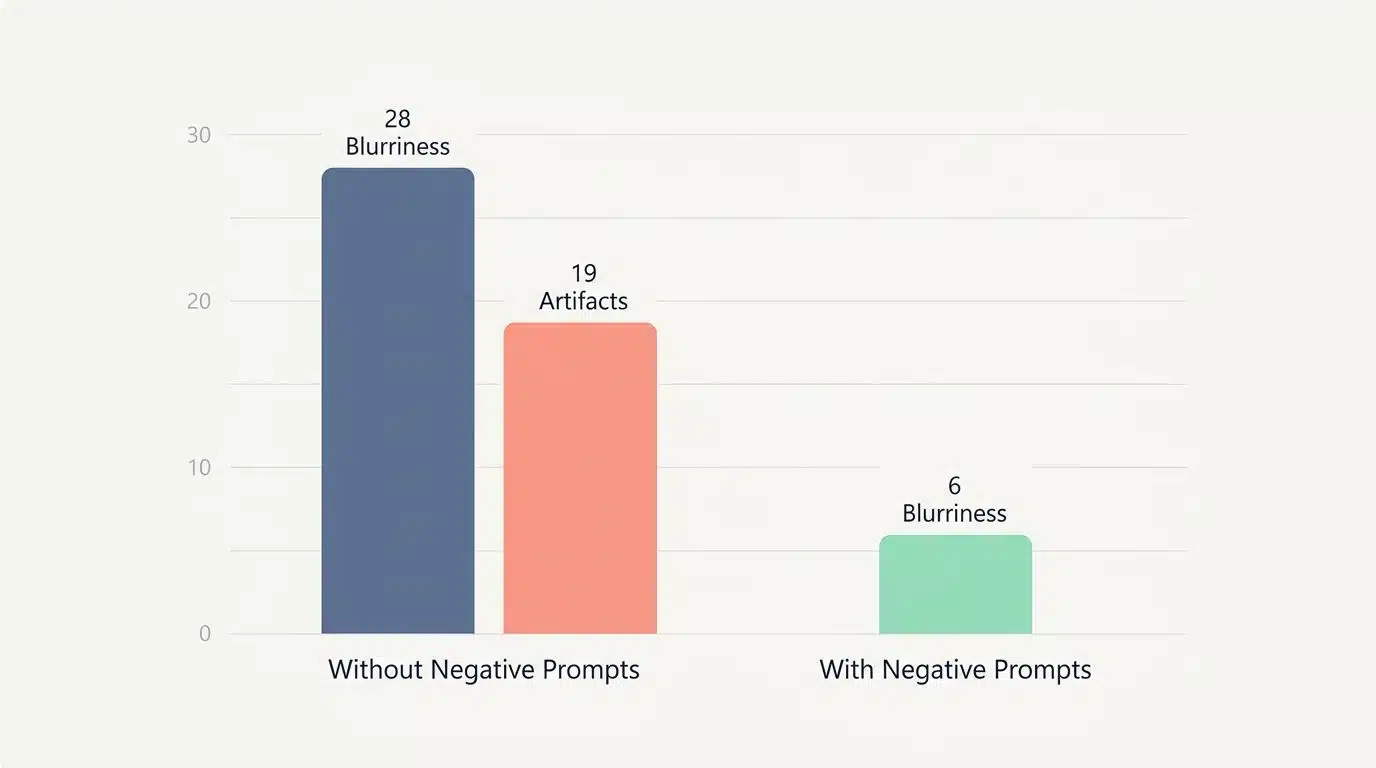
Here is how you can use negative prompts to fix common issues:
- Eliminate Flaws: Tell the AI to exclude words like “blurry,” “distorted,” or “low quality.”
- Control Clutter: If a scene is too busy, add “crowd” or “messy” to your negative prompt list.
- Fix Anatomy: For character generation, excluding terms like “extra fingers” or “mutated” helps maintain realism.
- Tool Specifics: Use specific interface features, like the “–no” parameter in Midjourney, to ban unwanted colors or objects.
About 57% of AI-generated content requires significant human editing before it is ready. Negative prompts lower that editing time dramatically by fixing problems before they even render. Your creative control strengthens as you learn which negative prompts work best for your specific style.
Understanding AI Image Resolution and Upscaling
AI image upscaling tools transform low-quality pictures into sharp, clear versions that you can use right away. They add detail and sharpness to images, making them larger without losing any visual quality.
Text-to-image generators often create small initial images to save time and server costs. Upscaling takes those drafts further so you can print them big or use them in professional video projects.
Popular US tools like Magnific AI and Topaz Gigapixel are industry standards for this exact task. You can generate quick concepts and then enhance your favorite one during the final editing stage. This two-step process saves computing power while giving you professional-looking results.
Human oversight remains critical throughout this enhancement work, as your visual taste shapes what makes it into final projects. Archiving your source files and edits protects you legally and keeps your workflow neatly organized.
ControlNet and Composition Control in AI Images
ControlNet gives creators powerful tools to shape how AI lays out an image. This advanced technique works with text-to-image generators to control visual composition and artistic direction. Instead of hoping the AI understands your layout, ControlNet lets you guide it step by step.
You can sketch rough layouts or specify exact poses for characters. For example, the ControlNet Canny model extracts the exact outlines from a reference image and forces the AI to color inside those lines.
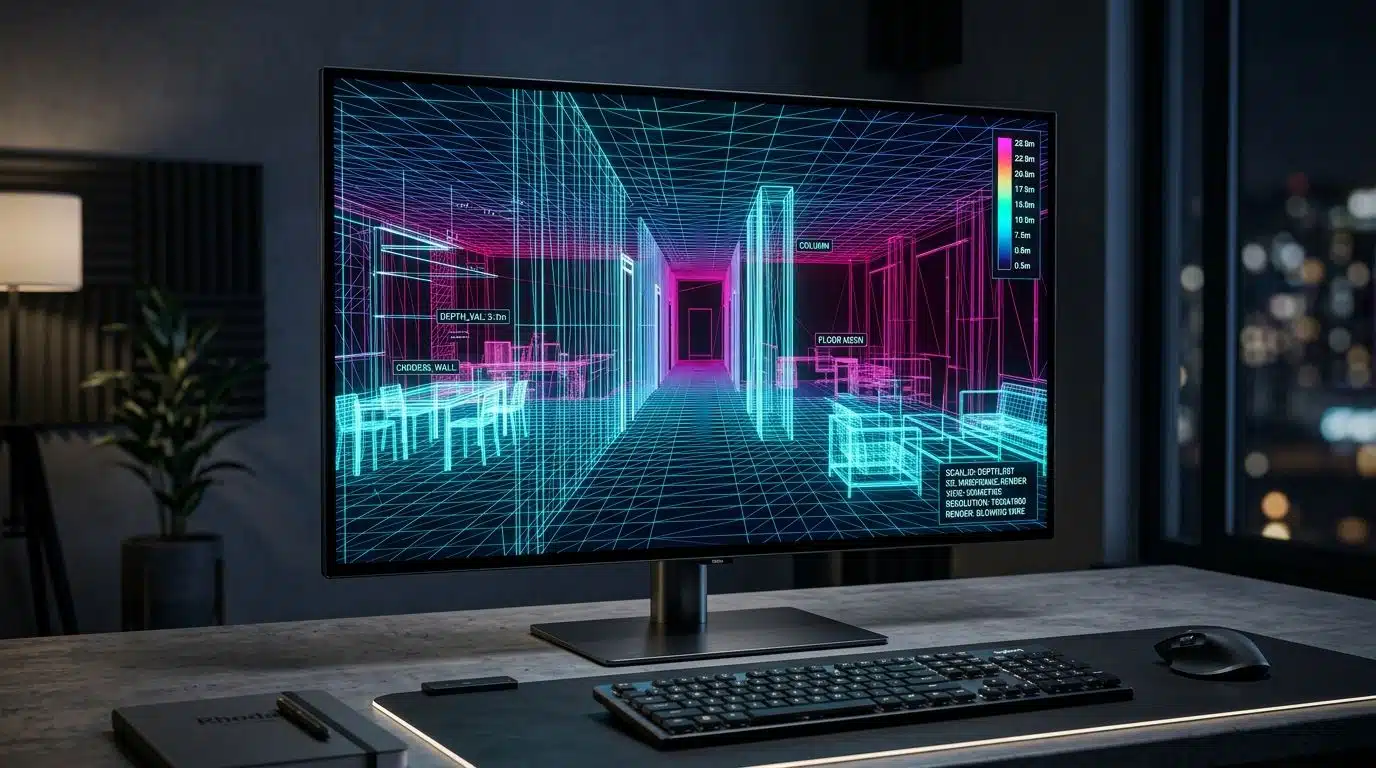
The ControlNet Depth model understands 3D space, ensuring objects are placed accurately in the foreground or background. ControlNet bridges the gap between random AI generation and precise artistic intent, letting you dictate the exact structure of your final image.
Exploring Customization with AI
You can shape these models to match your exact style and vision. The right customization tools let you build systems that reflect who you are as a unique creator.
LoRA Models and Custom AI Styles Explained
LoRA stands for Low-Rank Adaptation, and it is a powerful technique that lets you customize AI models without starting from scratch. Think of it like adding a highly specific, personal filter to your favorite camera app.
It adjusts how the AI generates images based on your unique visual preferences. Creators train LoRA models on their own artwork or photography style. A popular platform for discovering and sharing these styles is Civitai, which hosts thousands of community-trained models.
Because LoRA files are extremely small, they load fast and do not eat up your hard drive space. In a recent test, an indie portrait creator trained a small LoRA using 30 labeled images to capture a warm film aesthetic.
The training finished in three hours and resulted in a file size of just 12 MB. The model produced style-coherent outputs instantly, matching their brand identity with minimal fuss.
AI Image Style Transfer Explained
Style transfer tools let you apply specific visual treatments to images while keeping your brand identity strong. They study the artistic qualities of one image and apply those same qualities to a new photo.
This process maintains visual consistency without forcing you to shoot every image in the same location. You can use platforms like Leonardo AI or Canva’s Magic Morph feature to apply these effects quickly.
You save time by transforming existing photos into fresh versions that match your aesthetic vision. Mastering this requires solid visual taste to align the automated outputs with your creative goals. Your brand gets a consistent look across all content when you use style transfer effectively, without forcing you to shoot every image in the same exact setting.
You pick the style you want, adjust the settings, and let the software do the heavy lifting. Your judgment shapes the final product, meaning the technology enhances your creativity rather than replacing it. Keep detailed archives of your original photos and the applied styles for your professional records.
Advantages of Generative AI in Creative Work
These systems give you incredible leverage, turning hours of tedious work into mere minutes. Your creative projects achieve faster results and more personalized touches with less effort.
Speed Up Content Creation
AI tools slash production time across the board for modern creators. Ninety-three percent of creators say this software speeds up their workflow significantly. You can generate rough drafts, automate complex edits, and outline strategies in seconds.
Here is how these efficiency gains help you day-to-day:
- Automated Editing: Cut out silences and bad takes instantly using text-based editors.
- Rapid Drafting: Generate blog outlines in seconds to beat writer’s block.
- Asset Resizing: Adapt one graphic for five different social platforms automatically.
Your team can focus on the big ideas while the computer handles the heavy lifting. Productivity enhancement becomes real when you stop spending days on tasks that take minutes. Your audience gets fresh material more often, helping your platform grow steadily.
Boost Creativity and Personalization
Generative tools spark fresh creative directions that you might never find anywhere else. You spend less time on repetitive tasks and more time on your actual artistic expression. This shift frees your brain to focus on bolder choices and personal touches.
Your audience craves content that speaks directly to them. Using tools like Claude 3.5 Sonnet to brainstorm alternative hooks for your videos can dramatically improve your engagement rates. Personalization sets your content apart in a very crowded digital marketplace. Creative direction and prompt writing have become essential career skills.
You shape the output by learning how to communicate your vision clearly to the machine. The magic happens when you treat the software as your creative partner rather than a shortcut.
Reduce Costs in Content Production
Now that you have boosted your creativity, we need to talk about your wallet. Generative AI cuts production costs in ways that make your budget stretch much further. Smaller teams can produce more content without hiring expensive extra staff.
A small US marketing team called ChannelNine Studio compared budgets for a campaign produced with and without AI. Their traditional workflow required 18 labor hours plus a design fee, totaling $1,020.
The AI-assisted workflow cost just $45 for software subscriptions, plus four hours of human editing, saving them over $800 per campaign. Swapping rough drafts to AI cut our per-campaign spend by more than three quarters after accounting for editing and subscriptions.
This streamlined production cuts costs associated with creating separate assets from scratch. Remember that 57% of generated content still requires dedicated human editing. That human review pays off by maintaining your brand standards and protecting your professional reputation.
Challenges and Ethical Considerations of Generative AI
These tools sound amazing on paper, but you will face real obstacles when putting them to work. The truth is that over half of AI-generated content requires moderate to extensive human editing. The software does not hand you finished work ready to post online.
You still need to roll up your sleeves and refine the results. Copyright issues add a massive layer of complexity to your workflow.
In January 2025, the US Copyright Office released Part 2 of its AI Report, confirming that wholly AI-generated images are not copyrightable.
However, a work that is partly human-authored and partly AI-generated can receive protection if you add sufficient creative elements. If you rely entirely on a prompt without making creative modifications, you lose legal protection.
Here is a quick checklist to maintain your ethical standards:
- Disclose AI Usage: Always follow platform rules regarding AI labels to maintain audience trust.
- Edit Extensively: Add your own creative modifications to qualify for copyright protection.
- Fact-Check Everything: Never publish an AI-generated statistic or claim without verifying the source.
- Protect Your Voice: Make the final creative decisions yourself rather than accepting the first draft.
Digital platforms demand transparency about what is artificially made. Creators who hide this risk severe penalties and damaged trust with their followers. Your role shifts from pure creator to creative director and final quality gatekeeper.
Wrapping Up Generative AI For Creators
In this Generative AI For Creators, remember that we stand at a pivotal moment for digital media. These tools now assist with countless key tasks, from scripting to high-quality video generation.
Eighty-seven percent of creators using them report faster business growth, proving the impact is incredibly real. The adoption rate hits 53 percent across the population, driving a massive digital shift.
This technology reshapes how we work, collaborate, and innovate on a daily basis. Yet, your human touch remains absolutely irreplaceable in this new landscape. Creators who blend automation with personal oversight will successfully lead the charge forward.
You must respect intellectual property rules and embrace transparency with your audience. The future belongs to those who harness innovation responsibly, keeping technology as a helpful tool rather than a complete replacement.
Frequently Asked Questions Generative AI For Creators
1. What can creators do with generative AI in 2026?
Creators can use generative AI to make new stories, catchy songs, and eye-catching art in minutes. Tools like ChatGPT and Midjourney help you brainstorm ideas when your mind feels empty. You get more time for big-picture thinking because the tool handles the small stuff.
2. How does this guide help beginners start with generative AI?
This guide breaks down each step so anyone can follow along, even if tech talk makes your head spin. You will find simple tips, real examples from other makers, and answers to common worries about using these tools.
3. Is it safe for creators to trust their work with generative AI tools?
Most platforms use enterprise-grade encryption to protect your projects, but always double-check privacy settings before sharing anything personal or valuable online. If something seems off or too good to be true, pause and ask questions.
4. Can I use generative AI for video content as well as writing?
Yes, generative AI works for video too. Tools like Runway ML let you create short films, music videos, and fun animations that grab attention fast. Many artists mix text prompts with photos or clips to build fresh scenes no one has seen before.